

Chat Remastered
Send images directly in Minecraft chat — just like Discord. Drag & drop or paste from clipboard. Supports PNG, JPEG, WebP and more. Video support planned.
 17
17
Quick challenge
How far can you run before the mobs catch you?
Minecraft check
Confirm your run
Complete the quick check to get your code.
Chat Remastered
Chat Media — Media in Minecraft chat
> Send media in chat as easily as messages. > No commands, no setup, no learning. Just chat.
---
⚡ Features
- 🖼 Chat media (instant inline rendering) - ⚡ Instant load + placeholder - 🔍 Fullscreen viewer - 📐 Adjustable media size in chat settings (50%–200%) - 🕐 Upload cooldown system - 🔒 Server moderation (ban / delete media) - 🗂 PNG, JPEG, WebP, BMP, TIFF support (GIF coming soon)
---
📷 Send media instantly
- 🖱 Drag & drop into chat - 📁 Click to open file picker - 📋 Paste with `Ctrl+V`
---
🖼 In-game experience
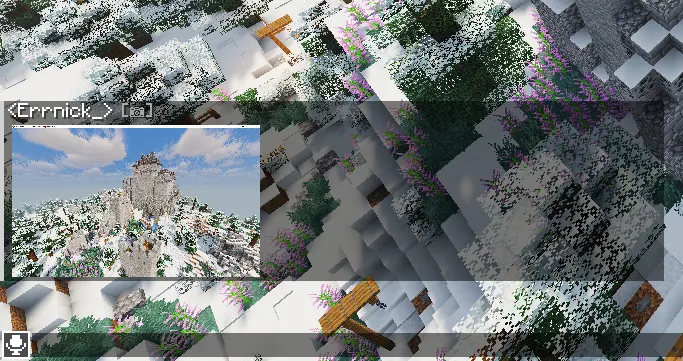
Chat media
Media appears directly inside chat with smooth loading and fullscreen view.
---
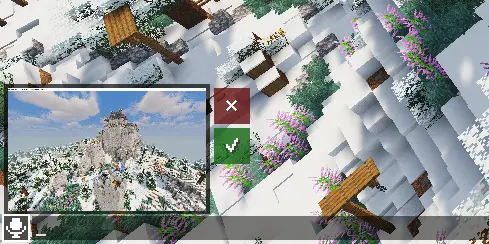
Before sending
Preview your media above the chat input before sending.
---
📋 Requirements
- Fabric Loader 0.18.6+ - Fabric API - Kotlin for Fabric
---
🛠 Installation
Client (required)
1. Install Fabric Loader 2. Install Fabric API 3. Install Kotlin for Fabric 4. Place `chatmedia.jar` into `.minecraft/mods/`
---
Server (required for sending media)
1. Install mod on server 2. Open TCP port 5050 3. Configure `config/chatmedia-server.json`
> ⚠️ Without server mod: players can't send and view media
---
🔒 Server features
- Lightweight media transfer system - Player upload cooldown - Media moderation tools - Fully configurable
---
⚙️ Server config
| Option | Default | Description | |--------|---------|-------------| | `resolution` | `720` | Max media resolution (480 / 720 / HD / 2K) | | `imagePort` | `5050` | TCP transfer port | | `autoDownload` | `false` | Auto-download full media when received | | `photoCooldownSeconds` | `5` | Cooldown between uploads per player |
---
🔧 Operator commands
| Command | Description | |---------|-------------| | `/chatmedia ban <player>` | Block media sending | | `/chatmedia unban <player>` | Restore media sending | | `/chatmedia delete <mediaId>` | Delete media globally |
> Right-click media → copy ID for deletion.
---
📅 Plans
Chat Media is actively maintained and expanding across Minecraft versions and platforms.
📦 Current
- Fabric 1.21.11 ✔
🔜 Coming next
| Platform | Status | |----------|--------| | Fabric 26.x | 🔜 In progress | | Fabric 1.1x-1.2x | 🔜 In progress | | Forge / NeoForge | 📅 Planned | | Quilt | 📅 Planned | | Paper (server plugin) | ⚡ Planned | | Spigot / Purpur | 📅 Planned | | Video support | 🚧 Planned |
