

Cape Provider
Provides you with capes! You can choose from various providers or add your own
 955,74k
Quick challenge
How far can you run before the mobs catch you?
Minecraft check
Confirm your run
Complete the quick check to get your code.
Cape Provider

Provides you with capes!
You can choose from various providers or add your own.
Improved/Reworked version of the "Capes" mod: * Improved and easier cape provider integration * Allows ordering providers * Support for custom providers * More options to fine tune how capes are applied * Written only in Java (no Kotlin needed) * Various fixes and improvements
Creating a custom cape provider
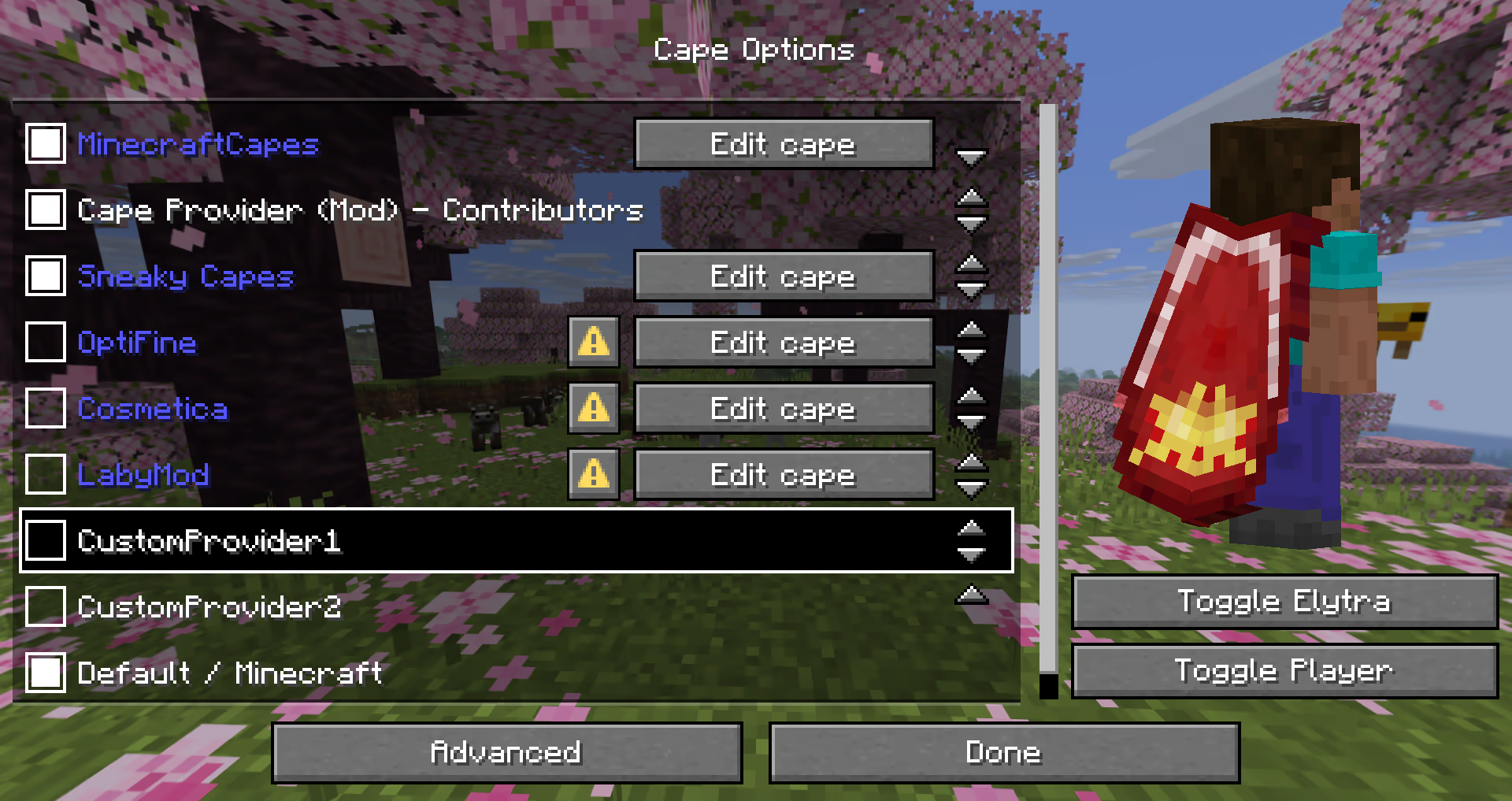
The mod provides many different ways how a provider can be added.
The following possibilities are sorted by simplicity:
Simple Local Provider
> Recommended for: > * Users that just want a customizable cape > * Modpacks (using `config/cape-provider/simple-custom`)
The simplest way to display a cape is by going into the `config/cape-provider` directory and creating a cape texture file named `cape.png`.
Additionally there are the following optional files: * `owners.txt` - Determines which player names or UUIDs will get the cape displayed. If this file is not present then all players will display with the cape. * `name.txt` - To override the display name of the provider
You can also add more providers by creating corresponding directories in `config/cape-provider/simple-custom`.
Example: `config/cape-provider/simple-custom/my-super-cool-provider/cape.png`
Remote Provider in configuration
> Recommended for: > * Users that want to add a custom remote provider
This demo showcases how to apply the capes inside ``custom-cape-demo``.
1. Open the config file located in ``config/cape-provider/config.json`` 2. In the ``remoteCustomProviders`` section add the following entry: ```jsonc { "id": "cp1", "name": "CustomProvider1", // You can replace uuid with $id, $name or $idNoHyphen to customize the cape per Player "uriTemplate": "https://raw.githubusercontent.com/litetex-oss/mcm-cape-provider/refs/heads/dev/custom-cape-demo/uuid.png" } ```
Example for SkinMC
```jsonc { "id": "skinmc", "name": "SkinMC", "uriTemplate": "https://skinmc.net/api/v1/skinmcCape/$id" } ```
3. Restart the game and activate the provider
For more details have a look at RemoteCustomProvider and RemoteCustomProviderConfig
NOTE: Texture resolvers can be selected using the `textureResolverId` attribute (see below for details).
via Mods
> Recommended for: > * Mods
If you are a mod developer and want to e.g. display a cape for supporters or contributors of your mod, you can provide it using the mod's resources and/or metadata in ``fabric.mod.json``. The overall behavior is similar to how ``modmenu`` handles this.
##### Local/Simple (Recommended)
This approach requires no network communication and is the recommended way. It works by reading metadata and resources from the `cape` directory.
Here is an example: 1. Add the following mod metadata: ``fabric.mod.json`` ```json5 { ... "custom": { "cape": "Contributors" } } ``` 2. Create a `cape` directory inside `resources` 3. Add the cape texture in `cape/cape.png` 4. Add the players that should be given the cape in `cape/owners.txt` with their UUIDs or names
Note: There is also a more detailed variant
``fabric.mod.json`` ```json5 { "custom": { "cape": { "name-extra": "Contributors", "owners": { // You can also used UUIDs "names": [ "Notch" ] } } } } ```
The mod uses this strategy itself. See the `fabric.mod.json` or `cape` directory for details.
##### Remote
Here's an example implementation that shows how a remote cape provider can be added:
``fabric.mod.json`` ```json5 { ... "custom": { "cape": "https://raw.githubusercontent.com/litetex-oss/mcm-cape-provider/refs/heads/dev/custom-cape-demo/uuid.png" } } ```
Here's a more detailed variant
``fabric.mod.json`` ```json5 { "custom": { "cape": { // Gives everyone a christmas cape // You can also use variables here, like $uuid. See above for more details // You may have to escape the $ with or you can alternatively use § instead of $ // Alternative: "uriTemplate" "url": "https://example.org/textures/§uuid.png", "changeCapeUrl": "https://...", "rateLimitedReqPerSec": 20 // Default is 20 } } } ```
Programmatic
You can also create a programmatic cape provider.
Further notes
Maximum size
Images/Textures should not exceed 10MB. Otherwise they might be ignored.
Texture resolvers / Animated textures
The following resolvers are currently built-in:
| Resolver-ID | Animated | Format | Example | Notes | | --- | --- | --- | --- | --- | | `default` / null | ❌ | PNG | uuid.png | | | `sprite` | ✔ | Stacked PNG | animated.png | | | `gif` | ✔ | GIF | animated.gif | Usage not recommended
GIFs require more resources when compared to more modern formats like PNG. |
Please note that animated textures can be frozen or completely disabled in the settings.
