

blocktuner-pitchsmith
A mod which helps you tune note blocks. (fork of Lumine1909/BlockTuner_Continue with enhanced pitch controls)
 5
5
Quick challenge
How far can you run before the mobs catch you?
Minecraft check
Confirm your run
Complete the quick check to get your code.
blocktuner-pitchsmith
BlockTuner pitchsmith
About
This is the fabric version of BlockTuner *and* requires fabric API.
If you are using forge, you can check out the forge version by A_Peng215.
If you want the data pack for older versions of Minecraft, please visit this page.
BlockTuner-pitchsmith is a Fabric fork of the original BlockTuner_Continue (also forked from orginal BlockTuner), adjusted for builders who spend more time repeatedly tuning note blocks.
This branch keeps the familiar tuning workflow, but focuses on a setup that is more practical for heavy `tune` usage: cleaner input handling, configurable pitch-copy behavior, and a more maintainable configuration and build setup.
Highlights
- Better suited for builders who repeatedly tune note blocks during large builds - Added a YACL-powered config screen with Mod Menu integration - Added `require-ctrl-to-copy-pitch` so pitch-copy behavior can be configured explicitly - Some hard-coded key bindings now refer to Minecraft keys - Reworked input handling around GUI access, note display, and related interactions - Updated build, Stonecutter, Gradle, and Loom setup for ongoing maintenance
Instructions
Required Dependencies
- Fabric API - YetAnotherConfigLib (YACL)
Installation
Put this mod in your `mods` folder. You also need to install Fabric API if you haven't installed it yet. For the client, also YetAnotherConfigLib (YACL) is needed.
How to Use BlockTuner
`Ctrl` + `Right click` on a note block to open up tuning UI. Placing a note block while holding `Ctrl` also opens the UI automatically.
`Ctrl` to show the note of the note block at crosshair.
`Ctrl` + `Middle click` on note blocks to pick up readily tuned note blocks.
Right click note blocks with blaze rods to play with right clicks without tuning.
> [!NOTE] > - If you are using BlockTuner 1.0.0 (Minecraft 1.18.2) or lower, you don't need to hold `Ctrl` to open up the tuning UI. Instead, use `/blocktuner` to toggle this. > - If you have Tweakeroo installed and have no access to the `Ctrl` key, please go to Tweakaroo configs, find `flexibleBlockPlacementOffset` under `Hot Keys` and set it to something else. e.g. `Right Alt`. Sorry for the inconvenience.
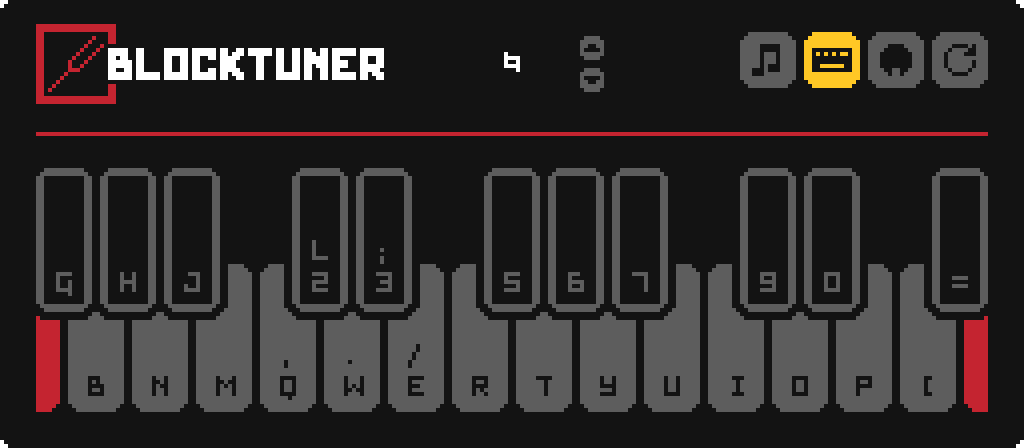
Tuning UI
Top-right corner (from left to right)
*  Play mode - toggle whether the GUI will turn off immediately upon clicking a note on the piano keyboard. *
  Typing keyboard to piano keyboard - toggle whether you want to play the piano keyboard using your computer keyboard. *
  MIDI Device - Click to cycle through available MIDI input devices. The icon shows red if the device is currently unavailable. This usually means it is being used by another program.
Keyboard Mapping:
Credits
Localization
* Russian - Felix14-v2 (Currently outdated) * Japanese - misaka10843 & hakkaku
Forge Port
License
Copyright (C) 2021, xwjcool; Copyright (C) 2025, Lumine1909; Copyright (c) 2026, rs256;
This fork is distributed under the GNU Lesser General Public License v3.0.
That is intentional. This repository was forked from upstream while the upstream codebase was still licensed under LGPLv3, and this fork has not synchronized commits from upstream after upstream changed its license to GPLv3.
Accordingly, this repository remains distributed under LGPLv3 based on the code snapshot it originally forked from. This does not imply that newer upstream code, or upstream changes made after the GPLv3 relicensing, are available under LGPLv3 here.
This program is free software: you can redistribute it and/or modify it under the terms of the GNU Lesser General Public License as published by the Free Software Foundation, either version 3 of the License, or (at your option) any later version.
This program is distributed in the hope that it will be useful, but WITHOUT ANY WARRANTY; without even the implied warranty of MERCHANTABILITY or FITNESS FOR A PARTICULAR PURPOSE. See the GNU Lesser General Public License for more details.
You should have received a copy of the GNU Lesser General Public License along with this program. If not, see <https://www.gnu.org/licenses/>.
