

ArenaRegenerator
Handles arena saving, regeneration, and full customizable minigame logic using WorldEdit or FAWE
 949
949
Quick challenge
How far can you run before the mobs catch you?
Minecraft check
Confirm your run
Complete the quick check to get your code.
ArenaRegenerator

ArenaRegenerator




ArenaRegenerator Plugin
ArenaRegenerator is a plugin for Minecraft servers that handles arena saving, resetting, and full minigame logic using WorldEdit or FAWE.
This plugin manages and regenerates WorldEdit or FAWE-defined arenas. Includes full minigame support (e.g., lobby, countdown, game state, win detection) and interactive signs for easy use.
Table of Contents
1. Features 2. Dependencies 3. Installation 4. Usage * Interactive Signs * Commands and Permissions 5. Example Configuration 6. Data Storage 7. Building from Source 8. Support & Contribution
Features
* Arena Management:
- Save WorldEdit selections as arenas.
- Instantly clear or regenerate arenas.
- List, delete, and view detailed information for saved arenas.
* Minigame System: - Lobby System: Players can join an arena's lobby and wait for enough players.
- Countdown: A configurable countdown begins when the minimum player count is met.
- Game Start: Players are moved from the lobby to game spawn points, inventories are cleared (configurable), and game mode is set.
- Game End: Game ends after a set duration or when a win condition (e.g., last player standing) is met. Players are teleported out, their state is restored (configurable), and the arena is reset.
- Spectator Mode: Players leaving the arena boundaries during a game can be moved to spectator mode.
- Configurable Rules: Set minimum/maximum players, game duration, lobby countdown, items and game mode on join, what blocks can be broken or placed, and damage prevention per arena.
* Interactive Signs: - Regenerate arenas on click with `[RegenArena]` signs - Join minigame arenas with `[JoinArena]` signs - Leave minigame arenas with `[LeaveArena]` signs
/arena save and /arena info

/arena clear and /arena regen

Arena Regen Signs

Join Arena Signs
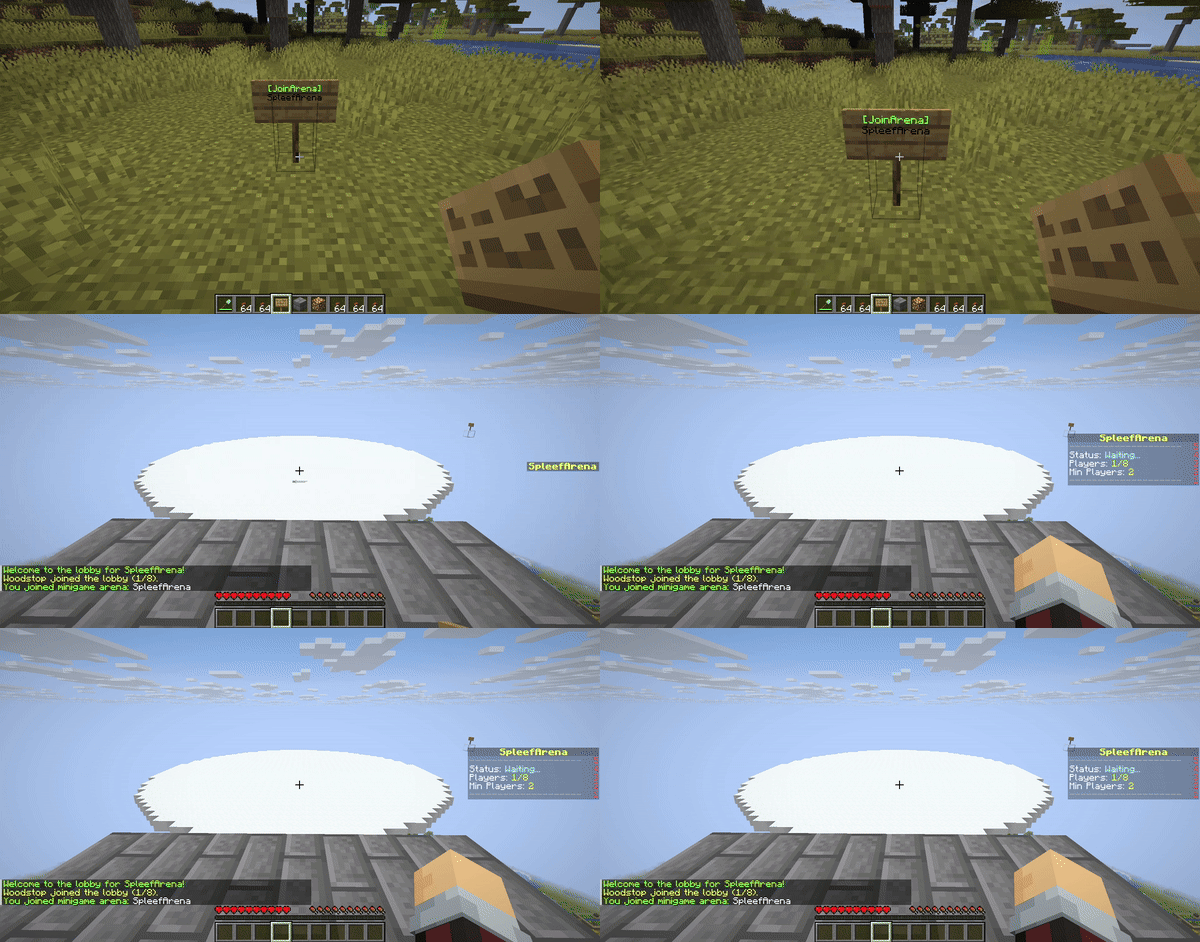
Minigame Logic
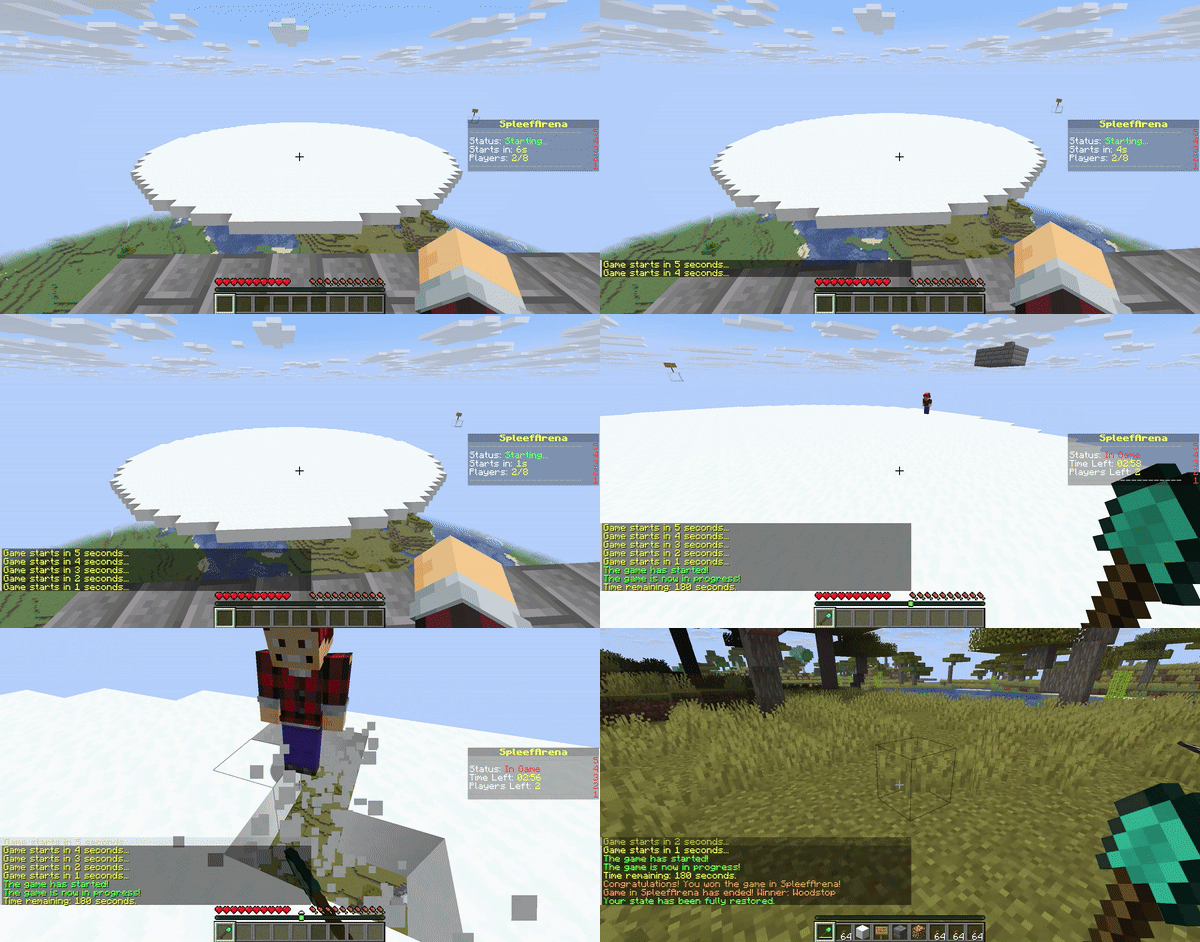
Dependencies
This plugin requires either FastAsyncWorldEdit (FAWE) or FastAsyncWorldEdit (FAWE) to be installed on your server.
* Download WorldEdit * Download FAWE
Important: Only install ONE of these plugins (WorldEdit or FAWE) on your server. Having both can cause conflicts.
Installation
1. Download the latest `ArenaRegenerator-X.X.X.jar` from the FastAsyncWorldEdit (FAWE) page (or compile it yourself). 2. Download either FastAsyncWorldEdit (FAWE) or FastAsyncWorldEdit (FAWE) that is compatible with your server version. 3. Place both `ArenaRegenerator-X.X.X.jar` and your chosen WorldEdit/FAWE JAR into your server's plugins/ folder. 4. Restart server.
Usage
Interactive Signs
Create signs to automatically regenerate arenas, join minigames, or leave minigames.
1. Place sign. 2. Line 1: `[RegenArena]` or `[JoinArena]` or `[LeaveArena]`. 3. Line 2: Your exact arena name. 4. Players with appropriate permissions can click to use. 5. Default 10-second cooldown; `arenaregenerator.sign.bypass` overrides.
Commands and Permissions
Commands use the `/arena` prefix. An alias `/ar` is also available. Replace `<arenaName>` with your desired name for the arena.
`<arenaType>` can be either `lobby`, `exit`, `spectator`, or `game`.
| Command | Command | Command | |--------------------------------------|----------------------------------------------------------------------|-------------------------------------------------------| | `arenaregenerator.regen` | Allows use of the regen function | `/arena regen <arenaName>` | | `arenaregenerator.save` | Allows saving an arena | `/arena save <arenaName>` | | `arenaregenerator.list` | Allows listing saved arenas | `/arena list` | | `arenaregenerator.delete` | Allows deleting an arena | `/arena delete <arenaName>` | | `arenaregenerator.clear` | Allows clearing an arena without deleting the schematic | `/arena clear <arenaName>` | | `arenaregenerator.info` | Allows viewing info about the current arena | `/arena info <arenaName>` | | `arenaregenerator.select` | Allows selecting a region for an arena | `/arena select <arenaName>` | | `arenaregenerator.setspawn` | Allows setting lobby, exit, spectator, and game spawns for minigames | `/arena setspawn <arenaType> <arenaName> [spawnName]` | | `arenaregenerator.delspawn` | Allows deleting spawn points for minigames | `/arena delspawn <arenaType> <arenaName> [spawnName]` | | `arenaregenerator.join` | Allows joining minigame arenas | `/arena join <arenaName>` | | `arenaregenerator.leave` | Allows leaving minigame arenas | `/arena leave` | | `arenaregenerator.reload` | Allows reloading the plugin configuration | `/arena reload` | | `arenaregenerator.sign.create.regen` | Allows players to create `[RegenArena]` signs | *Create sign with tags* | | `arenaregenerator.sign.create.join` | Allows players to create `[JoinArena]` signs | *Create sign with tags* | | `arenaregenerator.sign.create.use` | Allows players to create `[LeaveArena]` signs | *Create sign with tags* | | `arenaregenerator.sign.use.regen` | Allows players to use `[RegenArena]` signs | *Click `[RegenArena]` sign* | | `arenaregenerator.sign.use.join` | Allows players to use `[JoinArena]` signs | *Click `[JoinArena]` sign* | | `arenaregenerator.sign.use.leave` | Allows players to use `[LeaveArena]` signs | *Click `[LeaveArena]` sign* | | `arenaregenerator.sign.bypass` | Allows players to bypass sign cooldowns | *Click signs repeatedly* | | `arenaregenerator.sign.break` | Allows players to break interactive signs | *Break sign block* |
Example Configuration
```
ArenaRegenerator Plugin Configuration
Cooldown in seconds for using ArenaRegenerator signs (e.g., [JoinArena], [RegenArena]).
Set to -1 to disable the cooldown entirely.
sign-use-cooldown-seconds: -1
Minigame Arena Configurations
Define settings for each arena that will function as a minigame.
minigames:
Example Arena Configuration
arena_1: enabled: false # Whether this arena can be used as a minigame min-players: 2 # Minimum players required to start the game max-players: 8 # Maximum players allowed in the arena game-duration-seconds: 180 # How long the game lasts (e.g., 3 minutes) lobby-countdown-seconds: 10 # Countdown before game starts when min players met
Player State Restoration
If true, players' inventory, health, food, game mode, and exact location
will be saved before joining and restored upon leaving/game end.
If an exit spawn is defined, this will override the player's last location.
restore-player-state-on-exit: true
Whether players' inventories are cleared when joining the game
clear-inventory-on-join: true
Specify items to give on join as a list of "MATERIAL_NAME" or "MATERIAL_NAME:AMOUNT"
give-item-on-join: - DIAMOND_SHOVEL - STONE_AXE:1 # Example: a stone axe with quantity 1 - LEATHER_HELMET - LEATHER_CHESTPLATE - LEATHER_LEGGINGS - LEATHER_BOOTS - COOKED_BEEF:16 # Example: 16 cooked beef
game-mode-on-join: SURVIVAL # SURVIVAL, ADVENTURE, CREATIVE, SPECTATOR
List of materials that players are allowed to break in this arena
breakable-blocks: - SNOW_BLOCK - ICE - GLASS
List of materials that players are allowed to place in this arena
placeable-blocks: - COBBLESTONE - DIRT - SAND
prevent-damage: true # Prevent any damage to the players item-drops: true # Allow item drops from blocks prevent-item-durability-loss: true # Prevent items from losing durability
winner-rewards: # Gives players rewards for winning the game. Use %player% to specify the winning player. commands: - "give %player% diamond 3" - "eco give %player% 100" ```
Data Storage
The plugin stores:
* Arena Metadata and Spawn Points: Located in `plugins/ArenaRegenerator/arenas.json`. This file contains the origin, world, and all configured lobby, exit, spectator, and named game spawn points for each arena.
* Schematic Files: Located in `plugins/ArenaRegenerator/schematics/`. These are the WorldEdit schematic files (.schem) for each saved arena.
* Minigame Configurations: Located in `plugins/ArenaRegenerator/config.yml`. This file defines the rules and settings for which saved arenas function as minigames (e.g., min/max players, game duration, specific game rules).
Building from Source
To build from source:
1. Clone repository. 2. Ensure Java 21 and JAVA_HOME are set. 3. Build with Maven (`mvn clean package`). The compiled JAR will be in the `target/` directory.
Support & Contribution
If you encounter issues, have suggestions, or wish to contribute, visit the GitHub repository.
