

AdminWatchdog
AdminWatchdog lets you monitor what staff members do on your server. When an admin runs a command, changes gamemode, or takes items from creative mode, the plugin sends a message to your Discord channel. This helps server owners keep track of staff activit
 311
311
Quick challenge
How far can you run before the mobs catch you?
Minecraft check
Confirm your run
Complete the quick check to get your code.
AdminWatchdog
AdminWatchdog


Monitor what your admins are doing and get notified on Discord
Documentation | Report Bug | Request Feature
---
What is AdminWatchdog?
AdminWatchdog monitors what staff members do on your server. When an admin runs a command, changes gamemode, or takes items from creative mode, the plugin sends a message to your Discord channel. Helps you keep track of staff activity and catch misuse.
What it does
- Sends Discord messages when admins run commands - Tracks gamemode switches - Logs items taken from creative inventory - Sets up custom alerts for specific commands - Only monitors who you want to monitor - Lets trusted admins bypass monitoring
Screenshots
Discord messages
Creative inventory tracking
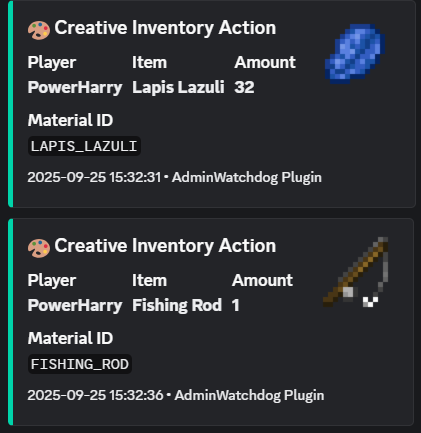
When someone takes items from creative mode, you get a Discord message showing exactly what they took:
Command alerts
Custom alerts
Set up special messages for important commands:
Gamemode changes
Features
Discord alerts
- Instant notifications in your Discord server - Nice looking messages with item pictures - Ping specific roles for important commands - Works with any Discord channel using webhooks
What gets monitored
- Commands run by admins - Commands run from console - Gamemode changes - Items taken from creative inventory
Who gets monitored
You choose:
- Only OPs - Only players with certain permissions - Or everyone
You can also give trusted admins a bypass permission so they don't get logged.
Custom command alerts
Set up special alerts for commands you care about. You can even match specific command patterns:
- `ban` - matches any ban command - `lp user` - matches LuckPerms user commands - `lp user * permission set *` - matches only when someone sets a permission
Get pinged only for the important stuff, like when someone grants a dangerous permission.
How to install
1. Download the plugin from the Downloads tab 2. Put the JAR file in your server's `plugins` folder 3. Restart your server 4. Edit `plugins/AdminWatchdog/config.yml` 5. Add your Discord webhook URL 6. Run `/adminwatchdog reload`
Setting up Discord
1. In Discord, go to your channel settings 2. Click "Integrations" then "Webhooks" 3. Create a new webhook 4. Copy the webhook URL 5. Paste it in your config.yml
Configuration
Basic setup
```yaml discord: webhook-url: "YOUR_WEBHOOK_URL_HERE" enabled: true ```
Custom alerts
Set up alerts for specific commands:
```yaml custom-responses: enabled: true
Alert when someone uses /ban
ban: "BAN - %player% banned someone at %time%"
Alert and ping a role when someone uses /op
op: "CRITICAL - %player% used OP! <@&YOUR_ROLE_ID> at %time%"
Alert for specific LuckPerms commands
"lp user * permission set *": "PERMISSION - %player% set permission: %command%" ```
What the placeholders mean
- `%player%` - The player who ran the command - `%sender%` - For console commands - `%command%` - The full command they typed - `%time%` - When it happened
Mentioning roles in Discord
To ping a role, you need the role ID. In Discord, type `@RoleName` to get the ID, then use it like `<@&123456789>` in your config.
Commands
| Command | What it does | |---------|--------------| | `/adminwatchdog` or `/aw` | Shows plugin info | | `/adminwatchdog version` | Shows version number | | `/adminwatchdog reload` | Reloads the config | | `/adminwatchdog update` | Checks for updates |
Permissions
| Permission | What it does | Who has it | |------------|--------------|------------| | `adminwatchdog.reload` | Lets you reload config | OPs only | | `adminwatchdog.monitor` | Makes you get monitored | OPs only | | `adminwatchdog.bypass.commands` | Stops your commands being logged | Nobody | | `adminwatchdog.bypass.creative` | Stops creative inventory being logged | Nobody | | `adminwatchdog.bypass.customresponses` | Stops custom alerts for you | Nobody | | `adminwatchdog.bypass.gamemode` | Stops gamemode changes being logged | Nobody |
How to stop being monitored
Give yourself one of the bypass permissions. For example, if you don't want custom responses pinging you:
``` /lp user YourName permission set adminwatchdog.bypass.customresponses true ```
Need help?
1. Check if someone already asked about your problem in Issues 2. Join the Discord server 3. Open a new issue on GitHub
Requirements
- Paper or Spigot server (Paper recommended) - Minecraft 1.20 or newer - Java 21 or newer
License
This plugin has a proprietary license. You can use it on your server, but you cannot modify the code or redistribute it.
---
Made by TejasLamba2006
