zzzZombie World
# Zombie World Horde
Zombie World Horde is a small gameplay-focused mod designed to be used alongside a zombie apocalypse–style modpack.
This mod modifies hostile mob behavior in the Overworld to create a more consistent and immersive zombie survival experience.
## Features
– Prevents non-zombie hostile mobs from spawning in the Overworld
– Spawns zombies in organized groups or hordes
– Allows configuration of minimum and maximum horde sizes using the `/zwhorde` command
This mod is intended to support a specific playstyle and enhance the overall experience of survival-based gameplay.
## Important Notes
This mod is still a work in progress. There are known issues that I have not been able to fully resolve yet and plan to address in future updates.
### Known Issues
– ~~In some cases, hostile mobs may appear as “ghost” entities. These entities are removed server-side, but the client may fail to immediately recognize their removal.~~
**Update:** All reported bugs have been fixed.
## Feedback
Feedback and bug reports are always welcome. The mod will continue to be improved over time as issues are identified and resolved.
ZZZ_LayoutFixer
# ZZZ Layout Fixer – Description & Configuration
## 📖 Description (Описание)
## Git Hub
https://github.com/aimdf/ZZZ_LayoutFixer[Git Hub](https://github.com/aimdf/ZZZ_LayoutFixer)
**ZZZ Layout Fixer** is a smart Minecraft server plugin that automatically fixes incorrect keyboard layouts in player messages. The plugin detects when players type Russian words in English layout (or vice versa) and automatically converts the text to the correct form.
**ZZZ Layout Fixer** — это умный плагин для серверов Minecraft, который автоматически исправляет неправильную раскладку клавиатуры в сообщениях игроков. Плагин определяет, когда игрок печатает русские слова на английской раскладке (или наоборот) и автоматически преобразует текст в правильную форму.
### 🔧 Key Features (Основные возможности):
– ✅ Automatic layout correction (RU↔EN) / Автоматическое исправление раскладки (RU↔EN)
– ✅ Dictionary-based language detection / Проверка по словарям для точного определения языка
– ✅ Porter stemming for Russian words / Использование стемминга Портера для русских слов
– ✅ Anti-spam protection system / Система защиты от спама сообщений
– ✅ Visual correction notifications / Визуальное уведомление об исправлениях
– ✅ Optimized memory usage / Оптимизированная работа с памятью
## 📥 Installation (Установка)
1. Download the `ZZZ.jar` file / Скачайте файл `ZZZ.jar`
2. Place the file in your server’s `plugins` folder / Поместите файл в папку `plugins` вашего сервера
3. Restart the server / Перезапустите сервер
## ⚙️ Configuration for Modrinth (Конфигурация для Modrinth)
The plugin works out-of-the-box without additional configuration. All anti-spam parameters are optimally configured:
Плагин работает из коробки без необходимости дополнительной настройки. Все параметры защиты от спама уже настроены оптимально:
“`yaml
# Показывать символ предупреждения при исправлении раскладки/Show warning symbol when fixing keyboard layout
show-warning-symbol: true
# Настройки защиты от спама/Spam protection settings
anti-spam:
# Максимальное количество сообщений в окне времени/Maximum number of messages in the time window
max-messages: 4
# Временное окно для подсчета сообщений (в миллисекундах)/Time window for counting messages (in milliseconds)
time-window-ms: 2000
# Длительность блокировки за спам (в миллисекундах)/Block duration for spam (in milliseconds)
block-duration-ms: 20000
ZZZ Weapons
## NOTE: This project is fan-made
And is not affiliated with or endorsed by HoYoverse.
# How to Use
To turn a weapon into a ZZZ weapon, use an anvil.
Currently available weapons:
Swords:
– Qingming Sword
– Ye Shiyuan Sword
– Ye Shunguang Sword
– Tailless
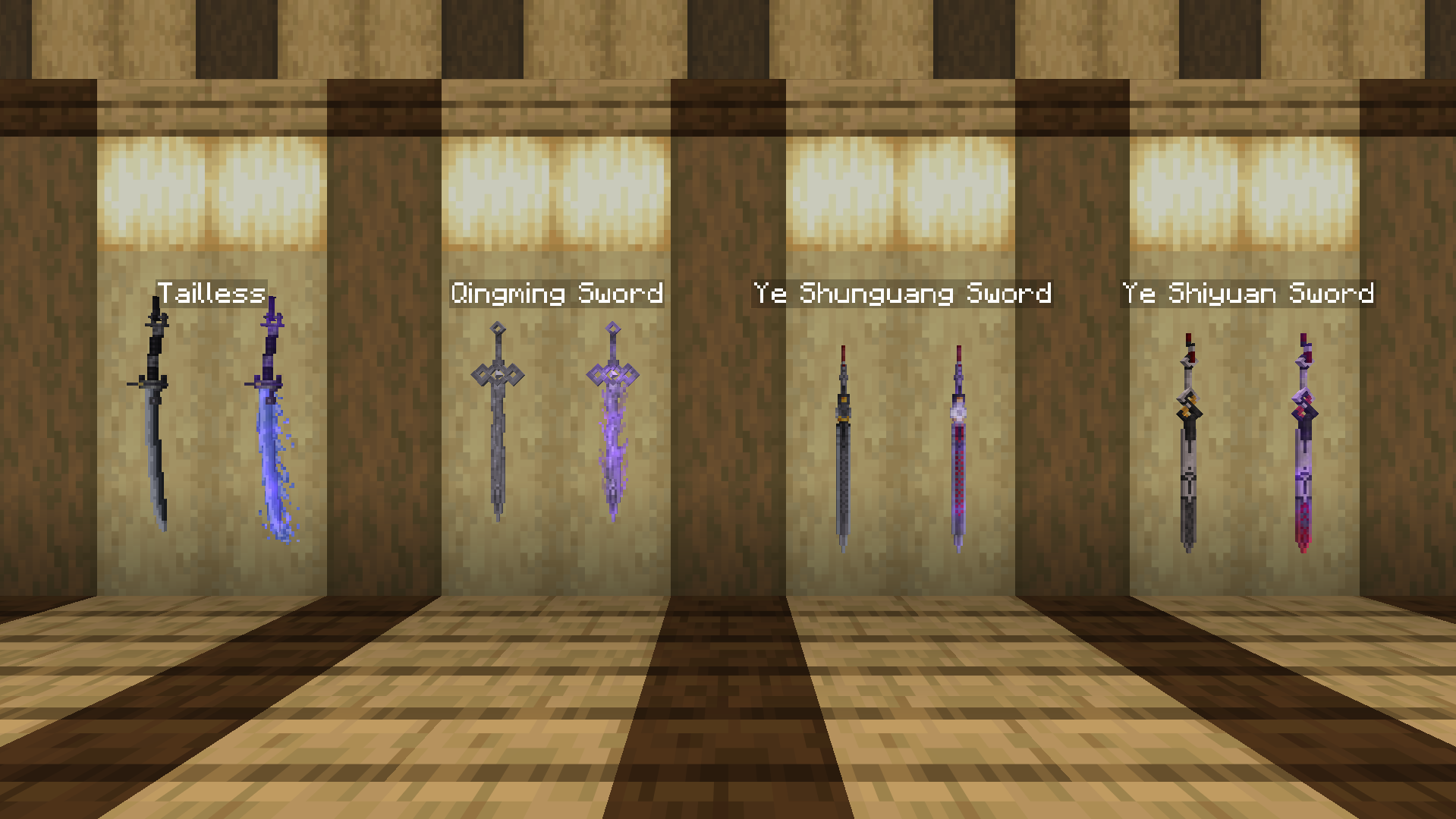
All weapons have enchanted variants!
# Dependencies
For Minecraft 1.21.5 and below, please install [Optifine](https://optifine.net/downloads) or [CIT Reforged (Forge)](https://modrinth.com/mod/citreforged) or [CIT Resewn (Fabric)](https://modrinth.com/mod/cit-resewn) for the pack to work.
zzz… rrr… Rawr?
Server-side mod that sends a (configurable) message to chat when it’s time to wake up.
The config file can be found at `config/zzz_rawr/config.toml`. This is what it looks like by default:
“`toml
# List of messages to send (one will be chosen at random)
messages = [
“Wakey, wakey, rise and shine… Good Morning everyone!”,
“zzz… rrr… Rawr?”
]
“`
You can add or remove messages here as you see fit, following the [TOML specification](https://toml.io/en/) for an array of strings.
Then, every time players awaken from sleep, one of the defined messages will be broadcast to chat globally.
Inspired by the same feature found in the classic mod [Morpheus](https://www.curseforge.com/minecraft/mc-mods/morpheus), with the title borrowed from that mod’s config in ReikaKalseki’s [DragonRealm](https://dragonrealm.overminddl1.com/).
ZZZ Mobs
## NOTE: This project is fan-made
And is not affiliated with or endorsed by HoYoverse.
## How to use
To turn a mob into a ZZZ character, use a nametag renamed on an anvil.
Currently available mobs and characters:
**Fox:**
– Into Hoshimi Miyabi:
– “Miyabi” for normal version, has a chance to have long ears;
– “Miyaaaaabi” for long ears version
– Into Ye Shunguang:
– “Shunguang/Xiao’Guang” for normal version, has a chance to wear pink outfit, turns into alter form if snowy fox is used.
– Into Ye Shiyuan:
– “Shiyuan” for normal version, turns into alter form if snowy fox is used.
**Bat:**
– Into Vivian Banshee:
– “Vivian” for normal version, has a chance to wear swimsuit.
– Into Hugo Vlad:
– “Hugo” for normal version, has a chance to wear hat.
## This resource pack only works with
– OptiFine Custom Entity Models (CEM) feature:
https://optifine.net/downloads
or
– Entity Model Features + Entity Texture Features:
https://modrinth.com/mod/entity-model-features
https://modrinth.com/mod/entitytexturefeatures
ZZZ Fissure Sounds
This resourcepack replaces the Nether Portal sounds with the ones from the Fissures in Zenless Zone Zero! Sounds changed are:
– Idle portal sound.
– Entering the portal.
– Exitng the portal.
This video showcases the sounds in action:
–
zzufix
# zzufix
A very simple 1.21+ Minecraft plugin that restores certain behaviors from 1.8 SportPaper and vanilla servers.
## Remove TNT offset
Prevents TNT blocks from moving to the sides a bit when primed (while keeping custom projectiles such as those from PGM functional).
Pair this with
“`yml
fixes:
prevent-tnt-from-moving-in-water: true
“`
in your `root/config/paper-world-defaults.yml` file for maximum PGM TNT action.
## Restore damage and knockback from thrown projectiles
Restores 1.8 behavior for thrown snowballs and eggs (including the new types), which means it makes them deal a bit of damage and give knockback to other players.
## Restore arrow self hits
Restores 1.8 behavior which allowed you to hit yourself with arrows and get knockback. Useful for 2 Player Parkour maps.
# config.yml
“`yml
features:
tnt: true
projectiles: true
arrow-self-hits: true
“`
Zzoyn HCompass



# **Zzoyn HCompass**
### A clean and customizable HUD compass for everyday gameplay
**Zzoyn HCompass** adds a minimalistic compass bar to the top of your screen, showing cardinal directions and degree markers exactly where you need them — without cluttering your interface.
Designed to stay out of the way, yet always useful.
—
## **Features**
– **Minimalistic design** — clean, sharp and unobtrusive
– **Customizable colors** — set any hex color you want
– **Optional features** — toggle background, degree numbers and more
– **Built-in configuration menu** — change settings in-game (default key: **P**)
– **Lightweight and efficient** — no performance impact
– **Always available** — perfect for exploration, building, travelling, roleplay, or simply keeping your sense of direction
—
## **Why use it?**
Unlike large minimaps or heavy UI mods, **Zzoyn HCompass** stays nearly invisible until you need it.
It gives you quick orientation without distractions — ideal when you want a clean screen but still need reliable navigation.
—
## **Perfect for**
– Survival and exploration
– Building large structures
– Adventure maps
– Minimalistic HUD setups
– Any gameplay where a simple, elegant compass makes life easier
—

## **Controls**
– **P** — open the settings panel
– All options update instantly and save automatically
—
A simple, elegant, customizable compass — exactly when you need it and nowhere else.
Zzarty’s Visible Powder Snow
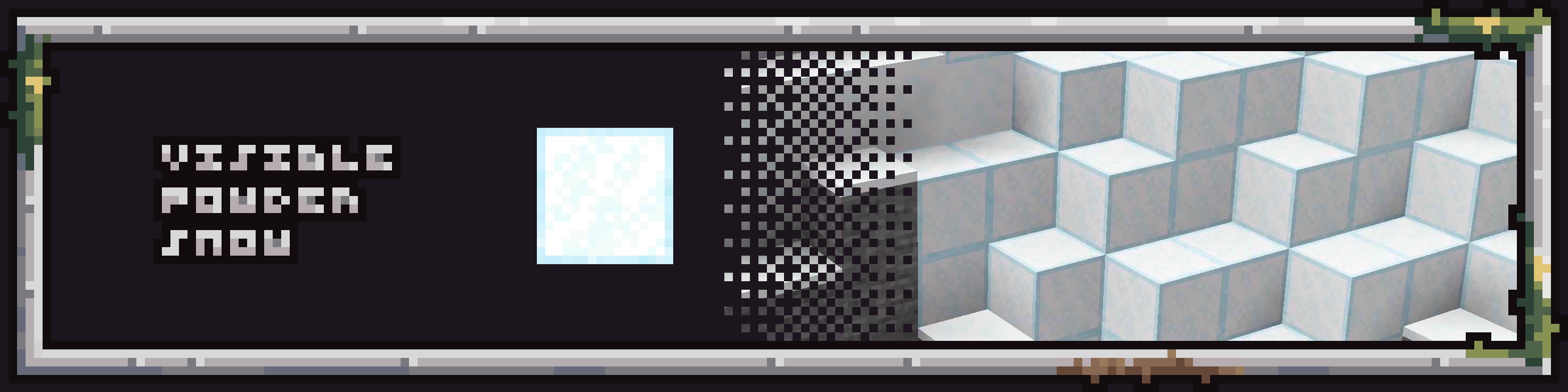
The Visible powder snow texture pack for Minecraft will make your life easier with the updated appearance of the suspicious powder block. This texture pack adds 1 pixel frame around powder snow block, making block more visible.
ZYYN0X Survival Mods
## 🧭 Zyyn0x’s Survival Modpack – Fabric Edition
Survival gets a serious upgrade with this lightweight yet powerful modpack by **zyyn0x**, built on Fabric for smooth performance and modular flexibility. Designed for creators, explorers, and survivalists alike, it enhances the vanilla experience without overwhelming it.
### 🔧 Core Features:
**Performance Boosters**: Sodium, Iris, and Clumps ensure high FPS and smooth gameplay, even in modded worlds.
**UI & QoL Enhancements**: BetterF3, MouseTweaks, Controlling, and ModMenu streamline your interface and controls.
**Survival Tools**: AppleSkin, ClickMobs, Flashback, and ChatCalc add depth to food, combat, and exploration.
**Navigation & World Awareness**: Xaero’s Minimap + WorldMap keep you oriented, while ShulkerBoxTooltip and Searchables improve inventory management.
**Immersion Mods**: Sound Physics Remastered and VoiceChat bring your world to life with realistic audio and multiplayer interaction.
Customization Ready: Architectury, Cloth Config, and PlaceholderAPI make it easy to expand or tweak your setup.
### 🧱 Why It Works:
⚡ Fast & Modular – Built for creators who value speed, clarity, and control.
🎮 Survival-First – Every mod supports the core gameplay loop: gather, build, survive, thrive.
🛠️ Streamer-Friendly – Clean overlays, voice chat, and performance mods make it ideal for content creation.