Worlds
## Worlds – World Management for Paper & Folia
Worlds is a modern, lightweight world management plugin designed for **Paper** and **Folia** servers.
It brings seamless world handling with **customization presets**, eliminating the need for extra plugins just to create
void or custom flat maps. Simply pick a predefined preset, or create your own!
### Why Choose Worlds?
**Vanilla Flat World Preset** – No more extra plugins for void or flat maps
**No Extra Data Files** – Worlds doesn’t store extra files, no more messy file syncing when sharing worlds
**Drag & Drop Import** – Just place the world in the folder & use /world import
**Full World Regeneration** – Reset any world (even the Overworld!) with one command
**Modern & Efficient** – Uses up-to-date server mechanics, not outdated methods
**World Keys** – Worlds are referenced by unique keys, improving compatibility with client mods
**World Linking** – Restore vanilla Nether and End portal behavior for custom worlds
### What’s Next?
**Custom Dimension Creation** – Like datapacks, but usable from commands and API!
[Download now on Modrinth](https://modrinth.com/project/gBIw3Gvy)
[Latest version supporting 1.20.6 (Java 21)](https://github.com/TheNextLvl-net/worlds/releases/tag/v1.2.5)
[Latest version supporting 1.19/1.20.4 (Java 19)](https://github.com/TheNextLvl-net/worlds/releases/tag/v1.1.6)
[Latest version supporting 1.19/1.20.4 (Java 17)](https://github.com/TheNextLvl-net/worlds/releases/tag/v1.1.3)
For further information check out the [Wiki](https://thenextlvl.net/docs/worlds)
[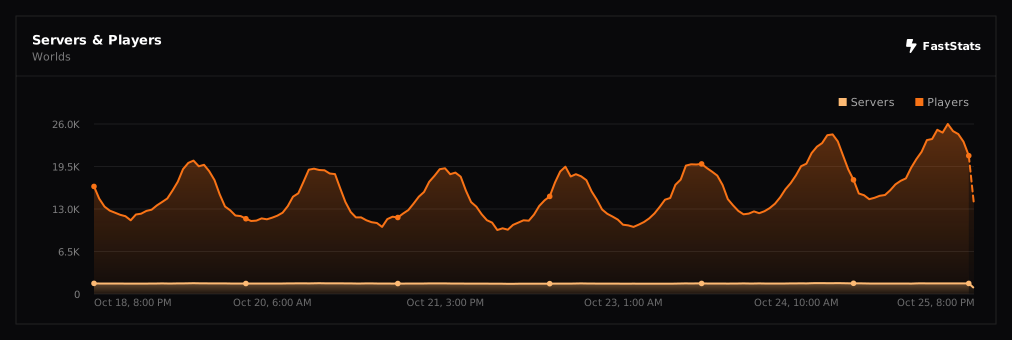](https://faststats.dev/project/worlds)
WorldRulesManage
# WorldRulesManage Plugin Overview
**WorldRulesManage** is a professional plugin for managing world rules. It allows you to freely configure player behavior (e.g., blocking block breaking, block triggering, block interaction, etc.) and world behaviors (e.g., blocking fire spread, liquid flow, etc.) in specific worlds. You can also define radius-based rules using coordinates to restrict player or world actions within a certain area.
**Use cases:** Server lobbies, spawn protection, and controlled world zones.
> English [README.md](https://github.com/MaddyJace/WorldRulesManage/blob/5.0/README.md)
> 中文简体 [CN-README.md](https://github.com/MaddyJace/WorldRulesManage/blob/5.0/CN-README.md)
—
## 📦 Plugin Features
– Supports global and radius-based world rules: prevent fire spread, prevent leaf decay, prevent block ignition (non-player), prevent entity block destruction, and block liquid flow (e.g., lava and water).
– Supports global and radius-based player rules: custom permission control, prevent block ignition, block breaking, block placing, item pickup/drop, bucket usage (e.g., collect water), hunger,
auto-restore hunger to full, prevent player damage, block all portals (overrides Nether/End), block Nether portal, block End portal, block specific item usage (configured by you),
block interaction with specific entities/blocks, block triggering of specific blocks.
– Radius rule shapes (for world and player): 2D Circle (ignores Y), 3D Sphere (includes Y), 2D Square (ignores Y), 3D Cube (includes Y), custom origin and radius values.
– Supports blacklist/whitelist configuration
– Supports multiple worlds
– Supports auto-hot-reload of configuration files
—
# ⚙️ WorldRulesManage Configuration Guide
> [config.yml](https://github.com/MaddyJace/WorldRulesManage/blob/5.0/src/main/resources/config.yml)
> [world.yml](https://github.com/MaddyJace/WorldRulesManage/blob/5.0/src/main/resources/world.yml)
> [radius.yml](https://github.com/MaddyJace/WorldRulesManage/blob/5.0/src/main/resources/radius.yml)
> [message.yml](https://github.com/MaddyJace/WorldRulesManage/blob/5.0/src/main/resources/message.yml)
### ✅ `worldName: ` # Name of the world (e.g., world)
### ✅ `globalRules:` # Rules applied to the world, regardless of player permissions
– `flameSpread: true` # Prevent fire from spreading
– `leavesDecay: true` # Prevent leaf decay
– `blockIgnite: true` # Prevent block ignition
– `entityBlockBreak: true` # Prevent entities from breaking blocks
– `liquidFlow: true` # Prevent liquid flow
### ✅ `playerRules:` # Rules applied to players without permission
– `permission: “wm.world”` # Permission node
– `blockIgnite: true` # Prevent players from igniting blocks
– `blockBreak: true` # Prevent players from breaking blocks
– `blockPlace: true` # Prevent players from placing blocks
– `itemPickup: false` # Prevent players from picking up items
– `itemDrop: false` # Prevent players from dropping items
– `usePail: true` # Prevent players from using buckets (e.g., to collect water)
– `food: true` # Prevent hunger
– `foodSatiety: true` # Restore hunger to full
– `playerDamage: true` # Prevent player damage
– `portalAll: false` # Prevent all portal access (overrides portalNether and portalEnder)
– `portalNether: false` # Prevent Nether portal access
– `portalEnder: false` # Prevent End portal access
######
– `🎯playerUseItem:` # Block item usage
– `type:` `BLACKLIST` / `WHITELIST`
– `list:`
– “EGG” # Egg
– “FLINT_AND_STEEL” # Flint and Steel
######
– `🧍PlayerInteractEntity:` # Block entity interaction
– `type:` `BLACKLIST` / `WHITELIST`
– `list:`
– “ITEM_FRAME” # Item Frame
– “PAINTING” # Painting
– “ARMOR_STAND” # Armor Stand
######
– `🧱PlayerInteractBlock:` # Block block interaction
– `type:` `BLACKLIST` / `WHITELIST`
– `list:`
– “LEVER” # Lever
– “FURNACE” # Furnace
######
– `🎛️PlayerTriggerBlock:` # Block block triggering
– `type:` `BLACKLIST` / `WHITELIST`
– `list:`
– “SOIL” # Farmland
– “TRIPWIRE” # Tripwire
—
### `This option only takes effect in radius.yml`
– `✅settingsRadius:`
– `type:` `2DRange`, `3DRange`, `2DCube`, `3DCube`
– `xyz:` # Starting coordinates (e.g., 0 0 0)
– `radius:` # Radius in blocks
## 📌 Case Sensitivity Warning
> ⚠️ **Important:** All configuration keys are case-sensitive. Misuse of uppercase/lowercase may result in errors or ignored settings.
—
## 🛠 Recommended Practices
– When using TNT near the radius edge, explosions may affect blocks just outside the protected area. To avoid this, expand the radius by 7 blocks for edge safety.
– Remove or comment out unused configuration sections to keep your setup clean and readable.
—
WorldResetPlugin
[](https://www.ashcraft.cz/)
WorldResetPlugin is a powerful yet straightforward tool that allows server administrators to quickly reset and regenerate worlds directly from in-game or the console. Instead of manually deleting world folders and restarting the server, this plugin automates the entire process with a single command.
Using /resetworld , admins can instantly remove the specified world. The plugin will unload all players from the world, delete its folder from the server, and trigger a server restart, ensuring the world is regenerated cleanly on the next startup.
Key features include:
Simple command /resetworld to remove worlds.
Automatic player handling – all players in the world are safely teleported to the default spawn before deletion.
Permission-based access (worldreset.use) to prevent abuse.
Safe unloading of the target world before deletion.
Server restart integration to ensure clean regeneration.
Lightweight and efficient, with no unnecessary dependencies.
This plugin is perfect for survival servers, minigames, or any environment where worlds need to be reset regularly. With just one command, WorldResetPlugin ensures your server stays fresh, clean, and ready for new adventures.
WorldReset
❤️ **If you enjoy this plugin, please consider leaving a like! It means a lot for me.** ❤️
> **⚠️ Compatibility Note:** This plugin is built for **Minecraft 1.21.5 Purpur**. I tested it on Purpur 1.21.5, 1.21.11 and Spigot 1.21. It should work on 1.21-1.21.11 Spigot/Purpur/Paper/Bukkit.
If you want to report a bug or suggest a new plugin, join my [Discord server](https://discord.gg/A7WVnYj3BP).
Also check my other plugin **[SharedHealthAndHunger](https://modrinth.com/plugin/sharedhealthandhunger)**
# 🌍 WorldReset
**Reset your world instantly without restarting the server! Perfect for Speedruns, Manhunts, and Challenges.**
WorldReset is a plugin designed to manage game worlds dynamically. Instead of kicking players and restarting the server to generate a new map, this plugin moves players to a “Limbo” world, deletes the old map, generates a fresh one, and teleports everyone back—all within seconds!
### ✨ Key Features
* **🔄 Instant Reset:** Regenerates Overworld, Nether, and End without shutting down the server.
* **🌱 Seed Control:** Choose between **Random Seed** for a fresh experience or **Fixed Seed** for practice/speedruns.
* **🏹 Spawn Shifter:** Never reset for a good seed again! Configure a target **Structure** (e.g., Village) or **Biome** (e.g., Cherry Grove). The plugin intelligently scans the generated world and **moves the world spawn** directly to your target.
* **🏝️ Smart Land Seeker:** No more spawning in the middle of the ocean! After generating a new world (or shifting spawn), the plugin scans the terrain to ensure the spawn point is on solid ground.
* **☁️ Seamless Limbo:** Players are moved to a waiting world (“Limbo”) during generation.
* **⏱️ Advanced Speedrun Timer:** Built-in Action Bar stopwatch! Race in **Global** mode (first to finish stops the timer) or **Individual** mode (personal timers). Set automatic stop triggers (Goals) such as killing an entity (e.g., Ender Dragon), entering a specific portal, or getting an advancement!
* **🧭 Player Tracker Radar (Compass):** A dynamic compass ribbon at the top of your screen! Track other players in real-time. Players appear as colored dots (`●`) on the compass based on where you look. Fully customizable player colors.
* **🌍 Multi-Language:** Full support for **English** and **Polish** (changeable via command).
—
### 📜 Commands and Permissions
Main command: `/worldreset` or `/wr`
| Command | Description | Permission |
| — | — | — |
| `/wr reset` | Instantly resets the game: moves everyone to Limbo, regenerates the world, and starts a new game. | `worldreset.reset` |
| `/wr limbo` | Toggles Limbo mode. Moves you to Limbo (Pause) or starts a new game if you are already in Limbo. | `worldreset.limbo` |
| `/wr death` | Toggles **Reset on Death** mode (Hardcore) ON/OFF. | `worldreset.death` |
| `/wr silent` | Toggles **Silent Mode** (hides global chat messages) ON/OFF. | `worldreset.silent` |
| `/wr filter structure ` | Sets a target structure (e.g., VILLAGE). Auto-clears biome filter. | `worldreset.filter` |
| `/wr filter biome ` | Sets a target biome (e.g., PLAINS). Auto-clears structure filter. | `worldreset.filter` |
| `/wr seed ` | Sets a fixed seed for future resets. | `worldreset.seed` |
| `/wr seed` | Disables fixed seed (enables Random Seed mode). | `worldreset.seed` |
| `/wr timer ` | Turns the speedrun stopwatch system ON/OFF. | `worldreset.timer` |
| `/wr timer ` | Controls the built-in speedrun stopwatch. | `worldreset.timer` |
| `/wr timer ` | Configures timer settings (RTA/IGT, Global/Individual, end triggers). | `worldreset.timer` |
| `/wr compass ` | Toggles the player tracker radar on top of the screen. | `worldreset.compass` |
| `/wr compass color [player] ` | Sets a specific radar dot color for a player. | `worldreset.compass` |
| `/wr language ` | Changes the plugin language (English / Polish). | `worldreset.language` |
| `/wr reload` | Reloads configuration and language files instantly. | `worldreset.admin` |
**Wildcard Permission (Full Admin):** `worldreset.*`
—
### 🚀 Installation
1. Download the `.jar` file.
2. Place it in the `/plugins/` folder of your server (Spigot/Paper/Purpur **1.21+**).
3. **Restart** the server.
4. Done! The plugin will generate the `limbo` world and the `game_world`.
* *Tip: To use your own custom lobby, simply stop the server, delete the generated `limbo` folder, and upload your own world folder named `limbo`.*
—
### ❤️ Credits
The default Limbo map is **Floating Island Sanctuary**.
All credits go to the original creator.
**[Download Original Map Here](https://www.planetminecraft.com/project/floating-island-sanctuary/)**
WorldRemover
# Word Remover
## Description
This Datapack will help you to remove terrain from your world, while you are moving, leaving the Ores
This is perfect if you are developing a mod or datapack that generates new Ores and you want to visually see the generation of Ores in the world.
## Usage
– Activate
“`mcfunction
/trigger worldremover set 1
“`
– Deactivate
“`mcfunction
/trigger worldremover set 0
“`
WorldPreview
# World Preview
[](https://ko-fi.com/voidxwalker)
Minecraft mod that draws a preview of the world on the loading screen during chunk generation.
– **Legal** for the minecraft java edition leaderboards
– The **full chunk map** must be shown in the recording to get a run verified
– Switching to the F3 + Esc menu will make your run **count as f3**
– **Compatible** with all allowed mods
– **Compatible** with the newest releases of specnr’s multi-instance macros and with FinestPigeon’s spawn reset macro for ssg
**For macro
– World preview **doesn’t modify world generation** in any way. It simply takes already completed chunks, converts them to client chunks (Chunks minecraft can render) and then draws these chunks on the loading screen.
– There are **no server side modifications** besides minecraft getting the random value for the player spawn earlier (Random is Random so it doesn’t change anything)
– You will not be able to reset after ~ when the chunk map reaches 100%. This is intentional
## Usage
The preview will always render when you create a world.
There are 5 ways the player can interact with the preview:
**Direct Inputs**
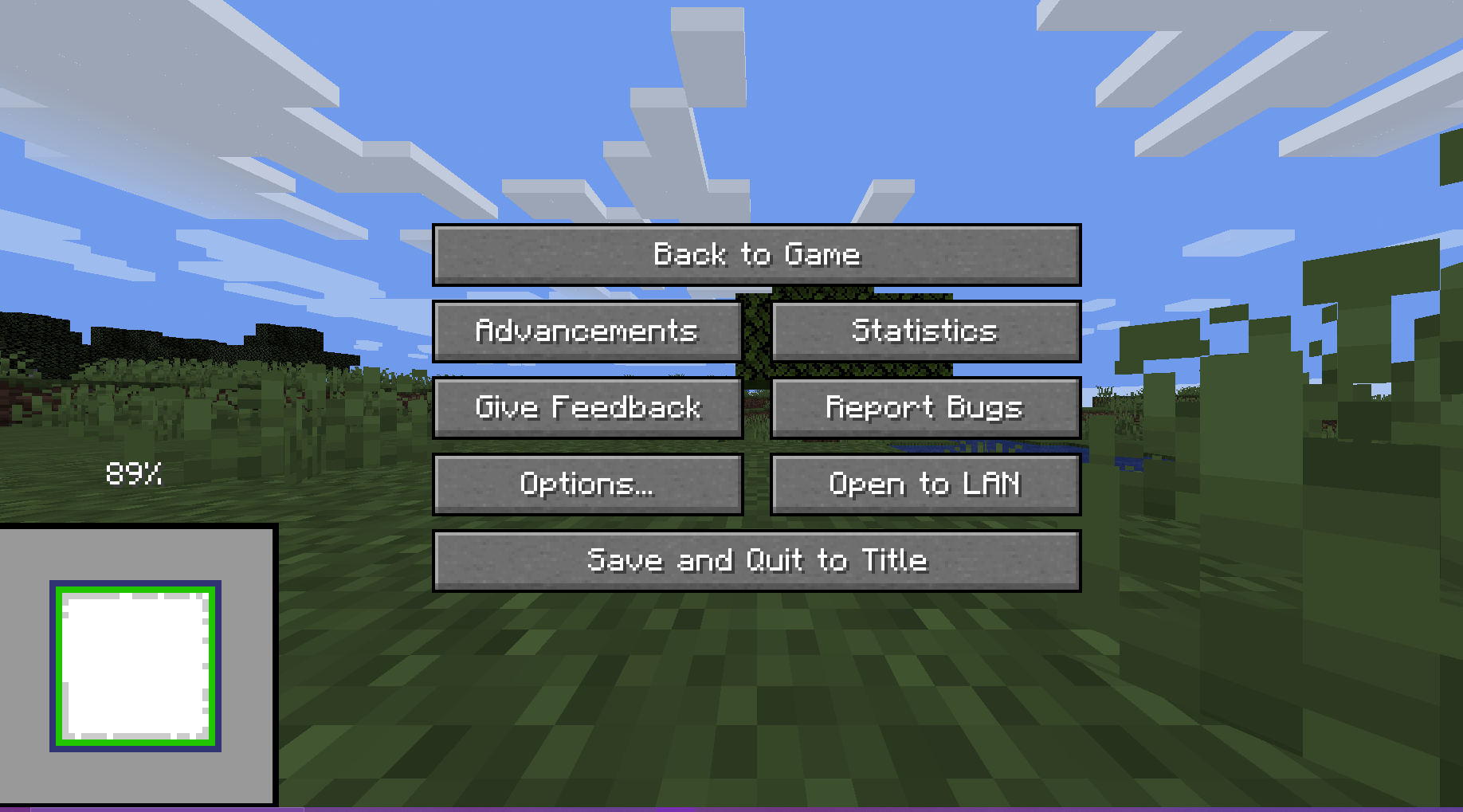
– Leave World Generation and Reset: Press the “Save and Quit to Title” button to instantly leave the World Generation to the title screen
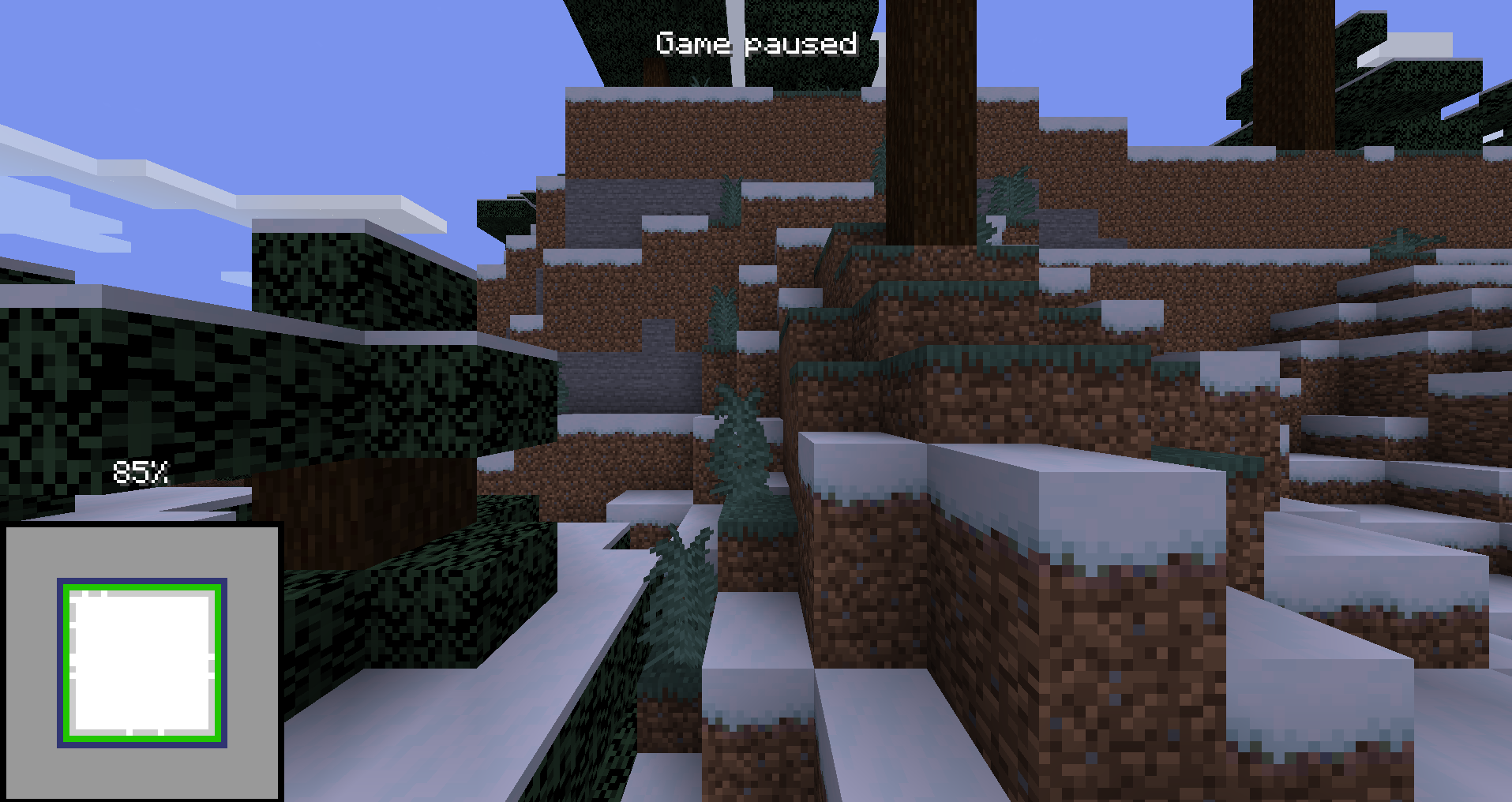
– F3 + Esc: Press F3 and Esc at the same time to switch the pause menu to the F3+Esc pause menu (shown below) and press Esc to switch back. This will make your run count as f3.
——–
**Hotkeys**
(These can be changed in the Controls Screen)
– Leave World Generation and Reset with Hotkey, default button “g” (English keyboard): Press the hotkey button to instantly leave the World Generation to the title screen
– Cycle Chunk Map, default button “h” (English keyboard): Cycle through the 4 positions of the chunk map
– Freeze Preview, default button “j” (English keyboard): Freezes the preview (helps with CPU performance)
## For Macro Makers
The mod prints 3 different log lines:
– “Starting preview at (x, y, z)” at the start of the preview (Reset buttons unlocked)
– “Leaving world generation” when leaving world generation (Reset buttons locked)
– “Freezing Preview / Unfreezing Preview” when the freezing / unfreezing the preview
You will not be able to reset after ~ when the chunk map reaches 100%. This is intentional.
## Authors
– [@Void_X_Walker](https://www.github.com/voidxwalker) (https://ko-fi.com/voidxwalker)
WorldPreventer
# WorldPreventer – Advanced Anti-Exploit & World Protection
⚠️ **Early Development Notice**
WorldPreventer is still in a very early stage of development. Many systems are functional, but the **machine learning (ML) detection system does not ship with a trained model**.
* Do **not enable ML detection** unless you have trained your own model.
* If you see the notification `REQUEST_STATS observed (WorldTools signature)`, this likely indicates that a client is attempting to download your world.
—
## Overview
WorldPreventer is a **high-performance anti-exploit and world protection plugin** designed to safeguard your server from a wide range of threats, including:
* **World downloads**
* **Chunk exploitation**
* **Suspicious client behavior**
It combines **packet-level monitoring**, **behavioral analysis**, and **adaptive responses** to protect your server from malicious activity.
—
## Features
### Core Protection Systems
1. **Chunk Exploit Prevention**
* Detects & prevents rapid chunk loading/unloading
* Monitors chunk interaction patterns
* Stops chunk boundary exploits
2. **WorldTools Blocker**
* Blocks WorldTools client functionality
* Prevents unauthorized world downloads
* Detects & blocks rapid join/leave patterns
3. **Deep Packet Inspection**
* Analyzes network traffic for suspicious patterns
* Detects & blocks malicious packet sequences
* Monitors data volume & timing anomalies
4. **Adaptive Response System**
* Dynamic threat-level scoring
* Escalating responses (warn → kick → ban)
* Fully configurable actions
—
### Machine Learning Detection (Optional)
**Important:** The ML system is disabled by default and ships **without a trained model**. Do not enable it unless you train your own.
When configured properly, the ML system provides:
* **Anomaly Detection** – Spotting unusual player behavior
* **Behavioral Analysis** – Learning normal server patterns
* **Real-time Scoring** – Constantly evaluating actions
* **Adaptive Thresholds** – Adjusting to server conditions
**Tracked Features (12 total):**
Chunk transitions, container interactions, movement volume, entity spawn rates, packet bursts, systematic movement, join surges, client brand, timing precision, data volume variance, interaction patterns, movement entropy.
—
## Commands & Permissions
### Admin Commands
* `/worldpreventer reload` – Reload configuration
* `/worldpreventer status` – View protection status
* `/worldpreventer simulate ` – Run simulation tests
* `/worldpreventer ml [enable|disable|status]` – Manage ML system
### Permissions
* `worldpreventer.admin` – Full access & bypass
* `worldpreventer.staff` – Receive suspicious activity alerts
* `worldpreventer.bypass` – Exclude player from detection
—
## Configuration
Example `config.yml`:
“`yaml
# Grace period after join
join_grace_period_seconds: 120
# Escalation actions
actions:
on_exceed: WARN # WARN, KICK, BAN
# Suspicion scoring
scoring:
enabled: true
decay_per_minute: 10.0
thresholds:
warn: 100.0
kick: 500.0
# Machine Learning (disabled by default)
ml:
enabled: false
direct_kicks: false
score_threshold: 3.0
points_on_exceed: 20.0
kick_message: “§cKicked by ML anti-cheat system”
window_seconds: 60
autosave_minutes: 5
decay: 0.98
# ProtocolLib-based packet blocking
packet_blocking:
enabled: true
block_stats_request: false
block_statistics: false
block_map_data: false
corrupt_block_entities: false
inject_fake_data: false
“`
—
## Integration
### Dependencies
* **Required:** ProtocolLib
* **Recommended:** Vault
### API Example
“`java
WorldPreventer plugin = (WorldPreventer) Bukkit.getPluginManager().getPlugin(“WorldPreventer”);
// Get suspicion score
double score = plugin.getSuspicionScorer().getScore(player.getUniqueId());
// Add custom detection points
plugin.getSuspicionScorer().addScore(player.getUniqueId(), 10.0, “CUSTOM_EVENT”);
“`
—
## Staff Notifications
Staff with permission receive alerts for:
* Suspicious activity
* ML system detections
* Config changes
* Warnings & errors
—
## Bypass Options
Players excluded from detection:
* `worldpreventer.bypass` permission holders
* Players in Creative mode
* Players in Spectator mode
—
## Support
For bug reports, feature requests, or support, please visit the [GitHub repository](https://github.com/yourusername/WorldPreventer).
World Portal
# World Portal
World Portal can create custom world portal to travel between dimensions. You can make your own portal for your custom dimension easily.
### Important
– [0.0.8] Portal frame corner left and right will be swapped.
– [0.0.10] Client side issue fix and data migration. Load world with this version first before updating.
## Features
– No client needed custom portal.
– Transform nether portal to custom portal by changing it’s frame corners.
– Horizontal portal (>=0.0.8).
– Simple configuration and datapack support.
**Can be added to existing modpack or world and can be removed from existing world easly. Please make sure backup your world first.**
### Planned
– End portal mode.
– Customized portal frame.
– Customized portal spawned mobs not just piglin or disable it.
– Customized portal minimum spawn height.
– Add or change portal particles.
– Command or function execution when entering and exiting portal.
– Destination based on biome, dimension, height, moon phase, time, and weather.
– Destination based on player level, saturation, or even economy and mana.
– Destination based on executed command or function.
– Destination restricted by dimension and player permissions.
– Destination override gamerule.
– Support for economy, permission, and quest mods.
– And many more including compat mods in the way.
Suggest new features for world portal on [GitHub Discussion](https://github.com/mahmudindev/mcmod-worldportal/discussions) or [Discord](https://discord.gg/cuYgFmq3kz) would be appreciated.
## Usage
You can configure this mod by config or data driven by using datapack.
Config (worldportal.json)
The id “minecraft:example” can be anything as long as it’s unique.
“`
{
“portals”: {
“minecraft:example”: {
“frame_top_right”: “minecraft:gold_block”,
“frame_top_left”: “minecraft:iron_block”,
“frame_bottom_right”: “minecraft:iron_block”,
“frame_bottom_left”: “minecraft:gold_block”,
“mode”: “worldportal:default”,
“destination”: “customdimension:dimension”
},
“minecraft:example_horizontal”: {
“frame_top_right”: “minecraft:gold_block”,
“frame_top_left”: “minecraft:iron_block”,
“frame_bottom_right”: “minecraft:iron_block”,
“frame_bottom_left”: “minecraft:gold_block”,
“mode”: “worldportal:horizontal”,
“destination”: “customdimension:dimension_flat”
}
}
}
“`
Datapack
In your datapack namespace folder, create “worldportal” folder with “portal” folder inside. In portal folder create json file with any name with content:
“`
{
“frame_top_right”: “minecraft:gold_block”,
“frame_top_left”: “minecraft:iron_block”,
“frame_bottom_right”: “minecraft:iron_block”,
“frame_bottom_left”: “minecraft:gold_block”,
“mode”: “worldportal:default”,
“destination”: “test:test”
}
“`
-> data\{namespace}worldportalportal\{id}.json
For now you can only customize portal frame corner and destination dimension if matches. More mechanics will be added on the next update, for now it’s enough for my use case.
## Compatibility
– [Passengers Portal Fix](https://modrinth.com/project/LI0BrUQA)
– **Create** Addons: [Create: Portal Integration](https://modrinth.com/project/2f4ngcAb)
## Issues
– [Radium]
Use Canary instead for better mod compatibility or manually disable “mixin.ai.poi.fast_portals”.
There are no new compatibility issues or bugs being reported. Please report it on [GitHub](https://github.com/mahmudindev/mcmod-worldportal/issues) so it can be fixed.
## Support
🟩 26.1-26.1.2 / 🟩 1.21.1 / 🟥 1.21-1.21.11 / 🟩 1.20.1 / 🟪 1.16.5 / 🟪 1.12.2
🟩 Supported
🟥 Support Dropped
🟨 In Progress
🟪 Considered
## Important Note
This mod can only be used to create custom portal. To make dimension, you need datapack or another mod to do it.
Made for personal gameplay tinkering, server customization, and modpack creation. Feel free to use in modpacks, videos, stream, or similar media. Consider help me financially if you like this mod, I will be really grateful.


WorldMaster
WorldMaster
- Prefixes for players: [Player] + [Owner] (If enabled chat message won’t be signed and can’t be reported)
- New welcome text and join, leave message and chat style
- Player counter bossbar
- Elevators [/elevator]
Enable flying on server, if used in survival
- Chest Shops: See documentation
- Chunk loader [/chunk_loader]
May produce lag, if you have to many chunk loaders
- Inventory Managment System [/inventory]
- Mulitple Worlds [/world]
May produce lag, if world is created or regenerated
Every world has always loaded spawn chunks which may produce lag
Level-Name in server.properties has to be “world”
- Permission for all commands of the plugin + shop owner permission
Installation
Copy the .jar file into your plugins directory of your server.
Start the server. If the server was already started, type “/reload” in the server console.
Documentation
Documentation on GitHub
WorldMagic
# World Magic
Progressive world manager
—
WorldMagic is minecraft paper plugin that use nms to provide better world management.
Supports paper versions **1.20.6** and above.
On versions lower than **1.20.6** plugin will be disabled.
—
## Features
– World creation
– Minecraft 1.16 generation pipeline support
– Plugins generation support
– Async world initialization
– Gamerules support
– Worlds without save
—
## Wiki
More information about plugin can be founded on the [wiki](https://github.com/hotwopik/WorldMagic/wiki)