Xwarps
## Xwarp – A Complete Teleportation Solution for Minecraft
Xwarp is a feature-rich teleportation plugin for Minecraft that allows players to easily set and teleport to custom warp points within their world. Whether you’re managing a large server with multiple locations or just want to teleport between your favorite spots, Xwarp offers a seamless and immersive experience.
## Key Features:
Custom Warp Points: Set warp points anywhere in the world with ease using the /setwarp [warpname] command. These warp points can be accessed by any player with the appropriate permissions.
Teleport Countdown: When a player selects a warp, a 5-second countdown begins, with a clear message displayed in the center of the screen: “Teleporting in 5 seconds, don’t move!” (colored in yellow). If the player walks or moves during this time, the teleportation is canceled, adding an element of realism and control to the teleportation process.
Movement Cancellation: Prevent players from teleporting if they move while waiting. This encourages players to remain stationary for teleportation to complete successfully, preventing accidental teleports during gameplay.
GUI-Based Warp Selection:
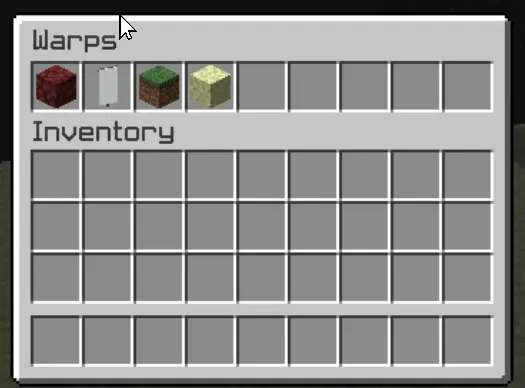
One of Xwarp’s standout features is its Graphical User Interface (GUI) for selecting warps. Instead of relying solely on commands, players can access a sleek warp selection screen where they can visually choose their desired warp point. Here’s what makes the GUI special:
Icon Customization: Each warp point can be represented by a different icon (block/item) in the GUI. Administrators can change the warp icon using the /seticonwarp [warpname] [itemname] command, allowing full customization of the look and feel of the warp menu.
Visual Warp Selection: Players simply open the warp menu and click on the desired warp icon to begin teleporting. The GUI provides an intuitive and engaging way to access teleport points, especially for large servers with multiple destinations.
## Admin-Friendly:
Warp Management: Server administrators can easily add, delete, and manage warp points, and even assign custom icons to each warp point for better organization and clarity.
Permissions Integration: Fine-grained permissions allow you to control which players can set, access, or delete warps. This ensures that only authorized users can manage or use certain warp points.
## How it Works:
1. Setting a Warp: Use /setwarp [warpname] to create a new warp at your current location. The warp is saved along with a default icon.
2. Selecting a Warp: Players can open the warp GUI and click on the icon for their desired destination. A 5-second countdown will start, and if they don’t move, they are teleported to the selected warp.
3. Customizing Warps: Use /seticonwarp [warpname] [itemname] to change the icon representing a warp in the GUI, making it easy for players to distinguish between different warp points.
## Why Xwarp?
Xwarp is designed for flexibility, ease of use, and visual appeal. It’s perfect for large servers that need efficient teleportation management or for small groups of players who want a fast and intuitive way to travel across their world. With its GUI-based approach, teleportation becomes not just a command-line task, but a visually engaging experience that fits right into Minecraft’s world.
Take your server to the next level with Xwarp—your all-in-one teleportation solution!
## LuckPerms
/warp – xwarp.warp
/setwarp – xwarp.setwarp
/delwarp – xwarp.delwarp
/seticonwarp – xwarp.seticonwarp
Xtra stuf
This mod has many new features, some may seem hard to figure out. here are some instructions for hard features.
Mars dimension. in order to go to mars, you need to make a portal out of mars block. you craft it with red sand in the middle and corners of the crafting grid, the rest filled in with iron ingots. you make it like a nether portal, but ignite it with the mars portal igniter made with red sand and flint and steel. in mars, you will find iron oxide, volcanic basalt, and mars bases. the iron oxide can be crafted with iron nugget + bottle of water (not water bottle) the bottle of water is crafted with 2 glass on top of each other. iron oxide can be converted to iron nuggets with sandpaper + iron oxide. sandpaper is made with paper and sand on top of the paper. volcanic basalt can be made into slabs, stairs and walls.
2. Biomes. The biomes naturaly generate around the world. the pine forest is the most commen. it is like a tall tree spruce biome, but the trees are a new tree type, pine, they can be crafted into planks, slabs, stairs, door, trapdoor, and fence. i forgot to make wooden tool and stick craftable with it. Biome 2: Orange tree feilds. this biome generates with orange trees and grass. the oranges drop from the leaves. the oranges can be eaten or crafted into with orange + bottle of water. Biome 3: Glowing plains. this biome is less serious, the ground is glow block, and dirt is glowstone. In mars, there is mars biome and mars basalt plains. in the garbage dimension there is landfill.
3. Garbage dimension. garbage is crafted with paper, stick, dirt. 4 garbage makes a garbage block, used to make a garbage portal. be careful to not break the garbage block be cause it drops junk. to ignite the portal use the garbage portal igniter crafted with flint and steel and garbage. the garbage dimension is garbage block and trash water. it is just like water but flows slower.
4. Ores and materials there are 2 new ores and 5 new materials. first uranium its a bit rare and the armour gives you blast protection and the pickact mines a 3×3 area. the sword gives poison 1 for 60 ticks. next, tin. tin is another ore. it can be used to craft bronze with 1 copper and one tin ingot. bronze can be used to craft a sword, pickaxe, and trumpet. the bronze tools are almost as good as diamond. next, stone armour is now a thing. it is crafted with stone, andisite, diorite, and granite, not cobblestone. Next, great material. the tools and armour are overpowered. you craft it with netherite, diamond and iron. it has a sword, axe, pickaxe, and armour.
5. Plants. Many new plants generate all over the world. some plants, like corn, raspberrys, and tomatos can be eaten. corn when you eat it drops a corn husk, which can be crafted into bonemeal. other plants are decorative. the mushroom piles drop mushrooms.
6. mobs. at the time of writing this, the only new mob is a duck. they are a bit buggy.
7. this may change. new things are always being added.
Xtpa
Xtpa is an innovative teleportation plugin for Minecraft designed to enhance player interaction and navigation. With Xtpa, players can easily send and accept teleport requests, creating a more connected gameplay experience.
One of the standout features of Xtpa is the TPA GUI. When a player receives a teleport request, they can click on a simple button to open the GUI, which provides a clear and intuitive interface. This GUI includes:
– Accept Button:
A green wool block that allows players to accept the teleport request effortlessly.
– Warning Message:
A paper item labeled “!!warning maybe a tp trap!!”, alerting players to the risks associated with teleportation.
– Cancel Button:
A red wool block that enables players to cancel the teleport request if they choose not to accept it.
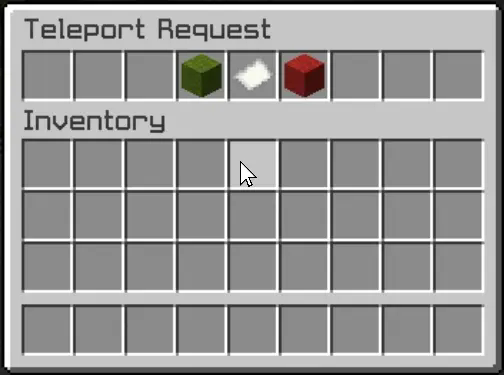
This user-friendly design not only makes the process of accepting or rejecting requests straightforward but also adds an engaging visual element to the experience. Players can quickly make decisions without cluttering their chat with commands, making teleportation seamless and efficient.
Xtpa integrates seamlessly with LuckPerms, allowing server owners to manage permissions easily. The following commands and permissions are included:
– Commands and Permissions
/tpa [playername]
Permission: xtpa.tpa
Description: Send a teleport request to another player.
/tpahere [playername]
Permission: xtpa.tpahere
Description: Request another player to teleport to your location.
/tpaccept [playername]
Permission: xtpa.tpaccept
Description: Accept a teleport request from another player.
/tpcancel [playername]
Permission: xtpa.tpcancel
Description: Cancel a teleport request.
/tpatoggle [on/off]
Permission: xtpa.tpatoggle
Description: Toggle TPA requests on or off for yourself.
/tpagui [requester]
Permission: xtpa.tpagui
Description: Open the TPA request GUI for accepting or canceling requests.
– Conclusion
Overall, Xtpa aims to enrich the Minecraft community by providing a smooth and enjoyable teleportation system that players will love to use. With its intuitive GUI and robust permission management through LuckPerms, Xtpa is the ideal solution for any Minecraft server looking to enhance player connectivity.
Xrtp
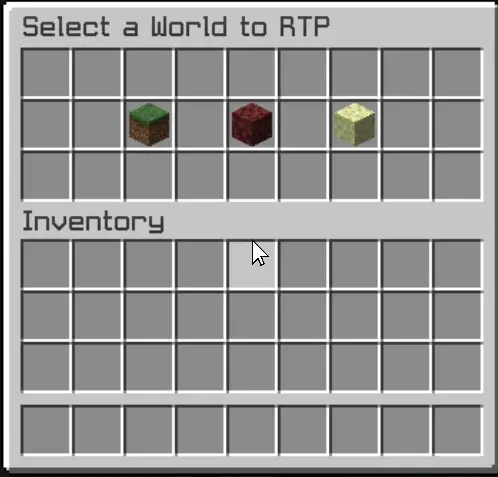
– The Xrtp plugin enhances Minecraft gameplay by providing a robust random teleportation (RTP) feature. Players can teleport to safe locations in the Overworld, Nether, and The End, ensuring a seamless adventure experience.
– The plugin includes a user-friendly graphical interface (GUI) that allows players to initiate teleportation effortlessly. A countdown timer adds an exciting element of anticipation, while the teleportation process cancels if the player moves, preventing unintended outcomes. This combination of safety and convenience makes Xrtp an essential tool for players seeking exploration without the risk of falling into danger.
– Additionally, the config.yml file offers extensive customization options for server administrators. This configuration file allows for the adjustment of teleportation settings, including cooldown periods, maximum teleportation distances, and specific world restrictions. Administrators can fine-tune these parameters to align with their server’s gameplay style, ensuring that the RTP feature enhances rather than disrupts the overall experience.
– The GUI is designed to be intuitive, providing clear options and feedback, ensuring that players can navigate the teleportation process with ease.
XMyIsland
# XMyIsland
A comprehensive island management plugin that brings robust protection, intuitive GUI management, and economy integration to your Minecraft server.
## 🌟 Key Features
### Island Management
– Create personal islands with customizable sizes
– Visual border particles for easy boundary identification
– Expandable islands with economy integration
– Intuitive GUI-based management system
### Advanced Protection Systems
– Complete grief prevention
– Protection against:
– Explosions
– Liquid flow
– Redstone manipulation
– Piston mechanics
– Tree growth exploitation
– Falling block abuse
– Wither damage
### Trust System
– Detailed permission management
– GUI-based trust controls
– Per-player permission settings
– Multiple permission types:
– Block breaking/placing
– Chest access
– PvP controls
– Entity interaction
– And more!
### Economy Integration
– Expansion costs
– Configurable pricing
– Refund system for island deletion
– Full Vault support
## 🔧 Technical Details
– **Version:** 1.17+
– **Dependencies:** Vault
– **Permissions:** Automatic handling
– **Configuration:** Fully configurable
– **Database:** YAML-based storage
– **Performance:** Optimized for minimal impact
## 💡 Perfect For
– Survival servers
– Economy-focused communities
– PvE servers
– Community-driven servers
– Skyblock-style gameplay
## 🤝 Support & Community
– Active issue tracking
– Regular updates
– Community-driven development
– Comprehensive documentation
Experience the next level of island management with XMyIsland!
X-Mountains

## X-Mountains
**”Extreme Mountains” datapack for Minecraft**
*This datapack removes the 256 height limit to the new mountains (and world) generation of the overworld.*
With 1.18 “Caves & Cliffs” update, mountains can go very high, in some cases above 250+ blocks!
If you love build very high towers on top of the mountains, and they are too high, there may be not enough space to build (the max build limit is 319).
To make things easier, avoiding terraforming before building, the actual world generation height is limited to 256 blocks, even if a mountain “wants go higher”.
This is a good solution, but, for a bunch of blocks, there is an evident side effect: mountains higher that 256 are cutted off (like with a katana!) generating a flat unnatural area.
This is even more noticeable in a mountain range, in which all mountains are cutted at the same height, resulting in this:

Anyway, even without this limit, mountains rarely go beyond 290+ height, and there is still enough space to build (maybe not that 50-blocks height tower…).
After removing the top limit you can see the real majesty of this beautiful new mountain generation!
You will find more higher mountains without that unnatural flat area on top! Only peaks!

## How to install
### Step 1
Download the datapack zip file for your Minecraft version.
### Step 2
Open Minecraft and click to create a new world.
### Step 3
Before start generating the world click the “Data Packs” button from the “More” tab: it will open a new window.
### Step 4
Drag and drop the downloaded zip file to that window, then activate the datapack by moving it on the right side.
(Make sure it is over the default datapack)
### Step 5
Click “Done”, create the world, and enjoy!
## License
Copyright (C) 2021-2023 devpelux (Salvatore Peluso)
Licensed under MIT license.
XMobGeneration
## ⚠️ Project Archived — See the Successor / Alternative
This **XMobGeneration** plugin is now **archived**. I no longer maintain it, so there will be **no further updates** (bug fixes, new features, version support).
—
### 📖 What this was
XMobGeneration was a powerful plugin for managing **custom mob spawn areas** with GUI support and WorldEdit integration.
Key features included:
– Up to 45 custom spawn zones
– Intuitive GUI for config
– Support for vanilla mobs *and* MythicMobs integration
– Boss systems (thread-safe spawns, respawn delays, damage-based drop distribution)
– Customizable drop systems, XP rewards, and area configurations
—
### 👉 Use another maintained plugin / fork
For better support, stability, and compatibility with newer Minecraft versions, I encourage using an actively maintained alternative or community fork.
—
### 📌 Notes & Permissions
– No further updates or enhancements will be done.
– **You are free to fork, reuse, or adapt the code if you want to.**
– I may read reports but can’t promise fast responses.
– Please verify compatibility before using in production setups.
XL-mod
# !⚙️EARLY DEVELOPMENT⚙️!
### ☕ About mod
> Hello cadet!
> Lets read information about our mod!
[XL-mod documentation](https://xl-projects.github.io/xl-wiki/)
#### What adds?
Our mod adds bioms , with mods and weapons/items to fight!
As you explore the world, you will come across biomes, mobs, new structures, or even dimensions.
Like..
Like biome “Frozen forest” , there you can find new mob “The frozen wolf” , and some new items! We want to bring something unique and high-quality to each of our biomes, for example, a lot of crafting and the complexity of these crafting.
In future!
Wait for the 0.1.0-BETA relese , and explore the world with friends!
This mod is only for forge 1.20.1 , at the moment.
—
### Friendly community.
Also, in our social networks, we try to protect you from negative people who can spoil your impression of our projects, or those who would insult you in any way.
—
### ⚙️ Developers:
1. uertyk_ (manager/owner)
2. nika_eol (manager/helper/ideer)
—
### 📎 Links
[Source-code](https://github.com/XL-projects/XL-mod)
[XL-mod documentation](https://xl-projects.github.io/xl-wiki/)
[Our discord server](https://discord.gg/dP58cdu7ay)
Xhomes
### Xhomes – Your Personal Home Management Plugin for Minecraft
**Xhomes** is an essential plugin designed to enhance your Minecraft experience by allowing players to seamlessly set, manage, and teleport to personal homes. With its user-friendly GUI and intuitive functionality, Xhomes simplifies home management and provides an engaging way to navigate the game world.
## Key Features:
– **Set Home**: Easily set your home location using the command `/sethome [homename]`, enabling quick travel back to your favorite spots.
– **Home GUI**: Access a visually appealing GUI to view and select homes, featuring slots filled with blue beds for a straightforward teleportation interface.
– **Teleportation Countdown**: Enjoy a 5-second countdown before teleportation, accompanied by the message: “Teleporting in 5 seconds, don’t move!” to build anticipation.
– **Movement Cancellation**: Teleportation is canceled if the player moves during the countdown, ensuring safe and accurate arrival at the desired location.
– **Delete Home**: Remove homes easily with the command `/delhome [homename]`.
– **Configurable Limits and Tiers**: Server owners can configure the maximum number of homes players can set based on their permission tier:
– **Tier 1 (xhomes.hometier1)**: 2 homes
– **Tier 2 (xhomes.hometier2)**: 4 homes
– **Tier 3 (xhomes.hometier3)**: 6 homes
– **Tier 4 (xhomes.hometier4)**: 8 homes
These limits are fully configurable in the `config.yml` file.
– **Admin-Friendly Management**: Xhomes provides robust tools for server owners to oversee home settings and permissions, offering fine-grained controls for authorized players.
### LuckPerms Permissions:
– `/sethome`: `xhomes.sethome`
– `/delhome`: `xhomes.delhome`
– `/home`: `xhomes.home`
– Tier 1: `xhomes.hometier1` (2 homes)
– Tier 2: `xhomes.hometier2` (4 homes)
– Tier 3: `xhomes.hometier3` (6 homes)
– Tier 4: `xhomes.hometier4` (8 homes)
Elevate your Minecraft gameplay with **Xhomes**—your all-in-one home management solution!
### Source Code
Check out the source code on GitHub: [Xhomes Repository](https://github.com/Akar1881/Xhomes)
XD’s Library
### XD’s Library
#### XDPXI’s library for numerous tasks.
—
### Features
> Please view the [Documentation](https://xdlib.xdpxi.dev/) for the correct features for your version
—
### Building from Source
#### To build the mod from source follow the steps below:
– Clone the [Git repository](https://github.com/XDPXI/XDLib)
– Run `gradlew build` or `build.ps1` in your terminal in the cloned repository
#### The compiled mod will be in `build/libs`