[World Generator] Superflat++ World Generator
# Features as of Minecraft version 1.19:
* The overworld is unchanged compared to previous versions. Everything is working fine.
* The nether won’t generate many stuff if I flatten it so the best I could do was to remove the bedrock ceiling thus you can easily dig up to the flat surface of the world this way traversing the nether and getting flat surface for builds is still a viable thing.
* The end is untouched.
* Two editions: Regular, that only flattens the overworld and Plus that removes the bedrock ceiling in the nether too
# Features as of Minecraft version 1.18:
* Redone the data pack so now achieving flatness with different methods
* Now aquatic biomes spawn too!
* Jungle and desert pyramids are added back!
* Everything seem to be working in order in the overworld
* Mountainous biomes are obviously flat so there isn’t too much to them
* In plus version the nether and the end are both quite flattened, at least the top of them
* In achieving that I accidentally made the ender dragon easier to beat since there are no obsidian monoliths and crystals… Sorry?
* The nether is relatively safe to walk around but don’t go diving deep in lava while using the plus version. For some reason where there is lava lake there isn’t any bedrock. You might just… you know. Fall out of the world?
# Features up to Minecraft version 1.17.1:
* The world surface generates in only one plane, highly resembling to Mojang’s original superflat mode, except for it is not but tries to achieve it by sticking to a given height
* The world is still very ideal for both survival and creative modes for the majority of the world space is still empty as seen in the very first picture in the description
* With the exception of oceans, ocean monuments and desert pyramids everything works
* Ruined portals and stronghold still generate so you can “complete” the game if you wished so
* Two editions. One that makes the overworld superflat, the other makes the nether and the end superflat too
In the plus edition end biomes are a bit modified so chorus trees generate everywhere, giving the landscape a more dense look
[World Generator] Ocean Only Water World!
# Introduction:
So after 10 years of playing me and my friend wanted to spice up things a bit and play in an ocean only world where the whole gameplay would be different since the different available resources. We didn’t want to choose between all the available ocean biomes like frozen deep ocean or warm ocean since some of them are very different in terms of default blocks such as coral or ice.
# Changes since 1.21.5 release:
– Reverted back to stock world generation: Added back top layer of ice in most snowy/frozen biomes to make it easier for the player to navigate
– Added Underwater Potion to most village chests that grants the player 30 minutes of water breathing upon drinking
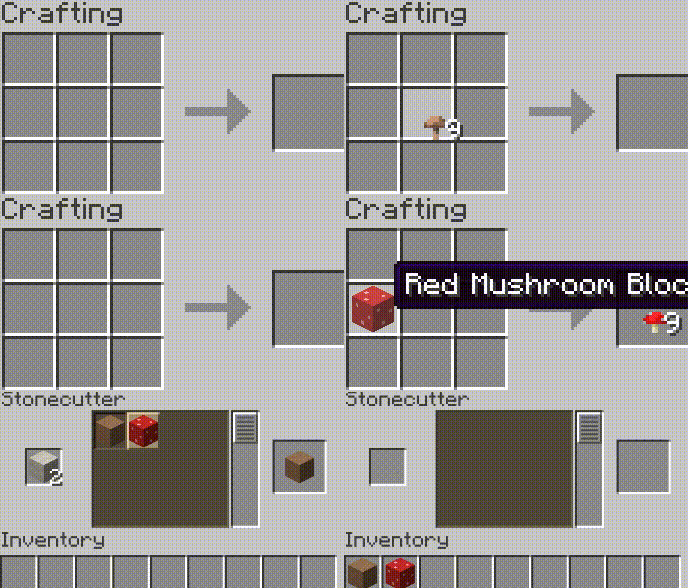
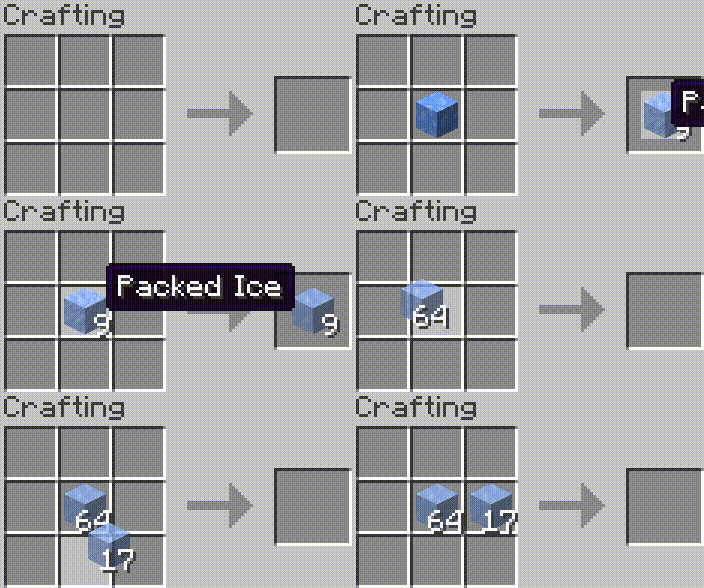
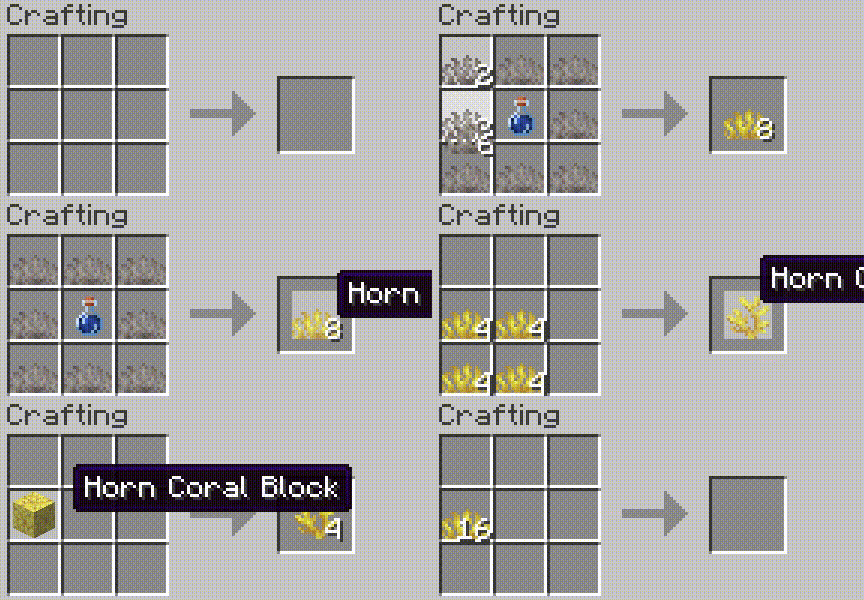
– Corals, budding amethyst, ice variants, mushroom blocks can be mined with simple tools without silk touch enchantment
– Reverse crafting ice, corals, mushroom blocks via crafting table or stonecutter is now possible
– Safe world spawn is still risky. Since I’m still horrible at coding and couldn’t come up with a fix platform generation during the first time the player spawns in the world, I’ll give you pre-tested seeds that have safe world spawn:
– Spawn on ice: 906182347964544722
– Spawn on abandoned ship: 6696165159819216322
– Spawn on a floating nether portal: 2589681248334255595
# Changes since 1.21 release:
– Set water limit to 208 as well as generated terrain.
– Most structures will generate in the world just fine, including villages, outposts, mansions, swamp huts, igloos, strongholds etc. but for some reason jungle and desert pyramids won’t?
– Dimensions were left untouched, only noise settings and the biomes were modified.
– Removed ice layer on top from all biomes to remove way too much free, flat surface from a water themed survival world to avoid too easy gameplay. I’ll add different editions for enhanced gameplay, such as modified villages, mansions and outposts to fit a water themed world.
# Changes since version 1.18 release:
Mojang/Microsoft drastically changed world generation and while there are more options for fine-tuning the vanilla gameplay they removed/altered several stuff so making custom world generators is still an unknown field. Also they’ve removed custom structure and structure start support so you cannot just tell the game to generate 10 biomes but put all sorts of structures such as villages, strongholds, mansions etc. on top of it. Meaning, structures are now hard-coded and will only generate in their respective biome. Dark oak forest->Mansion. Villages cannot generate in ocean biomes. I had to solve this issue and there weren’t many options for me. I increased sea level from 63 to 284. Telling the world to generate ocean biomes only was no longer an option for you’d be missing almost all and every structure including villages, outposts, swamp huts, buried treasures, mansions etc. Imagine it this way: The world is normal, every biome is there it’s just that they’re submerged like in the movie called Water World. According to my knowledge only desert and jungle pyramids are unable to generate this way and I’m unable to solve that. There are a few issues with this sudden increase of sea level and submerging biomes though. For some reason the player won’t care anymore if it’s a safe place to spawn or not. You can get lucky and the world will put your default spawn at an iceberg on top of the ocean or mansion, village, outposts etc. but you can also get buried in a cave suffocating or at the bottom of the sea 200 meters below… This needs fixing but at the current world generator settings I cannot do anything to fix this… So there are a few workarounds for this and I’ll talk about them in the features section.
# As of 1.18:
– Every biome generates now. They’re just submerged.
– Sea level increased from 63 to 284.
– You can play with sea level by modifying /data/minecraft/worldgen/noise_settings/overworld.json file in the data pack before generating the world and editing “sea_level”: 284″ to your desired value.
– Safe spawn in no longer an option. You can spawn on the bottom of the ocean or in a stone wall or a cave or if you’re lucky on the top of an iceberg, village, mansion, outpost etc. Thank Mojang for this.
– Most structures still spawn with the exception of desert and jungle pyramid and thankfully they’re still above the sea so you can find them relatively easily.
# Workarounds of getting default player spawn to a safe place:
– Enter the world in creative and find a safe place then use /setworldspawn command to place your default spawn to a safe location.
– Keep generating new worlds with the data pack until you get a safe spawn location. If you’re patient this could be best for you if you really don’t want to use creative mode.
# Up to 1.17.1:
– The world only generates ocean biomes such as: Ocean, Deep Ocean, Frozen Ocean, Deep Frozen Ocean, Cold Ocean, Deep Cold Ocean, Lukewarm Ocean, Deep Lukewarm Ocean, Warm Ocean, Deep Warm Ocean
– Villages as of 1.0.1 plus edition generate in their respective ocean biomes. Plains village in ocean, savannna in lukewarm, desert in warm, taiga in frozen ocean.
– The world still generates most structures (if allowed to) such as: ocean monuments, desert pyramids, villages, pillager outposts, ruined nether portals, shipwrecks, igloos
– Sadly strongholds and mansions don’t generate and I’m not good enough to make them do so
– Now that I rebuilt the data pack from scratch, not based on other sources strongholds, mansions, jungle temples, buried treasures and all sorts of villages can generate too!
– The player can set the wanted ocean depth before starting a new game by modifying sea_level line in overworld.json in the extracted zip files dataminecraftworldgennoise_settings location (default is 67 blocks. 222 is a very deep sea…
–
# Different versions:
Based the work on slicedlime Mojang developer’s vanilla worldgen and nate101thebattler’s Water World Datapack. (the old one, which you can silll download from the files. Beware, that version doesn’t generate strongholds so the end is unavailable)
Remade from scratch with the help of misode’s data pack editor.
# Older versions:
Here on Modrinth you can download the basic edition which only generates oceans with strongholds, buried treasures and ruined portals. More challenging and recommended gameplay.
There is the plus edition which generates all sorts of structures such as various villages, depending on the ocean type, mansions, jungle temples, pillager outposts, desert pyramids.
I’ve also made a resource pack that replaces the standard Minecraft overworld as well as the main menu music with more sailor like. You can download it in the files too.
WorldGen
# WorldGen
*WorldGen* is a mod for pre-generating Minecraft worlds, with a main focus on ***speed***.
## Installation
Just download the latest *WorldGen* JAR file for your ***exact*** Minecraft version.
Additionally, ***always*** ensure that you are using the correct version for your modloader (Fabric/Forge).
Then save the downloaded jar to the `mods` folder of your Minecraft instance.
Finally, if you are on Fabric you also need to download the
[Fabric API](https://modrinth.com/mod/fabric-api).
## Usage
*WorldGen* can be used to generate more chunks for an **existing World**.
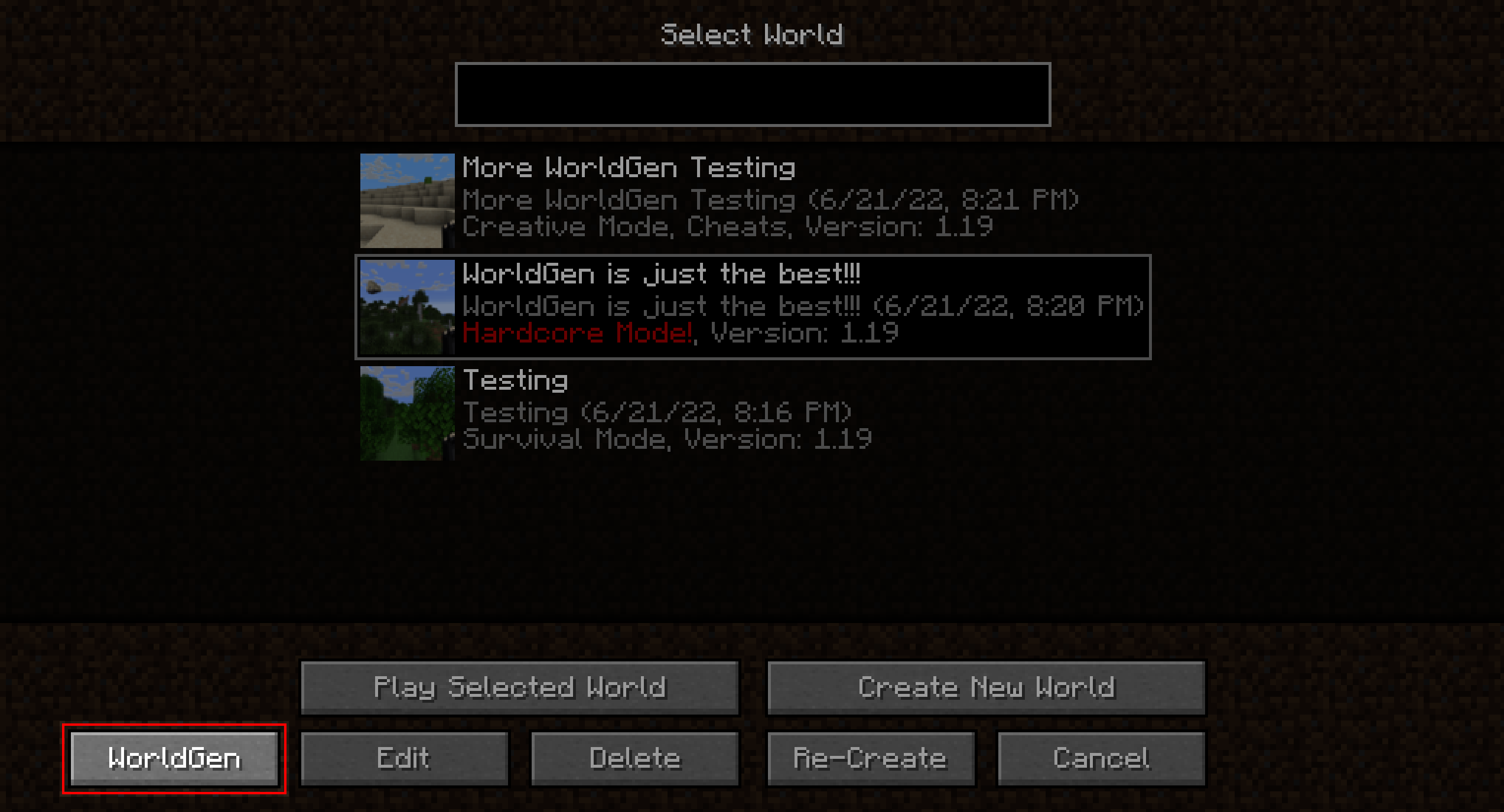
Simply select the world you want to expand from the World Selection screen and press the “WorldGen” button as seen below:
By default, existing chunks will not be overwritten and only new ones will be generated.
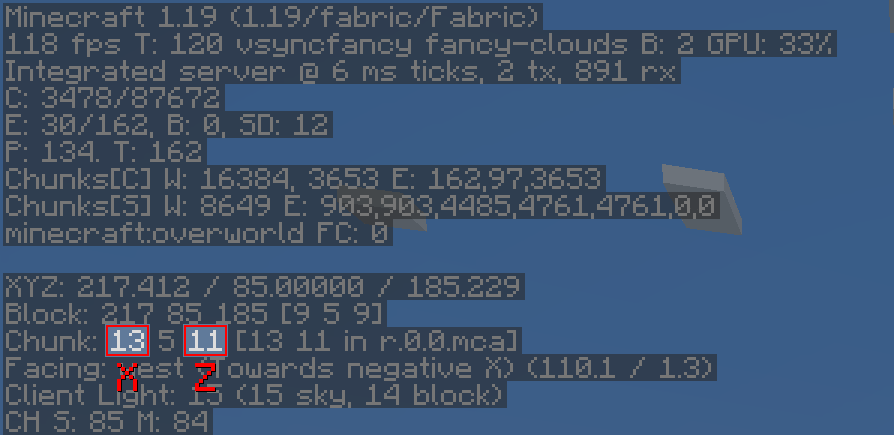
Also, please note that *WorldGen* uses **chunk** coordinates and **not** block coordinates! Since each Chunk
measures `16×16` blocks from a top-down view, you can easily convert between block and chunk coordinates by multiplying / dividing
by `16`. You can also find the current chunk position with the `F3` debug menu:
It is currently not possible to use *WorldGen* directly from the “Create New World” screen. Instead, you have
to first create the world normally, save and quit, and then open the world with *WorldGen*.
Furthermore, we recommend storing your world on an SSD (at least for running *WorldGen*). Using a hard drive can lead
to scenarios where new chunks are generated faster than previously generated chunks can be saved. This can cause out-of-memory
errors, since more and more chunks will accumulate in RAM as time goes on. Additionally, the performance
of the generator itself may be negatively affected.
Although we consider *WorldGen* to be stable, it is recommended to back up your world before using this mod.
We are not responsible if you lose your world because you ran into a bug!
## Recommended settings
When using *WorldGen*, there is no real upper limit on how many chunks can be generated.
However, we do not recommend using a radius of more than `512` chunks (which would be `8192` blocks in each direction).
## How it works
In contrast to other existing chunk pre-generation methods our mod does not require a full Minecraft server to be running.
Instead, a lightweight internal server is used to generate the chunks efficiently.
This has the advantage of having a **dedicated GUI** and allows **multithreading**. On the downside,
the world must be opened in a Minecraft client and cannot be loaded elsewhere while the chunks are being generated with *WorldGen*.
## Supported version
This table shows the current support status for the Minecraft version.
| Minecraft Version | Status |
|——————-|———–|
| `1.20.x` | Supported |
| `1.19.x` | No future updates |
| `1.18.2` | No future updates |
Note: For both `1.19.1` and `1.19.2` Use the WorldGen 1.19.x version. However, for Minecraft `1.19.3` and above, the specific WorldGen version for the Minecraft release is required!
## FAQ
**Q:** *The progress screen does not fit and is cut off!*
**A:** Try reducing the GUI scale in the Minecraft video options until it fits
—
**Q:** *How do I center the square / rectangle / circle around my current position?*
**A:** Click on the square button on the right of the Center chunk selection row. This will automatically load
the last position of the player.
—
**Q:** *Will Minecraft versions before 1.18.2 be supported?*
**A:** No.
—
**Q:** *How do I reset chunks to their original state?*
**A:** First of all: **BACK UP YOUR WORLD!** Afterwards: In the advanced WorldGen settings enable the “Please allow me to
break my world!” checkbox, then enable “Override existing chunks”. Also, we recommend using the “Mode: Coordinates”
in the main menu to reduce the chance of resetting chunks you don’t want to!
—
**Q:** *How do I make a perimeter / replace all blocks in chunks with air?*
**A:** First of all again: **BACK UP YOUR WORLD!** Afterwards: In the advanced WorldGen settings enable the “Please allow me to
break my world!” checkbox. Then, set “Max. chunk status” to `structure_starts`. Next, enable “Override
existing chunks”. Finally, set “Fake chunk status” to `full`.
The generation will stop early and save the chunk as a fully generated one.
The “Max. chunk status” option allows stopping at different stages of generation, allowing for experimentation.
## Mod incompatibilities
This mod should be compatible with most mods (including those adding new biomes and dimensions).
However, mods that interfere with the Minecraft world generation process might pose a problem.
### Currently known incompatible mods
| Mod | Failure |
|—————|———————————————————-|
| **Starlight** | Chunks generated with WorldGen will have **no** lighting |
# Acknowledgments
Many thanks to the following projects for supporting open source development:
– GitHub for free code hosting
– The [Java profiler – JProfiler](https://www.ej-technologies.com/products/jprofiler/overview.html) for providing a profiling tool
[](https://www.ej-technologies.com/products/jprofiler/overview.html)
World Foundry

—
Adds a new world type to the create world screen, the Amplified-Mixed Type.
This world type rolls Regular Worlds, Large Biomes, and Amplified Terrain into one (slow) world type. There is also some configs to determine the size/frequency of certain biomes like deserts to forests.
– ~~In Large Biome Worlds, the biomes are 8 times larger, in Amplified-Mixed, its only 4.~~ Biome sizes are now configurable, to get the old way, set the Temperature and Humidity config values to 4
– In Amplified worlds, all terrain (above the sea level) is doubled in height, (as well as some other things that create the overhangs and whatnot), in Amplified-Mixed, it only occurs in around about half the world.
World Expansion
**🧊The project is frozen!🧊**
# World Expansion
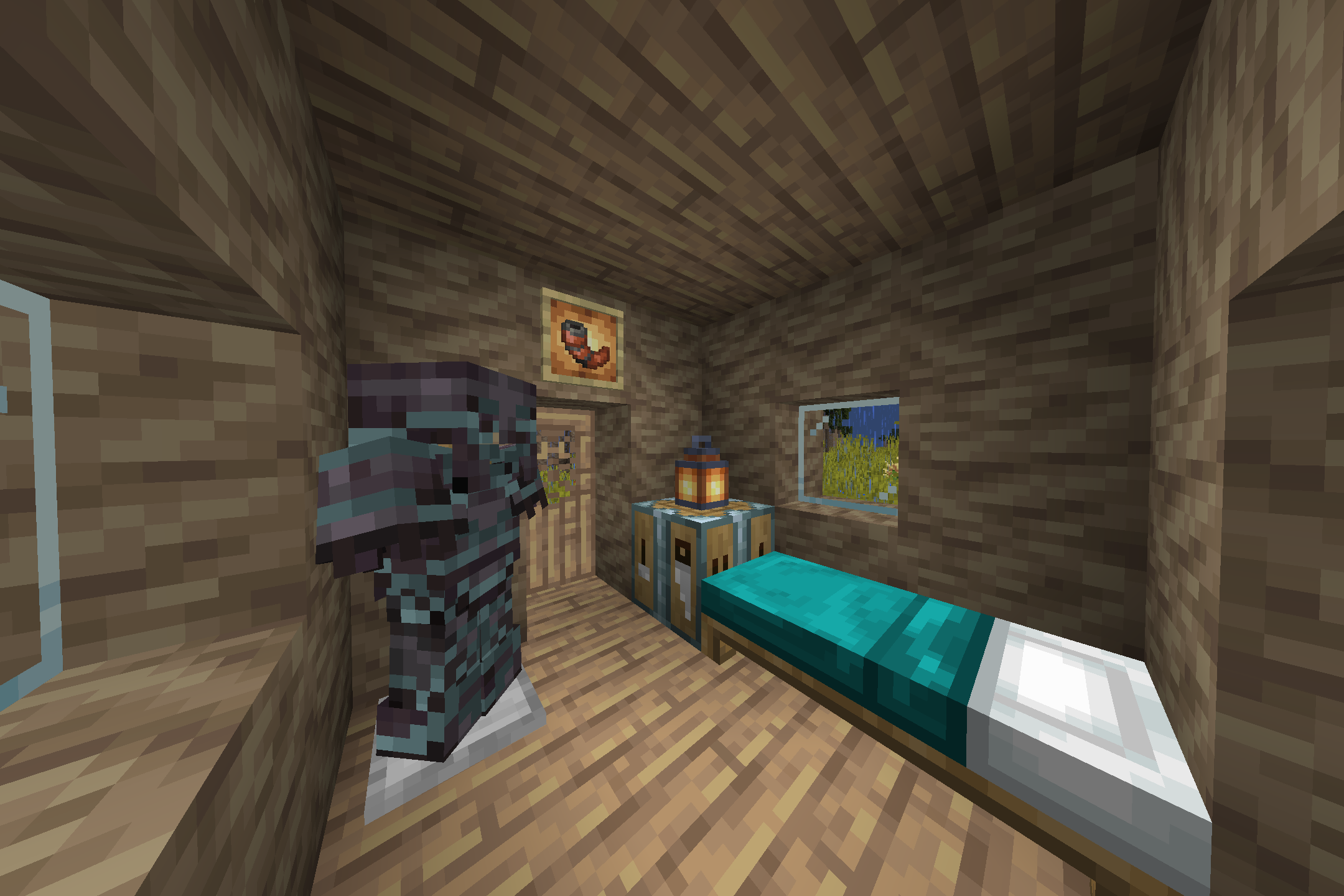
_This is a mod that will diversify your stay in warm (and dry😲) Savanna by **adding new blocks, items, and buildings** (some can be found outside of the Savanna🤔)! In addition, World Expansion **adds as 3 new Savanna biomes!** Dry Savanna (it’s uncomfortable there🙁), Politania (someone will say that it’s a Desert😅) and **THE MOST STYLISH – THE BAOBAB VALLEY** (yes, yes, Baobabs🤠)! Explore new lands, mine new resources here, and also look for new buildings here!_
# Found bugs?
_There should be no bugs🐛, because we are trying very hard to work out every detail (which no one may notice🌚). But if they are still found, then be sure to write about it on GitHub or in the Discord (links are attached in the information about the project)!_
# As a result
_If you liked this description with strange emoji😜 and screenshots from the game, then be sure to try this mod!
Also go to our Discord server🗿_
World Edit as a Datapack
# WORLD EDIT Datapack
As the Title suggests this is my attempt to re-create World Edit as a Datapack. It only has the basic function of selecting two points and filling the space between them with a certain block(the one held in offhand).
To initiate the datapack you need to rename a wooden axe to “WE”. This item will be needed to use the datapack. Then you should be able to select two corner blocks with left and then right click.
After this you need to place the item you want to fill the area with in your offhand.
Last you need to shift and right click the axe with the block in offhand to fill the selected area.
### Links:
[Youtube](https://www.youtube.com/@qn0ss)
[Planet Minecraft](https://www.planetminecraft.com/member/qnoss/)
World Dimension Nexus
# 🌐 World Dimension Nexus
[](https://www.curseforge.com/minecraft/mc-mods/world-dimension-nexus)
[](https://www.curseforge.com/minecraft/mc-mods/world-dimension-nexus)
[](https://www.curseforge.com/minecraft/mc-mods/world-dimension-nexus)
[](https://modrinth.com/mod/world-dimension-nexus)
[](https://modrinth.com/mod/world-dimension-nexus)
[][issues]
[][wiki]
[][ko-fi]
![World Dimension Nexus Logo][logo]
**The ultimate serverside tool for managing dimensions, worlds, and player data without requiring
any client-side installation.**
🛠️ *This mod is created as part of
the [NeoForged Serverside Summer Modjam 2025][neoforged-modjam].*
⚠️ **Beta Version Notice**: This mod is currently in beta. Features and commands may change before
the stable release.
## ✨ Key Features
### 🌍 Dimension Management
– **Multi-World Support** – Create and manage unlimited custom dimensions with various world types
– **World Import/Export** – Easy dimension sharing and migration between servers
– **Game Mode Management** – Set different game modes per dimension (creative, survival, adventure,
spectator)
– **Cross-Dimension Safety** – Void protection, safe landing, and automatic fallback systems
### 🚀 Teleportation & Movement
– **Cross-Dimensional Teleportation** – Seamless travel between worlds with built-in safety features
– **📍 Warp System** – Create private and public teleportation points for quick travel
– Private warps for personal bases and locations
– Public warps for community areas and landmarks
– Configurable limits and cooldown protection
– Cross-dimension warp support
– **🤖 Auto-Teleport System** – Automated player movement based on events and triggers
– First join, death, respawn triggers
– Customizable destination coordinates
– Event-based player routing
### 🏛️ Portal Network
– **Physical Portals** – Create visible gateways between dimensions
– **Portal Management** – Bind and configure portal connections
– **Visual Portal System** – Interactive portal blocks for immersive travel
### ⚙️ Server Administration
– **Fully Serverside** – Works with vanilla clients – no client mods required
– **Comprehensive Commands** – Intuitive command system with tab completion
– **Flexible Configuration** – Extensive config options for all systems
– **Permission Integration** – Supports server permission levels and moderation tools
## 🚀 Quick Start (Demo)
This quick start guide will show you a limited set of commands to get you started with the
World Dimension Nexus mod.
Please use a test world to try out the commands and features before using them in your main world.
### 🌍 Dimension Setup
The following commands will help you create and manage dimensions:
“`bash
# Import a new dimension like lobby and fishing
/wdn dimension import lobby_dimension.wdn
/wdn dimension import fishing_dimension.wdn
# Optionally, create a new dimension with a preset
/wdn dimension create my_skyblock skyblock
# List all dimensions
/wdn dimension list
“`
### 🚀 Teleportation & Auto-Teleport Workflow
Set up automated player movement between dimensions using auto-teleport rules:
“`bash
# Teleport to a dimension
/wdn teleport dimension world_dimension_nexus:my_skyblock
# Set up auto-teleport rules
/wdn autoteleport add always world_dimension_nexus:lobby_dimension # 🏠 Send new players to lobby
/wdn autoteleport add on_death world_dimension_nexus:fishing_dimension # 🎣 Send players to fishing on death
# List all auto-teleport rules
/wdn autoteleport list
“`
After running these commands:
– 🏠 Players will be sent to the lobby dimension when they join for the first time.
– 🎣 Players will be sent to the fishing dimension when they die.
💡 *Tip: You can customize triggers, target dimensions, and even coordinates!
See* [Auto-Teleport Commands][commands-auto-teleport] *for advanced options.*
Note: The hot-creation of dimensions is limited, so you might need to restart the server
to get the dimensions fully functional with all features and entities.
### 🏛️ Portal Setup
Create and manage portals between dimensions:
“`bash
# Teleport to the fishing dimension (if not already in the dimension)
/wdn teleport dimension world_dimension_nexus:fishing_dimension
# Use a good location for the portal, e.g. at one of the trees
/wdn portal create unbound green 43 49 20
# Teleport to the lobby dimension
/wdn teleport dimension world_dimension_nexus:lobby_dimension
# Use a good location for the portal, e.g. in the woods
/wdn portal create unbound green -36 9 -27
“`
After running these commands, you will have two portals created in the lobby and fishing.
You can now use the portals to teleport between the dimensions.
## 🎯 Use Cases
– **Creative Servers** – Separate building worlds with different themes
– **Survival Networks** – Multiple survival worlds with different difficulties
– **Minigame Servers** – Dedicated arenas and lobbies
– **Hub Servers** – Central lobby connecting to various game modes
– **Event Hosting** – Temporary dimensions for special occasions
## 📚 Documentation
📖 **[Complete Wiki Documentation][wiki]** – Comprehensive guides and tutorials
### Quick Links
– [⚡ Quick Start Guide][quick-start] – Get started in 5 minutes
– [🌍 Dimension Commands][commands-dimension] – Create and manage dimensions
– [🚀 Teleport Commands][commands-teleport] – Player teleportation
– [🤖 Auto-Teleport Commands][commands-auto-teleport] – Automated rules
– [🏗️ Example Tutorials][examples-creative] – Step-by-step setups
## 🤝 Contributing
We welcome contributions! Please:
1. Check existing [issues][issues] and [pull requests][pull-requests]
2. Follow the existing code style and conventions
3. Test your changes thoroughly
4. Update documentation as needed
## 🐛 Support
– **Bug Reports**: [GitHub Issues][issues]
– **Feature Requests**: [GitHub Discussions][discussions]
– **Documentation**: [Wiki][wiki-home]
– **Troubleshooting**: [Debug Guide][debug-guide]
## 📜 License
This project is open source under the [MIT License][license].
**Ready to get started?** Check out the [Quick Start Guide][quick-start] to create your
first dimension in minutes!
[ko-fi]: https://ko-fi.com/Kaworru
[wiki]: https://github.com/MarkusBordihn/BOs-World-Dimension-Nexus/wiki
[wiki-home]: https://github.com/MarkusBordihn/BOs-World-Dimension-Nexus/wiki/Home
[issues]: https://github.com/MarkusBordihn/BOs-World-Dimension-Nexus/issues
[pull-requests]: https://github.com/MarkusBordihn/BOs-World-Dimension-Nexus/pulls
[discussions]: https://github.com/MarkusBordihn/BOs-World-Dimension-Nexus/discussions
[license]: https://github.com/MarkusBordihn/BOs-World-Dimension-Nexus/blob/main/LICENSE.md
[neoforged-modjam]: https://neoforged.net/news/2025serversidesummer/
[quick-start]: https://github.com/MarkusBordihn/BOs-World-Dimension-Nexus/wiki/Quick-Start
[commands-dimension]: https://github.com/MarkusBordihn/BOs-World-Dimension-Nexus/wiki/Commands-Dimension
[commands-teleport]: https://github.com/MarkusBordihn/BOs-World-Dimension-Nexus/wiki/Commands-Teleport
[commands-auto-teleport]: https://github.com/MarkusBordihn/BOs-World-Dimension-Nexus/wiki/Commands-Auto-Teleport
[examples-creative]: https://github.com/MarkusBordihn/BOs-World-Dimension-Nexus/wiki/Examples-Creative-World
[debug-guide]: https://github.com/MarkusBordihn/BOs-World-Dimension-Nexus/wiki/Commands-Debug
[logo]: https://cdn.modrinth.com/data/nUBOuZRL/images/62b764b75c067e7a716c93eeebc934f75a4256c5.png
Decay
A horror mod.
Random blocks will disappear… but only if you’re not looking at them.
In containers such as chests and barrels, items will be randomly shuffled around, large stacks will be split, and some items might disappear. Mobs can disappear at any time. Creepy sounds will be played occasionally. And more features to come.
Enjoy.
World Border Alert
# Features
– Alerts you whenever you go near World Border
– Helpful in border shrinking situations
– Enhances your experience while playing
### Supports all 1.21+ servers
World Balance
Minecraft is currently pretty poorly balanced, I made these changes to try improve it somewhat. There’s many more changes I want to make, but here’s an early version of the pack!
# Features:
## 💎Wandering Trader tweaks
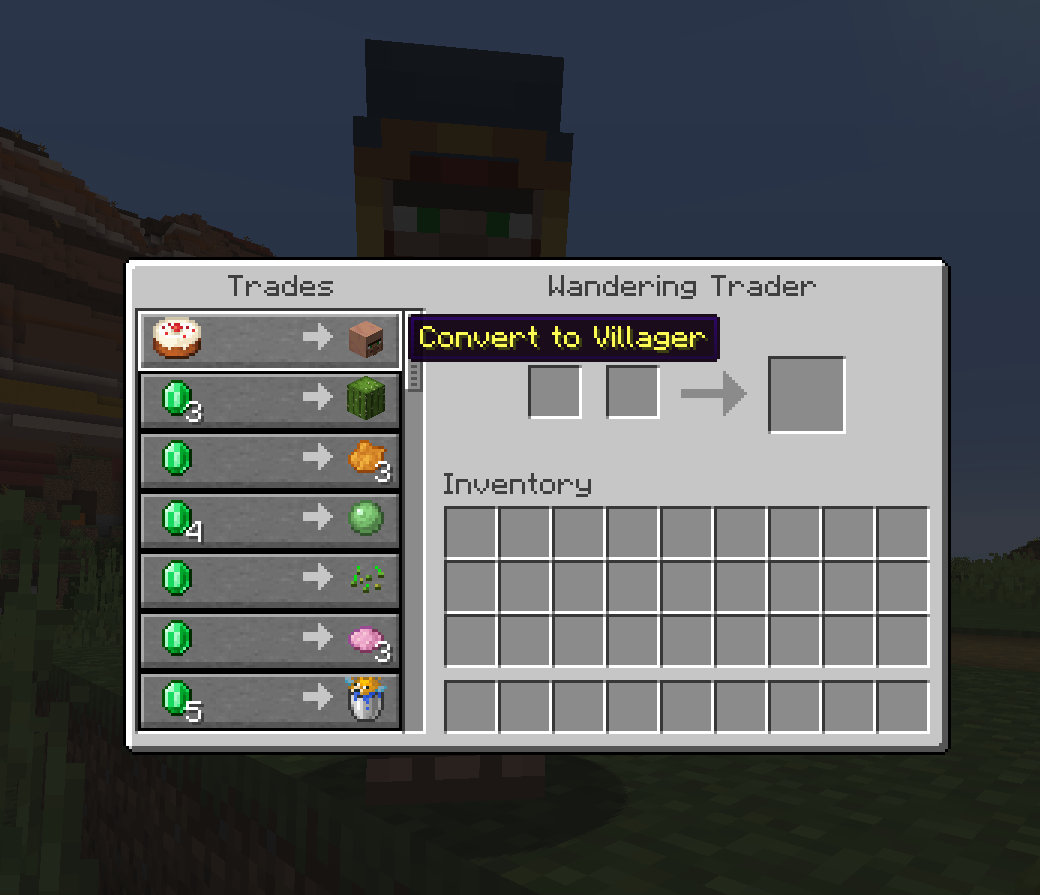
– added trade to convert them to a villager
– will not spawn with trader llamas anymore
_Now killing him truly does not give you anything, and he is happy to convert to a villager for some cake!_
I suggest also using a datapack to change the Wandering Trader’s trades to be more useful.
## 🏘️Village tweaks
– all generated villages are abandoned, only spawning zombie villagers
– villages are way rarer, ~2k blocks between them
– removed hay bales, animals and crops from villages
– adjusted village chest loot, removing tools, armor, obsidian, diamonds, changing ingots to nuggets and reducing amounts of other items
_Villages give players way too much free stuff for being a peaceful structure. My solution is to make them abandoned, rarer and removing most of the loot. This way if you do find one its special and you have to use other ways to get villagers (curing or wandering trader)._
I also suggest using these two datapacks to balance villagers:
– [Villager Restock Balance](https://modrinth.com/datapack/villager-restock-balance)
– [Librarian’s Balance](https://modrinth.com/datapack/librarians-balance)
## 🐪Other tweaks
– camels will now spawn naturally in deserts
– cave spiders spawn in deserts at night instead of normal spiders (due to them being similar to scorpions)
– made ruined portals generate more rarely
– made rabbit jump height a bit higher so they dont get stuck on edges of blocks as often