World Preview
# World Preview
*World Preview* is a mod for visualizing Minecraft world seeds before they are generated.
## Installation
Just download the latest *World Preview* JAR file for your ***exact*** Minecraft version.
Additionally, ***always*** ensure that you are using the correct version for your modloader (Fabric/Forge).
Then save the downloaded jar to the `mods` folder of your Minecraft instance.
Finally, if you are on Fabric you also need to download the
[Fabric API](https://modrinth.com/mod/fabric-api).
## Usage
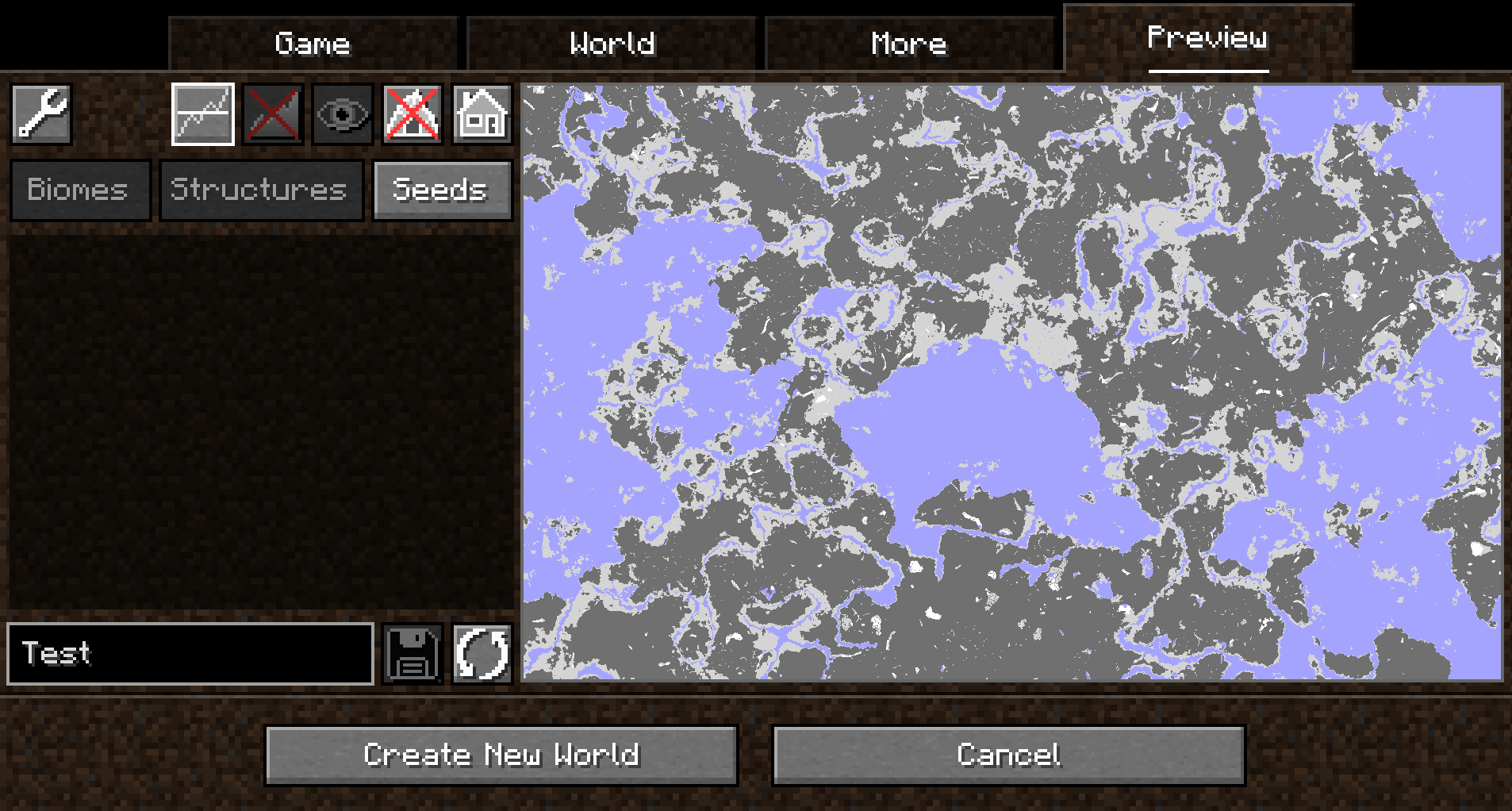
*World Preview* adds a new `Preview` tab to the Singleplayer menu.
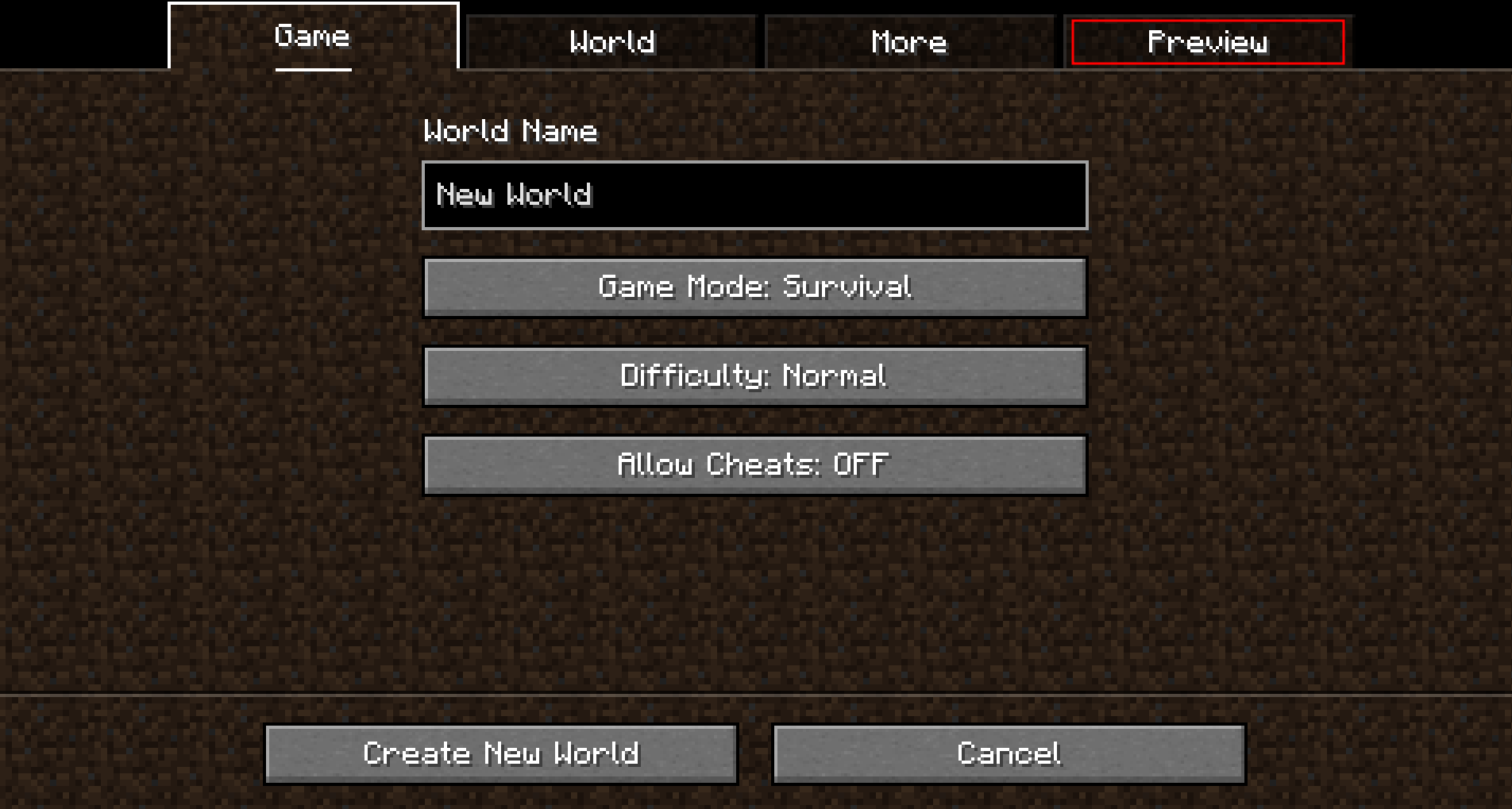
Upon opening that tab, a random seed is selected and a map of biomes is generated:
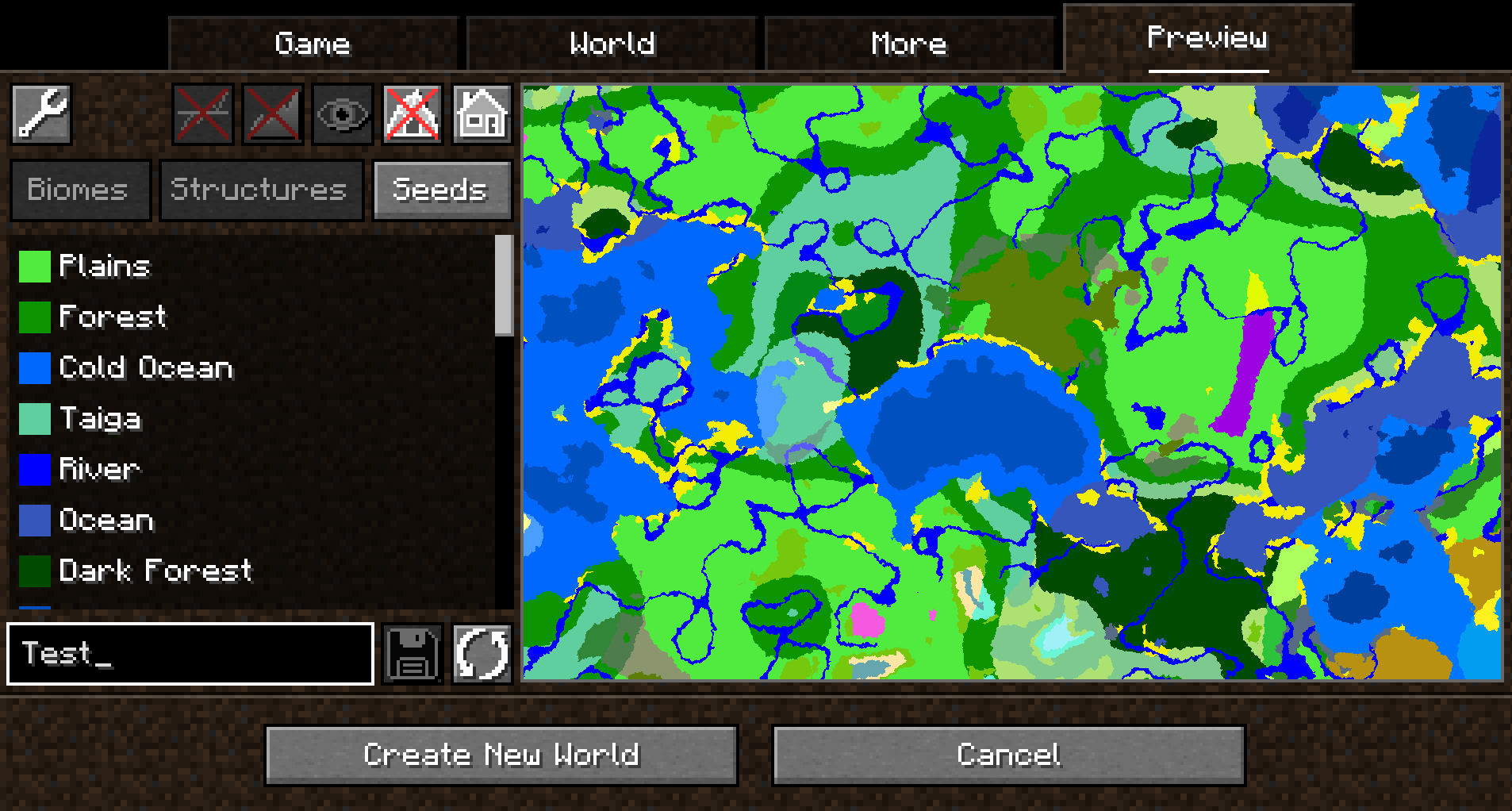
By default, the overworld dimension will be generated, structures will not be shown and no heightmap will be generated.
This can be changed in the Settings (top-left button in the `Preview` tab).
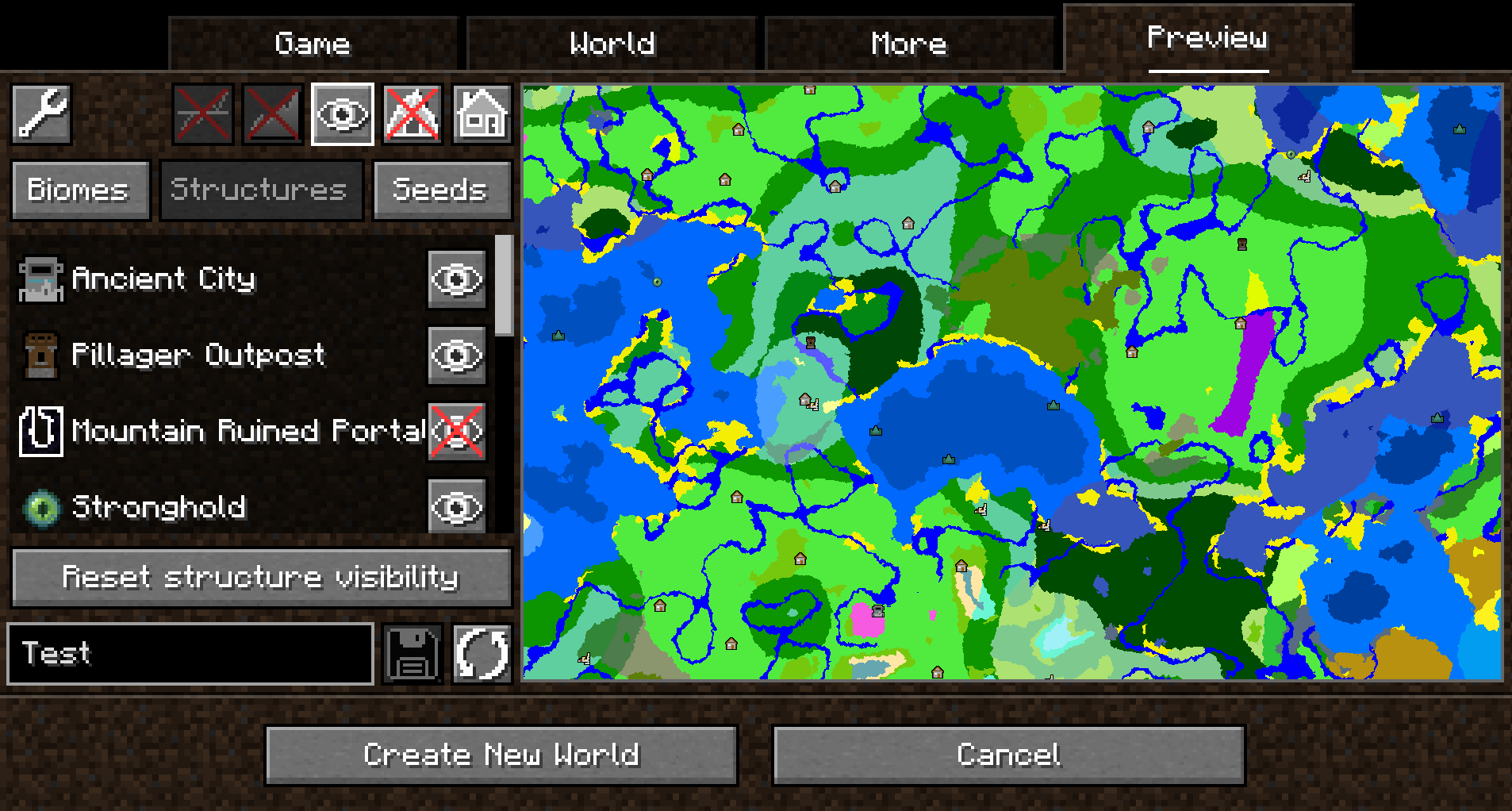
When structure sampling is enabled, the visibility of individual types of structures on the preview can be toggled:
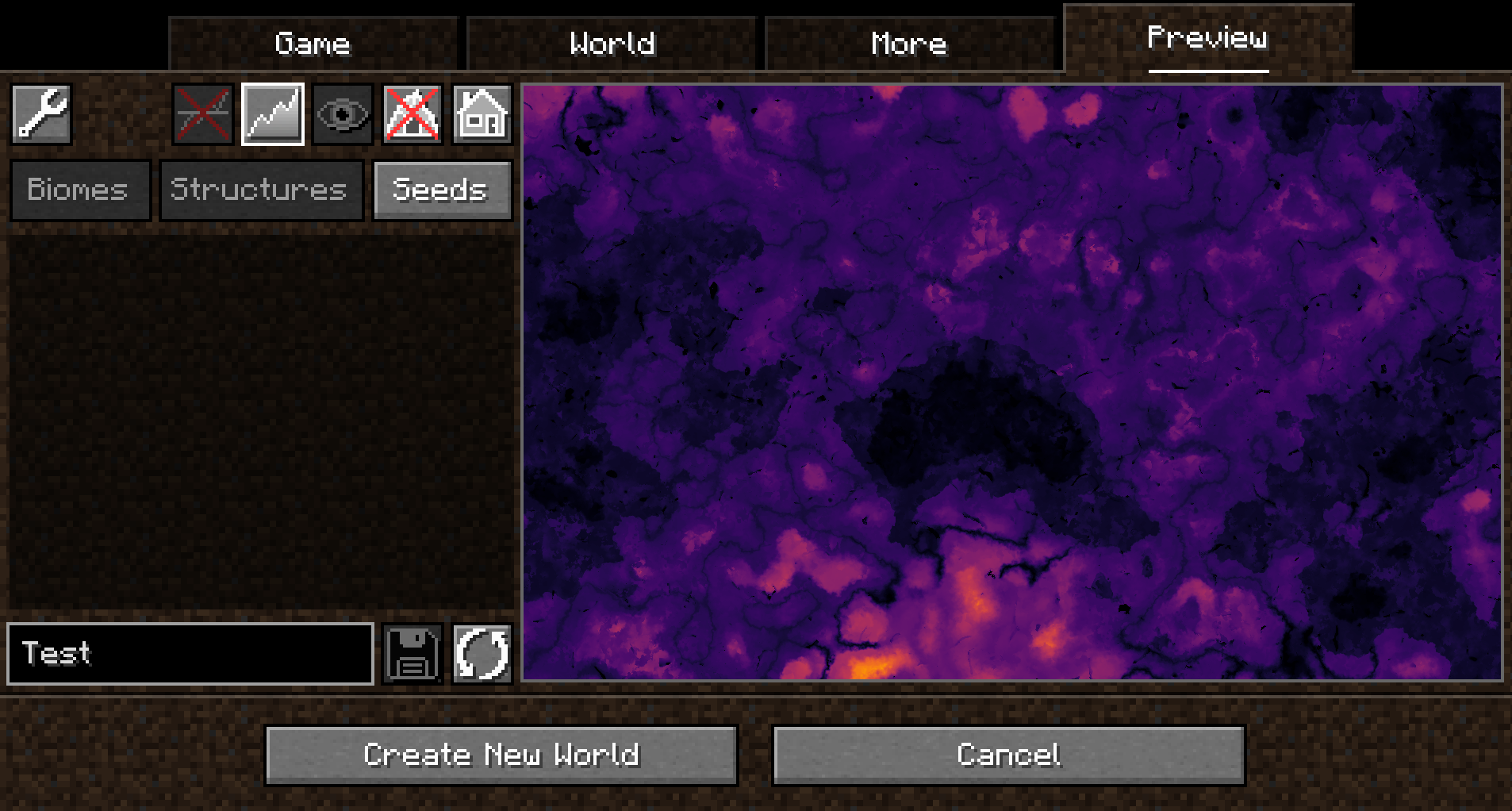
When height sampling is enabled, the preview can be toggled between the biome map and a colorized heightmap:
When y-layer intersection sampling is enabled, the preview can also show the blocks on the current y-layer.
Additionally, the y-layer one step below is also shown in a lighter color:
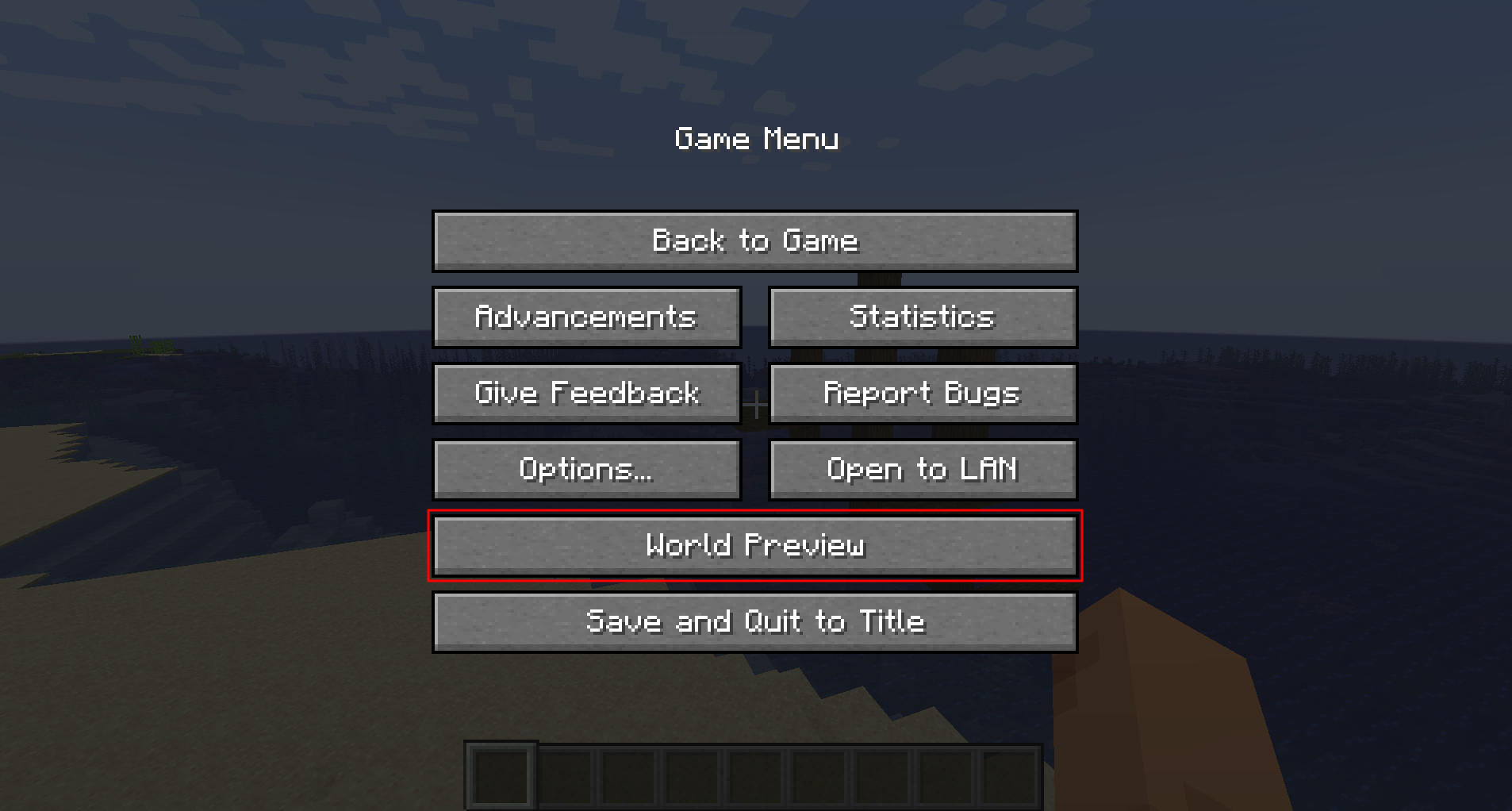
Since version 1.1.0, there is also experimental support for opening the preview in-game for a single-player worlds:
##### Moving on the preview
Clicking and dragging on the map-part of the preview tab will move along the x and z axis.
This will cause the following load sequence:
– Any biomes that are not yet sampled on the current y-level
– Structures (if enabled)
– Height map (if enabled)
– Adjacent y-layers (if enabled)
Scrolling does **not** zoom into the map (there is a separate setting in the configuration menu for controlling the zoom level), but instead travels along the y-axis.
This allows cave biomes to be seen as well. Please note that non-cave biomes span the entire world height beyond that.
##### Other features
– Works with mods! Tested with:
– Terralith
– Biomes O’ Plenty
– Persistent seed storage
– Highlighting specific biomes
– Highly configurable and extendable
## Supported version
This table shows the current support status for the Minecraft version.
| Minecraft Version | Status |
|——————-|———–|
| `1.20.x` | Supported |
## FAQ
**Q:** *Will Minecraft versions before 1.20 be supported?*
**A:** No.
—
**Q:** *Will Multiplayer be supported?*
**A:** No.
—
**Q:** *Scrolling does not zoom the preview!*
**A:** Scrolling moves the y-level up and down. To change the zoom level, go to `Settings (top left wrench) -> Resolution` and change the visual size of a chunk.
—
**Q:** *The preview is completely white / black for the y-intersections view.*
**A:** This is likely because the starting y-layer for the preview is the build limit. Try scrolling down to a lower y-layer and something should show up.
—
**Q:** *My CPU is at 100%!*
**A:** You can limit the number of used cores in `Settings (top left wrench) -> General`. By default, *World Preview* tries to compute the biome preview / structures / heightmap as quickly as possible. These calculations require a lot of CPU power.
## Mod incompatibilities
This mod should be compatible with most mods (including those adding new biomes and dimensions).
### TerraFirmaCraft (TFC)
World Preview **is** compatible with TFC, however, there is a known issue:
The Y intersections view will always be a white screen for all Y levels with TFC, because the `TFCChunkGenerator` has a dummy implementation for the [`getBaseColumn`](https://github.com/TerraFirmaCraft/TerraFirmaCraft/blob/v3.1.2-beta/src/main/java/net/dries007/tfc/world/TFCChunkGenerator.java#L643-L646) method.
To clarify: This doesn’t mean that TFC is broken / does something wrong (it clearly works on its own and does its job).
It just means that TFC does not provide the specific information World Preview needs in this case.
## Adding support for new biomes and structures
New biomes, structures, and more can be registered via the Minecraft datapack mechanism. See [the World Preview dataformat docs](https://github.com/caeruleusDraconis/world-preview/blob/1.20/DataFormats.md) for more information.
World Pre Generator
## Version 5.X.X
For older versions of the mod, check the [wiki](https://github.com/GeheimagentNr1/WorldPreGenerator/wiki).
This Mod can pre generate the Minecraft dimensions per command.
The Mod is only needed on the server side, but can also be used on the client side.
—
You need a server to play with friends? You don’t know how to set up one? Just rent an already configured server!

Click on the picture above, select a plan (with recommended at least 6 GB),
use my code **[agent](https://bisecthosting.com/agent)** to get **25%** off your first month and enjoy playing with your friends!
—
## Support
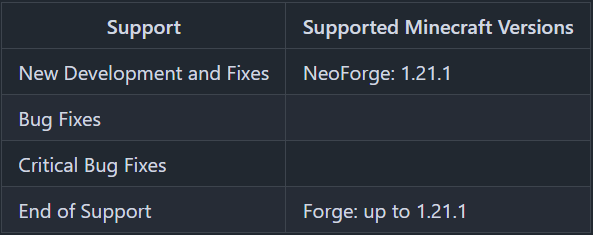
Minecraft versions, for which the mod is not released, are not supported.
You can find a text version [here](https://github.com/GeheimagentNr1/Online_Mod_Data/wiki/Supported-Versions).
## Hints
The pre generation tasks are executed one after the other.
The pre generations are continued after restarts.
Chunks already generated are skipped on pre-generation, if the forced flag is not true.
If you run semi-parallel pre generation, you should set “max-tick-time” in the “server.properties”-file to -1 to prevent crashes, because the tick time gets too long.
In semi-parallel pre generation mode, multiple tasks for pre generation are started in parallel, but the execution is done the Minecraft way. As of 1.20.1, this means, that only one chunk can be generated at a time.
## Server Config
The config file can be found in the “serverconfig” folder in the “world” folder and is named “world_pre_generator-server.toml”. The name of the world folder is set for servers in the “server.properties” file and for clients it is the name of the world/save game in the world list, and it can be found in the “saves” folder in the “.minecraft” folder.
* **send_feedback**
Shall a pre generation feedback send to all online players?
* **generation**
Parameters for generation
* **type**
Type of generation
SERIAL: Every chunk one after another is generated.
SEMI_PARALLEL: Multiple chunk generation tasks are created, but the generation is still serial (speed up the chunk generation).
* **semi_parallel_task_count**
How many chunk generation tasks shall be start in parallel?
If the value is “0”, the number of processor cores is used.
* **delays**
Delays of the print and save tasks
* **print**
Time between 2 status prints
* **save**
Time between 2 saving events
## Commands
* `/pregen list` – Lists all running pre generation tasks.
* `/pregen gen start []` – Creates a pre generation task with the specified centre, radius and dimension. Optional, the force flag (true, false) can be set. If it is set to true, all chunks are loaded. If it is set to false, already generated chunks are skipped. If the force flag is absent, it is set to false.
* **block**: The center coordinates and the radius are in blocks.
If you want to generate a 4000×4000 (2000 in the positive and negative direction) from the center of the world, the command would be:
`/pregen gen minecraft:overworld start block 0 0 2000`
If you want to generate a 4002×4002 (2001 in the positive and negative direction) from x = 100, z = 150 of the world, the command would be:
`/pregen gen minecraft:overworld start block 100 150 2001`
Hint: In the pregeneration list it will show up, with the following center and radius data, because the block data are calculated to chunk data and back:
x = “round down”(100 / 16) * 16 = 96
z = “round down”(150 / 16) * 16 = 144
radius = “round up”(2001 / 16) * 16 = 2016
* **chunk**: The center coordinates and the radius are in chunks.
If you want to generate a 4000×4000 (2000 in the positive and negative direction) from the center of the world, the command would be:
`/pregen gen minecraft:overworld start chunk 0 0 125`
If you want to generate a 4002×4002 (2001 in the positive and negative direction) from x = 100, z = 150 of the world.
“chunk x” = “round down”(100 / 16) = 6
“chunk z” = “round down”(150 / 16) = 9
“chunk radius” = “round up”(2001 / 16) = 126
The command would be:
`/pregen gen minecraft:overworld start chunk 6 9 126`
* `/pregen gen resume` – Resumes the pre generation task of the dimension.
* `/pregen gen pause` – Pauses the pre generation task of the dimension.
* `/pregen gen cancel` – Cancels the pre generation task of the dimension.
* `/pregen clear` – Cancels all pre generation tasks.
* `/pregen sendFeedback` – Shows, if the progression feedback is enabled or disabled.
* `/pregen sendFeedback ` – Enables or disables progression feedback depending on isFeedbackEnabled. Generation start and finish feedback are not affected of that.
## Progression State
The progress state computed is in chunks.
You get the following information in the generation messages: “A B/C (D%) E chunks/s”
* **Dimension (A)**
* **Chunk generated (B)**
* **Total chunks to generate (C)**
* **Percentage of chunks for which generation is finished (D)**
* **Rate of Chunks per second generated between this and the last message (E)**
—
Thanks for the logo to Muse31.
You can use this mod in non-commercial modpacks without asking.
You can find more mods from me on [CurseForge](https://www.curseforge.com/members/geheimagentnr1/projects) and [Modrinth](https://modrinth.com/user/GeheimagentNr1).

World of Wonder

World of Wonder
—
**World of Wonder** adds a new biome, the Dandelion Fields. This mystical biome has giant dandelions, as well as a new creature: the Dandy Lion!
Dande Lions are very similar to wolves. They can be tamed with small flowers, bred with larger flowers, and healed with bonemeal!
—

World of money
The “World of money” mod adds realistic money and coins to Minecraft, inspired by the currencies of various countries, including Ukraine, Russia, Belarus, Europe (euro), the United States (dollars), and historical coins from the Soviet Union. This mod works seamlessly with Custom NPCs, allowing you to create trading systems, role-playing scenarios, and economic interactions for your in-game “countries.” It enhances the gameplay by adding realistic economic elements suitable for both single-player and multiplayer servers with role-playing elements.
World of Lush Caves
IMPORTANT: Click the world-type button until you see “generator.wolc”,
otherwise it WILL NOT WORK.
This is a Minecraft Datapack that replaces the normal Minecraft worldgen with a lush cave-only worldgen.
Sometimes you will spawn on Bedrock if there’s no air beneath you to teleport you to.
It was partially made with my (see github credits) custom world generator:
https://github.com/c3l3rN0/MC-Biome-Selector
WorldManager
# WorldManager
WorldManager is a simple plugin allowing worlds to be automatically reset on demand.
**NOTE:** The plugin is currently in beta, so please check out [here](https://github.com/Zffu/WorldManager) to suggest features you’d like!
## Commands
### /worldmanager
This is the main command of the plugin, allows to have a list of the commands.
### /worlds
This command allows you to have information on worlds handled by WorldManager.
### /loadworld
This command allows you to load a world handled by WorldManager.
### /unloadworld
This command allows you to unload a world handled by WorldManager.
### /createworld
This command allows you to create a world reset option for the specified world.
## Permissions & Messages
WorldManager allows its users to modify the required permissions and messages to whatever they’d like. In order to do so, please head to the config
## API
WorldManager comes with an API allows you to use its features without the plugin.
World Looting
This datapack replaces all barrels and chests without custom names the player opens with unlooted chests, player’s placed chests and barrels are automatically named on place so they wont be replaced also, by default all chests and barrels uses the vanilla loot table:chests/simple_dungeon but you can change them to whatever you like in the data/packreplacer/functions/hit.mcfunction
Also work with mods if the mods add loot to the vanilla loot table
WARNING: THIS DATAPACK WILL REPLACE ALL CHESTS THE PLAYER INTERACT WITH WHEN IT IS INSTALLED, IF YOU INSTALL IT ON A PREMADE WORLD, ALL YOUR CHESTS WILL BE REPLACED ALSO I ADVISE YOU PACK ALL THE STUFFS ON TO YOUR PLAYER INVENTORY/ENDERCHEST/CHESTMINCART ETC BEFORE INSTALLING
World Heritage: More Beautiful Optimization
World Heritage: More Beautiful Optimization
Purpose
World Heritage is a Minecraft Java Edition 1.20.1 mod-pack that keeps the vanilla feel you love while doubling performance and tripling adventure. It adds dozens of new biomes, structures, mobs and gear, then wraps everything in widely-trusted optimization mods so you can explore farther, fight smoother and load faster on almost any PC.
What it adds or changes
Performance: Sodium
Exploration: 15+ biomes (emerald highlands, aurora tundra, suspended amethyst grottoes), 5 + naturally generating structures (sky temples, buried libraries, nether crystal gardens) and one optional late-game dimension reachable with vanilla-style portals.
Creatures & NPCs: 25 + new mobs
Gear & resources: Titanium, new tiers of tools, weapons and trinkets with custom enchantments that still work in vanilla anvils.
Download:
You want the same crafting table, the same combat timing, the same redstone logic—but twice the frame-rate and a world that surprises you every few chunks. Perfect for solo play, friend groups or public servers that need both stability and fresh content.
Key facts to know before installing
Requires Java 17 newer.
(The content is subject to adjustments in subsequent version updates.)
World Height Booster
# World Height Booster
Changes to 1.17’s world height code has allowed for modders to increase the maximum build height to 512 blocks. This mod goes farther – the ground now begins at 300 blocks. Dig deeper underground, and build higher into the sky! Minecraft’s final frontier has been broken.
[World Generator] Winter Apocalypse++
# Introduction:
There are many players who wanted to play the game while it snows everywhere. There are many mods and data packs that try to achieve this with different methods like:
[Winter Apocalypse](https://www.planetminecraft.com/data-pack/winter-apocalypse/) (deprecated) for 1.16-17
[Eternal Winter](https://www.planetminecraft.com/data-pack/eternal-winter/) (deprecated) for 1.16
[Another Winter Apocalypse](https://www.planetminecraft.com/data-pack/winter-apocalypse-now-1-18-compatible/) (deprecated) for 1.18 and many more.
# Features:
* Each and every biome is mostly untouched
* It is constantly a thunderstorm everywhere so it keeps snowing all the time
* Every biome is inverse in temperature. 0.6 is -0.6 and 2.0 is -2.0 in biomes
* As a small bonus you don’t need silk touch to mine ice, packed ice and blue ice
* Also you can reverse craft blue ice to 9 packed ice and packed ice to 9 ice
* You can craft 4 snowballs from a snow block and powder snow with bucked and snowballs too!
* You can craft a snow block into 4 snow layers and vice versa
As of additional features for each difficulty level check out the update logs under the files section by clicking on the file with the appropriate level that you want to play with.
# Goals:
Nothing extreme. Just enjoy yourself. Have fun in your winter wonderland!
# Versions:
The initial release is the easy version. I’m planning to add many more versions, each one making the game harder than the previous.