CommandWhitelist

Command Whitelist is a plugin that allows you to control
precisely what commands players can see and use.
[](https://www.codefactor.io/repository/github/youhavetrouble/commandwhitelist)
[](https://github.com/YouHaveTrouble/CommandWhitelist/releases)
[](https://discord.gg/j8KK5dGBps)


Plugin Features
- Lock selected commands behind permission
- Overwrite default “no such command” message with your branding
- Block tab completion
- Block command execution
- Block completion and execution of specified subcommands
Compatible versions: 1.13+
Compatible software:
– Bukkit-based servers (Spigot, Paper, Pufferfish, Purpur, etc)
– Waterfall (NOT Bungeecord!)
– Velocity
[Download latest release](https://github.com/YouHaveTrouble/CommandWhitelist/releases/latest)
Having some issues? Make sure to check out Plugin Wiki.
Found a bug or you think plugin is missing an important feature? Create an issue.
CommandGuard
# CommandGuard
A cross-platform command blocker and tab-complete manager for **Paper/Spigot**, **Velocity**, and **Waterfall**.
Control exactly which commands each player can execute and see in tab-complete — using a flexible permission group system with inheritance, priority, and per-server rules.
—
## Features
– **Tab-complete filtering** — players only see commands they’re allowed to use
– **Command blocking** — block commands with fully customizable actions (message, title, sound, kick, potion effect, console command)
– **Whitelist mode** — allow only specific commands, block everything else
– **Permission groups** — define groups with different command lists, assign via LuckPerms
– **Group inheritance** — groups can extend other groups recursively
– **Group merging** — groups with equal priority are merged automatically
– **Per-server groups** — restrict a group to specific backend servers (proxy only)
– **Cross-server sync** — proxy pushes its allowed commands to backend via plugin messaging so tab-complete is consistent across the network
– **Spy-client protection** — blocks tab-complete packet responses for hidden commands
– **Multi-language** — `en_EN` and `ru_RU` bundled, add your own lang file
– **Configurable prefix** — change the plugin prefix in the lang file, no restart needed
– **`/cg check `** — inspect which group and commands a player has
– **`/cg updategroup `** — push updated tab list to a player instantly
—
## Platforms
| Platform | Versions |
|———-|———-|
| Paper / Spigot | 1.13+ |
| Velocity | 3.1+ |
| Waterfall | 1.18+ |
**Java 17+** required.
—
## Network Setup
Install CommandGuard on both the proxy and each backend server, set `is_network: true` on both sides. The proxy will automatically push its allowed command list to the backend on every player connection — no relog needed after `/cgv reload`.
—
## Documentation
Full documentation: [1wairesd.github.io/1wairesdIndustriesWiki](https://1wairesd.github.io/1wairesdIndustriesWiki/docs/CommandGuard/commandguard-intro)
Source code: [github.com/1wairesd/CommandGuard](https://github.com/1wairesd/CommandGuard)
CommandBridge

CommandBridge is a cross-server command execution plugin for Minecraft networks running on Velocity. You define commands in YAML scripts on the proxy, and CB registers and dispatches them across all connected backend servers. No plugin messaging, no player-online requirements, no limitations.
A player runs `/lobby` on a backend, the proxy picks it up. An admin runs `/alert` on Velocity, every backend executes it. Commands go through instantly over WebSocket or Redis.

[](https://cb.objz.dev)
[](https://github.com/objz/CommandBridge)
[](https://discord.gg/QPqBYb44ce)

### How it works
Everything runs through scripts. You create a `.yml` file, define the command name, arguments, where it registers, and what happens when someone runs it. Drop it in the scripts folder on Velocity and you’re done. CB reads, validates, and registers commands on whichever servers you specified. If something is wrong, it tells you exactly what and skips that script. The rest still loads fine.
Here is a quick example. This registers `/alert` on the proxy and broadcasts a message to two backends as console:
“`yaml
version: 4
name: example
description: An example command script – edit or replace this with your own
enabled: false
aliases: [ex]
permissions:
enabled: true
silent: false
register:
– id: “client-1”
location: VELOCITY
defaults:
run-as: CONSOLE
execute:
– id: “survival-1”
location: BACKEND
server:
target-required: false
schedule-online: false
player-arg: “”
delay: 0s
cooldown: 0s
args:
– name: player
required: true
type: STRING
suggestions: []
– name: message
required: true
type: TEXT
suggestions: []
commands:
– command: “msg ${player} ${message}”
“`

### Platforms
One jar works everywhere. Install the same file on Velocity and all your backends.

### Transport
Pick one. WebSocket is the default and works out of the box. Redis is there if you need it.

WebSocket mode: Velocity hosts the server, backends connect to it. No external dependencies. TLS built in.
Redis mode: all instances connect to your existing Redis server. Useful if your servers are behind NAT or you already run Redis for other things.
Both modes support multi-proxy setups. One Velocity runs as the primary, any additional proxies connect in client mode.
### Security
Every connection is authenticated with HMAC-SHA256. Both sides prove they know the secret without ever sending it over the wire. On top of that you get TLS encryption with three modes to choose from.

TOFU is the default. Velocity generates a self-signed certificate on first startup, backends pin it automatically. Zero manual certificate management, encrypted from the start.
### Execution modes
Commands can run in three different contexts depending on what you need.

`CONSOLE` runs with full permissions. `PLAYER` runs as the player who triggered it. `OPERATOR` gives temporary elevated permissions for that specific command and nothing else.
### Arguments
Full argument parsing with tab completion via CommandAPI. 22 types covering everything from basic strings to Minecraft-specific types like players, locations, items, and entities.

Arguments become `${name}` placeholders in your command strings. PlaceholderAPI is supported too if you need external data like player stats or economy values.

### Built for real networks
CommandBridge is designed for production. Commands can be rate limited per player with cooldowns from milliseconds to hours. If a player is offline when a command targets them, CB queues it and executes it when they come back, even across server restarts.
You can apply delays to individual commands, reload all scripts without restarting with `/cb reload`, and run multiple commands in a single script with different targets and settings each. Everything is managed from one place on the Velocity proxy.
Player presence is tracked across the entire network, including multi-proxy setups. CB knows where every player is at all times, so commands that depend on a player being on a specific server just work. No guessing, no race conditions.
### Requirements

[CommandAPI](https://modrinth.com/plugin/commandapi) is required on every server. [PlaceholderAPI](https://modrinth.com/plugin/placeholderapi) via [PapiProxyBridge](https://modrinth.com/plugin/papiproxybridge) and [PacketEvents](https://modrinth.com/plugin/packetevents) are optional.

### Metrics
This plugin collects anonymous statistics via [bStats](https://bstats.org/). You can disable this in `plugins/bStats/config.yml`.
Command Passthrough
# command-passthrough
A plugin that allows you to configure certain commands that will be executed on another sub-server

The plugin works on the following proxies:
– [BungeeCord](https://www.spigotmc.org/wiki/bungeecord/)
– [Waterfall](https://papermc.io/downloads#Waterfall)
– [Velocity](https://papermc.io/downloads#Velocity)
Also, the plugin must be installed on the sub-servers
**Notes:**
* Same jar for every platform.
* The config is located in `config/command-passthrough.json`
Cloud Command Plugin
# Cloud Command Plugin
![Banner][banner]
[![Modrinth][badge-modrinth]][modrinth]
[![Discord][badge-discord]][social-discord]
[![Follow @simplecloudapp][badge-x]][social-x]
[![Follow @simplecloudapp][badge-bluesky]][social-bluesky]
[![Follow @simplecloudapp][badge-youtube]][social-youtube]
[Report a Bug][issue-bug-report]
·
[Request a Feature][issue-feature-request]
🌟 Give us a star — your support means the world to us!
> All information about this project can be found in our detailed [documentation][docs-thisproject].
The Cloud Command Plugin empowers your network with in-game proxy commands, enabling efficient cloud management directly from within the game
## Features
– [x] **Velocity**
– [x] **BungeeCord**
– [ ] **Gate**
## Contributing
Contributions to SimpleCloud are welcome and highly appreciated. However, before you jump right into it, we would like you to read our [Contribution Guide][docs-contribute].
## License
This repository is licensed under [Apache 2.0][license].
[banner]: https://github.com/simplecloudapp/branding/blob/main/readme/banner/plugin/cloud-command.png?raw=true
[issue-bug-report]: https://github.com/theSimpleCloud/command-plugin/issues/new?labels=bug&projects=template=01_BUG-REPORT.yml&title=%5BBUG%5D+%3Ctitle%3E
[issue-feature-request]: https://github.com/theSimpleCloud/command-plugin/discussions/new?category=ideas
[docs-thisproject]: https://docs.simplecloud.app/plugin/cloud-command
[docs-contribute]: https://docs.simplecloud.app/contribute
[modrinth]: https://modrinth.com/plugin/command-plugin
[license]: https://opensource.org/licenses/Apache-2.0
[snapshots]: https://repo.simplecloud.app/#/snapshots
[social-x]: https://x.com/simplecloudapp
[social-bluesky]: https://bsky.app/profile/simplecloud.app
[social-youtube]: https://www.youtube.com/@thesimplecloud9075
[social-discord]: https://discord.simplecloud.app
[badge-modrinth]: https://img.shields.io/badge/modrinth-18181b.svg?style=flat-square&logo=modrinth
[badge-license]: https://img.shields.io/badge/apache%202.0-blue.svg?style=flat-square&label=license&labelColor=18181b&style=flat-square&color=e11d48
[badge-discord]: https://img.shields.io/badge/Community_Discord-d95652.svg?style=flat-square&logo=discord&color=27272a
[badge-x]: https://img.shields.io/badge/[email protected]?style=flat-square&logo=x&color=27272a
[badge-bluesky]: https://img.shields.io/badge/[email protected]?style=flat-square&logo=bluesky&color=27272a
[badge-youtube]: https://img.shields.io/badge/youtube-d95652.svg?style=flat-square&logo=youtube&color=27272a
Clinny

RU Translate / Русский перевод
Привет! Это плагин Clinny для очистки ненужных ентити в мире Minecraft. Он убирает лежащие предметы, стрелы, шары опыта и мобов, но делает это умно – защищает мобов рядом с игроками, чтобы при очистке не удалить вашего прирученного волка или жителя, с которым вы торгуете.
Что умеет Clinny:
• Автоочистка – настройте интервал (например, раз в 10 минут) и плагин будет сам очищать мир
• Защита мобов рядом с игроками – это основная фича! Мобы в радиусе 10 блоков от игрока не удаляются
• Гибкие настройки – можно выбрать что очищать: предметы, мобов, XP, снаряды
• Защита важных мобов – не трогает именованных мобов, прирученных, жителей, големов
• Ручная защита – можно защитить любого моба командой /clinny protect
• Статистика – посмотреть сколько ентити на сервере и сколько памяти используется
• Поддержка всех ядер – работает на Bukkit, Paper, Folia, Purpur и других
Команды простые:
_/clinny clean_ – очистить мир прямо сейчас
_/clinny stats_ – посмотреть статистику
_/clinny protect_ – защитить моба на которого смотрите
_/clinny reload_ – перезагрузить конфиг

Настройки в config.yml понятные:
“`
# CLINNY v2.0.1
clean-interval: 5
countdown-time: 5
clean-memory: true
player-protection-radius: 30
language: ru
debug: true # Временно включите для отладки
clean:
items: true
xp: true
mobs: true
projectiles: true
misc: true
keep:
named-mobs: true
tamed: true
villagers: true
golems: true
near-players: true
“`
Плагин не нагружает сервер, работает аккуратно и отчитывается о своих действиях в чате. Отлично подходит для выживания и мини-игр, где важно поддерживать порядок в мире, не навредив игрокам.
Совместимость: Minecraft 1.13+ и все популярные ядра серверов.
Просто установите плагин, настройте под себя, и мир всегда будет чистым!
Поддержка/Вопросы:
Telegram: @osatxadm
Почта: [email protected]
Hi! This is a Clinny plugin for cleaning up unnecessary entities in the Minecraft world. He removes lying objects, arrows, experience balls and mobs, but he does it wisely – he protects mobs near players so that during cleaning he does not remove your tamed wolf or the villager with whom you trade.
What Clinny can do:
• Auto-cleaning – adjust the interval (for example, once every 10 minutes) and the plugin will clean the world by itself
• Protecting mobs near players is the main feature! Mobs within a 10 block radius of the player are not removed
• Flexible settings – you can choose what to clean: items, mobs, XP, projectiles
• Protect important mobs – does not touch named mobs, tamed, residents, golems
• Manual protection – you can protect any mob with the command /clinny protect
• Statistics – see how many entities are on the server and how much memory is being used
• Support for all cores – works on Bukkit, Paper, Folia, Purpur and others
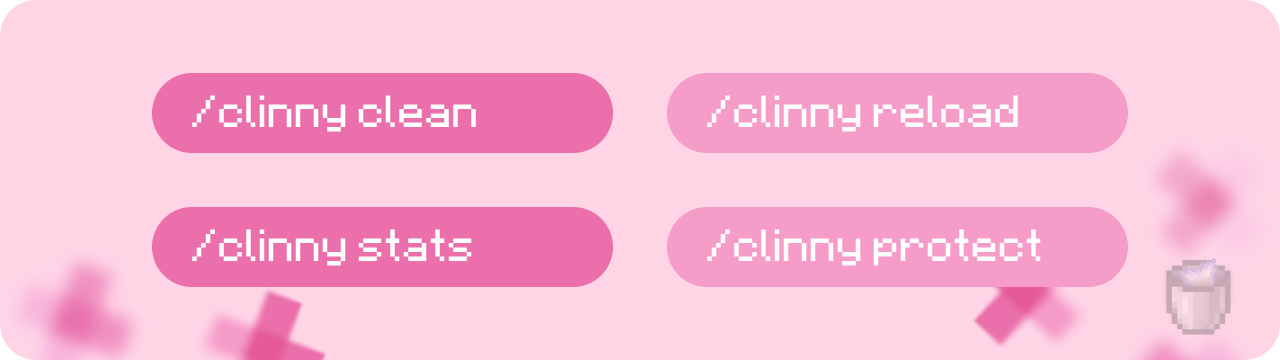
The commands are simple:
_/clinny clean_ – clean up the world now
_/clinny stats_ – view statistics
_/clinny protect_ – protect the mob you’re looking at
_/clinny reload – restart the config
The settings in config.yml are clear:
“`
# CLINNY v2.0.1
clean-interval: 5
countdown-time: 5
clean-memory: true
player-protection-radius: 30
language: ru
debug: true
clean:
items: true
xp: true
mobs: true
projectiles: true
misc: true
keep:
named-mobs: true
tamed: true
villagers: true
golems: true
near-players: true
“`
The plugin does not load the server, works carefully and reports its actions in the chat. Great for survival and mini-games where it’s important to keep the world in order without harming the players.
Compatibility: Minecraft 1.13+ and all popular server cores.
Just install the plugin, customize it for yourself, and the world will always be clean!
Support/Questions:
Telegramm: @osatxadm
Mail: [email protected]
ClearScreen
This is a simple plugin to clear the terminal screen for terminals that don’t have a GUI for it. This is useful as you can’t run `clear` or `cls` while a Minecraft server is running, as it will be inferred as a Minecraft command.
Simply run `cls` in the server console and the screen will be cleared.
#### Planned Updates
– Sponge and NeoForge Server support is potentially planned in the future
– Fabric Server and Quilt Server is a big maybe
– After that it will most likely go into maintenence mode, but I *might* add more loaders
This has been tested on Purpur and Velocity on Linux and BungeeCord on Windows 11
CleanStaffChat
About “A proxy plugin caused an illegal protocol state.” error
This is not a CleanStaffChat issue.
This is a limitation of Velocity. Use this plugin to completely solve the problem:
https://modrinth.com/plugin/unsignedvelocity2
This plugin gives you the possibility to talk in private chats, for staff and server donors (Donor Chat, can be deactivated). Compatible with BungeeCord, Velocity (also RedisBungee), Folia and Spigot.
# FEATURES
“`
> » Obviously, StaffChat;
> » Possibility to deactivate StaffChat globally;
> » Possibility of not seeing StaffChat personally;
> » Possibility to talk in StaffChat without doing commands;
> » RedisBungee support;
> » AFK System;
> » Admin Chat System (Deactivable);
> » Donor Chat System (Deactivable);
> » Discord Integration (Deactivable);
> » StaffList;
> More functions to come…
“`
# COMMANDS
“`
> » /sc (message) • Send messages in the StaffChat;
> » /sctoggle • Makes StaffChat invisible, just for you;
> » /scmute • Deactivate StaffChat globally;
> » /scafk • Toggle AFK.
> » /ac (message) • Send messages in the AdminChat;
> » /actoggle • Makes AdminChat invisible, just for you;
> » /acmute • Deactivate AdminChat globally;
> » /dc (message) • Send messages in the DonorChat;
> » /dctoggle • Makes DonorChat invisible, just for you;
> » /dcmute • Deactivate DonorChat globally;
> » /stafflist • Shows online staff;
> » /screload • Reloads the plugin.
“`
## All commands are configurable in file aliases.yml!
# PERMISSIONS
> (Configurable from config.yml)
CleanScreenShare
## CleanScreenShare, an hack control plugin, made for networks.
CleanScreenShare is a plugin that allows staff to take players suspected of using client hacks/cheats to a separate server for inspection. It creates a private chat between the two and offers many features such as a scoreboard/tab (different for suspect and administrator). Requires a separate server, dedicated purely to hack checks. It supports multiple control servers and teleportation to these is balanced according to preference (you can set the sorting type in config.yml).
### Wiki
[Click here to see the plugin’s wiki](https://github.com/frafol/CleanScreenShare/wiki)
### Commands & Permissions
[Click here to see all commands and permissions!](https://github.com/frafol/CleanScreenShare/wiki/Commands-and-permissions)
### Placeholders
[Click here to see all placeholders (Supported in Bukkit Addon)](https://github.com/frafol/CleanScreenShare/wiki/Supported-placeholders)
### Features
– Multiple hack control servers;
– Multiple fallback servers;
– 3 types of sorting strategy (LEAST_PLAYERS, MOST_PLAYERS, RANDOM);
– Spectator mode with the command /sspectator (server);
– Auto ban that supports ALL ban plugins;
– Auto detect if the control server goes offline and then stop the control;
– Titles for suspect and for administrator, all configurable with placeholders;
– Backend server (spigot) addon: With scoreboard/tablist and placeholderapi support with a lot of placeholders that you can see in the Wiki! It can also teleport administrator/suspect/spectators to different spawns;
– Support for ALL fallback plugin, like FallbackServer;
– Does not require a database, but MySQL support is here!
– /ssinfo command to see informations about an user;
– Open Source, you can modify this plugin as you want;
– Discord Support: you can send on discord messages on start/end control with administrator/suspect name placeholders and messages for start/end spectator mode, you can also see the result of the control with the placeholder %result%;
– Lot of options to customize the plugin.
### Compatibility
CleanScreenShare is compatible with Velocity, BungeeCord (& forks), Spigot (& forks), Folia.
CleanPing
## CleanPing is compatible with BungeeCord, Velocity and Spigot.
– This plugin gives you the possibility to **display your latency** or that of **another player**. In addition, you can set a **different colour depending on how high the latency is** (low, medium or high ping).
# Features
> » You can see your ping, or that of other players;
> » You can see the difference between two pings;
> » Extensive compatibility (Spigot – Paper – Velocity – BungeeCord – Folia);
> » Support for RedisBungee/RedisVelocity & PlaceholderAPI.
> » Command to reload the plugin;
> » The plugin and translations are **FULLY** configurable.
> » More functions to come…
# Commands
> » /ping • Send your ping;
> » /ping (player) • Send the ping of the player of your choice;
> » /ping (player1) (player2) • Send the ping difference between two players;
> » /pingreload • Reloads the plugin.
# Permissions
> » Permissions are configurable from config.yml.
# Placeholders
> » %cleanping_ping% • Send your ping;
> » %cleanping_coloured_ping% • Send your ping with the colors added in config.yml;
> » %cleanping_ping_(player’s name)% • Send the ping of a player.
> » %cleanping_coloured_ping_(player’s name)% • Send the ping of a player with the colors added in config.yml.
> » %cleanping_difference_(player’s name)% • Send the difference between your ping and an online player’s ping.
> » %cleanping_difference_(player’s name)_(player2’s name)% • Send the difference between an online player’s ping and an another online player’s ping.