VersionTinmoli
# VersionTinmoli
> **Version**: 1.0.2
> **Supported Platforms**: Velocity 3.0+ | BungeeCord 1.16+ | Bukkit/Spigot/Paper 1.20.1+
A lightweight Minecraft proxy/server plugin for customizing the version name displayed in the server list, with rich color and formatting support.
[中文文档](README_CN.md) | [English Documentation](README.md)
—
## Table of Contents
– [Features](#features)
– [Supported Platforms](#supported-platforms)
– [Quick Start](#quick-start)
– [Color Support](#color-support)
– [Commands](#commands)
– [Configuration](#configuration)
– [FAQ](#faq)
– [Changelog](#changelog)
—
## Features
– **Colored Version Names** – Velocity supports MiniMessage format (RGB, gradients, rainbow), BungeeCord/Bukkit support legacy color codes
– **Rich Formatting** – Bold, italic, underline, strikethrough support
– **Hot Reload** – Reload configuration with `/vt reload` command
– **Dynamic Modification** – Instantly modify version name with `/vt md ` command
– **Simple Configuration** – YAML configuration file
– **Lightweight** – No performance impact
– **Auto Fallback** – Compatible with older client versions
– **Multi-language** – Supports English and Chinese
—
## Supported Platforms
| Platform | Version | Java Version | Status |
|———-|———|————–|——–|
| Velocity | 3.0+ | Java 21+ | Fully Supported |
| BungeeCord | 1.16+ | Java 17+ | Fully Supported |
| Bukkit/Spigot | 1.20.1-1.21.11 | Java 17+ | Requires newer version |
| Paper | 1.20.1-1.21.11 | Java 17+ | Fully Supported |
—
## Quick Start
### Installation
1. Download the JAR file for your platform from [Releases](https://github.com/Tinmoli/VersionTinmoli/releases)
2. Place the JAR file in your server’s `plugins/` directory
3. Restart the server
4. Edit the configuration file (auto-generated)
5. Use `/vt reload` to reload the configuration
### Configuration File Location
– **Velocity**: `plugins/versiontinmoli/config.yml`
– **BungeeCord**: `plugins/VersionTinmoli/config.yml`
– **Bukkit**: `plugins/VersionTinmoli/config.yml`
—
## Color Support
### Velocity – MiniMessage Format
“`yaml
# Named colors
version_name: “Velocity 1.8-1.21”
# RGB colors (1.16+)
version_name: “<#FF5555>Red <#55FF55>Green”
# Gradient effects
version_name: “Rainbow Server”
# Rainbow effects
version_name: “Rainbow Server”
# Style combinations
version_name: “VIP | Online”
“`
**Available Colors**: ``, ``, ``, ``, ``, ``, ``, ``, ``, ``, ``
**Available Styles**: ``, ``, ``, ``
—
### BungeeCord/Bukkit – Legacy Color Codes
“`yaml
# Basic colors
version_name: “&6BungeeCord &71.8-1.21”
# With formatting
version_name: “&l&6VIP Server&r &7| &a1.8-1.21”
# Multi-color combinations
version_name: “&cRed &6Gold &eYellow &aGreen”
“`
**Color Codes**: `&0`-`&9`, `&a`-`&f` (black, dark blue, dark green, dark aqua, dark red, purple, gold, gray, dark gray, blue, green, aqua, red, pink, yellow, white)
**Format Codes**: `&l` (bold), `&m` (strikethrough), `&n` (underline), `&o` (italic), `&r` (reset)
—
### Client Compatibility
| Client Version | Supported Colors |
|—————-|——————|
| 1.16+ | Full RGB colors |
| 1.7-1.15 | 16 named colors |
| < 1.7 | Basic colors |
---
## Commands
| Command | Permission | Description |
|---------|------------|-------------|
| `/vt` | `versiontinmoli.admin` | Show plugin information |
| `/vt reload` | `versiontinmoli.admin` | Reload configuration file |
| `/vt md ` | `versiontinmoli.admin` | Modify version name |
**Permission Notes**: Velocity/BungeeCord require `versiontinmoli.admin` permission, Bukkit defaults to OP
—
## Configuration
### Basic Configuration
“`yaml
# VersionTinmoli Configuration File
# Customize the version name displayed in the server list
# Language setting (en_US or zh_CN)
language: “en_US”
# Version name configuration
version_name: “Velocity 1.8.x-1.21.11”
“`
### Language Settings
The plugin supports multiple languages. You can set the language in the configuration file:
– `en_US` – English
– `zh_CN` – Simplified Chinese
After modifying the `language` field, use `/vt reload` to reload the configuration and switch languages. All command messages and prompts will be displayed in the corresponding language.
### Language File Customization
Language files are automatically copied to the external directory on first run:
– **Velocity**: `plugins/versiontinmoli/lang/`
– **BungeeCord**: `plugins/VersionTinmoli/lang/`
– **Bukkit**: `plugins/VersionTinmoli/lang/`
You can edit these files to customize messages. The plugin will load from the external directory first, then fall back to the built-in files.
### Configuration Examples
**Regular Server**
“`yaml
# Velocity
version_name: “Minecraft 1.8-1.21”
# BungeeCord/Bukkit
version_name: “&6Minecraft &71.8-1.21”
“`
**VIP Server**
“`yaml
# Velocity
version_name: “VIP Server”
# BungeeCord/Bukkit
version_name: “&l&6VIP Server”
“`
**Minigames Server**
“`yaml
# Velocity
version_name: “MiniGames | Online”
# BungeeCord/Bukkit
version_name: “&cM&6i&en&ai&9G&ba&dm&5e&cs &f| &aOnline”
“`
**PVP Server**
“`yaml
# Velocity
version_name: “PVP | Fighting”
# BungeeCord/Bukkit
version_name: “&l&cPVP &r&7| &eFighting”
“`
—
## FAQ
### Migrating from TOML to YAML
If you’re upgrading from an older version (before v1.0.2), you need to migrate your configuration from TOML format to YAML format.
**Automatic Migration (Recommended):**
1. Backup your `config.toml` file
2. Delete the `config.toml` file
3. Restart the server or run `/vt reload`
4. The plugin will automatically create a new `config.yml` file
5. Edit `config.yml` and set your custom version name
**Manual Migration:**
TOML format (old):
“`toml
version_name = “My Server 1.20”
“`
YAML format (new):
“`yaml
version_name: “My Server 1.20”
“`
Main difference: Use colon `:` instead of equals sign `=`
### Configuration Not Working
1. Ensure the configuration file is in the correct location
2. Check YAML syntax is correct
3. Use `/vt reload` to reload configuration
4. If still not working, restart the server
### Colors Not Displaying or Showing as Text
**Problem**: RGB color codes display as text like `Red Green`
**Cause**: Using incorrect closing tags ``
**Solution**:
“`yaml
# Wrong
version_name: “<#FF5555>Red <#55FF55>Green”
# Correct
version_name: “<#FF5555>Red <#55FF55>Green”
version_name: “Red Green”
“`
**Other Color Issues**:
1. **Velocity**: Use MiniMessage format `text`
2. **BungeeCord/Bukkit**: Use `&` or `§` color codes
3. RGB colors require Minecraft 1.16+ client
4. Check server logs for errors
### Platform-Specific Requirements
1. **Velocity**: Requires Velocity 3.0+ and Java 21+
2. **BungeeCord**: Requires BungeeCord 1.16+ and Java 17+
3. **Bukkit**: Requires Minecraft 1.20.1+ and Java 17+
—
## License
This project is licensed under the MIT License.
## Support
For issues or suggestions, please submit them on [GitHub Issues](https://github.com/Tinmoli/VersionTinmoli/issues).
—
**Documentation Version**: 1.0.2
**Maintainer**: Tinmoli
VerifyMC-Proxy
VerifyMC-Proxy is a companion plugin for VerifyMC that runs on your BungeeCord/Waterfall or Velocity proxy server. It intercepts player logins and verifies whitelist status via the VerifyMC backend API before allowing players to connect to your backend servers.
Features:
– Support for both BungeeCord/Waterfall and Velocity
– Real-time whitelist verification via HTTP API
– Customizable kick messages
– Multi-language support (English/Chinese)
– Auto-update configuration from remote
VanishV
## VanishV
### ✨ Features
– Vanish mode (on / off)
– Fly enabled while vanished
– Hidden from other players and TAB list
– Silent join & quit while vanished
– Vanish state saved between restarts
– PlaceholderAPI support (soft-depend, no hard dependency)
### 🧩 Commands
– `/vanish on`
– `/vanish off`
– `/vanish status`
– `/vanish reload`
### 🔐 Permissions
– `vanish.use`
– `vanish.see`
– `vanish.reload`
### ⚙️ Technical
– Java 17
– Paper / Spigot / Folia compatible
– Supports Minecraft 1.19 – 1.21.x
– MIT License
### 📦 Notes
– Placeholder: `%vanishv_status%`
– PlaceholderAPI is optional (auto-detected)
vane

[](./LICENSE)
[](https://discord.gg/RueJ6A59x2)
[](https://oddlama.github.io/vane/)
[](https://github.com/oddlama/vane/wiki/Installation-Guide)
[](https://github.com/oddlama/vane/wiki/FAQ)
# About vane
Vane is a plugin-suite which provides many immersive and lore friendly additions to vanilla minecraft.
It will run on any [PaperMC](https://papermc.io) based minecraft server.
[**For a comprehensive feature overview, visit the official website.**](https://oddlama.github.io/vane/)
– 🎆 Lore friendly and properly integrated immersive features.
Vane augments the classic vanilla experience, and doesn’t try to replace it.
Generally, player’s are not supposed to notice which features were introduced by vane.
– 🚀 Countless quality-of-life, gameplay and system improvements
– ⚙️ Fully-configurable. Disable or configure anything you dislike
– 🛠️ Several carefully designed custom items
–  Many custom enchantments for a selection of tools, including the elytra
– 🌌 The best portals you can imagine. Expensive but worthwile for long distance travel. Supports all entities including minecarts!
– 📜 A simple but powerful region system for grief protection
– 🗺️ [BlueMap](https://bluemap.bluecolored.de/), [Dynmap](https://www.spigotmc.org/resources/dynmap%C2%AE.274/) and [Pl3xMap](https://github.com/BillyGalbreath/Pl3xMap) integration
– [And a lot more!](https://oddlama.github.io/vane/)
## 📷 Gallery
Visit the [**Gallery on Modrinth**](https://modrinth.com/mod/vane/gallery) to view a selection of features or
refer to [**the official website**](https://oddlama.github.io/vane/) for a complete overview.






(And a whole lot more!)
## 📥 Installation
If you are setting up a new server, check out our [Server Installer](https://oddlama.github.io/minecraft-server)
for an easy way to properly setup a minecraft server with vane, autostart, 3D online map, and more awesome features.
Simply download the plugin zip file from here or from [GitHub](https://github.com/oddlama/vane/releases/latest) and extract the .jar files into the `plugins/` directory. Make sure that:
– You are using the correct Paper (or Purpur) server version (compatible versions are listed in the title on the download page)
– Beware that `vane-velocity` is not a classical server plugin, but a plugin for the velocity proxy! Use it only if you know what you are doing.
For a comprehensive guide, visit the [Installation Guide](https://github.com/oddlama/vane/wiki/Installation-Guide) on the wiki.
## ❓ FAQ
Please refer to the [FAQ](https://github.com/oddlama/vane/wiki/FAQ) in the wiki.
## ✅ Acknowledgements & 3rd-party software
I would like to thank the following projects and people maintaining them:
– [Spigot](https://www.spigotmc.org/) for the awesome baseline server software.
– [PaperMC](https://papermc.io/) for the valuable additions missing from Spigot, and for Waterfall.
– [DynmapCoreAPI](https://github.com/webbukkit/DynmapCoreAPI) (Apache-2.0), dynmap integration
– [BlueMapAPI](https://github.com/BlueMap-Minecraft/BlueMapAPI) (MIT), [BlueMap](https://bluemap.bluecolored.de/) integration
– [Quark](https://quarkmod.net) (CC-BY-NC-SA 3.0) Assets and texts for the Slime Bucket
#### Included software
The following projects will be included in the compilation step:
– [org.json](https://github.com/stleary/JSON-java) (MIT), Java json implementation
– [SnakeYAML](https://bitbucket.org/snakeyaml/snakeyaml) (Apache-2.0), Java YAML 1.1 implementation
– [ronmamo reflections](https://github.com/ronmamo/reflections) (WTFPL), Java reflection helper
– [PacketWrapper](https://github.com/dmulloy2/PacketWrapper) (LGPL3), only specific parts are included
– [bStats](https://bstats.org/) (LGPL3), plugin metrics
v4Guard Anti VPN

Your safety is important to us.
Today, many servers have zero protection against fraud, VPNs, proxies, and peer-to-peer networks. v4Guard has come to the Minecraft communities to change this and offer a quality solution at an affordable price.
# Features
– We’re a **cloud based** solution, meaning near zero impact on your infrastructure resources
– Update all settings in **real time**, with **no restarts** and **no configuration** files. All customization is done via a **web dashboard**.
– You’re able to **whitelist** usernames and IP addresses completely if you want to allow anonymization services to certain users, or if you think there’s an error.
– Fast and **efficient support** team, if you have any questions, issue or feedback, just reach out through your **dedicated support channel** or via a ticket.
– You can **search** for **user profiles**, or **IP address profiles** to get historical information, VPN usage statistics, version and game information, etc…
– Do you have a big team? We support **sub users**, just invite them to your team and give them access to all or certain features by using our **permission system**.
– We have an addon called **Account Shield** that will help you prevent account theft and allow you to restrict access to certain accounts within specific IP address, subnet or even 2FA!
– Easily manage **automated accounts** powered by **AFK console clients** (such as MinecraftAFK) thanks to our partnerships and incorporated settings + contextual information.
– Use our own **API** implementation to be able to create **your own implementations**: discord bots for whitelisting players, extracting information, custom 2FA workflows…
– Allow connections from trusted game boosters such as ExitLag, NoPing, etc…
## Mobile Providers
Unlike similar services, v4Guard has an enhanced mobile hotspot detection and integrated 100+ mobile carriers. This feature helps you tailor your protection: choose specific providers to block, ensuring uninterrupted access for larger player bases and easily customize your experience.

## Local Blacklist
You can also manage your in-game moderation with our Local Blacklist feature, which gives your team a new seamless and centralised management possibilities for your local blockages.

## Manage all information unified in a single service.
It has never been so easy to see so much information about your community summarized in just a click.
– **Detailed Information** Access a user’s profile to see all his detailed information in one click.
– **Custom Rules** Control the flow of your traffic as you wish in a very innovative way.
– **Residential Detection** Say goodbye to bad actors who use P2P networks to bypass with residential IPs.
– **Machine Learning** Automated algorithms and processes for effective and pioneering protection.
# Installation
1. Download the latest version here, or in our [GitHub](https://github.com/v4guard/connector/releases/latest) respository
2. Drop the plugin on your proxy’s plugins folder, and restart the server
3. Click on the dashboard link printed in the console
4. On the website, click on your company name
5. Voilà, we’ll be processing your players right away.
# Large clients who trust us
We are proud to say that small to large communities trust our service and use it every day to enhance their protection. Compared to other services, v4Guard offers the best service customized to your needs.

and many more…
UniversalPluginUpdater
UniversalPluginUpdater
[](https://github.com/DreamVoid/UniversalPluginUpdater/releases/latest)

[简体中文](https://github.com/DreamVoid/UniversalPluginUpdater/blob/main/README.md) | English
—
## Introduction
UniversalPluginUpdater (UPU) is a Minecraft server plugin that allows you to quickly update existing server plugins, while also providing APIs to help developers easily implement automatic update functionality for their plugins.
The development of UniversalPluginUpdater was inspired by [APT](https://wiki.debian.org/zh_CN/Apt).
## Documents and tutorials
For first-time UPU users, reading the [UPU Help Manual](https://docs.upu.dreamvoid.me/en/) can help them get started quickly. Many questions can be answered by consulting the documentation, which also includes how UPU checks for updates to other plugins.
## Download
* Stable version
* [Modrinth](https://modrinth.com/plugin/upu/versions)
* [Hangar](https://hangar.papermc.io/DreamVoid/UniversalPluginUpdater/versions)
* [GitHub Releases](https://github.com/DreamVoid/UniversalPluginUpdater/releases)
## Commands
This is just a list of some commonly used commands. For a complete list of commands, please refer to the [documentation](https://docs.upu.dreamvoid.me/en/core/commands).
| Command | Description |
| — | — |
| /universalpluginupdater (/upu) | UniversalPluginUpdater main command |
| /upu update | update list of available plugins. |
| /upu list | list all available plugins |
| /upu download | download existing plugins’ newer version by downloading. |
| /upu upgrade | upgrade existing plugins by downloading/installing newer version. |
| /upu repo | configuration file repository sub-command |
## License
[GNU General Public License v3.0](https://github.com/DreamVoid/UniversalPluginUpdater/blob/main/LICENSE)
—
[DreamVoid](https://github.com/DreamVoid), Made with ❤.
UnifiedMetrics

[](COPYING.LESSER)
[](https://github.com/Cubxity/UnifiedMetrics/issues)
[](https://github.com/Cubxity/UnifiedMetrics/actions)
[](https://discord.gg/kDDhqJmPpA)
UnifiedMetrics is a fully-featured free and open-source metrics collection plugin for Minecraft servers. This project is
licensed under [GNU LGPLv3](COPYING.LESSER).
[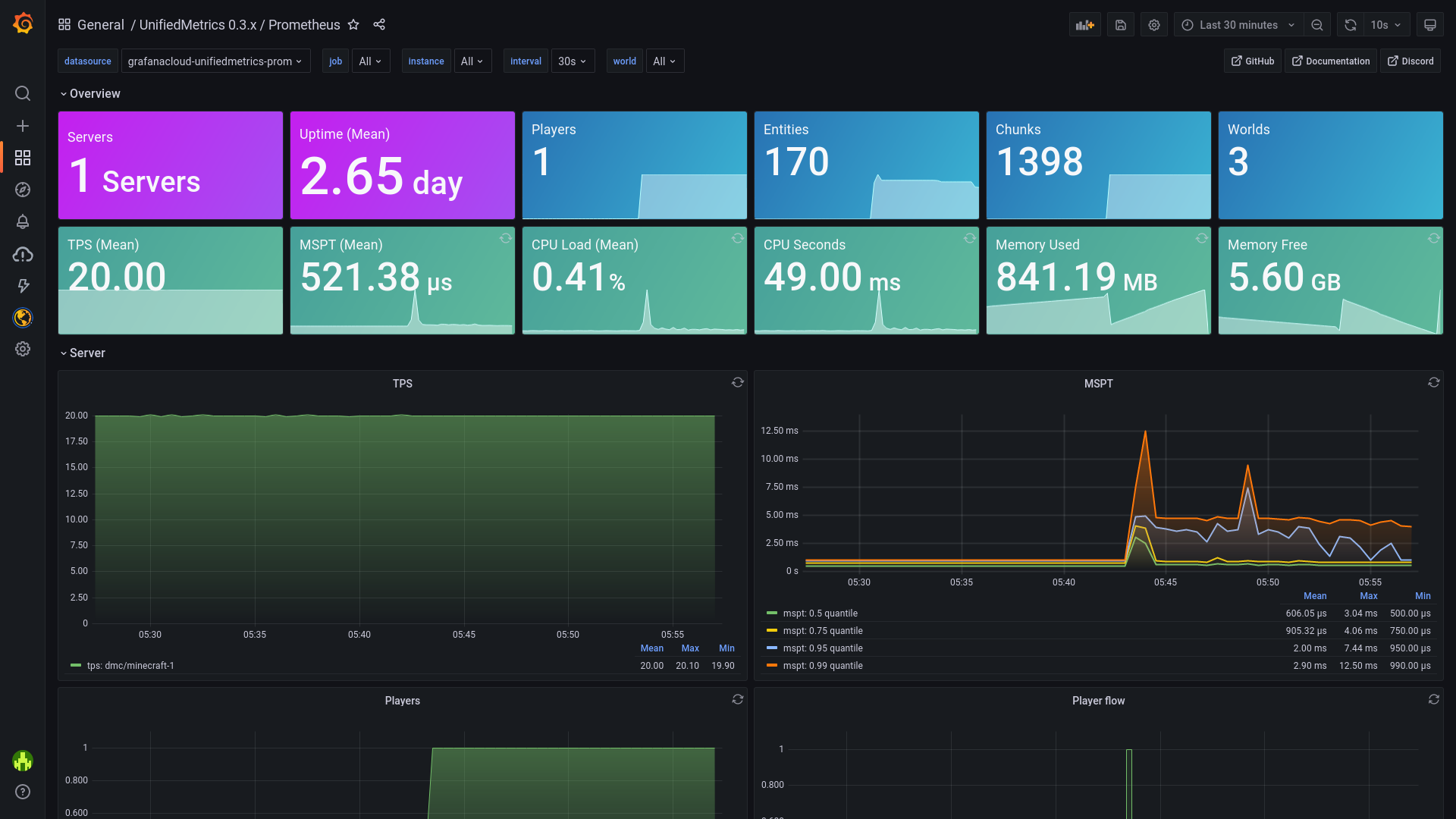](https://dedimc.link/unifiedmetrics)
*Dashboard [included](https://github.com/Cubxity/UnifiedMetrics/wiki/Grafana) out-of-box!*
Click [here](https://unifiedmetrics-demo.cubxity.dev/) for live preview!
## Features
– **Platform-agnostic & compatible with popular platforms**. Get the same metrics and features on any supported
platform.
– **Monitor your server in real-time** with Prometheus/InfluxDB and provided Grafana dashboards.
– **High performance** metric collection. Low to none performance impact on the server’s performance.
– **Free and open-source**. The code is free and open for anyone to audit and contribute to.
## Compatibility
**Server:**
– 1.8+ Spigot servers *(includes Spigot-based forks)*
– 1.16+ Fabric servers
– Minestom
– Velocity
– BungeeCord
**Metrics:**
– Prometheus
– InfluxDB
## Getting started
Read the [wiki](https://github.com/Cubxity/UnifiedMetrics/wiki) for instructions on how to get started.
## Metrics
Table of metrics (click to show)
| Collector | Description | Platform | Default |
| ————- | ———————————————– | ——————- | ——- |
| systemGc | Garbage collection duration and freed bytes | All | true |
| systemMemory | Memory used, committed, max and init | All | true |
| systemProcess | CPU load, seconds, and process start time | All | true |
| systemThread | Current, daemon, started, and peak thread count | All | true |
| events | Login, join, quit, chat, and ping event counter | All | true |
| server | Plugins count and player counts | All | true |
| tick | Tick duration histogram | Bukkit, Minestom | true |
| world | World entities, players, and chunks count | Bukkit, Minestom | true |
## Special Thanks
[Bloom Host](https://billing.bloom.host/aff.php?aff=9) has kindly provided UnifiedMetrics with development servers.
Bloom has server splitting built-in, which makes it extremely easy to build your monitoring stack. Get high performance
servers at Bloom by using [this link](https://billing.bloom.host/aff.php?aff=9).
[](https://billing.bloom.host/aff.php?aff=9)
YourKit supports open source projects with innovative and intelligent tools for monitoring and profiling Java and .NET
applications. YourKit is the creator of [YourKit Java Profiler](https://www.yourkit.com/java/profiler/),
[YourKit .NET Profiler](https://www.yourkit.com/.net/profiler/),
and [YourKit YouMonitor](https://www.yourkit.com/youmonitor/).
[](https://www.yourkit.com/)
## Building from source
Instructions (click to show)
**Requirements:**
– JDK 8+ (16+ for Fabric, 17+ for Minestom)
– Git (Optional)
To build UnifiedMetrics, you need to obtain the source code first. You can download the source from GitHub or use the
Git CLI.
“`bash
$ git clone https://github.com/Cubxity/UnifiedMetrics && cd UnifiedMetrics
“`
Open a terminal in the cloned directory and run the following command. The following command will build all subprojects.
“`bash
$ ./gradlew assemble -x signArchives
“`
> `-x signArchives` is required to skip signing, unless you have signing set up
To build a specific subproject, you can prefix it with the subproject path. For example:
“`bash
$ ./gradlew :unifiedmetrics-platform-bukkit:assemble -x signArchives
“`
The output artifacts can be found in `subproject/build/libs`.
## API
Instructions (click to show)
### Examples
Example plugins can be found under [examples](examples) directory.
### Gradle (Kotlin)
“`kotlin
repositories {
mavenCentral()
maven(“https://s01.oss.sonatype.org/content/repositories/snapshots/”)
}
“`
“`kotlin
dependencies {
// …
compileOnly(“dev.cubxity.plugins”, “unifiedmetrics-api”, “0.3.3-SNAPSHOT”)
}
“`
### Usage
Add `:unifiedmetrics-api` as a dependency (compileOnly/provided). Prefer using platform’s service manager if possible.
“`kotlin
import dev.cubxity.plugins.metrics.api.UnifiedMetricsProvider
/* … */
val api = UnifiedMetricsProvider.get()
“`
ulib
# uLib
 
ulib is a general purpose library.
Copyright (c) 2022 [fluse1367](https://gitlab.com/fluse1367)
See “Included Software” (at the bottom) for copyright and license notice of included software.
Please also refer to the [documentation](https://gitlab.com/fluse1367/ulib/-/blob/main/docs/Readme.md).
## Features
Brief overview of ulib’s features.
### Core
– Code Injection Framework
– Dynamic Library Injection
– Maven Resolver
– Reflection Utilities
– JsonRPC v2 API
– Yaml/Json API
– SQL API
– Misc
### Minecraft
– Mojang Launchermeta API
– Mojang/Bukkit Mappings API
– Proxy-Server Bridge
– User Cache
– Misc
### Spigot
– GUI/Inventory Menus API
– Custom Enchantments
– Item API
– Misc
## Things to Know
– The minecraft variants of library depend on recent spigot/bungeecord/velocity versions. That means it may not work as
expected or may not work at all on older server versions. You will not receive any support, when using another server
version than the one this library is built for.
If you want to use older server versions, consider a cross-version compatibility tool, like
[ViaBackwards](https://www.spigotmc.org/resources/viabackwards.27448),
[ViaRewind](https://www.spigotmc.org/resources/viarewind.52109) or
[ProtocolSupport](https://www.spigotmc.org/resources/protocolsupport.7201).
– Minimum Java version is 17.
– When launching uLib for the first time (or if the respective caching folder was removed), it will download a few of
dependencies/libraries.
## Disclaimer
Note the copyright and [license of this project](https://gitlab.com/fluse1367/ulib/-/blob/main/LICENSE). Use this library at your own risk! The contributors of this
project do not take any responsibility/liability in any way.
# Included Software
The following 3rd-party software is included within this project:
– NBTEditor
([click](https://github.com/BananaPuncher714/NBTEditor/blob/ff303d06e16eed119079bae92b8ef5700ec35d87/src/main/java/io/github/bananapuncher714/nbteditor/NBTEditor.java))
Copyright (c) 2018 [BananaPuncher714](https://github.com/BananaPuncher714), licensed under
the [MIT license](https://github.com/BananaPuncher714/NBTEditor/blob/ff303d06e16eed119079bae92b8ef5700ec35d87/LICENSE)
– Apache Commons Lang v3 (Copyright (c) 2022 [The Apache Software Foundation](https://www.apache.org/), licensed under
the [Apache License 2.0](https://github.com/apache/commons-lang/blob/9f1ac974e1b52c58b1950acdaaf3e0d5881409df/LICENSE.txt)):
– SystemUtils
Class ([click](https://github.com/apache/commons-lang/blob/9f1ac974e1b52c58b1950acdaaf3e0d5881409df/src/main/java/org/apache/commons/lang3/SystemUtils.java))
– JavaVersion
Class ([click](https://github.com/apache/commons-lang/blob/9f1ac974e1b52c58b1950acdaaf3e0d5881409df/src/main/java/org/apache/commons/lang3/JavaVersion.java))
—
TraceSMP
# Plugin
This is a recreation of minecrafts Trace SMP. There will be many updates on this minecraft plugin. There are powers, effects, and particles.
## Why Download this?
It can add fun gameplay to your server, whether its pvp based, or just chilling. My friends used this for a minigame thing so they could find each other once (1.1).
## Who originally made this?
Jitscraft made TraceSMP with the custom plugin, shut down a bit later.
## What are the effects/powers
### Red
Effect: Fire resistance
Power: Right Click to turn lava into obsidian in a 5 block radius.
### Blue
Effect: Water Breathing
Power: Make a player Drown for a minute.
### Yellow
Effect: Speed
Power:Strike lightning
### Green
Effect: Hero Of The Village
Power: Get resistance 2 for 30 seconds
### Black
Effect: Invisability
Power: Teleport
### White
Effect: Slow falling. Do /slowfalling to toggle it. (Plugin version 1.2.1 or higher)
Power: Shoot up into the sky with levatation, no fall damage
### Pink
Effect: Regeneration
Power: gain 5 extra hearts for 30 seconds.
### Orange (Version 1.4.0+)
Effect: Strength
Power: Lazar Beam
# Stones (Upgrade, Version 1.4.1+)
You get a stone when you kill a mob. You need a different stone for each power.
### Black
Spiders (0.5%)
### White
Skeletons (0.5%)
### Green
Zombies (0.5%)
### Red
Blazes (1%)
### Blue
Drowned (1%)
### Pink
Which (1%)
### Yellow
Piglin (1%)
### Orange
Gaurdians (2%)
# Power Swapper
### Look in gallery for recipe!
# Help
You can get help in the discord under trace-smp-talk
TheNewEconomy
**Note: This resource is no longer maintained/supported.**
# The New Economy
[](https://app.codacy.com/gh/TheNewEconomy/EconomyCore/dashboard?utm_source=gh&utm_medium=referral&utm_content=&utm_campaign=Badge_grade)
[](https://ci.codemc.io/job/creatorfromhell/job/TNE/)
[](https://github.com/TheNewEconomy/VaultUnlockedAPI)
The New Economy, TNE, is the ultimate economy plugin for your Minecraft server, no matter what platform you’re on. While
TNE is pushed as being “feature-packed,” but it’s not feature-packed in the normal sense of jamming a bunch of useless features
into the core plugin, but rather using modules.

The economy plugin for server owners that want more out of their economy.
# About TNE
TNE was originally created for hey0’s hMod long before Bukkit/Spigot/Paper was a thing. Since then, it has taken on many
forms and this is the future form of the plugin. This core is designed to be robust and carry TNE into the future with or
without Minecraft by not being platform-dependent.
# Requirements
TNE has some minimum requirements that should be followed.
– MySQL 8.0+ (if using MySQL for storage)
– MariaDB 10.7.0+
– Java 17+
# Switched?
– Converter Coming Soon! Take the poll: [here](https://strawpoll.com/4xw9gxag)
# Support
To get an actual response use a support method below, not the reviews.
– [Developer API Docs](https://github.com/TheNewEconomy/EconomyCore/wiki/API)
– [Discord](https://discord.gg/WNdwzpy)
– [Github](https://github.com/TheNewEconomy/EconomyCore/issues)
# Features
## Menu System
Want to use menus for currency creation and player actions? We got you!
### MyBal for Players
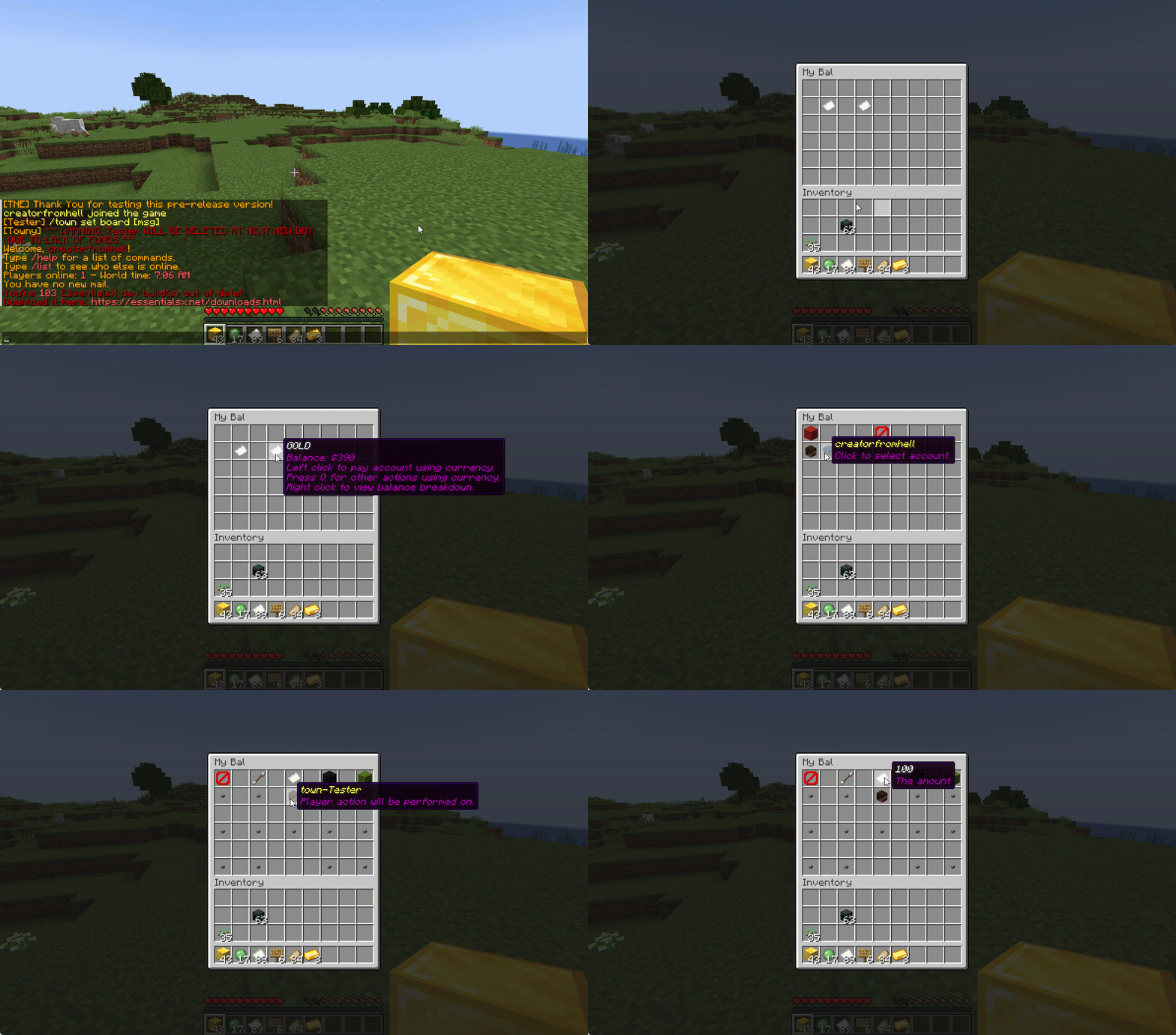
### MyEco for Admins
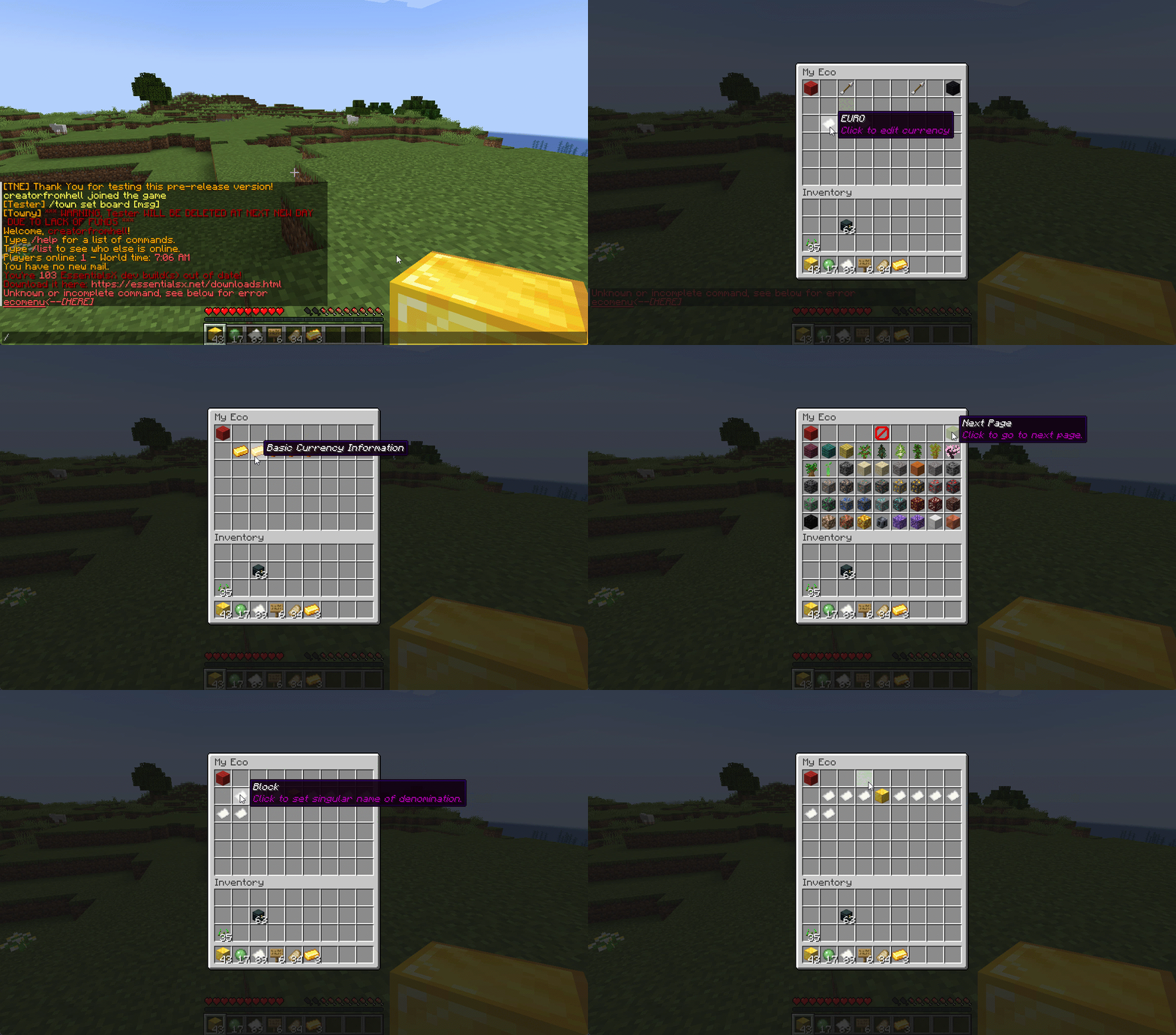
## Support your favorite plugins
We provide support for all your favorite plugins from Towny to Factions. Anything that supports Vault, supports TNE!
## Cross-Server
We support cross-server balance syncing through our velocity and bungee plugins, as well as Redis!
### Bungee
Download: [here](https://cdn.modrinth.com/data/bZ4eSWf0/versions/OTwQFFn1/TNE-BungeeCore-0.1.2.8-Release-1.jar)
### Velocity
Download: [here](https://cdn.modrinth.com/data/bZ4eSWf0/versions/prNGjbjv/TNE-VelocityCore-0.1.2.8-Release-1.jar)
## Updates
We continue to develop updates for TNE for free, and fix bugs as they’re reported.
## All the currencies – Unlimited
TNE Allows you to create unlimited currencies with ease through the currency creation GUI.
### Types
TNE Supports different types of currencies!
#### Virtual: Simple currency that exists in thin air
#### Item: Use minecraft items as currency.
– Shulker Box Support
– Bundle Support
### Fine Tune your Currency
Lots of per-currency configuration options.
– Create a custom balance format for each currency
– Set a starting amount for each currency
– Set custom conversion rates for each currency
– Create custom crafting recipes for item currencies
– Block Mob drops for each currency
– Set the max balance for each currency
– Set enderchest balance inclusion per currency
– Set item currencies to use MiniMessage inputs for display name and lores!
– Set custom note items for each currency, used to have a currency voucher for each currency.
– Allows for use of model data items as currency items
### Fine Tune Who Can Access What Currency
TNE allows you to fine tune who can run commands with each currency. You’re able to block players from using
/pay for certain currencies, and even checking their balance for others!
#### Mixed: This type uses both virtual and item balances, and allows players to switch their balance between items and virtual whenever!
#### Experience: Use experience as currency.
#### Experience-level: Use experience levels as currency.
## Money Notes
Convert your virtual currency into a physical money note using the /money note command.
## Multi-platform
Use Sponge? Sure. Paper? Why not? Both? Over Velocity? Definitely! Switch between, your TNE data works
for you no matter your platform. More platforms soon!
### Supported:
– Paper/Spigot/Purpur
– Sponge8
### Coming:
– Fabric
– Sponge7
## Discord Server
We have a discord server available to those users that have questions or need support!
## Configurability
TNE strives to allow you to configure things as much as possible. From the messages to starting money, to max holdings!
## MISC Features
– Adventure Chat support for translations to allow for awesome colorful messages!
– Support for Placeholders, include top 10
– Easy commands for easy administration
– Transaction Logging
– Easy-to-use menu system for currency creation and balance actions!
– Multiple data types
– SQL, YAML, and Maria DB
– Tab completion for commands!
– baltop command
## Open Source
Contribute on the [github](https://github.com/TheNewEconomy/EconomyCore)!
## Placeholders
| Name | Description |
|——————————————————-|—————————————————————-|
| tne_balance | Returns player’s balance. |
| tne_balance_formatted | Returns formatted player’s balance. |
| tne_world_worldname | returns player’s balance for specific world. |
| tne_world_worldname_formatted | returns the formatted player’s balance for specific world. |
| tne_currency_currencyname | returns player’s balance for specific currency. |
| tne_currency_currencyname_formatted | returns player’s balance for specific currency. |
| tne_wcur_worldname_currencyname | returns player’s balance for specific world and currency. |
| tne_wcur_worldname_currencyname_formatted | returns player’s balance for specific world and currency. |
| tne_toppos | returns player’s position on baltop |
| tne_toppos_world name or all | returns player’s balance for specific currency. |
| tne_toppos_world name or all_currency name or all | returns player’s balance for specific world and currency. |
| tne_toppos__position_ | returns the value for the position based on the value of Messages.Money.PlaceholderTopEntry in messages.yml |
## Permissions & Commands
## /tne
**About:** All commands that are designated as being for administrative purposes.
**Shortcuts:** /tne menu(/ecomenu), /tne(/ecomin, /ecoadmin, /ecomanage, /tneneweconomy)
**Base node:** tne.admin (default: ops)
**Wildcard node:** tne.admin.*
| Command | Permission | Description | Default |
|———————————–|——————-|———————————————————————————————————–|—————|
| tne backup | tne.admin.backup | Creates a backup of all server data. | ops |
| tne create [balance] | tne.admin.create | Creates a new economy account. Player ~ The account owner. Balance ~ The starting balance of the account. | ops |
| tne debug [level] | tne.admin.debug | Toggles console debug mode to the specified level. | ops |
| tne delete | tne.admin.delete | Deletes a player account. Player ~ The account owner. | ops |
| tne extract | tne.admin.extract | Extracts all player balances with their username attached for database related debugging. | ops |
| tne menu | tne.admin.menu | Opens up the tne economy admin menu | ops |
| tne purge | tne.admin.purge | Deletes all player accounts that have the default balance | ops |
| tne reload [configs] | tne.admin.reload | Used to reload configurations. | ops |
| tne reset | tne.admin.reset | Deletes all economy-related data from the database. | ops |
| tne restore | tne.admin.restore | Restores all balances that are located in extracted.yml after performing the extract command. | ops |
| tne save | tne.admin.save | Force saves all TNE data. | ops |
| tne status [status] | tne.admin.status | Displays, or sets, the current account status of an account. Player ~ The account owner. | ops |
| tne version | tne.admin.version | Displays the version of TNE currently running. | ops |
## /money
**About:** All commands that are used to interact with the server’s money system.
**Shortcuts:** /money balance(/bal, /balance), /money pay(/pay), /money top(/baltop), /money menu(/mybal)
**Base node:** tne.money (default: everyone)
**Wildcard node:** tne.money.*
| Command | Permission | Description | Default |
|————————————————————|———————–|—————————————————————————————-|—————|
| money balmenu | tne.money.mybal | Opens up the mybal menu. | everyone |
| money balance [world] [currency] | tne.money.balance | Displays your current holdings. | everyone |
| money convert [from currency] | tne.money.convert | Convert some of your holdings to another currency. | everyone |
| money deposit [currency] | tne.money.deposit | Deposits money from an item form into a virtual bank for mixed currencies. | everyone |
| money give [world] [currency] | tne.money.give | Adds money into your economy, and gives it to a player. | ops |
| money givenote [currency] | tne.money.givenote | Gives the specified player a currency note for the specified amount. | ops |
| money note [currency] | tne.money.note | Makes your virtual currency physical, for storage/trading purposes. | everyone |
| money other [world] [currency] | tne.money.other | Retrieves the balance of a player. | everyone |
| money pay [currency] | tne.money.pay | Use some of your holdings to pay another player. | everyone |
| money request [currency] | tne.money.request | Request money from a player. |
| money set [world] [currency] | tne.money.set | Set the holdings of a player. | ops |
| money setall [world] [currency] | tne.money.setall | Set the holdings of all players. | ops |
| money take [world] [currency] | tne.money.take | Removes money from your economy, specifically from a player’s balance. | ops |
| money top [page] | tne.money.top | A list of players with the highest balances. | ops |
| money top [page] [refresh(true/false)] | tne.money.top.refresh | This permission allows the user to include the refresh argument to refresh the baltop. | ops |
| money withdraw [currency] | tne.money.withdraw | Withdraws money from your virtual balance into its item form. | ops |
## /transaction
**About:** All commands that are used to interact with the transaction system.
**Shortcuts:** /trans
**Base node:** tne.transaction (default: everyone)
**Wildcard node:** tne.transaction.*
| Command | Permission | Description | Default |
|——————————————————————–|———————————————————|—————————————————————————————|—————|
| transaction away [page #] | tne.transaction.away | Displays transactions that you missed since the last time you were on. | everyone |
| transaction history [player:name] [page:#] [world:name/all] | tne.transaction.history / tne.transaction.history.other | See a detailed break down of your transaction history. Page ~ The page number you wish to view. World ~ The world name you wish to filter, or all for every world. Defaults to current world. | everyone |
| transaction info | tne.transaction.info | Displays information about a transaction. UUID ~ The id of the transaction. | everyone |
| transaction void | tne.transaction.void | Undoes a previously completed transaction. UUID ~ The id of the transaction. | ops |