DisBot
# 🤖 **DisBot — Bot Plugin**
**DisBot** is a lightweight plugin that connects your Minecraft server with **Discord**, allowing administrators to interact with the server directly from Discord.
Designed to run on software like **BungeeCord**, **Velocity** and **Paper**.
## **Requirements**
– None!
## **Features**
– Custom commands via YAML files
– Easy configuration with `config.yml`
– Prefix commands (`db! `) and slash commands (`/`)
– Embed messages with custom color per command
– Ephemeral messages (slash commands only)
– Command cooldowns
– Command aliases
– Channel restrictions
– Reload without restart (`/disbot reload`)
– Support for BungeeCord, Velocity and Paper
– Lightweight and modular design
## **Custom Commands**
Administrators can create custom commands simply by adding `.yml` files inside:
“`
plugins/DisBot/commands
“`
This allows you to expand the bot’s functionality **without modifying the plugin code**.
## **Internal Commands**
“`
– disbot reload — Reload the plugin.
“`
## **Support**
Join our [Discord server](https://discord.gg/E2hAAa7F6q) for help and suggestions!
CyAnnouncer

A simple yet powerful, multi-platform announcement plugin designed for Bukkit, BungeeCord, and Velocity.
Keep your players informed with automated, scheduled messages tailored to specific servers or worlds.
## Supported Platforms
– Bukkit/Spigot (and any forks like Paper, Purpur)
– Bungeecord (and any forks like Waterfall)
– Velocity
## Features
– Multi-Platform: A single codebase provides native JARs for Bukkit, BungeeCord, and Velocity.
– Customizable Messages: Configure unlimited announcements, each with its own multi-line text.
– Configurable Interval: Set the global time (in seconds) between each announcement.
– Custom Prefix: Add a global prefix to all messages (supports color codes).
– Context-Aware Targeting:
– On Bukkit, show messages in specific worlds or globally (all).
– On BungeeCord/Velocity, show messages on specific servers or globally (all).
– Reload Command: Reload the configuration in-game without a server/proxies restart.
## Installation
Download the correct JAR file for your server type from the Release Page. Do not install all three JARs.
### For Bukkit/Spigot
1. Download `CyAnnouncerBukkit-1.0.0.jar` (Use the Latest Version).
2. Place the JAR file in your Bukkit/Spigot server’s `plugins/` folder.
3. Restart your server.
4. Change the configuration as desired in `plugins/CyAnnouncerBukkit/config.yml`.
### For BungeeCord
1. Download `CyAnnouncerBungee-1.0.0.jar` (Use the Latest Version).
2. Place the JAR file in your Bungee proxy’s `plugins/` folder.
3. Restart your proxy.
4. Change the configuration as desired in `plugins/CyAnnouncerBungee/config.yml`.
### For Velocity
1. Download `CyAnnouncerVelocity-1.0.0.jar` (Use the Latest Version).
2. Place the JAR file in your Velocity proxy’s `plugins/` folder.
3. Restart your proxy.
4. Change the configuration as desired in `plugins/CyAnnouncerVelocity/config.yml`.
## Commands and Permissions
Commands are different and permissions remain the same
### Bukkit/Spigot
| Commands | Descriptions | Permissions |
| ———————————— | —————————————————– | ——————————- |
| `/announcer` | Display a list of commands | `-` |
| `/announcer reload` or `/an reload` | Reload config.yml | `announcer.reload` |
| `/announcer broadcast` | Send messages to all worlds or to specific worlds. | `announcer.broadcast` |
### BungeeCord
| Commands | Descriptions | Permissions |
| ————————- | —————————————————– | ——————————- |
| `/bcreload` | Reload config.yml | `announcer.reload` |
| `/bcbroadcast all/server` | Send messages to all servers or to specific servers. | `announcer.broadcast` |
### Velocity
| Commands | Descriptions | Permissions |
| ———————— | —————————————————– | ——————————- |
| `/announcer reload` | Reload config.yml | `announcer.reload` |
| `/vbroadcast all/server` | Send messages to all servers or to specific servers. | `announcer.broadcast` |
## Configuration
The configuration of each platform is different
### Bukkit/Spigot
`/plugins/CyAnnouncerBukkit/config.yml`
Default Configuration
“`yaml
# ===================================================================
# CyAnnouncer Configuration
# ===================================================================
#
# Plugin Author: cydev-id
# Plugin Version: 1.0.2
#
# HOW IT WORKS:
# This plugin will display announcements with an independent cycle for each world.
#
# 1. A world with specific messages (e.g., ‘world_the_end’) will have a cycle of:
# (Global Message -> Specific End Msg 1 -> Global Message -> …)
#
# 2. A world without specific messages will ONLY cycle through global messages.
#
# ===================================================================
# DO NOT CHANGE THIS.
config-version: 2
# Interval in SECONDS between each announcement for a world.
interval: 60
# Prefix appearing before each announcement line.
# Set to “” to disable.
prefix: “&e[&l!&r&e] &r”
# (NEW) — SETTINGS SECTION (Feature #3) —
settings:
# Set to true to pick a random message from all available messages (global + specific) each cycle.
# Set to false to use the default sequential cycle (default).
random: false
# — ANNOUNCEMENTS SECTION —
announcements:
# — GLOBAL ANNOUNCEMENTS —
# These messages will be part of the cycle in ALL worlds.
# Use “all” in the ‘worlds’ list.
# Example 1: Standard CHAT message (default type)
– worlds:
– “all”
lines:
– “&eDon’t forget to vote for the server every day!”
– “&fUse the command &b/vote&f to get rewards.”
# Example 2: Global ACTIONBAR message with a SOUND (Features #2 & #5)
– worlds:
– “all”
type: “ACTIONBAR” # (NEW) Type: CHAT, ACTIONBAR, or TITLE
sound: “ENTITY_PLAYER_LEVELUP” # (NEW) Sound from Bukkit’s Sound Enum
lines:
– “&aWelcome! Check out our store at &b/buy”
# Note: ACTIONBAR only uses the first line.
# — WORLD-SPECIFIC ANNOUNCEMENTS —
# These messages will ONLY appear in the specified worlds.
# Example 3: TITLE message for a specific world (Feature #2)
– worlds:
– “world_the_end”
type: “TITLE”
lines:
– “&5Welcome to The End!” # Line 1 is the main TITLE
– “&7Be careful of the Dragon!” # Line 2 is the SUBTITLE
– worlds:
– “world_nether”
lines:
– “&cIt’s hot in here! Make sure to bring fire resistance potions.”
– “&fDon’t hit a Piglin without preparation!”
“`
### BungeeCord
`/plugins/CyAnnouncerBungee/config.yml`
Default Configuration
“`yaml
# ===================================================================
# CyAnnouncerBungee Configuration
# ===================================================================
#
# Plugin Author: cydev-id
# Plugin Version: 1.0.2
#
# HOW IT WORKS:
# This plugin will display announcements with an independent cycle for each server.
#
# ===================================================================
# DO NOT CHANGE THIS.
config-version: 2
# Default interval in SECONDS between each announcement for a server.
interval: 60
# The prefix that appears before every line of an announcement.
# Set to “” (empty quotes) to disable the prefix entirely.
prefix: “&e[&l!&r&e] &r”
# (NEW) — SETTINGS SECTION (Feature #3) —
settings:
# Set to true to pick a random message from all available messages (global + specific) each cycle.
# Set to false to use the default sequential cycle (default).
random: false
# — ANNOUNCEMENTS SECTION —
announcements:
# — GLOBAL ANNOUNCEMENTS —
# To make a message global, add “all” to its ‘servers’ list.
# Example 1: Standard CHAT message (default type)
– servers:
– “all”
lines:
– “&eDon’t forget to vote for the server every day!”
– “&fUse the command &b/vote&f to get rewards.”
# Example 2: Global ACTIONBAR message (Feature #2)
– servers:
– “all”
type: “ACTIONBAR” # (NEW) Type: CHAT, ACTIONBAR, or TITLE
# sound: “…” # (Note: Sound is NOT supported on BungeeCord)
lines:
– “&aWelcome! You are on server &e%server_name%&a!”
# Note: ACTIONBAR only uses the first line.
# — SERVER-SPECIFIC ANNOUNCEMENTS —
# These messages will ONLY be shown to players on the specified servers.
# Example 3: TITLE message for a specific server (Feature #2)
– servers:
– “lobby”
type: “TITLE”
lines:
– “&bWelcome to the Lobby!” # Line 1 is the main TITLE
– “&7Check out the new gadgets!” # Line 2 is the SUBTITLE
# Example 4: Original Survival message
– servers:
– “survival”
lines:
– “&cWatch out! This is a PvP-enabled server.”
“`
### Velocity
`/plugins/CyAnnouncerVelocity/config.yml`
Default Configuration
“`yaml
# ===================================================================
# CyAnnouncerVelocity Configuration
# ===================================================================
#
# Plugin Author: cydev-id
# Plugin Version: 1.0.2
#
# HOW TO USE THIS FILE:
#
# – Use the ‘&’ symbol for color codes (e.g., &a for green, &l for bold).
# – YAML is sensitive to spacing. Do not use tabs; use spaces.
# Indentation is crucial for the structure.
#
# ===================================================================
# Default interval in SECONDS between each announcement for a server.
# For example, if a player is on the Survival server, they will see a
# new message from their announcement cycle every 60 seconds.
interval: 60
# The prefix that appears before every line of an announcement.
# Set to “” (empty quotes) to disable the prefix entirely.
prefix: “&e[&l!&r&e] &r”
# (NEW) — SETTINGS SECTION (Feature #3) —
settings:
# Set to true to pick a random message from all available messages (global + specific) each cycle.
# Set to false to use the default sequential cycle (default).
random: false
# ===================================================================
# ANNOUNCEMENTS SECTION
# ===================================================================
#
# HOW IT WORKS:
# This plugin uses an intelligent, independent cycle system for each server.
#
# 1. A server with its own specific messages (e.g., ‘survival’) will create a
# unique cycle: (Global Message -> Specific Survival Msg 1 -> Specific Survival Msg 2 -> Global Message -> …)
#
# 2. A server WITHOUT specific messages (e.g., ‘lobby’) will only cycle
# through the global messages: (Global Message 1 -> Global Message 2 -> Global Message 1 -> …)
#
# Each server’s cycle runs independently and does not affect the others.
#
announcements:
# — GLOBAL ANNOUNCEMENTS —
# These messages will be part of the cycle for EVERY server.
# To make a message global, add “all” to its ‘servers’ list.
# Example 1: Standard CHAT message (default)
– servers:
– “all”
lines:
– “&eDon’t forget to vote for our server every day!”
– “&fUse the command &b/vote&f to get rewards.”
# Example 2: Global ACTIONBAR message with a SOUND (Features #2 & #5)
– servers:
– “all”
type: “ACTIONBAR” # (NEW) Type: CHAT, ACTIONBAR, or TITLE
sound: “entity.player.levelup” # (NEW) Sound (use Minecraft key, e.g., ‘block.note_block.pling’)
lines:
– “&dCheck out our webstore for exclusive ranks and items!”
# Note: ACTIONBAR only uses the first line.
# — SERVER-SPECIFIC ANNOUNCEMENTS —
# These messages will ONLY be shown to players on the specified servers.
# They will be inserted into the cycle after a global message.
# Example 3: TITLE message for Skyblock/Oneblock (Feature #2)
– servers:
– “oneblock”
– “skyblock” # You can target multiple servers with the same message block.
type: “TITLE”
lines:
– “&aWelcome to the Sky!” # Line 1 is the main TITLE
– “&fType &b/is&f to start your adventure.” # Line 2 is the SUBTITLE
– servers:
– “oneblock”
– “skyblock”
lines:
– “&bLooking for a team? Use &a/team&b to cooperate with others!”
# Example 4: Standard CHAT message for Survival
– servers:
– “survival”
lines:
– “&cWatch out! PvP is enabled in the wilderness.”
– “&fClaim your land using a Golden Shovel to stay safe.”
“`
## License
This project is licensed under the [MIT](LICENSE)
Custom F3 Brand
# Custom F3 Brand
### Edit your server name in debug screen!
#### It’s simple, it’s powerful, it’s fully customizable!
Set your custom message or animation in the debug screen (F3) of your server. You just need to edit the config of the plugin,
it’s easy and intuitive.
#### The plugin seems to work fine on Minecraft 1.21 (_Update Protocollib if you are using spigot_). Make sure to test the plugin in your environment before using it in production. If you fine any error let me know [here](https://mcni.it/dsdev).
## Features
– Spigot version
– PlaceholderAPI support
– Bungeecord version
– Velocity version
– Velocity version is in alpha stage, please report any issue you find.
## Requirements
– Minecraft 1.16+
– Java 17+.
– ProtocolLib is required for the Spigot version.
## Installation
Download the plugin from [here](https://modrinth.com/plugin/customf3brand) and put it in your plugins folder.
If you are installing this plugin in a Spigot server download also [ProtocolLib](https://www.spigotmc.org/resources/protocollib.1997/);
That’s it!
## Commands
– “`/f3r“` to reload the config (spigot)
– “`/bf3r“` to reload the config (bungeecord)
– “`/vf3r“` to reload the config (velocity)
## Permissions
– “`cf3.reload“` to reload the config
## Warnings
– Do not reload the plugin in a velocity server! If you want to reload the config use the command “`/vf3r“`.
– The configuration file is a JSON file with json5 extension. This is done to allow comments in the file but is parsed as a json.
When editing the file make sure to follow the json syntax.
## Known issues
– Some plugins and mods to communicate needs certain brand names and may not work properly with this plugin.
## Contributing
To contribute to this repository just fork this repository make your changes or add your code and make a pull request.
## License
CustomF3Brand is released under “The 3-Clause BSD License”. You can find a copy [here](https://github.com/MultiCoreNetwork/CustomF3Brand/blob/master/LICENSE)
CSF-Bungee
A bungeecord utility plugin that allows you to hide desired messages or errors that appear on server console and logs. The messages or errors are only hidden and not fixed! Useful if you want to hide errors or messages that spam the server console and get huge sized server logs. This plugin was made to stop console spam when you can’t have the issue fixed, to prevent other issues because of intense console spam and unreadable console logs. It’s very useful on modded servers where some mods can cause a lot of console spam. This does not hide all errors! Only the ones you configure to be hidden!
**Please do not go and ask brunyman to support this. This plugin has no affiliation with brunyman.**
*I have looking for a console spam block plugin to block the spam logs in bungeecord caused by bot scanner but there no one actually works plugin, so I made this.*
## Features
* Hides configured messages from appearing on server console and logs.
* Easy to configure. Check the plugin config file.
* Reload command to apply the config changes without a server restart.
* **This plugin cannot fix the errors like magic, just hide them.**
## Install instructions
Place the plugin in the server plugins folder.
Start the server and the config file will be generated on the first run.
Change the config settings anytime and run the command /csfreload (no space) to apply the changes.
Done, enjoy.
## Permissions
**csfbungee.reload** – Allow the use of config reload command.
## Commands
**/csfreload** – Reload the plugin config.
## Configuration
“`yaml
#Add here the messages you want to hide from your console and logs.
#Each line represents a new message.
#NOTE! You don’t need to add the full message!
#The plugin will hide all messages that contain the text added below.
# EXAMPLE:
#
# Messages-To-Hide-Filter:
# – ‘WARNING: unlocalizedName’
#
# To use regex, add “@” prefix in that line
#
# All messages that will appear in the server console that contain these words ‘WARNING: unlocalizedName’ will be hidden and they will not appear on logs or console.
# If you have large errors you don’tt have to type the full error. But the more words you add the more accurate will be and will not hide other messages that may contain the words added in the filter.
Messages-To-Hide-Filter:
– ‘WARNING: unlocalizedName’
– ‘look up profile properties for’
– ‘InitialHandler – NativeIoException: readAddress(..) failed: Connection reset by peer’
“`
CraftersStaff

# CraftersStaff – Advanced Staff & Moderation Suite for Spigot/Paper
CraftersStaff is an advanced, all‑in‑one administration and moderation plugin for **Spigot** and **Paper** servers. It centralizes day‑to‑day staff tasks (staff mode, vanish, freezing, notes, reports, inventory inspection, staff chat, GUI menus, etc.) into a single, cohesive system that is easy for server owners to configure and easy for staff members to learn and use.
The plugin is designed to be:
– **Intuitive** – Staff can start using it with minimal training thanks to clear commands and GUIs.
– **Powerful** – Covers the full moderation workflow: detecting issues, freezing players, collecting evidence, logging staff actions and coordinating decisions.
– **Flexible** – Highly configurable via YAML files and language files so every server can adapt texts, menus and flows to its own community.
– **Network‑ready** – Built with hybrid Spigot/Velocity support (for network setups) while still working perfectly on single Spigot/Paper servers.
> **Official documentation:** For full setup guides, screenshots, configuration reference and troubleshooting, visit **https://craftersdevelopment.pages.dev/**
—
# About the Developer
CraftersStaff is developed and maintained by **xUnknowns**, a developer focused on creating robust, production‑ready tools for Minecraft communities.
Key principles behind the project:
– **Stability first** – Features are implemented with careful attention to performance and error handling so the plugin can run on production servers without issues.
– **Clarity for staff** – Every command, GUI and message is written to be clear for staff members under pressure (e.g. during a cheat investigation or a griefing incident).
– **Respect for customization** – Server owners are encouraged to customize menus, texts and permissions. The plugin includes advanced config‑merge logic to add new options without overwriting existing customization.
– **Internationalization** – Out of the box, CraftersStaff ships with multiple languages (including English, Spanish, Portuguese, German, French, Russian, Dutch and Italian), and the system is designed to keep translations in sync.
—
# Key Features Overview
– **Staff Mode** – A dedicated mode for moderators with safe inventory saving, staff tools, flight and optional vanish.
– **Vanish System** – Fully hides staff from normal players, including the tab list, while still allowing them to moderate.
– **Freeze System & FreezerChat** – Freeze suspicious players, prevent movement/interaction and open a private “freeze chat” channel with them.
– **Notes System (Notes Manager)** – Add structured notes to players with statuses, requests for attention and auditing via GUI.
– **Reports Manager** – Let players submit reports and give staff a powerful GUI to review, filter and act on those reports.
– **Online Players Menu** – Visual overview of all online players with quick actions for moderation (inspect, freeze, teleport, etc.).
– **Staff List / Staff Online** – Quickly see which staff members are online and interact with them through a GUI.
– **GUIs Driven by YAML** – Menus such as Notes Manager, Online Players, Reports Manager and Staff Detail are defined by editable YAML files.
– **Staff Pass (Activity Logger)** – Log key staff actions (freeze, notes, vanish, etc.) and review them later via in‑game commands.
– **Extensive Permissions System** – Fine‑grained permissions for every feature, from basic staff toggles to advanced admin actions and note management.
—
# Commands Overview
Commands are defined dynamically via `commands.yml` and registered at runtime. By default, the plugin provides the following main commands:
– **`/staff`** (aliases: `/s`, `/mod`) – Toggle Staff Mode on/off.
– **`/freeze `** – Freeze or unfreeze a player.
– **`/vanish`** (alias: `/v`) – Toggle vanish (invisibility).
– **`/clearchat`** (aliases: `/clear`, `/cc`) – Clear the global chat.
– **`/inspect `** – Open the inspection panel for a player.
– **`/invsee `** – View a player’s inventory in real time.
– **`/note …`** – Manage player notes (list, add, remove, accept).
– **`/craftersstaff`** (alias: `/cs`) – Main management command (e.g. `/cs reload`).
– **`/report `** – Let normal players report others to staff.
– **`/staffchat`** (alias: `/sc`) – Toggle private staff chat.
– **`/freezerchat`** – Open or toggle the private chat with the frozen player.
> The actual command names and aliases can be changed in `plugins/CraftersStaff/commands.yml`. A server restart is required for command name changes to apply fully.
—
# Permissions Overview
– `craftersstaff.use` – Allows toggling Staff Mode.
– `craftersstaff.freeze` – Allows using `/freeze`.
– `craftersstaff.vanish` – Allows using `/vanish`.
– `craftersstaff.chat` – Allows using `/staffchat` and reading staff chat.
– `craftersstaff.list` – Allows viewing the staff list.
– `craftersstaff.players` – Allows viewing the full player list.
– `craftersstaff.help` – Allows viewing help.
– `craftersstaff.clearchat` – Allows clearing the global chat.
– `craftersstaff.invsee` – Allows opening inventories with `/invsee`.
– `craftersstaff.inspect` – Allows using `/inspect`.
– `craftersstaff.admin.actions` – Allows admin‑level actions in GUIs.
– `craftersstaff.note` – Base permission for note commands (includes `note.list`, `note.add`, `note.remove`).
– `craftersstaff.note.admin` – Allows removing any note regardless of creator.
– `craftersstaff.staffpass.log` – Allows viewing staff activity logs.
—
# Staff Mode and Vanish
## `/staff` – Entering and Leaving Staff Mode
**Permission:** `craftersstaff.use`
When a staff member runs `/staff`:
– **Current inventory is saved** – Stored and fully restored when exiting.
– **Staff tools are equipped** – Predefined set of staff items (inspection tools, teleport tools, etc.).
– **Optional flight and gamemode switches** – Staff may receive flight and creative mode depending on configuration.
– **Vanish integration** – Entering Staff Mode can also toggle vanish automatically.
– **State persistence** – Staff Mode and vanish state are remembered across reconnects.

Running `/staff` again exits Staff Mode: tools are removed, original inventory is restored and optional changes are reverted.
## `/vanish` – Invisible Moderation
**Permission:** `craftersstaff.vanish`
`/vanish` toggles the moderator’s visibility to normal players and removes them from the tab list. While vanished, staff can still move, teleport, inspect players and use all moderation tools.
—
# Freeze System and FreezerChat
## `/freeze ` – Locking a Player in Place
**Permission:** `craftersstaff.freeze`
When you freeze a player:
– The target cannot move, break blocks, place blocks, or interact with the world.
– Certain commands can be blocked or whitelisted while frozen.
– Alerts are sent to staff and/or Discord via webhooks.
## `/freezerchat` – Private Chat with the Frozen Player
During a freeze, `/freezerchat` opens a **private chat channel** between the staff member and the frozen player. Messages are only visible to staff and the frozen target — ideal for calm, organized investigations without confusing other players.
—
# Notes System – Player Notes and Collaboration

The **Notes System** allows staff to attach structured notes to players, track status, and collaborate over time.
– **Notes** – Text entries attached to a player (e.g. “Suspected x‑ray on 2026‑02‑20”).
– **Statuses** – States such as `PENDING` and `IN_PROGRESS`, so the team can see which notes need action.
– **Requests for attention** – Staff can request other team members to look into a note.
– **Admin overrides** – With the right permission, admins can remove any note.
**Permissions:** `craftersstaff.note` | `craftersstaff.note.list` | `craftersstaff.note.add` | `craftersstaff.note.admin`
—
# Reports Manager – Handling Player Reports

`/report ` lets players send structured reports to staff. Reports are stored and reviewed via the **Reports Manager GUI**:
– Staff can see a list of open reports.
– Each entry shows the reporting player, the reported player, and the reason.
– From the GUI, staff can teleport, inspect, freeze or otherwise act on the case.
—
# Online Players & Staff Menus


– **Online Players Menu** – Shows all connected players with quick actions (inspect, freeze, teleport, notes, etc.).
– **Staff Online Menu** – Shows currently connected staff members for real‑time coordination.
Both menus are fully customizable via YAML (`menus/player_list.yml`, `menus/staff_list.yml`).
—
# Staff Detail – Per‑Staff Overview

The **Staff Detail** GUI gives an overview of a single staff member: online status, role, and quick access to actions (teleport, open inventory, see recent actions). Layout is driven by `menus/staff_detail.yml`.
—
# Inspect – Deep Dive into a Player
**Permission:** `craftersstaff.inspect`
`/inspect ` opens a powerful **Inspection Panel** including:
– Basic player info (name, UUID, current world, ping, etc.).
– Direct access to Notes, Reports, Freeze, Teleport and more.
– Quick‑Action buttons configurable in `config.yml` using `%player%` placeholders.
—
# Inventory Inspection – `/invsee`
**Permission:** `craftersstaff.invsee`
`/invsee ` lets staff view (and optionally modify) a player’s inventory in real time — inspect suspicious items, illegal stacks, x‑ray loot and more.
—
# Chat Management
## `/staffchat` – Private Staff Channel
**Permission:** `craftersstaff.chat`
Toggle a private channel where only staff with the right permission can read messages — ideal for coordinating freezes, planning actions and internal discussion.
## `/clearchat` – Clean the Global Chat
**Permission:** `craftersstaff.clearchat`
Instantly clears the public chat for all players. Useful after spam attacks, advertising or heated arguments.
—
# Configuration, Languages and Menus
– **`config.yml`** – Staff Mode, vanish, database (SQLite/MySQL), TPS alerts, Discord webhooks, network flags, and more.
– **`lang/message_xx.yml`** – Localization for EN, ES, PT, DE, FR, RU, NL, IT and more. New keys are merged automatically without overwriting custom translations.
– **`menus/*.yml`** – Full control over GUI sizes, items, names, lores and click actions.
The plugin includes a **non‑destructive config merge** system: when the plugin updates, new options are appended to your existing files without replacing custom values.
—
# Getting Started – Quick Setup
1. **Drop the JAR** – Place it in your `plugins/` folder and restart the server.
2. **Configure the basics** – Set language, database, vanish behavior and Discord webhooks in `config.yml`.
3. **Assign permissions** – Use LuckPerms or any permissions plugin to grant staff their permissions.
4. **Customize menus (optional)** – Edit YAML files in `plugins/CraftersStaff/menus/` to match your server’s style.
5. **Train your staff** – Share the docs and let them practice in a test environment.
—
# Official Documentation & Support
> **Official Docs:** https://craftersdevelopment.pages.dev/
There you will find the full configuration reference, detailed feature pages, troubleshooting tips and changelogs.
If you appreciate the plugin, consider leaving a review or sharing feedback with **xUnknowns**. Enjoy moderating your server with **CraftersStaff**! 🎮
## License & Intellectual Property
© 2026 **Crafters Development**. All rights reserved.
Redistribution, copying, or modification of this software is prohibited without the express permission of Crafters Development. This code is intellectual property protected by **Chilean Intellectual Property Law 17.336**.
> [!IMPORTANT]
> **Redistribution Clarification:**
> The prohibition on redistribution applies strictly to hosting or uploading the software to **external download websites** or unauthorized third-party platforms.
>
> This restriction **DOES NOT** apply to sharing information, screenshots, or official links through:
> * **Messaging Apps:** Discord, WhatsApp, Telegram, etc.
> * **Social Media:** Twitter (X), Facebook, etc.
> * **Community Groups:** Private server chats or staff groups.
CraftersLogin
# CraftersLogin — The Ultimate Authentication System for Minecraft Networks
**CraftersLogin** is a **professional, robust, and highly configurable** authentication system designed for Minecraft servers that require **full control** over player access. Whether you manage a **single server** or a **complex proxy network**, CraftersLogin delivers a **complete, secure, and easy-to-deploy** solution.
—
## ✨ Why CraftersLogin?
In an environment where **player security** and **server integrity** are top priorities, having a reliable authentication system makes all the difference. CraftersLogin was built around three core pillars:
– 🔐 **Security** — Modern hashing algorithms, brute-force protection, and advanced session control.
– ⚡ **Performance** — Efficient connections via **HikariCP** and optional **Redis** support.
– 🎯 **User Experience** — Intuitive interface, fully customizable messages, and seamless authentication across servers.
—
## 🔐 Authentication System
CraftersLogin provides a **complete and secure authentication flow** for all types of environments:
– **Account registration** with double password confirmation
– **Login** protected with encrypted passwords
– **Password change** directly in-game at any time
– **Auto-login for premium players** — **Mojang/Microsoft** accounts verified automatically without any player action
– **Offline mode support** — Full compatibility with servers running in **non-premium** or offline mode
—
## 🌐 Multi-Server Proxy Support
CraftersLogin is **fully prepared** for networks running **Velocity** or **BungeeCord** as a proxy:
– **Persistent sessions across servers** — Players **do not need to log in again** when switching servers
– **Proxy ↔ backend communication** — The proxy **automatically notifies** backend servers about each player’s authentication status
– **Differentiated spawn points** — Automatic teleport to the **authentication area** and to the **lobby** after a successful login
—
## 💾 Flexible Database Support
The plugin offers **three storage options** adapted to the size and needs of your network:
| Engine | Description | Best For |
|——–|————-|———-|
| **H2** | Embedded database, **no additional setup required** | Single servers |
| **MySQL** | External connection with **HikariCP pooling** | Multi-server networks |
| **Redis** *(optional)* | **Real-time synchronization** between servers | Large high-traffic networks |
—
## 🔒 Advanced Security
CraftersLogin implements **modern security standards** to protect both your players and your infrastructure:
– **BCrypt** with configurable rounds *(recommended — **industry standard**)*
– **SHA-256** and **Argon2** available as alternatives
– **Anti-brute-force protection** — Temporary ban after multiple failed login attempts
– **Accounts per IP limit** — Configurable, defaults to **2 accounts per IP**
– **Session hijacking protection** — IP verification enforced on every session
– **Case spoofing prevention** — Blocks identity impersonation through username capitalization tricks
—
## 🎨 Fully Customizable User Experience
Every visual and interactive aspect of the system is **completely customizable**:
– **Titles and subtitles** displayed on screen during authentication
– **ActionBar countdown** timer while the player is waiting to authenticate
– **Sound effects** for actions such as login, registration, and errors
– **Chat clearing** on server join for better visibility
– **Optional blindness effect** while the player has not yet authenticated
—
## 📋 Player Commands
| Command | Description |
|———|————-|
| `/register ` | Create a new account |
| `/login ` | Log in to the server |
| `/changepassword ` | Change your password |
| `/unregister ` | Delete your account from the server |
| `/premium` | Enable automatic verification with your Mojang/Microsoft account |
| `/offline` | Switch to offline authentication mode |
—
## ⚡ Admin Commands (`/crafterslogin` or `/cl`)
| Subcommand | Description | Required Permission |
|————|————-|———————|
| `/cl reload` | Reload the plugin configuration | `crafterslogin.admin.reload` |
| `/cl version` | Display the current plugin version | `crafterslogin.admin.version` |
| `/cl info ` | View account information for a player | `crafterslogin.admin.info` |
| `/cl accounts` | Show the total number of registered accounts | `crafterslogin.admin.accounts` |
| `/cl forcelogin ` | Force a player to be logged in | `crafterslogin.admin.forcelogin` |
| `/cl forcelogout ` | Force a player to be logged out | `crafterslogin.admin.forcelogout` |
| `/cl changepass ` | Change another player’s password | `crafterslogin.admin.changepass` |
| `/cl unregister ` | Unregister a player’s account | `crafterslogin.admin.unregister` |
| `/cl delete ` | Permanently delete a player’s account | `crafterslogin.admin.delete` |
| `/cl dupeip ` | View all accounts registered under an IP | `crafterslogin.admin.dupeip` |
| `/cl purge ` | Remove accounts inactive for X days | `crafterslogin.admin.purge` |
| `/cl convert ` | Migrate data from another auth plugin | `crafterslogin.admin.convert` |
| `/cl spawns setspawnregistred` | Set the authentication spawn point | `crafterslogin.admin.spawns` |
| `/cl spawns setspawn` | Set the lobby spawn point | `crafterslogin.admin.spawns` |
—
## 🔑 Permissions
### Administrator Permissions
“`
crafterslogin.admin — Full access to all /cl commands
├── crafterslogin.admin.reload
├── crafterslogin.admin.version
├── crafterslogin.admin.info
├── crafterslogin.admin.accounts
├── crafterslogin.admin.forcelogin
├── crafterslogin.admin.forcelogout
├── crafterslogin.admin.changepass
├── crafterslogin.admin.unregister
├── crafterslogin.admin.delete
├── crafterslogin.admin.dupeip
├── crafterslogin.admin.purge
├── crafterslogin.admin.spawns
└── crafterslogin.admin.convert
“`
### User Permissions
“`
crafterslogin.bypass — Bypasses all authentication (for bots or trusted mods)
crafterslogin.bypass.ip-limit — Ignores the accounts-per-IP limit
crafterslogin.notify — Receives plugin update notifications
“`
—
## ⚙️ Configuration Overview (`config.yml`)
### Database
“`yaml
database:
type: “h2” # Options: h2, mysql
mysql:
host: “localhost”
port: 3306
name: “crafterslogin”
username: “root”
password: “”
useSSL: false
pool:
maximum-pool-size: 10
minimum-idle: 5
“`
### Passwords
“`yaml
password:
algorithm: “BCRYPT” # BCRYPT, SHA256, ARGON2
bcrypt-rounds: 10 # Higher = more secure but slower
min-length: 6
max-length: 32
block-username-as-password: true
“`
### Sessions
“`yaml
session:
duration: 10 # Duration in minutes
same-ip-only: true # Requires same IP to reuse a session
“`
### Security
“`yaml
security:
max-accounts-per-ip: 2
max-failed-attempts: 5
temp-ban-duration: 10 # Minutes
kick-after-seconds: 60
block-ip-change-on-session: true
prevent-case-spoofing: true
“`
—
## 🚀 Installation
### Standalone Server (No Proxy)
1. Download `CraftersLogin-1.0.jar`
2. Place it in your `plugins/` folder
3. Restart the server
4. Configure `config.yml` as needed
5. Use `/cl spawns` to set your spawn points
### Velocity Proxy Network
1. **On the Velocity proxy:** Place `CraftersLogin-1.0.jar` in `plugins/`
2. **On each backend server:** Place the same JAR in `plugins/` and configure a shared **MySQL** database *(recommended)*
3. **Set spawn points:**
– Run `/cl spawns setspawnregistred` on your authentication server
– Run `/cl spawns setspawn` on your lobby server
—
## 📦 Compatibility
| Category | Supported |
|———-|———–|
| **Minecraft versions** | 1.13 — 1.21.x |
| **Server software** | Paper, Spigot, Bukkit |
| **Proxy software** | Velocity, BungeeCord, Waterfall |
| **Java** | 17 or higher |
—
## 💬 Support & Links
If you encounter any issues or have suggestions, feel free to reach out through the **Issues** tab or join our community.
> **Developed by xUnknown | Crafters Development**
> Compatible with Minecraft 1.13 – 1.21.x
## License & Intellectual Property
© 2026 **Crafters Development**. All rights reserved.
Redistribution, copying, or modification of this software is prohibited without the express permission of Crafters Development. This code is intellectual property protected by **Chilean Intellectual Property Law 17.336**.
> [!IMPORTANT]
> **Redistribution Clarification:**
> The prohibition on redistribution applies strictly to hosting or uploading the software to **external download websites** or unauthorized third-party platforms.
>
> This restriction **DOES NOT** apply to sharing information, screenshots, or official links through:
> * **Messaging Apps:** Discord, WhatsApp, Telegram, etc.
> * **Social Media:** Twitter (X), Facebook, etc.
> * **Community Groups:** Private server chats or staff groups.
CraftersBan

# CraftersBan – Advanced Punishment & Moderation Suite for Spigot/Paper
CraftersBan is a complete punishment management plugin for Minecraft servers that want a fast, organized, and modern moderation workflow. It brings the most important staff tools into one place: bans, tempbans, mutes, tempmutes, warnings, tempwarnings, kicks, IP punishments, punishment history, active punishment lists, account investigation tools, lockdown controls, chat moderation, and Discord webhook support.
Designed for real production use, CraftersBan focuses on:
– **Clean staff workflows**
– **Flexible YAML configuration**
– **Useful moderation utilities**
– **Support for both local and network-style server setups**
– **Reliable storage with MySQL or H2**
—
## ⚔️ Main Features
– **Full punishment system** – `ban`, `mute`, `warn`, `tempwarn`, `kick`, `ipban` and `ipmute`.
– **Staff-friendly commands** – Check active punishments, view player history, and browse ban, mute and warning lists.
– **Warning management** – `unwarn` and warning lookup commands.
– **Silent punishments** – Staff-only moderation actions hidden from public chat.
– **Punishment templates** – Quick reasons for faster staff responses.
– **Alt/account lookup** – Investigate linked accounts through stored player IP history.
– **GeoIP lookup support** – Know where players are connecting from.
– **Lockdown mode** – Restrict server access during incidents.
– **Chat moderation** – `clearchat` and `mutechat` tools.
– **Discord webhook integration** – Punishment logs and alerts sent to Discord.
– **Auto config merge** – Updates never overwrite your existing customization.
—
## 🖼️ Screenshots
Ban screen shown to a punished player.

Full punishment history view for a player.

Kick message displayed when a player is removed from the server.

Mute notification shown to the affected player.

Temporary ban screen with expiration details.

—
## 📋 Command Highlights
– **Punishments:** `/ban`, `/ipban`, `/mute`, `/ipmute`, `/warn`, `/tempwarn`, `/unwarn`, `/kick`
– **Lookup:** `/history`, `/checkban`, `/checkmute`, `/checkwarn`, `/alts`, `/geoip`, `/lastuuid`
– **Lists:** `/banlist`, `/mutelist`, `/warnlist`
– **Server:** `/lockdown`, `/clearchat`, `/mutechat`, `/punish`, `/craftersban`
—
## 🔌 Storage & Integrations
– **Storage:** MySQL, H2
– **Soft dependencies:** LuckPerms, Vault, PlaceholderAPI
– **Notifications:** Discord webhook support
—
## ✅ Compatibility
– **Platform:** Bukkit / Spigot / Paper
– **Versions:** 1.13+
– **Compiled against:** Spigot API 1.21.5
– **Java:** Java 11+
– **Velocity:** Not supported
—
## 💡 Why CraftersBan?
CraftersBan is built for servers that want moderation tools to feel consistent and easy to use under pressure. Whether staff need to issue a fast punishment, review a player’s full history, investigate linked accounts, or temporarily lock down the server, the plugin keeps everything in one focused system.
The goal is simple: **reduce staff friction, improve consistency, and make punishment management easier to control as your server grows.**
—
*Developed by **xUnknowns** | Documentation: https://craftersdevelopment.pages.dev/*
## License & Intellectual Property
© 2026 **Crafters Development**. All rights reserved.
Redistribution, copying, or modification of this software is prohibited without the express permission of Crafters Development. This code is intellectual property protected by **Chilean Intellectual Property Law 17.336**.
> [!IMPORTANT]
> **Redistribution Clarification:**
> The prohibition on redistribution applies strictly to hosting or uploading the software to **external download websites** or unauthorized third-party platforms.
>
> This restriction **DOES NOT** apply to sharing information, screenshots, or official links through:
> * **Messaging Apps:** Discord, WhatsApp, Telegram, etc.
> * **Social Media:** Twitter (X), Facebook, etc.
> * **Community Groups:** Private server chats or staff groups.
Console Spam Fix : Reborn
A bukkit/folia/velocity/bungeecord utility plugin that allows you to hide desired messages or errors that appear on server console and logs. The messages or errors are only hidden and not fixed! Useful if you want to hide errors or messages that spam the server console and get huge sized server logs. This plugin was made to stop console spam when you can’t have the issue fixed, to prevent other issues because of intense console spam and unreadable console logs. It’s very useful on modded servers where some mods can cause a lot of console spam. This does not hide all errors! Only the ones you configure to be hidden!
***Note!** On modded servers some errors my not be hidden by this plugin due the fact that mods run on forge and some console messages are sent outside the main server thread. If you have messages that this plugin can’t hide please post them on the Discussion page.*
**How to update your ConsoleSpamFix to ConsoleSpamFixReborn?**
1. Download **ConsoleSpamFixReborn**.
2. Put **ConsoleSpamFixReborn** to `plugins/` folder
3. Rename `plugins/ConsoleSpamFix` to `plugins/ConsoleSpamFixReborn`
4. Enjoy!
**Do you want a powerful anti-xray?** Then check out my other plugin:
[ MinerTrack Anti-XRay – Minecraft Plugin (modrinth.com)](https://modrinth.com/plugin/minertrack)
**Features**
– The plugin should work fine on any bukkit/folia server no mater the version. It works on Arclight modded servers too.
– Hides configured messages from appearing on server console and logs.
– Easy to configure. Check the plugin config file.
– Reload command to apply the config changes without a server restart.
– Performance friendly, no TPS drops.
**Install instructions**
– Place the plugin in the server plugins folder.
– Start the server and the config file will be generated on the first run.
– Change the config settings anytime and run the command /csf reload to apply the changes.
– Done, enjoy.
**Permissions:**
*csf.admin* – Allow the use of config reload command. Default to OP.
**Commands:**
*/csf reload* – *csf.admin* – Reload the plugin config. (Bukkit)
*/csfv reload* – *csf.admin* – Reload the plugin config. (Velocity)
*/csfb reload* – *csf.admin* – Reload the plugin config. (BungeeCord)
**Configuration example:**
“`yaml
# default config.yml for ConsoleSpamFixReborn
# config version 1.11.0
#Add here the messages you want to hide from your console and logs.
#Each line represents a new message.
#NOTE! You dont need to add the full message!
#The plugin will hide all messages that contain the text added below.
# EXAMPLE:
#
# Messages-To-Hide-Filter:
# – ‘No new version available’
#
# All messages that will appear in the server console that contain these words ‘WARNING: unlocalizedName’ will be hidden and they will not appear on logs or console.
# If you have large errors you dont have to type the full error. But the more words you add the more accurate will be and will not hide other messages that may contain the words added in the filter.
Messages-To-Hide-Filter:
– ‘First example message’
– ‘Second example message’
#Chat messages with color and format codes support.
#Minecraft Color and Format Codes: http://minecraft.gamepedia.com/Formatting_codes
ChatMessages:
NoPermission: ‘[System] You don”t have permission!’
CmdHelp: ‘[System] Available commands: /csf reload’
CmdReload: ‘[System] Config reload complete!’
“`
**Note!**
This plugin **does not hide all error messages** from the server console and logs!
This plugin hides **only the messages/errors you add to the config file!**
#### bStats
##### Bukkit
[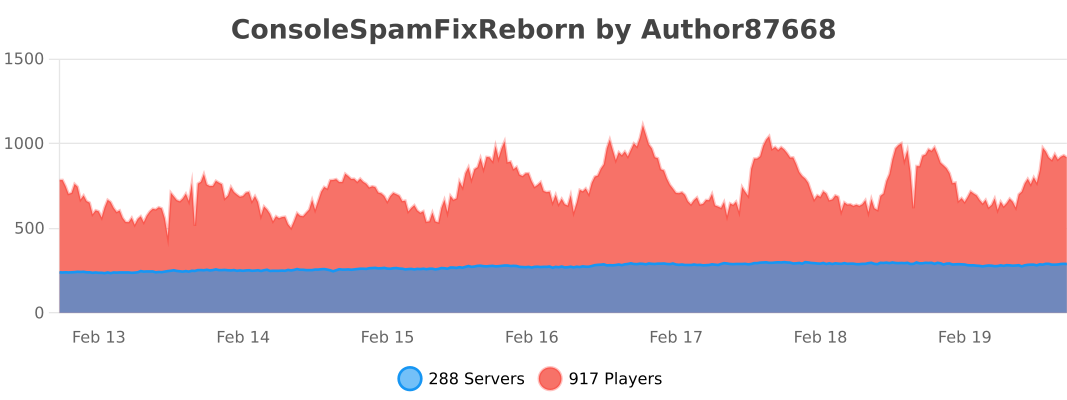](https://bstats.org/plugin/bukkit/ConsoleSpamFixReborn/24348)
##### Velocity
[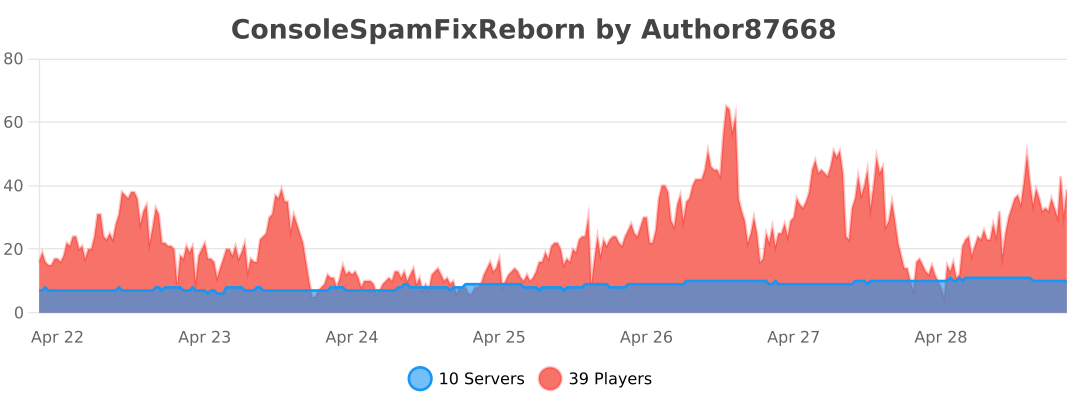](https://bstats.org/plugin/velocity/ConsoleSpamFixReborn/25291)
##### BungeeCord
[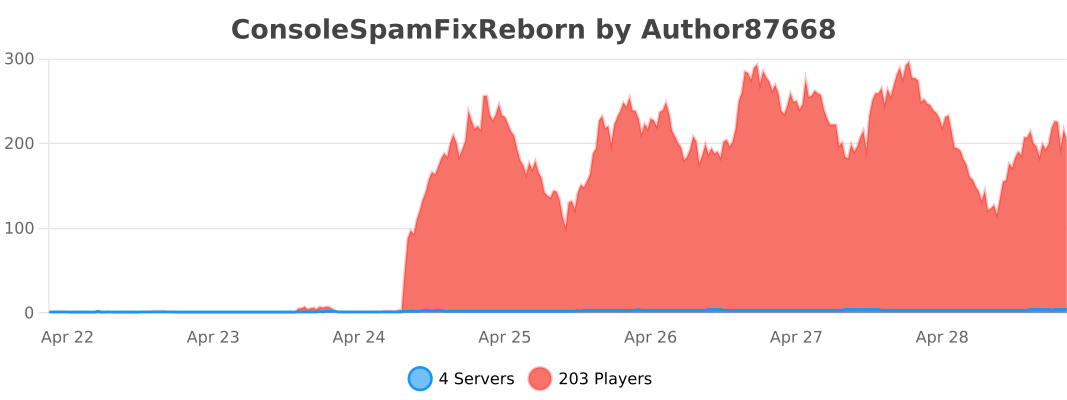](https://bstats.org/plugin/bungeecord/ConsoleSpamFixReborn/25292)
—
### *If you want to support my work, you can subscribe my [Patreon](https://www.patreon.com/Author87668/join) membership.*
Connection Guard
# Connection Guard – Anti-VPN and Geo-Blocker
### What is Connection Guard?
Protect your Minecraft server like never before with Connection Guard, the definitive solution for keeping unwanted players out. With robust **anti-VPN** detection and advanced **geo-blocking** capabilities, Connection Guard ensures your server stays secure, your community stays safe, and your players enjoy a smoother, bot-free experience.
### Links
– [Documentation](https://github.com/gerolndnr/connection-guard/wiki)
– [GitHub](https://github.com/gerolndnr/connection-guard)
– [Discord](https://discord.gg/GekQVPqsfS)
### Features
– Detect VPNs with **99.9% accurracy**
– completely **asynchronous** (no tps loss)
– checks **multiple vpn databases** (ProxyCheck, IP-API, …)
– strictness can be **customized** (block only when certain to block if it’s likely)
– custom actions (e.g. block the connection, notify staff, …)
– Support for Discord WebHooks
– Detect and Block over 200 countries
– `Whitelist` or `Blacklist` mode
– Customize the action: e.g. `KICK`, `NOTIFY_TEAM` or `DISCORD_WEBHOOK`
– Support for Discord WebHooks
– Detailed Connection Information
– IP address (and vpn and proxy information)
– Country (e.g. `US`, `CA`, …)
– City name (e.g. `Berlin`, `London`, …)
### Installation
Download the file and place it in the plugin directory!
ConditionalActions
# Commands
`conditionalactions.admin` is required to run commands (will most likely be changed)
– /ca reload
– /ca condition list
– /ca condition check
– /ca group list
– /ca group execute
– /ca execute
# Action types
`/ca execute ` and it’ll suggest all available actions with their arguments
You can also check the [code](https://github.com/Tanguygab/ConditionalActions/tree/master/src/main/kotlin/io/github/tanguygab/conditionalactions/actions/types) for all supported actions for now until I add a proper documentation.
The `bungeeplayer` & `bungeeconsole` actions are only available if you install the plugin on BungeeCord as well (a simple drag&drop should suffice)
# Default configs
## Commands
“`yml
mycoolcommand:
aliases:
– mycoolcmd
– coolcommand
– coolcmd
actions:
– “msg: Heya %player_name%! Cool command right?”
restart:
actions:
– “msg: %conditionalactions_args% %conditionalactions_args-size% %conditionalactions_arg-0% %conditionalactions_arg-1%”
– condition: “is_op”
deny:
– “msg: You don’t have the permission to run this command!”
– return
– condition: “%conditionalactions_args%!==”
success:
– condition: “%conditionalactions_arg-0% >= 1”
success:
– “msg: Restarting the server in %conditionalactions_arg-0% seconds!”
– “delay: %math_0_{conditionalactions_arg-0}*1000%”
deny:
– “msg: “%conditionalactions_arg-0%” is not a valid number!”
– return
– “group: restart”
“`
## Action groups
“`yml
restart:
– “broadcast: SERVER WILL RESTARTING IN 10 seconds!”
– “delay: 5000”
– “broadcast: SERVER WILL RESTARTING IN 5 seconds!”
– “delay: 1000”
– “broadcast: SERVER WILL RESTARTING IN 4 seconds!”
– “delay: 1000”
– “broadcast: SERVER WILL RESTARTING IN 3 seconds!”
– “delay: 1000”
– “broadcast: SERVER WILL RESTARTING IN 2 seconds!”
– “delay: 1000”
– “broadcast: SERVER WILL RESTARTING IN 1 seconds!”
– “delay: 1000”
– “broadcast: RESTARTING…”
– “console: stop”
test:
– “msg: Start”
– condition: “%player_name%==Tanguygab”
success:
– “msg: Hi me!”
– “msg: How’s it going?”
deny: “msg: Who are you? o_O”
– “msg: End”
“`
## Conditions
“`yml
conditions:
is_op: “%player_is_op%=yes” # simple conditions
is_admin: # OR checks
– “%player_is_op%=yes”
– “permission:group.admin”
– “permission:*”
has_money_and_vip: # AND checks
– – “%vault_eco_balance%>=1000”
– “permission:group.vip”
# alternatively:
is_admin: “%player_is_op%=yes || permission:group.admin || permission:*”
has_money_and_vip: “%vault_eco_balance%>=1000 && permission:group.vip”
“`