LiveMotdManager
# LiveMotdManager
**LiveMotdManager** is a multi‑platform Minecraft plugin that keeps your server list entry dynamic and engaging.
—
## ✨ Features
– **Dynamic MOTD**
Your MOTD can react to:
– Time of day
– Player counts
– TPS (server performance)
– Real‑world weather (via OpenWeather)
– Discord activity
– **Wide Platform Support**
– Spigot, Paper, Purpur, Folia (**1.16–1.21**)
– BungeeCord & Waterfall (**1.16+**)
– Velocity (**3.3.0+**)
– **Handy Commands**
– Reload or temporarily override the MOTD
– View debug info
– Force specific MOTD templates
– **Smart Update Checker**
On startup, the plugin checks GitHub for new releases and prints a download link if an update is available.
– **Open Source & MIT Licensed**
100% open source, licensed under MIT.
—
**Make your server list entry come alive with LiveMotdManager!**
Life Plugin
A Minecraft plugin that allows players to start out with 3 lives and every time the player dies they lose a life and if you kill another player you can gain a life if you lose all your lives you are banned for 24 hours, once the 24 hours are up you get a life and a chance at redemption.
/withdraw [Amount]
Command to withdraw lives, you cannot withdraw all your lives or more than your lives.
MiguLoginNext
# MiguLogin-Next
This is a next-generation version of [LibreLogin](https://github.com/kyngs/LibreLogin), continuing its development with new features, improvements, and bug fixes.
> Continuing the legacy of LibreLogin.
> The author kyngs asked me to upload the project without mentioning LibreLogin in the name for preventing confusion, soo here is the project with the name “MiguLogin-Next”!
# Quick information




## Basic set of features
– AutoLogin for premium players
– TOTP 2FA (Authy, Google Authenticator…) [details](https://github.com/MiguVerse/LibreLoginNext/wiki/2FA)
– Session system
– Name validation (including case sensitivity check)
– Automatic data migration for premium players
– Migration of a player’s data by using one command
– Geyser (Bedrock) support using [Floodgate](https://github.com/MiguVerse/LibreLoginNext/wiki/Floodgate)
## Considerations
– When using on proxy, you need to secure your limbo
## Platforms
– Velocity
– BungeeCord
– Paper
LibreLogin
LibreLogin is an open-source, multiplatform and a highly customizable authentication plugin with outstanding features and API.
**THIS PLUGIN REQUIRES JAVA 21 OR NEWER**
**A complete set of features, guides, and other things is available on the wiki!**
**>> [Installation Guide](https://github.com/kyngs/LibreLogin/wiki/Installation) <<**
## Features
- **Automatic Login for premium players**
Players can choose whether they want to auto-login or not.
You can choose to enable auto login for premium players on the register in the config.
- **TOTP 2FA**
LibreLogin is the only proxy authentication plugin on the market that offers 2FA via TOTP (Google Authenticator, Authy, etc.). This is a great choice if you want to make sure your accounts stay safe.
[See the wiki page.](https://github.com/kyngs/LibreLogin/wiki/2FA)
- **Bedrock Edition Support**
LibreLogin offers support for players connecting from Bedrock Edition via Floodgate. All players connecting via Floodgate will be exempt from authentication and handled similarly to Premium players. They however cannot execute most commands.
**As the only proxy authentication plugin, LibreLogin also supports Floodgate player linking.**
[See the wiki page.](https://github.com/kyngs/LibreLogin/wiki/Floodgate)
- **Name Validation**
- **Sessions**
Your players do not have to log in every time they join if they've used the same IP as the last time. You can configure the duration in which they are allowed to do this in the configuration.
- **Automatic and Manual Data Moving Between Names (Inventories, plugin data, etc.) in one command**
LibreLogin automatically detects when a player with enabled autologin has changed their name and automatically moves their stuff to their new nick. You can also initiate this process on any player via a command.
- **Load Balancing**
LibreLogin firstly connects players to limbo and when they authenticate they are sent to the lobby, chosen by the lowest players. (You can modify this using the API)
All servers are periodically pinged to verify whether they are online.
- **Vast API**
You can customize almost everything using the API, this makes LibreLogin easy to integrate into your network with minimal effort. Check the [docs](https://github.com/kyngs/LibreLogin/wiki/Basic-API-Information) for further details
- **Documented**
Most parts of LibreLogin's behavior are documented. See the wiki.
- **Velocity and Bungee support**
Spigot support is also planned.
- **Conversion from other plugins**
LibreLogin currently supports conversion from a lot of other systems, [check this page](https://github.com/kyngs/LibreLogin/wiki/Database-Migration#migrations-implemented). If you have another type of database, follow the guide linked.
- **RedisBungee**
LibreLogin has support for multiple-proxy setup via RedisBungee. This also applies to the Velocity version of RedisBungee.
- **Open-Source**
The plugin is and always will be completely open-source, so you don't need to be worried about malware or other naughties
LibertyBans
LibertyBans is the sparkling, extraordinary and brilliant weapon of punishment administration.
[Homepage]:https://img.shields.io/badge/-Home_Page-blueviolet.svg?logo=StarTrek&style=for-the-badge&logoColor=white
[Documentation]:https://img.shields.io/badge/-Documentation-blue.svg?logo=Wikipedia&style=for-the-badge&logoColor=black
[Discord]:https://img.shields.io/badge/-Discord-5865F2.svg?logo=discord&style=for-the-badge&logoColor=white
[Source]:https://www.gnu.org/graphics/agplv3-155×51.png

[![Homepage]](https://libertybans.org)
[![Discord]](https://discord.gg/3C4qeG8XhE)
[![Documentation]](https://docs.libertybans.org/#/Getting-Started)
[![Source]](https://github.com/A248/LibertyBans)
**Why?**
The existing punishment plugins all have their flaws. Either they are plagued with bugs and concurrency issues, or they are closed-source and pay-walled, or both.
None of the existing punishment plugins have a test framework which can compare to LibertyBans’ extensive automated testing. This means that many bugs are caught automatically and never make it into stable releases.
LibertyBans features a full-suite of punishment-related tools. It is a general-purpose punishment plugin with a focus on effective design, quality of experience, and unbeatable code quality.
LibertyBans is the best designed plugin to punish players. It can efficiently scale to large networks and operate on single servers with minimal resources.
**Features**
* Add and remove punishments:
* /ban, /ipban, /unban, /unbanip – bans or unbans a player or IP address
* /mute, /ipmute, /unmute, /unmuteip – mutes or unmutes a player or IP address
* /warn, /ipwarn, /unwarn, /unwarnip – warns or unwarns a player or IP address
* /kick, /ipkick – kicks a player or IP address
* Temporary versions of bans, mutes, and warns
* All player data is stored using UUIDs.
* List punishments:
* /banlist – shows all bans
* /mutelist – shows all mutes
* /history – shows all punishments for a player
* /warns – shows all warns for a player
* /blame – shows all the punishments a staff member has enacted
* Multiple means to block alt accounts:
* Automatic enforcement to block alt accounts. *By default, when using IP-bans, alts are automatically banned from joining if the main account is banned.* This behavior is configurable, and you can even increase the strictness of alt-checking.
* Manual /alts command – shows suspected alt accounts for a player.
* Alts notification on join – tells staff members when a player whose suspected alt is banned or muted.
* Exemption. For example, trainees cannot ban admins; admins cannot ban owners.
* Layouts & punishment templates. For example, the first mute for swearing lasts 10 days, the next is for 30 days, and the third mute is permanent. Supports calculating the reason, time, and even punishment type.
* Options and behavior are fully configurable. You can even tweak your connection pool and statement cache settings to fine-tune performance.
* The plugin is carefully designed to be performant and lightweight. It uses an efficient SQL schema which stores the raw bytes of UUIDs and IP addresses, rather than storing them as strings/text.
* Full multi-proxy and multi-instance support. You can place LibertyBans on the proxy if you use a single proxy, or on multiple backend servers.
### Commands, Permissions, Configuration
Everything is explained on the wiki: **[Link](https://docs.libertybans.org/)**
The wiki has a lot of information, including about the configuration.
* The configuration files are extensively commented and the options are explained in detail.
* If you update LibertyBans, your old configuration will be updated automatically if there are new options.
**Commands**
Run:
* /libertybans usage
to show all commands. When typing this into your console, leave off the slash.
When creating temporary punishments, the same command is used for permanent punishments. Simply add the time after the username:
* /ban Player1 30d This is a temporary ban
For an extended guide, see [this wiki page](https://docs.libertybans.org/#/Getting-Started).
**Design**
* Effective and lightweight. No complicated installation and avoids unnecessary features.
* Option to use local file-based database (HyperSQL), or remote database (MariaDB, MySQL, PostgreSQL).
* Enhanced database-oriented performance emphasising calculations in SQL. Low memory usage because punishments are stored almost completely in the database. Data is stored in minimal form as raw bytes instead of strings.
* Best practices for asynchronous calculations are followed. The performance cost of context switching is understood and avoided; the plugin does not blindly fire async tasks.
* Designed for high availability and concurrency. Minimal locking is employed while keeping state consistent; this is mostly realized through the fact that most plugin state is maintained in the database itself.
* Well-structured API providing a framework for other plugins to work with. An external [web interface](https://github.com/Dimitri-Bit/Liberty-Bans-Web) is maintained by Dmitri and it uses the API.
**Requirements**
* Java 17
Supported platforms:
* Bukkit / Spigot / Paper / Purpur (+Folia)
* BungeeCord / Waterfall
* Sponge
* Velocity
Compatibility with Geyser/Floodgate usernames. Platform forks supported where reasonable.
Due to 1.19+ chat signing, installing LibertyBans on a Velocity proxy requires [SignedVelocity](https://modrinth.com/plugin/signedvelocity) for mutes to work. Velocity users will need to install SignedVelocity on their proxy and backend servers, or switch to using LibertyBans on the backend servers.
**Installation**
LibertyBans will work out-of-the-box for most users.
If you’re running a proxy:
* When using a single proxy, it is recommended to install LibertyBans on the proxy itself.
* LibertyBans can also be installed on the backend servers if you are willing to configure multi-instance synchronization.
See also [this wiki page](https://docs.libertybans.org/#/Network-Installation) on proxy installation.
**External Connections**
When the plugin first starts, it downloads its internal dependencies. This is normal, and can take a couple of seconds the first time. Afterward, the plugin should start faster. The method used to download dependencies is just as secure as if the dependencies were shaded – the expected hashes of the dependencies are hard-coded, so if the downloaded dependency’s hash differs, it is not saved to the filesystem.
**Fun Facts**
* LibertyBans was first released on 4 July 2020, Independence Day in the United States of America.
* Updates are typically released on or shortly after major holidays or days of significance:
* 0.8.0 was released 11 September 2021.
* 0.8.1 was released 3 days after Thanksgiving.
* 1.0.0 was released 2 days after New Year’s.
* 1.0.1 was released 2 days after Valentine’s Day.
* 1.0.2 was released 4 July 2022, exactly 2 years after the first release.
* 1.0.4 was released 11 September 2022.
* 1.1.0-M1 was released on Christmas Day, 2022.
* 1.1.0-M2 was released 2 days after St. Patrick’s Day.
* 1.1.0-M3 was released 5 days after July 4.
* 1.1.0-RC1 was released 11 September 2023.
* 1.1.0-RC2 was released 29 February 2024.
* 1.1.0-RC3 was released 30 March 2025.
* 1.1.1 was released on 4 July 2025.
**Development Builds**
https://ci.hahota.net/job/LibertyBans/
**Reporting Bugs**
Please use Github issues: https://github.com/A248/LibertyBans/issues
LemonCore
### **Overview**
– **Lemoncore is a core plugin for Minecraft servers, designed to provide essential functionalities similar to EssentialsX, but with enhanced configuration options. It is compatible with Minecraft 1.21.x and is built to work across various server softwares.**
### **Features**
– Currently, Lemoncore provides the following commands:
“`
• /home: Teleport to your set home.
• /team : Manage your team.
• /tpa : Request to teleport to another player.
• /tpahere : Request another player to teleport to you.
• /spawn : Teleport to the server spawn.
• /help : Displays help information for Lemoncore.
• /discord : Displays the server Discord link.
• /lemoncore reload : Reloads the plugin’s configuration from config.yml.
“`
### **Configuration**
The config.yml file allows you to customize various aspects of the plugin. An example configuration is shown below:
> **
“`
YAML:
>
>
> discord-link: “https://discord.gg/yourserver”
>
“`
**
•
discord-link: Set this to your server’s Discord invitation link. This link will be displayed when players use the /discord
LeavePulse Agent
# LeavePulse Agent
LeavePulse Agent connects a Minecraft server to the LeavePulse ecosystem. It sends privacy-aware server telemetry, synchronizes whitelist data, and provides in-game workflows for verification and moderation.
Technical ids, release artifacts, and update channels may still use `verified` for compatibility.
## What it does
– Sends periodic metrics such as online players, max players, MOTD, favicon, and server/version information
– Can send real-time updates on join, leave, and activity events
– Syncs whitelist configuration and entries from LeavePulse
– Supports both kick and restrict enforcement modes for whitelist access
– Includes in-game tools to review, approve, and deny whitelist applications
– Lets players link their Minecraft account with a LeavePulse verification code in-game
– Tracks playtime and exposes placeholders for chat, scoreboards, and other integrations
– Supports update channels for stable, beta, and dev releases
## Notes
– Built for communities and servers using LeavePulse services
– Designed to be lightweight, configurable, and safe to run in production environments
– Some features depend on LeavePulse backend services being configured
LatencyWatch
# 📶 LatencyWatch
**Know your ping. Track the lag. Keep your server responsive.**
LatencyWatch is a lightweight, precise plugin designed to monitor player latency in real time, display ping values with clarity, and help server admins spot connection issues before they become gameplay problems.
Whether you’re running an SMP, PvP arena, or a community hub, LatencyWatch gives you the tools to keep your server smooth and your players informed.
—
## ✨ Features
– 📊 View your ping and other players pings with precision
– 📋 List all online players with their current latency
– 🔄 Reload configuration instantly with `/latencywatchreload`
– 🧠 Smart command system: `/ping`, `/pinglist`, and more
– ⚙️ Clean YAML config with customizable options
– 🧰 No performance impact, no external dependencies
—
## 💡 Why use LatencyWatch?
Because lag ruins gameplay, and guessing isn’t good enough. LatencyWatch doesn’t flood your chat or clutter your screen. It quietly delivers accurate ping data when you need it, where you need it.
Whether you’re troubleshooting a lag spike, checking your own connection, or monitoring your players, LatencyWatch makes latency visible and manageable.
—
## ✅ Tested & Supported
– 🧩 Works with Paper, Spigot, Purpur, Bukkit, Folia, BugeeCord, Velocity and Waterfall
– 🧪 Fully tested on Minecraft `1.18+`
– ☕ Requires **Java 17 or higher**
– 🔁 Plug, reload, monitor, no restart required
—
## 📄 License & Support
This project is released under the [MIT License](https://github.com/RickPerix/latencywatch/blob/main/LICENSE)
Need help or want to report an issue? Reach out on Discord: `https://discord.gg/b4MFEa7tkP`
—
Crafted with care by **RickPerix** 🛠
Enjoy LatencyWatch!
**Simple. Smart. Stable.**
LanServers
# LanServers
This is a small plugin that runs on all major Minecraft Servers.
The only feature is listing the server as a LanServer in the Multiplayer-Menu of Minecraft.
# Supported Servers
– Bukkit/Spigot/Paper 1.8+ (and Folia)
– Bungeecord 1.16+
– Velocity 3.0.1+
# What does it do exactly?
The same as the Minecraft Client when you open your world to LAN.
It sends every 1.5 seconds a special message with the server port and MOTD to `224.0.2.60` on port 4445.
`224.0.2.60` is a Multicast Address which means that everyone in your local network that wants
to get messages sent to `224.0.2.60` will get them like your Minecraft Client when you’re in the Multiplayer Menu.
That’s all it does, so compatibility should not break when updating to newer Server versions.
# Config
To keep the plugin small and working on all servers, there is no config file.
Instead, Java System Properties are used, which you can set in your server startup script
using `-Ddev.redstones.lanservers.setting=value` before the `-jar` argument.
| Java System Property | Description | Default Behaviour |
|——————————————|—————————————————|———————————-|
| `dev.redstones.lanservers.bindAddresses` | Comma separated list of IP addresses to send from | All interface addresses are used |
LANBroadcaster
# LANBroadcaster
[](https://discord.gg/5NMMzK5mAn) 
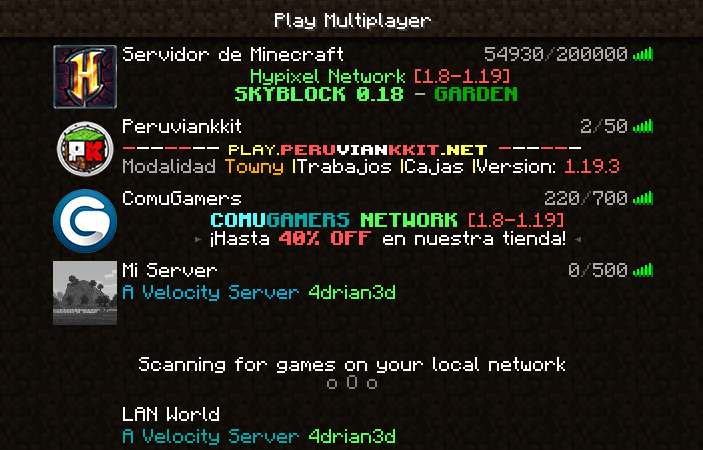
LANBroadcaster, originally created by [Ruan](https://gitlab.com/ruany/) allows a Minecraft
server to be broadcasted over the local area network and appear in the LAN server list without actually adding it.
## Why this version?
The original LANBroadcaster, by Ruan has support for Spigot and BungeeCord, bhopahk make its own fork with support for [Sponge](https://spongepowered.org/) and [Velocity](https://velocitypowered.com/),
however this version modularize the project and improves performance and code quality, as well as being upgraded to new platform versions.
[](https://www.bisecthosting.com/4drian3d?r=ModLANBroadcaster)
## Getting Started
LANBroadcaster can be downloaded from the versions tab [here](https://modrinth.com/mod/lanbroadcaster/versions).
Once it is downloaded, simply place it in the relevant plugins folder and start your server. No configuration is required.
> Note: To use LANBroadcaster with BungeeCord or Velocity, you do not need to install it on the servers itself. Only the proxy.
## Limitations
– The description field, when displaying the server in LAN, does not support components, so it does not support RGB colors or gradients