[Report a Bug][issue-bug-report]
·
[Request a Feature][issue-feature-request]
🌟 Give us a star — your support means the world to us!
> All information about this project can be found in our detailed [documentation][docs-thisproject].
Keep your staff informed about server state changes with real-time notifications using MiniMessage formatting.
## Features
– [x] **Ingame Notifiction**: Get chat messages about server changes
– [x] **Customize Messages**: Configurable messages ([minimessage](https://docs.advntr.dev/minimessage/index.html) supported)
– [x] **Velocity & BungeeCord support**
## Configuration
Here you can see the configuration file for the plugin. All possible options are explained in the comments.
“`yaml
# The date format pattern the notify plugin uses.
# For more information, see the official Java documentation: https://docs.oracle.com/en/java/javase/21/docs/api/java.base/java/text/SimpleDateFormat.html
date-format: dd.MM.yyyy HH:mm:ss
# Filter server states to notify about.
server-state-filter:
# server-state obviously sets the server state to filter for
– server-state: STARTING
# The message that is being sent to the permitted players goes here.
# Don’t get irritated by the |- format, it’s just a multiline string. You can also pass oneliners.
# Possible placeholders you can use here are:
# – : The group name the server belongs to
# – : The numerical id of the server
# – : The UUID of the server
# – : The state of the server after the update
# – : The IP that the server is running on
# – : The port that the server is bound to
# – : The amount of players currently online on the server
# – : The maximum amount of players that can join the server
# – : The date of the last update of the server
# – : The date of the initial update (creation) of the server
message: |- ⚡⚡ Information of Timestamp: State: Server-IP: Port: Players: /‘>Server updated its state to .
# Users will need this permission to receive the message. Leave it empty (just ”) to allow everyone to receive it.
permission: notify.receive.state-changed.starting
# You can add more server states to filter like this:
– server-state: AVAILABLE
# To design your own messages, we recommend using the minimessage web-ui: https://webui.advntr.dev/
message: |- ⚡⚡ Information of Timestamp: State: Server-IP: Port: Players: /‘>Server updated its state to .
# The default permission is notify.receive.state-changed.[server-state]
permission: notify.receive.state-changed.available
– server-state: STOPPING
message: |- ⚡⚡ Information of Timestamp: State: Server-IP: Port: Players: /‘>Server updated its state to .
# Here you can see that everyone will receive the message, as the permission is empty.
permission: ”
“`
## Contributing
Contributions to SimpleCloud are welcome and highly appreciated. However, before you jump right into it, we would like you to read our [Contribution Guide][docs-contribute].
## License
This repository is licensed under [Apache 2.0][license].


DEVELOPED BY NITROPLUGINS
Nexus Queue
🎉 GRAND OPENING: NexusDev Network!
Join our brand new Minecraft network!
Featuring cutting-edge custom gamemodes:
⚔️ Arc Raiders | 🏛️ Civ 7 | 💀 SMP Hardcore | 🤠 Wild West RP
Server IP:mc.nexusdev.cc
📋 Overview
Nexus Queue is purpose-built for networks that consistently reach their player capacity. Instead of forcing players to spam-reconnect or face repeated kick messages, Nexus Queue creates a fair, managed waiting system that respects both your players’ time and your server’s performance.
See it live on NexusDev Network! Our own server uses Nexus Queue to manage players across multiple high-demand gamemodes, proving its reliability in real-world scenarios.
⚡ How It Works
The system operates intelligently in the background:
Real-time monitoring — Continuously tracks available slots on your target servers
Automatic connection — Instantly moves the next player in queue when space opens
Priority support — VIP or donator ranks? They skip ahead automatically
Zero spam — No more connection spam or frustrated players hammering your server
💡 The result? A professional player experience that keeps your community happy and your server stable.
📸 See It In Action
Clean, informative queue display showing position, server, estimated time, and priority weight
Real-time queue information seamlessly integrated into gameplay
📦 Current Status
Version 1.0.1 is currently in active development, with Version 2.0 on the horizon bringing significant enhancements. The plugin is lightweight at approximately 3MB and comes as a unified JAR for both Velocity and BungeeCord — ensuring zero impact on your server’s performance.
Coming in Version 2.0: A dedicated Paper plugin to bridge proxy and Paper servers for seamless command execution. For persistent priority points across restarts, you can configure file-based storage or connect to a MySQL database.
✨ Features
🔌 Proxy-side queueing — Works entirely on your proxy layer (Velocity/BungeeCord)
🎯 Flexible queue modes — Per-target queues or single global queue
⭐ Priority tiers — Permission-based priority system for VIPs and staff

Neptune Core is a Velocity server plugin which provides many utility features for your server.
## Features
* Staff Chat
* Admin Chat
* Global Messaging System
* MOTD System
* Utility Commands (/lobby etc.)
* Social Spy
* Command Spy
* Maintenance System
* Player Balancer
and many more coming soon…
NatsBridge
# NatsBridge
**NatsBridge** is a Java library that connects your **Spigot**, **Velocity**, or **BungeeCord** plugins to a **NATS** server — easily and efficiently.
## 🚀 Features
* ✅ Shared NATS **connection** across plugins
* ✅ Supports **Spigot/Paper**, **Velocity**, and **BungeeCord**
* ✅ **High-performance Consumer API** for message handling
* ✅ Clean API to **publish** messages
* ✅ **Auto-reconnect** & error handling
* ✅ **YAML configuration**
* ✅ TLS & authentication support
* ✅ Sync & async message handling
## 📦 Setup
1. **Download** the JAR:
2. Drop it into your server’s `/plugins` folder.
3. Start the server. A `nats-config.yml` file will be generated.
// Async consumer (String) – more convenient!
api.subscribeStringSubject(“game.chat”, chatMessage -> {
// Directly receive as String – no need for manual conversion
broadcastToAllServers(chatMessage);
}, true);
“`
### Publish a message
Firstly you need to know when the connection is established.
There are 3 events for Velocity, Bungeecord and Spigot.
– VelocityNatsBridgeConnectedEvent
– BungeeNatsBridgeConnectedEvent
– SpigotNatsBridgeConnectedEvent
Something like
“`java
@EventHandler
public void onNatsBridgeConnected(SpigotNatsBridgeConnectedEvent event) {
//Do something here
}
“`
You just need to listen these events and the event is fire when the connection to NATS is up.
“`java
BungeeCordNatsPlugin.getNatsAPI().publishString(“subject”, “Awesome message”);
BungeeCordNatsPlugin.getNatsAPI().publishRaw(“subject”, [something that is byte[]]);
“`
## 📂 Configuration (`nats-config.yml`)
“`yaml
nats:
# List of NATS servers (can be a single server or a cluster)
servers:
– “nats://127.0.0.1:4222”
– “nats://nats-cluster.local:4222”
# Reconnection configuration
reconnect:
# Maximum number of reconnection attempts (-1 = unlimited)
max_reconnects: -1
# Delay between reconnection attempts (in milliseconds)
reconnect_wait: 2000
# Connection timeout (in milliseconds)
connection_timeout: 5000
“`
## 🔧 Commands
* `/nats help` – Show help menu
* `/nats status` – Check NATS connection status
* `/nats test ` – Send a test message
* `/nats reload` – Reload NATS configuration (planned)
Permission required: `natsbridge.admin`
## 🧩 Gradle
“`gradle
repositories {
maven {
name = “natsbridge-repo”
url = uri(“https://repo.nhsoul.fr/releases”)
}
}
dependencies {
//Use the latest version
//Select your platform
compileOnly(“fr.nhsoul.natsbridge:spigot:1.0.0”)
compileOnly(“fr.nhsoul.natsbridge:velocity:1.0.0”)
compileOnly(“fr.nhsoul.natsbridge:bungeecord:1.0.0”)
}
“`
## 🧩 Performance Considerations
The Consumer API approach offers several advantages:
1. **No reflection overhead**: Native performance for message handling.
2. **Type safety**: Use of standard Java interfaces.
3. **Explicit control**: You control exactly when and how messages are processed.
4. **Platform integration**: Easy access to platform-specific APIs (Spigot, Velocity, BungeeCord).
## ✅ Requirements
* Java 21+
* A NATS server
* Minecraft 1.20+ server (Spigot, Velocity, or BungeeCord)
## 🤝 Contributing
1. Fork this repo
2. Create a branch
3. Submit a PR – all contributions welcome!
Name Tag
A lightweight and highly customizable nickname plugin!
Supports 1.21.4-26.1.2
bStats:
What is Name Tag?
Name Tag is a nick plugin for Paper servers. It lets players fully disguise as another identity — changing their display name, skin, and optionally their UUID — with persistence across restarts, proxy network support, TAB integration, and automatic rewriting of death, advancement, and join messages.
Features
Feature
Description
Nick as Player
Fully disguise as another player’s name and skin with /nick <player> as <name>
Name-Only Nicking
Change just the display name with /nick <player> with_name <name>
Skin-Only Changes
Apply another player’s skin with /nick <player> with_skin <name>
Mineskin Support
Apply skins from Mineskin URLs or IDs with /nick <player> from_url <url>
Random Nicking
Generate a realistic random username via Lodestone’s cloud service, with legacy fallback
Persistent Storage
Local YAML, MongoDB, MySQL, or MariaDB — nicks survive restarts and re-apply on join
Proxy-Ready
Point all backends at a shared database and nick state follows players across BungeeCord, Velocity, or Waterfall
TAB Integration
Automatically updates the TAB plugin’s tab list when a nick is applied or reset
Message Rewriting
Death, advancement, join/quit messages, and commands all use the nicked name
UUID Spoofing
Optionally spoof the player’s UUID to match the nicked identity (experimental)
Working on a Scripted SMP? Do you want to nick new players with a random username?
You should try out Auto Nickname!
Name Tag includes an extensive API that allows developers to integrate Name Tag’s systems directly into their plugins.
Read our Documentation for usage details and examples.
Most of Lodestone’s plugins—including Name Tag—are completely free to use!
Please consider supporting development through Ko-fi or Paypal. It directly helps fund future projects.
A plugin for blocking nicknames and adding additional checks for privileged accounts.
– Supports Paper and BungeeCord
– Convenient declarative configuration
– Checks by IP, subnet, or virtual host
– Nickname blocking by exact match or regex pattern
– Reload with a single command: `/nameguard reload`
## Whitelist
All access rules are described declaratively in the `access-groups.yml` file.
“`yaml
# Group name. Can be anything and will be shown in logs if logging is enabled
group:
# If disabled, the group will be ignored
enabled: false
# Enable logging for failed join attempts
log-to-console: true
match:
# If enabled, any player will be checked against this group
everything: false
# If the nickname is in this list, the player will be checked against this group
nicknames:
– owner
– helper
# If the nickname matches at least one regex pattern from the list,
# the player will be checked against this group
patterns:
– “b[a4]d_?w[o0]rd”
“`
If a player is checked by a group and does not pass any access rule,
the join attempt is denied with the `kick-message`, and a corresponding
message is logged to the console if `log-to-console` is enabled.
If a player is checked by a group and passes at least one access rule,
the player is allowed to join, and all further checks are skipped.
The order in which groups are checked is determined by their order in the file.
MythicSkywars
# MythicSkyWars
A modern, high-performance SkyWars plugin built for Spigot and Paper servers, supporting Minecraft versions from 1.8 up to 26.1.2.
This project started as a hard fork of MythicSkywars but has evolved into a fully independent and heavily extended solution focused on performance, scalability, and modern features.
—
## ✨ Overview
MythicSkyWars is designed for both standalone servers and large proxy networks. It focuses on:
– Low resource usage
– Fast setup
– High configurability
– Seamless player experience
—
## 🚀 Core Features
– Multi-arena support with solo and team modes
– Full proxy compatibility (BungeeCord and Velocity)
– Advanced cage system with customizable spawn cages (including schematic cages via WorldEdit)
– Configurable chest loot system (basic, normal, overpowered + center variants)
– Voting system (time, weather, chest type, modifiers, health)
– Spectator mode with full controls
– Scoreboards with PlaceholderAPI support (5 different states)
– Kit system with in-game creation and voting
– Game events (EnderDragon, Wither, MobSpawn, CrateDrop, ChestRefill, DeathMatch, ArrowRain, AnvilRain, ShrinkingBorder, and more)
– Party system
– MySQL support
– Holographic leaderboards (DecentHolograms)
– Particle effects, projectile trails, taunts, kill/win sounds, glass colors
– Player statistics (wins, kills, losses, deaths, games played, XP, level, K/D, W/L)
– 100% configurable messages
—
## 🔥 MythicSkyWars Enhancements
### Gameplay & Systems
– **Rejoin System** — reconnect to active matches after disconnect (`/rejoin`)
– **Lucky Block Integration** — optional Lucky Block mode with NTD-LuckyBlock, custom drops, hand items, and dedicated menus
– **Prestige System** — multiple prestige tiers with requirements (level, kills, permissions), custom prefixes, and database tracking
– **Level & XP System** — full progression with configurable XP rewards per action, progress bars, level-up reward commands
– **Soul Well** — Hypixel-style soul well with animated spinning, rarity tiers (legendary/rare/common), soul currency
– **Team Balancing** — automatic distribution of unselected players across teams
– **Summoned Mob System** — mobs spawned via spawn eggs are friendly to the owner and their team, auto-target enemies
– **Water Portal Joining** — configurable water portal regions in lobby that auto-join players to games
– **Default Kit Files** — bundled starter kit configurations
– **Easy Arena Setup** — streamlined arena creation workflow
### Visual & UX Improvements
– **Chest Refill Visuals** — visual indicators with timers for chest refills
– **Lobby Enhancements** — hide join/quit/death messages, water portal system
– **Glass Color Options** — legacy-compatible cosmetics
– **Cosmetics Reorganization** — clean directory structure
### Backend & Developer Features
– **Config Auto-Merge** — safely syncs bundled config updates without overwriting existing values
– **MongoDB Migration** — import full player data from UltraSkyWars (kills, wins, XP, souls, levels, cosmetics, prestige)
– **Developer API Events** — SkyWarsDeathEvent, SkyWarsJoinEvent, SkyWarsKillEvent, SkyWarsLeaveEvent, SkyWarsWinEvent, SkyWarsMatchStateChangeEvent, SkyWarsVoteEvent, SkyWarsSelectKitEvent, SkyWarsSelectTeamEvent, SkyWarsReloadEvent, SkyWarsReloadPreLoadEvent, SkywarsGameEventTriggerEvent, SkywarsGameEventAnnounceEvent
### New Commands
| Command | Permission | Description |
|———|———–|————-|
| `/sw prestige` | `sw.prestige` | Open prestige selection menu |
| `/rejoin` | `sw.rejoin` | Rejoin previous match if still available |
| `/leave` | `sw.leave` | Leave current match (standalone) |
| `/sw soulwell` | `sw.admin` | Configure soul well location |
| `/sw migrateusw` | `sw.migrateusw` | Import stats from UltraSkyWars MongoDB |
### New Permissions
| Permission | Description |
|———–|————-|
| `sw.rejoin` | Use /rejoin command |
| `sw.leave` | Use /leave command |
| `sw.prestige` | Use prestige menu |
| `sw.soulwell` | Use Soul Well from options menu |
| `sw.migrateusw` | Run UltraSkyWars migration |
### New Placeholders (PlaceholderAPI)
| Placeholder | Description |
|————-|————-|
| `%swr_souls%` | Total souls |
| `%swr_soulwell_usages%` | Soul well spins |
| `%swr_soulwell_legendaries%` | Legendary drops received |
| `%swr_soulwell_rares%` | Rare drops received |
| `%swr_soulwell_souls_gathered%` | Souls collected from gameplay |
| `%swr_soulwell_souls_purchased%` | Souls bought with currency |
| `%swr_prestige_prefix%` | Prestige tier prefix |
| `%swr_prestige_id%` | Current prestige ID |
| `%swr_level_display_prefix%` | Combined level + prestige display |
| `%swr_players_playing_solo%` | Solo players currently in-game |
| `%swr_players_playing_team%` | Team players currently in-game |
| `%swr_players_waiting_solo%` | Solo players waiting |
| `%swr_players_waiting_team%` | Team players waiting |
### New Config Files
– **`levels.yml`** — XP rewards, level definitions, progress bar settings, prestige tiers, level-up rewards
– **`luckyblocks.yml`** — Lucky Block mode settings, custom drops, hand items, chest loot integration
1. Build or download the plugin jar
2. Place the jar into your `plugins` folder
3. Start the server to generate configs
4. Set lobby spawn with `/sw setspawn`
5. Create arenas and configure settings
6. Restart and enjoy
### Player Commands (`/sw …`)
| Command | Description |
|———|————-|
| `/sw join` | Join a SkyWars match |
| `/sw joinmenu [solo|team]` | Open the join menu |
| `/sw quit` | Quit from the current game |
| `/sw lobby` | Return to lobby |
| `/sw spectate [player/map]` | Spectate a game |
| `/sw stats [player]` | View player stats |
| `/sw top [stat]` | Display leaderboard |
| `/sw options` | Open options menu |
| `/sw prestige` | Open prestige selection menu |
| `/sw winsound` | Open win sound menu |
| `/sw killsound` | Open kill sound menu |
| `/sw glass` | Open glass color menu |
| `/sw taunt` | Open taunt menu |
| `/sw particle` | Open particle effect menu |
| `/sw projectile` | Open projectile effect menu |
| `/sw bypasslobbyslots` | Bypass lobby slot limits |
### Admin Commands (`/sw …`)
| Command | Description |
|———|————-|
| `/sw setspawn` | Set the lobby spawn |
| `/sw reload` | Reload SkyWars |
| `/sw start` | Force start a match |
| `/sw stat [player] [stat] [method] [amount]` | Modify player stats |
| `/sw clearstats [player]` | Clear a player’s stats |
| `/sw chestadd [type] [method] [%]` | Add items to chest loot |
| `/sw chestedit` | Edit chest loot in-game |
| `/sw updatetop` | Force update leaderboards |
| `/sw hologram [stat] [format]` | Add a hologram leaderboard |
| `/sw holoremove` | Remove closest hologram |
| `/sw soulwell` | Configure soul well location |
| `/sw lobbywaterportal` | Configure lobby water portals |
| `/sw migrateusw` | Import stats from UltraSkyWars MongoDB |
| `/sw send` | Send a player to a game |
| `/sw select` | Select an arena |
### Map Commands (`/swmap …`)
| Command | Description |
|———|————-|
| `/swmap create [name]` | Create a new map |
| `/swmap edit [name]` | Open map for editing |
| `/swmap save [name]` | Save an open map |
| `/swmap register [name]` | Register map for play |
| `/swmap unregister [name]` | Remove map from play |
| `/swmap delete [name]` | Delete a map |
| `/swmap list` | List available maps |
| `/swmap arenas` | Open Arena GUI |
| `/swmap spawn [type] [team]` | Add spawn (player/spec/deathmatch/look) |
| `/swmap chesttype [name]` | Toggle chest type (normal/center) |
| `/swmap checkchest` | Verify chest placements |
| `/swmap minimum [name] [num]` | Set minimum players |
| `/swmap name [name] [display]` | Set display name |
| `/swmap creator [name] [creator]` | Set creator name |
| `/swmap teamsize [name] [size]` | Set team size |
| `/swmap refresh [name]` | Reload map data file |
| `/swmap legacyload [name]` | Import legacy beacon-based map |
| `/swmap leave` | Leave map editor |
| `/swmap debug` | Debug map info |
### Kit Commands (`/swkit …`)
| Command | Description |
|———|————-|
| `/swkit create [name]` | Create kit from inventory |
| `/swkit update [name]` | Update kit with current inventory |
| `/swkit enable [name]` | Toggle kit enabled/disabled |
| `/swkit icon [name]` | Set kit icon to held item |
| `/swkit lockicon [name]` | Set locked icon to held item |
| `/swkit name [name] [display]` | Set display name |
| `/swkit lore [name] [line] [text]` | Set lore line (1-16 or “locked”) |
| `/swkit position [name] [pos]` | Set menu position (0-44) |
| `/swkit perm [name]` | Toggle permission requirement |
| `/swkit list` | List all kits |
| `/swkit load [name]` | Preview kit in inventory |
### Party Commands (`/swparty …`)
| Command | Description |
|———|————-|
| `/swparty create [name]` | Create a party |
| `/swparty invite [player]` | Invite a player |
| `/swparty accept` | Accept invite |
| `/swparty decline` | Decline invite |
| `/swparty leave` | Leave party |
| `/swparty disband` | Disband party |
| `/swparty info` | View party info |
| `/swparty name [name]` | Change party name |
—
## 🔑 Permissions
### Group Permissions
| Permission | Description |
|———–|————-|
| `sw.*` | All SkyWars permissions |
| `sw.admin` | All admin commands |
| `sw.maps` | All map commands |
| `sw.kits` | All kit commands |
| `sw.parties` | All party commands |
| `sw.player` | All player commands |
### Player Permissions
| Permission | Description |
|———–|————-|
| `sw.join` | Join games |
| `sw.joinmenu` | Use join menu |
| `sw.quit` | Quit games |
| `sw.leave` | Use /leave command |
| `sw.rejoin` | Use /rejoin command |
| `sw.spectate` | Spectate games |
| `sw.stats` | View stats |
| `sw.top` | View leaderboard |
| `sw.prestige` | Use prestige menu |
| `sw.soulwell` | Use Soul Well |
| `sw.soulwell.xezbethluck` | Soul well luck bonus |
| `sw.votemenu` | Open vote menu |
| `sw.chestvote` | Vote on chest type |
| `sw.healthvote` | Vote on health |
| `sw.timevote` | Vote on time |
| `sw.weathervote` | Vote on weather |
| `sw.modifiervote` | Vote on modifier |
| `sw.winsound` | Win sound menu |
| `sw.killsound` | Kill sound menu |
| `sw.glass` | Glass color menu |
| `sw.taunt` | Taunt menu |
| `sw.projectile` | Projectile effect menu |
| `sw.particle` | Particle effect menu |
| `sw.colorchat` | Use color codes in chat |
| `sw.signs` | Break/place SkyWars signs |
| `sw.vip1` – `sw.vip5` | VIP multiplier tiers |
| `sw.kit.[filename]` | Unlock specific kits |
| `sw.pareffect.[name]` | Unlock particle effects |
| `sw.proeffect.[name]` | Unlock projectile effects |
| `sw.glasscolor.[name]` | Unlock glass colors |
| `sw.killsound.[name]` | Unlock kill sounds |
| `sw.winsound.[name]` | Unlock win sounds |
| `sw.taunt.[name]` | Unlock taunts |
### Admin Permissions
| Permission | Description |
|———–|————-|
| `sw.setspawn` | Set lobby spawn |
| `sw.reload` | Reload plugin |
| `sw.start` | Force start match |
| `sw.stat` | Modify player stats |
| `sw.clearstats` | Clear player stats |
| `sw.chestadd` | Add chest loot |
| `sw.chesttype` | Change chest type |
| `sw.updatetop` | Update leaderboards |
| `sw.migrateusw` | Run UltraSkyWars migration |
| `sw.send` | Send player to game |
| `sw.select` | Select arena |
| `sw.allowcommands` | Use commands while in-game |
| `sw.admin.joinBypass` | Bypass full game restrictions |
| `sw.alterlobby` | Modify lobby |
| `sw.opteleport` | OP teleport |
| `sw.partychatspy` | Spy on party chat |
This project originates from MythicSkywars. All original code remains under its respective license. New modifications and additions are maintained independently by the Mythical team.
1. **Almost 100% Configurable**
Most settings are customizable, allowing you to tailor the plugin to fit your exact needs.
2. **Create Custom Groups**
Enables you to create custom groups, assigning specific permissions and roles to different player groups.
3. **Permission Per Player**
Allows for individual permissions per player, so you can assign special access rights to specific players.
4. **SubGroups**
Supports creating sub-groups that inherit certain permissions or have unique roles within a primary group.
5. **Live Updates**
Changes are applied instantly without requiring a server restart, so permissions and settings can be adjusted during gameplay.
6. **Colored Chat**
Enables color-coded messages in chat, adding a visual element to identify or highlight specific messages or roles.
7. **Basic Rights**
Provides a foundation of default permissions to simplify setup for standard roles and access levels.
8. **Auto Config Updater**
Automatically updates the configuration file when the plugin is updated, ensuring compatibility with the latest features.
___
» All permissions follow the same schema
/permission group add
/permission group create
/permission group delete
/permission group edit
/permission group remove
/permission reload
/permission user add
/permission user clear
/permission user info
/permission user remove
/permission user set
___
– [MultiPerms on SpigotMC](https://www.spigotmc.org/resources/multiperms-bukkit.111992)
– [MultiPerms on bStats](https://bstats.org/plugin/bukkit/MultiWorld/15446)
– [MultiPerms on Modrinth](https://modrinth.com/plugin/multiperms)
___
1. **Download the Latest Jar File**
Go to the [Modrinth Page](https://modrinth.com/plugin/multiperms) to download the needed version of the MultiPerms plugin and any other required plugins.
2. **Put Both Plugins in Your “Plugins” Folder**
Ensure both the MultiPerms and FacilisCommon plugins are placed in your server’s `plugins` folder.
3. **Restart the Server**
Restart your Minecraft server to load the plugins and apply the changes.
4. **Enjoy!**
You’re all set to use MultiPerms! Enjoy managing multiple groups on your server.
**With this plugin your minimap will never be confused which world you’re in. [A more in-depth explanation can be found in the wiki](https://github.com/turikhay/MapModCompanion/wiki/How-it-works).**
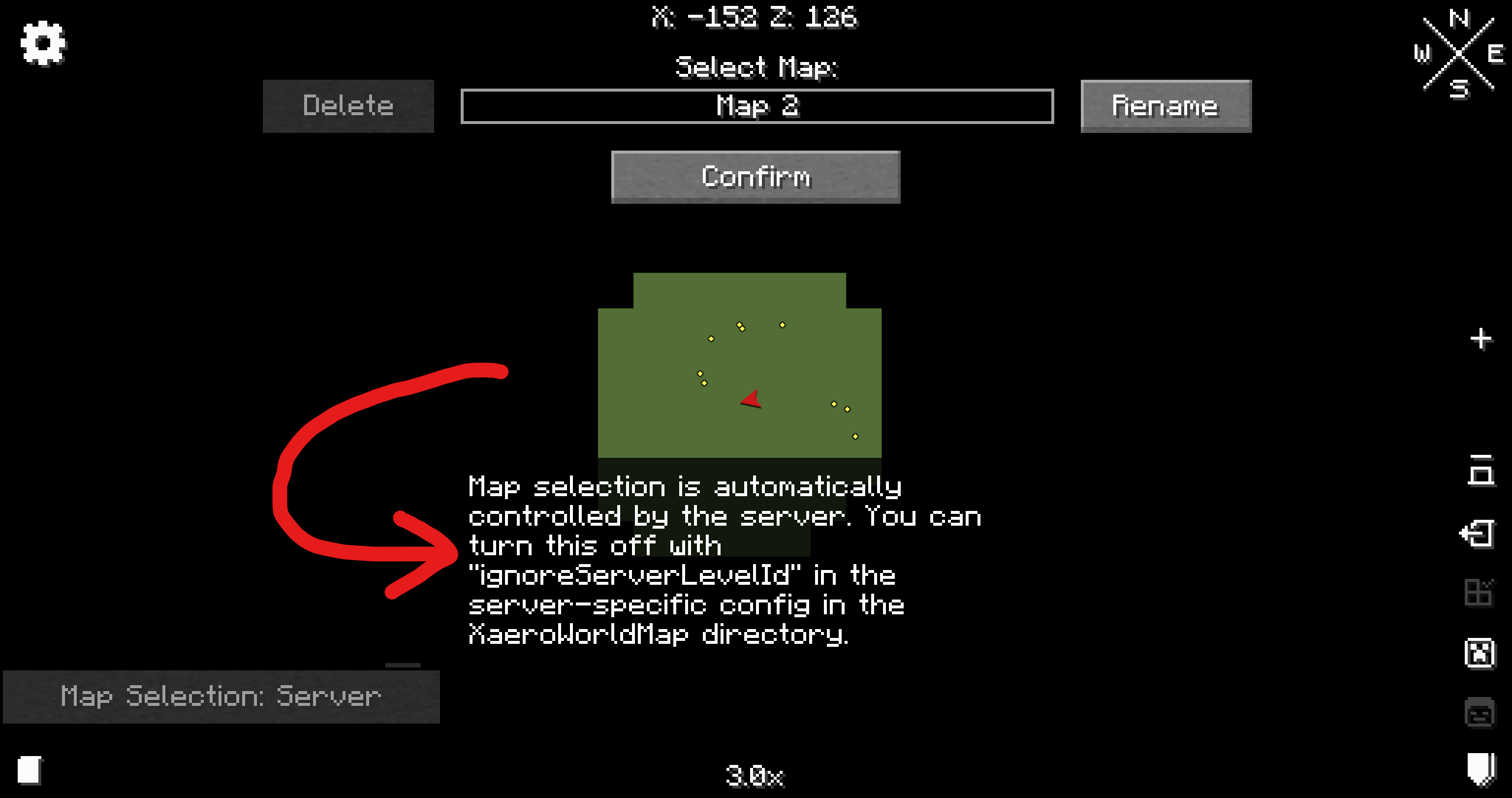
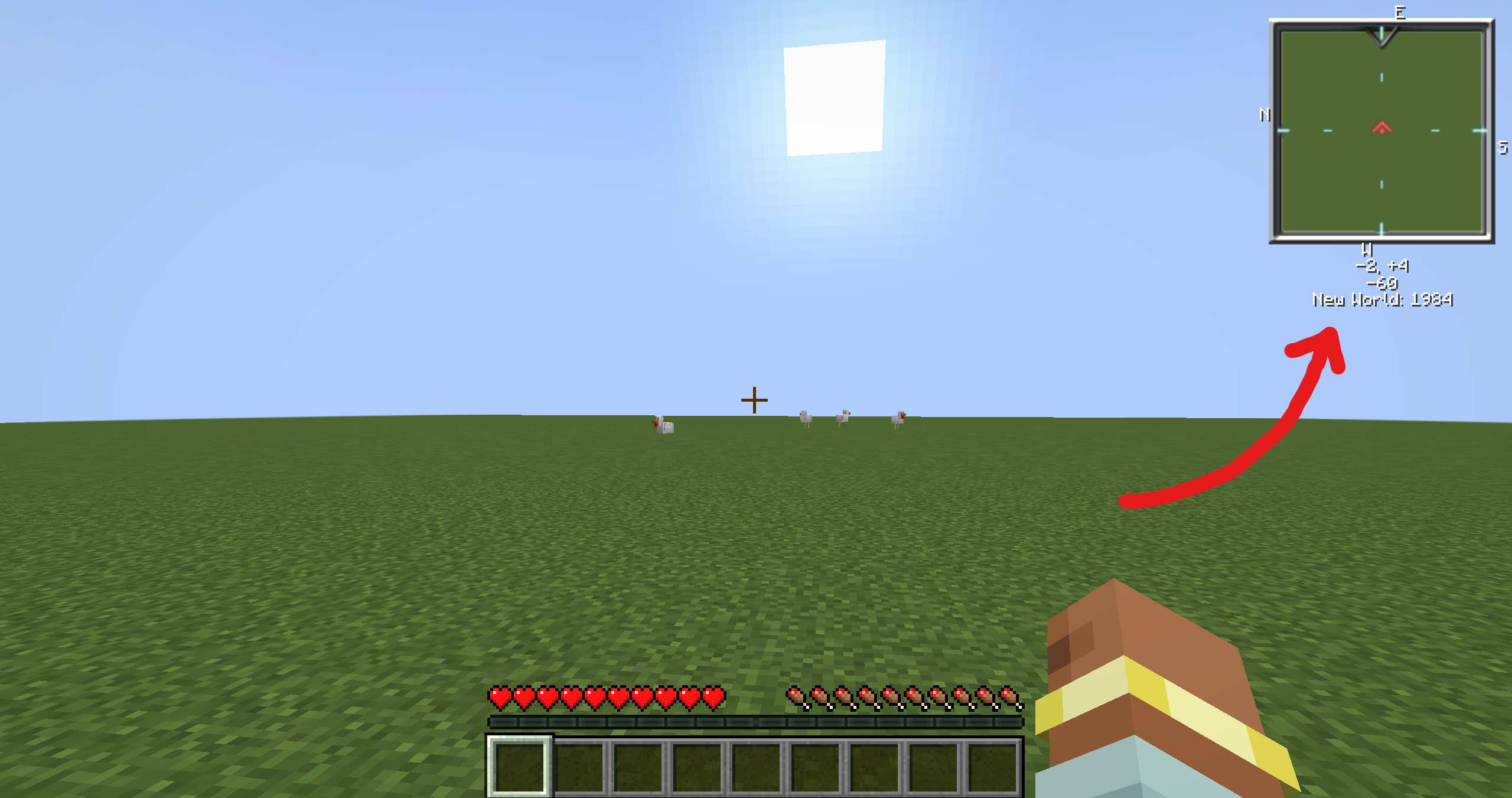
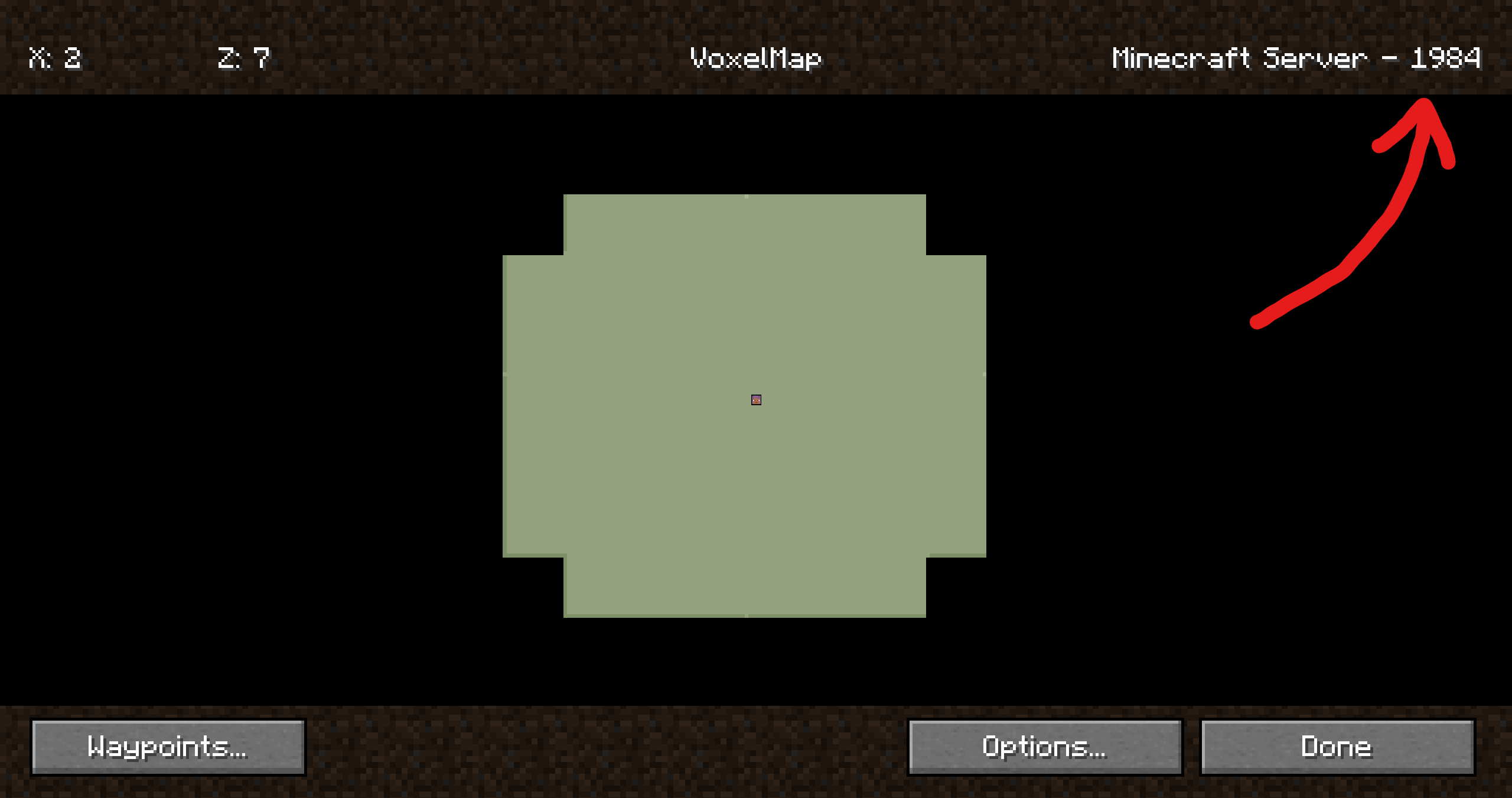
How it should look like
| Mod | Screenshot |
| —-|————|
| Xaero’s World Map | |
| VoxelMap | |
| Xaero’s Minimap | See Xaero’s WorldMap |
| JourneyMap | It just works 😄 |
Companion plugin for
[Xaero’s Minimap]
(and their [World Map][Xaero’s World Map]),
[JourneyMap] and
VoxelMap (both [old][VoxelMap (old)] and [updated][VoxelMap-Updated]).
Provides a way for these mods to identify worlds on BungeeCord/Velocity servers.
It’s recommended to install this plugin on a fresh server, otherwise **existing map data**
(waypoints, map cache, etc.) **may no longer be visible to some players**. Fortunately,
[there are ways to restore it](https://github.com/turikhay/MapModCompanion/wiki/Restore-map-data).
It’s worth mentioning that the plugin doesn’t affect in-game progress.
This plugin was inspired by @kosma’s [worldnamepacket],
which supported Velocity, Fabric and Spigot at the time of writing.
If you have any questions, please [join my Discord][Discord].
[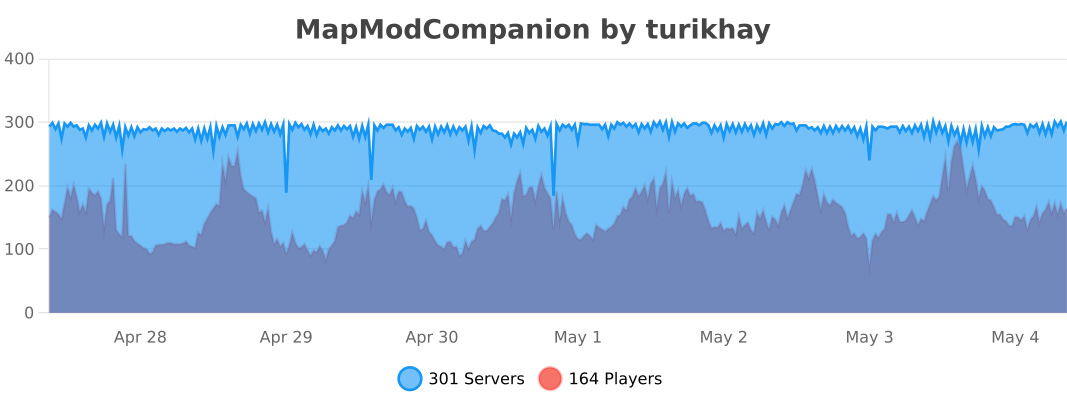](https://bstats.org/plugin/bukkit/MapModCompanion/16539 “MapModCompanion on bStats”)
[Folia](https://papermc.io/software/folia) is supported, but isn’t tested thoroughly. Please report if the support is broken.
## Installation
ℹ️ Plugin must be installed on every downstream (backend) server in your network. Simply installing it on the proxy side (BungeeCord/Velocity) isn’t enough. To ensure compatibility, you need to install the plugin on both the proxy server (BungeeCord/Velocity) and each of the backend servers (Spigot/Paper).
1. Download the latest release
2. Put each file into the corresponding plugins folder
3. That’s it. No configuration is required. You can restart your servers now.
## Configuration
The configuration file is stored at `plugins/MapModCompanion/config.yml` for both Spigot and BungeeCord.
Velocity uses `plugins/mapmodcompanion/config.toml`.
The configuration file reloads automatically if it’s modified.























 |
|
 |
|