Personalized Favicon
# Personalized Favicon



[](https://modrinth.com/plugin/personalized-favicon)
[](https://www.spigotmc.org/resources/38285)
[](https://hangar.papermc.io/freddi/personalized-favicon)
[](https://discord.gg/freddi)
The Personalized Favicon plugin allows you to customize your server’s favicon and takes advantage of MongoDB for multi-proxy capabilities. With this plugin, server owners can add a personalized touch to their servers, making them stand out and creating a more engaging experience for players.
## Features
* Customize your server’s favicon with unique images.
* Utilize MongoDB integration for multi-proxy functionality.
* Create distinct favicons for different server instances, making them easily recognizable.
* Seamless integration with popular Minecraft platforms.
* Simple and intuitive commands to manage your server’s favicon.
* Lightweight and resource-friendly for optimal server performance.
## Commands & Permissions
| Command | Permission | Description |
| ——- | ———- |———————————————-|
| `/pf` | `personalizedfavicon.command` | Shows the help menu |
| `/pf reload` | `personalizedfavicon.command.reload` | Reloads the plugin configuration |
|`/pf clear` | `personalizedfavicon.command.clear` | Clears the Personalized Favicon Database |
## Download
Plugin jars are available in the [Releases](https://github.com/frederikheinrich/personalized-favicon/releases) section,
on [Modrinth](https://modrinth.com/plugin/personalized-favicon),
[SpigotMC](https://www.spigotmc.org/resources/38285/),
and [Hangar](https://hangar.papermc.io/Freddi/personalized-favicon).
[](https://github.com/frederikheinrich/personalized-favicon/releases)
[](https://modrinth.com/plugin/personalized-favicon)
[](https://www.spigotmc.org/resources/38285/)
[](https://hangar.papermc.io/Freddi/personalized-favicon)
Parties

# Parties
**Parties** is an advanced plugin for Minecraft servers that allows the creation of parties (groups/clans/guilds) on your server.
Everything is configurable and modular, if you don’t want a feature, just disable it (it won’t have a bad impact on the server).
## General Features
* 100% configurable
* **Censor system** for a lot of features (regex based)
* Commands are configurable
* **Placeholders system**
* Make custom placeholders for external use
* Scoreboard (via PAPI) supported
* Sync data between Spigot and BungeeCord
* Data sharing configurable
* Automatic update old configurations
* Support for HEX colors of MC 1.16+ (&#ff0000)
* Support for offline players (**LastLoginAPI** required)
## Party Features
* **Chat** dedicated to the party
* **EXP system**
* Give a level to each party and let them level up
* Levels are completely customizable and optional
* Obtain exp by killing normal mobs or via API
* **Fixed** parties
* Permanent parties that don’t require a leader
* Useful for reigns, clans or factions of a server
* A customizable **list** of every party
* Choose the sort system
* You can filter or hide some parties
* Fully customizable **ranks** (roles)
* You decide every rank of a party
* Every rank have their own party permissions
* Every rank have their own rank placeholder
* Set a limit number of members
* **Tag** system
* Set an unique tag for the party
* Party **color**, choose or achieve their own color
* Party **description**
* Party **MOTD**
* Member nicknames
* **Invite**, **ask** or **join** a party with commands
* **Teleport** command to tp party members to you
* Protect your party with a **password** or just join others with a command
* **Open/close** command to allow other users to join
* Party **delete/rename** for admins/users
* Ignore/disable notification commands
* Server join/leave member message
* **Auto** perform leader executed commands
* **Friendly fire** protection
* You can set it globally or toggleable with a command
* **Home** and **sethome** system
* **Kills counter** for each party
* **Follow party** feature, whenever a player change the world/server, the party will follow him
## External Features
* JSON messages supported
* Asynchronous to avoid server lag
* API for developers
* Handle custom events via Bukkit, Bungee or Velocity
* Handle parties/players data via API
* Statistics system (bStats)
* Databases supported: YAML, H2, MariaDB, MySQL, PostgreSQL and SQLite
* Redis support via RedisBungee plugin
* Plugins supported
* **AdvancedBan & BanManager**: Auto kick banned users or prevent chat if muted
* **BedWars1058**: Join into the minigame with the party
* **BungeeChat**: Prevent chat if the player is muted
* **DungeonsXL**: Use Parties system instead of their one
* **Dynmap**: Create a mark for each party home
* **EssentialsX**: Save back location for teleport commands
* **EssentialsChat**: Use Parties placeholders in EssentialsChat
* **GriefDefender & GriefPrevention**: Give claim permissions to the entire party
* **LastLoginAPI**: Support for offline players
* **Magic**: Prevent friendly fire damage with spells
* **Marcely’s Bedwars**: Join into the minigame with the party
* **MMOCore**: Use Parties system instead of their one
* **OpenAudioMc**: Support Parties chat filter
* **PlaceholderAPI**: Use PAPI placeholders inside Parties and viceversa
* **Plugily Projects**: Minigame plugins support Parties
* **PremiumVanish**: Support for BungeeCord vanish
* **Quality Armory**: Support friendly fire protection with weapons
* **Quests**: Share quest progress with your party
* **RedisBungee**: Redis support
* **Screaming BedWars**: Automatically follow leader on minigame join
* **ShowItem**: Show items in party chat
* **Skript**: Dedicated skripts
* **TNTRun_Reloaded**: Use Parties system instead of their one
* **Unite**: Support Parties as abstract party API
* **Vault**: Give a price to each command
PAPIProxyBridge

GitHub — Discord
PAPIProxyBridge is a library bridge plugin you install on both your backend and proxy servers that allows proxy plugins to format text with PlaceholderAPI placeholders.
## For server owners
This is a library plugin intended for use with plugins that implement its API. There is nothing to configure.
Install the latest version of the plugin alongside the [PlaceholderAPI plugin](https://www.spigotmc.org/resources/placeholderapi.6245/) on your Spigot (1.16.5+) or the [PlaceholderAPI mod](https://placeholders.pb4.eu/) on your Fabric (1.19.3+) server, then install the plugin on your BungeeCord or Velocity proxy server.
Note this plugin is not a replacement for PlaceholderAPI. You still need to install PlaceholderAPI on your Spigot/Fabric server.
## For developers
PAPIProxyBridge exposes a cross-platform API to let you format text with PlaceholderAPI placeholders.
Adding the library to your project
PAPIProxyBridge is available on `repo.william278.net` ([view javadocs here](https://repo.william278.net/javadoc/releases/net/william278/papiproxybridge/latest)). First, add the maven repository to your `build.gradle`:
“`groovy
repositories {
maven { url ‘https://repo.william278.net/releases/’ }
}
“`
Then add the dependency:
“`groovy
dependencies {
implementation ‘net.william278:papiproxybridge:1.6’
}
“`
Example usage
The `PlaceholderAPI` class exposes the API for formatting placeholders. At the moment, only singleton non-bracketed placeholders are supported (more in the future).
Get an instance of the class with PlaceholderAPI.getInstance(), then use the `#formatPlaceholders` method to format a string with placeholders on a player (specified with UUID for cross-platform simplicity).
The method returns a [CompletableFuture](https://www.baeldung.com/java-completablefuture) (since we don’t want to lock threads while the proxy networks with players on the backend) that you can use to accept the formatted string.
“`java
// Format a string with placeholders
final PlaceholderAPI api = PlaceholderAPI.createInstance();
final UUID player = player.getUniqueId();
api.formatPlaceholders(“Hello %player_name%!”, player).thenAccept(formatted -> {
player.sendMessage(formatted);
});
“`
Never invoke `#join()` on calls to `#formatPlaceholders`; this is unsafe.
PAPIProxyBridge caches resolved requests for 30000 milliseconds (30 seconds), to avoid causing excessive traffic over your server’s network channels. You can adjust how long to cache requests for using the `PlaceholderAPI#setCacheExpiry(long)` method.
There also exists `#formatComponentPlaceholders`. This method allows you to supply a string containing placeholders and receive an adventure component containing the formatted text, which may contain formatting and chat events.
PacketEvents
Resources
– [Read documentation](https://packetevents.gitbook.io/)
– [Getting Started](https://packetevents.gitbook.io/docs/getting-started)
– [JavaDocs](https://packetevents.github.io)
– [Releases](https://github.com/retrooper/packetevents/releases/)
– [GitHub](https://github.com/retrooper/packetevents/releases/)
– [Modrinth](https://modrinth.com/plugin/packetevents)
– [SpigotMC](https://www.spigotmc.org/resources/packetevents-api.80279/)
– [Development Builds](https://ci.codemc.io/job/retrooper/job/packetevents)
– [Statistics](https://bstats.org/plugin/bukkit/packetevents/11327)
Sponsors
Thanks to the following sponsors for supporting this project:


Credits
Here are some projects that we are heavily inspired by, thus we have integrated
small portions of their code into our work.
[Protocol Documentation for the Minecraft Java Edition](https://wiki.vg/Protocol)
[ViaVersion](https://github.com/ViaVersion/ViaVersion)
[ProtocolSupport](https://github.com/ProtocolSupport/ProtocolSupport)
[adventure](https://github.com/KyoriPowered/adventure)
[MCProtocolLib](https://github.com/GeyserMC/MCProtocolLib/)
### Statistics
[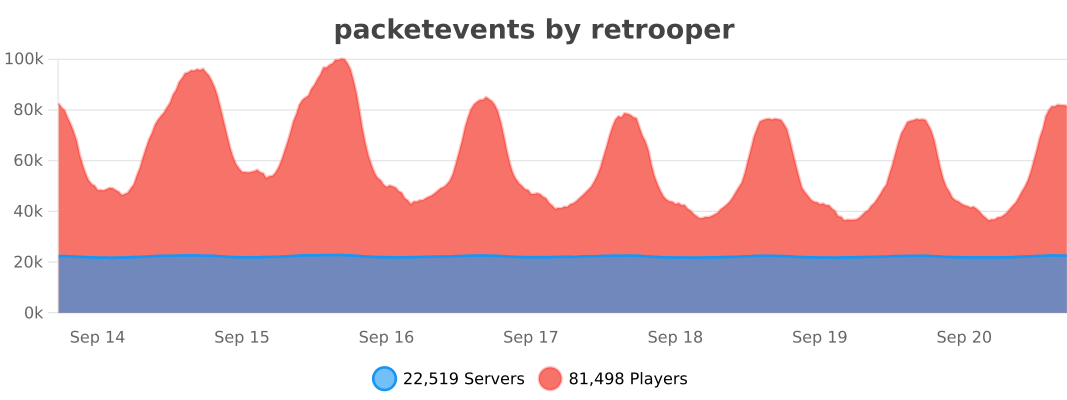](https://bstats.org/plugin/bukkit/packetevents/11327)
Packet Auth




# Packet Auth
Packet Auth is a project that provides additional security for your server by authenticating players with a token sent via a custom plugin message.
## Features
– Secure authentication with custom plugin messages
– Customizable configuration options
Enjoy your secure server with Packet Auth!
OriginBlacklist
Features
– Origin based blacklisting
– Client brand based blacklisting
– Username based blacklisting
– IP based blacklisting
– Modular multi-platform support
– JSON5 based configuration
– Kick message customization
– Blacklist MOTD customization
– MiniMessage and legacy formattings supported
– Plugin update checker
– Send blacklist logs to a webhook
– Ingame blacklist management commands
– Blacklist sharing via EaglerXServer routes
– Reverse blacklist (whitelist)
– ~~Subscribe to an auto-updating blacklist~~
Download
The latest release can be found at https://github.com/WebMCDevelopment/originblacklist/releases/latest/
Building
“`sh
$ git clone https://github.com/WebMCDevelopment/originblacklist
$ cd originblacklist
$ gradle wrapper
$ ./gradlew shadowJar
“`
Origami
# Origami
Origami lets you run other jar files inside of your server or proxy, letting you do things like running a lobby inside your proxy server, instead of buying separate hosts.
Note that any running servers you add using Origami will share resources with the parent server – But you may not always need all resources for something like Velocity, allowing you to use spare resources for low-intensity servers like a small lobby.
For support join the [Starshooter](https://discord.gg/dQGaXgxMpg) discord server.
## Installation:
Download and add the Origami jar file to the `plugins` folder on your server, and the Origami folder will be generated inside the plugins folder when you load the server.
## Troubleshooting:
If Origami fails to load or to run jar files, your server host may block plugins from running terminal commands. There isn’t currently any sort of workaround for this other than switching host, though there may be a fix in the future.
If you have any other issues please join the [Starshooter](https://discord.gg/cFXPSPCfsw) discord server and ask for help in the bug reports channel.
## Setup:
To create a program to run within a server, create a new folder e.g. `Lobby` inside of the `plugins/Origami/programs/` folder, and place the jar file you want to run in there.
You should name the jar file `executable.jar` for now, but this can be changed later. For now, boot up the server and let the files generate.
## Configuration:
The origami.yml file, generated inside of the `plugins/Origami/programs/[name of your program]` folder upon running the server, can be used to change various features of the program.
In this file, you can toggle:
– If players with the permission `origami.command` should be able to run the command `/origami [name of program] command [command]` to run commands on the program
– If the program’s output should be displayed in the server console alongside the main console output
– Startup arguments for the jar (here you can do things like add Aikar’s flags if you are running a Minecraft server)
– The name of the jar file to use
– The stop command for the server – “NONE” simply kills the server (for Minecraft servers it is recommended you set this to ‘stop’)
If you experience any issues create an issue on the [github page](https://github.com/cometcake575/Origami/), or message me on my discord, `cometcake575`
## Donate
[ ](https://ko-fi.com/cometcake575)
OneVersionRemake
# OneVersionRemake
OneVersionRemake is a simple BungeeCord and Velocity plugin originating from the original plugin [OneVersion] by johnnywoof.
It has been recoded from scratch to bring Velocity support alongside other improvements and new features.
## Features
– Set a list of Protocol Versions that should be able to join your network.
Any Client using a version not defined in the config will be denied access with a customizable kick message (Supports 1.16+ HEX colours).
– Define a MOTD, Player count text and Player count hover for Clients using not allowed versions.
– `{version}` and `{clientVersion}` to display the supported Versions and the client’s version respectively.
OneVersionRemake uses an external JSON file to find the MC version to display for a specific protocol.
## Formatting
OneVersionRemake uses the popular MiniMessage formatting to allow formatted text to display.
The MOTD and Kick message allows the usage of Gradients and 1.16+ HEX colours.
Check the [wiki] to find more information about available options.
## External Connections
OneVersionRemake may establish connections towards external sites on startup for different purposes:
### bStats
The plugin may connect to [bStats](https://bstats.org) to submit anonamous statistics to it.
You may disable this by disabling bStats in the global config located at `plugins/bStats`
You can find the statistics of OneVersionRemake under the following links:
– [BungeeCord][bstats-bungee]
– [Velocity][bstats-velocity]
### Versions.json
The plugin will connect to an external URL to retrieve the default content of its `version.json` file.
This will only happen when the `versions.json` doesn’t exist, or when `UpdateVersions` is set to `true` in the config.yml
Depending on what Version of OneVersionRemake is used will a different URL be accessed:
– v3.11.0 and newer: https://andre601.ch/oneversionremake/protocol_versions.json [[Source][protocol-versions]]
– v3.9.0 – v3.10.0: https://andre601.ch/oneversionremake/versions.json [[Source][versions]]
– v3.8.2 and older: https://raw.githubusercontent.com/Andre601/OneVersionRemake/master/versions.json [[Source][versions-old]]
[oneversion]: https://github.com/johnnywoof/OneVersion
[wiki]: https://ovr.andre601.ch/config
[bstats-bungee]: https://bstats.org/plugin/bungeecord/OneVersionRemake/10340
[bstats-velocity]: https://bstats.org/plugin/velocity/OneVersionRemake/10341
[protocol-versions]: https://codeberg.org/Andre601/website/src/branch/main/docs/oneversionremake/protocol_versions.json
[versions]: https://codeberg.org/Andre601/website/src/branch/main/docs/oneversionremake/versions.json
[versions-old]: https://github.com/Andre601/OneVersionRemake/blob/master/versions.json
OneTimePack
[](https://saic.one/discord) [](https://www.codefactor.io/repository/github/saicone/onetimepack) [](https://github.com/saicone/onetimepack)
### **Download & Install**
* Click on download button.
* Select the most apropiated download for your server.
* Go to your proxy server (Bungeecord, Waterfall or Velocity).
* Put the downloaded .jar into /plugins folder.
### **Requirements**
* Minimum Java 17.
### **About OneTimePack**
If you have mutliple servers in a proxy with same resource pack you probably experienced the annoying situation where you already downloaded or denied the resource pack, but when you move to other server, the resource pack request window appears again.
OneTimePack plugin acts like a filter in your proxy (bungeecord, waterfall or velocity) server to avoid double sending the same resource pack.


### **The plugin don’t work?**
If you have any issue with the plugin, please report in the Github Page:
[https://github.com/saicone/OneTimePack/issues](https://github.com/saicone/OneTimePack/issues)
### **Frecuent Problems:**
**1. The resource pack is the same in the servers, but it keep re-send to players**
Change pack comparator in settings.yml file, so you can use PROMPT comparator if the resource pack has the same prompt message everywhere or ANY comparator if you have only one resource pack in your network.
**2. The resource pack is not being send to players**
Set `Send-Invalid` option to `true` on plugin settings.yml file.
**3. The plugin is not working with ItemsAdder**
Set `apply-during-chunk-load-phase` option to `false` on ItemsAdder config.yml file.
NullBrand
# NullBrand
**NullBrand** is an ultra-lightweight proxy plugin for **Velocity** that removes default proxy branding and provides a clean, configurable MOTD with full HEX color support.
Designed to be minimal, fast, and invisible.
[](https://client.teronastudios.com/)
[](https://discord.com/invite/88avyryBgt)
—
## ✨ Features
– 🔒 **F3 Branding Override**
– Replace default proxy branding
– Fully configurable
– Supports legacy (`&`) and HEX colors
– 📝 **Custom MOTD**
– Single or multi-line MOTD
– HEX (`#RRGGBB`) and legacy color support
– Applied instantly on ping
– 🔁 **Reload Command**
– Reload configuration without restarting
– Command: `/nullbrand reload`
– Permission-based
– ⚡ **Extremely Lightweight**
– No schedulers
– No background tasks
– No reflection
– Minimal memory usage
—
## 📦 Requirements
– **Velocity** 3.3.0+
– **WaterFall, BungeeCord** 1.16+
– **Java** 17+
—
## 📂 Installation
1. Download the latest `NullBrand.jar`
2. Place it in your Velocity `plugins/` folder
3. Start the proxy once to generate the config
4. Edit `config.yml` to your liking
5. Reload using `/nullbrand reload`
—
## ⚙️ Configuration (`config.yml`)
“`yml
# —————————————————
# NullBrand Configuration
# Lightweight MOTD system
# —————————————————
# Enables debug logging
debug: false
# —————————————————
# MOTD SETTINGS
# —————————————————
motd:
# Enable MOTD control
enabled: true
# Active profile
profile: “default”
# Favicon file inside /plugins/NullBrand/favicons/
favicon: “test.png”
# —————————————————
# MOTD PROFILES
# —————————————————
# NOTE: Hover will only work on Proxies, and it does not support HEX Colors!
profiles:
# Global fallback profile
global:
lines:
– “&7Welcome to our server”
– “&fHave fun!”
# Default server MOTD
default:
lines:
– “&5Null&dBrand”
– “&7This is line 2”
hover:
enabled: false
lines:
– “&7Welcome to &5Null&dBrand”
– “&7Running powerful infrastructure”
# Example event profile
event:
lines:
– “&6Special Event Live!”
– “&eJoin today!”
hover:
enabled: true
lines:
– “&6Limited time event”
– “&eDon’t miss it!”
“`