VelocityCoolList
### [Hangar page](https://hangar.papermc.io/atikiNBTW/VelocityCoolList)
VelocityCoolList is a simple and easy-to-use plugin for Minecraft Velocity servers that allows you to create a whitelist based on nicknames.
## Commands and permissions
The main command is “`/vclist“`, it shows you information about VelocityCoolList, below are its arguments:
| Argument| Description | Permission |
|———|——————————————-|—————|
| enable | Enables whitelist. | vclist.admin |
| disable | Disables whitelist. | vclist.admin |
| add | Add player to the whitelist. | vclist.manage |
| remove | Remove player from the whitelist. | vclist.manage |
| list | Gives you a list of whitelisted players. | vclist.manage |
| reload | Reload plugin. | vclist.admin |
| clear | Clears the whitelist. | vclist.manage |
| status | Get the status of the plugin. | vclist.admin |
Aliases: “`/vcl“`, “`/velocitycoollist“`
## Colors and formatting
This plugin supports MiniMessage modern formatting, which allows you to make gradients and many other things.
Here is what this formatting supports, its documentation is in config and [here](https://docs.advntr.dev/minimessage/format.html#standard-tags)!
  
Velocity Commands
# Velocity Commands
**Velocity Commands** is a powerful and fully customizable command system for the **Velocity proxy**.
It allows server owners to create their own commands using a simple configuration file — no coding required.
Create custom chat commands, automate actions, broadcast messages, run console commands, and much more across your entire network.
**Documentation:** https://velocitycommands.dannb.online/
**Discord:** https://discord.gg/v5hU7kBp2S
—
# ✨ Features
### Fully Custom Commands
Create your own commands using a simple `commands.yml` configuration file.
### Multiple Command Types
Velocity Commands supports several command behaviours:
– `message_self` — send a message to the player executing the command
– `message_other_player` — send a message to another player
– `broadcast` — broadcast a message to the entire proxy
– `console_command` — execute a command from the console
Find information on command types here: [https://velocitycommands.dannb.online/command-types/message-self](https://velocitycommands.dannb.online/command-types/message-self)
—
### 🔄 Hot Reloading
Add, remove, or modify commands **without restarting your server**.
—
### 🎯 Custom Command Parameters
Create dynamic commands with parameters such as:
“`
/msg
/punch
“`
Supported parameter types include:
– `player`
– `string`
– `word`
– `greedy_string`
Find more information on custom parameters here: [https://velocitycommands.dannb.online/getting-started/command-syntax-and-parameters](https://velocitycommands.dannb.online/getting-started/command-syntax-and-parameters)
—
### 🎨 Chat Formatting
Velocity Commands supports:
– **MiniMessage formatting**
– **Legacy colour codes (`&6`, `&a`, etc)**
—
### 🔗 Automatic Link Detection
Links in messages are automatically converted into **clickable chat links**.
—
### 🔊 Command Sounds
Play sounds when commands are executed to provide feedback to players.
—
### ⚡ Run Commands Anywhere
Commands can execute:
– as the **player**
– as the **server console**
– on the **Velocity proxy**
– on **backend servers** (Spigot, Paper, Purpur, etc)
—
### 🔐 Permission Support
Restrict commands with permissions so only certain players can use them.
You can also define **view permissions** so only certain players receive broadcasted messages.
—
### 📦 Built-in Placeholders
Velocity Commands includes several built-in placeholders, such as:
– `%player_name%`
– `%player_ping%`
– `%server_online_players%`
– and more!
These allow you to create dynamic and interactive commands.
Find all available base placeholders here: [https://velocitycommands.dannb.online/getting-started/placeholders](https://velocitycommands.dannb.online/getting-started/placeholders)
—
# 📖 Documentation
Full documentation can be found here:
https://velocitycommands.dannb.online/
—
# 💬 Support
If you need help, have suggestions, or want to report a bug, join the Discord:
https://discord.gg/v5hU7kBp2S
—
# 🚀 Example
Example command configuration:
“`yaml
punch:
type: “broadcast”
aliases: [“broadcast”]
command: /punch [otherPlayerName:player] [reason:greedy_string]
message: “[PUNCHED] %player_name% has punched %otherPlayerName% for the reason of %reason%”
permission: “velocitycommands.punch”
view_permission: “velocitycommands.view”
enabled: true
“`
This would allow players to run:
“`
/punch
“`
—
# ❤️ Why Velocity Commands?
Velocity Commands makes it easy to build powerful commands for your network without writing any code.
Perfect for:
– network utilities
– moderation tools
– roleplay commands
– announcements
– automation
– server quality-of-life improvements
VelocityCommandForward
# VelocityCommandForward
**Forward commands from backend to proxy!**
## ✨ Features
* Custom command.
* Custom message.
* Customize commands to be sent silently (without sending messages or console logs).
* Players and console can execute proxy commands (sends a packet to the proxy to execute either as player or console).
## 📥 How to install? / Installation / Setup
Very simple, download both Velocity and Paper plugin and upload to their designed servers (proxy/backend).
1. Turn off your proxy (Velocity) and backend (Paper) server.
2. Download Velocity and Paper version plugin.
3. Drop both plugin files (for your server version) into the `plugins` folder.
4. Start your server.
## 💡 Notes
* Configuration only generates for backend server!
## ❓ Use case for this?
* My use case was very niche, I have a discord command that can run minecraft commands (if player is online) and
the issue was that the discord bot was running on backend server, and so I decided to make a plugin to run proxy
commands, such as `/skin`.
* Another common use case is when you install the TAB plugin on Velocity and need to send commands from the backend server to the proxy server, such as `/btab scoreboard` to toggle TAB’s scoreboard. While executing it manually works fine, if you use custom items from other plugins that are bound to this command, the command may fail to execute. In such cases, simply relying on this plugin’s commands can resolve the issue of TAB commands not working.
## 🕹️ Command usage
Command name can be changed in the backend plugin configuration:
“`yaml
custom-command: proxyexec
“`
| command | description | permission |
|————————|——————————————————————————————————|———————————–|
| `/proxyexec reload` | Used to reload plugin config. Changing `custom-command` requires a server restart. | velocitycommandforward.admin (op) |
| `/proxyexec ` | Forward commands to the proxy. Example: `/proxyexec tab reload` executes `/tab reload` on the proxy. | velocitycommandforward.send |
In the examples I changed the command to `proxy`, I didn’t set it as default because I was worried that some other plugin could use this command already.

## Executing in console
If you execute the command in the console, you won’t get any output, and instead it’s going to show up in the proxy server logs.
There must be at least one online player to be able to send command packet to the proxy (that’s how plugin messaging channels work between backend and proxy).
Backend server.

Proxy server.

## 📄 Default configuration
Changing `custom-command` requires a server restart.
“`yaml
# VelocityCommandForward
# Command for forwarding commands to proxy.
# You need to restart the server for the changes to apply.
custom-command: proxyexec
# Here you can specify root commands that will not send log and message.
filtered-commands:
– example_command
# {command} = The command that was sent by the sender
# {sender} = The player who sent the command
# If set to ”, no message will be sent.
messages:
reload: ‘&aPlugin messages and filters have been reloaded!’
command-sent-as-player: ‘&2Command sent to proxy &7=> &a/{command}’
command-sent-as-console: ‘&2Command sent as console to proxy &7=> &a/{command}’
no-online-player: ‘&cThere must be at least 1 online player to be able to execute proxy console commands!’
console-log: ‘[{sender}] Sending command packet to proxy => /{command}’
velocity-log: ‘[{sender}] Received proxy command packet => /{command}’
“`
## ✅ Requirements
* Velocity plugin was built with `Java 17` and Paper plugin is `Java 21`.
* Compatible with versions 1.20.6 and above. Since the plugin uses Brigadier (added in 1.20.6) to build commands, servers running lower versions will encounter errors.
VelocityChat
# VelocityChat
– [中文](https://github.com/MapleDust/VelocityChat/blob/v1.8/README.md)
– English
A Cross-server chat plugin for Velocity proxy
## Features
– Cross-server chat
– (configurable, default true) Enable color code
. check [Minecraft Wiki](https://minecraft.wiki/w/Formatting_codes) for
more information
, use `&` instead of `§` in game.
– `/vchat local` Send local message (to current server), alias (configurable) `/lc`.
– `/vchat broadcast` Send global message, alias (configurable) `/br`.
– Message of player joined, left and switch server.
– (configurable, default false) Send sample players when client refreshing multiplayer games.
– (configurable, default false) Show all proxy players on tab list.
– (configurable, default true) enable command `glist`.
– (configurable, default true) enable default global chat.
– (configurable) Send local message if chat message is starts with matched string.
– (configurable) translations
## Files
Locate in `plugins/VelocityChat`
### Configuration `config.toml`
– See in the file
### Langs
#### Default `langs/default/*.properties`
– The default language file is now forced to refresh
#### Custom `langs/custom/*.properties`
– You can replace any default translation here.
Some of the translations:
– Fallback chat format:`qu_an.chat.message.chat.default=`
– Server exclusive chat format:`qu_an.chat.message.chat.server.=`
– Examples:
– `qu_an.chat.message.chat.server.lobby=§8[§r{0}§8|§r{1}]§r<{2}§r> {3}`
– `qu_an.chat.message.chat.server.survival=§8[§r{0}§8]§r<{2}§r> {3}`
– Use fallback chat format if missing.
– Server name:`qu_an.chat.server.name.=`
– Examples:
– `qu_an.chat.server.name.lobby=Lobby`
– `qu_an.chat.server.name.survival=§aSurvival Server`
– Use server id if missing.
VelocityBlockVersion
VelocityBlockVersion






A simple Velocity plugin to whitelist/blacklist versions from connecting to your network. This let’s you block or allow certain versions.
## Features
* Whitelist/blacklist versions from connecting.
* Custom disconnect message.
## Documentation
Visit the [wiki](https://docs.hyper.lol/plugins/velocityblockversion/about/) for help.
## License
This plugin is released under GNU General Public License v3. See [LICENSE](https://github.com/hyperdefined/VelocityBlockVersion/blob/master/LICENSE).
VelocityAutoBackup
# VelocityAutoBackup
is a comprehensive plugin for the Velocity proxy server, designed to provide a fully automated, flexible, and secure backup solution. With direct integration into Google Drive, this plugin ensures all your critical server data is stored safely off-site and is accessible at any time.
This plugin is specifically designed to work with personal Google accounts, utilizing a unique authorization flow to bypass common technical limitations.
### ✨ Key Features
**_Flexible Scheduling_** ⏰: Configure multiple backup times within a single day through the config.yml. You can schedule backups to run twice, three times, or as often as you need, complete with timezone settings for precise scheduling.
**_Instant Manual Backups_** ⚡: With the /backup-now command, administrators can trigger a full backup process at any moment without waiting for the schedule. This feature is perfect before performing maintenance or significant server changes.
**_Dynamic File Naming_** 📝: Take full control of your backup file naming. Use placeholders like {server_name} and {timestamp} with a customizable date format (e.g., yyyy-M-d–HH-mm) to produce organized and easily searchable filename.
**_Full Google Drive Integration_** ☁️: Backups, compressed into a .zip format, are automatically uploaded to a specific folder in your Google Drive. The plugin supports the use of a personal Google account after completing a secure, one-time authorization process.
**_Reliable Anti-Loop Logic_** 🛡️: Built with a smart mechanism to automatically exclude its own directory from the backup process, preventing “backup loop” issues that can cause file sizes to grow uncontrollably.
[How to setup VelocityAutoBackup](https://github.com/DeluzeKitsuu/VelocityAutoBackup/blob/main/SETUP.md)
## Configuration
All settings are managed in `/plugins/velocityautobackup/config.yml`.
“`yaml
# A list of daily backup times in “HH:mm” format.
backup-times:
– “02:00”
– “14:00”
# The timezone for the schedule.
timezone: “UTC”
# The ID of the Google Drive folder where backups will be uploaded.
google-drive-folder-id: “PASTE_YOUR_FOLDER_ID_HERE”
# The name of the credentials JSON file.
credentials-file-name: “credentials.json”
# The server name to be used in the backup filename.
server-name: “proxy”
# The format for the backup filename.
# Use {timestamp} and {server_name}.
backup-file-name: “Backup-{server_name}-{timestamp}.zip”
“`
## 💻 Permissions
| Command | Description | Permissions |
| ————- | ————————– | —————————————– |
| `/backup-now` | Force Backup. | `velocityautobackup.command.backupnow` |
## 📝 Licence
This project is licensed under [MIT](LICENSE).
Velocity Whitelist
# Velocity Whitelist
This is a Velocity plugin designed to manage a Minecraft whitelist using MySQL/MariaDB as the backend storage. Unable to find a plugin that met my exact requirements, I decided to adapt this one to suit my needs.
The project is based on [MySQLWhitelistVelocity by moesnow](https://github.com/moesnow/MySQLWhitelistVelocity) version 1.2.0.
## Installation
1. Download the latest release from the [Releases](https://github.com/rathinosk/VelocityWhitelist/releases) page.
2. Place the JAR file in the `plugins` directory of your Velocity proxy.
3. Start or Restart the proxy.
## Configuration
The plugin uses a configuration file (`config.properties`) located in the `plugins/velocitywhitelist` directory.
### Default Configuration
“`properties
# Whitelist Status
enabled: false
# Enable Debug Messages
debug: false
# MySQL settings
host: localhost
user: username
password: strongpassword
database: velocity
port: 3306
table: g_whitelist
# Kick message
message: Sorry, you are not in the whitelist.
“`
### Configuration Options
– `enabled`: Set to `true` to enable the whitelist.
– `host`, `user`, `password`, `database`, `port`, `table`: MySQL database connection details.
– `message`: Kick message displayed to players not in the whitelist.
## Commands
# Basic Commands
– `/vwl add `: Add a player to the whitelist.
– `/vwl del `: Remove a player from the whitelist. (with DB autocomplete)
– `/vwl list `: Lists players matching search criteria. (min 2 characters)
# Admin Commands
– `/vwl enable`: Enable the whitelist.
– `/vwl disable`: Disable the whitelist.
– `/vwl reload`: Reload the config.properties.
– `/vwl debug `: Turn debug messages on or off.
## Permissions
– `velocitywhitelist`: Required to use the basic whitelist commands.
– `velocitywhitelist.admin`: Required to use whitelist admin commands.
## Usage
1. Configure the MySQL connection details in the `config.properties` file.
2. Start the proxy.
3. Use the `/vwl` command to manage the whitelist.
## Issues and Contributions
[](https://forthebadge.com)
If you encounter any issues or have suggestions for improvement, please open an issue or submit a pull request on the [GitHub repository](https://github.com/rathinosk/VelocityWhitelist).
Velocity WebServer
🧩 WebServer
WebServer is a lightweight and simple HTTP server plugin for Velocity proxies.
It allows you to host a small website directly from your proxy without using external web servers.
Perfect for:
server status pages
landing pages
maintenance pages
API endpoints (future-ready)
✨ Features
🌐 Built-in HTTP server
⚡ Lightweight & fast
📁 Serves static files (HTML, CSS, JS, images)
🛠 Automatically creates default website
🔧 Configurable port
📦 No external dependencies
🔌 Designed for Velocity
📂 File Structure
After first launch:
velocity/
└─ WebServer/
├─ config.yml
└─ web/
├─ index.html
├─ style.css
└─ logo.png
You can fully replace the contents of the web folder with your own website.
⚙️ Configuration
port: 8080
Restart the proxy after changing the port.
🚀 Getting Started
1. Drop the plugin into your plugins folder
2. Start Velocity
3. Open your browser and go to: http://your-server-ip:8080
If the page opens — the plugin is working correctly.
🧠 Notes
Only static content is supported for now
Designed to be simple and secure
More features may be added in future updates
🛠️ Compatibility
Velocity 3.x
Java 17+
Velocity Web API
# Velocity Web API


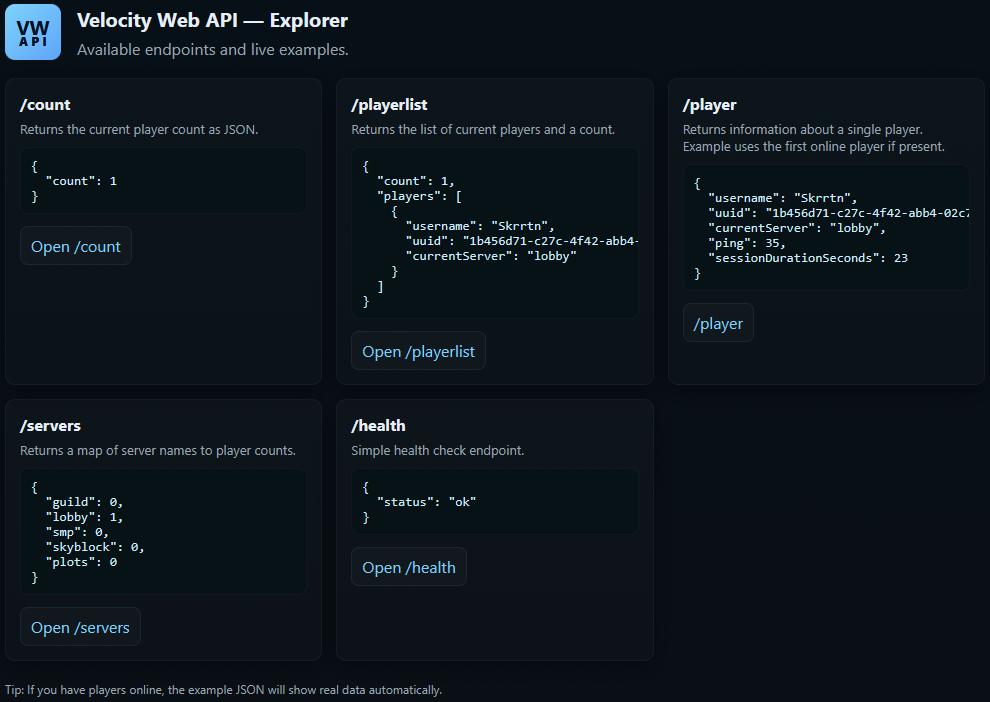
Lightweight HTTP API for Velocity proxies. Expose player lists, per-server counts, per-player details, etc. Ideal for websites, bots or other monitoring applications. I built it for my own uses, but it might help someone else out too.
## Quick Install
– Drop the compiled plugin JAR into your Velocity `plugins/` folder.
– Start (or restart) your proxy; the plugin will create its data folder and a `config.cfg` (if missing) in the plugin data directory.
## Configuration
– The plugin creates a `config.cfg` in its data folder on first run. Available keys:
– `port` : port the HTTP server listens on (default `25576`).
– `bindAddress` : interface/address to bind the HTTP server (default `0.0.0.0` to listen on all IPv4 interfaces; set to `127.0.0.1` for local-only access).
– `checkUpdates` : enable automatic Hangar update checks (default `true`).
– `snapshotUpdates` : include snapshot/unstable updates in checks (default `false`).
– `debugEnabled` : show debug messages (`logger.debug`) in the proxy console when `true` (default `false`).
– `allowedOrigins` : CORS allowed origins for HTTP API access (comma-separated, or * for all) (default `*`).
## Tested With
– Velocity 3.x (expects `velocity-api` on the runtime classpath)
## Endpoints
All JSON endpoints return `Content-Type: application/json; charset=utf-8` unless otherwise noted.
– `/`
– Serves the embedded `index.html` (browser-friendly).
– Example URL: `http://localhost:25576/`
– `/playerlist`
– Purpose: list connected players with basic metadata and a total count.
– Example URL: `http://localhost:25576/playerlist`
– Sample response:
“`json
{
“count”: 2,
“players”:
[
{“username”:”Alice”,”uuid”:”…”,”currentServer”:”lobby”},
{“username”:”Bob”,”uuid”:”…”,”currentServer”:”minigames”}
]
}
“`
– `/count`
– Purpose: return the total number of connected players.
– Example URL: `http://localhost:25576/count`
– Sample response:
“`json
{
“count”: 42
}
“`
– `/player/` or `/player?username=`
– Purpose: fetch detailed info for a connected player (exact-case lookup).
– Example URLs:
– `http://localhost:25576/player/Notch`
– `http://localhost:25576/player?username=Notch`
– Notes: returns `400` if username is missing; `404` if the player is not connected.
– Sample response:
“`json
{
“username”:”Notch”,
“uuid”:”…”,
“currentServer”:”lobby”,
“ping”:42,
“sessionDurationSeconds”:360
}
“`
– `/servers`
– Purpose: returns a mapping of server names to player counts.
– Example URL: `http://localhost:25576/servers`
– Sample response:
“`json
{
“lobby”: 5,
“minigames”: 12
}
“`
– `/health`
– Purpose: lightweight health check for monitoring.
– Example URL: `http://localhost:25576/health`
– Sample response:
“`json
{
“status”: “ok”
}
“`
## Commands
– `/vwapi reload` : reloads the `config.cfg` from the plugin data directory and restarts the HTTP server if the `port` or `bindAddress` have changed.
– `/vwapi version` : prints the plugin version (from the plugin metadata).
– `/vwapi debug [on|off]` : toggle or explicitly set debug logging at runtime. When enabled, the plugin prints detailed debug messages and HTTP access lines to the console.
– `/vwapi status` : shows the current HTTP server status (running/not running), the bound host and port, and an example URL you can visit (falls back to `localhost` when bound to all interfaces).
– `/vwapi help` : prints a short help listing the available `/vwapi` subcommands and usage examples.
## Permissions
– `vwapi.admin` : required to use the `/vwapi` commands.
## Notes & Behavior
– Player lookup is exact-case and only returns connected players.
– The HTTP server binds to `bindAddress`; by default this is `0.0.0.0` (all interfaces). Change to `127.0.0.1` for local-only access or a specific IP if desired.
– When you change `bindAddress` or `port` and run `/vwapi reload`, the plugin will restart the HTTP server automatically to apply the new bind/port (a full proxy restart is no longer required for those changes).
## Troubleshooting
– If the HTTP server does not start, check the proxy logs for errors about port binding or resource issues.
– Ensure `velocity-api` is available at runtime and that the plugin is placed in the correct `plugins/` folder.
## License & Support
– Licensed under the MIT License.
– If you need any help or support, please contact me on [our Discord](https://discord.2lz.pro/).
Velocity Vanish
# VelocityVanish
A lightweight vanish plugin for **Velocity** proxy servers. Vanished players are hidden from the tab list and trigger fake leave/join messages for players without the see permission.
## Installation
1. Drop `VelocityVanish.jar` into your Velocity proxy’s `plugins/` folder.
2. Restart (or reload) the proxy.
> **Do not install this on your backend (Paper/Purpur) servers.** It runs on the proxy only.
## Commands
| Command | Description |
|—|—|
| `/vanish` | Toggle vanish on yourself |
| `/vanish ` | Toggle vanish on another online player |
| `/v` | Alias for `/vanish` |
## Permissions
| Permission | Description |
|—|—|
| `vanish.use` | Required to use `/vanish` at all |
| `vanish.others` | Required to vanish/unvanish other players |
| `vanish.see` | See vanished players in tab list; skip fake join/quit messages |
## How It Works
– **Tab list** — When a player vanishes, their entry is removed from the tab list of every player who does not have `vanish.see`. Players with `vanish.see` always see everyone.
– **Fake messages** — When a player vanishes, a fake `left the game` message is broadcast to players without `vanish.see`. When they unvanish, a fake `joined the game` message is broadcast.
– **Server switches** — The tab list is refreshed every time any player changes backend servers, keeping it accurate across your network.
– **Disconnect cleanup** — If a vanished player disconnects, they are automatically removed from the vanished set and the tab list is updated.
## Limitations
– Vanish state is stored **in memory only**. If the proxy restarts, all players will be unvanished.
– Backend servers are unaware of vanish state. Players on the same backend server may still see vanished players through means other than the tab list (e.g. nearby detection in-game). For full invisibility, pair this with a backend vanish plugin.
## Requirements
– Velocity **3.4.0** or newer
– Java **21**+