Velodicord
[](https://modrinth.com/plugin/velodicord)
[](https://discord.gg/352Cdy8MjV)
[](https://lit.link/nekozuki0509)
[](https://github.com/Nekozuki0509/Fabdicord)
[](https://github.com/Nekozuki0509/V4S4J)
# Velodicord
## [JAPANESE/日本語](https://github.com/Nekozuki2009/Velodicord?tab=readme-ov-file#velodicord)
## Description
This is a plugin for velocity, which allows you to share chat between discord and minecraft, Japanese language version of it, start/stop velocity server notification, player move in/out/server move notification, player death notification, player progress achievement notification, player command execution notification, server move by /server name, current coordinates notification to discord by /pos, current player notification by /player (can also be done from discord). player’s progress, player’s command execution, server move by /server name, /pos notification to discord of current coordinates, /player notification of current players (from discord as well), etc.
> **Notification of player death, player progress, player command execution, /pos notification to discord of current coordinates, and [Fabdicord](https://modrinth.com/project/fabdicord) is also needed on the fabric server side**
## TODO
1. Create a discord bot
– Required permissions
– Bot
– Privileged Gateway Intents
– PRESENCE INTENT
– SERVER MEMBERS INTENT
– MESSAGE CONTENT INTENT
– OAuth2
– OAuth2 URL Generator
– SCOPES
– applications.commands
– bot
– BOT PERMISSIONS
– Administer
1. Put this plugin in the plugins folder of velocity server and restart
1. Edit plugins/Velodicord/config.json
1. let’s enjoy!
## config file
“`
{
“_bcomment_” : “discordbotのtoken”,
“BotToken” : “aaaaaa”,
“_mcomment_” : “discordのメインチャンネルID”,
“MainChannelID” : “000000”,
“_pmcomment_” : “discordのプラグインメッセージチャンネルID”,
“PMChannelID” : “000000”,
“_lcomment_” : “マイクラサーバーのログ**フォーラム**チャンネルID(オプション)”,
“LogChannelID” : “000000”,
“_ncomment_” : “discordの入退出などの通知チャンネルID(オプション)”,
“NoticeChannelID” : “000000”,
“_pocomment_” : “discordのPOSチャンネルID(オプション)”,
“PosChannelID” : “000000”,
“_cccomment_” : “discordのコマンドチャンネルID(オプション)”,
“CommandChannelID” : “000000”,
“_vcomment_” : “VOICEVOXのタイプ CPU : 1 DirectML : 2 CUDA : 3”,
“VOICEVOX-type” : “1”,
“_dcomment_” : “デフォルトの読み上げの声のID”,
“DefaultSpeakerID” : “3”,
“_crcomment_” : “管理者コマンドを実行できるロールID”,
“CommandRoleID” : “aaaaaa”
}
“`
[](https://ko-fi.com/U7U213BUNP)
VelocityWhitelist
# VelocityWhitelist
*A Velocity proxy whitelist management plugin.*
> **If you have any ideas for improving the plugin, please open a new issue with the IDEA label on github.**
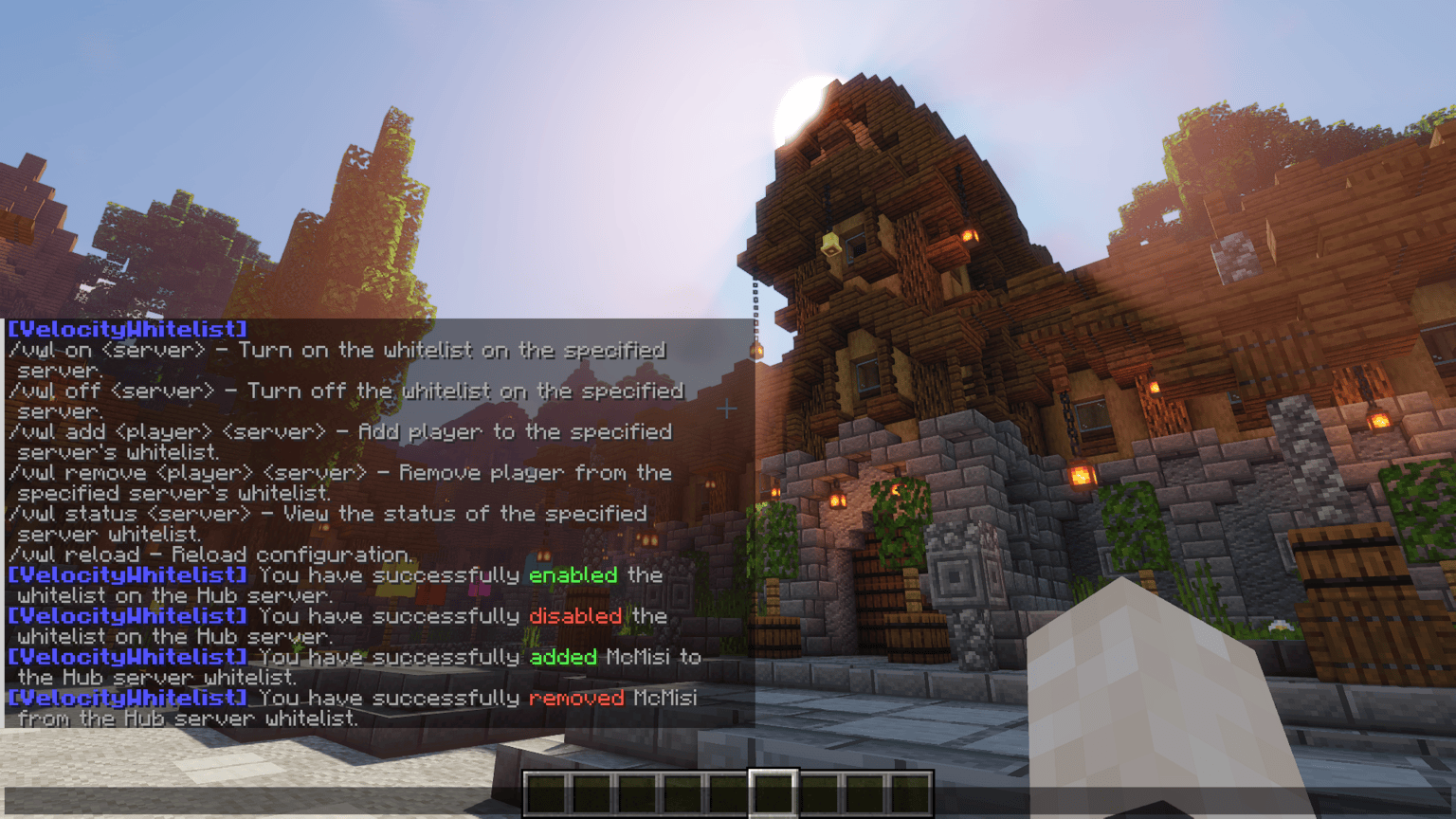
## Commands
| Command | Description |
|——————————-|——————————————————|
| /vwl on | Turn on the whitelist on the specified server. |
| /vwl off | Turn off the whitelist on the specified server. |
| /vwl add | Add player to the specified server’s whitelist. |
| /vwl remove | Remove player from the specified server’s whitelist. |
| /vwl status | View the status of the specified server whitelist. |
| /vwl reload | Reload configuration. |
## Permissions
| Permission | Description |
|————————————|—————————————————————————————————|
| `velocitywhitelist` | Grants access to view the plugin’s help and basic commands. |
| `velocitywhitelist.on.` | Allows enabling the whitelist on a specific server (replace `` with the server name). |
| `velocitywhitelist.on.*` | Grants global permission to enable the whitelist on any server. |
| `velocitywhitelist.off.` | Allows disabling the whitelist on a specific server (replace `` with the server name). |
| `velocitywhitelist.off.*` | Grants global permission to disable the whitelist on any server. |
| `velocitywhitelist.add.` | Allows adding a player to the whitelist on a specific server (replace `` with the server name). |
| `velocitywhitelist.add.*` | Grants global permission to add players to the whitelist on any server. |
| `velocitywhitelist.remove.`| Allows removing a player from the whitelist on a specific server (replace `` with the server name).|
| `velocitywhitelist.remove.*` | Grants global permission to remove players from the whitelist on any server. |
| `velocitywhitelist.status.`| Allows viewing the whitelist status on a specific server (replace `` with the server name). |
| `velocitywhitelist.status.*` | Grants global permission to view the whitelist status on any server. |
| `velocitywhitelist.reload` | Allows reloading the plugin configuration. |
| `velocitywhitelist.bypass` | Allows the player to bypass whitelist restrictions, regardless of server-specific settings. |
## ☕ Support
[](https://www.buymeacoffee.com/gmisi)
VelocityWelcomeX
**VelocityWelcome
Overview**
VelocityWelcome is a comprehensive Minecraft server welcome system that works across both Velocity proxy and Bukkit/Spigot servers. It provides customizable, colorful welcome messages while eliminating the default vanilla join and quit messages for a cleaner, more professional server experience.
**Features**
Custom Welcome Messages: Display personalized, randomized welcome messages when players join your network
Player Join Counter: Show players their unique join number (e.g., “#42”) to create a sense of community and history
No Vanilla Messages: Automatically suppresses the default Minecraft join/quit messages
Network-Wide Support: Works seamlessly between Velocity proxy and all connected Bukkit/Spigot servers
Fully Customizable: Change colors, message formats, and welcome text through a simple configuration
Persistent Player Data: Maintains player join rankings across server restarts
**Why Choose VelocityWelcome?**
Clean Server Experience
VelocityWelcome completely eliminates the standard Minecraft join and quit notifications that can clutter your chat, especially on busy servers. Only your custom welcome messages will be displayed, giving your server a professional and polished feel.
Enhanced First Impressions
First impressions matter. When new players join your server, they’ll be greeted with a colorful, personalized welcome message that stands out from the standard Minecraft experience. This small touch can significantly improve how players perceive your server’s quality.
Community Building
The unique join counter feature shows players their position in your server’s history (e.g., “Welcome PlayerName! (#137)”). This creates a sense of belonging and community, making players feel like they’re part of something established and significant.
Network Efficiency
VelocityWelcome is designed specifically for proxy-based server networks. It efficiently communicates between your Velocity proxy and backend servers to ensure consistent behavior and prevent duplicate welcome messages when players move between servers in your network.
Technical Excellence
VelocityWelcome is built with performance in mind:
Lightweight with minimal resource usage
Uses efficient plugin messaging channels
Thread-safe concurrent collections for player tracking
Early-priority event handling to prevent conflicts with other plugins
**Setup and Installation**
**Prerequisites**
Velocity proxy server (latest version recommended)
Bukkit/Spigot/Paper servers (latest version recommended)
Installation Steps
**Download the Plugin Files**
VelocityWelcome.jar (for Velocity proxy)
VelocityWelcomeBukkit.jar (for each Bukkit/Spigot server)
Both from here.
**Install on Velocity**
Place VelocityWelcome.jar in your Velocity plugins folder
Restart your proxy server
A default configuration will be generated
**Install on Backend Servers**
Place VelocityWelcomeBukkit.jar in the plugins folder of each backend server
Restart each server
No additional configuration needed on backend servers
**
Configuration (Optional)**
Edit the config.json file in the VelocityWelcome folder
Customize welcome messages, colors, and other options
Save changes and use /velocity reload to apply
Configuration
The plugin creates a simple JSON configuration file with the following options:
VelocityWebPanel
# VelocityWebPanel
Requires LuckPerms
A distributed Minecraft network web panel for **Velocity + Paper** environments.
`VelocityWebPanel` runs a central panel on your Velocity proxy and connects Paper servers as backend agents, giving you one place to monitor and manage your network.

## What It Does
– Hosts a browser-based admin panel from the Velocity side
– Connects multiple Paper servers through a backend WebSocket channel
– Streams server stats, players, plugins, and console output in near real time
– Lets authorized users run commands on individual backend servers
– Includes account-based login with BCrypt-hashed passwords

## Architecture
### 1) Velocity Side (Central Hub)
– Serves the web UI over HTTP (`web-port`, default `8080`)
– Exposes API endpoints for auth, polling, and actions
– Runs internal backend WebSocket server (`ws-port`, default `8100`)
– Maintains connected server sessions and broadcasts updates to browsers
– Includes a built-in `Velocity` node in the dashboard via `VelocityProxyBridge`
### 2) Paper Side (Agent on Each Server)
– Connects to Velocity using shared secret handshake
– Sends periodic stats (TPS, memory, CPU, uptime, players)
– Streams console lines and command outputs
– Sends plugin list and player list updates
## Web Panel Features
– **Dashboard**: all connected servers with online status and quick metrics
– **Console**: live output + remote command execution
– **Players**: per-server player list view
– **Stats**: server performance cards + historical player samples
– **Plugins**: installed plugin list per backend
– **Network Info**: aggregated table across all servers
– **Users**: list/remove panel users from the UI


## Authentication & Access
– Players register or update panel password using:
– `/vwpanel `
– Passwords are stored as BCrypt hashes in `users.dat`
– Required LuckPerms integration validates `velocitywebpanel.use` permission
– Backend agent connections are protected by a shared `secret` value

## Configuration (from `config.yml`)
– `panel-name`: panel branding/title
– `web-port`: panel HTTP port
– `ws-port`: backend agent WebSocket port
– `secret`: shared backend handshake secret
– `velocity-host`: proxy host used by Paper agents
– `server-name`: backend display name
– `server-type`: backend type label
– `update-interval`: stats push interval (seconds)
– `console-buffer-size`: retained console lines on agent side
## Typical Use Case
Ideal for network operators who want lightweight centralized visibility and control across multiple Paper servers behind Velocity, without requiring a heavy external dashboard stack.
VelocityWebConsole
# VelocityWebConsole
**Control your Velocity proxy from anywhere via a web browser.** No SSH, no external web server — just drop the plugin and open a URL. Perfect for VPS setups where you don’t have direct terminal access.
**_NOTE THIS PLUGIN IS NEW AND UNDER ACTIVE DEVELOPMENT, EXPECT BUGS. PLEASE REPORT THEM TO THE PROVIDED DISCORD CHANNEL UNDER #plugin-help_**
—
## 🟢 SUPER Easy setup & use
– **No external server** — The plugin runs its own web server. No Apache, nginx, or database to install or configure.
– **Three steps** — Drop the jar in `plugins/`, restart Velocity, then open `http://YOUR_SERVER_IP:25580/` in a browser. That’s it.
– **Sensible defaults** — Port **25580**, log file auto-detected. You only need to edit `config.properties` if you want a different port or to bind to localhost.
– **First login** — Log in with **admin** / **admin**, set a new password when prompted, and you’re in. Add more users (admin/viewer) from the **Users** page if you like.
—

—
## ✨ Features
– **Live console view** — See your proxy’s console output in real time, streamed straight to the browser.
– **Run commands** — Execute any Velocity console command from the web UI.
– **User management** — Create multiple users with **Admin** (full control) or **Viewer** (read-only console, no command execution) roles.
– **Secure by default** — Passwords are stored hashed (PBKDF2) in `users.json`.
– **HTTPS support** — Serve the console over TLS. Set `use_https=true` in config and provide a keystore (PKCS12 or JKS). Use a certificate from **Let’s Encrypt** (or another CA) for your domain to avoid browser “Not secure” warnings; self-signed certs work but require clicking “Advanced → Proceed” once per browser. When using HTTPS, the session cookie is `Secure` and responses send **HSTS** so browsers stick to HTTPS. Optional **HTTP redirect**: set `redirect_http_port` so users can type `http://yourserver:25580` and get redirected to `https://yourserver:25581` (see config comments).
—
## ⚙️ Configuration
Edit `plugins/velocitywebconsole/config.properties` and restart the proxy for changes to take effect.
| Option | Default | Description |
|——–|———|————-|
| `port` | `25580` | Port the web console listens on (HTTPS if `use_https=true`, else HTTP). |
| `bind_address` | `0.0.0.0` | `0.0.0.0` = all interfaces, `127.0.0.1` = localhost only. |
| `log_file` | *(auto)* | Path to Velocity’s log file if auto-detect fails (e.g. `logs/latest.log`). |
| `use_https` | `false` | Serve over HTTPS (requires `keystore_path` and `keystore_password`). |
| `keystore_path` | *(empty)* | Path to keystore file (.p12/.pfx or .jks). Relative = under plugin data dir. |
| `keystore_password` | *(empty)* | Keystore password. |
| `keystore_type` | `PKCS12` | `PKCS12` or `JKS`. |
| `redirect_http_port` | `0` | When using HTTPS: HTTP port that redirects to HTTPS so users can type the URL without `https://`. Set `port` to the HTTPS port (e.g. 25581) and `redirect_http_port` to the port users type (e.g. 25580). `0` = disabled. |
—
## 🔒 Security tips
– **Change the default password** on first use.
– Prefer `bind_address=127.0.0.1` and use SSH port forwarding if you only need access from your own machine.
– Don’t expose the web console port to the internet without a firewall or strong passwords.
—
## 📋 Requirements
– **Velocity** 3.4.x – 3.5.x proxy, built on 3.4.x API (tested on 3.5.x)
– **Java 17+**
—
VelocityVersionBouncer
# VelocityVersionBouncer
**A simple and fully automated way to connect players to the correct server based on their game version.**
**VelocityVersionBouncer** is a plugin for the [Velocity proxy](https://papermc.io/software/velocity) (tested on version 3.4) that automatically selects the most compatible backend server for a connecting player, based on their protocol version (Minecraft game version).
—
### 🔧 How It Works
– Everytime a client connects to your proxy the plugin will check all the registered servers and compare their protocol versions (game versions).
– By default, the first server that matches will be selected (you can change that in the config).
– There is a config.toml file located in the plugins folder (`plugins/VelocityVersionBouncer/config.toml`).
– In the config itself each option is pretty well explained (nevertheless I’ll include an example config.toml at the end of this README).
– Optional features include: a fallback functionality as well as comparing versions for server list pings.
### ❓ Questions you may have:
– **Is this also triggered when changing servers via `/server`?** No, the version checking is only triggered when connecting initially (from the multiplayer server list) or when using the fallback functionality.
– **What happens if no compatible server is found?** The client will simply be disconnected with the according note/reason.
– **Does this work with modded minecraft servers?** If you’re using setups like Ambassador+ProxyCompatibleForge [(more information)](https://docs.papermc.io/velocity/server-compatibility) this plugin will route the client based purely on their protocol version (game version), not their installed mods. _Note: This setup has only been tested with PaperMC and (Neo)Forge servers._
### 📦 Installation & 🛠️ Requirements
1. Download the `.jar` file of the last stable release ([here](https://github.com/Hallo5000/VelocityVersionBouncer/blob/master/build/libs/VelocityVersionBouncer-1.5.0-release.jar)) or build it yourself (the gradle files are included).
2. Put the file in your servers `plugins/` folder (only the proxy!) and restart the server once to generate the config file.
3. When you’re finished editing the config restart the proxy once more and everything should be working.
_Note: this plugin may not work properly if you are not running on `Java 21` (or higher) and `Velocity 3.4.0` or above_
4. If you’re having problems: make sure you’re not using a snapshot (as these are expected to be unstable and this README is always explaining the latest release anyway), if there’s still a problem feel free to open an issue on the plugins GitHub repository.
## Example Config:
“`toml
# This config is used to determine how and if servers are checked for their protocol versions whenever a client tries to connect to a backend server (and optionally if they lost connection)
# ‘whitelist’ is a string array of server names to check for their protocol version when a client tries to connect.
# leaving this empty is equal to putting all registered servers in
# Example: [“server1”, “server2”]
# Note: spaces outside the strings will be ignored.
whitelist = [“lobby1”, “lobby2”, “fun-minigame”, “devServer”]
# ‘blacklist’ is an array of strings to exclude from the temporary list of servers during version comparison.
# first the whitelist is added and then all servers contained in the blacklist are removed from that temporary list.
blacklist = [“devServer”]
# If enabled this option ensures that joining players will be distributed evenly over all servers
# Options: (case-insensitive)
# “FIRST-MATCH” – players will be sent to the first matching server
# “BALANCED” – players will be evenly distributed over all matching servers
distribution = “FIRST-MATCH”
# This option if set to ‘true’ lets you override verlocity’s way of determining the server list ping response by using the try-list of the config (‘ping-passthrough’)
# instead when a client sends a server ping it will use the same algorithm to determine a matching server as in the joining/fallback process
# be carefully when also using clientbrands in the explicit routings as these can’t be used to match server pings
server-list-ping = false
# This option determines wether to use velocities ping-passthrough when no matching server was found for the ping response
# If set to true, things like the description will probably show but the client shows that the version doesn’t match,
# otherwise the client will display “Can’t connect to server”
# This option will also be ignored if ‘server-list-ping’ is set to false
default-to-ping-passthrough = true
# This defines how often all backend servers get pinged to refresh infos in the plugins ping cache
# in seconds
ping-intervall = 300
# If enabled this option ensures that whenever a client is kicked from a server (whether during login, via /kick, or for another reason),
# they will be automatically redirected (bounced) to another server instead of being disconnected. (obviously if a client disconnects explicitly via leaving the server they will not be redirected)
enable-fallback-bouncing = true
# If set to true, the server the client was kicked from will be temporarily excluded from fallback options,
# preventing the client from being sent back there during fallback-bouncing.
exclude-previous-server = false
# When there is a valid server name in ‘explicit-fallback-server’ the plugin won’t search for a new server and instead only tries the specified server.
# Leave this empty, if you’d like to disable this option (also this is disabled when enable-fallback-bouncing is set to false).
explicit-fallback-server = “lobby”
# —— explicit routing ——
# Syntax
# v1_x_x – game version
# p000 – protocol version (Protocol Versions for every release/snapshot can be found here: https://minecraft.wiki/w/Minecraft_Wiki:Projects/wiki.vg_merge/Protocol_version_numbers)
# cFORGE – Client brand (for example: vanilla, forge, fabric, Geyser (for player joining through GeyserMC), badlion, etc.
# either a game version (v) or a protocol version (p) is necessary but client brands (c) are completely optional
# when no client brand is defined the routing just takes every client joining with the defined game/protocol version
[explicit-routing]
# Example: v1_21_8cFORGE = “lobby-1”
# Example: p123 = “lobby-2”
# Example: cGeyser = “GeyserMC-server”
“`
VelocityUtilsPlus
A comprehensive Velocity proxy plugin that provides intelligent lobby balancing, premium player routing, database-backed player statistics, and advanced moderation features.
[](https://www.oracle.com/java/)
[](https://papermc.io/software/velocity)
**Features**
**Smart Lobby Management**
– Intelligent Load Balancing: Automatically distributes players across multiple lobby servers based on current player counts
– Premium Player Routing: Dedicated lobby and challenge servers for premium/creator players
– Offline Server Detection: Automatically detects and avoids offline servers when balancing
– Server Status Caching: Efficient server status checking to minimize performance impact
**Database Integration**
– Player Playtime Tracking: Track total playtime and per-server statistics
– Custom Statistics: Track challenges completed and other custom player achievements
– Database-Backed Bans: Offline ban support with MySQL/MariaDB backend
– Connection Pool Management: Efficient HikariCP connection pooling
**Moderation Features**
– Database Bans: Ban players even when they’re offline
– Ban Management Commands: Easy-to-use commands for banning, unbanning, and viewing bans
– Configurable Permissions: Fine-grained permission system for all commands
**Player Statistics**
– Leaderboards: View top players by playtime
– Personal Stats: Players can check their own statistics
– Challenge Tracking: Track and record challenge completions
**Metrics and Monitoring**
– bStats Integration: Anonymous usage statistics
– Comprehensive Logging: Detailed logging for debugging and monitoring
**Requirements**
– Velocity proxy server version 3.4.0 or higher
– Java 17 or higher
– MySQL 8.0+ or MariaDB 10.5+ (optional, required for database features)
**Installation**
1. Download the latest VelocityUtilsPlus.jar from the Releases page
2. Copy the JAR file to your Velocity plugins folder
3. Start your Velocity server to generate the default configuration
4. Stop the server and configure `plugins/velocityutilsplus/config.toml`
5. If using database features, set up your database (see Database Setup section below)
6. Restart your Velocity server
## Configuration
The plugin will generate a config.toml file in `plugins/velocityutilsplus/`. Key configuration sections include:
**Lobby Configuration**
“`toml
[lobbies]
# List your regular lobby servers (must match names in velocity.toml)
regular_lobbies = [“Lobby 1”, “Lobby 2”, “Lobby 3”, “Lobby 4”]
# Premium player servers
premium_lobby = “Creator Lobby”
premium_challenge = “Creator Challenge”
“`
**Database Configuration**
“`toml
[database]
# Enable database integration
enabled = true
type = “mysql” # or “mariadb”
address = “127.0.0.1:3306”
database = “vup”
username = “vup_user”
password = “your_secure_password”
# Connection pool settings
max_pool_size = 10
min_idle = 2
connection_timeout = 30000
[database.features]
playtime_tracking = true
statistics_tracking = true
friends_system = false # Not yet implemented
database_bans = true
“`
**Permissions Configuration**
“`toml
[permissions]
# Define which permissions are required for each command
# Set to empty string “” to allow everyone to use the command
gban = “vup.admin”
gunban = “vup.admin”
banlist = “vup.moderator”
stats = “” # Everyone can use /stats
stats_others = “vup.moderator” # Permission to view other players’ stats
leaderboard = “” # Everyone can use /leaderboard
vup = “vup.admin”
lobby = “” # Everyone can use /lobby
creator = “vup.premium” # Premium players only
invite = “” # Everyone can invite
accept = “” # Everyone can accept invites
“`
See `config.toml.example` for a complete configuration template.
**Database Setup**
If you want to use database features, you need to set up a MySQL or MariaDB database.
**Step 1: Create Database and User**
“`sql
CREATE DATABASE vup CHARACTER SET utf8mb4 COLLATE utf8mb4_unicode_ci;
CREATE USER ‘vup_user’@’localhost’ IDENTIFIED BY ‘your_secure_password’;
GRANT ALL PRIVILEGES ON vup.* TO ‘vup_user’@’localhost’;
FLUSH PRIVILEGES;
“`
**Step 2: Configure Plugin**
Update the database section in `config.toml` with your credentials. The plugin will automatically create all required tables on first startup when database is enabled.
**Step 3: Optional Manual Schema Import**
If you prefer to create the schema manually, you can import `database-setup.sql`.
For more details, see:
– [DATABASE-GUIDE.md](https://github.com/JuliaKnoth/VelocityUtilPlus/blob/main/DATABASE-GUIDE.md) – Complete database setup and configuration guide
– [DATABASE-IMPLEMENTATION.md](https://github.com/JuliaKnoth/VelocityUtilPlus/blob/main/DATABASE-IMPLEMENTATION.md) – Technical implementation details
**Commands**
All commands are configurable with permissions in config.toml.
**Navigation Commands**
| Command | Aliases | Description | Default Permission |
|———|———|————-|——————-|
| `/lobby` | None | Connect to a balanced lobby server | None (everyone) |
| `/creator` | None | Connect to the creator/premium lobby | `vup.premium` |
| `/invite ` | None | Invite a player to your current server | None (everyone) |
| `/accept` | None | Accept a pending server invite | None (everyone) |
**Moderation Commands**
| Command | Description | Default Permission | Notes |
|———|————-|——————-|——-|
| `/gban ` | Ban a player globally | `vup.admin` | Works offline if database bans enabled |
| `/gunban ` | Unban a player globally | `vup.admin` | Works offline if database bans enabled |
| `/banlist [page]` | View all active bans | `vup.moderator` | Paginated list |
**Statistics Commands**
| Command | Aliases | Description | Default Permission | Requires Database |
|———|———|————-|——————-|——————|
| `/stats [player]` | None | View playtime statistics | None (everyone) | Yes |
| `/leaderboard [limit]` | `/lb`, `/top` | View playtime leaderboard | None (everyone) | Yes |
**Admin Commands**
| Command | Description | Default Permission |
|———|————-|——————-|
| `/vup` | Plugin information and management | `vup.admin` |
**Statistics Command Details**
**`/stats [player]`**
– Without arguments: View your own statistics
– With player name: View another player’s statistics (requires `vup.moderator` permission by default)
– Displays: Total playtime, per-server playtime, challenges completed
**`/leaderboard [limit]`**
– Without arguments: Shows top 10 players
– With number: Shows top N players (maximum 50)
– Displays players ranked by total playtime
**Permissions**
The plugin uses a flexible permission system where all permissions can be customized in config.toml.
**Default Permission Nodes**
*Navigation Permissions*
– No permission required for `/lobby` (configurable via `permissions.lobby`)
– `vup.premium` for `/creator` (configurable via `permissions.creator`)
– No permission required for `/invite` (configurable via `permissions.invite`)
– No permission required for `/accept` (configurable via `permissions.accept`)
*Moderation Permissions*
– `vup.admin` for `/gban` (configurable via `permissions.gban`)
– `vup.admin` for `/gunban` (configurable via `permissions.gunban`)
– `vup.moderator` for `/banlist` (configurable via `permissions.banlist`)
*Statistics Permissions*
– No permission required for `/stats` (view own stats) (configurable via `permissions.stats`)
– `vup.moderator` for `/stats ` (view others’ stats) (configurable via `permissions.stats_others`)
– No permission required for `/leaderboard` (configurable via `permissions.leaderboard`)
*Admin Permissions*
– `vup.admin` for `/vup` (configurable via `permissions.vup`)
**Configuring Permissions**
Edit the `[permissions]` section in config.toml to customize permission nodes:
“`toml
[permissions]
gban = “myserver.admin.ban” # Custom permission for /gban
stats = “myserver.stats.view” # Require permission for /stats
lobby = “” # Empty string = no permission required
“`
**Using with LuckPerms**
Example LuckPerms commands:
“`
# Grant admin permissions
/lp group admin permission set vup.admin true
# Grant moderator permissions
/lp group moderator permission set vup.moderator true
# Grant premium player access
/lp user PlayerName permission set vup.premium true
# Allow all players to use stats
/lp group default permission set vup.stats true
“`
For detailed permission setup with LuckPerms, see the permissions guide.
**Common Issues**
*Database Connection Failures*
– Verify database credentials in config.toml are correct
– Ensure the database server is running and accessible
– Check firewall settings to allow connections on the database port (default 3306)
– Confirm the database and user have been created
*Players Not Being Balanced*
– Verify lobby server names in config.toml match exactly with names in velocity.toml (case-sensitive)
– Confirm that lobby servers are online and responding
– Check the Velocity proxy logs for connection errors or warnings
*Commands Not Working*
– Verify the player has the required permission (check config.toml permissions section)
– For database commands (/stats, /leaderboard), ensure database is enabled and connected
– For ban commands, check if database_bans feature is enabled in config.toml
*Statistics Not Tracking*
– Ensure database.enabled is set to true in config.toml
– Verify database.features.playtime_tracking is enabled
– Check database connection is working
– Review logs for any database errors
For more detailed troubleshooting steps, see [TROUBLESHOOTING.md](https://github.com/JuliaKnoth/VelocityUtilPlus/blob/main/TROUBLESHOOTING.md).
**Contributing**
Contributions are welcome! To contribute to this project:
1. Fork the repository
2. Create a feature branch: `git checkout -b feature/your-feature-name`
3. Make your changes and commit them: `git commit -m ‘Add some feature’`
4. Push to your branch: `git push origin feature/your-feature-name`
5. Open a Pull Request
Please ensure your code follows the existing code style and includes appropriate documentation.
**Support**
If you encounter any issues or have questions:
– Check the documentation files in the repository
– Open an [Issue](https://github.com/JuliaKnoth/VelocityUtilPlus/issues) on GitHub with detailed information about your problem
When reporting issues, please include:
– Plugin version
– Velocity version
– Java version
– Relevant log excerpts
– Steps to reproduce the issue
**License**
This project is licensed under the MIT License.
**Credits**
– Metrics: Powered by [bStats](https://bstats.org/)
– Database: [HikariCP](https://github.com/brettwooldridge/HikariCP) connection pooling
– Built for: [Velocity Proxy](https://papermc.io/software/velocity)
**Changelog**
**Alpha-0.1 (Current Release)**
– Database integration with MySQL/MariaDB support
– Player playtime tracking with per-server statistics
– Global ban system with offline support via database
– Statistics tracking for custom achievements
– Leaderboard system for playtime rankings
– Smart lobby balancing with offline detection
– Premium player routing to dedicated servers
– Configurable permission system
– Server invite system
– bStats metrics integration
**Planned Features**
– Friends system (database structure ready)
– Additional statistics tracking options
– Enhanced admin tools
—
Made with ❤️ for the Minecraft community
VelocityUtils

VelocityUtils is a plugin designed for Velocity proxy servers that adds essential utilities for both players and server administrators. It aims to simplify network management with useful, configurable, and easy-to-use features.

[](https://rexi666-plugins.gitbook.io/rexi666/velocityutils/installation)

[]([https://rexi666-plugins.gitbook.io/rexi666](https://rexi666-plugins.gitbook.io/rexi666/velocityutils/commands-and-permissions))
| [](https://rexi666-plugins.gitbook.io/rexi666) | [](https://discord.com/invite/a3zkKtrjTr) |
|—|—|
VelocityTransfer
# VelocityTransfer
**VelocityTransfer** is a simple Velocity plugin that adds the `/transfer` command to velocity.
—
### Command
“`
/transfer [player | local | all]
“`
* Transfers the sender to the specified server by default.
* `player`: Transfers the specified player (requires `proxytransfer.others` permission).
* `local`: Transfers all players on the sender’s current server.
* `all`: Transfers all players on the proxy.
—
### Permissions
* `proxytransfer.others` — Required to transfer other players.
—
VelocityTools
# Available commands
– /alert
– /find
– /send
– /hub (You can change aliases in config)
– /vtools
# Available tools
– Protocol Blocker (prohibits connection from certain versions)
– Hostnames Manager (denies connection from a specific hostname, see details below)
– Brand Changer aka Brand Rewriter (changes brand in game and in ping requests)
# Permissions
– In config