ProtocolChanger
# ProtocolChanger
**Lightweight Velocity plugin for spoofing protocol version and server name in server pings.**
Change how your server appears in server lists and to port scanners without any performance overhead.
## Features
– **Protocol Version Spoofing** — Display any protocol ID (e.g., 767 for 1.21.1, 340 for 1.12.2) in pings, regardless of actual backend version
– **Custom Server Name** — Replace the default “Velocity Server” text with your brand
– **Simple Configuration** — Single `config.properties` file, no bloat
– **Hot Reload** — Update config and apply changes instantly via console command
– **Production-Ready** — Zero allocation per ping, compatible with high-tick-rate setups
## Installation
1. Download the plugin JAR
2. Place it in your Velocity `plugins/` directory
3. Restart the proxy (or use plugin reload)
4. Edit `plugins/ProtocolChanger/config.properties`
5. Reload with `/pc reload`
## Configuration
**File:** `plugins/ProtocolChanger/config.properties`
“`properties
# Display name of your server in the ping response
name=My cool server
# The Protocol ID (version code) shown to clients
# Example: 767 is for version 1.21.1
protocol=767
“`
### Common Protocol IDs
| Version | Protocol ID |
|———|————-|
| 1.21.1 | 767 |
| 1.21 | 766 |
| 1.20.5 | 765 |
| 1.20.1 | 763 |
| 1.19.3 | 761 |
| 1.19 | 759 |
| 1.18.2 | 758 |
| 1.12.2 | 340 |
## Commands
* “`/pc reload“` — Reloads the configuration file instantly.
## License
GNU General Public License v3.0 — See LICENSE file for details.
—
**Made by LadaLegendss**
Protectcord
# ProtectCord — Advanced IP Protection & Moderation
**Block VPNs, proxies, bots, and malicious connections with real-time IP intelligence. Built-in moderation, AutoMod chat filtering, alt detection, and MySQL multi-server sync — all in one lightweight plugin.**
ProtectCord connects every joining player against a live threat intelligence database before they ever reach your server. Combined with a full moderation suite, it’s the only tool you need to keep your server clean and your community safe.
## ✨ Milestones
– **2,300+** downloads on Modrinth
– **100,000+** ProtectCord API requests served
– **46** unique Minecraft servers running ProtectCord concurrently
– **203** concurrent protected players
– **1,000+** unique Discord users verified
– **3,000+** unique API requests per day
– **555** Discord Guilds using @ProtectCord#0253
– Watching over **100,000+** Discord users
**bStats:** https://bstats.org/plugin/bukkit/Protectcord/24623
—
## ✨ Key Features
### IP Protection
– 🛡️ **Real-Time IP Verification** — Every connection checked against live threat intelligence
– 🚫 **VPN, Proxy & Tor Blocking** — Stop ban evaders and alt accounts instantly
– 🏢 **Datacenter IP Detection** — Flag and block hosting provider IPs used for bots
– ⚠️ **Risk-Based Blocking** — Configurable threat levels: UNKNOWN → LOW → MEDIUM → HIGH → CRITICAL
– 🌍 **Geo-Blocking** — Block or whitelist entire countries using ISO codes
– 👥 **Accounts-Per-IP Limiting** — Cap simultaneous connections from a single IP
– ✅ **Smart Whitelist System** — Bypass protection by player name, UUID, or IP
### Moderation Suite
– ⚡ **Progressive Warning System** — Configurable auto-escalation from warn → kick → ban
– ⏱️ **Temp Bans & Temp Mutes** — Time-limited punishments with human-readable durations (`1h`, `7d`, `30d`)
– 🔇 **Mute System** — Persistent mutes with reasons, issuer tracking, and auto-expiry
– 🔍 **Alt Account Detection** — Find alts by shared IP (`/pc alts `) — names only, never raw IPs
– 📋 **Warning History** — Full timestamped warning logs for any player, online or offline
– 🧹 **Clear & Remove Warnings** — Remove individual warnings by index or clear all at once
– 🗄️ **Audit Log** — Automatic log of all moderation actions
– 💾 **Offline Player Support** — Warn, ban, mute, or check players who aren’t online
### AutoMod (Chat Filtering)
– 🔗 **Anti-Link** — Block URLs with domain whitelist support
– 📢 **Anti-Advertising** — Block server IPs and Discord invites
– 💬 **Anti-Spam** — Rate limiting with configurable message window and duplicate detection
– 🤬 **Anti-Swear** — Custom word blacklist with regex support and per-word exceptions
– 🔠 **Anti-Caps** — Configurable caps threshold by percentage
– 🌊 **Anti-Flood** — Block repeated character flooding
– 🔣 **Anti-Unicode/Zalgo** — Block invisible text and character abuse
– ⚙️ **Per-Rule Actions** — Each rule independently set to: `BLOCK`, `WARN`, `KICK`, `MUTE`, or `TEMPMUTE`
### Storage & Multi-Server
– 🗃️ **YAML Flatfile Storage** — Zero setup, works out of the box
– 🐬 **MySQL Storage** — Full MySQL backend with HikariCP connection pooling
– 🌐 **Multi-Server Sync** — Share one MySQL database across your entire network; bans and mutes are enforced on every server
– 🔄 **Live Migration** — Migrate between YAML and MySQL at any time with `/pc migrate`
– 🧹 **Data Purge** — Clean up old warnings, bans, mutes, IP logs, audit entries, and inactive players with `/pc purge`
### Staff Tools
– 📣 **In-Game Staff Alerts** — Real-time notifications for kicks, bans, warns, mutes, automod actions, and more
– 🎭 **IP Masking** — Show staff masked IPs (`192.168.1.*`) until they earn the `protectcord.ip.full` permission
– 📝 **Player Reports** — Players submit reports with `/report`; staff are notified in-game and via Discord
– 📊 **API Stats** — Check usage, rate limits, and API health with `/pc stats`
– 🔎 **Manual IP Check** — `/pc check ` for on-demand threat analysis
### Platform & Integration
– 🌐 **6-Platform Support** — Paper, Spigot, Folia, BungeeCord, Velocity, and Forge
– 📢 **Discord Webhooks** — Rich embeds with country flag, city, VPN/proxy/tor/risk fields, per-event control, rate limiting, and retry logic
– 📣 **Moderation Alert Webhooks** — Separate webhook channel for ban/warn/mute/kick staff events
– ⚡ **100% Async** — All IP checks are non-blocking; no main-thread impact
—
## 🎮 Supported Platforms
| Platform | Versions | Notes |
|———-|———-|——-|
| **Paper** | 1.13 – 1.21+ | Recommended for standalone servers |
| **Spigot** | 1.8.8 – 1.21+ | Full legacy support |
| **Folia** | 1.19+ | Multithreaded scheduler support |
| **Velocity** | 3.0+ | Recommended for proxy networks |
| **BungeeCord** | 1.8.8 – 1.21+ | Waterfall compatible |
| **Forge** | 1.20.1+ | Server-side only; checks at post-login |
> **Network tip:** Install only on your proxy (Velocity/BungeeCord) to protect all backend servers with a single API key.
—
## 📥 Quick Setup
### 1️⃣ Get Your Free API Key
1. Visit **protectcord.com**
2. Create a free account
3. Generate an API key from **Dashboard → API Keys**
4. **Free tier includes 32 requests/minute** — enough for most servers
### 2️⃣ Install the Plugin
1. Download the correct JAR for your platform from Modrinth
2. Drop it into your `plugins/` folder (or `mods/` for Forge)
3. Start your server — config generates automatically
4. Add your API key to `plugins/ProtectCord/config.yml`
5. Run `/protectcord reload` or restart
6. ✅ Your server is now protected
—
## ⚙️ Full Configuration Reference
The config file is auto-generated at `plugins/ProtectCord/config.yml` on first run. Every option is explained below.
> Velocity uses `config.toml` (same structure, TOML syntax). Forge uses `config/protectcord-forge.toml`.
—
### API Settings
“`yaml
# Your ProtectCord API key — get one free at https://protectcord.com/dashboard/api-keys
api-key: “YOUR_API_KEY_HERE”
# How long to wait (ms) for the API to respond before giving up
api-timeout:
connect: 15000 # Time to establish the connection (default: 15s)
read: 15000 # Time to wait for a response after connecting (default: 15s)
# Automatic retry for failed/timed-out API requests
api-retry:
max-attempts: 3 # Max number of retries before allowing/denying the player (1–5)
initial-delay: 1000 # Wait this long before the first retry (ms)
max-delay: 5000 # Never wait longer than this between retries (ms)
multiplier: 2.0 # Multiply delay by this factor each retry (exponential backoff)
“`
—
### Server Identity
“`yaml
# Used for player tracking and multi-server MySQL identification
server:
name: “My Server” # Friendly name — stored in MySQL as server_id on every row
ip: “” # Your public IP — leave blank to auto-detect
port: 25565 # Your server port
type: “spigot” # Platform: paper / spigot / bungeecord / velocity / forge / folia
“`
—
### Player Tracking
“`yaml
# UUID-based tracking via the ProtectCord API
player-tracking:
enabled: true
block-flagged-players: true # Block players flagged as malicious by the API
block-inactive-players: false # Block players whose accounts are marked inactive
“`
—
### IP Protection
“`yaml
# Master switch — set to false to disable all IP checking (not recommended)
enable-ip-check: true
# Choose which connection types to block
block-vpn: true # Virtual private networks (ban evaders, alt accounts)
block-proxy: true # HTTP/SOCKS proxies and anonymizers
block-tor: true # Tor exit nodes
block-datacenter: true # Hosting provider IPs (common source of bots)
block-bogon: true # Invalid, reserved, or unroutable IP ranges
# Risk-based blocking (optional, runs in addition to the flags above)
# Enable this to block by overall threat score instead of (or as well as) individual flags
enable-risk-level-blocking: false
blocked-risk-level: “HIGH”
# Levels (each blocks itself and everything above it):
# LOW — blocks LOW, MEDIUM, HIGH, CRITICAL (very strict)
# MEDIUM — blocks MEDIUM, HIGH, CRITICAL
# HIGH — blocks HIGH, CRITICAL (recommended if enabling)
# CRITICAL — blocks CRITICAL only (very lenient)
“`
—
### Geographic Blocking
“`yaml
geo-blocking:
enabled: false
mode: “blacklist” # “blacklist” = block listed countries
# “whitelist” = ONLY allow listed countries (everyone else blocked)
countries: # ISO 3166-1 alpha-2 country codes
– “CN”
– “RU”
“`
—
### Accounts Per IP
“`yaml
# Limit how many Minecraft accounts can connect simultaneously from the same IP
account-per-ip-limit:
enabled: false
max-accounts: 3 # Maximum simultaneous connections from one IP
enforcement: “BLOCK” # “BLOCK” — deny the new connection
# “KICK_OLDEST” — kick the oldest session to make room
“`
—
### Discord Webhook (Connection Events)
“`yaml
discord-webhook:
enabled: false
url: “” # Paste your Discord webhook URL here
timeout: 10000 # HTTP timeout for sending the webhook (ms)
# Retry failed webhook deliveries
retry:
enabled: true
max-attempts: 3 # How many times to retry a failed delivery (1–10)
initial-delay: 1000 # Wait before first retry (ms)
max-delay: 10000 # Maximum wait between retries (ms)
multiplier: 2.0 # Exponential backoff multiplier
# Rate limiting — Discord allows ~5 requests per 2 seconds per webhook
rate-limit:
max-per-second: 2 # Requests sent per second (1–5)
burst-limit: 5 # Maximum burst before throttling kicks in
# Which events send a webhook message
events:
denied: true # Player was blocked by ProtectCord
accepted: false # Player passed all checks and joined (high volume — off by default)
whitelisted: true # A whitelisted player joined
error: true # An API error occurred during a check
# Which data fields appear in the embed
data-fields:
show-country: true
show-country-flag: true # 🇺🇸 flag emoji next to country name
show-city: true
show-vpn: true
show-proxy: true
show-datacenter: true
show-tor: true
show-mobile: true
show-satellite: true
show-crawler: true
show-bogon: true
show-risk-level: true
show-abuser: true
show-blacklisted: true
show-company: true # ISP / hosting provider name
show-company-risk: true
# Customise the appearance of each embed type
embeds:
denied:
title: “Connection Denied”
emoji: “x”
color: 15158332 # Decimal RGB — red
footer: “” # Optional footer text
thumbnail-url: “” # Optional image in top-right corner
accepted:
title: “Connection Accepted”
emoji: “white_check_mark”
color: 3066993 # Green
footer: “”
thumbnail-url: “”
whitelisted:
title: “Whitelisted Player Joined”
emoji: “white_circle”
color: 16776960 # Yellow
footer: “”
thumbnail-url: “”
error:
title: “API Error”
emoji: “warning”
color: 15105570 # Orange
footer: “”
thumbnail-url: “”
# Advanced webhook behaviour
advanced:
validate-url-on-startup: true # Send a test ping when the plugin loads
log-failures: true # Print failed deliveries to console
log-retries: true # Print retry attempts to console
queue-size: 100 # Max webhooks queued before dropping oldest
“`
—
### Staff Alerts
“`yaml
# In-game and Discord notifications for moderation actions
alerts:
enabled: true
# Broadcast to online staff with the protectcord.alerts permission
in-game:
enabled: true
# Separate webhook channel just for mod-team events
discord-webhook:
enabled: false
url: “”
# Fine-tune exactly which actions trigger an alert
events:
kick: true
ban: true
unban: true
warn: true
clear-warnings: true
remove-warning: true
automod: true
mute: true
unmute: true
tempmute: true
tempban: true
“`
—
### Warning System
“`yaml
warnings:
# Automatically take action when a player accumulates enough warnings
auto-action:
enabled: true
action: “BAN” # “BAN” — permanent ban | “KICK” — kick only
threshold: 3 # Number of warnings before auto-action fires
# Kick the player with a “final warning” message at a lower threshold
kick-on-warn:
enabled: true
threshold: 2 # Kick at this warning count (before the ban threshold)
# Warnings older than this are not counted toward thresholds
expiry:
duration: “0” # “0” = warnings never expire
# Examples: “7d”, “30d”, “90d”
# Escalation tiers — overrides auto-action when enabled
# Each tier fires when warning count reaches `count`
escalation:
enabled: false
tiers:
– count: 1
action: “WARN”
– count: 2
action: “TEMPMUTE”
duration: “1h”
– count: 3
action: “TEMPBAN”
duration: “1d”
– count: 4
action: “TEMPBAN”
duration: “7d”
– count: 5
action: “BAN”
# Available actions: WARN, KICK, MUTE, TEMPMUTE, TEMPBAN, BAN
# Duration format: 30s, 10m, 1h, 7d, 30d
“`
—
### AutoMod (Chat Filtering)
“`yaml
automod:
enabled: false # Master switch — must be true for any rules to run
# Blocked actions apply to the message that triggered the rule.
# Available actions for all rules: BLOCK, WARN, KICK, MUTE, TEMPMUTE
# TEMPMUTE duration is set by tempmute-duration below.
tempmute-duration: “10m”
# Block links in chat
anti-link:
enabled: true
action: “BLOCK”
whitelisted-domains: # These domains are allowed through
– “yourdomain.com”
– “discord.gg/yourserver”
# Block spam (too many messages too fast, or too many duplicates)
anti-spam:
enabled: true
action: “BLOCK”
max-messages: 5 # Max messages allowed within the time window
time-window-seconds: 10 # Rolling window size in seconds
max-duplicates: 3 # Max identical messages allowed in the window
# Block server IPs and Discord invite links
anti-advertising:
enabled: true
action: “BLOCK”
block-server-ips: true # Blocks patterns like “play.someserver.net”
block-discord-invites: true # Blocks discord.gg/… links
whitelisted-domains:
– “yourdomain.com”
– “discord.gg/yourserver”
# Block profanity and custom banned words
anti-swear:
enabled: false
action: “BLOCK”
use-regex: false # Set true to treat blocked-words entries as regex patterns
blocked-words:
– “badword1”
– “badword2”
whitelisted-words: # These words are never blocked even if they match a pattern
– “scrapbook”
# Block excessive CAPS LOCK
anti-caps:
enabled: false
action: “BLOCK”
min-message-length: 5 # Ignore short messages (e.g. “OK”, “YES”)
threshold-percent: 70.0 # Block if more than this % of letters are uppercase
# Block character flooding (aaaaaaaaaa, !!!!!!!!!)
anti-flood:
enabled: false
action: “BLOCK”
max-repeated-chars: 5 # Consecutive identical characters before blocking
min-message-length: 3 # Ignore very short messages
# Block Unicode abuse and Zalgo text
anti-unicode:
enabled: false
action: “BLOCK”
block-zalgo: true # Block combining diacritical mark stacking (z͎̤̙̘̭͇͠a̵͔͓l̡͔͍̦͚͙g̢͕̲͔͔͕ö̥́)
max-unicode-percent: 50.0 # Block if more than this % of chars are non-ASCII
“`
—
### Player Reports
“`yaml
reports:
enabled: true
cooldown-seconds: 60 # How long a player must wait between reports
# Post reports to a Discord channel
discord-webhook:
enabled: false
url: “”
mention-role-id: “” # Optional — ping a role when a report comes in (e.g. “123456789”)
notify-staff: true # Broadcast reports to online staff with protectcord.alerts
predefined-reasons: [] # Optional list of reasons shown in tab-complete
# Example: [“Hacking”, “Spam”, “Harassment”, “Inappropriate name”]
“`
—
### Database Storage
“`yaml
database:
type: “YAML” # “YAML” — flatfile storage (default, no setup needed)
# “MYSQL” — MySQL/MariaDB (required for multi-server sync)
mysql:
host: “localhost”
port: 3306
database: “protectcord” # Database name (must exist before starting)
username: “root”
password: “”
table-prefix: “pc_” # All tables prefixed with this (e.g. pc_warnings, pc_bans)
# HikariCP connection pool settings
pool:
max-pool-size: 10 # Maximum simultaneous database connections
min-idle: 2 # Minimum idle connections kept open
connection-timeout: 30000 # Max wait for a connection from the pool (ms)
idle-timeout: 600000 # Close idle connections after this long (ms)
max-lifetime: 1800000 # Recycle connections after this long (ms)
“`
—
### IP Masking
“`yaml
# Control how IP addresses appear to staff in command output
# Staff with the protectcord.ip.full permission always see the full IP
ip-masking:
enabled: false
mask-format: “last-octet”
# “last-octet” → 192.168.1.* (hides last segment)
# “last-two-octets” → 192.168.*.* (hides last two segments)
# “full-mask” → *.*.*.* (hides everything)
“`
—
### Custom Messages
“`yaml
# All messages support & colour codes. Placeholders listed per message.
messages:
# Shown to players blocked by IP check — {reason}, {risk}
connection-denied: |
&c&lConnection Denied
&7Your connection has been blocked by ProtectCord.
&7Reason: &c{reason}
&7Risk Level: &c{risk}
&7If you believe this is an error, please contact server staff.
# Shown when the API is unreachable during a check
api-error: |
&c&lTemporary Connection Issue
&7We’re unable to verify your connection at the moment.
&7Please try again later.
# Shown to a player blocked by the accounts-per-IP limit — {max}, {current}
account-limit-reached: |
&c&lConnection Limit Reached
&7Maximum accounts per IP: &c{max}
&7Current connections from your IP: &c{current}
&7Please disconnect another account before connecting.
# Shown to the oldest session kicked by KICK_OLDEST enforcement — {max}
account-limit-kicked: |
&c&lYou have been disconnected
&7A new account connected from your IP address.
&7Maximum accounts per IP: &c{max}
# Shown when player-tracking blocks a flagged player — {flags}
player-flagged: |
&c&lConnection Denied
&7Your account has been flagged.
&7Flags: &c{flags}
&7If you believe this is an error, please contact server staff.
# Shown when player-tracking blocks an inactive player
player-inactive: |
&c&lConnection Denied
&7Your account has been deactivated.
&7Please contact server staff.
# Shown in chat to whitelisted players who bypass the IP check
whitelist-bypass: “&aYou have bypassed IP verification.”
“`
—
## 🎯 Commands & Permissions
**Aliases:** `/pc`, `/protect`
### Core Commands
| Command | Description |
|———|————-|
| `/pc reload` | Reload config, whitelist, and storage |
| `/pc stats` | View API usage and rate limits |
| `/pc check ` | On-demand IP threat analysis |
| `/pc version` | Plugin version and platform info |
| `/pc health` | API connectivity health check |
| `/pc alerts` | Toggle in-game staff alerts on/off |
### Whitelist Commands
| Command | Description |
|———|————-|
| `/pc whitelist add player ` | Whitelist a player by name |
| `/pc whitelist add uuid ` | Whitelist by UUID |
| `/pc whitelist add ip
` | Whitelist an IP address |
| `/pc whitelist remove ` | Remove whitelist entry |
| `/pc list` | List all whitelisted entries |
### Moderation Commands
| Command | Description |
|———|————-|
| `/pc kick [reason]` | Kick an online player with IP info |
| `/pc warn ` | Issue a warning (auto-escalates) |
| `/pc warnings ` | View full warning history |
| `/pc clear warning ` | Clear all warnings |
| `/pc clear ban ` | Clear a ban record |
| `/pc remove warning [#]` | Remove a specific warning by index |
| `/pc ban ` | Permanently ban a player |
| `/pc tempban ` | Temp-ban (`1h`, `7d`, `30d`) |
| `/pc unban ` | Unban a player |
| `/pc mute ` | Permanently mute a player |
| `/pc tempmute ` | Temp-mute |
| `/pc unmute ` | Unmute a player |
| `/pc alts ` | Find alt accounts by shared IP |
### Storage Commands
| Command | Description |
|———|————-|
| `/pc migrate ` | Migrate all data between storage backends |
| `/pc purge ` | Delete data older than X days |
**Purge types:** `warnings`, `bans`, `mutes`, `iplogs`, `auditlog`, `inactive`, `all`
### Player Commands
| Command | Description |
|———|————-|
| `/report [player] ` | Report a player (or submit an anonymous report) |
### Permissions
| Permission | Description | Default |
|————|————-|———|
| `protectcord.admin` | All `/pc` commands | OP |
| `protectcord.bypass` | Bypass IP checks on join | false |
| `protectcord.alerts` | Receive in-game staff alerts | OP |
| `protectcord.ip.full` | See unmasked IPs in command output | OP |
| `protectcord.automod.bypass.*` | Bypass all AutoMod checks | false |
—
## ⚡ Progressive Warning System
Automatically escalate discipline based on warning count. Two modes available:
### Simple Mode (default)
| Warning | Action |
|———|——–|
| 1st | In-game warning message |
| 2nd | Kicked with “final warning” message |
| 3rd | Permanent ban |
### Escalation Tiers Mode (configurable)
Fully custom escalation — any combination of WARN → TEMPMUTE → TEMPBAN → BAN:
“`
1 warning → Warning message
2 warnings → Temp mute (1 hour)
3 warnings → Temp ban (1 day)
4 warnings → Temp ban (7 days)
5 warnings → Permanent ban
“`
Warnings can optionally **expire** after a configured duration (`7d`, `30d`, etc.) so past behavior doesn’t follow players forever.
—
## 🤖 AutoMod — Automated Chat Filtering
Protect your chat without lifting a finger. Each AutoMod rule runs independently and can be configured to `BLOCK`, `WARN`, `KICK`, `MUTE`, or `TEMPMUTE` the offending player.
| Rule | What It Catches |
|——|—————-|
| **Anti-Link** | URLs, with per-domain whitelist |
| **Anti-Advertising** | Other server IPs, Discord invites |
| **Anti-Spam** | Message rate and duplicate flooding |
| **Anti-Swear** | Custom word list, with regex and exceptions |
| **Anti-Caps** | Excessive uppercase by percentage |
| **Anti-Flood** | Repeated character abuse |
| **Anti-Unicode** | Zalgo text and invisible character abuse |
—
## 🔍 Alt Account Detection
Find players evading bans or using multiple accounts with a single command:
“`
/pc alts Notch
→ [ProtectCord] Alt accounts for Notch:
– Notch2 (shared IPs: 2)
– AltAccount99 (shared IPs: 1)
“`
IPs are **never displayed** in alt output — staff see player names only, protecting privacy while identifying evaders.
—
## 🗄️ MySQL & Multi-Server Sync
Store all data (warnings, bans, mutes, IP history, audit logs) in MySQL instead of local YAML files.
– **All servers share one database** — ban on Factions, blocked on Survival
– **HikariCP connection pooling** — high-performance and thread-safe
– **Auto table creation** — tables are created on first startup
– **server_id tracking** — every row records which server the action came from
– **Live migration** — move from YAML to MySQL (or back) with `/pc migrate mysql`
“`
/pc migrate mysql
→ Migrated 47 players, 12 IP bans, 203 audit entries.
→ Update database.type in config.yml and run /pc reload.
“`
—
## 🧹 Data Purge
Keep your database clean with fine-grained purge commands:
“`
/pc purge warnings 90 — remove warnings older than 90 days
/pc purge bans 30 — remove expired bans older than 30 days
/pc purge mutes 30 — remove expired mutes older than 30 days
/pc purge iplogs 365 — remove IP history older than 1 year
/pc purge auditlog 90 — trim the audit log
/pc purge inactive 180 — remove player records unseen for 6 months
/pc purge all 90 — run all of the above
“`
—
## 📢 Discord Integration
### Connection Webhook
Get a rich Discord embed every time a player is blocked, accepted, or whitelisted:
– Country with flag emoji, city, VPN/proxy/tor/datacenter/bogon flags, risk level, company
– Per-event toggle — only receive the events you care about
– Rate limiting to stay within Discord’s limits
– Automatic retry with exponential backoff
### Staff Alert Webhook
Separate webhook for moderation events: bans, unbans, warns, kicks, mutes, AutoMod actions — so your mod team always knows what’s happening.
### Setup in 30 seconds
1. Discord → Server Settings → Integrations → Webhooks → New Webhook → Copy URL
2. Add to `config.yml`:
“`yaml
discord-webhook:
enabled: true
url: “https://discord.com/api/webhooks/YOUR_WEBHOOK”
“`
3. `/pc reload`
—
## 🛡️ How IP Detection Works
Every connecting player’s IP is sent to the ProtectCord API for evaluation:
| Check | What It Detects |
|——-|—————-|
| **VPN** | Virtual private networks used to hide location |
| **Proxy** | HTTP/SOCKS proxies and anonymizers |
| **Tor** | Tor exit nodes |
| **Datacenter** | Hosting providers (common bot source) |
| **Bogon** | Invalid or reserved IP ranges |
| **Risk Score** | AI-powered score from UNKNOWN to CRITICAL |
| **Geo** | Country of origin (for geo-blocking) |
### Automatic Bypasses
No API call is made for:
– Localhost (`127.0.0.1`, `::1`)
– Private networks (`192.168.x.x`, `10.x.x.x`, `172.16–31.x.x`)
– Whitelisted players, UUIDs, or IPs
—
## ❓ FAQ
**Is this free?**
Yes. The free API key includes **32 requests per minute**, enough for most servers.
**Will it lag my server?**
No. All IP checks are **fully asynchronous** and never block the main thread.
**Can legitimate players get blocked?**
Rarely. Use `/pc check ` to see why, then `/pc whitelist add player `. You can also raise `blocked-risk-level` to `CRITICAL` for less aggressive blocking.
**Does it work with offline mode?**
Yes. The plugin functions in both online and offline mode.
**What about proxy networks?**
Install **only on the proxy** (BungeeCord or Velocity). All backend servers are automatically protected with one plugin and one API key.
**What if the API is down?**
Players are allowed to connect by default during API outages. This prevents lockouts and can be changed in config.
**Do you store player data?**
Only IP addresses are sent to the ProtectCord API. No usernames or UUIDs are transmitted externally. See our privacy policy.
**Can I sync bans across servers?**
Yes — enable MySQL storage and point all servers at the same database. Bans and mutes are enforced network-wide automatically.
—
## 🔧 Troubleshooting
**”API KEY NOT CONFIGURED!”**
Get your key at protectcord.com/dashboard, add it to `config.yml`, run `/pc reload`.
**Player blocked incorrectly**
Run `/pc check ` to see the reason. Whitelist with `/pc whitelist add player ` or lower `blocked-risk-level`.
**Rate limit hit**
Free tier: 32 req/min (~1 player every 2 seconds). Solutions: whitelist regulars to skip API calls, or install only on your proxy instead of all backends.
**Discord webhook silent**
Verify URL is correct, `enabled: true`, events are enabled, and check console for errors.
**MySQL connection failed**
Check host/port/credentials in config. Ensure the MySQL user has `CREATE TABLE` privileges. Check console for the HikariCP error message.
—
## 🌐 Links & Support
– 🌍 **Website:** protectcord.com
– 📖 **API Docs:** api.protectcord.com
– 🎫 **Dashboard:** protectcord.com/dashboard
– 💬 **Discord:** protectcord.com/discord
—
## 💖 Support the Project
– ⭐ Follow on Modrinth
– 💬 Join the Discord community
– 📝 Leave a review and share your experience
– 🐛 Report bugs or suggest features on Discord
—
*Made with ❤️ for the Minecraft community — **ProtectCord**, because prevention is better than moderation.*
Propaganda
# Propaganda
An announcement plugin for Velocity proxy servers.
## Usage
### Announce command
`announce “” [flags]`
– ``: The message to announce. Must be enclosed in double quotes.
– `[flags]`: Optional flags to customize the announcement.
Permission required to use the command: `propaganda.announce`
### Flags
– `–type` or `-t` : Type of the announcement. Possible values are `chat`, `title` and `actionbar`. If no type is
provided, only chat announcement will be sent. This flag is repeatable.
– `–server` or `-s` : The server to send the announcement to. If no server is provided, the announcement will be sent
to all servers under the proxy. This flag is repeatable.
### Formatting
Announcements support MiniMessage formatting.
Only `chat` announcements support `` tag, as no other type of announcement supports multiline messages. The
`` tag will be silently removed from any other type of announcement for compatibility.
ProgressionRanks
# ProgressionRanks
Permissions chaos kills server management. ProgressionRanks is built to be predictable: ranks, prefixes/suffixes, and permission behavior that stays consistent. If you’re tired of “why does this work for one rank but not the other?”, this is the system you want.
# Highlights:
Rank/group structure with clean permission handling
Prefix/suffix identity for chat and roles
Designed for reliability in bigger setups
Perfect for: networks, staff systems, role-based servers.
# Why you’ll love it
Permissions stop being random and start being reliable
Clean rank identity through prefix/suffix
Designed for bigger setups where stability matters
### Basic workflow
Reload rank configs after edits:
/pranks reload
List ranks/groups:
/pranks list
Set a player’s rank:
/pranks set
Add an extra rank/group (if supported by your setup):
/pranks add
Remove a rank/group:
/pranks remove
Show a player’s current rank/info:
/pranks info
### Common usage
Create ranks in your config (prefix/suffix + permissions).
Assign ranks to players via commands (or via your sync workflow).
Verify in-game: chat prefix + permission checks.
If your actual command aliases differ, send your /pranks help output and I’ll rewrite this section exactly to match your plugin.
# Features
Rank/group structure with permission handling
Prefix/suffix formatting support
Built for consistent behavior in networks
# Setup
Install the plugin
Define ranks/groups and permissions
Assign users or sync via your workflow
Test rank changes and permission application
# Compatibility
Platform: Paper / Spigot (Paper recommended)
Works in multi-server environments (when configured properly)
ProgressionNetworkChat
# ProgressionNetworkChat
If your server runs multiple backends, chat often splits your community. ProgressionNetworkChat fixes that by syncing messages across the network, so it feels like one connected server. Players stay together socially, even when gameplay is separated.
# Highlights:
Network-wide chat synchronization for multi-server setups
Built for Velocity-based networks
Keeps community conversation unified
Perfect for: networks, multi-mode servers, shared communities.
# Why you’ll love it
Your network feels like one connected server
Community stays together across multiple backends
Eliminates “server chat silos”
# Features
Network-wide chat synchronization
Designed for Velocity + backend servers
Clean, stable cross-server messaging
# Setup
Install on Velocity + required backends (as intended)
Configure shared secret/network settings
Restart and test cross-server chat
# Compatibility
Platform: Velocity + Paper backends (depending on your setup)
Intended for multi-server networks
ProAntiTab
##### ****
One of the simplest plugin & command hider!
Decide what plugins and commands your players should see! ^^
**placeholderapi support – free – no dependencies required**
___________________________________
**
**********
# **A**BOUT
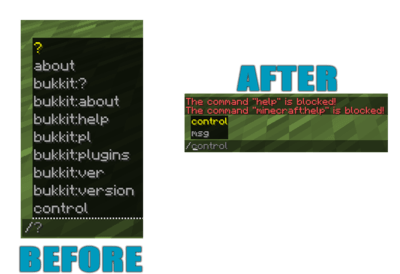
ProAntiTab is an advanced **plugin hider** with **many features** and a very simple to understand system. It prevents your server from **plugin spoofers** used by hack clients, manipulates the **tab-completion**, blocks unwanted **suggestions** and much more!
#####
#####
# **I**N ACTION
######
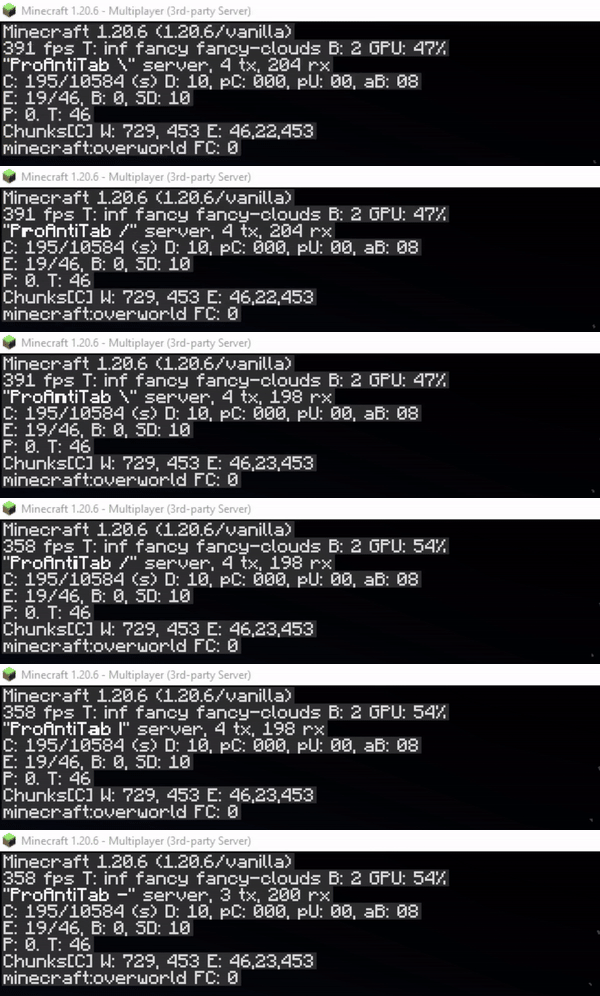
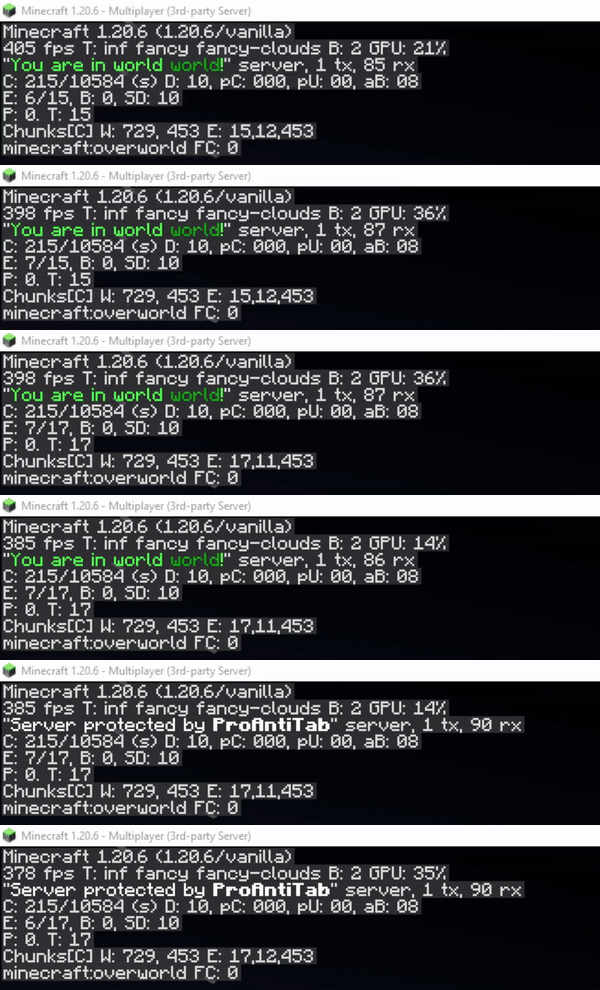
# **C**USTOM SERVER BRAND (F3)
Create your own animated custom server brand on your Spigot, Bungeecord and Velocity server!
**
open config.yml section
“`yaml
# This feature allows you to customize your server-brand you see when you press F3.
# Normally there stands something like ‘Purpur’, or ‘Spigot’.
# With this feature you are able to change and even animate it! ^^
custom-server-brand:
enabled: false
# Determines the speed in that the animation goes
repeat-delay: 3
# This here is the list of the animation
# Possible placeholders:
# %player% – name of the player
# %displayname% – displayname of the player
# %world% – name of world where the player is
# and the other placeholders from PlaceholderAPI
brands:
– ‘&f&lP&froAntiTab |’
– ‘&fP&lr&foAntiTab /’
– ‘&fPr&lo&fAntiTab -‘
– ‘&fPro&lA&fntiTab |’
– ‘&fProA&ln&ftiTab ‘
– ‘&fProAn<&fiTab |’
– ‘&fProAnt&li&fTab /’
– ‘&fProAnti&lT&fab -‘
– ‘&fProAnti&lT&fab ‘
– ‘&fProAntiT&la&fb |’
– ‘&fProAntiTa&lb&f /’
– ‘&fProAntiTab -‘
– ‘&fProAntiTab ‘
“`
######
# **U**SE BLACKLIST AS WHITELIST
You have way too many commands to block? Don’t worry.
There’s a section in the config.yml located pretty much high that allows you to turn the blacklist into a whitelist instead. This will block every command on your server except for those that are listed.
section in config.yml
“`yaml
# This is a very necessary feature if you have way too many commands to block and instead decide
# to whitelist specific commands.
# Enabling this will disable ALL commands except for those that are in the (group-)list.
turn-blacklist-to-whitelist: false
“`
######
# **A**NTI PLUGIN SPOOFING
##### ProAntiTab is able to detect and block plugin spoofing attempts used by hack clients.
**
######
# **B**LOCK SUB ARGUMENTS
We all know the problem when players should be able to use some of the commands but should not see literally EVERY sub-argument in a command. Well, then just blend them out? ProAntiTab can do this for you and it’s very easy to setup as well! (See some examples below)

example
“`yaml
# Let’s say you just want to allow “/help Minecraft” only and not “/help apple”.
# It will also automatically allow everything after “/help Minecraft …”
– help Minecraft
# [CMD] = Allow the execution of the command
# [TAB] = Allow the tab-completion of the command
– “[CMD]cmi tpa” # Only executable. Not tab-completable
– tpa # Executable & Tab-Completable
# %hidden_online_players% = Online players (Removed from tab-completion)
# %online_players% = Online players
# %hidden_players% = Registered players (Removed from tab-completion)
# %players% = Registered players
# %numbers% = Numbers, such as 1000 or 1.000
# _- = Block everything after
– “tpa %online_players%”
– “sell %numbers%”
# Using the operator _- at the end cancels every argument afterwards and blocks it.
# This will allow the player to use “/help Minecraft” but not “/help Minecraft xyz”
– help Minecraft _-
“`
######
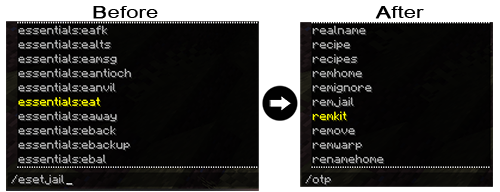
# **B**LOCK COLON COMMANDS
Blocking each and every colon command like essentials:spawn by hand is not an easy task. But with this simple feature, you can easily block all colon commands automatically! Only people with the proantitab.namespace permission can see and use these commands again.
open config.yml section
“`yaml
#>> HTP (Overwritten)
# Here you can disable all namespace commands.
# Namespace commands are commands like plugin:command (e.g: essentials:warp)
# You can bypass this restriction with the proantitab.namespace permission.
block-namespace-commands:
enabled: false
“`
######
# **C**USTOM PLUGINS LIST
Just blocking the /plugins command is pretty boring. This feature here allows you to make it more interesting by displaying for example fake plugins.

open config.yml section
“`yaml
#>> HTP (Overwritten)
# Here you can customize your own fake ‘/plugins’ command.
custom-plugins:
enabled: true
commands:
– pl
– plugins
– bukkit:pl
– bukkit:plugins
message:
– ‘&fPlugins (0):’
“`
######
# **C**USTOM VERSION COMMAND
Who wouldn’t like to pretend to own a custom server-jar? Have fun customizing your very own /version command to your personal liking.

open config.yml section
“`yaml
#>> HTP (Overwritten)
# Here you can customize your own fake ‘/version’ command.
custom-version:
enabled: true
commands:
– version
– ver
– icanhasbukkit
– bukkit:ver
– bukkit:version
message:
– ‘&fThis server is running CraftBukkit version git-NasaSpigot-294 (MC: X)’
“`
######
# **C**USTOM UNKNOWN COMMAND MESSAGE
The Bukkit/Spigot version of ProAntiTab gives your the possibility to create your own unknown-command message to align it with the blocked-command message for example.

open config.yml section
“`yaml
# Now there we come to the good stuff! ^^
# If ProAntiTab is loaded on a Spigot server, you will see this option right here.
# With that you can also customize your own “Unknown Command”-message.
custom-unknown-command:
enabled: true
message:
– ‘&cThis command does not exist!’
“`
######
# **C**USTOM PROTOCOL PING
Do you know the red text message at the players count when you ping a server with the wrong version? Exactly this holds the information of what kind of server your proxy server is running at. This feature hides the version of the proxy with a custom made one. It’s enabled by default but doesn’t show the text. The text can be seen when someone pings the server with the wrong version or uses a resolver. This picture shows you what someone with the wrong version would see, unless the “always-show” is enabled. If this option is enabled, this text will always appear.

open config.yml section
“`yaml
# Change the protocol for the version name when the server is being pinged
# (!) Warning: It’s required to use Paper or Purpur to use this feature!
# (!) Supported server versions: 1.12.2 – latest
custom-protocol-ping:
enabled: false
# Normally it would only display when someone pings the server with the wrong version.
# Enabling this will always display the protocol and replace it with the normal player count.
always-show: false
# This number here determines the outcome for the %online_extended% placeholder.
# It’s the current amount of players increased by this number.
# For example: 5/20 becomes 6/20
extend-online-count: 1
# true: Use new calculated online-count (%online_extended%) as max-players count.
# false: Use the default max-players count.
use-as-maxplayers: false
# Enabling this option hides the list of players on your server,
# when you hover over the player count.
hide-players: true
# The displayed protocol message
# Available placeholders:
# %online% – current online player count
# %online_extended% – manipulated online player count
# %max% – max player count
protocol: ‘&f&lProAntiTab &7(&a%online%&7/&c%max%&7)’
“`
######
# **C**USTOM RESPONSE ACTIONS
For some, it’s important to determine how the response message should be or what should happen. You can customize that factor to your personal liking and use different actions to have full control over your blocked commands.


Bukkit/Spigot examples
“`yaml
# ____ ___ __ _ ______ __
# / __ _________ / | ____ / /_(_)_ __/___ _/ /_
# / /_/ / ___/ __ / /| | / __ / __/ / / / / __ `/ __
# / ____/ / / /_/ / ___ |/ / / / /_/ / / / / /_/ / /_/ /
# /_/ /_/ ____/_/ |_/_/ /_/__/_/ /_/ __,_/_.___/
# custom-responses.yml
#
# Here you can configure a few of the blocked commands a bit further.
# But what exactly is this here? Every command that would normally respond with the typical “command is blocked” message, can be configured in here!
# And how does it work? It’s simple. You just provide the a trigger of the command that would be normally blocked.
# Commands that would normally work won’t send the messages you have set here.
# This way PAT can offer you full control over certain commands and their normal responses.
# What are these action section at each block?
# This is an additional feature to make your responses much more alive.
# Example actions that can be used are the following:
# Execute console command:
# Syntax: console::command
# Example: console::say %player% is an evil player
# Execute player command:
# Syntax: execute::command
# Example: execute::help
# Send actionbar:
# Syntax: actionbar::text
# Example: actionbar::&cThis is not cool %player%!
# Send title:
# Syntax: title::title::subtitle::5::20::5
# Example: title::&aTest title::&cHello %player%!
# Play sound:
# Syntax: sound::soundName::volume::pitch
# Example: sound::ENTITY_ENDER_DRAGON_GROWL::1.0::1.0
# Give potion effect:
# Syntax: effect::potionEffect::duration::amplifier
# Example: effect::BLINDNESS::45::1
# Here are a few examples:
# Example with kits.
# In here we only trigger the given message, if the player would type “/kit …”.
# If this command would work through sub-arguments, then the player would only able to execute the command with the
# listed sub-arguments assigned to it. Everything else will result with the set message in there.
# —
#example-with-kits:
# triggers:
# – “kit *”
# message:
# – “&cThis kit does not exist!”
# actions:
# – “actionbar::&cSorry %player%, but this kit does not exist!”
# Here another example with an auctionhouse plugin.
# In here we only trigger the given message, if the player would type “/ah plugin”.
# Normally it would print out the “command is blocked” message, because PAT would have blocked it in our case.
# Therefore, we can also assign a custom response message to it.
# —
#example-with-auctionhouse:
# triggers:
# – “ah plugin”
# message:
# – “&cThis sub-command does not exist. Please type: &e/ah help”
# actions:
# – “console::say That’s not nice %player%!”
# – “effect::BLINDNESS::45::1”
# – “sound::ENTITY_ENDER_DRAGON_GROWL::1.0::1.0”
# – “title::&cHey!::&cYou can’t do that %player%!::5::20::5”
# – “actionbar::&cNop, sorry %player%”
“`
Proxy examples
“`yaml
# ____ ___ __ _ ______ __
# / __ _________ / | ____ / /_(_)_ __/___ _/ /_
# / /_/ / ___/ __ / /| | / __ / __/ / / / / __ `/ __
# / ____/ / / /_/ / ___ |/ / / / /_/ / / / / /_/ / /_/ /
# /_/ /_/ ____/_/ |_/_/ /_/__/_/ /_/ __,_/_.___/
# custom-responses.yml
#
# Here you can configure a few of the blocked commands a bit further.
# But what exactly is this here? Every command that would normally respond with the typical “command is blocked” message, can be configured in here!
# And how does it work? It’s simple. You just provide the a trigger of the command that would be normally blocked.
# Commands that would normally work won’t send the messages you have set here.
# This way PAT can offer you full control over certain commands and their normal responses.
# What are these action section at each block?
# This is an additional feature to make your responses much more alive.
# Example actions that can be used are the following:
# Execute console command:
# Syntax: console::command
# Example: console::send %player% fallback
# Execute player command:
# Syntax: execute::command
# Example: execute::help
# Send actionbar:
# Syntax: actionbar::text
# Example: actionbar::&cThis is not cool %player%!
# Send title:
# Syntax: title::title::subtitle::5::20::5
# Example: title::&aTest title::&cHello %player%!
# Here are a few examples:
# Example with kits.
# In here we only trigger the given message, if the player would type “/kit …”.
# If this command would work through sub-arguments, then the player would only able to execute the command with the
# listed sub-arguments assigned to it. Everything else will result with the set message in there.
# —
#example-with-kits:
# triggers:
# – “kit *”
# message:
# – “&cThis kit does not exist!”
# actions:
# – “actionbar::&cSorry %player%, but this kit does not exist!”
# Here another example with an auctionhouse plugin.
# In here we only trigger the given message, if the player would type “/ah plugin”.
# Normally it would print out the “command is blocked” message, because PAT would have blocked it in our case.
# Therefore, we can also assign a custom response message to it.
# —
#example-with-auctionhouse:
# triggers:
# – “ah plugin”
# message:
# – “&cThis sub-command does not exist. Please type: &e/ah help”
# actions:
# – “console::say That’s not nice %player%!”
# – “title::Hey!::You can’t do that %player%!::30::3000::30”
# – “actionbar::Nop, sorry %player%”
“`
#####
# **N**EGATE COMMANDS
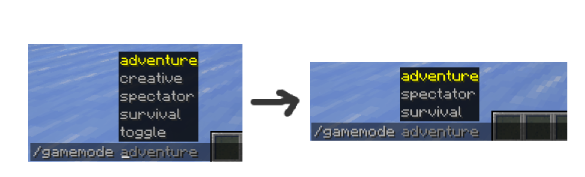
It’s not a must to write each and every possible sub-argument by hand. The same goes for commands in general.
You can negate them with the help of the negation operator (“!“).
**
example
“`yaml
# Allows /gamemode and all of its sub-arguments
# except “/gamemode creative”
– “gamemode”
– “!gamemode creative”
– ‘!gamemode toggle’
“`
“`yaml
# Allows all commands, except /anvil
– “*”
– “!anvil”
“`
#####
# **A**UTO-ADD ALL PLUGIN COMMANDS
Sometimes it’s so annoying to add all commands from a certain plugin by hand. That’s why ProAntiTab offers the possebility to simply add all commands from a certain plugin with a simple shortcut.
You can simply add “plugin=“ to add all commands from a plugin automatically.
**Only works for standalone Spigot (+Forks) servers**
example
“`yaml
# Allows all Essentials commands except /anvil.
# /gamemode is limited to only two sub-arguments
– “plugin=essentials”
– “!anvil”
– “gamemode creative”
– “gamemode survival”
“`
######
# **B**LOCK ON SPECIFIC SERVERS
If you use ProAntiTab on a network, you can pretty easily manage on what servers what commands should exist. Everything can be handled via the proxy and does not require additional maintenance on the backend servers.
For this, just follow the official setup and how-to guide, which can be both found on the Github wiki.
######
# **G**ROUP SYSYTEM
The PAT group system allows you to allow certain commands only for a certain group of people. PAT group commands are mainly for **whitelisting** commands, can merge with other groups, and so on.
They can also be used to blacklist commands by negating the commands inside there. But for this to work, the option `allow-group-overruling` inside the `config.yml` needs to be enabled.
How to use the PAT group system in general can be seen on the Github wiki.
######
# **P**LACEHOLDERAPI & PAPIPROXYBRIDGE SUPPORT
Customization and uniqueness is an important factor for many server owners. That’s why PAT offers you the possebility to edit and use many of its placeholders with the widely spreaded plugin PlaceholderAPI. Accessing those placeholders on the proxy isn’t a problem either. With the support of the addtional plugin PAPIProxyBridge, PAT’s placeholders are even accessable on your proxy server.
Available placeholders
“`yaml
# Some general Placeholders to work with:
# %pat_general_user% = Get the name of the user who receives this message.
# %pat_general_version_current% = Get current version name of PAT.
# %pat_general_version_newest% = Get newest version name of PAT.
# Placeholders of some of the messages in the config.yml:
# %pat_message_unknowncommand% = Get the “unknown command”-message from the config.yml of PAT. [cancel-blocked-command]
# %pat_message_blocked% = Get the “command blocked”-message from the config.yml of PAT. [custom-unknown-command]
# Placeholders to list all commands:
# %pat_list_size_commands% = Get the amount of all listed commands.
# %pat_list_commands% = Get all listed commands.
# %pat_list_sorted_commands% = Get all listed commands in alphabetic order. (A-Z)
# %pat_list_reversed_groups% = Get all listed commands in reversed alphabetic order. (Z-A)
# Placeholders to list all commands of a group: (replace ‘xxx’ with the group-name)
# %pat_list_size_commands_group_xxx% = Get the amount of all commands of a group.
# %pat_list_commands_group_xxx% = Get all commands of a group.
# %pat_list_sorted_commands_group_xxx% = Get all commands of a group in alphabetic order. (A-Z)
# %pat_list_reversed_commands_group_xxx% = Get all commands of a group in reversed alphabetic order. (Z-A)
# Placeholders to list all groups:
# %pat_list_size_groups% = Get the amount of all available groups.
# %pat_list_groups% = Get all groups.
# %pat_list_sorted_groups% = Get all groups in alphabetic order. (A-Z)
# %pat_list_reversed_groups% = Get all groups in reversed alphabetic order. (Z-A)
“`
###
# **M**INIMESSAGE SUPPORT
## 
##### You want to design your messages more unique? We got you covered! *(works on 1.17 server and above)*
*(Click here to see the documentation for the format*)
Look at those few examples to see what kind of possibilities awaits you:
example 1
“`yaml
cancel-blocked-commands:
enabled: true
message: ‘&cThis command is &4&lBLOCKED&c!’
“`

example 2
“`yaml
cancel-blocked-commands:
enabled: true
message: ‘&cThis command is blocked! &7Click here to get a view of all available commands instead.’
“`

######
# **H**OW TO SETUP?
Despite of the fact that ProAntiTab is pretty easy to use, the setup is slidely different for each server engine.
It normally is already enough to simply load ProAntiTab on the certain server you wanna use it, but in order to use ProAntiTab with all its features, its recommended to follow the official setup guide on the Github wiki.
**Please feel free to join the Discord server to request for help if the instruction is unclear or too complicated. ^^**
#
# **H**OW TO ALLOW COMMANDS?
Please check out the wiki to get an idea on how PAT works and can be used.
If you want to bypass all blocked commands, simply give yourself the following permission: **proantitab.bypass**
Following permission is required to execute all listed commands within a certain group: **proantitab.group.**
######
# **C**OMMANDS & PERMISSIONS
All commands and their permissions are listed on the documentation page at the very buttom.
######
# **C**ONFIGURATION FILE
Bukkit/Spigot
config.yml
storage.yml
Proxy (Bungeecord/Velocity)
config.yml
storage.yml
######
## **bStats**


Prism Perms
Prism Perms is a lightweight, cross‑platform permissions plugin for Minecraft servers. It provides simple, consistent group and user permission management across Bukkit/Spigot/Paper, BungeeCord, and Velocity without needing a database. Data is stored in readable YAML with built‑in backup/restore and live reload/watch.
– Uniform commands across all platforms for adding/removing groups and permissions
– Per‑user overrides (allow/deny) and group membership management
– Rich stats tools to inspect groups and users, including ungrouped/missing/list
– Pagination and safe chat chunking to prevent message overflows
– Online/offline player name resolution via a cached names store (timestamps persisted)
– Designed for small to medium servers that want a fast, file‑based solution
## Quick Commands
– Version: `/pp version`
– Groups: `/pp group add `, `/pp group remove `, `/pp group list`
– Group perms: `/pp group perm add `, `/pp group perm remove `, `/pp group perms list `
– User groups: `/pp user setgroup `, `/pp user removegroup `
– User perms: `/pp user perm add `, `/pp user perm remove `
– User info: `/pp user list `, `/pp user overrides `
– Stats: `/pp stats users …`, `/pp stats groups [members [limit]]`, `/pp stats verbose [group]`
– Backup/Restore: `/pp backup`, `/pp restore`
## Permissions
– Admin: `prismperms.admin`
MiniPlaceholders PremiumVanish Expansion
# PremiumVanish-Expansion
PremiumVanish Expansion for MiniPlaceholders
## Paper
### Installation
– Place the downloaded `MiniPlaceholders-PremiumVanish-Expansion-x.x.x.jar` into the `/plugins` directory
– Start / restart the server
### Placeholders
The expansion uses messages defined in the `plugins/PremiumVanish/messages.yml` file which can be changed from there.
| Placeholder |
Type |
Description |
<premiumvanish_isvanished> |
Audience |
Returns either Messages.PlaceholderIsVanishedYes or Messages.PlaceholderIsVanishedNo |
<premiumvanish_vanishprefix> |
Audience |
When a player is vanished returns Messages.PlaceholderVanishPrefix |
<premiumvanish_vanishsuffix> |
Audience |
When a player is vanished returns Messages.PlaceholderVanishSuffix |
<premiumvanish_vanishedplayers> |
Global |
Returns a comma seperated list of online vanished players. |
<premiumvanish_playercount> |
Audience |
Returns the amount of players a player can see. |
<premiumvanish_uselevel> |
Audience |
Returns a player’s use vanish permission level. |
<premiumvanish_seelevel> |
Audience |
Returns a player’s see vanish permission level. |
## Velocity
### Installation
– Place the downloaded `MiniPlaceholders-PremiumVanish-Expansion-x.x.x.jar` into the `/plugins` directory
– Start / restart the proxy
### Placeholders
Placeholders can be changed by modifying the `messages_en.properties` file in `plugins/miniplaceholders-premiumvanish-expansion/locale` directory.
For per-player locales, you can add more `.properties` files for other locales to the directory.
| Placeholder |
Type |
Description |
<premiumvanish_isvanished> |
Audience |
Returns either miniplaceholders.expansion.premiumvanish.placeholder.isvanished.yes or miniplaceholders.expansion.premiumvanish.placeholder.isvanished.no |
<premiumvanish_vanishprefix> |
Audience |
When a player is vanished returns miniplaceholders.expansion.premiumvanish.placeholder.prefix |
<premiumvanish_vanishsuffix> |
Audience |
When a player is vanished returns miniplaceholders.expansion.premiumvanish.placeholder.suffix |
<premiumvanish_vanishedplayers> |
Global |
Returns a comma seperated list of online vanished players. |
<premiumvanish_playercount> |
Audience |
Returns the amount of players a player can see. |
<premiumvanish_uselevel> |
Audience |
Returns a player’s use vanish permission level. |
<premiumvanish_seelevel> |
Audience |
Returns a player’s see vanish permission level. |
PooperMC
# PooperMC
is an all-in-one solution for your Minecraft server network that aims to provide all the features you need in just one simple plugin. Being lightweight and efficient, PooperMC tries to provide as many features as possible while having a simple and easy-to-maintain codebase.
The modern codebase using Java 21+ allows for fast response times and always-up-to-date code.
Although the plugin is still in development, it is already a valid choice for any server network that needs a working and lightweight plugin.
Read more at https://marcpg.com/pooper (soon…)!
## Requirements
– **Java 21 or higher**. Find instructions on how to install or update Java here.
– **SignedVelocity** (only for Velocity): https://modrinth.com/plugin/signedvelocity
## Releases
You can find our official releases on these platforms:
– Modrinth (recommended): modrinth.com/plugin/pooper
– GitHub: github.com/MarcPG1905/PooperMC/releases
– Hangar: hangar.papermc.io/MarcPG1905/PooperMC
– SpigotMC: spigotmc.org/resources/poopermc.115129
– Planet Minecraft: planetminecraft.com/mod/peelocity-all-in-one-proxy-plugin
– CurseForge: curseforge.com/minecraft/bukkit-plugins/pooper
## Features
Most features can be enabled or disabled in the configuration.
Some aren’t enabled by default, so make sure to check out the configuration!
### Chat Utilities
Some stuff that improves the chatting experience.
– **Message Logging:** All messages are logged and can be seen by moderators using `/msg-hist`.
– **Private Messaging:** You can globally message someone using `/msg PlayerName` or `/w` to reply.
– **Mentions:** By writing `@PlayerName`, you can ping another player or `@everyone`.
– **Chat Colors:** You can use MiniMessage’s colors and styles in the chat.
### Custom Server List
Refers to everything you see when looking at the server in your multiplayer server list.
– **Better MotD:** Simple custom MotDs that use MiniMessage and can be randomized.
– **Better Favicons:** Custom server icons from image links that can be randomized.
– **Online Player Count:** You can set a custom or fake online player count, although that’s dishonest and not recommended.
– **Better Player Limit:** You can set the custom max players. It also allows for the maximum number of players to always be one more than the online players.
### Moderation
Everything moderation-related is also sent to a Discord Webhook.
– **Banning:** Bans with expiration, permanent bans, and reasons.
– **Kicking:** Kicks with reasons.
– **Muting:** Mutes with expiration and reasons.
– **Reporting:** Easy reports that can be used by anyone and are pretty easy to use.
– **Staff-Chat:** A staff chat where all staff members (pee.staff permission) can chat privately.
### Social Stuff
Some social-stuff that’s nice for bigger servers with multiple game modes.
– **Friend-System:** A simple friend system with friend requests and not much usage.
– **Party-System:** A simple party system with invites, joining matches together, and party chatting.
### Paper-Modules
All modules are disabled by default and are fully optional. You can enable them in the configuration under `modules`.
– **Vein-Mining:** Fully configurable vein-mining with animation, proper item damage, etc.
– **Better Mob-AI:** Allows for stuff like whole groups panicking if one gets hit or generally a more intelligent AI.
– **Death-Banning:** Will ban or kick a player if they die or get killed. Fully customizable.
– **No Anvil-Cap:** Will remove the anvil cost limit and instead just make the cost grow slower, starting at level 40, to not reach absurd costs like 500 levels.
– **Better Sleep:** Will optimize sleep based on configuration, like more realistically skipping the night, more robust required player calculations, or even dreams.
– **Custom AFK:** A simple AFK feature that can be configured to your liking.
– **Utility Block Commands:** Commands for opening utility blocks, like the crafting table, a loom, or your ender chest, without needing to place down a block.
– **Global Ender Chest:** A global ender chest that everyone on the server can access. Acts like a community chest.
### Other
Some stuff that can’t be categorized but is still nice to have.
– **Global Whitelist:** A whitelist that works on the proxy instead of only the backend servers.
– **Custom Join-Logic:** Utilities for joining a game mode configured in the configuration, which also support plugin messaging over `pooper:joining`, for lobby plugins.
– **Player-Cache:** Caches all players with their name and UUID for later use, even if they are offline.
## Usage
### Configuration
The configuration is designed to be simple and descriptive. You can find everything you need inside the configuration file, which ships with useful descriptions.
### Translations
Translations are automatically downloaded over a simple database, which means that you don’t have to do anything except have a stable internet connection. The download itself will only take a few kilobytes on each startup.
### Data Storage
There are multiple ways of storing the data that you can set in the configuration. YAML and RAM both don’t require additional configuration.
But if you want to use a database, you will need to set it up yourself. For simple instructions, please visit the database help page (soon…)!
## Future Goals
Some of the major features that we hope to add in the future are:
– Simple and lightweight TAB-list utility.
– A wider range of moderation utilities, such as vanishing.
– Some features use inventory interfaces instead of pure commands.
– More translations are needed to make the plugin and all servers using it accessible to anyone.
## Contact
### Discord
You can join my Discord community and just ping me for a quick response: https://discord.gg/HvWhqY3kRG
### Direct Contact
If you don’t use Discord or would like to contact me otherwise, please rely on one of these methods:
– E-Mail: [[email protected]](mailto:[email protected])
– Discord: `@marcpg1905`
## For Developers
### Used Libraries
PooperMC is made to be as lightweight as possible. We only use three very small utility libraries:
– LibPG – A utility library provided by MarcPG that has various features, like downloads, pairs, time formats, etc.
– boosted-yaml – Provides a reliable and lightweight configuration library with file versions and more.
– libby – Allows for dynamically downloading the database drivers to have a smaller file size.
polocloud-proxy
# PoloCloud Proxy Addon
The **PoloCloud Proxy Addon** is a user-friendly extension for PoloCloud that helps you manage your network! It includes the `/cloud` command, which allows you to start and stop services or activate maintenance work via command.
It is designed for all supported proxies, including Velocity and BungeeCord, and helps employees and players enjoy the best possible gaming experience.
## 💫 Features
– **Works on all supported proxies** – No need to install it on every backend server.
– **Service management via command** – Start or stop services via `/cloud` command
– **Permission-based commands** – Only players with the configured permission are able zu perform the commands.
– **Fully configurable** – Customize messages through `proxy-config.json`.
– **Lightweight & dependency-free** – Minimal performance impact.
## 🎟️ Permission
This permission is needed to perform commands or bypass the maintenance mode:
“`polocloud.addons.proxy.command.cloud“`
“`polocloud.addons.proxy.command.cloud.info“`
“`polocloud.addons.proxy.command.cloud.list“`
“`polocloud.addons.proxy.command.cloud.maintenance“`
“`polocloud.addons.proxy.command.cloud.players“`
“`polocloud.addons.proxy.command.cloud.start“`
“`polocloud.addons.proxy.command.cloud.stop“`
“`polocloud.addons.proxy.maintenance.bypass“`
📂 Installation
Download the latest release of the PoloCloud Proxy Addon.
Place the .jar file into your plugins folder.
Restart the proxy instance.
Edit the generated proxy-config.json to customize messages.
Reload or restart the proxy to apply the changes.
💡 Use Cases
Offer players the best possible gaming experience with a configurable MOTD and tab list.
Inform your players about maintenance work via a configurable MOTD and only allow authorized team members to access the network during maintenance work.
—
With the PoloCloud Proxy Addon, you can ensure that players get the best possible gaming experience – simple, configurable, and reliable.