A **Plasmo Voice** addon that displays player nicknames instead of their Minecraft usernames.
Starting with **v2.0.0**, the addon ships as a **single universal jar** that runs on every server-side platform Plasmo Voice supports — drop it into `plugins/` (Bukkit-family) or `mods/` (Fabric, NeoForge via Sinytra Connector), no separate downloads.
### Example

—
## Tested matrix (v2.1.0)
Verified by booting each combination with the addon and observing both successful PV addon registration and `Done (…)` from the server thread:
**Note for Forge / NeoForge users:** install **Plasmo Voice’s native Forge or NeoForge build** (e.g. `plasmovoice-forge-1.21.1-2.1.9.jar` or `plasmovoice-neoforge-1.21.1-2.1.9.jar`), not the Fabric jar with Sinytra Connector. The addon ships auto-generated Forge / NeoForge entrypoints that load cleanly against the native PV builds — no Connector required.
The addon itself does not depend on any platform-internal API, so it should work on every other Plasmo-Voice-supported MC version (1.20.1 → 26.1.2) on the loaders listed above; the table above is just what was actually booted and verified.
| Command | Permission | Default | Action |
| — | — | — | — |
| `/pvnreload` | `pv.addon.nickname.reload` | `op` | Reload `config.toml` at runtime. Works with LuckPerms / Vault / PEX on Bukkit-family. |
The config also reloads automatically when Plasmo Voice’s own `/vreload` runs.
—
## Installation
1. Install **Plasmo Voice 2.1.9** on your server or proxy. Forge / NeoForge users: use the native PV Forge or NeoForge jar (no Connector needed).
2. Drop `pv-addon-nickname-.jar` into the same `plugins/` or `mods/` folder as Plasmo Voice.
3. Start the server. A config will be generated at `plugins/pv-addon-nickname/config.toml` (Bukkit) or `config/pv-addon-nickname/config.toml` (Fabric/proxy).
### Default config
“`toml
# Built-in placeholders: %player_name%, %player_uuid%, %player_displayname%
# On Bukkit/Paper with PlaceholderAPI installed, all PAPI placeholders work.
# On Fabric with PB4 placeholder-api installed, %namespace:placeholder% syntax works.
format = “%player_displayname%”
“`
Reload with `/pvnreload` (or Plasmo Voice’s `/vreload`) after editing.
—
## Migration from 1.x
– Old `1.0.0` (plugin) and `1.1` (NeoForge) splits are merged into a single jar starting at `2.0.0`.
– Config format moved from JSON to TOML. Re-create your `format` value in the new TOML config.
– The NeoForge-only `/pvn` command was removed; the addon now uses **Plasmo Voice’s player info** path on every platform, which is what client-side mods (e.g. nickname mods) expect.
– **AsamiKafune** — original NeoForge port and internal nickname system that inspired the unified built-in resolver. https://modrinth.com/user/AsamiKafune
Add-on bundled with LavaPlayer fork library required for some Plasmo Voice add-ons.
## Installation
1. Download the add-on from Modrinth
2. Install the add-on:
– For Paper, install the library in `~/plugins`.
– For Fabric or Forge, install the library in `~/mods`.
3. Restart the server
## Adding to the project (For developers)
### Kotlin DSL
“`kotlin
repositories {
maven(“https://repo.plo.su”)
}
Create group voice chat channels. Keep talking with players far away.
Groups are managed via chat commands. GUI client side add-on coming soon™.
Groups can be password protected, or only allow player with certain permissions.
## Installation
You can install this add-on as either (Paper, Fabric, Forge) OR (Bungee, Velocity) mod/plugin
If you install it as a Bungee or Velocity plugin then groups will work for players an all servers.
Players can talk while beeing on different servers.
## Basic usage
### Create a group and invite players
1. Open Plasmo Voice menu `V` (by default), go to the `Activation` tab and configure the `Groups` activation.
2. Use a command to create a group `/groups create […flags]`
3. Invite players to the group `/groups invite `
3. Use the activation to talk in the group.
### Browsing groups
You can browse public groups using a command: `/groups` or `/groups browse`
## Flags
You can use flags when creating a group to change the settings.
For example: `/groups create name: The Boys password: qwerty1245 persistent: true permissions: group.theboys`
All flags are optional and the order doesn’t matter.
`name:` and `password:` are quite obvious.
`persistent:` makes it so that the group is not automatically deleted when it’s empty or after the server restart.
`permissions:` only allow players with a certain permission to join.
You can set multiple permissions: `permissions: group.admin, group.moderator`
`/groups` or `/groups browse [page]` — Browse groups.
`/groups create […flags]` — Create a group.
`/groups invite ` — Invite a player to the group.
`/groups join [password]` — Join the group. Not recommended to use manually. Used from browse or invite.
`/groups info` — Show info about the current group.
`/groups leave` — Leave the current group.
`/groups set ` — Set a flag value for a current group.
`/groups unset ` — Set flag to a default value.
`/groups delete` — Delete the current group.
`/groups transfer ` — Transfer the ownership of the group to a different player.
`/groups kick ` — Kick a player from the group.
`/groups ban ` — Ban a player from the group.
`/groups unban ` — Unban a player from the group.
## Permissions
| Permission | Description | Default |
|———————————-|———————————————————————|———|
| `pv.activation.groups` | Use groups activation | True |
| `pv.addon.groups.browse` | Use `/groups browse` | True |
| `pv.addon.groups.browse.all` | Groups are visible even if player doesn’t have a permission to join | OP |
| `pv.addon.groups.create` | Use `/groups create` | True |
| `pv.addon.groups.invite.member` | Use `/groups invite` if member | True |
| `pv.addon.groups.invite.owner` | Use `/groups invite` if owner | True |
| `pv.addon.groups.join` | Use `/groups join` | True |
| `pv.addon.groups.join.all` | Use `/groups join` and bypass password and permission check | OP |
| `pv.addon.groups.info.member` | Use `/groups info` if member | True |
| `pv.addon.groups.info.owner` | Use `/groups info` if owner | True |
| `pv.addon.groups.leave` | Use `/groups leave` | True |
| `pv.addon.groups.set.owner` | Use `/groups set` if owner | True |
| `pv.addon.groups.set.all` | Use `/groups set` in any group | OP |
| `pv.addon.groups.unset.owner` | Use `/groups unset` if owner | True |
| `pv.addon.groups.unset.all` | Use `/groups unset` in any group | OP |
| `pv.addon.groups.delete.owner` | Use `/groups delete` if owner | True |
| `pv.addon.groups.delete.all` | Use `/groups delete` in any group | OP |
| `pv.addon.groups.transfer.owner` | Use `/groups transfer` if owner | True |
| `pv.addon.groups.transfer.all` | Use `/groups transfer` in any group | OP |
| `pv.addon.groups.kick.owner` | Use `/groups kick` if owner | True |
| `pv.addon.groups.kick.all` | Use `/groups kick` in any group | OP |
| `pv.addon.groups.ban.owner` | Use `/groups ban/unban` if owner | True |
| `pv.addon.groups.ban.all` | Use `/groups ban/unban` in any group | OP |
Broadcast your voice to all players in the radius, world, server, or proxy.
## Installation
You can install this add-on on:
– Paper, Fabric, or Forge
– Can set the broadcasting scope to a radius, world, or the whole server. Using the `/vbroadcast` or `/vbc` command.
– Bungee or Velocity
– Can set the broadcasting scope to a server, or all servers connected to a proxy. Using the `/vbroadcastproxy` or `/vbcp` command.
– Both
– Can use both commands
## Usage
1. Open Plasmo Voice menu `V` (by default), go to the `Activation` tab and configure the `Broadcast` activation.
2. Use a command to set the broadcasting scope:
– `/vbc range `
– `/vbc world `
– `/vbc server` or `/vbcp server `
– `/vbcp proxy`
3. Use the activation to broadcast in the scope you’ve selected.
## Permissions
All permissions are only available to OP by default.
**PureAuth** is a high-performance security framework built to safeguard player identities on modern Minecraft servers. Developed by *SzymeX Dev Studio*, it provides a bulletproof defense layer for **Spigot, Paper, Purpur, Velocity and BungeeCord** environments, ensuring maximum security with zero impact on server performance.
—
## 💎 Why choose PureAuth?
Identity theft is a major concern for server administrators. PureAuth solves this by implementing industry-standard protocols:
* **BCrypt Encryption:** Your players’ passwords are more secure than in a bank.
* **Mojang API Validation:** Real-time identity verification for official accounts.
* **Ultra-Fast Performance:** Powered by **HikariCP** (MySQL/SQLite), all database operations are fully asynchronous to keep your TPS stable.
—
## 🔥 Core Security Features
### ⚡ **Smart IP-Trust Verification**
* Once a player verifies their official account via `/premium`, the system remembers their trusted IP.
* Players login **instantly without a password** from that same address.
* If the IP changes, the system automatically forces a password check to keep the account safe.
### 🤖 **Anti-Intrusion & Brute-Force Shield**
* **Strike System:** 3 failed attempts = automatic kick/lock.
* **Security Lock:** Suspicious accounts are frozen instantly (unlock via `/pureauth unlock`).
* **Captcha:** A reliable barrier against automated bot registrations.
### 🔐 **Advanced Protection**
* **2FA (Google Authenticator):** Add a second layer of security via `/2fa setup`.
* **Ghost Mode:** Players are invisible and blinded until they successfully authenticate.
* **Zero Dependencies:** PureAuth **no longer requires ProtocolLib**, ensuring better stability and easier updates.
—
## 🎨 Visuals & Discord Integration
Monitor your server in real-time with professional **Discord Webhooks**:
* 🟢 **Green:** Successful Logins and Server Start.
* 🟠 **Orange:** Password changes and failed login attempts.
* 🔴 **Red:** Account lockouts and critical system stops.
* 🔵 **Blue:** Automatic login status updates.
> **Full Audit Logging:** Every administrative action (`Force Login`, `Unregister`, etc.) is recorded, ensuring total transparency.
—
### 🌐 Technical Specifications
* **Compatibility:** 1.21.x (and newer)
* **Database Support:** MySQL, SQLite
* **Localization:** Full support for **English** and **Polish**
* **Modern Formatting:** Full **MiniMessage** integration (RGB gradients and custom colors)
* PureAuth wiki here
—
PunishManager
# PunishManager
**Discord Announces, Multi Lang Support, GUI on Bungee/Velocity/Spigot, All Common Punishment Commands**
# About
PunishManager offers you many features you need to create a quality environment on your server. It has general ban and mute commands. It has optional Discord features.
# Features
+ UUID support for online and offline mode.
+ All commands can be used by name or uuid.
+ You can punish players who have previously joined your server but are offline.
+ It has multi-language support. Messages are sent to players in their chosen language. If there is no language file in the player’s language, the messages in the default language file you specified will be used.+
+ Advanced tab completions.
+ When a player is punished, you can send embed messages to a specific channel in discord.
+ Placeholders for all punishes to be able to use values such as “name of player punished, operator name of punish, type of punish, remaining time of punish, server where punish occurred”.
+ You can use mysql or a local database if you want.
+ You can prevent players that you specify in the configuration from being punished.
+ If you want, you can show the names of everyone who has entered the server before in the tab completions.
+ You can ban commands you don’t want players to use while muted.
+ All disconnect messages are customizable.
+ You can see the current status of the player with the /check command.
+ You can quickly reload the plugin’s configuration single commands.
+ A handy gui for general management(requires Protocolize)
+ You can prevent the use of punish commands against players you specify to prevent undesirable situations.
+ It works on both Bungeecord, Velocity and Spigot with a single jar file.
+ For proxy servers, you only need to put the plugin in the Bungeecord plugin folder.
+ Command to import punishes from other plugins.
# GUI Feature
+ Players can change the plugin language for themselves.
+ Staff can reload the plugin.
+ Staff can manage punishes.
# Important Informations
+ For the GUI feature, the Protocolize plugin must be installed on your bungeecord server.
# Commands
+ punish : Punish Punish the player with predefined templates via a gui.
+ ban [reason]: Ban a player.
+ tempban
+ Spigot or Bungeecord
+ Java 1.8 or newer
+ Protocolize [Optional]
Wiki: https://mehmet27.gitbook.io/punishmanager
Help to translate: https://crowdin.com/project/punishmanager
Metrics Bungee: https://bstats.org/plugin/bungeecord/PunishManager/14772
Metrics Bukkit: https://bstats.org/plugin/bukkit/PunishManager/14913
Metrics Velocity: https://bstats.org/plugin/velocity/PunishManager Velocity/15231
# Contact and Support
If you need help with the plugin, you can contact me on our discord server.
Discord: https://discord.com/invite/MYjmmEqKvE
# NOTE
This plugin:
+ stores the ip addresses of your players.
+ can access your discord server for punish announcements.
+ uses bstats api for metrics.
+ connects to spiget api to check for updates.
+ automatically downloads the protocolize plugin for some platforms.
The reason why the jar file is large is due to many api used.
A solution will be produced for this in the near future.
PunisherX-Proxy-Bridge
# PunisherX Proxy-Bridge
**PunisherX Proxy-Bridge** is a lightweight addon for Velocity/BungeeCord networks that synchronizes bans and IP bans from PunisherX (Paper/Folia) via a shared database and instantly disconnects punished players on the proxy.
## Description
Do you run a server network and find it frustrating when a player gets banned on one backend but can still stay on the lobby or hop between servers?
**PunisherX Proxy-Bridge** solves this problem.
The addon acts as a bridge between:
* **PunisherX on Paper/Folia** (where punishments are executed),
* **Velocity/BungeeCord Proxy** (where the player is actually connected),
* **a shared database** (where punishment events are stored).
When an administrator issues a BAN/BANIP (even from the console and even if the backend is empty), PunisherX records the event in the `bridge_events` table.
Proxy-Bridge periodically reads these entries and immediately disconnects matching players on the proxy. After handling, it marks the entry as processed, ensuring the same event is not executed again.
Result: punishments are enforced across the entire network, not just on a single server.
## Features
* ✅ Synchronization of BAN/BANIP between PunisherX and Velocity
* ✅ Works with punishments issued via commands, console, and offline players
* ✅ Immediate enforcement of punishments on the proxy
* ✅ Simple configuration (MySQL + polling interval)
* ✅ No manual kicking and no bypassing punishments between backends
## Requirements
* Java 21+
* Velocity 3.4+ / 3.5+
* PunisherX running on Paper/Folia servers
* Shared MySQL/MariaDB database for PunisherX and the bridge
## Installation
1. Place `PunisherX--Bridge-.jar` into the `plugins` folder on Velocity.
2. Start the proxy to generate `bridge.properties`.
3. Configure DB credentials (`host`, `port`, `database`, `username`, `password`) identical to PunisherX.
4. (Optional) Set `poll-interval-ms` (default: `1000 ms`, minimum: `200 ms`).
5. Restart Velocity.
## Disclaimer
> This is an **addon (bridge)**, not a standalone punishment system.
> It requires the main **PunisherX** plugin on Paper/Folia and a shared database to function.
PumpkinMsg
# 🎃 PumpkinMsg
**PumpkinMsg** is a high-performance, cross-platform private messaging system designed for **Velocity** proxies and **Paper/Spigot** servers. It allows you to use a **single JAR** file for your entire network while providing seamless communication, advanced moderation tools, and deep integration with the most popular APIs.
—–
## ✨ Key Features
– 🚀 **Dual-Platform Core:** A single `.jar` file that detects if it’s running on **Velocity** or **Paper/Spigot**. No need for multiple plugins!
– 🌍 **Global & Local Messaging:** Cross-server messaging for Velocity and high-speed local messaging for Paper.
– 🧩 **PlaceholderAPI Support:** (Paper only) Use any `%placeholder%` in your message formats. Ranks, levels, and custom variables are fully supported.
– 🎨 **LuckPerms Integration:** Native support for prefixes and suffixes in all platforms.
– 🕵️ **Dual Spy System:**
– **SocialSpy:** Monitor private conversations (`/msg`) between users.
– **CommandSpy:** Watch player commands in real-time. Includes server-specific filtering and sensitive command masking (login/register).
– 🛡️ **Total Privacy:** Includes `/ignore` system and `/togglemsg` for players who want to fly under the radar.
– 🌈 **MiniMessage Native:** Use RGB, Gradients, and hover events in your `config.toml`.
– 💾 **Safe Persistence:** All user settings (ignores, spy status) are saved in a lightweight database system.
Customize your styles using **MiniMessage** and **Placeholders**. The system is safe against “Placeholder Injection” (players cannot trigger placeholders in their chat).
“`toml
[format]
# You -> Target (Supports PAPI on Paper)
sender = “<#ABB2BF>[<#FF9500>You <#5C6370>-> <#61AFEF><#ABB2BF>] ”
# Recipient Format (Example with rank placeholder)
receiver = “<#ABB2BF>[%luckperms_prefix% <#61AFEF> <#5C6370>-> <#FF9500>You<#ABB2BF>] ”
### **For Velocity Networks:**
1. Place `PumpkinMsg.jar` in your Velocity `plugins` folder.
2. Ensure **LuckPerms** (Velocity version) is installed for prefix support.
3. Restart your proxy.
### **For Paper/Spigot Servers:**
1. Place the same `PumpkinMsg.jar` in your server’s `plugins` folder.
2. (Optional) Install **PlaceholderAPI** to enable custom variables in formats.
3. Restart your server.
The ultimate automated announcement system, now natively supporting both **Paper** servers and **Velocity** proxies in a single, smart `.jar` file!
PumpkinAnnouncer allows you to schedule highly immersive messages with full support for chat, ActionBars, BossBars, and custom sound effects.
## ✨ Features
– 🌐 **Cross-Platform (1 File):** Works seamlessly whether you drop it into your Paper `plugins` folder or your Velocity proxy. The plugin intelligently adapts to the platform!
– 🎨 **Universal Color Support:** Mix and match Legacy codes (`&a&l`), Bungee Hex (`&#FF0000`), and modern MiniMessage tags (``) on the same line. The plugin automatically translates everything flawlessly.
– 🪧 **BossBars & ActionBars:** Grab your players’ attention with animated, temporary boss bars and action bar messages paired with custom sounds.
– 🎯 **Multi-Server (Velocity):** Broadcast announcements to the entire network (`global`) or restrict them to specific servers (e.g., `[“lobby”, “survival”]`).
– 🌍 **Multi-World (Paper):** Filter announcements so they only appear to players in specific worlds (e.g., `[“world_nether”]`).
– 📏 **Mathematical Centering:** Simply add the `[center]` tag at the beginning of any line to center it perfectly in the Minecraft chat. It calculates pixels and intelligently ignores color codes!
– 🖱️ **Interactive Chat:** Full support for `` and `` tags to create clickable links and informative tooltips.
– ⌨️ **Smart Tab-Completion:** Press `TAB` while typing `/pa test` to instantly auto-complete the IDs of all your configured announcements.
—
## 📜 Commands & Permissions
| Command | Description | Permission |
| :— | :— | :— |
| `/pa reload` | Reloads the configuration in real-time. | `pumpkin.admin` |
| `/pa list` | Displays a list of all loaded announcement IDs. | `pumpkin.admin` |
| `/pa test ` | Instantly previews a specific announcement. | `pumpkin.admin` |
*Tip: When using `/pa test`, press the `TAB` key to auto-complete available announcements!*
—
## 🛠️ Installation
1. Download the `PumpkinAnnouncer-x.x.jar` file.
2. Drop it into the `plugins` folder of your **Paper** server or **Velocity** proxy.
3. Restart your server/proxy.
4. Edit the newly generated `plugins/pumpkinannouncer/config.yml` file to your liking.
5. Run `/pa reload` in-game or from the console to apply your changes instantly.
—
## 📖 Documentation & Examples (`config.yml`)
The v2.2 configuration system allows you to fully customize every aspect of your announcements. Here are 4 of the most common setups (feel free to copy and paste them!).
### 1. Store Sale (Features BossBar, ActionBar & Sound)
A premium-tier announcement. It plays a “Level Up” sound, shows a title above the hotbar, and displays a BossBar that smoothly depletes (`deplete: true`) over 15 seconds.
“`yaml
store_sale:
servers: [“global”]
worlds: [“global”]
sound: “ENTITY_PLAYER_LEVELUP”
actionbar:
enabled: true
text: “🔥 HUGE WEEKEND SALE – 50% OFF! 🔥”
duration-seconds: 10
bossbar:
enabled: true
text: “WEEKEND SALE IS LIVE!”
color: “RED”
style: “SOLID”
duration-seconds: 15
deplete: true
lines:
– “[center]🔥 WEEKEND SALE 🔥”
– “”
– “[center]Get a 50% DISCOUNT on all ranks and keys!”
– “[center]Support the server and get epic perks.”
– “”
– “[center]Click to visit the store!’>👉 store.yourserver.com 👈”
“`
### 2. Voting Reminder (Velocity Server Filter)
If you are running Velocity, this announcement will **only** broadcast to the “survival” and “skyblock” servers. It utilizes an ActionBar but disables the BossBar.
“`yaml
voting:
servers: [“survival”, “skyblock”]
worlds: [“global”]
sound: “ENTITY_EXPERIENCE_ORB_PICKUP”
actionbar:
enabled: true
text: “Vote for us and earn epic rewards!”
duration-seconds: 8
bossbar:
enabled: false
lines:
– “[center]SUPPORT THE SERVER”
– “”
– “[center]Do you enjoy playing here? Help us grow!”
– “[center]Use /vote or click the link below.”
– “[center]Click to vote!’>vote.yourserver.com”
“`
### 3. Danger Alert (Paper World Filter)
If you are running Paper, this is perfect. It will **only** appear to players who are currently in the Nether dimension. Features a Ghast warning sound and a segmented BossBar for a “timer” feel.
“`yaml
nether_warning:
servers: [“global”]
worlds: [“world_nether”] #[PAPER ONLY] Exclusive to this world
sound: “ENTITY_GHAST_WARN”
actionbar:
enabled: false
bossbar:
enabled: true
text: “⚠ DANGEROUS ZONE ⚠”
color: “RED”
style: “SEGMENTED_6”
duration-seconds: 10
deplete: true
lines:
– “[center]⚠ CAUTION ⚠”
– “”
– “[center]You are currently exploring the Nether!”
– “[center]Keep your inventory safe and watch out for lava.”
– “[center]» PvP is enabled in this world.”
“`
### 4. Informational Announcement (Clean & Minimalist)
A simple staff recruitment announcement. No ActionBars, no BossBars, no sounds. Just perfectly centered chat text.
“`yaml
staff_recruitment:
servers: [“global”]
worlds: [“global”]
sound: “”
actionbar:
enabled: false
bossbar:
enabled: false
lines:
– “[center]WE ARE HIRING!”
– “”
– “[center]Are you active and love helping others?”
– “[center]We are currently looking for Helpers and Moderators.”
– “[center]» Apply here: Good luck!’>apply.yourserver.com”
“`
—
## ⚙️ General Settings
At the very top of your `config.yml`, you can control the main timer and fully translate/customize all the plugin’s command responses.
“`yaml
settings:
cooldown-seconds: 60
messages:
help: “PumpkinAnnouncern» /pa reload – Reload settingsn» /pa list – View all IDsn» /pa test – Preview an announcement”
reload-success: “Reload complete! Everything is running smoothly.”
list-header: “Currently Loaded Announcements:”
id-not-found: “That announcement ID doesn’t exist. Please check your config.”
“`
PterodactylPowerAction
# PterodactylPowerAction
A resource-saving Velocity plugin that automatically manages your Minecraft servers by starting them on demand and
shutting them down when idle, using either the Pterodactyl API or shell commands.
> ⚠️ Important:
> Support for this project is limited as I don’t use it in production anymore.
—
## Community & Support
If you have any questions or suggestions, join the Discord server!
## ✨ Key Features
– 🔌 **Energy & Resource Saving** – Automatically shuts down empty servers after a configurable idle period (default: 1
hour)
– 🚀 **On-Demand Server Startup** – Starts servers only when players need them, optimizing resource usage
– 🔄 **Seamless Player Experience**:
– Redirects players to a lightweight waiting server during startup
– Automatically transfers players when their destination server is ready
– Keeps players informed with status messages throughout the process
– 🛡️ **Kick Protection** – Optionally redirects kicked players to your waiting server instead of disconnecting them
– 🧰 **Flexible Implementation**:
– Works with Pterodactyl Panel API for managed hosting
– Supports direct shell commands for self-hosted environments
– ⚙️ **Highly Configurable**:
– Customizable shutdown delay
– Multiple server status checking methods
– Configurable shutdown behavior on proxy restart
– 🌐 **Multilingual Support** – Automatically translates messages based on the client’s language (English, German,
French)
– 🔍 **Diagnostic Tools** – Built-in doctor command to validate your configuration and troubleshoot issues
## How it Works
When a player tries to connect to a stopped server, they’re temporarily sent to your waiting server while
PterodactylPowerAction starts their requested destination. Once the server is ready, they’re automatically transferred.
The plugin monitors player activity and intelligently shuts down empty servers to save resources.
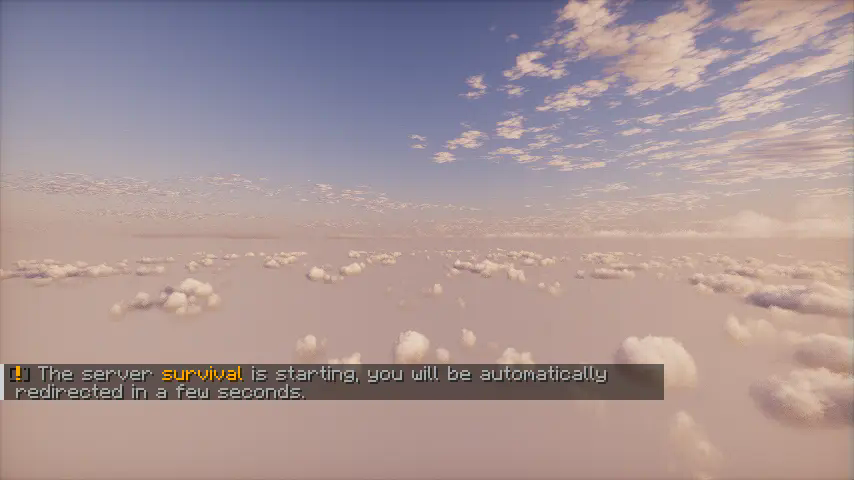
_Shader is Photon._
—
## Documentation
The documentation is available on the wiki of this GitHub repository.