SentryLogger
# SentryLogger
SentryLogger is a plugin that integrates Sentry error tracking with your Paper or Velocity server.
It automatically captures exceptions and logs with context, helping you identify and fix issues more efficiently.
## Features
– Automatic exception tracking with Sentry
– Detailed error reporting with server context
– Configurable ignore list for common exceptions
– Support for both Paper and Velocity platforms
– Alerts on Discord via the Sentry platform
## Supported Platforms
– Paper 1.21+
– Velocity 3.4.0+
## Usage
1. Sign up for a Sentry account if you don’t have one
2. Create a new project in Sentry, select the `Log4j 2.x` platform
3. Copy your DSN url from the Sentry project settings
– You can get it by going to `Settings` in sidebar
– click `projects`
– click on the created project
– near the bottom of the sidebar click on `Client Keys (DSN)`
– You should now see the DSN url
4. Add your DSN url to the `config.conf` file
5. Reload the plugin with `/sentrylogger reload`
6. Test the integration with `/sentrylogger test`
## Commands
| Command | Permission | Description |
|———————–|———————–|——————————————————–|
| `sentrylogger reload` | `sentrylogger.reload` | Reload the configuration file |
| `sentrylogger test` | `sentrylogger.test` | Test the Sentry integration by generating an exception |
SeleneChat
# SeleneChat


(Click here for Japanese documentation. / 日本語ドキュメントはこちら)
SeleneChat is a chat plugin for Minecraft inspired by LunaChat.
Available at Bukkit, BungeeCord, and Velocity.
Tested minecraft versions: 1.12.2-1.20.1
## Feature
– MiniMessage formatted chat
– Converts romaji sent in chat to Japanese
– Private message
## Customize
You can find detailed instructions on the Wiki.
## Support
Bug reports and requests for new features are welcome on Issues.
Pull requests are also accepted.
## Links
– Source code
– SpigotMC project page
– CurseForge project page
– Hangar project page
– Twitter

SayanVanish

# Introduction
Welcome to the introduction for **SayanVanish**, a versatile vanish system that allows you to disappear and reappear on your server network at will, along with many other features.
### Supported Platforms
SayanVanish is compatible with the following platforms:
* **Minecraft**
* **Bukkit**
– Spigot
– Paper
– Folia
* **Proxy**
* **Velocity**
* **Bungeecord**
### Key Features
#### Modularity
SayanVanish is designed as a modular system. Each module serves a specific purpose, which simplifies the maintenance and extension of the plugin.
#### Extensive API
SayanVanish includes a comprehensive API, allowing other plugins to interact with it and utilize its features.
#### Integration with Other Plugins
The API provided by SayanVanish enables deep integration with other plugins, facilitating the development of additional server management tools.
Anti VPN

# Installation
You can install it by placing the plugin in your plugins folder, then visiting our website to get the server access token and start using it. 🙂 For more details, check out the installation guide: Getting Started.
# Features
1. **Free tier** includes 5k Monthly requests.
2. **Cloud-based** checker optimized for the highest performance.
3. **Analytics** for your account, see where the users come from and more.
4. **Cloud Configuration** change your AntiVPN config through the panel and get instantly updated.
5. **Search** through the users tab and see who is blocked and who is allowed.
6. **Whitelist** ~ If you think any check is false, you can allow the player by searching it at the panel.
7. **Sub Accounts (BETA)**
8. **Cloud Configurations** ~ Change settings for your server through the panel, configure the kick message, and more..
9. **Rest-API** ~ Implement our Rest-API in your Services, prevent VPN usage as desired. Documentation
# Support
We are providing support in our Discord. If you feel more comfortable using email, you can contact us via [[email protected]](mailto:[email protected]).
RxNoBots
# RxNoBots 🤖🚫
> Advanced bot protection for Velocity servers using chat & movement verification


—
# 🇺🇸 English version
## 🔒 About the plugin
**RxNoBots** is a powerful anti-bot plugin for **Velocity** proxy that filters unwanted players **before they connect to the main servers**.
The plugin uses **LimboAPI** to create an isolated environment where the player undergoes verification.
### 🔍 How verification works
1. 🗣 Player enters a code in chat
2. 🎯 Performs a series of head movements
3. ✅ Upon success — admitted to the server
—
## ✨ Key features
| Category | Description |
|:———:|:———|
| 🗣 **Chat verification** | Generates a unique code |
| 🎯 **Movement** | Gaze check (up/down/left/right) |
| 🎲 **Randomization** | Unique sequences |
| 📦 **Sessions** | Resume after disconnection |
| 🔁 **Cooldown** | No re-verification required |
| ⚙ **Flexibility** | Fully customizable logic |
| 🛡 **Bypass** | By IP and permissions |
| 📊 **Statistics** | Logs and `/rnb stats` |
| 🔧 **Admin control** | Full control via commands |
—
## 📸 Example workflow
| Step 1 | Step 2 | Result |
|:–:|:–:|:–:|
| Enter code | Hold gaze direction | Join server |
—
## 🛠 Commands & permissions
| Command | Permission | Description |
|:——–|:——|:———|
| `/rnb reload` | `rxnobots.admin` | Reload config |
| `/rnb verify ` | `rxnobots.admin` | Verify player |
| `/rnb reset ` | `rxnobots.admin` | Reset state |
| `/rnb timeout ` | `rxnobots.admin` | Set timeout |
| `/rnb bypass ` | `rxnobots.admin` | Toggle bypass |
| `/rnb stats` | `rxnobots.admin` | Show statistics |
| `/rnb session info ` | `rxnobots.admin` | Session info |
| `/rnb session end ` | `rxnobots.admin` | End session |
| `/rnb cache clear ` | `rxnobots.admin` | Clear cache |
**Additional permission:**
`rxnobots.bypass`
—
## ⚙ Configuration
“`yaml
verification:
type: HYBRID
code:
length: 4
characters: “ABCDEFGHIJKLMNOPQRSTUVWXYZ0123456789”
movement:
random: true
available-directions: [“up”,”down”,”left”,”right”]
min-duration: 2
max-duration: 4
attempts:
max-attempts: 3
max-sessions: 3
timeout:
duration: 600
success:
action: DISCONNECT
target-server: lobby
cooldown:
track-by-user: true
track-by-ip: true
“`
—
# 🇷🇺 Русская версия
## 🔒 О плагине
**RxNoBots** — это мощный анти-бот плагин для прокси **Velocity**, который фильтрует нежелательных игроков **до подключения к основным серверам**.
Плагин использует **LimboAPI**, создавая изолированное окружение, где игрок проходит проверку.
### 🔍 Как работает проверка
1. 🗣 Игрок вводит код в чат
2. 🎯 Выполняет серию движений головой
3. ✅ При успехе — допускается на сервер
—
## ✨ Ключевые возможности
| Категория | Описание |
|:———:|:———|
| 🗣 **Чат-проверка** | Генерируется уникальный код |
| 🎯 **Движение** | Проверка взгляда (вверх/вниз/влево/вправо) |
| 🎲 **Рандомизация** | Уникальные последовательности |
| 📦 **Сессии** | Восстановление после дисконнекта |
| 🔁 **Кулдаун** | Повторная проверка не требуется |
| ⚙ **Гибкость** | Полная настройка логики |
| 🛡 **Байпас** | По IP и правам |
| 📊 **Статистика** | Логи и `/rnb stats` |
| 🔧 **Админ-контроль** | Полный контроль через команды |
—
## 📸 Пример работы
| Этап 1 | Этап 2 | Результат |
|:–:|:–:|:–:|
| Ввод кода | Удержание взгляда | Вход на сервер |
—
## 🛠 Команды и права
| Команда | Право | Описание |
|:——–|:——|:———|
| `/rnb reload` | `rxnobots.admin` | Перезагрузка |
| `/rnb verify <игрок>` | `rxnobots.admin` | Верификация |
| `/rnb reset <игрок>` | `rxnobots.admin` | Сброс |
| `/rnb timeout <игрок> <сек>` | `rxnobots.admin` | Таймаут |
| `/rnb bypass <игрок>` | `rxnobots.admin` | Байпас |
| `/rnb stats` | `rxnobots.admin` | Статистика |
| `/rnb session info <игрок>` | `rxnobots.admin` | Инфо |
| `/rnb session end <игрок>` | `rxnobots.admin` | Завершить |
| `/rnb cache clear <игрок>` | `rxnobots.admin` | Очистить кэш |
**Дополнительно:**
`rxnobots.bypass`
—
## ⚙ Конфигурация
“`yaml
verification:
type: HYBRID
code:
length: 4
characters: “ABCDEFGHIJKLMNOPQRSTUVWXYZ0123456789”
movement:
random: true
available-directions: [“up”,”down”,”left”,”right”]
min-duration: 2
max-duration: 4
attempts:
max-attempts: 3
max-sessions: 3
timeout:
duration: 600
success:
action: DISCONNECT
target-server: lobby
cooldown:
track-by-user: true
track-by-ip: true
“`
RustyConnector

# 👋 Welcome to RustyConnector






[RustyConnector] is a load-balancing plugin that can run on [Velocity]/[Paper]/[Folia] networks, which allows your proxy to automatically register or unregister sub-servers while it’s running.
🧭 Links

|
Wiki
Wanna learn how to get started? Look here!
|
|
Download
Download from GitHub, or check out the plugin release pages.
|
|
Support
Join our Discord community here for support!
(Support is offered to paying server members only)
|
|
Report Bugs
Experiencing annoying bugs while using the plugin? Report them here to help us squash them.
|
🚀 Plugin Release Page

|
Modrinth
Click to go to Modrinth plugin release page.
|

|
Hangar
Click to go to Hangar plugin release page.
|
# 🎨 Statistics
## 🌌 Networks Served (Click to view):
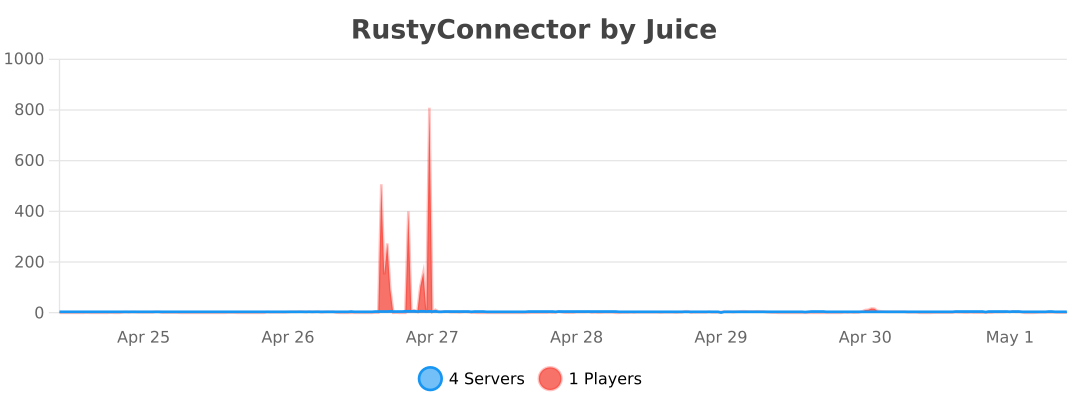
2025 © Aelysium
[Folia]:https://github.com/PaperMC/Folia
[Paper]: https://papermc.io
[Velocity]: https://velocitypowered.com
[RustyConnector]: https://github.com/Aelysium-Group/rustyconnector-minecraft
RoleLink
# RoleLink
Role Link is a Velocity plugin to link your Minecraft account to a Discord account and give the player a reward and synchronize their permissions with Discord roles.
## Features
– Customize all messages
– Customize the bot status
– Change the reward commands
– Change the permissions to receive the roles
– Change the roles to receive
## Permissions
– “rolelink.use“ – to use /dclink
– “rolelink.unsync“ – to use /dcunlink
## Commands
– /dclink – Sends a DM to the user to process the linking…
– /dcunlink – unlink a user
## Config
“`json
{
“botToken”: “”,
“botSettings”: {
“enable”: true,
“status”: “”,
“type”: “”
},
“guildId”: “”,
“minecraftRoles”: {
“server.permission”: “discordRoleID”
},
“discordRoles”: {
“discordRoleID”: “server.permission”
},
“rewardCommand”: “”,
“removeRewardCommand”: “”,
“commandsData”: {
“linkCommandName”: “link”,
“unlinkCommandName”: “unlink”,
“cooldown”: 5
}
}
“`
Spoiler
“`
ICON made with AI
“`
RocketJoin

RocketJoin is an OpenSource plugin that allows you to create custom join messages with groups, commands on join, sounds and more.

Installing RocketJoin is very easy.
1. Install RocketJoin
2. **Optional:** Install PlaceholderAPI
3. Done!


– Fully Customizable
– Fast support
– PlaceholderAPI support
– Custom conditions like first join and permissions
– Fireworks sounds and more
– Bungeecord support
– Hex support
Outdated Tutorial
RMotd
# 🎲 RMotd
A small Minecraft server plugin to serve rotating MOTDs (Message of the Day) and let server operators manage MOTDs at runtime.
# 🤑 Features
– Rotating MOTDs from `config.yml` (round-robin).
– `/randommotd` command: toggle random-rotation on/off.
– `/motd create ` command: add a new MOTD to `config.yml` at runtime.
– `/motd reload` command: reloads the `config.yml`.
# 🖌️ Configuration
“`yaml
random_motd_enabled: true
motds:
– “Welcome to our server!”
– “Explore the world of Minecraft with us!”
– “Join us and have fun!”
messages:
invalid_input: “Invalid input, Please use ‘true’ or ‘false’”
setting_updated: “Random MOTD feature updated to ”
“`
# 🕹️ Commands
– `/randommotd` — Toggle random MOTD rotation (reads/writes `random_motd_enabled` in `config.yml`).
– Permission: `rmod.randommotd` (declared in `plugin.yml`).
– `/motd create ` — Add a MOTD entry to `motds` in `config.yml` and save it. The `` is used only in the confirmation message currently. Provide the MOTD content as remaining args.
– Example: `/motd create welcome Welcome to our server!`
– Operator-only by default (only ops or console can run it). If you prefer permission-based control, see Permissions below.
– `/motd reload` — Reloads `config.yml` from disk. Operator-only.
# 🎭 Permissions
– `rmod.randommotd` — used for the `randommotd` command.
– `rmod.motd` — reserved for `/motd` (plugin.yml documents it). Currently the plugin enforces operator-only usage for `/motd`; if you prefer permissions, change the check to `sender.hasPermission(“rmod.motd”)` in `MotdCommand`.
ReWhitelist
# ReWhitelist
A simple, but still very powerful plugin that allows you to restrict access to the particular server or an entire network. Allows you to add many different lists, with ability to turn them on and off as needed.
For example, you can have a list with all administrators who can access the server at all times, and a list with testers who have access only for testing.
You no longer need to add or remove users from one whitelist, you just need to enable or disable whitelist with testers in it.
## Download
You can download the latest version of the plugin from the Modrinth or Hangar.
## Issues & suggestions
If you have any issues or suggestions, please report them in the issues section.
## Description
This plugin allows you to create and manage multiple whitelists.
By default all whitelists are disabled.
When the default whitelist is enabled, all players are forbidden to enter, unless any other enabled whitelist allows entrance.
When whitelist’s servers are empty, whitelist protects all servers, otherwise whitelist protects only specified servers.
Plugin has a built-in integration with Floodgate to allow players to join the server with their Floodgate accounts.
## Commands & permissions
Main command is `/whitelist` which allows you to manage whitelists.
| Argument | Description | Permission |
|—————————————————————————–|—————————————–|——————————————————————————————————————————-|
| /whitelist reload | Reload a whitelist configuration. | rewhitelist.command.whitelist.reload |
| /whitelist create `` | Create new whitelist group. | rewhitelist.command.whitelist.create |
| /whitelist `[group]` add `` `` | Add player entry to the whitelist. | rewhitelist.command.whitelist.add |
| /whitelist `[group]` remove `` | Remove player from the whitelist. | rewhitelist.command.whitelist.remove |
| /whitelist `[group]` list | Show list of all whitelisted players. | rewhitelist.command.whitelist.list |
| /whitelist `[group]` on | Enable whitelist. | rewhitelist.command.whitelist.on |
| /whitelist `[group]` off | Disable whitelist. | rewhitelist.command.whitelist.off |
| /whitelist `[group]` settings `` | Additional settings of whitelist. | rewhitelist.command.whitelist.settings |
| /whitelist `[group]` settings servers `` | Manage servers controlled by whitelist. | rewhitelist.command.whitelist.settings.servers
rewhitelist.command.whitelist.settings.servers.edit (for add/remove/clear) |
`[group]` – is an optional argument, that can be omited. Defaults to: `default`
`<...>` – has multiple options. If omited, available options will be displayed.
#### Example
“`
/whitelist on # enables whitelist blocking
/whitelist create Stuff # creates a new group “Stuff”
/whitelist Stuff on # enables a whitelist to allow entries to passthorugh players
/whitelist Stuff add nick Test123 # adds new entry allowing player with nick “Test123” to enter
/whitelist create Testers # creates a new group “Testers”
/whitelist Testers add permission Tester # adds new entry allowing player with permission “Tester” to enter
# due to fact that “Testers” group wasn’t enabled, players with permission “Tester” sill won’t be able to enter
/whitelist Testers on # enables “Testers” group
“`
## Configuration file
Example config file:
config.toml