ServerMaintenance
ServerMaintenance
Overview
ServerMaintenance is a powerful and lightweight solution for Minecraft server administrators who need to perform updates, fixes, or modifications without disruption. This elegant plugin enables a sophisticated maintenance mode that restricts access to your server while you work, ensuring only authorized personnel can connect during critical maintenance periods.
Key Features
🛠️ Simple Yet Powerful Management
Toggle maintenance mode on/off with a single command
Customizable kick messages with full color code support
Comprehensive permission system for granular access control
Player-specific bypass list that persists through server restarts
👥 Flexible Access Control
Automatically kicks non-authorized players when maintenance mode is enabled
Operators gain automatic access during maintenance
Permission-based bypass system (servermaintenance.bypass)
Named player bypass list for temporary access without permissions
💬 Rich Communication Tools
Fully customizable kick messages with color support
Server-wide announcements when maintenance status changes
Clear command feedback for administrators
⚙️ Advanced Configuration
Simple, well-documented configuration file
Reload configuration without server restart
Persistent settings across server restarts
Performance-optimized with minimal resource usage
Why Choose This Plugin?
Unlike other maintenance solutions that merely display a custom MOTD or rely on complex permission systems, this plugin offers the perfect balance of simplicity and power. It was designed with both small community servers and large networks in mind, providing the essential functionality needed without unnecessary complexity.
The code is meticulously optimized for performance, ensuring minimal impact on your server resources. Whether you’re running a small survival server or managing a large network with thousands of players, this maintenance solution scales perfectly to your needs.
Getting Started
Installation is straightforward:
Drop the plugin JAR into your plugins folder
Restart your server
Configure permissions as needed
Use /maintenance on when you need to restrict access
/maintenance on Enable maintenance mode
/maintenance off Disable maintenance mode
/maintenance status Check current maintenance status
/maintenance message Set custom kick message
/maintenance bypass add Add player to bypass list
/maintenance bypass remove Remove player from bypass list
/maintenance bypass list View players with bypass access
/maintenance reload Reload configuration
Permissions
servermaintenance.adminAccess to all maintenance
servermaintenance.bypassAbility to join during maintenance
Scheduled maintenance periods
Discord webhook integration
Customizable MOTD during maintenance
Database support for multi-server networks
We welcome community feedback and feature suggestions to make this the ultimate maintenance solution for Minecraft servers of all sizes!
Advertisement:

ServerLinks
# ServerLinks
Show your server links in the client pause screen.
It is the new features in 1.21, but not disclosed in vanilla.
Now supported both Velocity and Spigot (and its forks).
## Requirements
– Minecraft >= 1.21
– Spigot only
– ProtocolLib >= 5.1.0
## Configurations
### Spigot
File name: `config.yml`
“`yaml
server-links:
# Client known types:
# BUG_REPORT, COMMUNITY_GUIDELINES, SUPPORT, STATUS, FEEDBACK, COMMUNITY, WEBSITE, FORUMS, NEWS, ANNOUNCEMENTS
– type: WEBSITE
url: “https://github.com/MeowCraftMC/ServerLinks”
# Custom type with text
# Supports formatting codes (like &a) and hex colors (Bccff).
– type: CUSTOM
text: “&6Custom text”
url: “https://www.example.com”
“`
### Velocity
File name: `config.conf`
“`hocon
server-links=[
{
type=WEBSITE
url=”https://github.com/MeowCraftMC/ServerLinks”
},
{
label=”&bCustom example.com”
url=”https://www.example.com”
}
]
“`
## Command & Permissions
### Spigot
Use `/serverlinks reload` to reload the config.
– `serverlinks.admin`: For admins who can reload the config.
– `serverlinks.user`: For users who can see these links.
### Velocity
Use `/velocity reload` to reload the config.
No permissions provided.
## Screenshots

## License
SSPL-1.0
Copyright (c) 2024 qyl27
“`text
This program is free software: you can redistribute it and/or modify it under the terms of the Server Side Public License, version 1, as published by MongoDB, Inc. This program is distributed in the hope that it will be useful, but WITHOUT ANY WARRANTY; without even the implied warranty of MERCHANTABILITY or FITNESS FOR A PARTICULAR PURPOSE. See the Server Side Public License for more details. You should have received a copy of the Server Side Public License along with this program. If not, see http://www.mongodb.com/licensing/server-side-public-license.
“`
ServerJoinPerms
# ServerJoinPerms
A Velocity proxy plugin that enforces server-specific join permissions for Minecraft servers.
## Features
– Restricts players from joining servers they don’t have permission for
– Prevents server switching to unauthorized servers
– Simple permission-based access control
– Native Velocity integration
## Requirements
– Velocity 3.0.0 or higher
– Java 11 or higher
## Installation
1. Download the latest `ServerJoinPerms.jar` from the releases page
2. Place the JAR file in your Velocity server’s `plugins` directory
3. Restart your Velocity proxy
## Usage
### Permissions
The plugin uses a simple permission structure:
– `server.` – Grants permission to join the specified server
### Examples
– To allow access to a server named `survival`: `server.survival`
– To allow access to a server named `creative`: `server.creative`
### Behavior
– Players without the required permission will be disconnected with an error message
– Permission checks occur on both initial join and server transfers
– The error message clearly indicates the reason for disconnection
## Configuration
No configuration file is needed. The plugin works out of the box with Velocity’s permission system.
## Building from Source
1. Clone the repository
2. Run `mvn clean package`
3. Find the compiled JAR in the `target` directory
## Support
For support, please open an issue on the GitHub repository.
## License
This project is licensed under the MIT License.
## Author
– **LOLYAY** – Initial development
ServerAutoRestart

**PlayerCONSOLE is REQUIRED!**
Text version
ServerAutoRestart is a PlayerCONSOLE module that automatically relaunches your server the moment
it goes offline. Enable/disable state and all settings persist to disk across
restarts -> configure once and forget about it. Works on both Bukkit/Spigot
and Velocity from a single universal jar.
Controlled exclusively via the PlayerCONSOLE developer console.
Why this and not the spigot.yml alternative?
This expansion is meant to be an alternative to that, not replace it. This is more convenient and more accessible to people who did not know the spigot.yml auto-start on stop trick.
Server Shader Gate & Enforcer
## Description
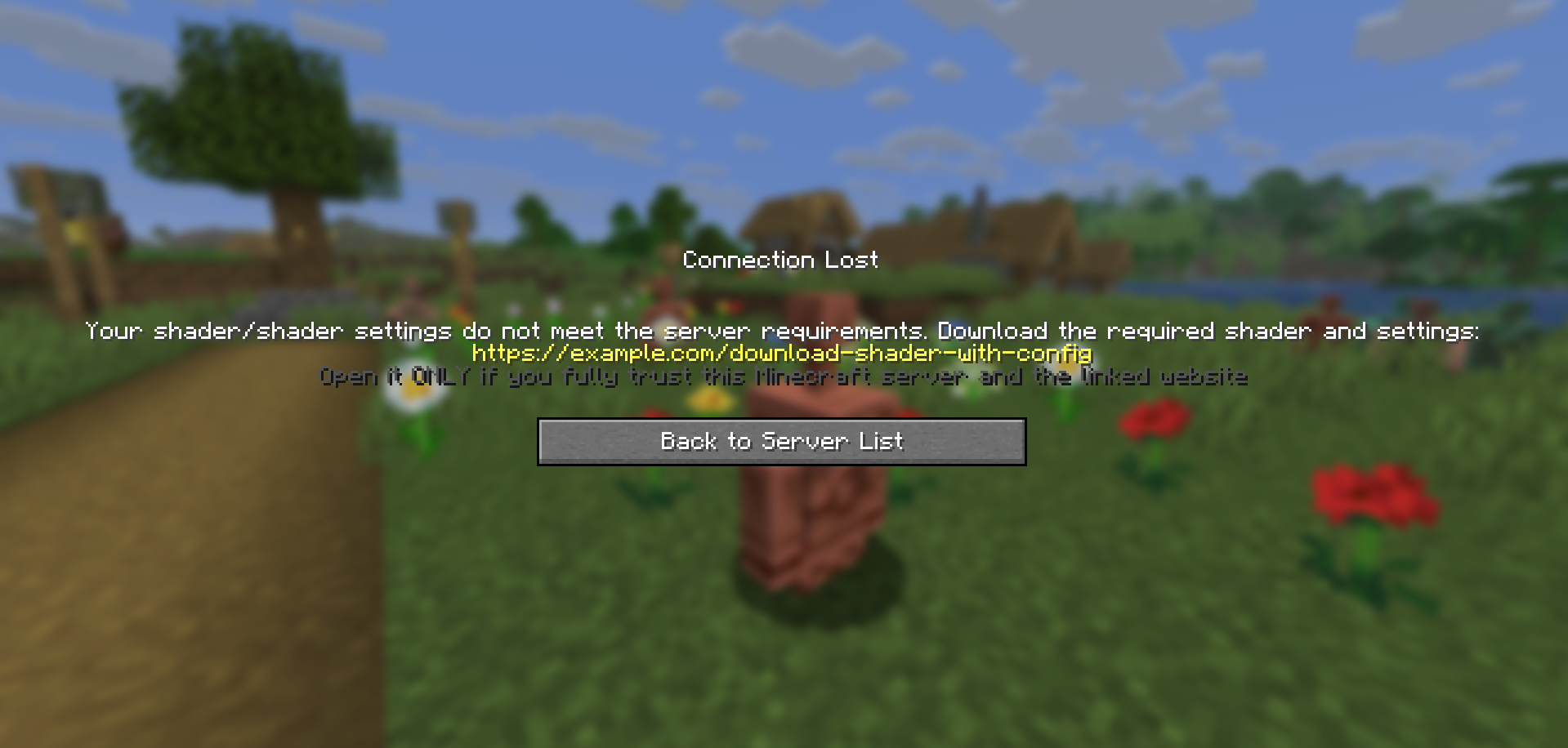
**Server Shader Gate & Enforcer (SSGE)** – a client-side mod and server-side plugin that requires players to install a shader and use specific shader options to play on the server.
Upon connecting to the server, the SSGE client mod automatically sends its configuration data about the current shader and its settings to the server plugin. The server plugin compares the received data with its own configuration. If the data matches, the player is allowed onto the server. Otherwise, the connection is refused.
The mod requires Iris and Fabric API to work.
## Сonfiguration
The configuration file of the mod – `ssge_mod.json`;
the configuration file of the plugin for the server – `ssge.yml`
ssge_mod.json
“`
{
“shaderFile”: “”,
“shaderOptions”: “”,
“sizeShader”: 0,
“sizeOptions”: 0,
“shaderHash”: “”,
“enableShaders”: false
}
“`
This configuration is generated automatically when connected to the server and depends on the Iris settings: the switch on/off shader, selected shader file and selected shader settings
`shaderFile` – shaderpack file
`shaderOptions` – shader settings file. If the shader uses default settings, this string will be `empty` because the file does not exist.
`sizeShader` – shaderpack size in bytes.
`sizeOptions` – shader settings size in bytes. If the shader uses default settings, this value is `0`.
`shaderHash` – SHA-256 hash of the shader file.
`enableShaders` – shaders enabled/disabled switch
ssge.yml
“`
require_enabled: true
shader_file: ”
shader_options: ”
size_shader: 0
size_options: 0
shader_hash: “”
require_shader: true
require_options: true
link: https://example.com/download-shader-with-config
exempt_players: []
“`
Generated automatically and must be configured manually to work properly.
`require_enabled` – shaders enabled/disabled switch.
`shader_file` – shaderpack file.
`shader_options` – shader settings file. If the shader uses default settings, this string will be `empty` because the file will not exist.
`size_shader` – shaderpack size in bytes.
`size_options` – shader settings size in bytes. If the shader uses default settings, this value is `0`.
`shader_hash` – SHA-256 hash of the shader file.
`require_shader` – requires a specific shaderpack.
`require_options` – requires specific shader settings.
`link` – your link to download the shader and specific settings.
`exempt_players` – list of exempt players can play on the server without installing the SSGE client mod or using any shaders (e.g., admins or moderators).
Use `/ssge reload` to reload the plugin configuration.
## Sending and receiving a link
If a player has the client mod installed but their configuration does not match the server’s, the plugin sends them a download link before kicking the player.
The client mod receives the link, saves it to the file `ssge_link.txt` in the *`.minecraft/config`* directory, and automatically opens the file for the user.
ssge_link.txt
“`
You received this file because you tried to join a Minecraft server that requires
a specific shader (or shader settings) that you may not have installed.
Download the shader from the link provided by the server administrator and follow
these instructions unless otherwise noted:
1. Download the shader archive (.zip) and the shader settings (.txt) from the link below.
2. Put both files into your game directory’s “shaderpacks” folder.
3. Go to the Iris menu, select and enable this shader from the list, and try logging into the server again.
If the server provides a checksum (SHA-256), verify it against the downloaded shader file.
If you still have any difficulties joining the server, please contact the server administration for help.
!!! WARNING: External link below may be dangerous !!!
Open it ONLY if you fully trust this Minecraft server and the linked website.
Possible risks include:
– malicious installers, viruses, or trojans that can harm your system
– phishing pages designed to steal Minecraft, Discord, email or other credentials
– web scripts that can collect personal or sensitive information
– stealers that silently extract passwords, tokens, or browser data
– drive-by or automated downloads that execute without clear consent
– spoofed or tampered downloads (files different from what they claim)
If unsure — do NOT open the link.
https://example.com/download-shader-with-config
“`
#### Be careful: the server administrator may provide a malicious link to harm your system or steal your data. Always check the link using online scanners and do not open it if it looks suspicious. If you detect a threat, report the server on the hosting platform or listing website.
When placing a link in the plugin configuration, follow these guidelines:
– The link should not be excessively short or long.
– The link should be readable and not contain random strings.
– Avoid shortened URLs or redirects to third-party resources.
– The link must not lead to websites containing malware, scripts, or suspicious content.
– If the link leads to a file-sharing service, it should point directly to a `.zip` file or a `folder` containing the shader and settings.
– If your Minecraft server has its own website, it’s better to create a dedicated download page.
– The link should not point to any installer files (`.exe`, `.msi`, `.jar`, etc.).
– The website should not require registration, phone numbers, email, or other personal data.
## For example
Let’s say we want all players on our server to play using thejinxedartist’s MC VHS shader.
Then the plugin configuration can be like this:
“`
require_enabled: true <––
shader_file: 'MCVHSV2.zip' <–– Required
shader_options: 'MCVHSV2.zip.txt' <–– values
size_shader: 275232 <––
size_options: 79 <––
shader_hash: "e59a3d139..." <––
require_shader: true
require_options: true
link: https://modrinth.com/shader/mc-vhs
exempt_players: ["Admin", "You"]
```
The mod configuration must match the plugin configuration and be like this:
```
{
"shaderFile": "MCVHSV2.zip",
"shaderOptions": "MCVHSV2.zip.txt",
"sizeShader": 275232,
"sizeOptions": 79,
"shaderHash": "e59a3d139...",
"enableShaders": true
}
```
If the player has a different configuration, the server will kick him.
Server Registration Plugin
# Server Registration Plugin
![Banner][banner]
[![Modrinth][badge-modrinth]][modrinth]
[![Discord][badge-discord]][social-discord]
[![Follow @simplecloudapp][badge-x]][social-x]
[![Follow @simplecloudapp][badge-bluesky]][social-bluesky]
[![Follow @simplecloudapp][badge-youtube]][social-youtube]
[Report a Bug][issue-bug-report]
·
[Request a Feature][issue-feature-request]
🌟 Give us a star — your support means the world to us!
> All information about this project can be found in our detailed [documentation][docs-thisproject].
A proxy plugin that registers SimpleCloud v3 Minecraft servers on a proxy server.
## Features
– [x] **Velocity**
– [x] **BungeeCord**
– [x] **Server name**: Specify how the server name of servers is assigned
– [x] **Additional servers**: Add non network servers
– [ ] **Advanced filters**: Use advanced filters for filtering which servers can get registered
## Contributing
Contributions to SimpleCloud are welcome and highly appreciated. However, before you jump right into it, we would like you to read our [Contribution Guide][docs-contribute].
## License
This repository is licensed under [Apache 2.0][license].
[banner]: https://raw.githubusercontent.com/simplecloudapp/branding/refs/heads/main/readme/banner/plugin/server-registration.png
[issue-bug-report]: https://github.com/theSimpleCloud/server-registration-plugin/issues/new?labels=bug&projects=template=01_BUG-REPORT.yml&title=%5BBUG%5D+%3Ctitle%3E
[issue-feature-request]: https://github.com/theSimpleCloud/server-registration-plugin/discussions/new?category=ideas
[docs-thisproject]: https://docs.simplecloud.app/plugin/server-registration
[docs-contribute]: https://docs.simplecloud.app/contribute
[modrinth]: https://modrinth.com/plugin/server-registration-plugin
[license]: https://opensource.org/licenses/Apache-2.0
[snapshots]: https://repo.simplecloud.app/#/snapshots
[social-x]: https://x.com/simplecloudapp
[social-bluesky]: https://bsky.app/profile/simplecloud.app
[social-youtube]: https://www.youtube.com/@thesimplecloud9075
[social-discord]: https://discord.simplecloud.app
[badge-modrinth]: https://img.shields.io/badge/modrinth-18181b.svg?style=flat-square&logo=modrinth
[badge-license]: https://img.shields.io/badge/apache%202.0-blue.svg?style=flat-square&label=license&labelColor=18181b&style=flat-square&color=e11d48
[badge-discord]: https://img.shields.io/badge/Community_Discord-d95652.svg?style=flat-square&logo=discord&color=27272a
[badge-x]: https://img.shields.io/badge/[email protected]?style=flat-square&logo=x&color=27272a
[badge-bluesky]: https://img.shields.io/badge/[email protected]?style=flat-square&logo=bluesky&color=27272a
[badge-youtube]: https://img.shields.io/badge/youtube-d95652.svg?style=flat-square&logo=youtube&color=27272a
Server Redirect
## **Server Redirect**
This mod provides a lightweight way for servers to transfer players to another server address, without the use of a proxy server.
Server Redirect supports Forge, Fabric, Bukkit/Spigot, SpongeVanilla/SpongeForge, Bungeecord/Waterfall and Velocity.
With Server Redirect, server admins can avoid mod incompatibility issues caused by proxy servers (Bungeecord, Waterfall, and Velocity).
In particular, this mod can be used in combination with **Waterfall and Forge 1.13+** servers and clients to provide a way to transfer players between servers (currently, the 1.13+ Forge server needs to be “online” as they haven’t included IP forwarding yet…).
This mod is optional, so it can be added to modpacks and players can still join servers without this mod. Likewise, servers with this mod can be joined by clients without this mod.
## **Commands**
– **/redirect <Target> <Server Address>**: redirects the specified target player(s) to the specified address
– **/fallback <Target> <Server Address>**: sets the fallback server address for the specified target player(s)
– **/ifplayercanredirect <Target> <Command…>**: runs the specified command for each of the target player(s) that have Server Redirect
– **/ifplayercannotredirect <Target> <Command…>**: runs the specified command for each of the target player(s) that have not Server Redirect
The command source can be anything that can run a command, like a command block, a player, or console.
Replace **/redirect** with **/fallback** to have the specified target players connect to the specified server address when they get forcefully disconnected from the server.
##### **The <Target> argument can be one of the following:**
– **Player Name/UUID**: the specified player on the server
– **Target Selector**: a target selector. Target selectors are not available on Bungeecord and Velocity.
– **r=N**: all players within N blocks from the command sender, or from the overworld spawn if run by console. Plugin version only.
– **s=<ServerName>**: all players in the specified ServerName. Bungeecord and Velocity only.
– *: all players on the server.
##### **The <Command…> argument can contain the following placeholders:**
– **%PlayerName**: this placeholder will be replaced with the player’s name
– **%PlayerId**: this placeholder will be replaced with the player’s UUID
**NOTICE**: **/ifplayercanredirect** and **/ifplayercannotredirect** will likely not work as expected if run when the target player just joined the server. These commands rely on the client sending a packet to the server telling them they have this mod installed. This packet requires some time to be sent by the client and processed by the server. It is recommended to delay this command execution by at least 20 ticks after the player has joined the server!
#### **Examples:**
– **/redirect KaiNoMood myawesomemcserver.net:25667**: the player named KaiNoMood will connect to myawesomemcserver.net:25667
– **/redirect a54a7884-9ea4-4d54-ac35-1623d70ffbe1 myawesomemcserver.net:25667**: the player with the specified UUID will connect to myawesomemcserver.net:25667
– **/redirect * myawesomemcserver.net:25667**: all players on the server will connect to myawesomemcserver.net:25667.
– **/redirect @a[m=creative] myawesomemcserver.net:25667**: all players in creative mode will connect to myawesomemcserver.net:25667.
– **/redirect r=10 myawesomemcserver.net:25667**: all players within 6 blocks from the command sender will connect to myawesomemcserver.net:25667. This works on Bukkit and Sponge based servers only.
– **/redirect s=lobby myawesomemcserver.net:25667**: all players in the “lobby” server will connect to myawesomemcserver.net:25667. This works on Bungeecord and Velocity proxy servers only.
– **/ifplayercanredirect * say %PlayerName is online and using Server Redirect! Yay!**: the specified command will run for each player on the server that has Server Redirect.
– **/ifplayercannotredirect @a[distance=..5] tell %PlayerName It does not seem you have Server Redirect installed! Make sure to install it!**: the specified command will run for all players without Server Redirect within 5 blocks of the command source.
Replace **/redirect** with **/fallback** for setting a fallback address for the target players. For more info about the fallback command, read below.
## **FAQ**
### **How this mod redirects players**
– By running the /redirect command, the server will send a “transfer” packet containing the specified server address to the specified players.
– All players receiving the packet that have the ServerRedirect mod installed will disconnect from the server, and automatically direct connect to the specified server address.
Any server address that is reachable by the players with the “Direct Connect” button can be used.
The “transfer” packet will not affect players without the mod installed: they will simply stay connected on the current server.
This behaves like the transfer packet present in “Minecraft: Bedrock Edition”, feature included by Mojang by default on that client. Regrettably, “Minecraft: Java Edition” is missing this feature entirely.
Both the redirect and fallback commands are not supposed to be run by players. They are intended for being run by the console, command blocks and other plugins. Command aliases and “server selector” GUIs are recommended (see BossShop or VirtualChest).
### **What the fallback command is for**
The fallback command tells the clients which server address they should connect to in case they get forcefully disconnected from the server (e.g. the server crashes).
Server admins want to use this by running the fallback command automatically by the server for every player that joins the server. If the server shuts down for any reason, the players will automatically direct connect to the fallback server address specified in the fallback command.
Another use of the fallback feature is when you want to redirect a player to a server, but they might get rejected for some reason (e.g. the server is offline). First, set the fallback address for the player to a server address you can be sure they can reach, then use the redirect command to redirect the player to the server address they might get rejected from. If the player cannot join the server they were redirected to, they’ll automatically join the fallback server.
### **Reasons for using this mod instead of a proxy like Bungeecord, Waterfall or Velocity**
Forge mods don’t always expect that the player is being moved from one server to another, and when a proxy transfers a player to a different server, it can cause glitches or crashes. Forge mods commonly expect to be disconnected from the server before connecting to another one. Additionally, Forge 1.13+ does not support proxies server switching. This mod solves the issue by properly disconnecting players from the server, and then connecting them to another server. This way, mods can properly handle players switching from a server to another.
Server admins can also use a combination of a proxy and Server Redirect if they want to use all the other features proxies can provide (except on Forge 1.13+ servers currently). Still, it is suggested to look into replacing the proxy with cross-server plugins and mods.
### **Players with this mod can join servers without this mod**
Any combination of presence/absence of this mod will let players connect to servers. Players with this mod can connect to Vanilla servers as well, and players with vanilla Minecraft can also connect to servers with this mod.
### **This mod can be added in modpacks**
Feel free to add this modpack in public and private modpacks. Asking for permission is not required. If you add Server Redirect to your public modpack, feel free to let everyone know in the comments below! Although this mod shouldn’t have any conflict with any other mod, feel free to report conflicts here.
### **License and improvements to the project**
This project is MIT licensed. Feel free to fork this project and/or suggest new features on the Issues page! If you cannot find the right version of Server Redirect for your Minecraft version, feel free to ask there!
If you wish to buy me a pizza, click here! I appreciate it very much! 🙂
Server Id Packet
An incredibly simple plugin for Velocity that receives and responds to the `worldinfo:world_id` (and legacy `world_id`) packet used by multiple client-sided mods to differentiate between different server worlds.
The primary difference between this plugin and others I have found is that this primarily supports world id during the **Configuration** phase of connecting to a server.
In fact, the entire reason for this project’s existence is I needed to identify a server during that Configuration phase and couldn’t find any other plugins that did it at the time.
A plugin config is intended eventually, but is not included currently.
ServerControl
_**Native Velocity plugin version:** 3.3.0-SNAPSHOT_
A Minecraft Velocity plugin to manage multiple backend servers through a list of simple commands. Define startup scripts for the servers on your network to allow players in game to start them up (from a fully shut down state) without your intervention!
## Why this plugin?
This plugin was made to allow players on a Velocity server network to start backend Minecraft servers without the need for manual intervention by a server admin, even if the backend server is completely shut down. This is done by defining a batch script or any other preferred program that will run the servers run.bat file. When an in-game player uses the startup or join commands, the server will be started up without the need for any admin to manually boot the server.
## Commands:
– **/sc help** – Shows a help menu
– **/sc list** – Returns a list of all the servers on the network
– **/sc info [server]** – Shows some details about the provided server
– **/sc start [server]** – Runs the startup script for the given server (if defined)
– **/sc join [server]** – Tries to redirect the player running the command to the given server. If the server is not online, the startup script will be ran and the player will be redirected to the server once it has started up.
– **/sc cancel_join** – Cancels any pending “delayed joins” as a result of using the /sc join command
– **/sc run_as [player] [command]** – Runs a Server Control command as another player but runs the permission checks through the player running the run_as command. This would for example allow you to send a player to a specific server even if they do not have the required permissions.
## Permissions:
– **servercontrol.base** – The basic permission to do anything with the plugin, if a player doesn’t have this, they cannot use /sc.
– **servercontrol.info** – Permission to run the /sc info command
– **servercontrol.list** – Permission to run the /sc list command
– **servercontrol.start** – Basic permission needed to start any server with /sc start. If a player has this permission, they cannot yet start a server, they will also need the permission for the specific server itself. (see below)
– **servercontrol.start.** – Allows the player to start the given server with /sc start
– **servercontrol.join** – Basic permission needed to join any server with /sc join as well as permission to use /sc cancel_join. If a player has this permission, they cannot yet start a server, they will also need the permission for the specific server itself. (see below)
– **servercontrol.join.** – Allows the player to join the given server with /sc start
– **servercontrol.run_as** – Permission to run the /sc run_as command. The permission check for the command that is executed is handled normally as if the original user of the run_as command (so not the player the command is run for) would’ve used the command. This means that a player with join permissions for a specific server can make a player without those permissions still join that server if they have the run_as permission.
## Config
The config should be self explanatory however if you do not know how to setup a script file, here is an example. Paste it in a file within the scripts folder of the plugin and name the file according to the script-pattern setting in the config.yml so the plugin can locate it.
Example server startup script
“`
@echo off
setlocal enabledelayedexpansion
:: —
:: Settings
:: —
:: Unique server name (used to check if the server isn’t already running)
set serverName=my_server_name
:: The batch file containing the startup script of the minecraft server
set batchDir=……..serversmy_server_folder
set batchFile=run.bat
:: !!!
:: Do not change anything below this line, unless you know what you are doing of course 🙂
:: !!!
set “windowName=[server-control] %serverName%”
set outFile=temp_%serverName%.tmp
:: —
:: Check if server isn’t already running
:: —
powershell -Command “(Get-Process -Name cmd, powershell | Where-Object {$_.MainWindowTitle -eq ‘%windowName%’}).Count” | findstr /C:”0″ >nul
if errorlevel 1 (
echo Server process window is already running, has it crashed?
exit /b 10
)
:: —
:: Start the batchFile in batchDir
:: —
set “originalDir=%cd%”
pushd “%batchDir%”
start /min “%windowName%” cmd /c “%batchFile%
popd
exit /b 0
“`
## Questions, bugs or feature requests?
Please use the github repo for this plugin for any support, feature requests, etc. as I will likely not read this Modrinth page much.
## Quick security note!
Only use scripts that you yourself have created or that you have received from trusted sources. Scripting languages such as batch can be used to do harm to your system.
Server Connection Plugin
# Server Connection Plugin
![Banner][banner]
[![Modrinth][badge-modrinth]][modrinth]
[![Discord][badge-discord]][social-discord]
[![Follow @simplecloudapp][badge-x]][social-x]
[![Follow @simplecloudapp][badge-bluesky]][social-bluesky]
[![Follow @simplecloudapp][badge-youtube]][social-youtube]
[Report a Bug][issue-bug-report]
·
[Request a Feature][issue-feature-request]
🌟 Give us a star — your support means the world to us!
> All information about this project can be found in our detailed [documentation][docs-thisproject].
The Server Connection Plugin provides comprehensive player connection management for your network, including network join handling, fallback servers, and navigation commands.
## Features
– [x] **Velocity**
– [x] **BungeeCord**
– [ ] **Gate**
– [x] **Connection targets**: Connection targets define server groups that players can connect to
– [x] **Matcher Operations**: Match Server names by Operations
## Contributing
Contributions to SimpleCloud are welcome and highly appreciated. However, before you jump right into it, we would like
you to read our [Contribution Guide][docs-contribute].
## License
This repository is licensed under [Apache 2.0][license].
[banner]: https://github.com/simplecloudapp/branding/blob/main/readme/banner/plugin/server-connection.png?raw=true
[issue-bug-report]: https://github.com/theSimpleCloud/server-connection-plugin/issues/new?labels=bug&projects=template=01_BUG-REPORT.yml&title=%5BBUG%5D+%3Ctitle%3E
[issue-feature-request]: https://github.com/theSimpleCloud/server-connection-plugin/discussions/new?category=ideas
[docs-thisproject]: https://docs.simplecloud.app/plugin/server-connection
[docs-contribute]: https://docs.simplecloud.app/contribute
[modrinth]: https://modrinth.com/plugin/server-connection-plugin
[license]: https://opensource.org/licenses/Apache-2.0
[snapshots]: https://repo.simplecloud.app/#/snapshots
[social-x]: https://x.com/simplecloudapp
[social-bluesky]: https://bsky.app/profile/simplecloud.app
[social-youtube]: https://www.youtube.com/@thesimplecloud9075
[social-discord]: https://discord.simplecloud.app
[badge-modrinth]: https://img.shields.io/badge/modrinth-18181b.svg?style=flat-square&logo=modrinth
[badge-license]: https://img.shields.io/badge/apache%202.0-blue.svg?style=flat-square&label=license&labelColor=18181b&style=flat-square&color=e11d48
[badge-discord]: https://img.shields.io/badge/Community_Discord-d95652.svg?style=flat-square&logo=discord&color=27272a
[badge-x]: https://img.shields.io/badge/[email protected]?style=flat-square&logo=x&color=27272a
[badge-bluesky]: https://img.shields.io/badge/[email protected]?style=flat-square&logo=bluesky&color=27272a
[badge-youtube]: https://img.shields.io/badge/youtube-d95652.svg?style=flat-square&logo=youtube&color=27272a