Shimatsu ProxyFallback
# Shimatsu ProxyFallback
Shimatsu ProxyFallback is a lightweight and efficient solution for Velocity proxies, designed to keep your community connected even when backend servers fail.
## 💡 The Story Behind the Plugin
This plugin was originally developed exclusively for my own server, Shimatsu Network. I spent a lot of time looking for a simple and reliable fallback plugin that met our specific needs, but I couldn’t find anything that fit. I decided to write my own solution and share it with the public to help other server owners who are looking for a “plug and play” fallback system.
## ⚡ Key Features
### Automatic Fallback:
Seamlessly moves players to the lobby (or any designated server) if their current server crashes or shuts down.
### Simple Exclusion System:
Uses a basic string-check to identify disconnect reasons that should not trigger a fallback (e.g., stopping the proxy from sending banned players back to the lobby).
### Custom Server Commands:
Create your own shortcut commands (like /vanilla or /lobby) with custom permissions directly in the configuration.
### Multi-language Support:
Pre-configured for English and Czech, utilizing MiniMessage (Adventure) for modern, easy-to-style formatting.
### Selective Fallback:
Choose whether to enable fallback for all servers on your proxy or only a specific list.
##
## ⚠️ Important Information
**!IMPORTANT** Simple Exclusion System: The excluded-reasons feature is a simple string-based filter. It scans the disconnect message for specific keywords (e.g., “banned”). This is intended as a basic bridge. For proper network security, it is highly recommended to use a dedicated punishment plugin (such as LibertyBans or AdvancedBans) that handles bans and kicks across the entire network.
**!NOTE** Compatibility: This plugin was specifically developed and tested on Velocity 1.21.11. While it is expected to function correctly on Velocity 1.21.1 and newer, please test it thoroughly in your specific environment before full deployment.
## ⚙️ Configuration
The plugin is designed to be highly flexible. You can modify the fallback logic, all player-facing messages, and custom commands in the config.yml.
##
## 🛠️ Commands & Permissions
**Custom Commands:**
As defined by you in the config (Default: /lobby, /vanilla).
**Permissions:**
Custom permissions can be assigned to each command
(e.g., proxyfallback.command.lobby).
Shiftly
**Shiftly** is a lightweight and high-performance proxy plugin designed for server networks running on **Velocity**. It allows administrators to smoothly move players between servers using the /move command with advanced tab completion and flexible message broadcasting.
The plugin is optimized for minimal resource usage while maintaining fast execution paths, making it suitable for large-scale networks.
– Smart tab completion
– MiniMessage formatting support
– Configurable message system
– Broadcast scope options (GLOBAL, TARGET_ONLY, TARGET_AND_ADMINS)
– Lightweight architecture for high-performance proxies
– Permission-based administration control
– LuckPerms compatibility support
# Performance
**Shiftly** is built with efficiency in mind, ensuring minimal impact on proxy tick performance while handling player transfers reliably.
## Configuration
All messages and settings can be customized inside the configuration files, allowing full control over plugin behavior.
### Commands
“`
/move
/move @a
/move -group
“`
Shardplex MOTD
# Overview
Velocity plugin for easily modifying the MOTD with unquain look for players in server list.

# Features
– Beautiful **HEX code** gradients, and **lagacy** colors.
– All Minecraft text formating support.
– Build-in placeholders **%players%** & **%maxplayers%**.
– Unusual text on the right in server list.
– Randomly text pull on every server refresh.
– Maintance mode with alternative ico.
– Fake online players.
– Changing any text in the serverlist.
## Commands:
– /motd reload – Hot-reload the MOTD at any time to apply changes.
– /motd maintenance – Enable “Maintenance” mode for the server.
– /motd maxplayers – Change the maximum amount of players for the server.
– /motd fakeplayers – Change the amount of “fake players” shown on the server list.
## Config & Showcase:
Default config
“`
# Plugin by Shardclay for Shardplex with Gemini and Love
#
# Formatting:
# Colors: Text
# Gradients: <#RRGGBB>Text<#BBGGRR>
# Styles: Text, , , ,
#—————————————————————————————–
prefix: ‘[ShardplexMOTD] ‘
#—————————————————————————————–
maxplayer: 20
fakeplayer: false
maintenance: false
#—————————————————————————————–
favicon:
normal: server-icon.png
maintenance: maintenance-icon.png
#—————————————————————————————–
motd:
normal:
top:
– ‘Welcome to my Server’
– ‘Hello and welcome!’
– ‘Enjoy your stay on the server!’
bottom:
– ‘Have fun playing!’
– ‘Good luck!’
– ‘We hope you enjoy the experience!’
maintenance:
top: ‘Welcome to my Server’
bottom: ‘We are currently performing maintenance’
#—————————————————————————————–
# Formatting:
# Colors: all lagacy only (&c)
# Styles: all lagacy only (&l)
versionname:
left:
– ‘A nice left text’
– ‘Version 1.0’
– ‘Minecraft 1.20’
right:
normal: ‘%players% / %maxplayers%’
maintenance: ‘Maintenance’
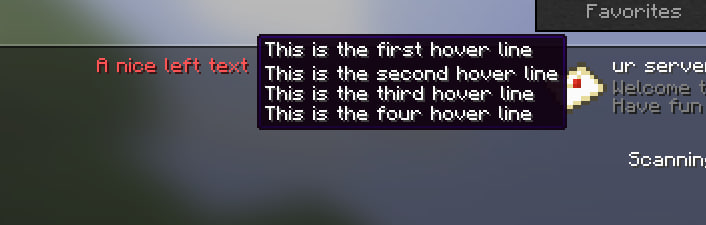
hover:
– ‘This is the first hover line’
– ‘This is the second hover line’
– ‘This is the third hover line’
– ‘This is the four hover line’
#—————————————————————————————–
messages:
maintenance:
kick:
– ‘%prefix%’
– ”
– ‘The server is currently under maintenance.’
– ‘Please try again later.’
fullserver:
– ‘%prefix%’
– ”
– ‘The server is currently full.’
– ‘Please try again later.’
“`
Showcase

SessionSkip
Simple velocity proxy plugin, that allows keeping server in a mixed online mode. By default, all players are authenticated, but for players that don’t own the game, they can be whitelisted by IP and will bypass Mojang authentication servers.
Notes:
Giving offline players OP or other permissions is insecure. Be careful when setting up permissions for offline users. If you must give them permissions, look into other plugins that might have better solutions (another form of auth besides IP).
Unauthenticated players will use offline UUIDs. Inventories and most other data are not shared between offline and online UUIDs, so try not to mix and match them. The plugin won’t allow players in the exempt list to authenticate with Mojang – if they don’t match the IP list it will explicitly reject them instead of attempting to authenticate them.
Usage:
– /exempt add <player> <cidr>
– Exempts a player
– /exempt remove <player> <cidr>
– Removes an existing exemption
– /exempt removeall <player>
– Removes all exemptions on a player. You’ll also need to migrate their inventory from an offline UUID to an online UUID.
– /exempt list <player>
– List all exemptions on a player
– /exempt listplayers
– List all players that have exemptions
– /exempt reload
– Reload config from disk
/exempt command requires the “command.exempt” permission on the velocity proxy.
ServerWebhook
# ServerWebhook Plugin
A simple plugin for Velocity proxies that sends a notification to a configured webhook when a player connects to a specific server.
## Features
– **Per-Server Settings**: Configure webhooks for specific servers or for all servers (“all”).
– **HTTP Method Support**: Supports `GET` and `POST` requests.
– **Dynamic Data Transfer**: Use placeholders like `{player.name}`, `{player.uuid}`, and `{server.name}` in the webhook’s URL, body, and headers to send dynamic information.
### Configuration Structure
“`json
{
“webhooks”: [
{
“server”: “ServerName”,
“url”: “WebhookURL”,
“method”: “HTTPMethod”,
“body”: “RequestBody (optional)”,
“headers”: {
“HeaderName”: “HeaderValue”
}
}
]
}
“`
– `server`: Specify the name of the server to send the webhook for. Set to `”all”` to receive notifications from all servers.
– `url`: The URL address to send the webhook request to.
– `method`: Supports `GET` or `POST`.
– `body`: The body to send with a `POST` request. (optional)
– `headers`: Custom headers to include in the request. (optional)
### Available Placeholders
You can use the following placeholders in the `url`, `body`, and `headers` values to include dynamic information:
– `{player.name}`: The player’s name
– `{player.uuid}`: The player’s UUID
– `{server.name}`: The name of the server the player connected to
### Configuration Example
“`json
{
“webhooks”: [
{
“server”: “limbo”,
“url”: “http://localhost:8080/webhook”,
“method”: “POST”,
“body”: “{“username”: “{player.name}”, “content”: “{player.name} has connected to {server.name}.”}”,
“headers”: {
“X-Auth-Token”: “your-secret-token”
}
},
{
“server”: “main”,
“url”: “https://discord.com/api/webhooks/your_webhook_id/your_webhook_token”,
“method”: “POST”,
“body”: “{“content”: “Player {player.name} ({player.uuid}) connected to {server.name}”}”
},
{
“server”: “all”,
“url”: “http://localhost:8080/player_join?player={player.name}&server={server.name}”,
“method”: “GET”
}
]
}
“`
ServerUtils
[spigot]: https://www.spigotmc.org/resources/79599/
[spigotRatingImg]: https://img.shields.io/badge/dynamic/json.svg?color=brightgreen&label=rating&query=%24.rating.average&suffix=%20%2F%205&url=https%3A%2F%2Fapi.spiget.org%2Fv2%2Fresources%2F79599
[spigotDownloadsImg]: https://img.shields.io/badge/dynamic/json.svg?color=brightgreen&label=downloads%20%28spigotmc.org%29&query=%24.downloads&url=https%3A%2F%2Fapi.spiget.org%2Fv2%2Fresources%2F79599
[issues]: https://github.com/FrankHeijden/ServerUtils/issues
[wiki]: https://github.com/FrankHeijden/ServerUtils/wiki
[release]: https://github.com/FrankHeijden/ServerUtils/releases/latest
[releaseImg]: https://img.shields.io/github/release/FrankHeijden/ServerUtils.svg?label=github%20release
[license]: https://github.com/FrankHeijden/ServerUtils/blob/master/LICENSE
[licenseImg]: https://img.shields.io/github/license/FrankHeijden/ServerUtils.svg
[bugReports]: https://github.com/FrankHeijden/ServerUtils/issues?q=is%3Aissue+is%3Aopen+label%3Abug
[bugReportsImg]: https://img.shields.io/github/issues/FrankHeijden/ServerUtils/bug.svg?label=bug%20reports
[reportBug]: https://github.com/FrankHeijden/ServerUtils/issues/new?labels=bug&template=bug.md
[featureRequests]: https://github.com/FrankHeijden/ServerUtils/issues?q=is%3Aissue+is%3Aopen+label%3Aenhancement
[featureRequestsImg]: https://img.shields.io/github/issues/FrankHeijden/ServerUtils/enhancement.svg?label=feature%20requests&color=informational
[requestFeature]: https://github.com/FrankHeijden/ServerUtils/issues/new?labels=enhancement&template=feature.md
[gradleInstall]: https://gradle.org/install/
[bStatsImg]: https://bstats.org/signatures/bukkit/ServerUtils.svg
[bStats]: https://bstats.org/plugin/bukkit/ServerUtils/7790
# ServerUtils
ServerUtils allows you to manage your plugins in-game.
Featuring reloading, unloading and loading of plugins from your plugins folder at runtime.
ServerUtils also has handy methods to lookup commands and plugins,
and provides you with handy information about them.
[![releaseImg]][release]

[![licenseImg]][license]
[![featureRequestsImg]][featureRequests]
[![bugReportsImg]][bugReports]
[![spigotRatingImg]][spigot]
[![spigotDownloadsImg]][spigot]

## Features
– Spigot/Paper, BungeeCord/Waterfall and Velocity compatible!
– Replaces (you can disable this) the /pl and /plugins (bukkit) commands with a customisable message plugins version. Adding the -v tag will add all versions to the output! Please note: the commands [plain]/bukkit:pl[/plain] and [plain]/bukkit:plugins[/plain] are not replaced, so you can still use those!
– A neat configurable /bpl plugins command for bungeecord! Use the -v flag to output the versions of the plugin and -m flag to also include modules in the plugin list (e.g. cmd_send.jar, cmd_server.jar etc.)
– Reload plugins on the fly with /su (load/reload/unload)plugin ! (BungeeCord: the main command is /bsu) Supports tabcomplete to quickly load new plugins from a jar in your plugins folder 🙂
– Watch plugin files for changes and automatically reload them! /su watchplugin!
– Unloading unused commands (spigot/paper): You can define in the config commands which will be unloaded by ServerUtils at boot. These commands will not be accessible anymore to any in-game player, nor the console.
– Reloading plugins and cleaning things up, like their PluginClassLoader and their recipes, recipe cleanup only works 1.12+, as below those versions a plugin is not associated with a recipe, so there’s no way ServerUtils can know a recipe belongs to a plugin.
– ServerUtils can also restart / update itself, as a gimmick (:
– Reload commands.yml on the fly without performing a whole reload or restart on the server! Useful to quickly make aliases 🙂 Please note: currently, this only works on 1.8 – 1.16.
– Reload the bukkit configuration on the fly without performing a whole reload or restart on the server! Please note: some configuration options may not be reloaded, please contact me if you think this is an error. Spigot/Paper configs are not reloaded, you can reload those with /paper reload or /spigot reload. Please note: currently, this only works on 1.8 – 1.16.
– Automatic updater. The plugin can be configured to automatically download & install new updates of the plugin on server boot or when updates are checked. This feature is disabled by default, but can be precisely configured per config.
Plugins can listen for changes! ServerUtils offers an event API which can notify plugins precisely what component has been loaded, enabled, disabled or unloaded — all with a Pre and Post stage. Please take a look at the Bukkit and Bungee events!
## Load stages of a plugin (Spigot/Paper):
To understand the difference between loading / enabling / disabling / unloading of plugins, I will describe the load stages below:
### Fully loading a plugin (like at startup):
1. First, the plugin is loaded from a .jar file from the plugins directory. This is called loading of a plugin. The plugin is now “red” in the /plugin list, because it is not yet enabled.
2. At the second step, a plugin is enabled. This causes the plugin to spit all sorts of things in the console (which the developer found important to notify you about at startup), like database connections being setup etc.
### Fully disabling a plugin (like closing the server)
1. First the plugin is disabled. This causes the plugin to lose all of it’s features, like commands, event listeners, etc. After disabling, the plugin is still loaded in memory, but it is seen “red” in the /plugin list.
2. Then the plugin will be unloaded from the memory, so the plugin won’t appear at all anymore in the /plugin list.
## Disclaimer ‼️
Please note that reloading may not be compatible with each and every plugin! Plugins which depend on a reloaded plugin, are likely to be error-prone for reloading. Improper cleanup, or improper startup practises may break plugin (re/un)loading as well. Please be careful!
## Statistics
[![bStatsImg]][bStats]
## Compiling ServerUtils
There are two ways to compile ServerUtils:
### 1. Installing gradle (recommended)
1. Make sure you have [gradle][gradleInstall] installed.
2. Run the project with `gradle build` to compile it with dependencies.
### 2. Using the wrapper
**Windows**: `gradlew.bat build`
**Linux/macOS**: `./gradlew build`
## Developer API
### Repository / Dependency
If you wish to use snapshot versions of ServerUtils, you can use the following repo:
“`
https://repo.fvdh.dev/snapshots
“`
#### Gradle:
“`kotlin
repositories {
compileOnly(“net.frankheijden.serverutils:ServerUtils:VERSION”)
}
dependencies {
maven(“https://repo.fvdh.dev/releases”)
}
“`
#### Maven:
“`xml
fvdh
https://repo.fvdh.dev/releases
net.frankheijden.serverutils
ServerUtils
VERSION
provided
“`
## Commands and Permissions
Please refer to the [Wiki][wiki] page for an updated overview of the commands and permissions.
ServerSwitch
## **MySQL needed!**
### **JSMySQLFix is REQUIRED for the Velocity version**
ServerSwitch is a versatile plugin designed for both BungeeCord and Spigot servers, providing comprehensive server switch logging and serving as an alternative to OnlyProxyJoin. With ServerSwitch, you can effortlessly track player server switches and customize their join experience, enhancing your server network management capabilities.
**Features:**
1. Server Switch Logging: ServerSwitch logs player server switches to a MySQL database, providing valuable insights into player behavior and server traffic patterns across both BungeeCord and Spigot servers.
2. OnlyProxyJoin Alternative: Replace OnlyProxyJoin with ServerSwitch to control player joins and implement custom join messages and actions based on specific criteria, catering to the needs of your server network.
3. Automatic Cleanup: The plugin includes a feature to automatically delete old server switch records, ensuring optimal database performance and storage efficiency for both BungeeCord and Spigot servers.
4. Customizable Configuration: Easily configure the MySQL connection settings, join messages, and other plugin options through the included configuration file, offering flexibility and customization for your server network setup.
5. Lightweight and Efficient: ServerSwitch is lightweight and designed for efficiency, ensuring minimal impact on both BungeeCord and Spigot server performance while delivering robust functionality for server switch logging and player join management.
**Instructions:**
1. Place the serverswitch.jar file in the plugins folder of both your BungeeCord and Spigot servers.
2. Customize the plugin settings, including the MySQL connection details and join messages, in the config.yml file located in the plugin’s folder on both server types.
3. Restart your BungeeCord and Spigot servers to apply the changes.
4. ServerSwitch will now log player server switches and handle player joins according to your configured settings on both BungeeCord and Spigot servers.
Enhance your server network management and provide a seamless join experience for your players with ServerSwitch today!
config.yml
“`
# Connect to your Database! (IS REQUIRED!)
database:
url: “jdbc:mysql://127.0.0.1:3306/YourDB” # Set Infos here
username: “root”
password: “password”
# YOU HAVE TO SET A SERVERNAME! THE SERVER NAME HAVE TO BE THE SAME AS THE BUNGEECORD NAME TO THIS SERVER!!
server:
# YOU HAVE TO SET A SERVERNAME! THE SERVER NAME HAVE TO BE THE SAME AS THE BUNGEECORD NAME TO THIS SERVER!!
servername: “SETITHERE!” # Example: servername: “Lobby-01”
# Set your custom messages and permissions
messages:
kick: ‘§cYou need to join through the proxy!’
staff_notification: ‘§c{player} attempted to join without going through the proxy!’
joinMessage: ‘§e{player} joined’
leaveMessage: ‘§e{player} left the server’
permissions:
notify: ‘serverswitch.notify’ # Set Permission here
settings:
Custom-join-leaveMessages: false
Disable-join-leaveMessages: false
“`
bungeeconfig.yml
“`
# Connect to your Database! (IS REQUIRED!)
database:
url: “jdbc:mysql://127.0.0.1:3306/YourDB”
username: “root”
password: “password”
“`
ServerShout
# ServerShout 2
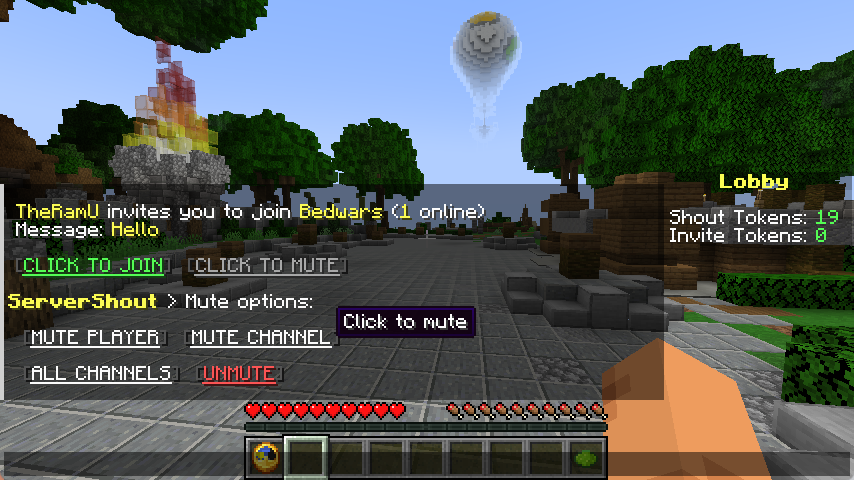
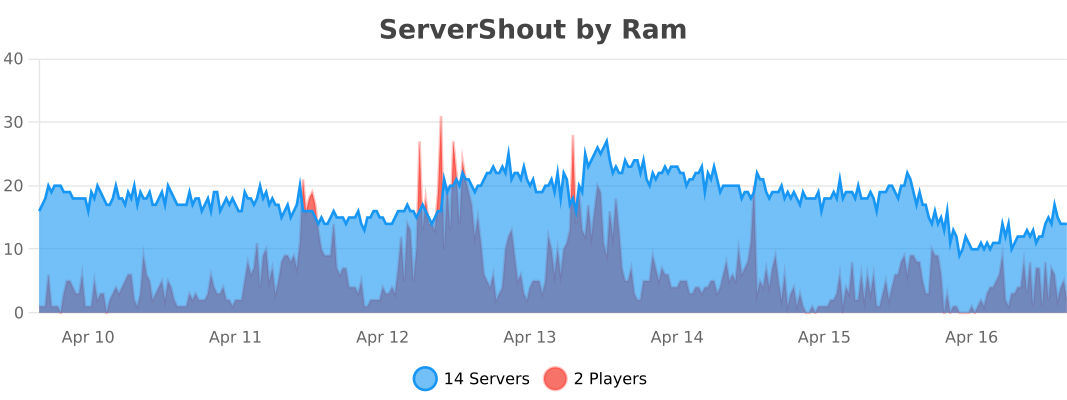
ServerShout is a Cross-Server Shout and Invite plugin for Bukkit/BungeeCord/Velocity. It features high performance and a high degree of customization, and it is compatible with PlaceholderAPI and LuckPerms.
## Screenshots
Cross-Server Shout

Cross-Server Invite

Message Mute
## Commands & Permissions
`/ss help` – Get help
`/ss reload` – Reload configuration
`/ss token list` – List all tokens
`/ss token create ` – Create new token
`/ss token delete ` – Delete token
`/ss balance get ` – Check player token balance
`/ss balance set ` – Set player token balance
`/ss balance give ` – Give tokens to player
`/ss balance take ` – Take tokens from player
`servershout.help` – Allows use of /ss help
`servershout.reload` – Allows use of /ss reload
`servershout.token.list` – Allows use of /ss token list
`servershout.token.create` – Allows use of /ss token create
`servershout.token.delete` – Allows use of /ss token delete
`servershout.balance.get` – Allows use of /ss balance get
`servershout.balance.set` – Allows use of /ss balance set
`servershout.balance.give` – Allows use of /ss balance give
`servershout.balance.take` – Allows use of /ss balance take
`servershout.update.notify` – Allows receiving update notifications
BungeeCord Command: `/ssb` | Velocity Command: `/ssv`
**⭐ Default Shout format:** `!`
**⭐ Default Invite format:** `/invite` or `/invite `
## PlaceholderAPI Placeholders
`%servershout_balance_%` the player’s token amount
## LuckPerms Meta Placeholders
In shout.yml, you can configure the show of a player’s LuckPerms Meta value in messages.
**For example:**
`{luckperms_meta_prefix}` displays the prefix Meta value, i.e., the player’s prefix.
Other Meta values can be managed via `/lp user meta`
## Usage
1. Download the jar file and place it in the plugins directory of the proxy (BungeeCord/Velocity) **(required)**
2. Place the jar file in the plugins directory of Bukkit as the management end of ServerShout (optional).
3. Restart the server.
4. Edit config.yml to configure the database and reload the plugin (optional). If the database is not configured, player tokens will not be deducted, and players can send messages without restrictions.
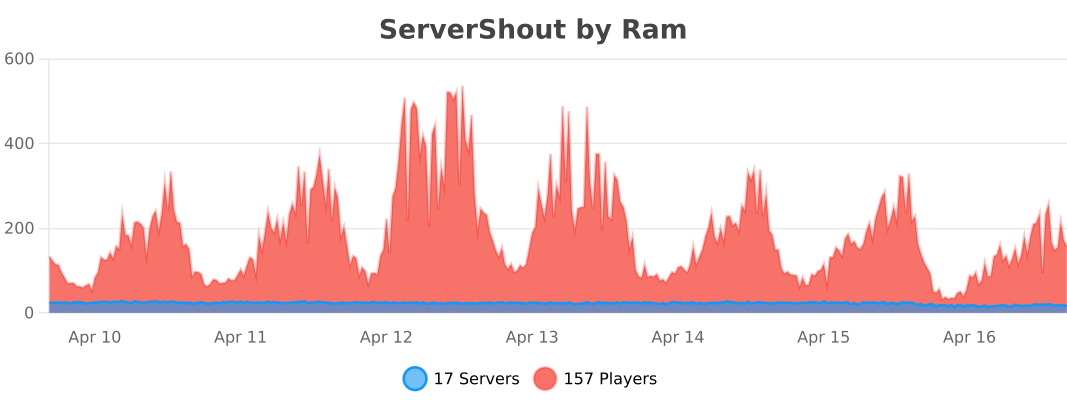
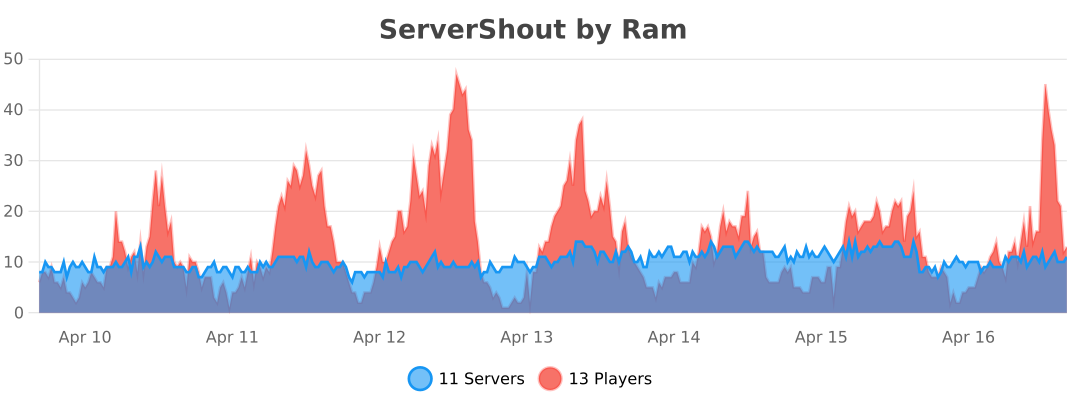
## Stats
BungeeCord
Velocity
Bukkit
ServerPulse

ServerPulse is your **all-in-one** server **monitoring** solution that combines **powerful** metrics collection, beautiful **visualizations**, real-time **alerting**, and **effortless** setup. Monitor **TPS, memory, entities, and more** through professional Grafana **dashboards** – all up and **running in minutes** with Docker!
Tired of guessing why your server is **lagging**? Frustrated with complex monitoring setups? **ServerPulse** is what you are looking for!
If you need support, or you have any question, join our Discord server
## Why ServerPulse?
– **Zero-Configuration Monitoring:** Get started in minutes with our Docker Compose setup – InfluxDB, Grafana, and pre-built dashboards, all ready to go!
– **Universal Platform Support:** Works with any **Bukkit-based, Velocity, BungeeCord** and **Fabric** server while taking advantage of Paper-specific optimizations when available
– **Complete Solution:** Not just a metrics exporter – includes the entire monitoring stack optimized for time-series data
– **Per-World Performance Tracking:** Uniquely monitor metrics separately for each world – find problem areas fast!
– **Advanced Tagging System:** Group and filter metrics by server, network, region, or any custom dimension
– **Production-Ready Infrastructure:** Built-in health checks, automatic reconnection, and proper error handling
## Real-Time Metrics Include:
– TPS (1m, 5m, 15m)
– MSPT (last, min, max, 1m, 5m, 15m)
– CPU Usage (System, JVM, Available Processors)
– Online Players
– Player Ping Statistics (min, max, avg)
– JVM Memory (Used, Committed, Max Heap)
– Disk Usage (Usable Bytes & Percent)
– Per-World Stats:
– Loaded Chunks
– Total Entities
## Alert Notification System:
– **Multi-Platform Support:** Choose between Discord or Telegram for notifications
– **Instant Notifications:** Get alerted when TPS drops, memory spikes, or other
critical events occur
– **Customizable Thresholds:** Set your own alert conditions for any metric
– **Intelligent Alert Grouping:** Prevents notification spam during ongoing issues
– **Easy Integration:** Simple webhook setup for Discord or bot configuration for
Telegram
## Technical Features:
– **Efficient & Safe**: Asynchronous tasks and batch writing minimize performance
impact
– **Platform Detection**: Automatically detects your server type and uses the optimal implementation
– **Flexible Configuration**: Customize metrics collection intervals, alerts, and
tagging
– **Professional Dashboards**: Start monitoring immediately with pre-designed Grafana
dashboards
– **Open Source**: Full transparency and community-driven development
## Requirements:
– **Server**: Any Bukkit-based, Velocity, BungeeCord or Fabric server (Bukkit, Spigot, Paper, or forks like Purpur, Pufferfish)
– **System**: Docker and Docker Compose for the monitoring stack
– Optional: Discord server or Telegram bot for alert notifications
## Quick Start:
Clone, compose up, and you’re monitoring! Full setup guide at https://github.com/renvins/serverpulse
Screenshots:
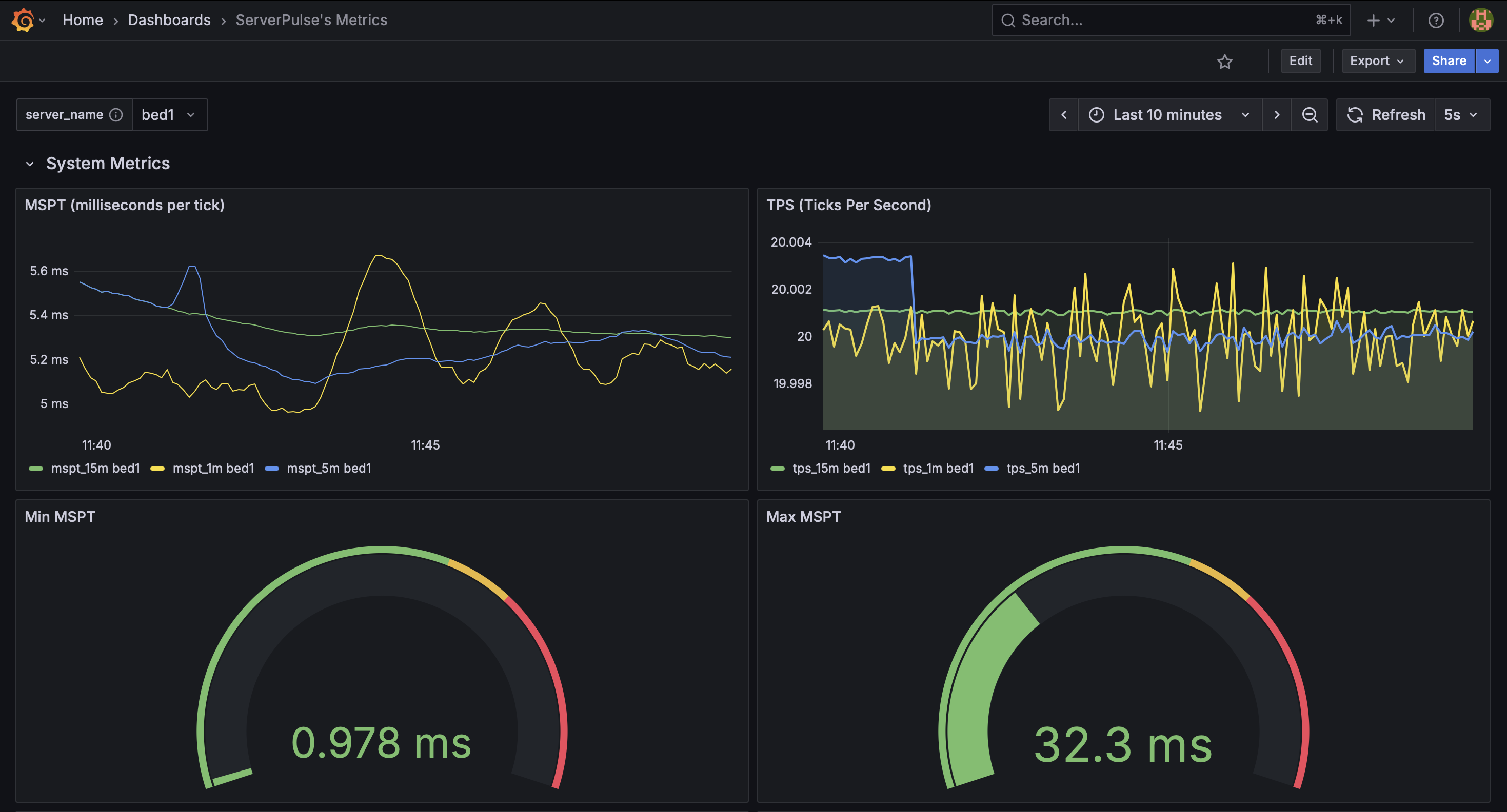
_Example dashboard view 1: System Metrics_
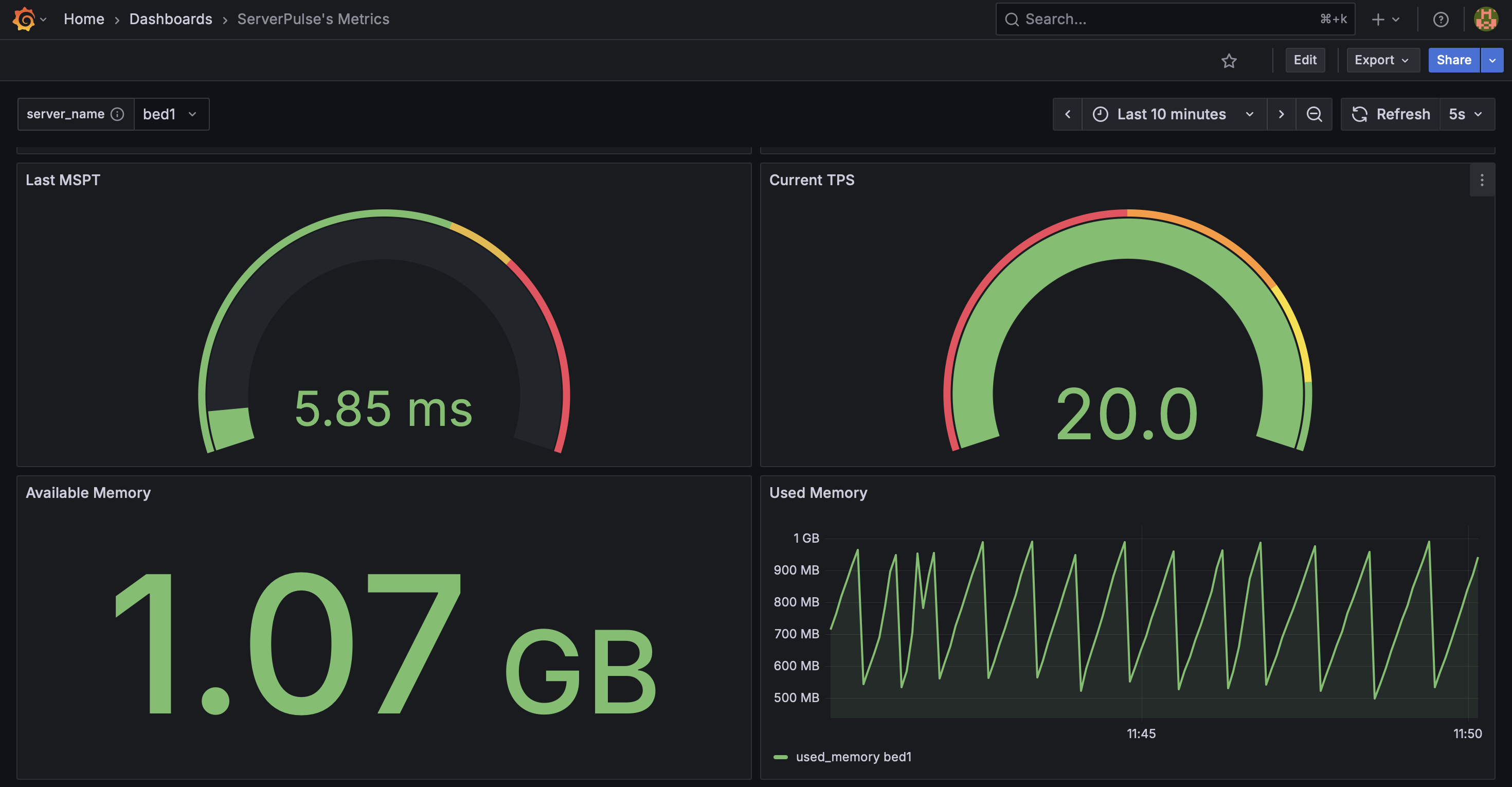
_Example dashboard view 2: System Metrics 2_
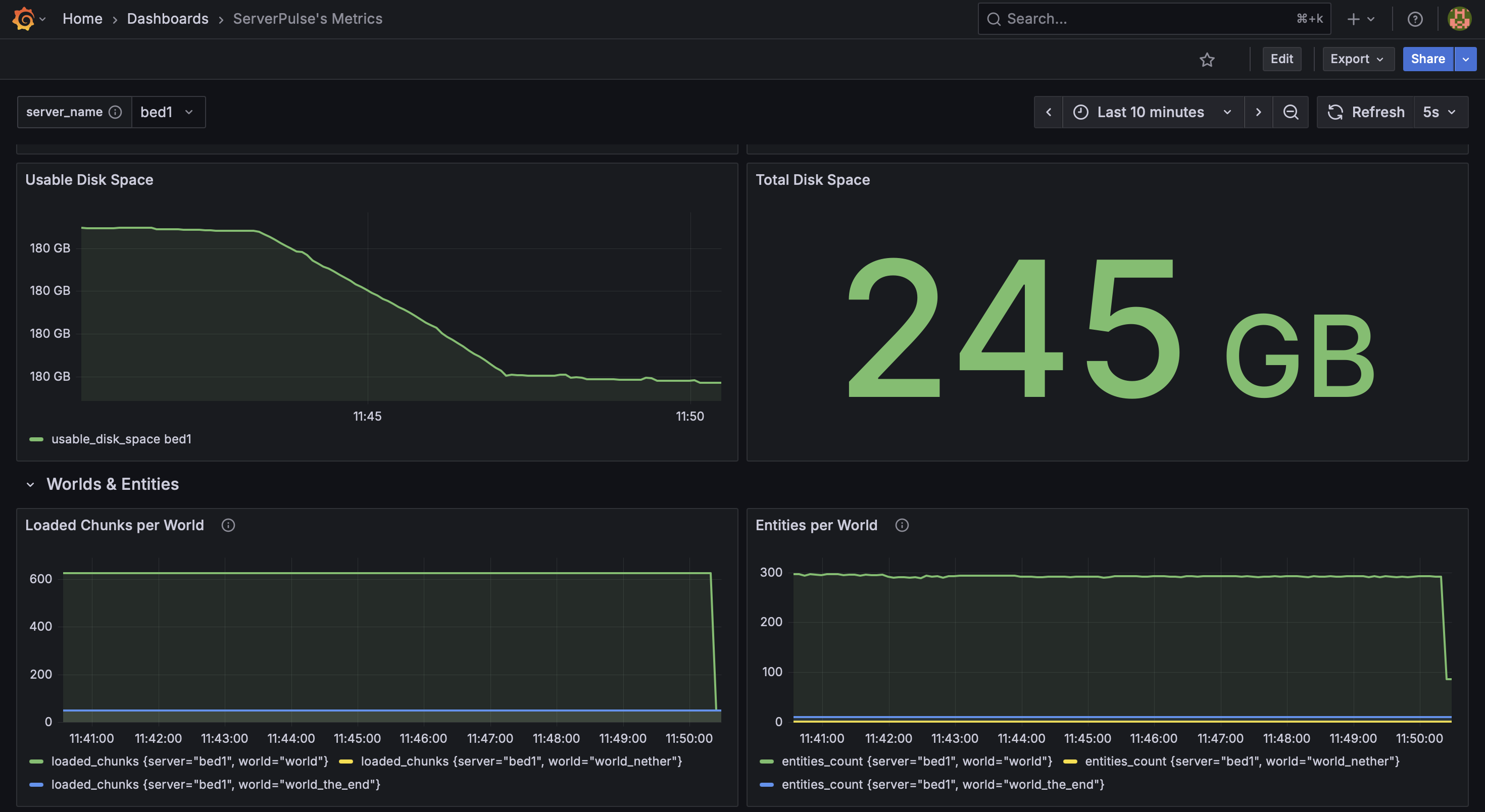
_Example dashboard view 3: System & World Metrics_
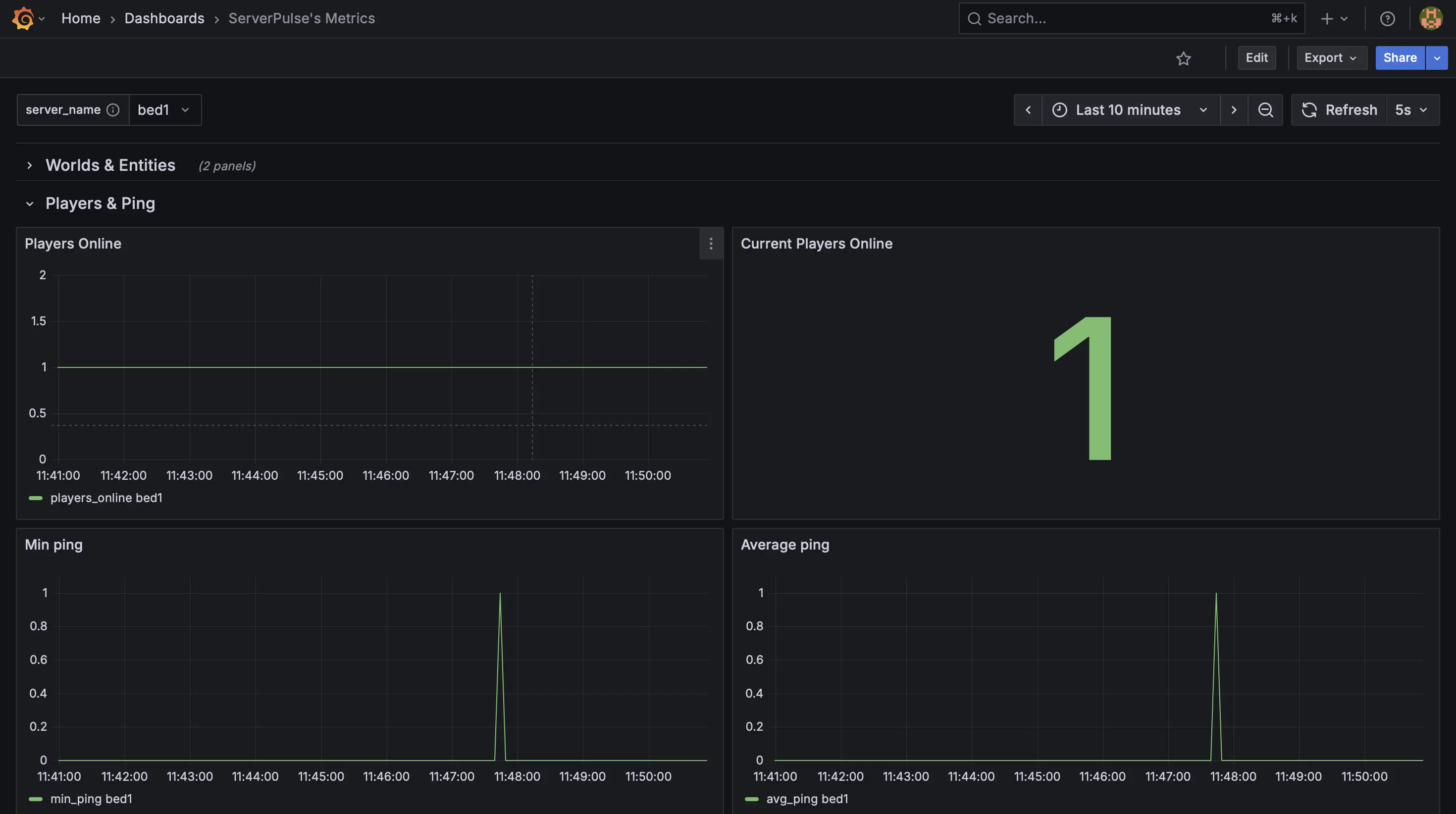
_Example dashboard view 4: Player Metrics_
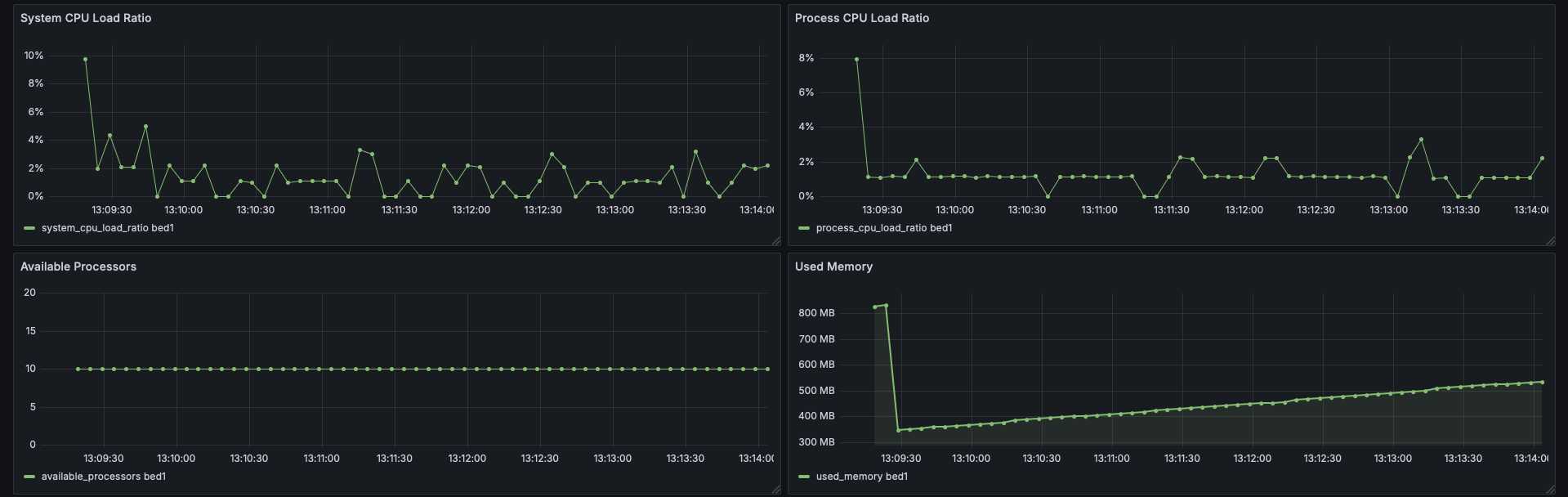
_Example dashboard view 5: CPU Stats_
## Support & Contributions:
– Issues & Features https://github.com/renvins/serverpulse/issues
– Contributing https://github.com/renvins/serverpulse/blob/master/CONTRIBUTING.md
– Discord https://discord.gg/jZUqcemc4G
**Ready to take control of your server’s performance with a professional monitoring solution? Download ServerPulse today!**
ServerPermissions


Add permissions to access your servers.
### Compatibility
– Velocity 3.2.0+ Support
– Java 17+

– Sends error messages when someone tries to access a non-allowed server
– MiniPlaceholders Support
– High performance using Velocity’s most powerful features
### Permissions
`serverpermissions.server.`
#### For example:
– `serverpermissions.server.survival`
– `serverpermissions.server.skyblock`
### How to configure it?
ServerPermissions requires no configuration, just add permissions (`serverpermissions.server.`) to access any of your servers. For this, you must install a permissions plugin in Velocity, such as LuckPerms.
Also, don’t forget to assign everyone the permission to access your lobby or first server, otherwise, no one will be able to access your server.
Spanish Tutorial

