SimpleCommandHub
A Simple ITALIAN plugin for /sitoweb /store /discord /youtube full custom from config.yml and commands (spigot and forks).
For Support Contant ME on discord .rotafn! or if you want add more from this simple plugin
A Simple ITALIAN plugin for /sitoweb /store /discord /youtube full custom from config.yml and commands (spigot and forks).
For Support Contant ME on discord .rotafn! or if you want add more from this simple plugin
# Cloud API
![Banner][banner]
[![Modrinth][badge-modrinth]][modrinth]
[![Dev][badge-dev]][dev]
[![License][badge-license]][license]
[![Discord][badge-discord]][social-discord]
[![Follow @simplecloudapp][badge-x]][social-x]
[![Follow @simplecloudapp][badge-bluesky]][social-bluesky]
[![Follow @simplecloudapp][badge-youtube]][social-youtube]
[Report a Bug][issue-bug-report]
·
[Request a Feature][issue-feature-request]
🌟 Give us a star — your support means the world to us!
> All information about this project can be found in our detailed [documentation][docs-thisproject].
This Project aims to provide very easy API access. This project fixes all dependency issues that were present before.
Just include the platform jar as a plugin and use the dependency as described below.
> [!CAUTION]
> Paper specific API is very experimental and unstable. Use Spigot API if you are running paper!
## Features
– [x] **Easy API Use**: Just add the plugin to your server and include the api as a provided artifact.
– [x] **Supported Server Software**: Supports Spigot & Forks, BungeeCord and Velocity.
– [ ] **Easy API access**: Use every api method we provide, just from one interface.
## Usage
### 1. Depend on `simplecloud-api`
### 2. Use APIs
> For always up-to-date artifacts visit [dev artifacts][dev-artifacts] or [artifacts][artifacts].
> Note: If you want to use the dev version, you have to use the [snapshot repository][snapshots].
#### Gradle Kotlin
“`kt
// Use Controller API if you want
compileOnly(“app.simplecloud.controller:controller-api:VERSION”)
// Use Player API if you want
compileOnly(“app.simplecloud.controller:controller-api:VERSION”)
“`
#### Gradle Groovy
“`groovy
// Use Controller API if you want
compileOnly ‘app.simplecloud.controller:controller-api:VERSION’
// Use Player API if you want
compileOnly ‘app.simplecloud.controller:controller-api:VERSION’
“`
#### Maven
“`xml
“`
## Contributing
Contributions to SimpleCloud are welcome and highly appreciated. However, before you jump right into it, we would like
you to read our [Contribution Guide][docs-contribute].
## License
This repository is licensed under [Apache 2.0][license].
[banner]: https://simplecloud.app/api/banner/Cloud%20API
[issue-bug-report]: https://github.com/simplecloudapp/cloud-api/issues/new?labels=bug&projects=template=01_BUG-REPORT.yml&title=%5BBUG%5D+%3Ctitle%3E
[issue-feature-request]: https://github.com/simplecloudapp/cloud-api/discussions/new?category=ideas
[docs-thisproject]: https://docs.simplecloud.app/api
[docs-contribute]: https://docs.simplecloud.app/contribute
[modrinth]: https://modrinth.com/organization/simplecloud
[dev]: https://repo.simplecloud.app/#/snapshots/app/simplecloud/cloud-api
[artifacts]: https://repo.simplecloud.app/#/snapshots/app/simplecloud/api/cloud-api
[dev-artifacts]: https://repo.simplecloud.app/#/snapshots/app/simplecloud/cloud-api
[badge-maven-central]: https://img.shields.io/maven-central/v/app.simplecloud.api/cloud-api?labelColor=18181b&style=flat-square&color=65a30d&label=Release
[badge-dev]: https://repo.simplecloud.app/api/badge/latest/snapshots/app/simplecloud/api/cloud-api?name=Dev&style=flat-square&color=0ea5e9
[license]: https://opensource.org/licenses/Apache-2.0
[snapshots]: https://repo.simplecloud.app/#/snapshots
[social-x]: https://x.com/simplecloudapp
[social-bluesky]: https://bsky.app/profile/simplecloud.app
[social-youtube]: https://www.youtube.com/@thesimplecloud9075
[social-discord]: https://discord.simplecloud.app
[badge-modrinth]: https://img.shields.io/badge/modrinth-18181b.svg?style=flat-square&logo=modrinth
[badge-license]: https://img.shields.io/badge/apache%202.0-blue.svg?style=flat-square&label=license&labelColor=18181b&style=flat-square&color=e11d48
[badge-discord]: https://img.shields.io/badge/Community_Discord-d95652.svg?style=flat-square&logo=discord&color=27272a
[badge-x]: https://img.shields.io/badge/[email protected]?style=flat-square&logo=x&color=27272a
[badge-bluesky]: https://img.shields.io/badge/[email protected]?style=flat-square&logo=bluesky&color=27272a
[badge-youtube]: https://img.shields.io/badge/youtube-d95652.svg?style=flat-square&logo=youtube&color=27272a
# SimpleAnnouncement



SimpleAnnouncement is a lightweight Velocity announcement plugin that periodically sends custom-formatted announcement messages to all online players.
## Features
– 🕒 Scheduled announcement broadcasts
– 🎨 Supports MiniMessage rich text formatting (gradients, click events, hover tooltips, etc.)
– 🔄 Hot-reload configuration support
## Configuration
“`properties
# Announcement interval (seconds)
interval = 300
# Announcement message list
announcements = [
# Gradient text example
“
# Text with click event
“
# Rainbow text
“
# Bold text
“
# Multi-line message example
“
]
“`
## MiniMessage Format Guide
MiniMessage enables rich text formatting:
**Colors**:
– Named colors: `
– HEX colors: `<#ff0000>Red text`
**Gradients**:
“`
“`
**Click Events**:
“`
“`
**Hover Tooltips**:
“`
“`
**Special Effects**:
“`
“`
**Line Breaks**:
“`
Line 1
“`
More formats: MiniMessage Documentation
## Commands
| Command | Permission | Description |
|———|————|————-|
| `/simpleannouncementreload` or `/sar` | `simpleannouncement.reload` | Reload configuration file |
—
> 💡 Tip: Preview MiniMessage effects using MiniMessage Viewer
—
# SimpleAnnouncement 简单公告
SimpleAnnouncement 是一个轻量级的 Velocity 公告插件,可以定时向所有在线玩家发送自定义格式的公告消息。
## 功能特点
– 🕒 定时发送公告消息
– 🎨 支持 MiniMessage 富文本格式(渐变、点击事件、悬停提示等)
– 🔄 支持热重载配置
## 配置说明
“`
# 公告间隔时间(秒)
interval = 300
# 公告消息列表
announcements = [
# 渐变文本示例
“
# 带点击事件的文本
“
# 彩虹文本
“
# 粗体文本
“
# 多行消息示例
“
]
“`
## MiniMessage 格式指南
MiniMessage 允许创建丰富的文本格式:
**颜色**:
– 命名颜色:`
– HEX 颜色:`<#ff0000>红色文本`
**渐变**:
“`
“`
**点击事件**:
“`
“`
**悬停提示**:
“`
“`
**特殊效果**:
“`
“`
**换行**:
“`
第一行
“`
更多格式可参考:MiniMessage 文档
## 命令
`/simpleannouncementreload`或 `/sar` `simpleannouncement.reload` 重新加载配置文件
—
> Tips:使用MiniMessage Viewer 可以预览MiniMessage效果。
Modrinth
|
CurseForge
|
Discord
|
Wiki
|
FAQ
|
Credits
|
API
# Simple Voice Chat
A proximity voice chat for Minecraft with a variety of addons that offer additional features and functionalities.
⚠️ **NOTE** This mod requires special setup on the server in order to work.
Please read the wiki for more information.

Please join the Discord if you have questions!
## Downloads
– Fabric
– NeoForge
– Forge
– Bukkit/Spigot/Paper
– Quilt
– Velocity
– BungeeCord/Waterfall
## Features
– Push to talk
– Voice activation
– Proximity voice chat
– Password protected groups
– Automatic voice activity detection
– Automatic microphone gain adjustment
– Opus codec
– RNNoise recurrent neural network noise suppression
– OpenAL audio
– Cross compatibility between Fabric, NeoForge, Forge, Quilt, Bukkit, Spigot and Paper
– Support for Velocity, BungeeCord and Waterfall
– Compatibility with ModMenu (Use ClothConfig for a better configuration UI)
– Configurable push to talk key
– Microphone and speaker test playback
– Configurable voice distance
– Whispering
– Individual player volume adjustment
– Microphone amplification
– 3D sound
– AES encryption
– Audio recording with separate audio tracks
– A powerful API
– Many addons
## Icons
| Icon | Description |
|:————————————:|——————————————————-|
|  | You are talking |
|  | You are whispering |
|  | Player is talking |
|  | Player is whispering |
|  | Microphone muted |
|  | Voice chat disabled |
|  | Voice chat not connected
Voice chat not installed |
## The GUI
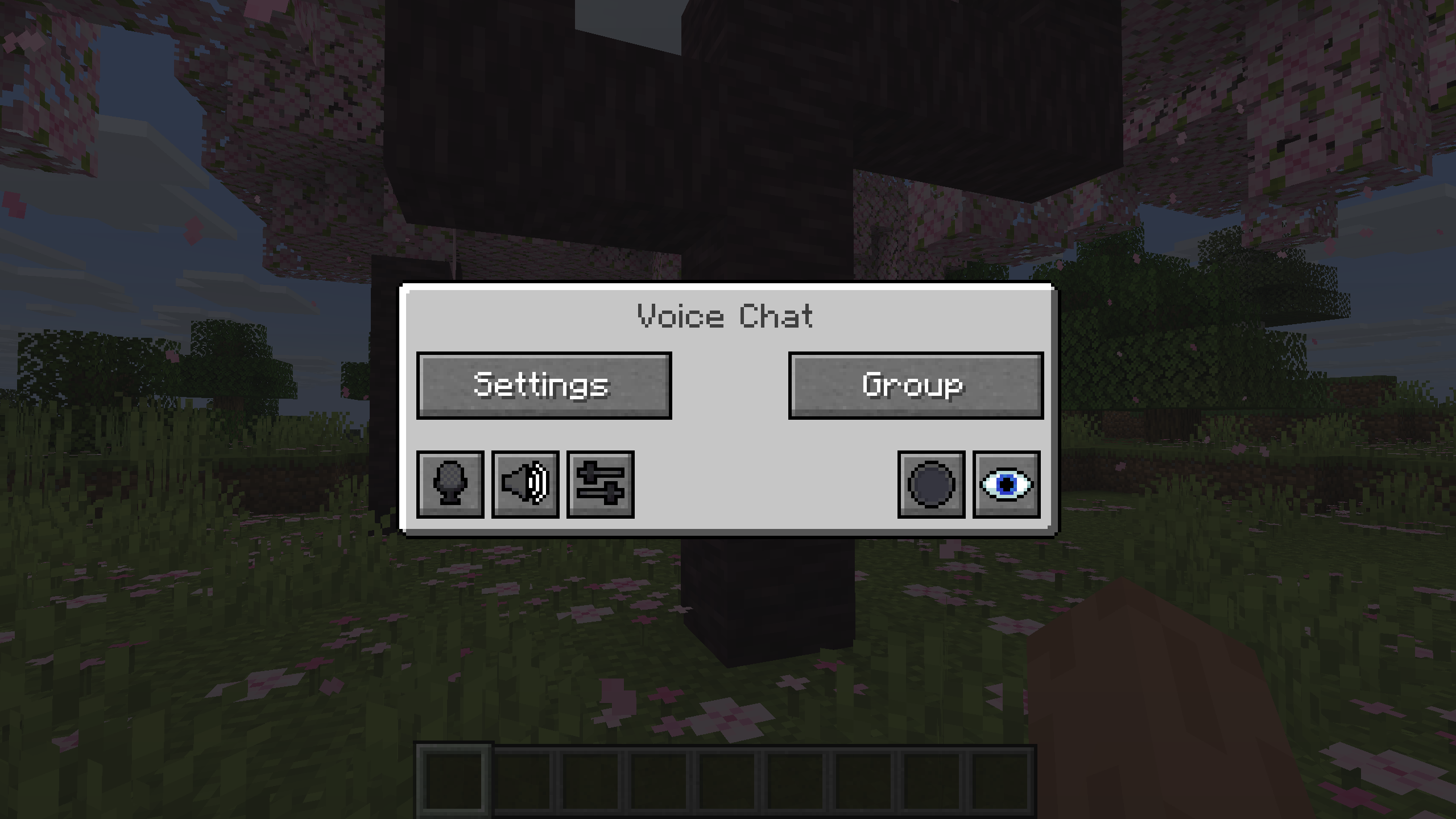
You can open the voice chat GUI by pressing the `V` key.
This allows you to open the settings, group chats, mute yourself, disable the voice chat, start/stop a recording and hide all icons.
### Group Chats
Group chats allow you to talk to players that are not in your vicinity.
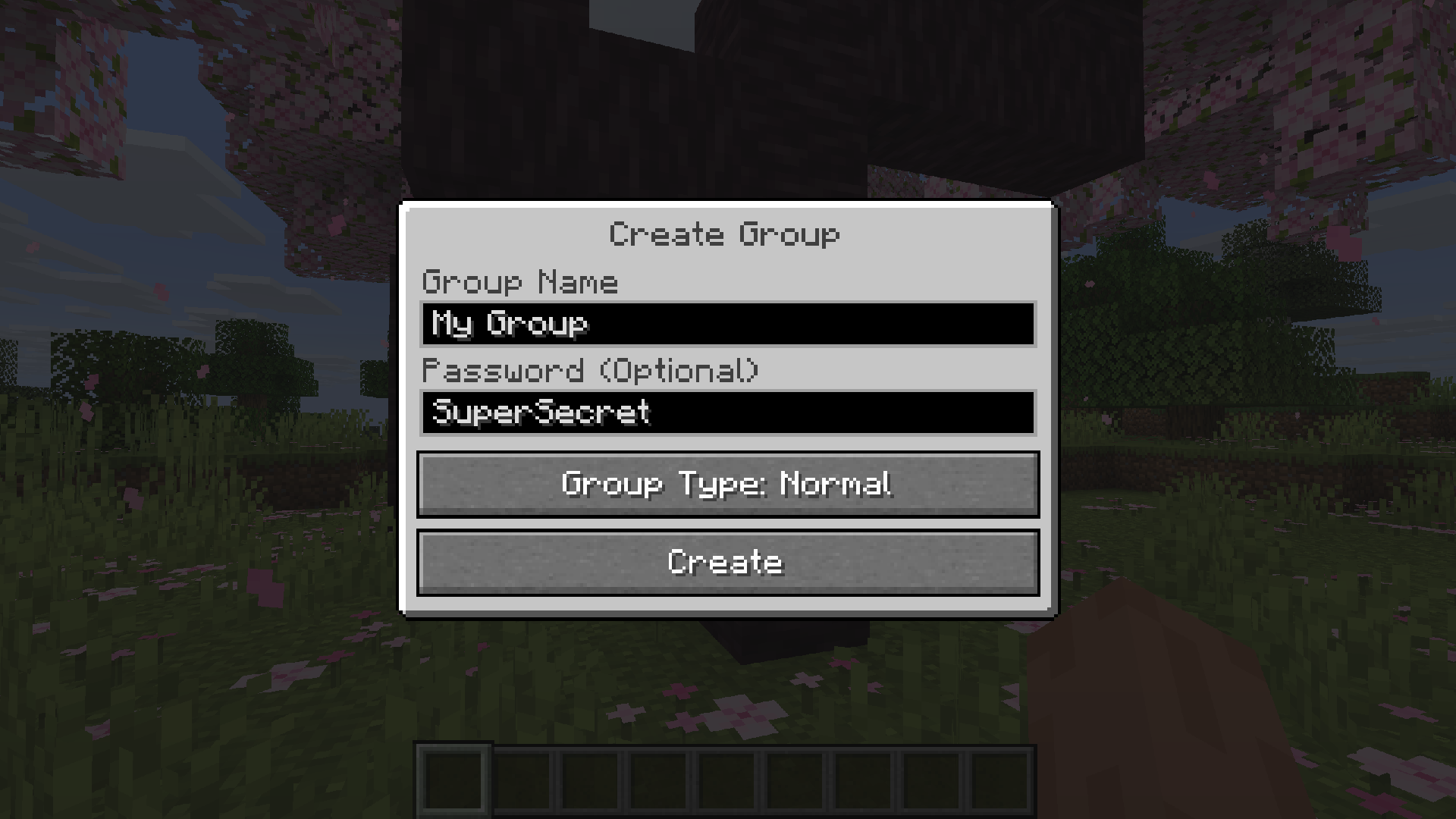
To open the group chat interface, either press the group button in the voice chat GUI or just press the group key.
To create a new group, just type a name in the text field and press the button at the bottom.
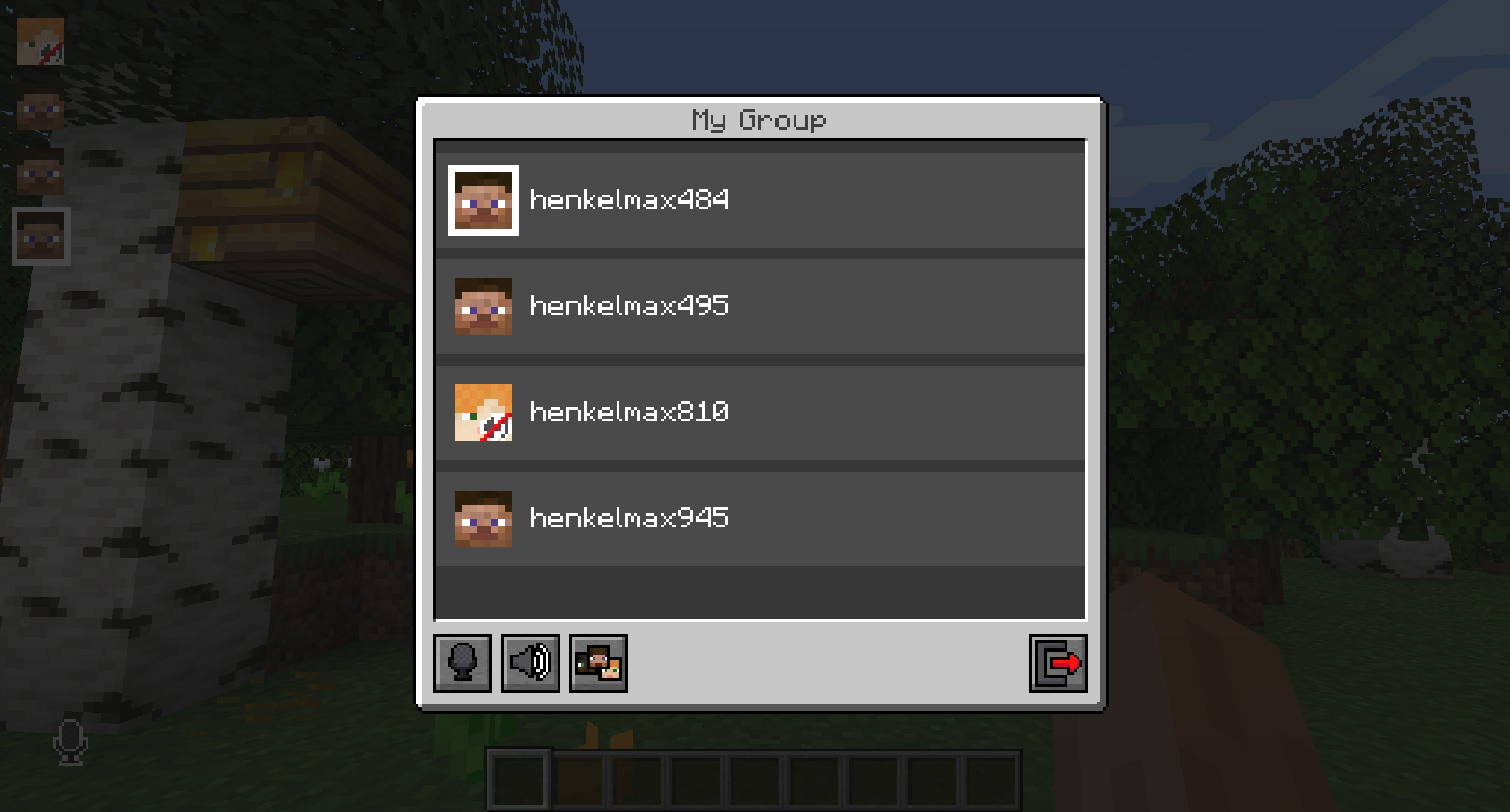
Creating or joining a group will bring you into the group chat interface.
You will also see the heads of the group members in the top left corner of your screen.
Talking players will be outlined.
You can disable these icons by pressing the third button from the left.
Players that are not in a group will see a group icon next to your head, indicating that you are in a group.
You can invite players to your group chat by entering the command `/voicechat invite
### Settings
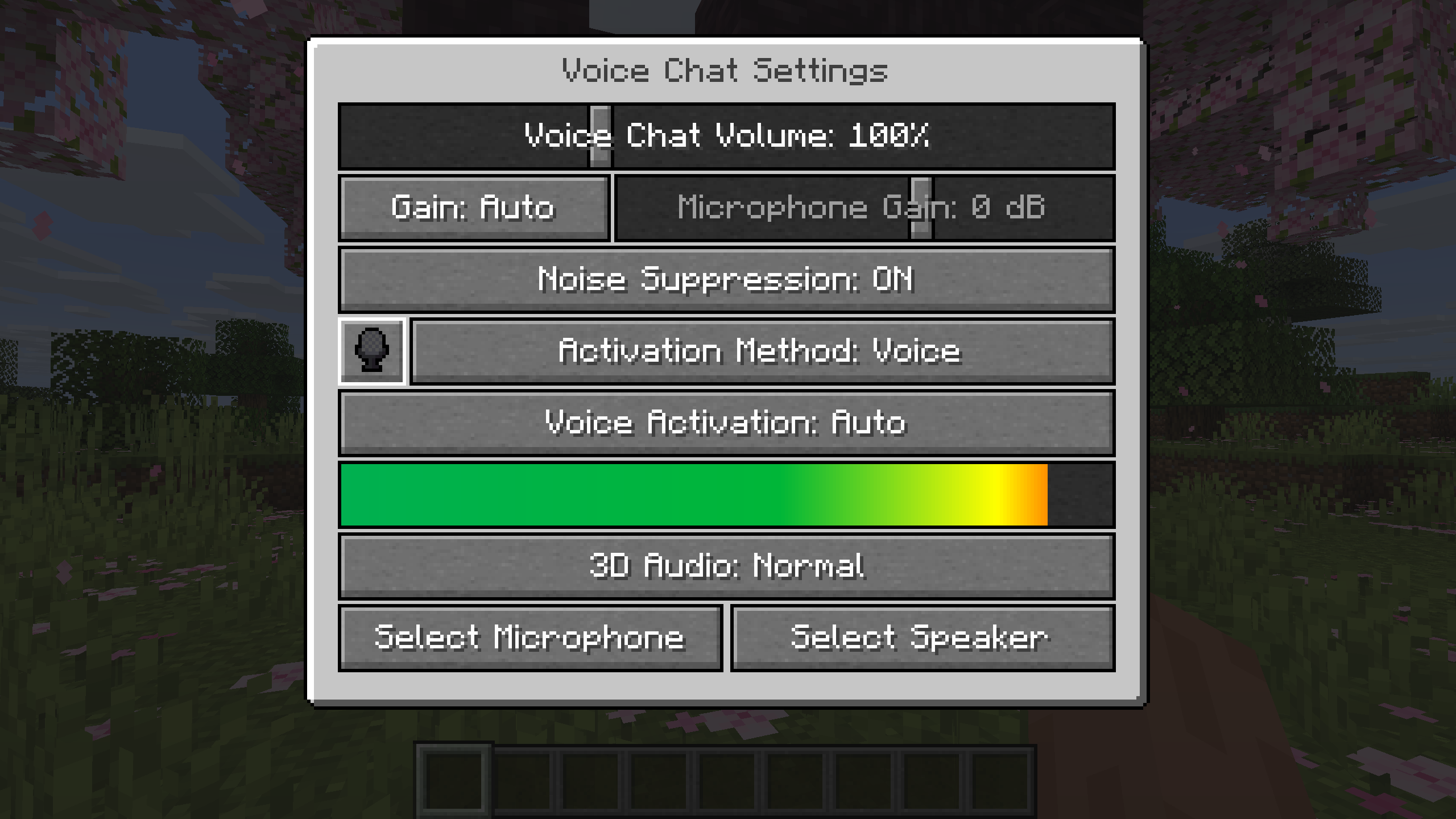
You can access the voice chat settings by pressing the `V` key and pressing the settings button.
This menu offers the ability to set up your voice chat audio settings.
By clicking the microphone button, you can test your microphone activation.
## Important Notes
You need to open a port on the server. This is port `24454` `UDP` by default.
Without opening this port, the voice chat will not work.
This port can be changed in the server config.
More information here.
The voice chat is encrypted, but we don’t guarantee the security of it. Use at your own risk!
A plugin for Velocity that reconnects players to the last server they were playing on
## Features
– **Automatic reconnection to the last server on player login**
– Configurable messages for reconnect success and server unavailable
– Multiple storage backends: YAML, SQLite, MySQL, MariaDB, PostgreSQL, LuckPerms
– Optional per-server permission (velocity.reconnect.
– Server blacklist to prevent reconnection to specific servers
– Optional LiteBans integration to prevent reconnecting banned players
– Optional fallback prevention (block redirect to fallback server when kicked)
– _reload_ command to reload configuration without restarting the proxy
## Commands
– **/vreconnect reload** Reloads the plugin configuration
## Permissions
– **reload:** requires permission velocity.reconnect.reload (default: op)
## Configuration
“`
# For debugging purposes, recommended to disable
debug: false
# Should we check for the latest version?
checkUpdates: true
# Send players a message when they are reconnected
messageOnReconnect: true
reconnectMessage:
– “
# Send a message when their previous server isn’t available
notAvailable: true
notAvailableMessage:
– “
# Require velocity.reconnect.
perServerPermission: false
# Servers that players cannot reconnect to
blacklist: []
# Prevent connection to fallback servers when kicked
preventFallback: false
preventFallbackMessage: []
# LiteBans hook – prevents banned players from reconnecting to banned servers
liteBansHook: false
storage:
method: “yaml”
data:
address: “localhost:3306”
database: “reconnect.db”
username: “root”
password: “1234”
“`
– **debug:** Enable debug logging
– **checkUpdates:** Check for new versions on startup; admins with velocity.reconnect.admin get update notifications
– **messageOnReconnect / reconnectMessage:** Message shown when player is reconnected. Placeholders: %server%, %player%
– **notAvailable / notAvailableMessage:** Message when the last server is offline or unreachable
– **perServerPermission:** If true, player needs velocity.reconnect.
– **blacklist:** List of server names where reconnection is never allowed
– **preventFallback / preventFallbackMessage:** When kicked, prevent redirect to fallback server (if not on blacklist)
– **liteBansHook:** Integrate with LiteBans to block reconnection to servers where the player is banned
– **storage.method:** Storage backend. Options: yaml, sqlite, mysql, mariadb, postgresql, luckperms
– **storage.data:** Connection settings for database backends. For SQLite/YAML, database is the file path
## Storage
In the **config.yml**, there are different storage options. If you don’t need your own plugins to interact with this one, we recommend you keep the **method** set as the default option **(yaml)**
“`
storage:
method: “yaml”
# The below is only needed if you are using MySQL
data:
address: localhost
database: reconnect
username: root
password: ”
“`
To change the method, alter the **method** key. Current options are:
– **yaml:** Local .yml file
– **sqlite:** Local SQL database
– **mysql:** Local or remote SQL database
The **data** section is for if you are using the **mysql** option for **method**
– **address:** The address of the SQL database
– **database:** The name of the database
– **username:** Username for the SQL database
– **password:** Password for the SQL database
###Requirements
– Java 21 (LTS)
– Velocity Proxy on the latest supported version
### Internal behaviour
– When using a forced host, the plugin does not override the initial server choice
– Storage location for YAML: **plugins/reconnect/data.yml**
– For LuckPerms storage, the last server is stored as user metadata
# Simple Maintenance Plugin
A simple solution to manage maintenance mode for your velocity server.
### Source Code
github.com/FlauschigesAlex
### Supported platforms and versions
– Velocity Versions: 3.4.0 – 3.5.0
Although simple-maintenance-plugin may work on other platforms or versions, I do not guarantee for their stability or functionality.
### Commands
– `/maintenance` – Lists all servers in maintenance mode.
– `/maintenance
– `/maintenance
– `/maintenance
– `/maintenance
– `/maintenance
– `/maintenance
– `/maintenance
### Permissions
`smp.command`: Allows the user to use the `/maintenance` command.
`smp.bypass`: Allows the user to bypass maintenance mode.
**It’s Finally here!**
**An easy to use VELOCITY Plugin to easier setup _/lobby_ Commands!**
**On every Backend Server is the _/lobby_ Command Available!**
🛠️**Install:**
– **Only install it on your Proxy Server _NOT_ the Backend Servers!**
– **1.16.x – 1.21.x for Velocity and BungeeCord!**
# SignedVelocity




Allows you to cancel or modify messages or commands from Velocity without synchronization problems

## Requirements
– Java 21+
– Velocity 3.4.0+
#### **Backend:**
– Paper 1.20+
– Sponge 10/12+
– Minestom
– Fabric 1.21+
## Features
– Transmit the modification and cancellation status of Velocity messages and commands to your backend server using plugin messages. This avoids chat chain synchronization problems and avoids Velocity’s security check by correctly synchronizing messages.
– Chat reporting support using Velocity (can be disabled using external plugins like FreedomChat, **not recommended**)
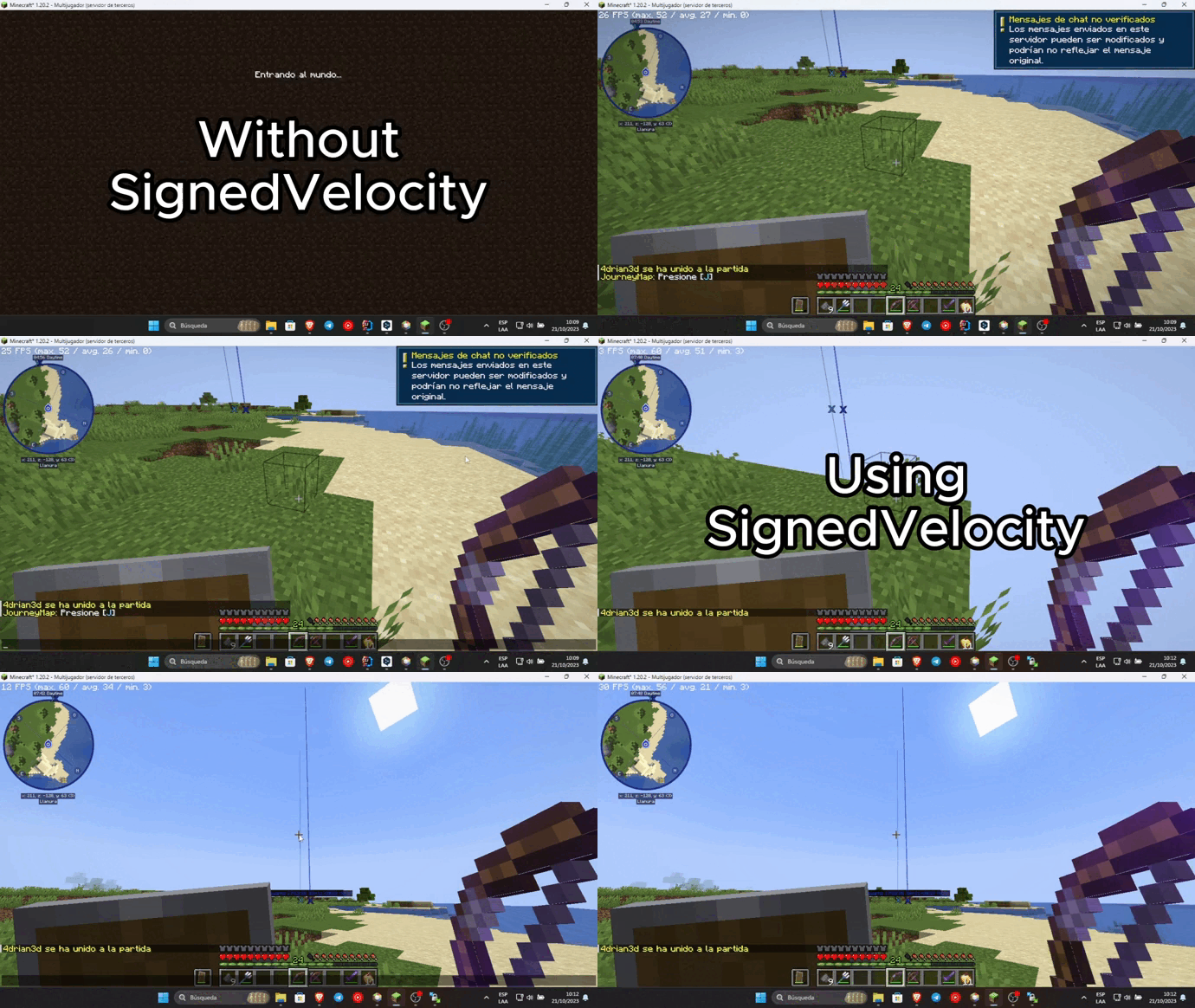
– Ability to remove the unsecured chat warning when logging into each server. Requires VPacketEvents or PacketEvents
> SignedVelocity-Proxy versions prior to 1.3.0 contain an exploit that can be used
> to replace the input of any player, and can give administrator permissions to malicious agents,
> it is recommended to upgrade to the latest version.
> SignedVelocity backend versions are not affected
## Installation
In order for SignedVelocity to work, you must install it on both Velocity and all your servers
### Velocity
– Download SignedVelocity-Proxy
– Drag and drop on your Velocity plugins folder
– Start your proxy
### Paper
– Download SignedVelocity-Paper
– Drag and drop on your Paper plugins folder
– Start your server
### Sponge
– Download the version of SignedVelocity-Sponge that is compatible with your server.
SignedVelocity-Sponge-8 supports API 8.1 and 9, SignedVelocity-Sponge-10 supports API 10 and 11
– Drag and drop on your Sponge plugins folder
– Start your server
### Fabric
– Download the version of SignedVelocity Fabric that corresponds to your server version
– Drag and drop on your Fabric mods folder
– Start your server
### Minestom
In the case of Minestom, SignedVelocity from version 1.3.0 onwards is used in the form of a library
so that it can be included in your own implementation.
#### Maven Repository
##### Gradle
“`kotlin
repositories {
mavenCentral()
}
dependencies {
implementation(“io.github.4drian3d:signedvelocity-minestom:1.4.0”)
}
“`
#### Example
“`java
import io.github._4drian3d.signedvelocity.minestom.SignedVelocity;
// then…
SignedVelocity.initialize();
“`
For older versions of Minestom, you can use SignedVelocity-Minestom 1.2.4 which comes as an extension
### Installation Videos
### Spanish by 4drian3d
## Metrics

# Sigil
Sigil is a telemetry plugin for Velocity proxy servers that tracks player activity and exposes metrics in Prometheus format. It provides real-time insights into your Minecraft network’s performance and player demographics.
## Features
– Real-time player tracking and metrics
– Geographic location tracking using GeoLite2 database
– Backend server status monitoring
– Prometheus-compatible metrics endpoint
– Session duration tracking
– Player count by region and backend server
## Metrics Available
– Active player sessions
– Player distribution by region
– Player distribution by backend server
– Session duration histograms
– Backend server status
## Installation
1. Download the latest release
2. Place the JAR file in your Velocity server’s `plugins` directory
3. Restart your Velocity server
## Metrics Access
Metrics are exposed in Prometheus format at:
“`
http://localhost:9091/metrics
“`
## License
This project is licensed under the MIT License.
### Third-party Licenses
GeoLite2 database is distributed under the Creative Commons Attribution-ShareAlike 4.0 International License.
### Look before you put it on the server
# ShortCmd – Plugin for executing commands from URLs | Плагин для выполнения команд из URL
## English
### Description
ShortCmd is a Minecraft server plugin that allows executing commands from external sources (like Pastebin) or saving them for later use. The plugin provides a convenient interface for managing and executing commands.
### Key Features
– **Execute commands from URLs/Pastebin**
– **Save commands and links for reuse**
– **Manage saved commands (run/delete)**
– **Flexible security settings**
– **Multi-language support (English/Russian)**
– **Different execution modes (as console or player)**
### Installation
1. Download the plugin file (ShortCmd.jar)
2. Place it in your server’s `plugins` folder
3. Restart the server
### Commands
Main command: `/shortcmd` or `/scmd` (alias)
Available subcommands:
| Command | Description | Permission |
|—————|———————————————–|———————|
| help | Show help menu | shortcmd.help |
| run
| save
| savecmd
| storage
| lang
| mode
| reload | Reload configuration | shortcmd.reload |
### Permissions
All permissions default to server operators (`default: op`):
– `shortcmd.help` – access to help
– `shortcmd.run` – execute commands from URLs
– `shortcmd.save` – save links
– `shortcmd.savecmd` – save commands
– `shortcmd.storage` – manage storage
– `shortcmd.lang` – change language
– `shortcmd.mode` – change execution mode
– `shortcmd.reload` – reload configuration
– `shortcmd.*` – all plugin permissions
### Configuration
Main settings in `config.yml`:
“`yaml
# Blocked commands
blocked-commands:
– op
– stop
– reload
– plugman
language: en # en/ru
# Timeouts in milliseconds
timeouts:
connect: 10000 # Connection timeout
read: 10000 # Read timeout
internet-check: 3000 # Internet check
command-delay: 100 # Delay between commands
“`
—
## Русская
### Описание
ShortCmd – это плагин для Minecraft серверов, который позволяет выполнять команды из внешних источников (например, Pastebin) или сохранять их для последующего использования. Плагин предоставляет удобный интерфейс для управления командами и их выполнения.
### Основные возможности
– **Выполнение команд из URL/Pastebin**
– **Сохранение команд и ссылок для повторного использования**
– **Управление сохранёнными командами (запуск/удаление)**
– **Гибкие настройки безопасности**
– **Поддержка двух языков (русский/английский)**
– **Различные режимы выполнения команд (от имени консоли или игрока)**
### Установка
1. Скачайте файл плагина (ShortCmd.jar)
2. Поместите его в папку `plugins` вашего сервера
3. Перезапустите сервер
### Команды
Основная команда: `/shortcmd` или `/scmd` (алиас)
Доступные подкоманды:
| Команда | Описание | Разрешение |
|—————|———————————————–|———————|
| help | Показать справку | shortcmd.help |
| run
| save
| savecmd
| storage
| lang
| mode
| reload | Перезагрузить конфигурацию | shortcmd.reload |
### Разрешения
Все разрешения по умолчанию выдаются операторам сервера (`default: op`):
– `shortcmd.help` – доступ к справке
– `shortcmd.run` – выполнение команд из URL
– `shortcmd.save` – сохранение ссылок
– `shortcmd.savecmd` – сохранение команд
– `shortcmd.storage` – управление хранилищем
– `shortcmd.lang` – изменение языка
– `shortcmd.mode` – изменение режима выполнения
– `shortcmd.reload` – перезагрузка конфигурации
– `shortcmd.*` – все разрешения плагина
### Конфигурация
Основные настройки в `config.yml`:
“`yaml
# Заблокированные команды
blocked-commands:
– op
– stop
– reload
– plugman
language: ru # ru/en
# Таймауты в миллисекундах
timeouts:
connect: 10000 # Таймаут подключения
read: 10000 # Таймаут чтения
internet-check: 3000 # Проверка интернета
command-delay: 100 # Задержка между командами
“`
### Лицензия
Плагин распространяется под лицензией MIT. Подробнее см. в файле LICENSE.