ulib
# uLib
 
ulib is a general purpose library.
Copyright (c) 2022 [fluse1367](https://gitlab.com/fluse1367)
See “Included Software” (at the bottom) for copyright and license notice of included software.
Please also refer to the [documentation](https://gitlab.com/fluse1367/ulib/-/blob/main/docs/Readme.md).
## Features
Brief overview of ulib’s features.
### Core
– Code Injection Framework
– Dynamic Library Injection
– Maven Resolver
– Reflection Utilities
– JsonRPC v2 API
– Yaml/Json API
– SQL API
– Misc
### Minecraft
– Mojang Launchermeta API
– Mojang/Bukkit Mappings API
– Proxy-Server Bridge
– User Cache
– Misc
### Spigot
– GUI/Inventory Menus API
– Custom Enchantments
– Item API
– Misc
## Things to Know
– The minecraft variants of library depend on recent spigot/bungeecord/velocity versions. That means it may not work as
expected or may not work at all on older server versions. You will not receive any support, when using another server
version than the one this library is built for.
If you want to use older server versions, consider a cross-version compatibility tool, like
[ViaBackwards](https://www.spigotmc.org/resources/viabackwards.27448),
[ViaRewind](https://www.spigotmc.org/resources/viarewind.52109) or
[ProtocolSupport](https://www.spigotmc.org/resources/protocolsupport.7201).
– Minimum Java version is 17.
– When launching uLib for the first time (or if the respective caching folder was removed), it will download a few of
dependencies/libraries.
## Disclaimer
Note the copyright and [license of this project](https://gitlab.com/fluse1367/ulib/-/blob/main/LICENSE). Use this library at your own risk! The contributors of this
project do not take any responsibility/liability in any way.
# Included Software
The following 3rd-party software is included within this project:
– NBTEditor
([click](https://github.com/BananaPuncher714/NBTEditor/blob/ff303d06e16eed119079bae92b8ef5700ec35d87/src/main/java/io/github/bananapuncher714/nbteditor/NBTEditor.java))
Copyright (c) 2018 [BananaPuncher714](https://github.com/BananaPuncher714), licensed under
the [MIT license](https://github.com/BananaPuncher714/NBTEditor/blob/ff303d06e16eed119079bae92b8ef5700ec35d87/LICENSE)
– Apache Commons Lang v3 (Copyright (c) 2022 [The Apache Software Foundation](https://www.apache.org/), licensed under
the [Apache License 2.0](https://github.com/apache/commons-lang/blob/9f1ac974e1b52c58b1950acdaaf3e0d5881409df/LICENSE.txt)):
– SystemUtils
Class ([click](https://github.com/apache/commons-lang/blob/9f1ac974e1b52c58b1950acdaaf3e0d5881409df/src/main/java/org/apache/commons/lang3/SystemUtils.java))
– JavaVersion
Class ([click](https://github.com/apache/commons-lang/blob/9f1ac974e1b52c58b1950acdaaf3e0d5881409df/src/main/java/org/apache/commons/lang3/JavaVersion.java))
—
TumiTranslator
# TumiTranslator
Add rich translations to you Minecraft Server or Proxy
## Installation
– Install [MiniPlaceholders](https://modrinth.com/plugin/miniplaceholders)
– Drag and drop on your plugins folder
– Start the server
## Features
– Add the translations you want, and use them anywhere on your server.
– Support for MiniPlaceholders placeholders. (Full support anywhere for global placeholders;
for player placeholders, requires plugins compatible with MiniMessage using the latest version)
## Placeholders
In addition to providing translations that can be used anywhere on your server,
TumiTranslator also provides placeholders for using your translations.
This is the recommended way to use translations, usable in plugins compatible with MiniPlaceholders.
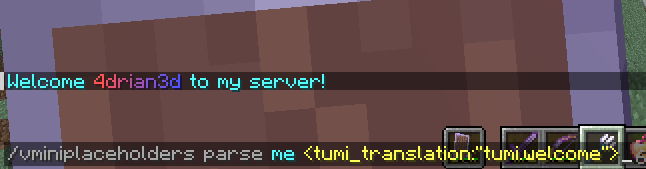
– ``
Returns a translation in the language of the target/executor.
If the translation does not exist in the specified language,
it will attempt to use the translation in the configured default language.
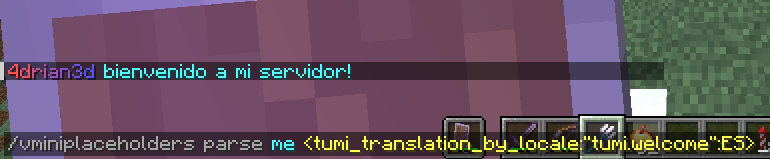
– ``
Returns a translation in the specified language.
If the translation does not exist in the specified language,
it will attempt to use the translation in the default language configured.
## Usage in General Translations
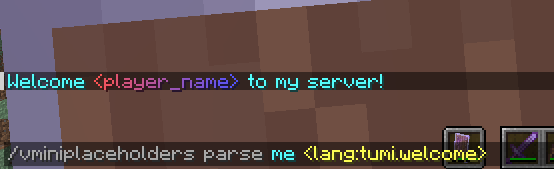
The recommended use of TumiTranslator is through its MiniPlaceholders placeholders.
But if you want to use them anywhere else, it is possible. Here are some examples.
Please note that player placeholders are not yet supported in this way of displaying placeholders.
[This feature will be applied to MiniMessage in future versions.](https://github.com/KyoriPowered/adventure/pull/1300)
### Lang Tag
– ``
## Videos
#### TumiTranslator with Velocitab
[](https://youtu.be/YSyx6R2_hK0)
#### TumiTranslator with VCustomBrand
[](https://youtu.be/1Me2Cw_1hHI)
## Support
Support is exclusively for those who have purchased the plugin from BuiltByBit or Polymart. You will be given a role on my Discord server with access to an exclusive channel.
tuffvote
## tuffvote
runs all commands in its config file whenever votifier recieves a vote from a server list. you can configure what server lists you want to have trigger the commands, and what commands run.
a usecase for this might be wanting users who vote to get a rank, so you could have a command be “/lpb %username% parent add voter“.
“/tuffvotereload“ to reload its config
True Proxy Send Command
# True Proxy Send Command
Place the Jar file into both Velocity and your Paper servers’ `plugins` folder, and you’ll have access to the `/send` command via players, datapacks, and command blocks!
## How to use:
The syntax is `/send `, where is any Minecraft player selector, (e.g @a, @p, @s), and is any named server in your `velocity.toml` file.
## How it works:
Both halves talk to each other via Bukkit’s plugin channel messages. Velocity will send the list of servers to each Paper server, and Paper will send what player(s) and what server were argued in the command back to Velocity.
## Contact me!
If you’re looking for older versions (or even newer!), or different server side loaders (e.g Spigot, or even just plain Bukkit), contact me at [email protected] or join my [Discord server](https://discord.com/invite/3fKNRsuwf9) to let me know and I’ll start working on that as soon as I can!
tpagui
# TpaGui
A simple plugin that provides GUI functionality for TPA, supporting chest menus and Bedrock Edition forms.
## Features
### Java Edition
– Chest menu interface
– Displays skulls of all online players
– Left-click to request teleportation to a player
– Right-click to request a player to teleport to you
– Supports multi-page display
– Previous/Next page buttons
### Bedrock Edition
– Dropdown form interface
– Player selection dropdown menu
– Teleport method toggle switch
– Automatically identifies Bedrock Edition players
– Teleport request popup
– Shows requester’s name
– Shows teleport direction
– Accept/Decline buttons
– Closing the window automatically declines the request
### Common Features
– Supports customizing all message texts
– Supports color codes
– Allows viewing the list of online players from the console without relying on other plugins
## Commands
– `/tpagui` – Opens the teleport request menu
– Aliases: `/tpag`, `/tgui`
## Permissions
– `tpagui.use` – Permission to use the `/tpagui` command (default: all players)
## Dependencies
– Required: Paper 1.13+
– Optional: Floodgate (for Bedrock Edition support)
ToriumPlayersSum
# ToriumPlayersSum
ToriumPlayersSum is a plugin for the Velocity proxy server that collects and displays the total number of online players connected to multiple servers linked through Velocity. The plugin is ideal for networks where multiple servers (e.g., lobbies, mini-games, survival, etc.) are running simultaneously, and administrators or players need to see the total number of active players across all servers.
## Installation:
1. Download the plugin and place it in the `plugins` folder on your Velocity proxy.
2. Restart the proxy server.
3. The plugin will automatically start collecting online player data from connected servers.
Torium
# Torium




**Torium** is a versatile plugin for Velocity-based proxy servers, designed to provide administrators with powerful tools for managing players and servers. The plugin easily integrates into your system, is configurable via files, and supports multiple languages, making it an ideal choice for servers of any size.
### Are you using my plugin? – write to me in Discord what you would like to see in it, or if something does not work. My discord: thorgathis.
## 📝 Commands
Torium offers a set of commands to manage players and servers, simplifying administrative tasks:
– **/alert** — Sends a global message to all players on the proxy.
– **/find** — Locates a player and shows which server they are on.
– **/send** — Moves a player to a specified server.
– **/lobby** — Teleports a player to the lobby server.
– **/list** — Displays a list of all servers and players.
– **/treload** — Reloads the plugin’s configuration and language files.
## 🔒 Permissions
Torium uses a permission system to control who can execute specific commands. Some examples include:
– **torium.command.alert** — Access to `/alert`.
– **torium.command.find** — Access to `/find`.
– **torium.command.send** — Access to `/send`.
– **torium.command.lobby** — Access to `/lobby`.
– **torium.command.list** — Access to `/list`.
– **torium.command.reload** — Access to `/treload`.
## ⚙️ Configuration
Torium provides flexible configuration via the `config.toml` file, allowing you to tailor the plugin to your server’s needs:
– Enable or disable commands.
– Customize message formats and command outputs.
– Set the lobby server for the `/lobby` command.
– Adjust proxy ping responses to show the total number of players across all servers.
– etc.
All adjustments can be made quickly and easily through configuration files.
## 🌍 Multi-Language Support
Torium supports multiple languages, including English and Russian. You can add your own custom language files by placing them in the `lang` folder. This makes it easy to adapt the plugin for your audience and use it in international communities.
## 🔧 Utils
Torium offers useful utilities that can significantly enhance your server’s functionality:
– **Proxy Ping Modification** — Adjusts the proxy ping response to display the total number of players across all servers, not just the current one.
– **Server List Customization** — Control the visibility of empty servers in the `/list` command through configuration, helping to avoid interface clutter.
– etc.
These utilities allow you to better manage your server and provide players with accurate information.
## ⚡ Installation
Installing Torium is quick and easy:
1. Download the plugin from Modrinth.
2. Place the `Torium-X.X.jar` file in your proxy’s `plugins` folder.
3. Restart the server.
4. Configure the plugin via the provided configuration files.
After that, Torium is ready to use!
—
**Torium** is the perfect choice for administrators who want to simplify proxy management and improve player interactions. Easy to set up, highly flexible, and supporting multiple languages, Torium is an excellent tool for servers of any size.
Topaz
# Topaz – A simple FOSS Anti-VPN plugin for Velocity
### Inspired by [egg82’s/Laarryy’s Anti-VPN plugin](https://github.com/Laarryy/Anti-VPN).
## Installation guide:
You need:
* Velocity 3.2.0+
* Java 17+
* Email address
* A custom plan from ProxyCheck.io **(required only if you will be making more than 100/1000 requests a day)**
1. Download the plugin from the [releases tab](https://github.com/MrZomka/Topaz/releases).
1. Install the plugin on your Velocity proxy.
1. Start the proxy.
1. In the config file and enter your API key. (This step is not required but is really recommended!)
1. Restart the proxy.
And you’re good to go! 🙂
## FAQ:
Q: Can I change the clear cache interval?
A: Yeah! Just keep in mind that the interval there is in seconds, not minutes or hours. 😉
Q: My players are getting kicked with an error message! What do I do?
A: Check your logs! It is possible that you just ran out of queries for today!
Q: What are the permissions that Topaz checks for?
A: `topaz.bypass` for bypassing the IP proxy check.
Q: What permission plugin do you recommend?
A: [LuckPerms never failed me. :)](https://luckperms.net)
## Support is offered on my [Discord server](https://discord.gg/y3VdCeJaC2).
TomieProfiles
# Introduction
A plugin for Minecraft Velocity servers that allows to connect with the same account to the server several times. The plugin will assign a new username to each new connection using the same account. By using commands the players can change which MiniProfile (sub-profile) they are using. This plugin is heavily inspired by [TwinSession](https://modrinth.com/plugin/chatpatchertwin).
# Requirements
– [configLib](https://github.com/Exlll/ConfigLib)
# Features
When a player with the account of and already connected player tries to connect to the proxy, they’ll get a new profile with a different name and info. These profiles are numbered starting from 0. If a player wants to use a diferent profile, they can use the command `profileswap` followed by and argument indicanting the miniprofile id, like this:
`/profileswap 1`, this will kick the player out of the server and when they reconnect, they’ll be using the miniprofile 1.
The config file should look like this.
“`
servers:
– serverName: “survival”
overwriteMessages: false
– serverName: “creative”
overwriteMessages: false
“`
overwriteMessages is false by default
# Known issues
– Chat messages don’t work properly, so in each server, you can change enforce-secure-profile (server.properties) to false. If you dont want to change that option, in the config file of the plugin, you have to set overwriteMessages to true. Some minecraft versions (mainly newer versions) do not allow to overwrite chat messages, so you’ll need a plugin like [ChatPatcher](https://modrinth.com/plugin/chatpatcher) to be able to use it. ChatPatcher comes with some other issues, its a proxy level plugin, so it’ll affect all the subservers. It’ll also have problems if enforce-secure-profile is set to false.
– MiniProfiles can’t be created without trying to connect with the same account first.
– Even if the second player connects to a diferent subserver, they’ll get the new profile instead of the base one.
TheNewEconomy
**Note: This resource is no longer maintained/supported.**
# The New Economy
[](https://app.codacy.com/gh/TheNewEconomy/EconomyCore/dashboard?utm_source=gh&utm_medium=referral&utm_content=&utm_campaign=Badge_grade)
[](https://ci.codemc.io/job/creatorfromhell/job/TNE/)
[](https://github.com/TheNewEconomy/VaultUnlockedAPI)
The New Economy, TNE, is the ultimate economy plugin for your Minecraft server, no matter what platform you’re on. While
TNE is pushed as being “feature-packed,” but it’s not feature-packed in the normal sense of jamming a bunch of useless features
into the core plugin, but rather using modules.

The economy plugin for server owners that want more out of their economy.
# About TNE
TNE was originally created for hey0’s hMod long before Bukkit/Spigot/Paper was a thing. Since then, it has taken on many
forms and this is the future form of the plugin. This core is designed to be robust and carry TNE into the future with or
without Minecraft by not being platform-dependent.
# Requirements
TNE has some minimum requirements that should be followed.
– MySQL 8.0+ (if using MySQL for storage)
– MariaDB 10.7.0+
– Java 17+
# Switched?
– Converter Coming Soon! Take the poll: [here](https://strawpoll.com/4xw9gxag)
# Support
To get an actual response use a support method below, not the reviews.
– [Developer API Docs](https://github.com/TheNewEconomy/EconomyCore/wiki/API)
– [Discord](https://discord.gg/WNdwzpy)
– [Github](https://github.com/TheNewEconomy/EconomyCore/issues)
# Features
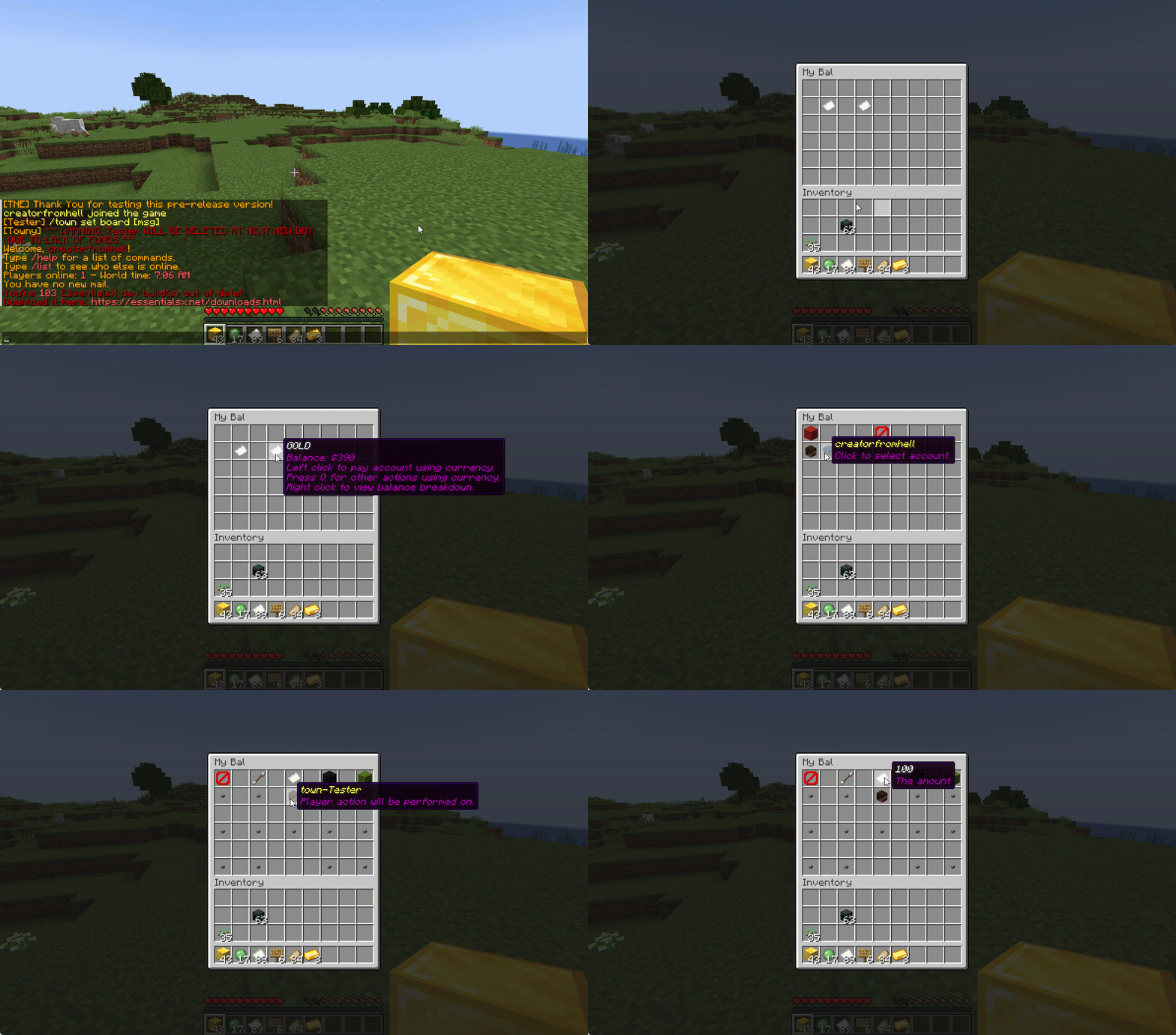
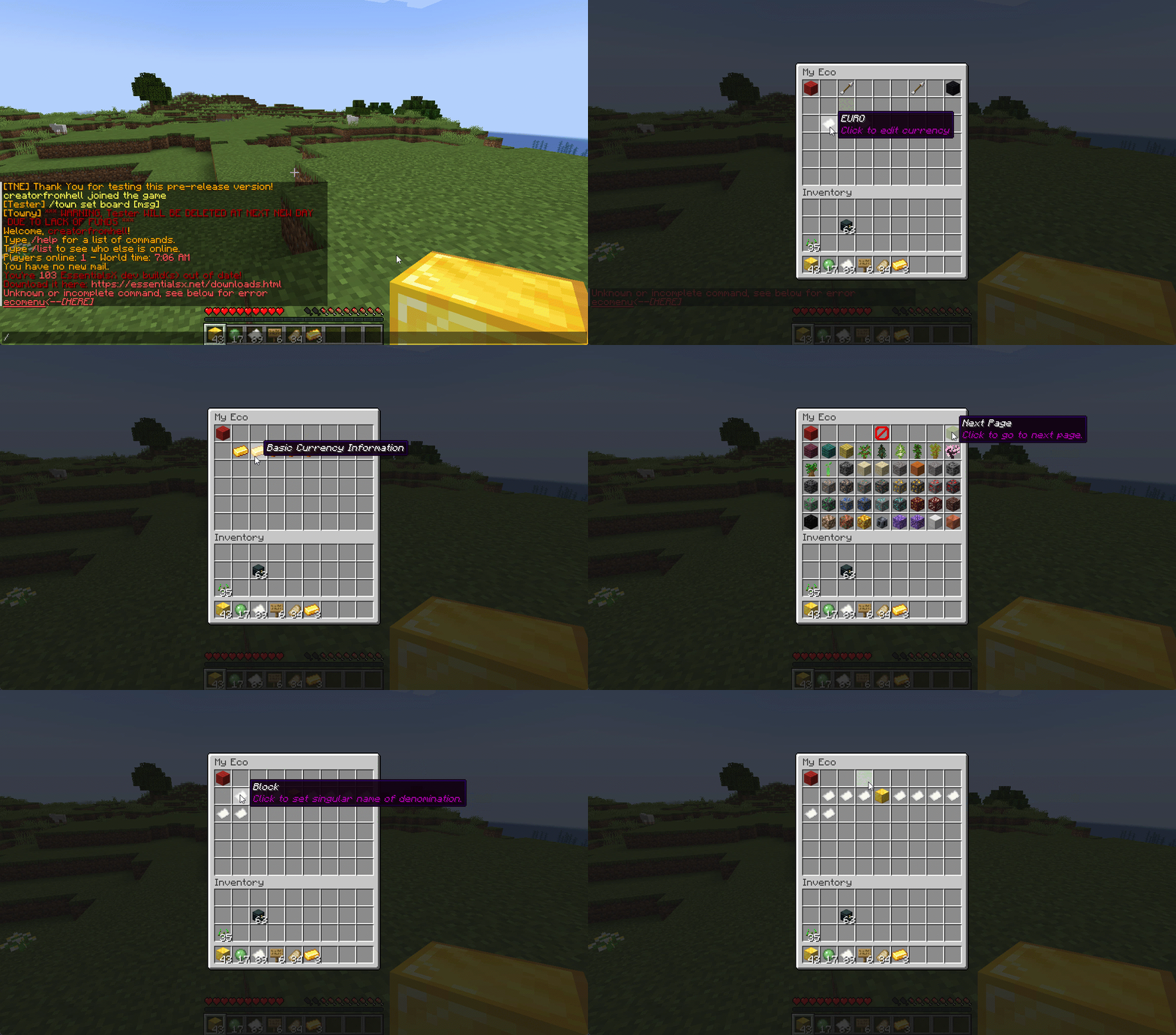
## Menu System
Want to use menus for currency creation and player actions? We got you!
### MyBal for Players
### MyEco for Admins
## Support your favorite plugins
We provide support for all your favorite plugins from Towny to Factions. Anything that supports Vault, supports TNE!
## Cross-Server
We support cross-server balance syncing through our velocity and bungee plugins, as well as Redis!
### Bungee
Download: [here](https://cdn.modrinth.com/data/bZ4eSWf0/versions/OTwQFFn1/TNE-BungeeCore-0.1.2.8-Release-1.jar)
### Velocity
Download: [here](https://cdn.modrinth.com/data/bZ4eSWf0/versions/prNGjbjv/TNE-VelocityCore-0.1.2.8-Release-1.jar)
## Updates
We continue to develop updates for TNE for free, and fix bugs as they’re reported.
## All the currencies – Unlimited
TNE Allows you to create unlimited currencies with ease through the currency creation GUI.
### Types
TNE Supports different types of currencies!
#### Virtual: Simple currency that exists in thin air
#### Item: Use minecraft items as currency.
– Shulker Box Support
– Bundle Support
### Fine Tune your Currency
Lots of per-currency configuration options.
– Create a custom balance format for each currency
– Set a starting amount for each currency
– Set custom conversion rates for each currency
– Create custom crafting recipes for item currencies
– Block Mob drops for each currency
– Set the max balance for each currency
– Set enderchest balance inclusion per currency
– Set item currencies to use MiniMessage inputs for display name and lores!
– Set custom note items for each currency, used to have a currency voucher for each currency.
– Allows for use of model data items as currency items
### Fine Tune Who Can Access What Currency
TNE allows you to fine tune who can run commands with each currency. You’re able to block players from using
/pay for certain currencies, and even checking their balance for others!
#### Mixed: This type uses both virtual and item balances, and allows players to switch their balance between items and virtual whenever!
#### Experience: Use experience as currency.
#### Experience-level: Use experience levels as currency.
## Money Notes
Convert your virtual currency into a physical money note using the /money note command.
## Multi-platform
Use Sponge? Sure. Paper? Why not? Both? Over Velocity? Definitely! Switch between, your TNE data works
for you no matter your platform. More platforms soon!
### Supported:
– Paper/Spigot/Purpur
– Sponge8
### Coming:
– Fabric
– Sponge7
## Discord Server
We have a discord server available to those users that have questions or need support!
## Configurability
TNE strives to allow you to configure things as much as possible. From the messages to starting money, to max holdings!
## MISC Features
– Adventure Chat support for translations to allow for awesome colorful messages!
– Support for Placeholders, include top 10
– Easy commands for easy administration
– Transaction Logging
– Easy-to-use menu system for currency creation and balance actions!
– Multiple data types
– SQL, YAML, and Maria DB
– Tab completion for commands!
– baltop command
## Open Source
Contribute on the [github](https://github.com/TheNewEconomy/EconomyCore)!
## Placeholders
| Name | Description |
|——————————————————-|—————————————————————-|
| tne_balance | Returns player’s balance. |
| tne_balance_formatted | Returns formatted player’s balance. |
| tne_world_worldname | returns player’s balance for specific world. |
| tne_world_worldname_formatted | returns the formatted player’s balance for specific world. |
| tne_currency_currencyname | returns player’s balance for specific currency. |
| tne_currency_currencyname_formatted | returns player’s balance for specific currency. |
| tne_wcur_worldname_currencyname | returns player’s balance for specific world and currency. |
| tne_wcur_worldname_currencyname_formatted | returns player’s balance for specific world and currency. |
| tne_toppos | returns player’s position on baltop |
| tne_toppos_world name or all | returns player’s balance for specific currency. |
| tne_toppos_world name or all_currency name or all | returns player’s balance for specific world and currency. |
| tne_toppos__position_ | returns the value for the position based on the value of Messages.Money.PlaceholderTopEntry in messages.yml |
## Permissions & Commands
## /tne
**About:** All commands that are designated as being for administrative purposes.
**Shortcuts:** /tne menu(/ecomenu), /tne(/ecomin, /ecoadmin, /ecomanage, /tneneweconomy)
**Base node:** tne.admin (default: ops)
**Wildcard node:** tne.admin.*
| Command | Permission | Description | Default |
|———————————–|——————-|———————————————————————————————————–|—————|
| tne backup | tne.admin.backup | Creates a backup of all server data. | ops |
| tne create [balance] | tne.admin.create | Creates a new economy account. Player ~ The account owner. Balance ~ The starting balance of the account. | ops |
| tne debug [level] | tne.admin.debug | Toggles console debug mode to the specified level. | ops |
| tne delete | tne.admin.delete | Deletes a player account. Player ~ The account owner. | ops |
| tne extract | tne.admin.extract | Extracts all player balances with their username attached for database related debugging. | ops |
| tne menu | tne.admin.menu | Opens up the tne economy admin menu | ops |
| tne purge | tne.admin.purge | Deletes all player accounts that have the default balance | ops |
| tne reload [configs] | tne.admin.reload | Used to reload configurations. | ops |
| tne reset | tne.admin.reset | Deletes all economy-related data from the database. | ops |
| tne restore | tne.admin.restore | Restores all balances that are located in extracted.yml after performing the extract command. | ops |
| tne save | tne.admin.save | Force saves all TNE data. | ops |
| tne status [status] | tne.admin.status | Displays, or sets, the current account status of an account. Player ~ The account owner. | ops |
| tne version | tne.admin.version | Displays the version of TNE currently running. | ops |
## /money
**About:** All commands that are used to interact with the server’s money system.
**Shortcuts:** /money balance(/bal, /balance), /money pay(/pay), /money top(/baltop), /money menu(/mybal)
**Base node:** tne.money (default: everyone)
**Wildcard node:** tne.money.*
| Command | Permission | Description | Default |
|————————————————————|———————–|—————————————————————————————-|—————|
| money balmenu | tne.money.mybal | Opens up the mybal menu. | everyone |
| money balance [world] [currency] | tne.money.balance | Displays your current holdings. | everyone |
| money convert [from currency] | tne.money.convert | Convert some of your holdings to another currency. | everyone |
| money deposit [currency] | tne.money.deposit | Deposits money from an item form into a virtual bank for mixed currencies. | everyone |
| money give [world] [currency] | tne.money.give | Adds money into your economy, and gives it to a player. | ops |
| money givenote [currency] | tne.money.givenote | Gives the specified player a currency note for the specified amount. | ops |
| money note [currency] | tne.money.note | Makes your virtual currency physical, for storage/trading purposes. | everyone |
| money other [world] [currency] | tne.money.other | Retrieves the balance of a player. | everyone |
| money pay [currency] | tne.money.pay | Use some of your holdings to pay another player. | everyone |
| money request [currency] | tne.money.request | Request money from a player. |
| money set [world] [currency] | tne.money.set | Set the holdings of a player. | ops |
| money setall [world] [currency] | tne.money.setall | Set the holdings of all players. | ops |
| money take [world] [currency] | tne.money.take | Removes money from your economy, specifically from a player’s balance. | ops |
| money top [page] | tne.money.top | A list of players with the highest balances. | ops |
| money top [page] [refresh(true/false)] | tne.money.top.refresh | This permission allows the user to include the refresh argument to refresh the baltop. | ops |
| money withdraw [currency] | tne.money.withdraw | Withdraws money from your virtual balance into its item form. | ops |
## /transaction
**About:** All commands that are used to interact with the transaction system.
**Shortcuts:** /trans
**Base node:** tne.transaction (default: everyone)
**Wildcard node:** tne.transaction.*
| Command | Permission | Description | Default |
|——————————————————————–|———————————————————|—————————————————————————————|—————|
| transaction away [page #] | tne.transaction.away | Displays transactions that you missed since the last time you were on. | everyone |
| transaction history [player:name] [page:#] [world:name/all] | tne.transaction.history / tne.transaction.history.other | See a detailed break down of your transaction history. Page ~ The page number you wish to view. World ~ The world name you wish to filter, or all for every world. Defaults to current world. | everyone |
| transaction info | tne.transaction.info | Displays information about a transaction. UUID ~ The id of the transaction. | everyone |
| transaction void | tne.transaction.void | Undoes a previously completed transaction. UUID ~ The id of the transaction. | ops |