zEssentials

[![MineStrator Code](https://cdn.modrinth.com/data/cached_images/715b4a8ffa9ed90dacb64c4847174bf651889809_0.webp)](https://minestrator.com/a/GROUPEZ)
**Attention, this is a free version of zEssentials, you can use it but you must buy the paid version to get help!**

[![zEssentials](https://img.groupez.dev/zessentials/zess-info.png)](https://zessentials.groupez.dev/)

[![GitHub](https://img.groupez.dev/zessentials/git.png)](https://github.com/Maxlego08/zEssentials/)
[![bStats](https://img.groupez.dev/zessentials/stats.png)](https://bstats.org/plugin/bukkit/zEssential/21703)

[![Discord](https://img.groupez.dev/zessentials/discord.png)](https://discord.groupez.dev/)

[![Website](https://img.groupez.dev/zessentials/wiki.png)](https://zessentials.groupez.dev/)

## **Plugin Required:**
– **zMenu**: [zMenu Ultra Complete Menu Plugin](https://www.spigotmc.org/resources/zmenu-ultra-complete-menu-plugin.110402/)
– **PlaceholdersAPI**: [PlaceholderAPI](https://www.spigotmc.org/resources/placeholderapi.6245/)

You can also install **Vault**, the plugin is intended to work with.

If you are on Folia, you must be careful to take the right version of the plugins. zMenu automatically supports Folia. For PlaceholderAPI, use [this version](https://github.com/Anon8281/PlaceholderAPI/releases/tag/1.1). For Vault, use [This version](https://github.com/Geolykt/Vault/releases).

Download the latest zMenu DEV version on my Discord: [Discord Link](https://discord.gg/ZaHrgZCfh4)

## **Convert from other plugins:**
– [CMI](https://zessentials.groupez.dev/getting-started/convert#cmi) **/zess convert CMI**

## [**Features:**](https://zessentials.groupez.dev/)
### ✅ **Economies**
### ✅ **Teleportation**
### ✅ **Confirmation Inventories** (for /pay and /tpa)
### ✅ **Join** and **Quit** messages
### ✅ **JSON** and **MYSQL** storage
### ✅ **Open Source**
### ✅ Support for multiple languages: **French**, **English**, and **Italian**
### ✅ All messages are configurable
### ✅ **Folia** Support
### ✅ **MiniMessage** Support
### ✅ **Module** system
### ✅ **Warp** (with GUI)
### ✅ **Spawn**
### ✅ Ability to **disable each command**
### ✅ **Random Tp**
### ✅ **Home** (4 display types)
### ✅ **Sanction** (ban, mute, kick, kickall)
### ✅ More than **130 commands**
### ✅ **Redis**
### ✅ **Chat Format**
### ✅ **Chat Histories**
### ✅ **Kits**
### ✅ **Holograms**
### ✅ **Scoreboard**
### ✅ **Mailbox** for items
### ✅ **Rules**
### ✅ More than **35 placeholders**
### ✅ **Alignment placeholder** (like MCC Island)
### ✅ **Replace placeholder** (replaces the result of a placeholder with another thanks to various conditions)
### ✅ Ultra complete **documentation** and **default configuration**, everything is explained correctly!
### ✅ **Baltop**
### ✅ **Developer API**
### ✅ **Offline EnderSee and InvSee**
### ✅ Create **custom items**
### ✅ **Multiple message types**: ACTION, CHAT, TITLE, CENTER, NONE, CHAT_AND_ACTION, WITHOUT_PREFIX

## [**Chat Module**](https://zessentials.groupez.dev/modules/chat)
### ✅ Different rules of chat protection (alphanumeric, links, ItemsAdder font, same message, etc.)
### ✅ Dynamic cooldown: The faster the player writes, the longer the cooldown
### ✅ Clear and Toggle chat commands
### ✅ Chat format by permission
### ✅ Permission for mini message or color in chat
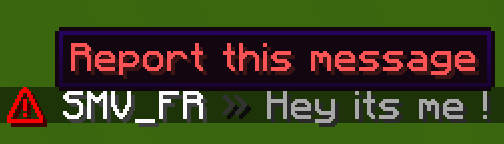
### ✅ Moderator actions on messages
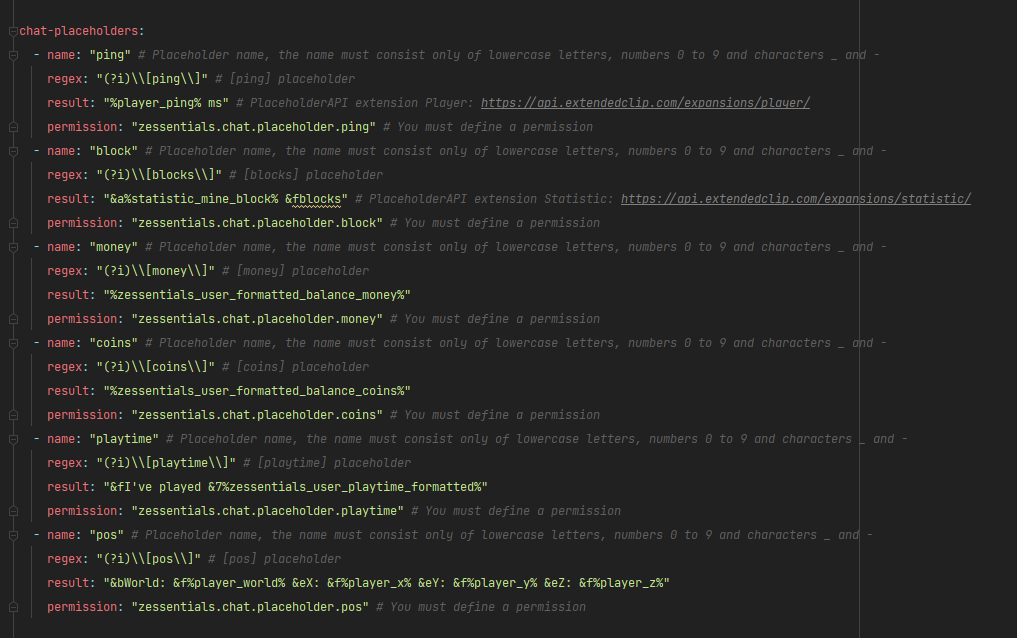
### ✅ Chat placeholders: [pos], [item], [playtime], and custom placeholders!
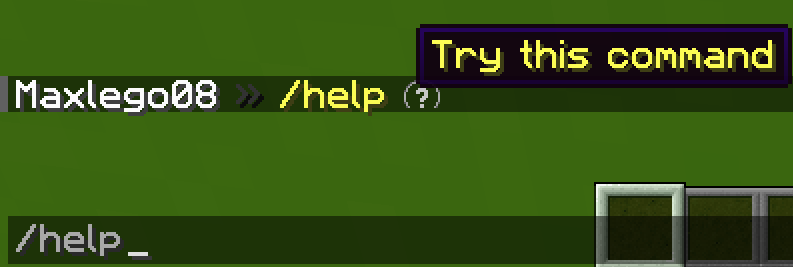
### ✅ Command placeholders: Replace **./** with a clickable command!

Images

![Chat Placeholders](https://img.groupez.dev/zessentials/chat-placeholders.png)
![Chat Item](https://img.groupez.dev/zessentials/chat-item.png)
![Chat Command](https://img.groupez.dev/zessentials/chat-command.png)
![Chat Action](https://img.groupez.dev/zessentials/chat-action.png)
![Chat Information](https://img.groupez.dev/zessentials/chat-information.png)
![Chat Punish](https://img.groupez.dev/zessentials/chat-punish.png)
![Chat Report](https://img.groupez.dev/zessentials/chat-report.png)
![Chat Config Placeholder](https://img.groupez.dev/zessentials/chat-config-placeholder.png)

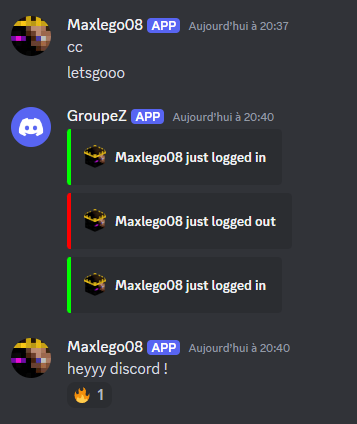
## [**Discord Module**](https://zessentials.groupez.dev/modules/discord)
### ✅ **Chat Message**
### ✅ **Join Message**
### ✅ **Quit Message**
### ✅ **First Join Message**

Images
![Discord Webhook](https://img.groupez.dev/zessentials/discord-webhook.png)

## [**Economy Module**](https://zessentials.groupez.dev/modules/economy)
### ✅ Create multiple virtual **economies**
### ✅ **Vault** support
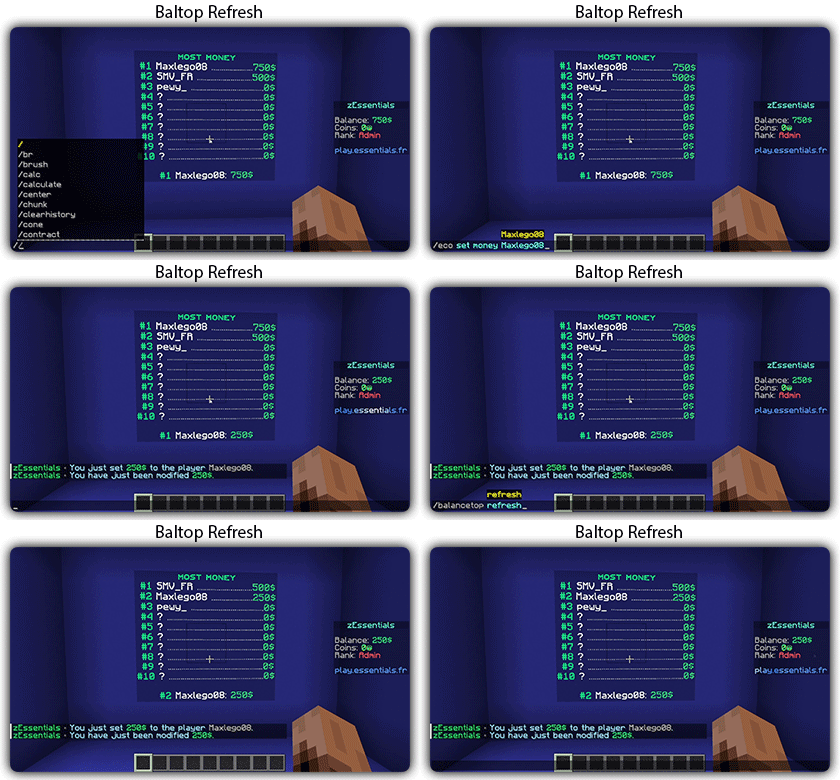
### ✅ **Baltop** (inventory and message)
### ✅ Several ways to **display numbers**
![Baltop Refresh](https://img.groupez.dev/zessentials/baltop-refresh.gif)

## [**Hologram Module**](https://zessentials.groupez.dev/modules/hologram)
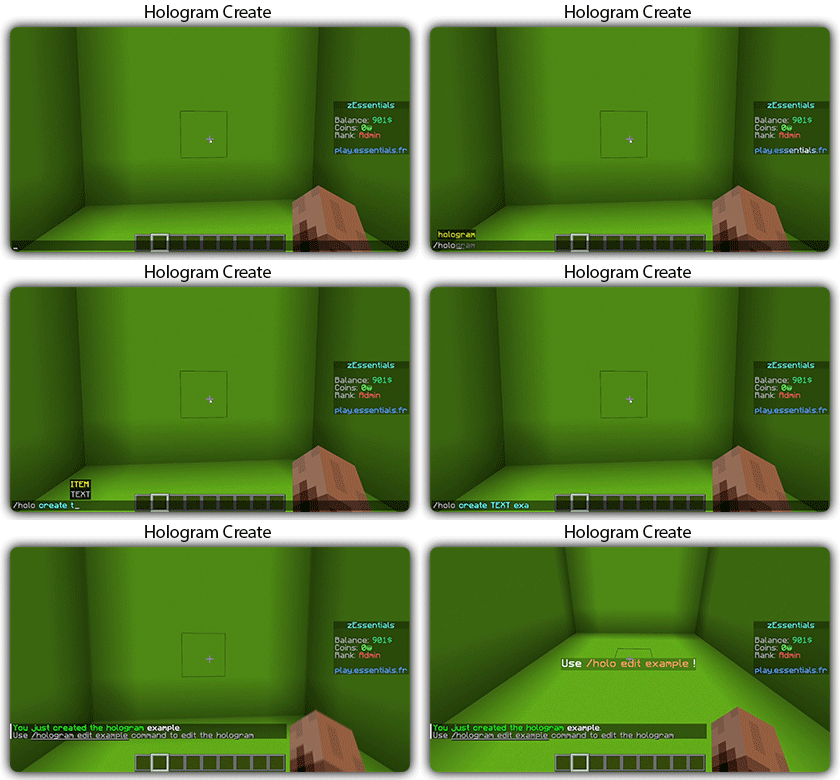
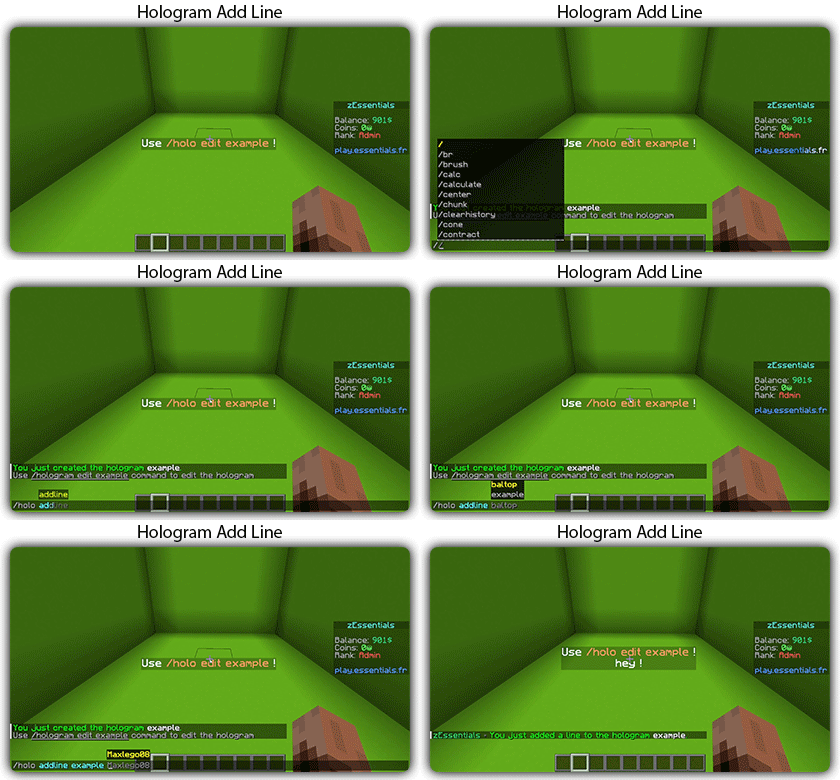
### ✅ **Display Entities**, Text, Item, and Block
### ✅ **Packet-Based**: All holograms are client-side (zEssentials takes care of everything, no other plugins needed)
### ✅ **In-game editor**: +20 commands to modify each element of your holograms
### ✅ [**Event System**](https://zessentials.groupez.dev/modules/hologram#events): Updates your holograms with events, no more lagging tasks
### ✅ PlaceholderAPI Support
### ✅ **Damage Indicator**
![Hologram Create](https://img.groupez.dev/zessentials/holo-create.gif)
![Hologram Add Line](https://img.groupez.dev/zessentials/holo-addline.gif)
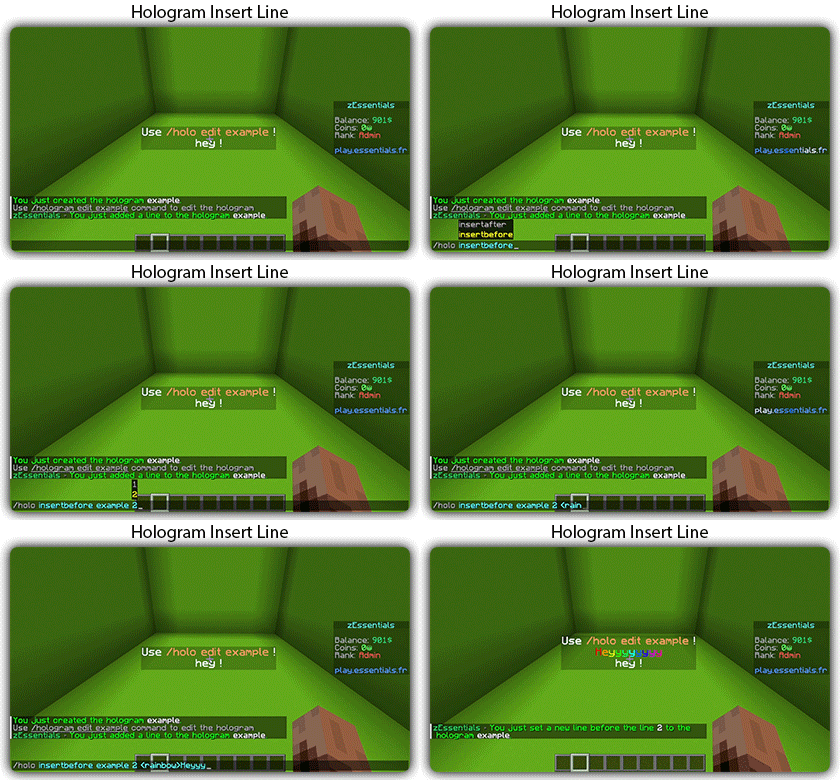
![Hologram Insert](https://img.groupez.dev/zessentials/holo-insert.gif)
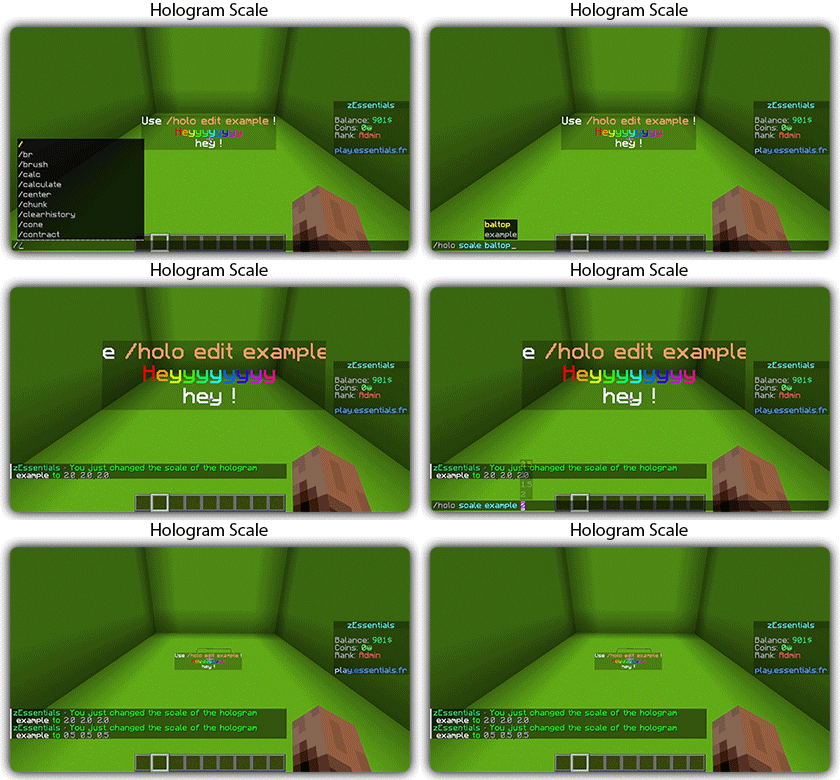
![Hologram Scale](https://img.groupez.dev/zessentials/holo-scale2.gif)

## [**Homes Module**](https://zessentials.groupez.dev/modules/home)
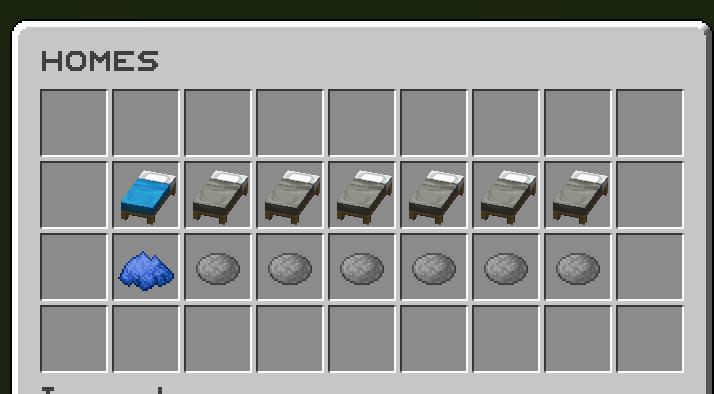
### ✅ 4 ways to display homes: inventory, like donutsmp inventory, inline message, multiline message
### ✅ Offline Support
### ✅ Homes Per Rank: Set the number of homes by permission

Images
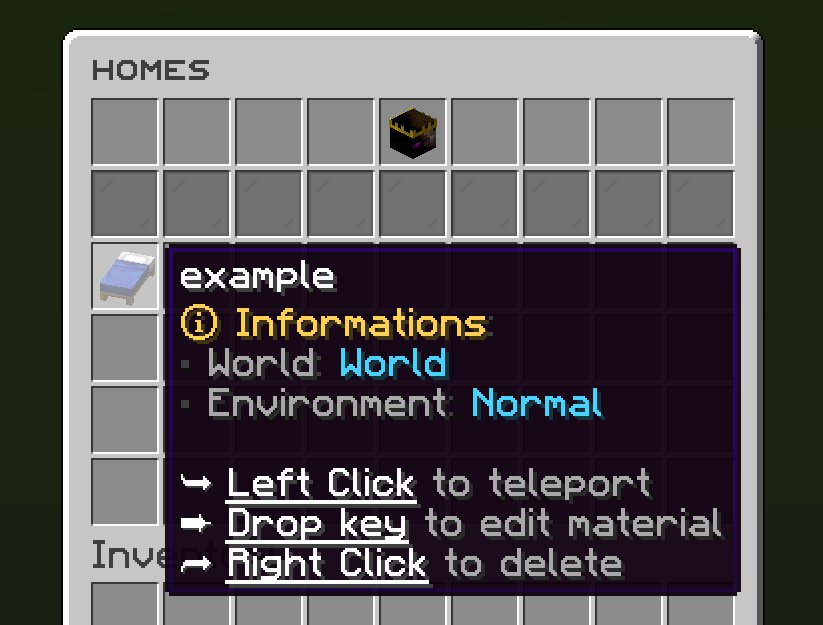
![Home Inventory](https://img.groupez.dev/zessentials/home_inventory.png)
![Home Donut](https://img.groupez.dev/zessentials/home_donut.png)
![Home Simple](https://img.groupez.dev/zessentials/home_simple.png)
![Homes](https://img.groupez.dev/zessentials/homes.png)
![Set Home](https://img.groupez.dev/zessentials/sethome.png)

## [**Items Module**](https://zessentials.groupez.dev/modules/items)
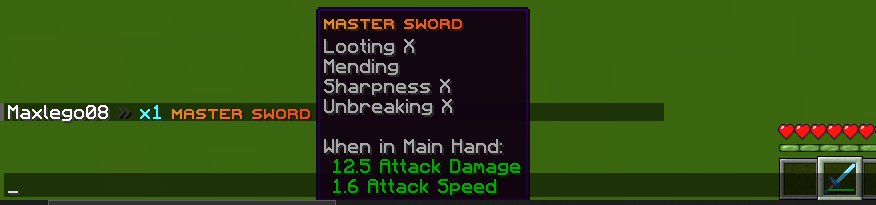
### ✅ Create custom items: Use the /give or /giveall command for accessions

Images
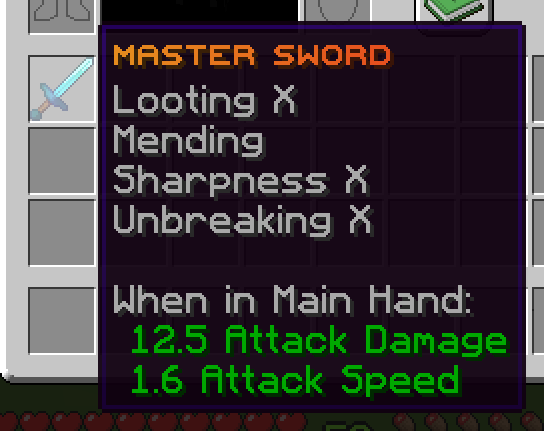
![Master Sword](https://img.groupez.dev/zessentials/master_sword.png)
![Master Sword Give](https://img.groupez.dev/zessentials/master_sword_give.png)

## [**Kit Module**](https://zessentials.groupez.dev/modules/kits)
### ✅ **Cooldowns**: Set a time between each kit recovery
### ✅ [**Execute actions**](https://docs.zmenu.dev/configurations/buttons/actions): Perform actions when a player gets the kit (commands, message, sound, etc.)
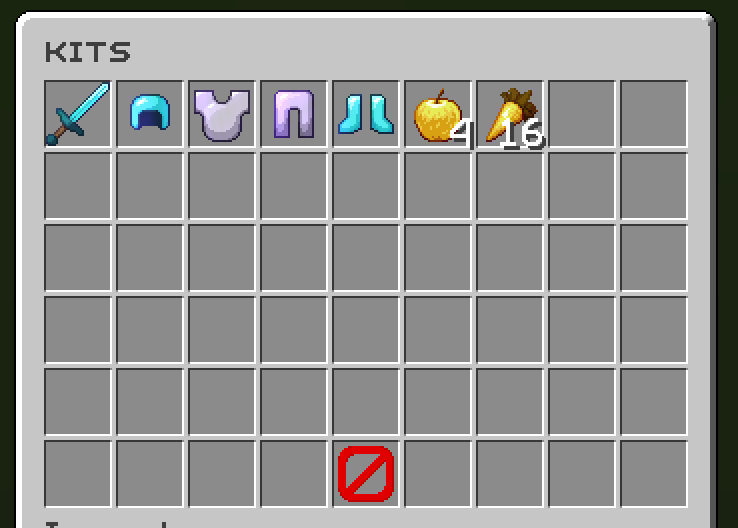
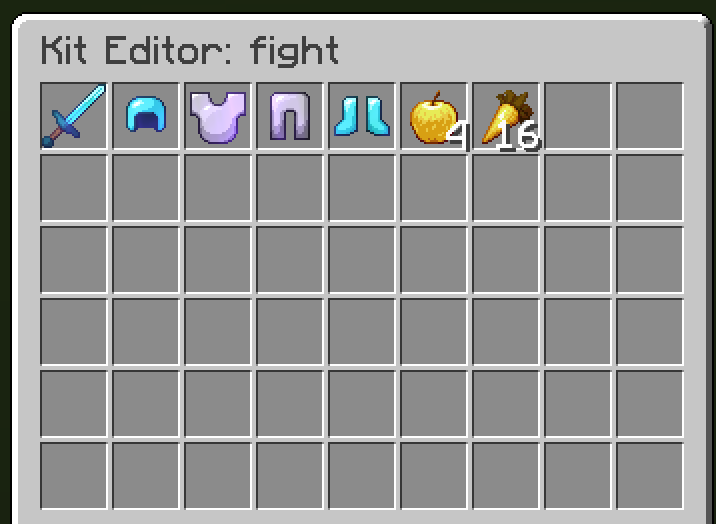
### ✅ **GUI Driven**: Edit, preview, and obtain kits via customizable inventories
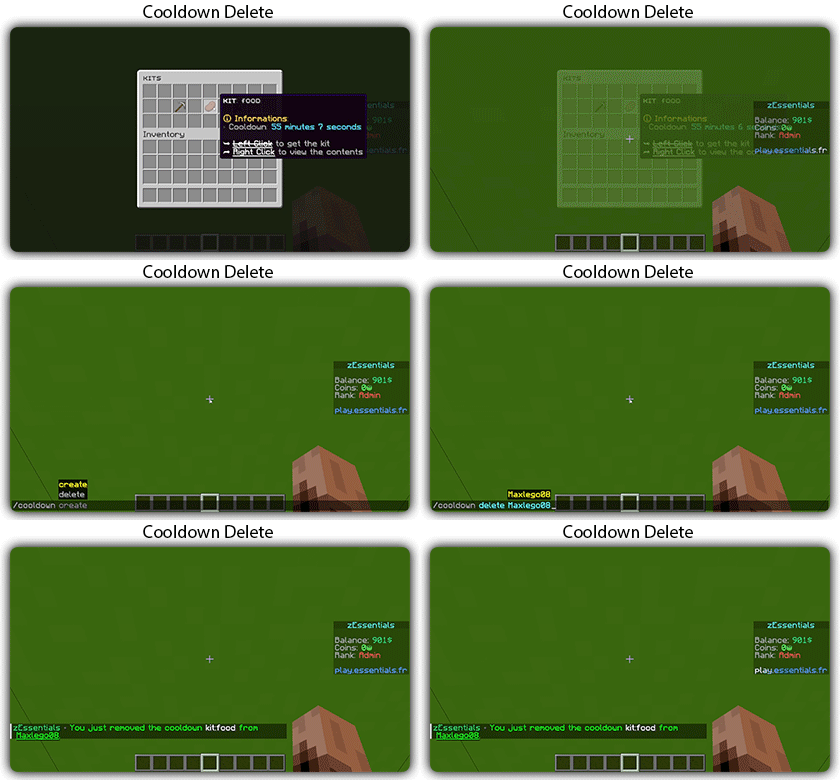
### ✅ **Cooldown management**: Use commands to manually add or remove cooldowns (not just for kits)
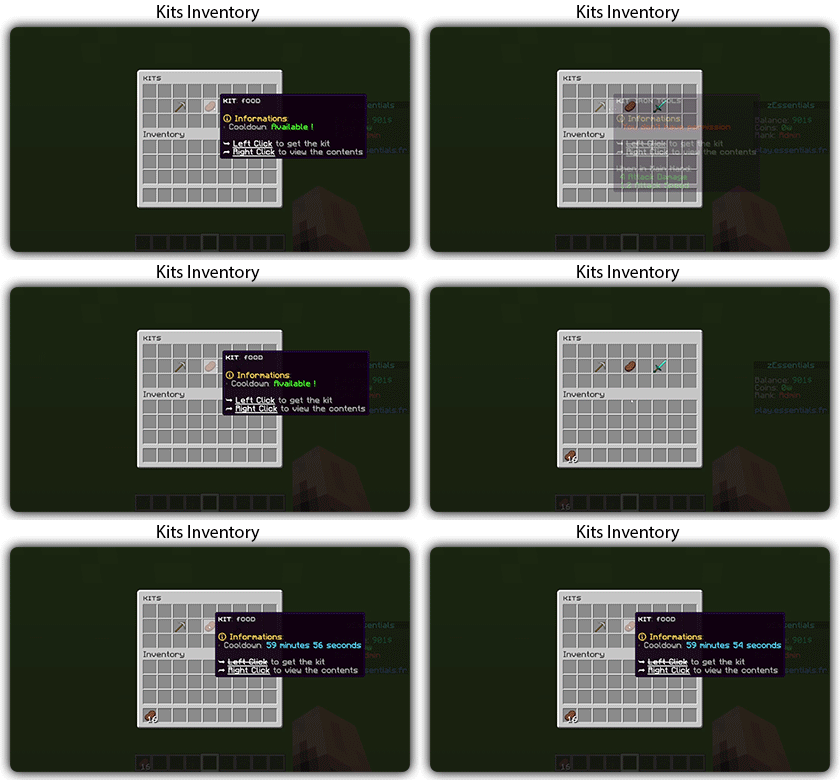
![Kits](https://img.groupez.dev/zessentials/kits.gif)
![Cooldown Delete](https://img.groupez.dev/zessentials/cooldown-delete.gif)

Images

![Kit Preview](https://img.groupez.dev/zessentials/kit-preview.png)
![Kit Editor](https://img.groupez.dev/zessentials/kit-editor.png)

## [**Mailbox Module**](https://zessentials.groupez.dev/modules/mailbox)
### ✅ Allows to **store items**; the player cannot add items to it, they can only remove them
### ✅ If the player’s inventory is **full**, the items will end up in the mailbox
### ✅ A complete **API** for anyone to add items to the mailbox
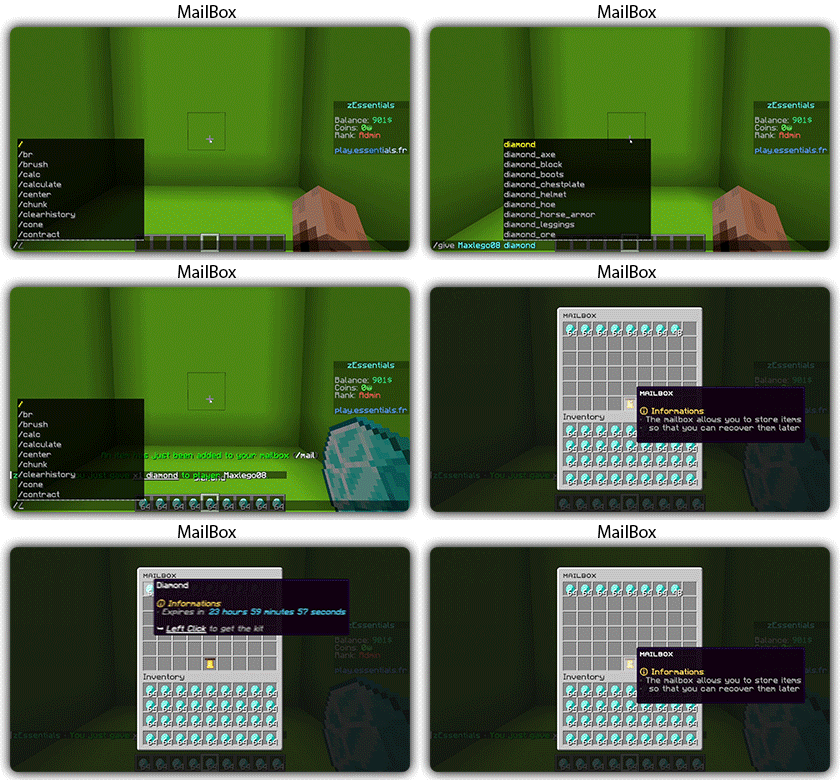
![Mailbox](https://img.groupez.dev/zessentials/mailbox.gif)

## [**Messages**](https://zessentials.groupez.dev/messages)
### ✅ **7 message types**: chat, action, without_prefix, none, center, bossbar, title
### ✅ **Translated into multiple languages**: English, French, Italian, German
### ✅ Send [**multiple messages**](https://zessentials.groupez.dev/messages#multi-messages) at the same time
### ✅ **MiniMessage** support
### ✅ **Custom placeholders**: Define a placeholder list for your messages, such as `` and ``

## [**Rules Module**](https://zessentials.groupez.dev/modules/rules)
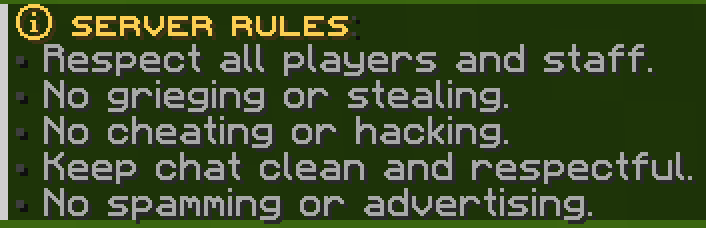
### ✅ Displays server rules either by message or in an inventory

Images
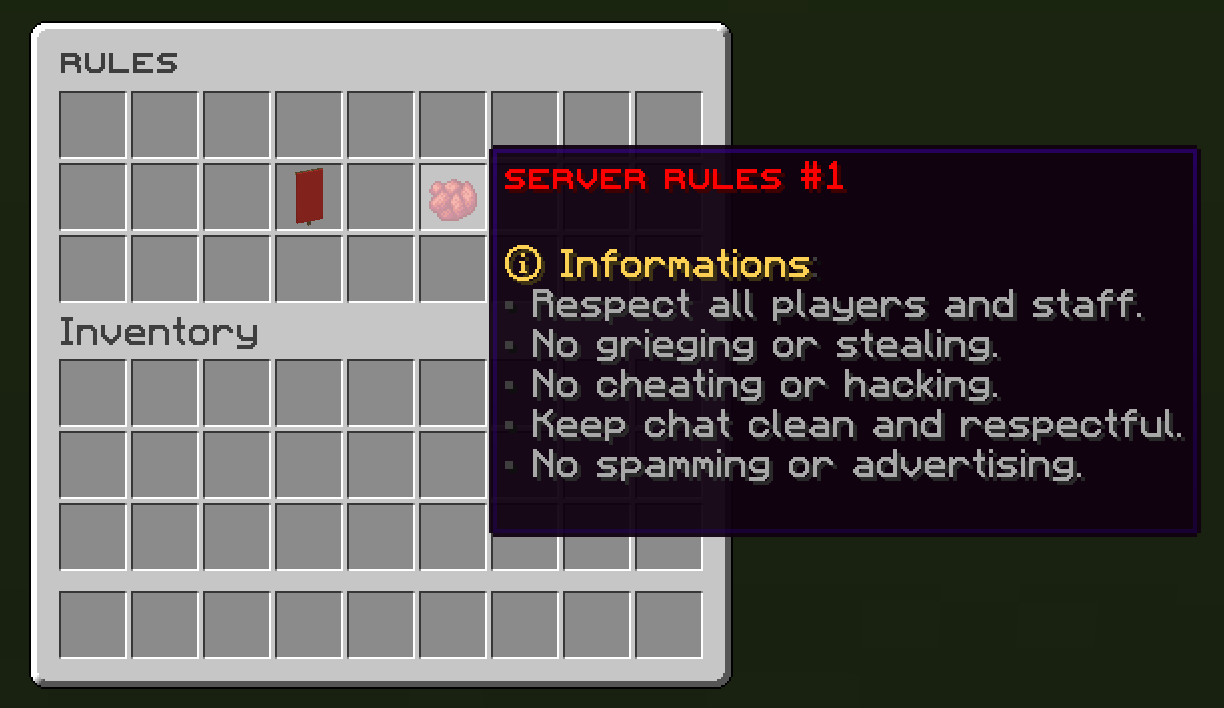
![Rules Inventory](https://img.groupez.dev/zessentials/rules_inventory.png)
![Rules Messages](https://img.groupez.dev/zessentials/rules_messages.png)

## [**Sanction Module**](https://zessentials.groupez.dev/modules/sanction)
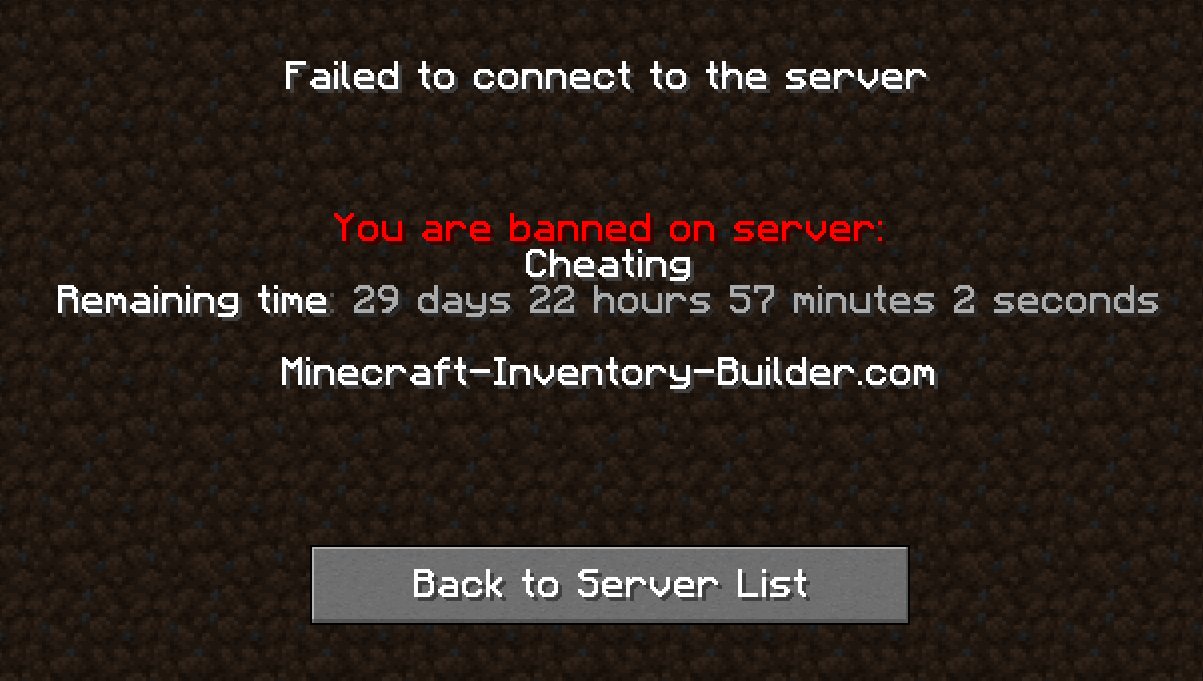
### ✅ 3 Punishment Types: Ban, Mute, and Kick
### ✅ **Immune**: A list of players immune to sanctions!
### ✅ **Sanctions history**
### ✅ **Inventories**: An inventory to display the player’s profile with active sanctions, an inventory to display the player’s sanctions history, and an inventory to apply a predefined sanction to the player
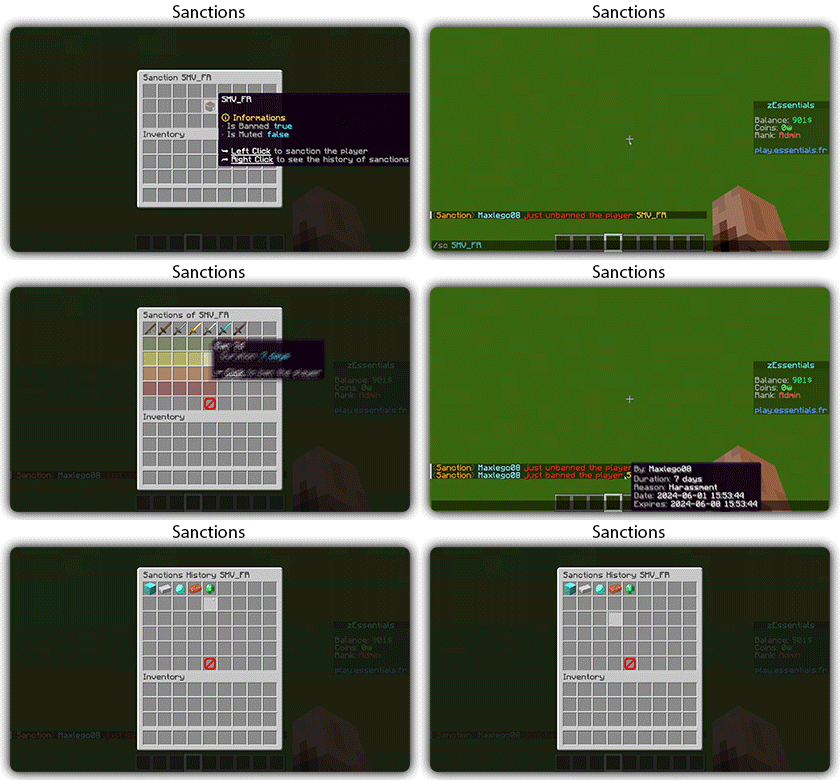
![Sanction](https://img.groupez.dev/zessentials/sanction.gif)

Images

![Ban](https://img.groupez.dev/zessentials/ban.png)
![Sanction](https://img.groupez.dev/zessentials/sanction.png)

## [**Scoreboard Module**](https://zessentials.groupez.dev/modules/scoreboard)
### ✅ **Packet-Based**: All scoreboards are client-side (no other plugins required, zEssentials handles everything)
### ✅ [**Event System**](https://zessentials.groupez.dev/modules/scoreboard#events): Updates your scoreboard with events, no more lagging tasks
### ✅ **Animation**: Create animations for your scoreboard
### ✅ **Unlimited Length**: Use as many characters per line as you want
### ✅ [**MiniMessage Support**](https://docs.advntr.dev/minimessage/index.html): Works perfectly with mini message formats
### ✅ **Scoreboard Commands**: Player command to toggle scoreboard display
### ✅ **Custom board**: Create unlimited scoreboards using [zMenu requirements](https://docs.zmenu.dev/configurations/buttons/requirements#requirements-type) (permission, placeholder, regex, LuckPerms, etc.)
### ✅ PlaceholderAPI Support
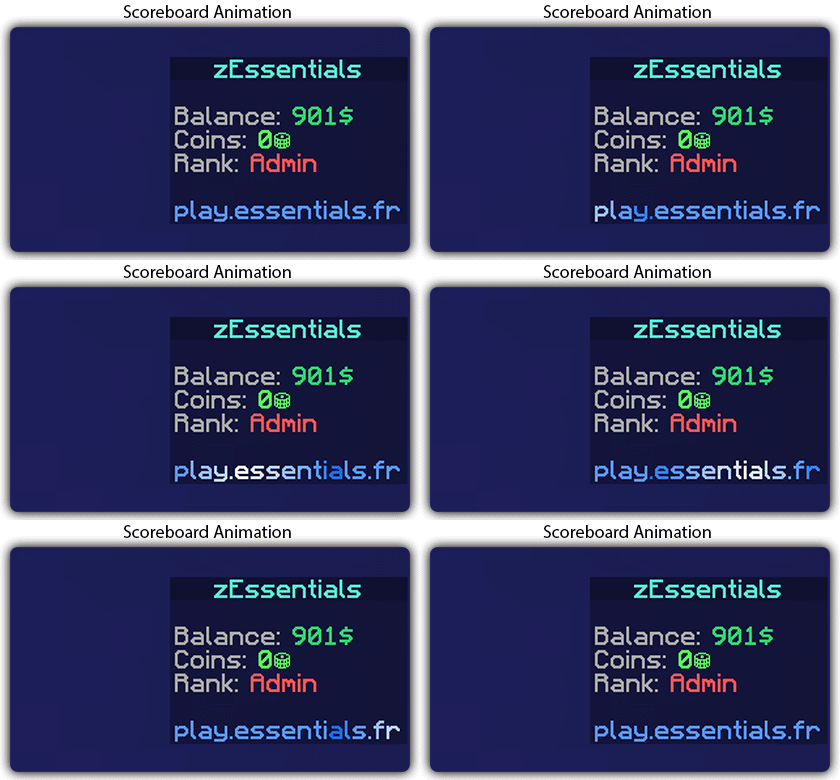
![Scoreboard Animation](https://img.groupez.dev/zessentials/scoreboard-animation.gif)

## [**Player Vault Module**](https://zessentials.groupez.dev/modules/vault)
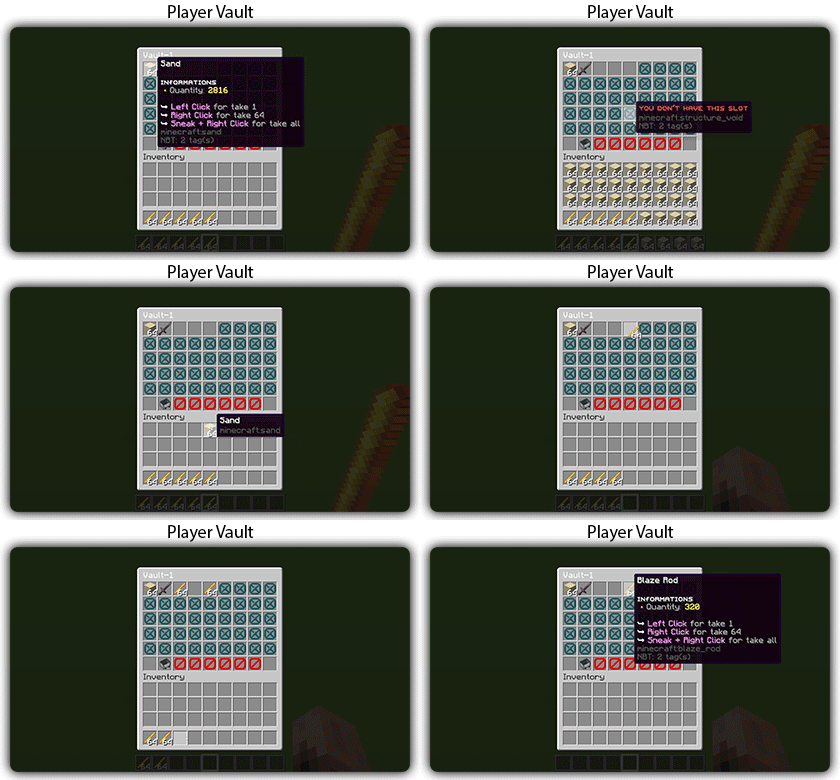
### ✅ **Unlimited** player vaults
### ✅ Set the number of **slots** for each player
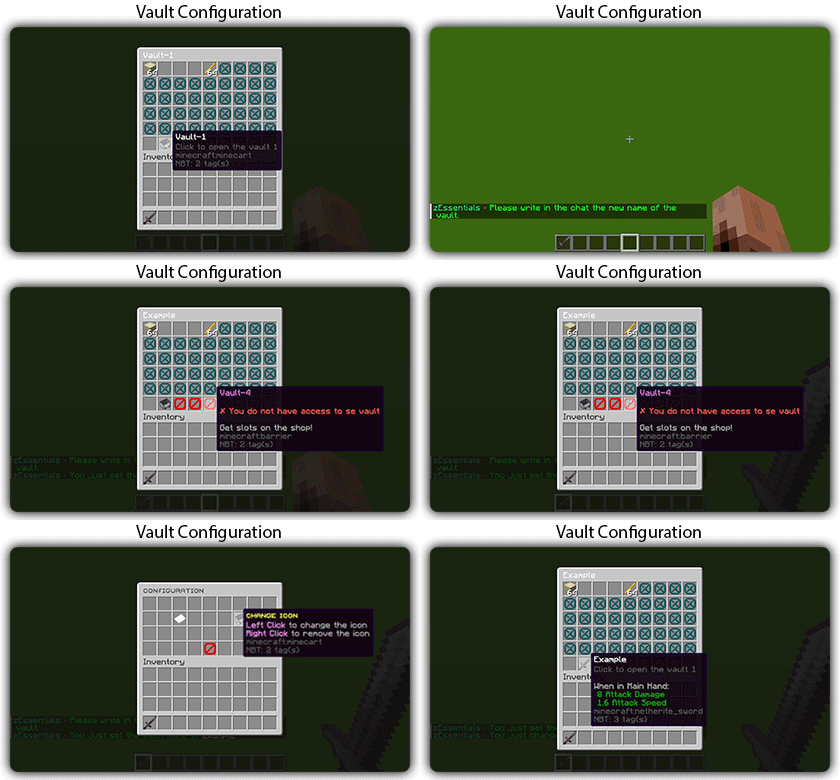
### ✅ **Rename** and custom **icon**
![Player Vault](https://img.groupez.dev/zessentials/player-vault.gif)
![Player Vault Admin](https://img.groupez.dev/zessentials/player-vault-admin.gif)

## [**Vote Module**](https://zessentials.groupez.dev/modules/vote)
### ✅ (I’m too lazy for the vote description now, sorry, but it’s a very good module, I swear!)

## [**Warp Module**](https://zessentials.groupez.dev/modules/warp)
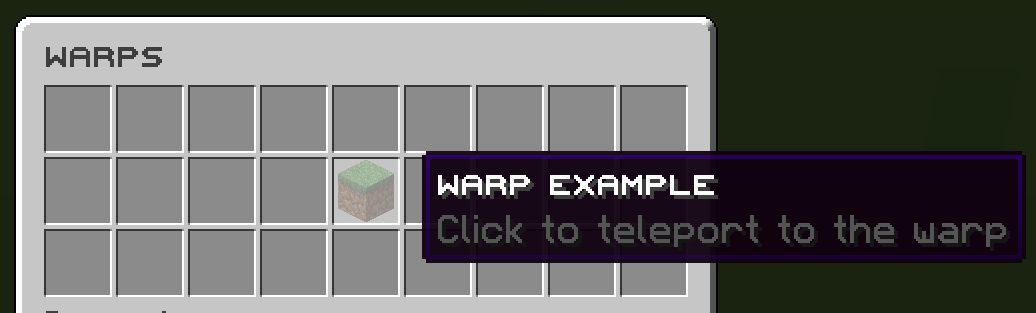
### ✅ Displays warps in an inventory or message
### ✅ **Permission per warps**

Images

![Warps](https://img.groupez.dev/zessentials/warps.png)
![Warps Inventory](https://img.groupez.dev/zessentials/warps_inventory.png)

**Documentation**: [https://zessentials.groupez.dev/](https://zessentials.groupez.dev/)

ZeroXFog

Zero Fog removes distance and dimensional fog for a clearer and sharper experience. Enjoy improved visibility in the Nether, End, and caves without altering the core aesthetic. Designed to stay lightweight and simple, this pack enhances exploration, building, and PvP by eliminating visual haze while keeping performance and compatibility in mind.

Zero Times Infinity

Bows (and crossbows) enchanted with infinity no longer require an arrow in the inventory.
This mod does not provide a way to enchant crossbows with infinity, you will need another mod for that.
This mod should work with modded ranged weapons as long as they can use vanilla arrows as projectiles.

Zerotekz’s Elytras

![Title](https://cdn.modrinth.com/data/cached_images/22d2378a4eddbd2dcce807ac68fa9f91152f28c0.png)

– compatible & tested for 1.16 – 1.20.1!
– should work for all upcoming Minecraft versions since texturepack format doesnt change!
– needs [Optifine](https://optifine.net/downloads) or [CIT-Resewn](https://www.curseforge.com/minecraft/mc-mods/cit-resewn) to work!
– if u need help join my [Discord](https://discord.gg/CdawEAH4va)!
– for more infos visit my [Website](https://www.zerotekz.net/)!

This pack includes unique Elytras!
You get them by **renaming** your elytra in an **anvil** to the designated name in the **nameslist**!

New:

![White Dragon Wings](https://cdn.modrinth.com/data/cached_images/79effc7d07dd291f24d8d391055b03b32719001d.png)

![Ripped Cape](https://cdn.modrinth.com/data/cached_images/8ae0e3d6e0abb03a75efe49ec680b7478e506aec.png)

Added Icons!
![Added Icons!](https://cdn.modrinth.com/data/cached_images/5c5e51ea654c44e86cdac4d3957a2e8e3316b3d1.png)

Nameslist!

New:
– White Dragon Wings
– Ripped Cape

Old:
– Angel Elytra
– Lesser Demon Elytra
– Red Demon Elytra
– Blue Demon Elytra
– True Demon Elytra

– White Wings
– Dark Wings
– Blue Wings
– Yellow Wings
– Guardian Elytra

– Leaf Elytra
– Maple Elytra
– Red Maple Elytra
– Yellow Maple Elytra
– Insect Elytra

– Red Dragon Elytra
– Green Dragon Elytra
– Jet Elytra
– Royal Elytra
– Elytra (Basic Elytra)

Zerotekz’s Blades of War 1

![Title](https://cdn.modrinth.com/data/cached_images/8c5655d76a08cde8885bafea6a5f10c9dc0ae03a.png)

– compatible & tested for 1.16 – 1.20.1!
– should work for all upcoming Minecraft versions since texturepack format doesnt change!
– needs [Optifine](https://optifine.net/downloads) or [CIT-Resewn](https://www.curseforge.com/minecraft/mc-mods/cit-resewn) to work!
– if u need help join my [Discord](https://discord.gg/CdawEAH4va)!
– for more infos visit my [Website](https://www.zerotekz.net/)!

This pack includes unique weapons and shields!
You get them by **renaming** your weapon or shield or tool in an **anvil** to the designated name in the **nameslist**!

Nameslist!

Swords:
– Angelic Sword
– Demonic Sword
– Corrupted Sword
– Angelic Greatsword
– Demonic Greatsword
– Corrupted Greatsword
– Yamato (Devil May Cry 5)
– Dante’s Devilsword (Devil May Cry 5)
– Awakened Devilsword (Devil May Cry 5)
– Bloodthirst (Metal Gear Rising Muramasa)
– Blue Rose (Sword Art Online Alicization)
– Infinity (Infinity Blade)
– Katana of War
– Dagger
– Bloodvein
– Royal Slash
– Golden Splitter
– Death Bringer
– Claws
– Grim

Bows:
– Assassination (Inspired by World of Warcraft) (Bow)
– Daedric (Inspired by TESV Skyrim) (Bow)
– Light Staff
– Lightning Staff
– Fire Staff

Shields:
– Wolfshield

Tools:
– Lucky Pick (Pickaxe)
– Soft Pick (Pickaxe)
– Lumberjack (Axe)
– Spade (Shovel)
– Hoe (Hoe)
– Zippo (Flint and Steel)

ZeroCore

**FAQ:**
– Can I use ZeroCore as an external dependency of my mod? Yes. Drop on discord if you have any question on how to use it
– Fabric ? Yes, I’m working on it. No ETA yet but it’s coming
– Up-to-date versions are available on [CurseForge](https://www.curseforge.com/minecraft/mc-mods/zerocore)

# ZeroCore

**ZeroCore is a mod intended for other mod authors**

It contains code to handle the basic mechanics of the game and Forge, including:

– handlers to process network messages on the correct thread

– new GUI system

– a base TileEntity implementation that simplifiy data syncronization between server and remote clients, updates and GUI handling

– helper classes and blockstate properties to handle connected textures

– standard configuration handler with built-in support for in-game configs changes

– standard ore generator and re-generation

– much more

It’s also the home of a revised multiblock API that support multiple client mods without performance penalities


## MAVEN

ZC is available on my maven rep: https://maven.zerono.it/


## PLAY ALONG WITH YOUR FRIENDS OR STREAM YOUR GAMEPLAY

I’ve partnered with BisectHosting!

If you’re interested in hosting a server to play with Extreme Reactors and other mods or mods pack along with your friends, or in a robust server to play in while you stream your gameplay on You Tube or Twitch, click the image below!

[![code: zero](https://zerono.it/curse/code_hosting2.png)](https://bisecthosting.com/zero)

BisectHosting offers quick, simple to use and high quality server hosting with over a dozen locations available across the world, ensuring low latency for you and your friends. I use one of their server myself to test Extreme Reactors and play Minacraft along with my friends.

They’ve got greath support to help you choose the best server for your mod pack, be that an existing pack or one that you put together yourself. After your purchase, the server is already configured and ready to use.

Remember to use the code “zero” to get 25% off your first month as a new client for any of their gaming servers. Enjoy!


## CONTACTS

Since many of you have asked, I’ve opened a Discord server. Ask questions about my mods, share your Reactors designs and report issues. You can also find me on the Minecraft Forge discord server or the Direwolf20 one. Happy chat.


## MODPACKS AND LET’S PLAYs AND OTHER PERMISSIONS

You can add Zero Core to your mod pack or use them in your let’s play / live streams to your heart content, no need to ask for my permission: you got it.

If you like, post a comment here or on the main forum thread to let’s us know what fun stuff you are doing with the mods so we can all share in the fun. 


No one is authorized to repost my mods, or any part of them, on any other website then the ones I post them to (see below). If you wish, you can link to this page from your website to let your users download the mod.


## A NOTE ON SAFETY

We release our mods only on CurseForge, Modrinth or the FTB launcher and their respective websites:

If you found our mods on another website be sure that they do not come from us and we cannot guarantee that you are downloading something safe to use and that will work on your version of Minecraft. To keep things short: do not download those files and always use the CurseForge, Modrinth or the FTB launcher or their respective websites


## TUTORIALS

A tutorial about the Multiblock API is available here: 

http://zerono.it/zerocore-multiblock-api-tutorial/

It’s not up-to-date but still relevant.


Zero Particles

This time I present you “Zero Particles” Pack.
its is a simple particles texture pack
which reduces particles in Minecraft.
modified and recreate the particles.

Changes in particles are
materials are:-

1]No Blocks Particles
2]Readable Enchantments
3]Minecraft Font
4]Generic Particles
5]All Particles

This pack is supported both single player world and multiplayer servers.

version supported
form- 1.16 TO Latest version

make sure you check the file version before downloading the pack
all versions have separate files

Enjoy the “Zero Particles” Pack.

THANKS FOR DOWNLOADING.

Zero Inventory Problems – ZIP Backpacks

# Zero Inventory Problems – ZIP Backpacks

Zero Inventory Problems is a plugin for Spigot based Minecraft Servers that adds backpacks to store there overfully inventorys.

### Features
* Plug & Play
* Highly configurable config
* Support for Spigot based servers 1.19.* (only tested on spigot)

### Requirements
– Java 17 or higher
– Spigot and (probably) any other fork of Spigot (1.19.* or higher)

### Installation
2. Download [Zero Inventory Problems](https://www.curseforge.com/minecraft/bukkit-plugins/zero-inventory-problems/files)
3. Put both in your *plugins* directory
4. Start your server and [configure](https://github.com/Imprex-Development/zero-inventory-problems/wiki/Config) Zero Inventory Problems to your liking

Still having trouble getting Zero Inventory Problems to run check out our [common issues](https://github.com/Imprex-Development/zero-inventory-problems/wiki/Common-Issues).

Zero G TNT

**Zero G TNT** is a datapack that removes gravity from primed TNT, making it float, drift, and behave unpredictably. This enables zero-G TNT cannons and related physics breaking builds.

**Features**
– Removes gravity from all primed TNT
– TNT will drift in a straight line when given motion (e.g. from another explosion)

**Design Goals**
– Minimal other changes to vanilla behavior
– Easy to integrate to integrate into existing worlds and servers

**Eperimental Mode 2**

An optional experimental mode can be enabled within the datapack. Navigate to the info page through the chat menu in game, and click where it says to toggle mode.

This does changes how the datapack works in the following ways.
– TNT is now normal again, affected by gravity
– Instead you can craft and use a separate Zero G TNT item

⚠️ Warning: Mode 2 is unstable, and may cause unexpected behavior or damage the world. Fixes may be implemented at a future date.

Zero Explosion Particles

> ## About
> A texture pack that removes explosion particles from objects like end crystals, respawn anchors, and TNT.

> ## Why
> This texture pack removes visual clutter to improve focus and reduce visual distortion. It can also help with netherite mining using TNT, making it easier to spot ancient debris as the TNT explodes.

> ## TNT Example
> ![TNT Preview Example](https://cdn.modrinth.com/data/cached_images/96d330a4767b3450e9e2e5ab098b45e941b0528b.gif)

> ## Contact
> To share suggestions or ideas for this texture pack or others, contact me on Discord: @999otp.