Zones
# Zones
This plugin allows server administrators and players to create and manage protected regions within their Minecraft
world. It provides a flexible system for defining areas, setting permissions, and controlling interactions within those
areas.
## Features
* **Region Creation:** Create regions using in-game selection or manual coordinates.
* **Sub-Regions:** Create sub-regions within existing regions for more granular control.
* **Permission Management:** Set detailed permissions for players within regions, controlling actions like breaking,
placing, interacting, and more.
* **Member Management:** Add and remove members from regions with specific permissions.
* **Region Overlap Control:** Configure whether regions can overlap.
* **Bypass Permissions:** Allow specific players to bypass region restrictions.
* **Configuration:** Customize messages and region settings through configuration files.
* **Beacon Visualization:** Visualize selected regions using temporary beacons.
## Commands
The plugin provides the following commands:
* `/zone create`: Creates a new region using the currently selected locations.
* Usage: `/zone create`
* Requires two locations to be selected using left and right click, starts selection if not present.
* Prevents creation if the new region would overlap an existing region, unless the `zones.create.overlap`
permission is set.
* `/zone subcreate`: Creates a new sub-region within an existing region using the currently selected
locations.
* Usage: `/zone subcreate [regionKey]`
* `regionKey` is optional, if not provided, the region at the player’s location will be used.
* Requires two locations to be selected using left and right click, starts selection if not present.
* Player needs to be considered an admin in the region, or have the `zones.subcreate.other` permission
* `/zone delete`: Deletes an existing region.
* Usage: `/zone delete `
* Requires the `regionKey` of the region to be deleted.
* Player needs to be the owner of the region, or have the `zones.delete.other` permission
* `/zone expand`: Expands an existing region by a specified amount.
* Usage: `/zone expand [overlap]`
* Player needs to be an admin of the region, or have the `zones.expand.other` permission
* If `overlap` is set to `true` and the player has the `zones.expand.overlap` permission,
* the region will be expanded even if it overlaps with other regions.
* `/zone info`: Displays information about a region.
* Usage: `/zone info [regionKey]`
* If `regionKey` is not provided, the region at the player’s location will be used.
* To show region members, the player needs to be an admin of the region, or have the `zones.info.other` permission
* `/zone list`: Lists all regions the player is a member of.
* Usage: `/zone list`
* Only shows regions the player is a member of, unless the player has the `zones.list.other` permission
* `/zone cancel`: Cancels the current region selection.
* Usage: `/zone cancel`
* `/zone set`: Sets a permission for a member of a region.
* Usage: `/zone set `
* `` is the key of the region.
* `` who to set the permission for.
* e.g., `Player1` – to create or modify a group, use `+group-GROUPNAME`, where GROUPNAME can be any name.
* `` is the permission to set (e.g., `role`, `break`, `place`, `interact`).
* `` is the value to set for the permission (
* e.g., `owner`, `true`, `false`, `*`, `!*`, `GRASS_BLOCK`, `!GRASS_BLOCK`).
* `/zone rename`: Renames a region.
* Usage: `/zone rename `
* `` is the key of the region, `` is the new name of the region.
* Player needs to be an admin of the region, or have the `zones.rename.other` permission
* `/zone select`: Selects a region.
* Usage: `/zone select [regionKey]`
* If `regionKey` is not provided, the region at the player’s location will be used.
* Visually highlights the region in the world using particles.
* Player needs to be a member of the region, or have the `zones.select.other` permission
* `/zone mode`: Changes the selection mode.
* Usage: `/zone mode `
* `` is the new mode to set the player to.
* e.g., `3d` for 3D selection mode, `2d` for 2D selection mode.
* `/zone save`: Manually saves all regions to file.
* Usage: `/zone save`
* Admin only, requires the `zones.save` permission (not given by default)
* `/zone load`: Manually loads all regions from file.
* Usage: `/zone load`
* Admin only, requires the `zones.load` permission (not given by default)
* `/zone import`: Imports regions from another plugin.
* Usage: `/zone import `
* Currently only supports WorldGuard.
* Admin only, requires the `zones.import` permission (not given by default)
## Usage
### Creating a Region
1. Use the `/zone create` command to start the creation process.
2. Use left-click on a block to set the first corner of the region. A green beacon will appear.
3. Use right-click on a block to set the second corner of the region. A red beacon will appear.
4. Use the `/zone create` command to create the region.
### Creating a Sub-Region
1. Use the `/zone subcreate` command to start the creation process.
2. Select the two corners of the sub-region as described above.
3. Use the `/zone subcreate` command to create the sub-region within the region you are standing in or
use `/zone subcreate ` to create a sub-region within the specified region.
### Setting Permissions
1. Use the `/zone set ` command to set permissions for a member of a region.
* Example: `/zone set Player1 break true` allows “Player1” to break blocks in the specified region.
* Example: `/zone set Player2 break GRASS_BLOCK` allows “Player2” to break only `GRASS_BLOCK` blocks
in the specified region.
* Example: `/zone set Player3 interact !OAK_DOOR` denies “Player3” to interact with `OAK_DOOR`in
the specified region.
* Example: `/zone set Player4 place *` allows “Player4” to place all blocks in the specified region.
* Example: `/zone set Player5 break !*` denies “Player5” to break all blocks in the specified region.
* Groups:
* To assign a group, set the value of the permission `group` to the group name.
* e.g.: Create a group and assign permission: `/zone set +group-some-group-name break true`
* e.g. `/zone set ExamplePlayer group some-group-name`
* ExamplePlayer now inherits the permission `break` from the group `some-group-name`
### Viewing Region Information
1. Use the `/zone info` command to view information about the region you are standing in.
2. Use the `/zone info ` command to view information about a specific region.
## Integrations
### WorldGuard
Zones supports importing WorldGuard regions via the `/zone import WorldGuard` command. To use this feature,
you must have WorldGuard installed and enabled. Zones will automatically import all Cuboid regions, including
their members.
### WorldEdit
WorldEdit can only be used to modify blocks in a region if the executing player would be allowed to manually
modify the region.
### PlaceholderAPI
Zones provides multiple placeholders for use with the PlaceholderAPI plugin, displaying region information for the
region the player is standing in. It currently supports the following placeholders:
* `%zones_get_name%`
* `%zones_get_key%`
* `%zones_get_members%`
* `%zones_get_owner%`
* `%zones_get_min%`
* `%zones_get_min_x%`
* `%zones_get_min_y%`
* `%zones_get_min_z%`
* `%zones_get_max%`
* `%zones_get_max_x%`
* `%zones_get_max_y%`
* `%zones_get_max_z%`
* `%zones_is_member%`
* `%zones_can_place_hand%`
* `%zones_can_break_target%`
* `%zones_can__%`
## Design Choices
* **YAML Configuration:** The plugin uses YAML files for configuration and storage, making it easy to read and modify.
Additional storage options are planned for future releases.
* **Permission System:** The permission system is designed to be flexible and granular, allowing for fine-grained
control over player interactions.
* **Event-Driven:** The plugin uses Bukkit’s event system to handle player interactions, making it efficient and
responsive.
* **Caching:** The plugin uses a caching system to improve performance when checking permissions.
## Contributing
Contributions to the plugin are welcome! If you have any ideas for new features, bug fixes, or improvements, please feel
free to submit a pull request or open an issue.
## License
This plugin is distributed under the MIT License.
ZoneCalculator
**ZoneCalculator – Minecraft Plugin**
A simple zone selector, block calculator, and outline visualization plugin for Paper/Spigot 1.21-1.21.11 servers.
**Features:**
– Zone Selection: Use a wooden axe to select two positions (left click = position 1, right click = position 2)
– Block Calculator: The /cal command calculates all non-air blocks in the selected cuboid area, showing a sorted list by block count
– Per-player selections stored automatically
**Commands:**
– /cal – Calculate blocks in selected area
**Permissions:**
– zonecalculator.use – Required to use the plugin (default: true)
**Usage:**
– Hold a WOODEN_AXE in your main hand
– Left-click a block to set position 1
– Right-click a block to set position 2
– Run /cal to see block counts
**Requires:**
– Paper 1.21+ or Spigot 1.21+
– Java 21
Zone Miner Single Use
## Zone Miner is a NeoForge mod that adds configurable area mining.
Switch between simple mining, 3x3x3, 5x5x5, or a fully custom mining shape, all while keeping vanilla-style durability handling and tool restrictions.
### Features
– Multiple mining modes:
– `1×1`
– `3x3x3`
– `5x5x5`
– `Custom`
– In-game keybinds to switch modes and open the custom area settings
– Mining direction follows the player’s look direction
– Live white block outline preview before breaking
– Only breaks extra blocks when the held tool is appropriate
– Ore vein support
– Vanilla block breaking logic is preserved for drops and interactions
## Two Versions Available
This project is available in two separate versions for NeoForge :
### Zone Miner
The standard version uses `legacy durability`.
Your tool loses durability based on the number of blocks actually broken.
[You’ll find it here!](https://modrinth.com/mod/zone-miner-legacy)
### Zone Miner Single Use
This version keeps the same mining features, but only uses `one durability point` for the whole area break.
_You’re on the right page!_
## Controls
– `Y` : Cycle mining mode
– `U` : Open custom area settings
## Custom Area Settings
The custom mode lets you configure:
– Left
– Right
– Up
– Down
– Depth
**Zone Miner is designed to stay simple and practical**
no enchantment requirement, no complicated setup, just configurable area mining with two durability variants depending on how you want to play.
Zone Miner Legacy
## Zone Miner is a NeoForge mod that adds configurable area mining.
Switch between simple mining, 3x3x3, 5x5x5, or a fully custom mining shape, all while keeping vanilla-style durability handling and tool restrictions.
### Features
– Multiple mining modes:
– `1×1`
– `3x3x3`
– `5x5x5`
– `Custom`
– In-game keybinds to switch modes and open the custom area settings
– Mining direction follows the player’s look direction
– Live white block outline preview before breaking
– Only breaks extra blocks when the held tool is appropriate
– Ore vein support
– Vanilla block breaking logic is preserved for drops and interactions
## Two Versions Available
This project is available in two separate versions for NeoForge :
### Zone Miner
The standard version uses `legacy durability`.
Your tool loses durability based on the number of blocks actually broken.
_You’re on the right page!_
### Zone Miner Single Use
This version keeps the same mining features, but only uses `one durability point` for the whole area break.
[You’ll find it here!](https://modrinth.com/mod/zone-miner-single-use)
## Controls
– `Y` : Cycle mining mode
– `U` : Open custom area settings
## Custom Area Settings
The custom mode lets you configure:
– Left
– Right
– Up
– Down
– Depth
**Zone Miner is designed to stay simple and practical**
no enchantment requirement, no complicated setup, just configurable area mining with two durability variants depending on how you want to play.
zonary123 Cobble WonderTrade
# WonderTrade
I will be creating more plugins/mods for Cobblemon. If you want to know more about them, join our Discord for more information: [Discord](https://discord.gg/fKNc7FnXpa)
**Required CobbleUtils is in discord:** [Discord](https://discord.gg/fKNc7FnXpa)
## Description
WonderTrade is a Minecraft plugin designed for Cobblemon. It introduces a unique trading system that allows players to
exchange their Pokémon for random ones from a pool. This adds an element of surprise and excitement to the game, as you
never know what Pokémon you might receive in return.
## Configuration
The file path is `config/wondertrade`
“`json
{
“lang”: “en”,
“cooldown”: 30,
“cooldownmessage”: 15,
“sizePool”: 2,
“minlvreq”: 5,
“minlv”: 5,
“maxlv”: 36,
“emitcapture”: false,
“allowshiny”: true,
“allowlegendary”: true,
“poolview”: true,
“savepool”: true,
“shinyrate”: 8192,
“legendaryrate”: 16512,
“shinys”: 0,
“legendaries”: 0,
“israndom”: false,
“pokeblacklist”: [
“Magikarp”
],
“poketradeblacklist”: [
“Magikarp”
],
“legends”: [
“Magikarp”
],
“aliases”: [
“wt”,
“wondertrade”
],
“itempreviouspage”: {
“item”: “minecraft:arrow”,
“slot”: 0,
“title”: “&7Previous Page”,
“lore”: [
“&7Click to go to the previous page”
],
“CustomModelData”: 0
},
“itemclose”: {
“item”: “minecraft:barrier”,
“slot”: 0,
“title”: “&cClose”,
“lore”: [
“&7Click to close the menu”
],
“CustomModelData”: 0
},
“itemnextpage”: {
“item”: “minecraft:arrow”,
“slot”: 0,
“title”: “&7Next Page”,
“lore”: [
“&7Click to go to the next page”
],
“CustomModelData”: 0
}
}
“`
## Commands
– `/wt` – Opens the WonderTrade GUI.
– `/wt slot confirm` – Trade the pokemon.
– `/wt other ` – Opens the WonderTrade GUI for other player.
– `/wt pool` – Opens the WonderTrade pool GUI.
– `/wt reload` – Reloads the plugin configuration.
## Dependencies
– [Cobblemon](https://modrinth.com/mod/cobblemon) (v1.5.0)
– [Gooeylibs](https://modrinth.com/mod/gooeylibs) (v3.0.0)
– [Architectury API](https://modrinth.com/mod/architectury-api) (v9.2.14)
ZombPlayer
# Introduction
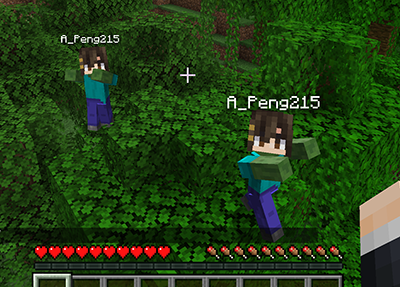
This mod will spawn a zombified player when a player is killed by zombified creature.
## Features
– When a player is killed by zombified creature (including husks, drowneds etc.), a zombie will be spawned in the place.
– The zombie will inherit player’s equipment and inventory. Players need to kill the zombie to retrieve them. _This feature won’t work when the gamerule `keepInventory` is set to true._
– The head of the zombie is same as the player’s, and will drop if killed by a __charged creeper__.
– The zombie will convert to the drowned when drowned like normal zombies.
– The zombie won’t burn in sunlight.
– Type command `/gamerule doPlayerInfected [false/true]` to switch the mod. (Default true)
## Gallery
## Feedback
Anyone can [create an issue](https://github.com/APeng215/ZombPlayer-forge/issues/new) to report bugs, provide suggestions, or share feedback.
Zombify
## Zombify
**Prevents villagers from dying when converting to zombie villagers on any difficulty**
Normally, on easy or normal difficulty, villagers may die when converting to zombie villagers, Zombify makes it so your villagers will never die during conversion!
### Chance of villager successfully converting to a zombie villager
| Difficulty | Chance (without the mod) | Chance (with the mod) |
|————|————————–|————————–|
| Easy | 0% | 100% |
| Normal | 50% | 100% |
| Hard | 100% | 100% |
Zombified Piglin restore anger loot
Restores the original Zombified Piglin loot mechanic like it was in 1.21
## Configuration
### Gamerule “spawn_zombified_piglin_always_with_sword_on_magma_block“
Forces Zombified Piglins to **always** spawn with a sword on magma blocks.
The default is “false“.
_This gamerule exists because_
* _starting with 1.21.11 Zombified Piglins can spawn with a spear:_
* _Piglins with spears can hit each other while attacking, which in turn causes retaliation/infighting and therefore lowering the overall effectiveness of farms_
* _The performed charge attack requires a lot more calculations when compared to a “normal” sword attack_
* _most gold farms use magma blocks anyway_
* _all other gameplay aspects are unaffected_
## Motivation/Why does this mod exist?
Gold farms got [significantly nerfed](https://bugs.mojang.com/browse/MC-56653) in [25w02a](https://minecraft.wiki/w/Java_Edition_25w02a).
See also: [More details, comparisons and arguments](https://github.com/litetex-oss/mcm-zombified-piglin-restore-anger-loot/blob/dev/MOTIVATION.md)
Zombies Reworked
⚜️ Description:
Requires Clockwork -> [https://www.curseforge.com/minecraft/mc-mods/clockworklib](https://www.curseforge.com/minecraft/mc-mods/clockworklib)
Zombies Reworked is a mod that overhauls and changes the zombies in a better way! Ranging from small features to better AI system and better mechanics to make the mod a must need for apocalyptic minecraft modpacks. This mod has some code that our other mod, Rotted has, but better! This mod is pretty lightweight but also heavy configurable as it does not add that much content!
Now drowned zombies can be captured when…fishing?? Not only that, but players can turn into zombies now just as villagers can turn into zombie villagers! Zombies are smart enough to use items and perform certain actions? Yes! Everything in one place, put it all together in this particular mod!
🎬 Credits:
Many thanks to some github repositories and their authors that made it easier for us to make such a mod.
Mod made by us, Team Abyssal. Any acts of copying / stealing the work of us can result in a DMCA claim or something similar. Code can be shared freely when taking a look at our github repositories.
💫 Features:
– Zombies can now spot you from further away, meaning that they will come to ur house from anywhere.
– If u hurt a zombie, it will alert all other close ones, giving them your location.
– Zombies can now stay in groups, following each other around.
– Zombies can perform small leaps at the player to be more unpredictable and dangerous.
– Zombies have improved attack range and visuals for that.
– Zombies can spawn with better armor and better equipment and more commonly. These tools greatly improve their abilities.
– Zombies can now perform small sprints when close to the player.
– Zombies will be faster at night.
– Zombies are smart enough to use items now. They can use shields to partially block attacks and they can use flint and steels to light the player on fire whenever they attack.
– When fishing, you have a chance to capture a drowned zombie.
– Players can now turn into zombies when a zombie kills them, taking their name and sometimes their equipment.
Zombies improved!
**### Русское описание:**
> 🧟♂️ **Zombies Improved** — мод, который делает зомби реальной угрозой!
> Теперь они ломают любые деревянные двери, объединяются в орды, подбирают и используют экипировку, боятся солнца и ищут укрытия.
> Зомби (и зомби-жители) могут заразить игрока вирусом: сначала тошнота, затем слепота, а потом — превращение в зомби!
> Если зомби или зомби-житель убивает игрока, он всегда возвращается в виде зомби с его снаряжением!
>
> 🦠 Спастись от инфекции можно только золотым или зачарованным яблоком.
>
> ⚙️ **Есть конфиг!**
> Все основные параметры настраиваются в файле `zombies_improved-common.toml`:
>
> * `firstStageSeconds` — длительность первой стадии (тошнота),
> * `secondStageSeconds` — длительность второй стадии (слепота + тошнота),
> * `infectionChance` — шанс заразить при ударе зомби (0.0–1.0),
> * `spawnZombieOnKill` — превращать ли игрока в зомби после смерти от зомби.
>
> 💬 Нашли баг или есть вопросы?
> 👉 Заходите в Discord!
> Подписывайтесь на обновления, чтобы ничего не пропустить, и посмотрите мой профиль — там много крутых модов!
**### English description:**
> 🧟♂️ **Zombies Improved** brings true zombie danger to Minecraft!
> Zombies break all wooden doors (but not iron), group up as hordes, pick up and use loot, fear sunlight, and seek shelter.
> Zombies (and zombie villagers) can infect players: first nausea, then blindness, then full zombification!
> If a zombie or zombie villager kills a player, they will always return as a zombie with all their gear!
>
> 🦠 Only a golden or enchanted apple can save you from infection.
>
> ⚙️ **Fully configurable!**
> Main features can be adjusted in `zombies_improved-common.toml`:
>
> * `firstStageSeconds` — first stage duration (nausea),
> * `secondStageSeconds` — second stage duration (blindness + nausea),
> * `infectionChance` — infection chance on hit (0.0–1.0),
> * `spawnZombieOnKill` — always turn killed players into zombies.
>
> 💬 Found a bug or have questions?
> 👉 Join our Discord!
> Subscribe for updates, and check out my profile for more awesome mods!