ZyPass
Unlike typical password plugins, this system goes a step further by tracking both a player’s unique ID and their IP address.
When a player joins and successfully enters the password, their ID and IP are stored as a trusted combination. On future joins from the same IP, they won’t need to re-enter the password, making the experience seamless for regular players. All trusted players are saved to the config file, so you can manually remove an IP and user ID if needed to force a password re-entry- just remember to restart the server after making any manual changes.
However, if that same account logs in from a different IP- whether it’s the player on a new network or someone attempting unauthorized access- the plugin will require the password again. Since the IP doesn’t match the trusted record, bypass is not allowed.
This approach improves security while still keeping things convenient for trusted users. No repeated logins for regulars, but strong protection against potential intruders.
Setup Instructions:
1. Download the plugin and place it in your server’s plugins folder.
2. Restart your server.
3. Open the generated ZyPass folder and edit the config file:
Keep the quotation marks.
Enter your password in the first set of quotes.
Enter your hint in the second set of quotes.
Do not modify anything else- the plugin will automatically manage additional data as players authenticate.
Players only need to type the password itself (not the quotation marks).
4. Save your changes and restart the server again.
5. Join the server, wait for the on-screen instructions (displayed above the hotbar), and enter your password in chat.
Additional Notes:
Password messages are not fully sent in chat, so other players cannot see what you entered.
Your password remains private unless you choose to share it.
Zxygo’s Crystal Util
**Business email: [email protected]** |
**Business discord: zxygomc.mod**
### Open to partnerships/sponsors ^
———————————————————————————————-
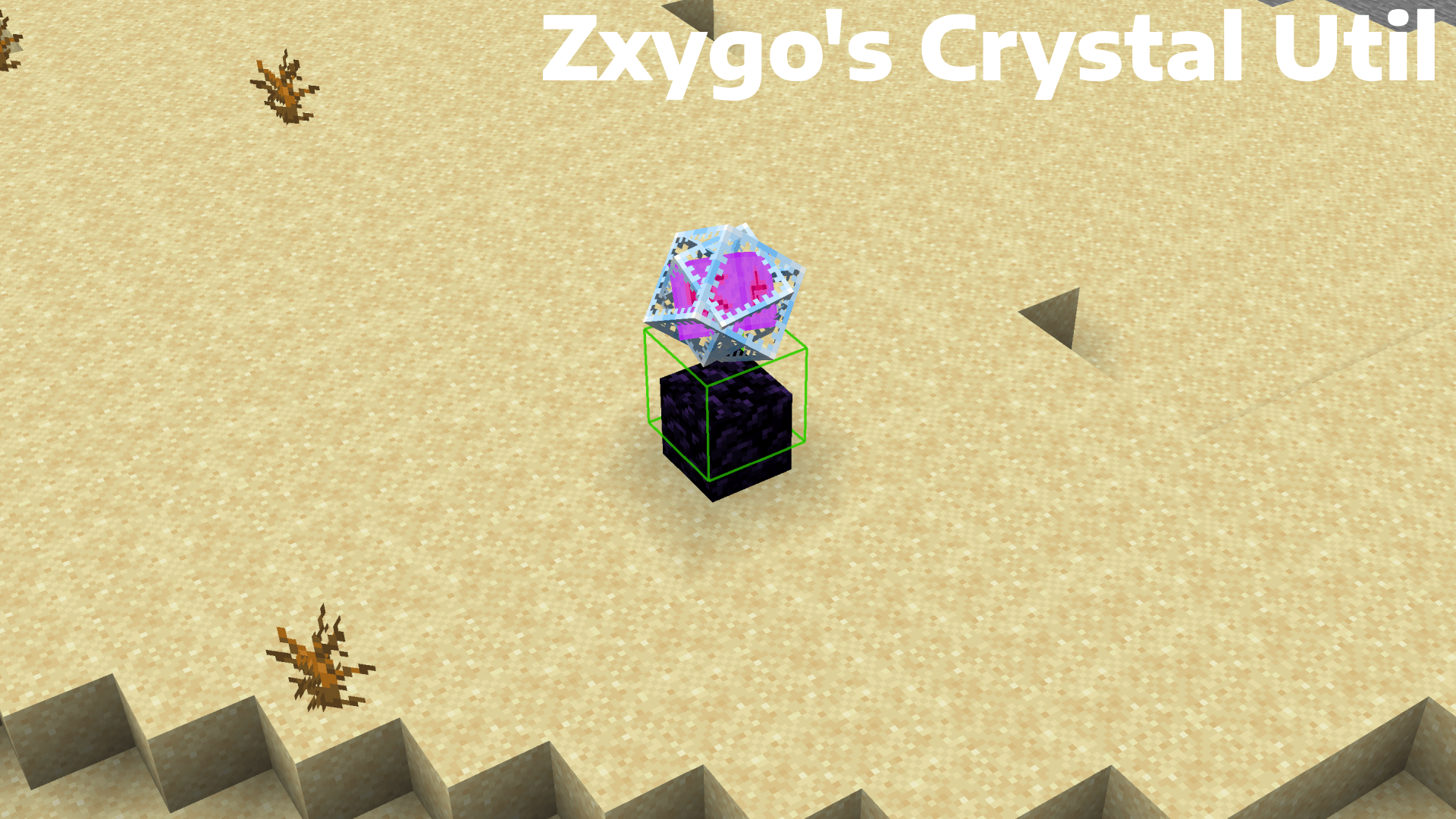
**Zxygo’s Crystal Util is a utility mod that shows people a relative damage indicator of a crystal comapred to the position and distance of a player compared to a crystal. It shows a simple box outline that changes color depending on your relative position and distance, and it allows for many uses.**
———————————————————————————————-
**NOTE: This mod may be seen as cheating on some servers and provides a unfair advantage. This mod is simply to be used as a learning tool for people getting into Crystal PVP. It exists as a tool that players can use, not a cheat. I don’t support hacking or cheating of any kind**
———————————————————————————————-
———————————————————————————————-
### Features
**Color-Coded Danger Levels**
– Red: can be dealt heavy damage and can be popped / killed
– Yellow: will deal some damage, a bit dangerous, take caution
– Green: safe
**Fully Customizable**
– Toggle the indicator on/off anytime
**Clean & Optimized**
– Minimal performance impact
– Works in multiplayer smoothly
**Mod Menu Integration**
– Simple Mod Menu Integration
———————————————————————————————-
### How It Works
Zxygo’s Crystal Util analyzes the vertical position of end crystals relative to your player, along with the distance from the player to the crystal. This allows for a calculation for the indicator and then a color depending on the calculation.
For example, if the crystal is above your head or you are far away from it, it renders green (least damage).
Intermediate positions blend between colors.
———————————————————————————————-
**This is my first ever mod, so apologies if there are some bugs. I hope this helps in someone’s journey in Crystal PVP, as at the very start of your journey, this mod can help you learn the mechanics and how you take damage from a crystal.**
Zxygo’s Anchor Util
**Business email: [email protected]** |
**Business discord: zxygomc.mod**
### Open to partnerships/sponsors ^
———————————————————————————————-
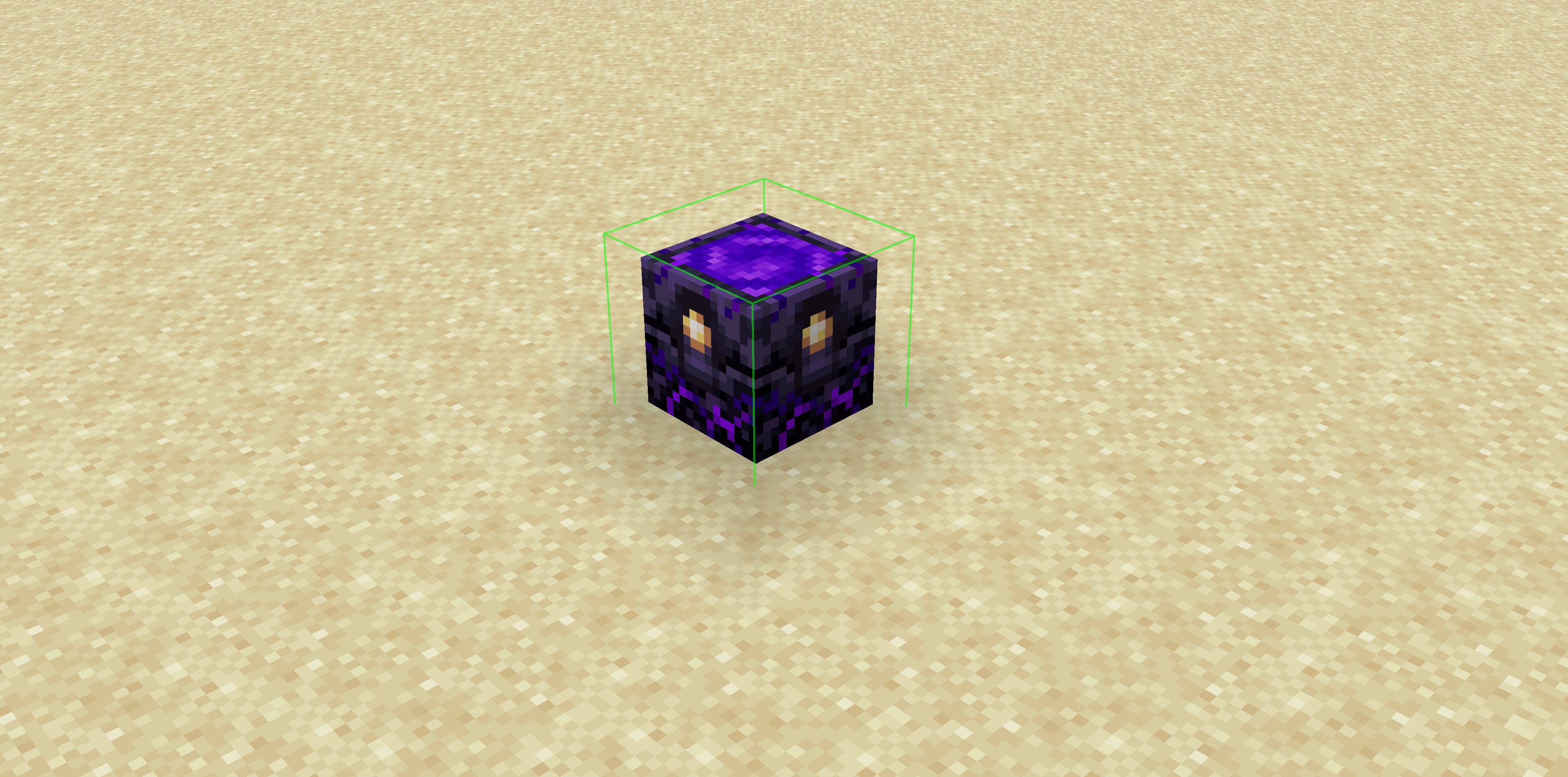
**Zxygo’s Anchor Util is a utility mod that shows people a relative damage indicator of a anchor comapred to the position and distance of a player compared to a anchor, along with taking in factors like the armor and enchantments a player is using. It shows a simple box outline that changes color depending on your relative position and distance, along with armor and enchantments, and it allows for many uses.**
**Check out my other mod: Zxygo’s Crystal Util**
————————————————————————————————
**NOTE: This mod may be seen as cheating on some servers and provides a unfair advantage. This mod is simply to be used as a learning tool for people getting into Crystal PVP. It exists as a tool that players can use, not a cheat. I don’t support hacking or cheating of any kind**
————————————————————————————————
————————————————————————————————
### Features
**Color-Coded Danger Levels**
– Red: (deadly)
– Yellow: (dangerous)
– Green: (safe)
**Fully Customizable**
– Toggle the indicator on/off anytime
**Clean & Optimized**
– Minimal performance impact
– Works seamlessly in multiplayer
**Mod Menu Integration**
– Simple Mod Menu Integration
————————————————————————————————
### How It Works
Zxygo’s Anchor Util analyzes the position and distance of anchors relative to your player, along with the other factors like blocks placed between you and the anchor, armor, and enchantments like protection on the armor. This allows for a calculation for the indicator and then a color depending on the calculation.
For example, if you have a obsidian block in front of the anchor between you, then it will be a green (least damage).
ZX HomeSystem
ZX HomeSystem – Advanced Minecraft Home Management Plugin
Transform your Minecraft server with the most feature-rich home system available!
ZX HomeSystem is a premium home management plugin developed by ZX Studio that provides players with an exceptional teleportation and home management experience. With its intuitive command system and stunning visual interface, players can easily set, manage, and teleport to multiple homes across your server.
Key Features:
🏠 Advanced Home Management
Set multiple named homes with /zxhome set
Delete, rename, and list your homes effortlessly
Public/private home sharing system for player interaction
Permission-based home limits for different rank tiers
⚡ Premium Teleportation System
Configurable teleport delays with movement cancellation
Customizable cooldowns to prevent abuse
Safe teleport location checking for player security
Cross-world teleportation support with sound effects
Particle effects for immersive teleport experience
🎮 Stunning User Interface
Beautiful GUI interface for home management
Full tab completion for all commands
Colorful, formatted chat messages with custom prefixes
Action bar notifications during teleport countdown
Professional ASCII art branding
🛡️ Server Administration Tools
Flexible configuration system with rank-based limits
Economy integration for teleport and home setting costs
World restrictions for home placement control
Automatic data saving with configurable intervals
Detailed logging for server monitoring
Admin reload command for configuration changes
Commands:
/zxhome help – Comprehensive help menu
/zxhome set – Set a new home location
/zxhome go – Teleport to your home
/zxhome del – Remove a home
/zxhome list – View all your homes
/zxhome gui – Open the home management GUI
/zxhome rename – Rename existing homes
/zxhome share – Share homes with friends
/zxhome public – Make homes publicly accessible
/zxhome near – Find your nearest home
/zxhome reload – Reload configuration (Admin only)
Perfect For:
Survival servers wanting enhanced player convenience
Creative servers with multiple world setups
Minigame servers needing quick teleport solutions
Any Minecraft server looking to improve player retention
Built with performance and scalability in mind, ZX HomeSystem seamlessly integrates with your existing server setup while providing the premium features your players demand.
Developed with ❤️ by ZX Studio – Creating exceptional Minecraft experiences
Zume
# IMPORTANT LICENSE NOTICE
By using this project in any form, you hereby give your “express assent” for the terms of the license of this project (see [LICENSE](https://github.com/Nolij/Zume/raw/master/LICENSE)), and acknowledge that I (the author of this project) have fulfilled my obligation under the license to “make a reasonable effort under the circumstances to obtain the express assent of recipients to the terms of this License”.
# Zume
An ~~over-engineered~~ simple zoom mod.
This mod adds a keybind which zooms in your FOV while it’s held down, allowing you to see further away, and keybinds
for increasing and decreasing the zoom level.
# FAQ
#### Q: Where is the config?
A: You’ll find the config at `.minecraft/global/zume.json5` (note that this is the default `.minecraft` folder, not
the instance `.minecraft`). You can modify the file while the game is running, and the config will be automatically
reloaded. On platforms which have mod menus (such as Forge, and Fabric with [Mod Menu](https://modrinth.com/mod/modmenu)
installed), the config button for Zume will open this file in your system text editor.
#### Q: discord where
A: https://discord.gg/6ZjX4mvCMR
#### Q: What version is this for?
A: Zume supports the following platforms:
– Fabric: Any version supported by Fabric Keybinding API v1 (currently 14.4+)
– NeoForge: 20.4+ (requires NeoForge 20.4.195+)
– LexForge: 14.4 – 20.5 (requires MixinBootstrap before 16.1) (there are currently no plans to support 20.6+)
– Legacy Fabric: Any version supported by Legacy Fabric Keybinding API v1 (currently 7.10 – 12.2)
– Babric (Fabric for Minecraft Beta): Any version supported by Station API (currently b7.3)
– Vintage Forge: 8.9 – 12.2 (requires MixinBooter or UniMixins)
– Archaic Forge: 7.10 (requires UniMixins)
#### Q: Can you add support for ?
A: Every platform I intend to add support for myself is already supported. PRs are welcome for other platforms **if
the following conditions are met**:
– Must not break single-jar compatibility with any already supported platform (obviously).
– Must not be for a platform that has a 1st-party compatibility layer for an already supported platform – explicit
Quilt support will not be accepted so long as Quilt maintains a Fabric compatibility layer; it’d be a waste of CI
time. [Sinytra Connector](https://github.com/Sinytra/Connector) is a 3rd-party compatibility layer, so explicit
Forge support will be provided.
– Must not manually maintain overridden game options; implementations that look like
[Mooz’s](https://github.com/embeddedt/Mooz/blob/92570f7449a7e71c1c0b988788027b10c00f1346/src/main/java/org/embeddedt/mooz/ClientProxy.java#L35-L56)
will not be accepted – no offense [embeddedt](https://github.com/embeddedt). Direct ASM is fine as long as functionality is similar enough.
– Must make a reasonable effort to be maximize compatibility with existing mods on target platforms – see use of
Neo/LexForge API over mixins in Neo/LexForge implementations, and use of `@WrapWithCondition` and
`@ModifyExpressionValue` and such from MixinExtras over `@Redirect` in most implementations.
– Must follow existing format – add a Unimined subproject for each newly supported platform.
– Must not have exclusive features without significant justification – if you’re adding a feature, add it to every
version.
#### Q: What kind of weird license is this?
A: OSL-3.0 is the closest equivalent to a LAGPL I could find. AGPL and GPL are incompatible with Minecraft, and LGPL
doesn’t protect network use. OSL-3.0 protects network use and is compatible with Minecraft.
#### Q: Why though? It’s so strict!!!!
A: This is, and will remain, free, copyleft software. Any requests to change the license other than to make it even
stronger will be denied immediately (unfortunately GPL and AGPL aren’t compatible with Minecraft due to linking
restrictions, as much as I’d like to use them). Even in situations where I use parts of other projects with more
“permissive” licenses, I will treat them as copyleft, free software.
## License
This project is licensed under OSL-3.0. For more information, see [LICENSE](https://github.com/Nolij/Zume/raw/master/LICENSE).
## Need a Minecraft server? Consider CreeperHost!

Zulu’s Simple Recipes
**Zulu’s Simple Recipes** allows you to create the following recipes!
### 8 Logs = 4 Chest
### 2 Logs = 16 Stick
### 3 Gravel = 1 Flint
More recipes will be added in the future.
You Can Join [Discord](https://discord.gg/5uC3MHpMwb) For Your Questions And Suggestions!
You Can Join My [Patreon](https://www.patreon.com/staciaexpert) To Support The Project!
Need A Server To Play With Friends?
Click [Here](https://bisecthosting.com/stacia) And Use Code “stacia” for %25 Off!

ZTools
# ZTools
This datapack includes a bunch of miscellaneous items and tools for Minecraft, including weapons, tools and more. This is my first datapack so if there is anything wrong, feel free to tell me in the comments.
All custom crafting recipes in this pack are always instantly unlocked and show in the recipe book.
This pack includes:
## Items
### Haste Talisman
When held in mainhand or offhand, gives the player +50% mining speed. For example, a diamond pickaxe with this in offhand can instantly mine netherrack.
### Speed Talisman
When held in offhand, gives the player 30% more speed and 37.5% in mainhand.
### Extendable Arm
When held in offhand, gives the player +1.5 reach and +1.75 in mainhand.
### Fireball Dusts
– Fireball Dust: When used, summons a fireball (With an explosion power of 2) and is consumed with a cooldown of 0.7 seconds.
– Greater Fireball Dust: When used, summons a fireball (With an explosion power of 4) and is consumed with a cooldown of 1.4 seconds.
– _Note: You must hit the fireballs summoned in the direction of choice after summoning them._
### Radar Compass
When held, gives the player -65% movement speed and reveals all entities in a 10 block radius.
### Lumberjack Axe
Cuts down entire trees at once, or any connected logs.
### Compressed Wind Charge
Explodes with 4 times the power of a wind charge.
### Warp Stone
Consumable. Teleports you 8 blocks forward.
## Weapons
### Scythe
Attack stats same as a Sharpness II, Sweeping Edge X Diamond Sword, and it summons a damaging cloud when attacking players.
### Ender Blade
When right clicked, teleports the player 2.5 blocks ahead.
### The Lootmaster
Looting X, Fortune X, Sharpness VII diamond pickaxe.
## Recipes
### Gunpowder
Gunpowder can be crafted with 1 flint to yield 3 gunpowder.
### Machine Gun
Crossbow with Quick Charge V for instant reloading.
### Smelting Lapis
Lapis smelts into a stick twice as fast in a furnace or blast furnace yielding a lot of xp.
### Gluing and Singularity Enchanted Books
### Nutrition-Enhanced Berries
Sweet berries cook faster than regular items in furnace and result in a food that can be eathen faster than most foods with 6 nutrition and 12.7 saturation.
## Enchantments
### Explosive
For crossbows and bows, but an anvil must be used to enchant crossbows. Makes arrows explode when hitting blocks. (Not entities)
### Knowledge
For pickaxes, increases mining XP up to 9x at level V, but is very very expensive, where a level 30 enchantment table can enchant to a maximum of Knowledge III. For higher levels, enchantments must be combined or villagers must be used.
### Gluing
For weapons, glues mobs (not players) in place for 2 seconds when you hit them.
### Singularity
For maces, deals double damage at level 1 and triple at level 2.
ZTab
# ztab
`ztab` is a Paper plugin that improves the TAB list experience with animated header and footer text, custom player list formatting, and built-in placeholders that work without PlaceholderAPI.
It is designed for server owners who want a cleaner and more dynamic player list without adding a large dependency stack. You can configure how players appear in the TAB list, add rank-based prefixes and suffixes, and show useful live information such as player name, world, online count, max slots, ping, TPS, and coordinates.
The plugin includes built-in placeholders like `%player%`, `%world%`, `%online%`, `%max%`, `%ping%`, `%tps%`, `%x%`, `%y%`, `%z%`, `%prefix%`, and `%suffix%`, which makes it easy to build styled TAB layouts directly from config. This keeps setup simpler for servers that want a customizable TAB system but do not want to rely on PlaceholderAPI for basic formatting features.
`ztab` also supports animated header and footer frames, so the TAB list can feel more active and polished instead of static. It is intended to be lightweight, practical, and easy to configure for modern Paper servers.
If needed, `ztab` can optionally work alongside [zSupportExtender](https://modrinth.com/plugin/zsupportextender) for broader compatibility workflows. This is optional, and the plugin can still run on its own normally.
This project is built for Paper `1.19+` and focuses on simple setup, useful placeholders, and better TAB presentation for real servers.
[MTR4] Zhongtong EuroZT18 – Metro Mondego


## Zhongtong N18/EuroZT18 – Metro Mondego
The Zhongtong N18 (also known as EuroZT18) is a 18m articulated electric bus. It features 3 doors and a reduced mobility area.
This pack in particular adds the EuroZT18 used in Portugal’s latest sensation – Metro Mondego (also known as SMM), a Bus Rapid System (BRT/MetroBus) that was built to replace a line that was closed over a decade ago between Coimbra and Lousã.
> This pack also features **a new feature**! The EuroZT18 has working indicators: the right indicator will **blink when the bus is at a stop** and, **prior to departure, the left indicator will blink**!
> The front door is animated and opens just like a normal bus door in order to give it some realism. The middle/rear doors aren’t animated like the front door because, in real life, these doors open outwards
> This vehicle also has an **experimental feature** – fleet numbers. Each vehicle has its own unique 3-digit number (shown on the rear and on the front) based on when they’ve departed from the depot.

## Retexturing this bus
Would you like to retexture this bus for your own operator?
Feel free to contact me (by joining my [Discord Server](https://discord.gg/astMcchNdP) or sending me a DM from the MTR server) to be able to assist you or, if needed, to do the retexture for you!
## Recommended consist
In order to enjoy this pack to its fullest, I recommend using the consist below when setting up this bus
Click to expand
– Zhongtong N18 Metro Mondego (Front)
– Zhongtong N18 Metro Mondego (Back)
## Support, Issues and Suggestions
If you find any issues in this pack, have any suggestions for improvement or need help setting this up, feel free to join my [Discord Server](https://discord.gg/astMcchNdP)! I also post sneak peeks of my upcoming packs there 🙂
> **Note:** This project is NOT affiliated with, and is not an official product of Metro Mondego
## KNOWN ISSUES
The bus’s doors will bug out if you attempt to open them WITHOUT any platform block. As such, **make sure** that you only open this bus’s doors **when standing at a stop with a platform**.
## Terms of Use
Click to expand
## Terms
“I”, “My”, “Creator”, “Modeler” or “Contributor” refer to Movies22
“ResourcePacks” refers to any resourcepack that I’ve created and distributed, whether it was on Modrinth or anywhere else
“MTR” or “Minecraft Transit Railway” refers to the minecraft mod required by all of My ResourcePacks in order to ensure their functionality of working trains
“Model” refers to any models, done in Blender or BlockBench that I distribute through my resourcepacks
“The User” or “You” refers to the user downloading the resourcepacks/reading these terms. These terms apply to The User.
“The Content”, “Resourcepack” or “the Pack” refers to any resourcepacks that the Creator has created/co-created and published on Modrinth or other platforms.
“Discord Server” refers to Movies22’s Dev Hub, a Discord Server owned by the Creator which is used to publish and share all of the Creator’s active works.
## Article 1 (Scope of these Terms)
These terms of use apply to **all resource packs** and **models** created by the Creator.
## Article 2 (Distribution)
1. You may include this resourcepack into a **modpack**.
2. You may **modify any of the packs for personal use**.
3. You **may not** distribute any modifications to any of my packs through Modrinth or any other platform without my express permission.
3.a) You may distribute modified versions of the pack if it’s intended to be used within a specific server only without requiring my permission. I’d appreciate it if you informed me of such uses, in order to give you any assistance required!
3.b) When redistributing, you must credit the creator and link the original resourcepack on Modrinth
3.c) When redistributing you must specify a license that does not conflict with these terms and conditions. If unsure, you may link this license to inherit its terms.
4. You **may not** integrate **any resourcepack OR any models within said resourcepacks** into another resourcepack/addon **without my express permission**.
## Article 3 (Prohibited Acts)
The user must **not** do any of the following when using any of my content:
1. Using the content for religious, political or cult purposes
2. Redistributing this content without any modifications (except for redistribution for the purpose of incorporating it into a multiplayer server or distributed world)
3. Acts that violate local/European laws, regulations, public order, morals or any other applicable regulations within the EU
4. Acts related to criminal acts
5. Acts that may cause disadvantages, damage or discomfort to other users and/or third parties
6. Using this content to represent and/or recreate an accident, disaster, or any other insensitive situation
7. Using this resourcepack for AI training/machine learning
8. Acts that violate the terms of use of the MTR discord server
9. Acts that violate minecraft’s EULA/Community Guidelines
10. Porting the content to any form of media other than MTR, whether inside or outside Minecraft (for example forge mod, RTM or BVE)
11. Other acts that are deemed inappropriate/inadequate
## Article 4 (Suspension of Distribution)
All active resourcepacks will be listed on my Discord Server.
Any inactive projects will be archived on Modrinth, **only receiving the necessary updates to ensure that they still work with newer versions of MTR unless stated otherwise in the resourcepack’s description/Discord Server.**
If a project is archived, you should **not** redistribute it, or breach any of the terms in this document. (specially the ones about redistribution)
**The Creator is not to be held liable for any disadvantage or damage caused to third parties due to the suspension of distribution of this resource pack.**
## Article 5 (Restrictions)
If found in breach of these terms, the Creator **may restrict or prohibit** the user from using all or part of this or all resourcepacks without prior notice.
Additionally, if the user utilises the resource pack in a manner that the Creator deems inappropriate, the Creator **may restrict** the user from utilising said pack and/or any other packs **after informing the user**.
## Article 6 (Disclaimers)
1. The Creator is not to be held responsible for any damage or other incidents caused by the usage of the creator’s models and resource packs
2. By downloading this resourcepack you agree to these terms of use.
3. The contents of any resourcepack may be changed at any time. You should keep your packs updated in order to enjoy the latest features/upgrades
4. These terms may be revised at any time at the discretion of the Creator. If any changes are made, the Creator will notify the public via the Discord Server.
## Disclaimer
This pack is not associated with **Metro Mondego**, **Sistema de Mobilidade do Mondego** or **Zhongtong**/**Energia Fundamental**.
ZStaffChatPro

—
*The most advanced staff communication plugin for Minecraft networks.*
**[Wiki & Documentation](https://docs.zenyxdev.org)** | **[Bridge Addon](https://modrinth.com/plugin/zstaffchatpro-bridge-(addon))** | **[Discord](https://discord.com/invite/ZGd6Mvacuf)**
—
## What is ZStaffChatPro?
ZStaffChatPro is a powerful and lightweight staff chat plugin designed for Minecraft server networks. It allows your staff team to communicate privately across multiple servers using fully customizable chat channels.
Whether you run a small survival server or a large network with dozens of backends, ZStaffChatPro provides everything your staff needs — private channels, playtime tracking, AFK detection, Discord integration, and much more.
The plugin works on **Spigot**, **Paper**, **Folia**, **BungeeCord**, and **Velocity**, supporting Minecraft **1.8.x — 1.21.x** and **26.1.1**.
—
## Features
### Unlimited Custom Channels
Create as many staff chat channels as you need — Staff, Admin, Builder, Helper, or anything you can think of. Each channel is fully independent with its own:
– Display name and color prefix
– Permission node
– Command and aliases (e.g. `/sc`, `/ac`, `/bchat`)
– Chat prefix shortcut (e.g. type `!hello` in chat to send “hello” to the Staff channel)
– Message format with full placeholder support
– Priority system for staff list ordering
Want just one channel? Keep only “staff” in the config and you’re done.
### Cross-Network Support
Full BungeeCord and Velocity proxy support. Staff can chat across all backend servers seamlessly.
– See which server each staff member is on
– Track server switches in the activity log
– Disable staff chat on specific servers (e.g. lobby, minigames)
– Custom server display names via aliases (e.g. `hub-01` shows as `Hub`)
– Bridge addon for accurate AFK detection and signed chat support on backends
### Discord Integration
Connect your staff chat to Discord with two available modes:
**Webhook Mode** — Simple one-way setup (Minecraft -> Discord). Just paste a webhook URL and you’re done. Each channel can have its own Discord channel. Supports rich embeds with customizable colors, authors, and footers.
**Bot Mode** — Full two-way integration (Minecraft <-> Discord). Staff can send messages from Discord directly into the in-game staff chat. Supports role-based permissions, custom bot status, and rich embeds.
Both modes include an **Activity Log** that sends staff joins, leaves, server switches, vanish, and AFK events to Discord — with per-event embed colors.
### Staff List
View all online staff members with `/stafflist`. Three display modes available:
**Default** — Compact, one line per channel:
“`
Staff (2): player1, player2
“`
**Grouped** — One player per line:
“`
Staff (2)
player1
player2
“`
**Server** — Grouped by backend server (proxy only):
“`
Staff (3)
Hub (1)
player1
Survival (2)
player2
player3
“`
Player format is fully customizable — show LuckPerms prefix, server name, or any combination.
### Staff Management
**Playtime Tracking** — Track how long each staff member spends online. View daily, weekly, and total playtime with AFK breakdown using `/stafftime`.
**AFK Detection** — Automatically marks inactive staff as AFK after a configurable timeout. AFK status is shown in the staff list and reported in the activity log. Staff can also manually toggle AFK with `/staffafk`.
**Spy Mode** — Allows authorized staff to see messages from all channels, even ones they don’t have permission for. Toggle with `/staffspy`.
**Toggle Mode** — Use `/sc` without a message to toggle auto-redirect. When enabled, all your regular chat messages are automatically sent to that staff channel.
**Activity Log** — Track staff activity directly in the staff chat channel:
– Player joins and leaves
– Server switches (with previous and current server)
– Vanish on/off
– AFK on/off
No extra permission needed — works for any player with access to a channel.
### Integrations
**LuckPerms** — Automatic support for prefix, suffix, group, and rank placeholders. Use `{luckperms_prefix}`, `{luckperms_rank}`, etc. in any message format. Full hex color support including `&#RRGGBB` format.
**PremiumVanish / SuperVanish** — Vanished players are shown with a [Vanished] tag in the staff list and vanish events are tracked in the activity log. Cross-server sync via Bridge addon.
**Chat Filter** — Built-in word filter with two modes: censor (replace with obfuscated text or custom string) or block (prevent the message entirely). Supports word lists and regex patterns.
### Customization
Everything is configurable. Clean config files with detailed comments for every option.
– Full hex color support (`{#FF5555}text`)
– Gradient support (`{#FF0000>>#0000FF}text{/}`)
– 20+ placeholders across all formats
– Multi-line message support
– Customizable help, about, and staff list output
– Auto-backup and regeneration when config version changes
—
## Quick Start
1. Drop the plugin JAR into your server’s `plugins/` folder
2. For proxy setups: install on the proxy + [Bridge addon](https://modrinth.com/plugin/zstaffchatpro-bridge-(addon)) on each backend server
3. Start the server — default channels work out of the box
4. Customize channels, formats, and features in `config.yml`
For detailed setup guides, all configuration options, and troubleshooting visit the **[Wiki](https://docs.zenyxdev.org)**.
—
## Commands
| Command | Description |
|———|————-|
| `/sc ` | Send a message to the Staff channel |
| `/ac ` | Send a message to the Admin channel |
| `/stafflist` | View all online staff members |
| `/staffspy` | Toggle spy mode (see all channels) |
| `/stafftime [player]` | View playtime statistics |
| `/staffafk` | Toggle AFK status |
| `/zscp reload` | Reload all configuration files |
| `/zscp about` | Show plugin info and status |
Full command list, permissions, and placeholders available on the [Wiki](https://docs.zenyxdev.org).
—
## Supported Platforms
| Platform | Versions |
|———-|———-|
| Spigot / Paper | 1.8.x — 1.21.x and 26.1.1 |
| Folia | 1.19.4+ |
| BungeeCord / Waterfall | All versions |
| Velocity | 3.0+ |
—
Need help? Visit the **[Wiki](https://docs.zenyxdev.org)** or join our **[Discord](https://discord.com/invite/ZGd6Mvacuf)**.