This mod receive live stream chat from YouTube, and display it into the game.
Overview
– YouTube Live Chat in game
This is an actual live chat from my live stream back in 2018.
– In-game chat action
Select an action from in-game chat.
And this person get banned, forever :p
Full Feature List
* Display YouTube Live Stream Chat in Minecraft. * Highlight Super Chat messages and how much he/she donated. (Untested because in Thailand doesn’t support Super Chat yet due to law.) * Show Only Super Chat messages. * Abilities to Delete, Ban, Add Moderator from in-game chat.
Your_Time
# Your_Time


This mod adds a Timer displaying your in-game/session time in the in-game HUD. Look at the Gallery if you want to know how it looks in-game.
## How to Configure
Use Mod Menu to access the Configuration Screen of the Mod.
### Formatting the Timer Text
There is a Guide on the syntax for the formatting settings:
“`
%s% Seconds (to next minute)
%m% Minutes (to next hour)
%h% Hours (to next day)
%d% Days
%tS% Total Seconds
%tM% Total Minutes
%tH% Total Hours
– Insert “n” for a line break.
– Put “%%” to insert a normal “%”.
“`
## Dependencies
– FabricAPI
– owo-lib
– Nixienaut
& You should install Mod Menu to get access to the config Screen.
—
### Recommended Mods
– Jump_Connect: Quickly join a configurable server by holding Alt/Ctrl/Shift Key whilst clicking on the Multiplayer Button in the Main Menu.
Your totem is your skin
# What the goal of this pack?
I think have your skin as a totem is pretty, then I created this pack.
You can found a tutorial in the pack (its name is tutoral.txt)
# How I can set the pack in my Resource packs?
Go in your .minecraft, resourcepacks, and drag and drop the pack.
# I can’t modify the pack
Just unzip the pack with right click, and select “Extract All…”
# How to setup the pack?
TUTORIAL
1. Grab your own skin
go on https://namemc.com
search your pseudo
click on your profile
under your skin preview, there is all your skins and click on your latest
click on the download button
2. Put the skin in the Resource Pack
Go in your downloads, click on your skin and press Ctrl + X
Go in the resource pack : assets, minecraft, textures, item and press Ctrl + V
Rename your skin “totem” (verify the extension : it’s normally png)
There it is!
If you have questions, ask me on my discord : https://dsc.gg/somroti (it’s a french server but you can use Google Translate)
Here’s my discord for suggest ideas or report an issue : https://discord.gg/7yXRx6yVVy
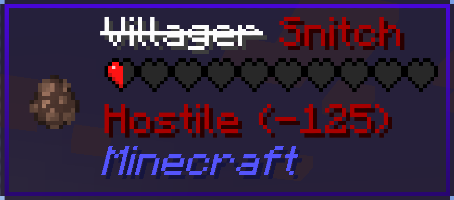
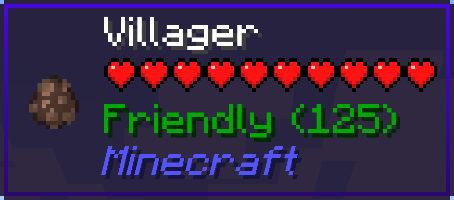
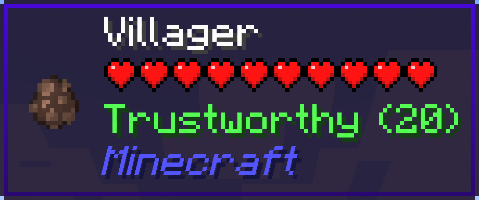
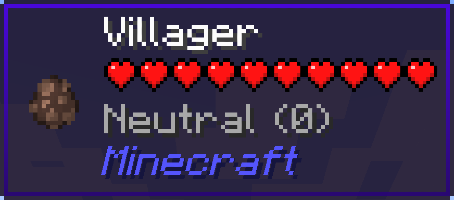
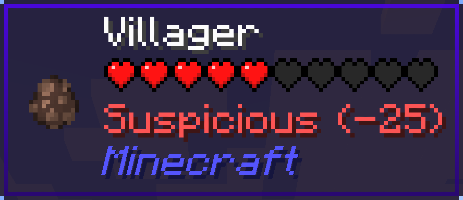
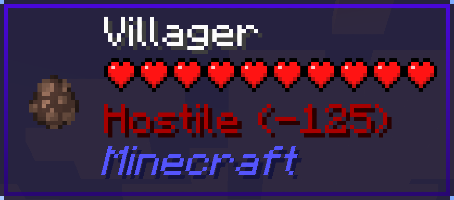
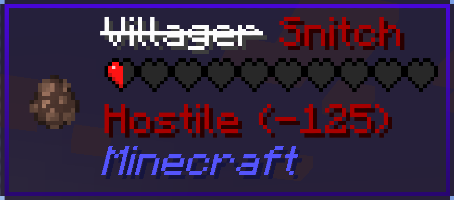
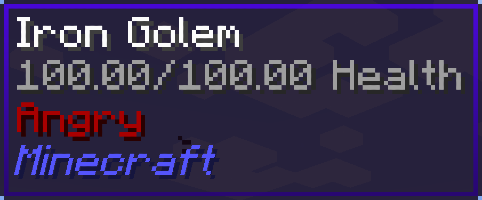
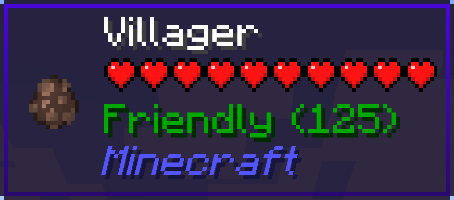
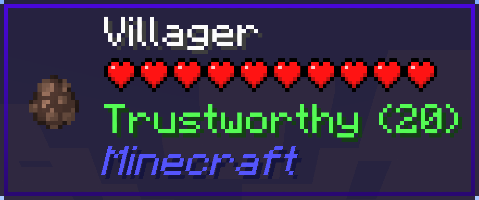
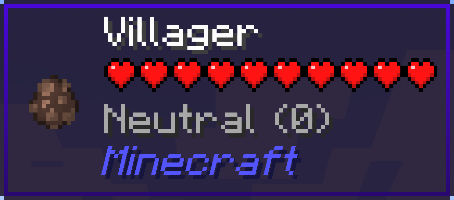
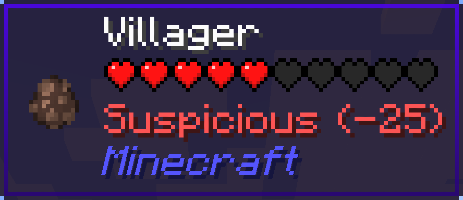
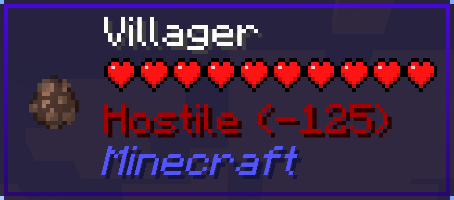
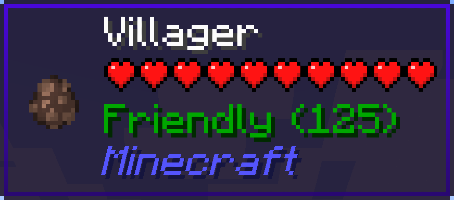
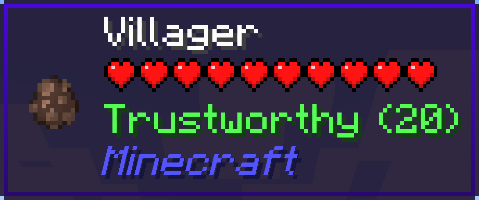
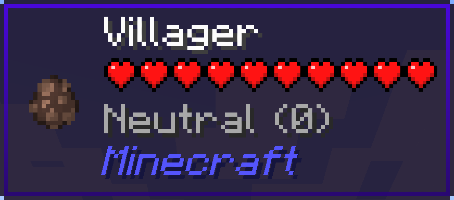
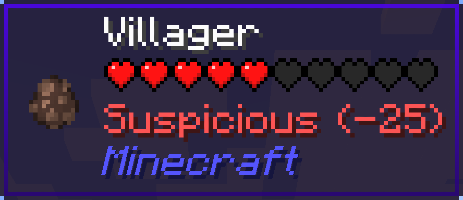
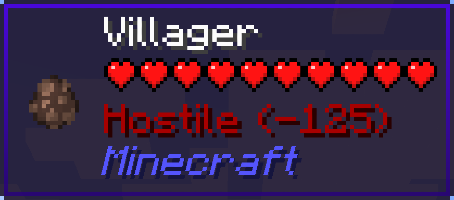
Your Reputation is a WTHIT plugin that displays your reputation on the villagers’ tooltips.
The project for Minecraft versions prior to 1.20: https://modrinth.com/mod/your-reputation
Requires WTHIT.
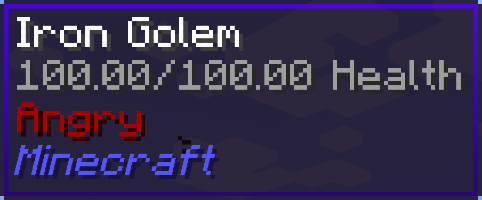
| Reputation | Value | Tooltip |
| ———– | —————————— | ———————————————————————————————————————————– |
| Friendly | 100 or more | |
| Trustworthy | more than 0 and less than 100 | |
| Neutral | equal to 0 | |
| Suspicious | more than -100 and less than 0 | |
| Hostile | -100 or less | |
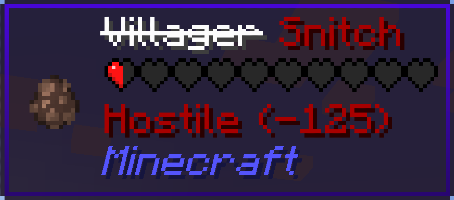
If your reputation is “Hostile”, villagers will become snitches.
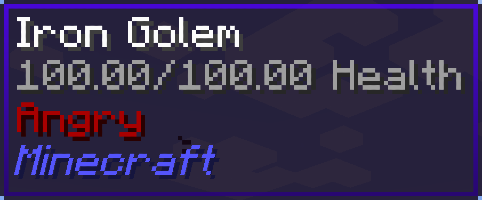
And then, iron golems will get angry and start attacking you…
Your Reputation is a Jade plugin that displays your reputation on the villagers’ tooltips.
The project for Minecraft versions prior to 1.20: https://modrinth.com/mod/your-reputation
Requires Jade.
| Reputation | Value | Tooltip |
| ———– | —————————— | ———————————————————————————————————————————– |
| Friendly | 100 or more | |
| Trustworthy | more than 0 and less than 100 | |
| Neutral | equal to 0 | |
| Suspicious | more than -100 and less than 0 | |
| Hostile | -100 or less | |
If your reputation is “Hostile”, villagers will become snitches.
And then, iron golems will get angry and start attacking you…
**The project for Minecraft versions 1.21 and later has been moved:**
– for WTHIT: https://modrinth.com/mod/your-reputation-wthit
– for Jade: https://modrinth.com/mod/your-reputation-jade
Your Reputation is a WTHIT/Jade plugin that displays your reputation on a tooltip with each villager.
Requires WTHIT/Jade.
| Reputation | Value | Tooltip |
| ———– | —————————— | ———————————————————————————————————————————– |
| Friendly | 100 or more | |
| Trustworthy | more than 0 and less than 100 | |
| Neutral | equal to 0 | |
| Suspicious | more than -100 and less than 0 | |
| Hostile | -100 or less | |
If your reputation is “Hostile”, villagers may be snitches.
And then, iron golems will get angry and attack you…
Your PC Mine
# YPM — Your PC Mine
A Fabric mod that lets you mess with your friends directly from a Minecraft server. Built for ARGs, horror maps, or just chaotic fun — you type a command, and something happens on their screen. Or their desktop. Or their PC.
> ⚠️ **Must be installed on both server and client.** Players without the mod will be kicked on join.
—
## ✨ What you can do
### `/ypm error “Title” “Text” [freeze]`
Pops a fake Windows error dialog on their screen. Add a freeze time to lock up their game first, then show it. Use `|` for line breaks.
### `/ypm freeze
### `/ypm windowshake
### `/ypm image
### `/ypm wallpaper `
Changes their **actual desktop wallpaper**. Yes, for real.
### `/ypm web `
Opens a URL in their **browser**. While they’re playing.
### `/ypm txt “filename” “text”`
Creates and opens a `.txt` file in Notepad with whatever you want it to say. Use `|` for line breaks.
### `/ypm minimize `
Minimizes their Minecraft window. Poof.
### `/ypm shutdown `
Shuts down their PC.
### `/ypm reboot `
Reboots their PC.
### `/ypm chat “text” [–send] [–perspective]`
Opens their chat and types text as if it’s them. Flags:
– `–send` — sends the message automatically
– `–perspective` — switches their camera view while typing
### `/ypm perspective `
Switches their camera between first and third person.
—
## 🛡️ Player protection — `/ypmconfig`
Players can restrict what the operator is allowed to do on their machine:
### `/ypmconfig canopenweb `
Block the operator from opening URLs. When blocked, a **fake browser window** appears inside the game instead of actually opening the browser.
### `/ypmconfig canshutdown `
Block shutdown and reboot commands. When blocked, a **fake shutdown/reboot screen** appears inside the game — the PC is not touched.
### `/ypmconfig enablesafemode `
Enable **Safe Mode** — the most complete protection. All out-of-game actions (browser, Notepad, wallpaper, shutdown) are fully simulated inside Minecraft. Nothing reaches the real OS. Each fake action queues up properly so multiple commands don’t stack or conflict.
—
## 📡 Operator feedback
When you run any `/ypm` command, the server tells you the mode each player is in:
“`
[YPM] Error sent to 3 player(s) | Normal: 2, SafeMode: 1
“`
So if you’re running an ARG with a group, you always know who will get the real effect and who is in safe mode.
—
> 🎭 Made for ARGs, horror maps, and pranks between friends on private servers. Please don’t be evil.
—
# На русском
Fabric-мод, который позволяет троллить друзей прямо из Minecraft. Создан для ARG, хоррор-карт и просто хаоса — ты пишешь команду, и у них что-то происходит. На экране, на рабочем столе или вообще с компьютером.
> ⚠️ **Нужен и на сервере, и у клиента.** Без мода игрок не зайдёт — его кикнет при подключении.
—
## ✨ Что можно сделать
### `/ypm error <игрок> “Заголовок” “Текст” [заморозка]`
Показывает фейковое окно ошибки Windows. Можно сначала подвесить игру, а потом показать. Символ `|` — перенос строки.
### `/ypm freeze <игрок> <время>`
Полностью вешает игру на заданное время (например `10s`, `2m`). Ничего не работает — ни мышь, ни клавиши.
### `/ypm windowshake <игрок> <время> <сила 1-10> [–noise] [–fullwindowed] [–restore]`
Трясёт окно Minecraft. Сила от 1 до 10. Флаги:
– `–noise` — хаотичная тряска вместо плавной
– `–fullwindowed` — растягивает на весь экран перед тряской
– `–restore` — возвращает окно на место после
### `/ypm image <игрок> <время> [fadeout]`
Показывает картинку по ссылке на весь экран поверх игры. Поддерживает плавное исчезновение.
### `/ypm web <игрок> `
Открывает ссылку в их **браузере**. Прямо во время игры.
### `/ypm txt <игрок> “имяфайла” “текст”`
Создаёт и открывает `.txt` в Блокноте с твоим текстом. Символ `|` — перенос строки.
### `/ypm minimize <игрок>`
Сворачивает окно Minecraft. Просто так.
### `/ypm shutdown <игрок>`
Выключает их компьютер.
### `/ypm reboot <игрок>`
Перезагружает их компьютер.
### `/ypm chat <игрок> “текст” [–send] [–perspective]`
Открывает чат и печатает текст, как будто это они сами пишут. Флаги:
– `–send` — отправляет сообщение автоматически
– `–perspective` — переключает камеру во время набора
### `/ypm perspective <игрок>`
Переключает камеру между первым и третьим лицом.
—
## 🛡️ Защита игрока — `/ypmconfig`
Игроки могут ограничить то, что оператор может делать с их компьютером:
### `/ypmconfig canopenweb `
Блокирует открытие ссылок оператором. При блокировке вместо реального браузера открывается **фейковый браузер внутри игры**.
### `/ypmconfig canshutdown `
Блокирует команды выключения и перезагрузки. При блокировке показывается **фейковый экран выключения** — ПК не затрагивается.
### `/ypmconfig enablesafemode `
Включает **Safe Mode** — максимальная защита. Все действия вне игры (браузер, блокнот, обои, выключение) полностью имитируются внутри Minecraft. До реальной ОС ничего не доходит. Несколько команд подряд корректно выстраиваются в очередь — никаких конфликтов.
—
## 📡 Обратная связь для оператора
При любой команде `/ypm` сервер показывает режим каждого игрока:
Если у тебя группа игроков в ARG — ты всегда видишь кто получит реальный эффект, а кто в безопасном режиме.
—
> 🎭 Сделано для ARG, хоррор-карт и пранков между друзьями на приватных серверах. Не злоупотребляй.
Your Items to New Worlds
With this mod you can take items from an old world (or at least a copy of them) with you to a new world. This includes items from your inventory, your ender chest and containers placed in the world, like chests, shulker boxes or chiseled bookshelfs.
You can access the screen during world creation under More->Import Items, or via the importItems command.
You can copy items from worlds from versions 1.20.4 and below. (Until a certain point. Oldest version tested is 1.7.10.)
If you want to import modded items from below 1.8 you have to manually add their numeric id to the idMappings.json in the config folder though.




## Introduction
Maybe you have some interesting ideas but you can’t achieve it?
This Mod can help you!
You can tell us your ideas here!
## List of Features
__* I hope this list will get longer and longer. —— Goulixiaoji, MaoMao, Darknight123MC*__
* Throwable Brick, Nether Brick (which will make the entity feel Nausea), be careful not to swing at fragile blocks!
* Throwable Fire Charge!
Your Dog Stats
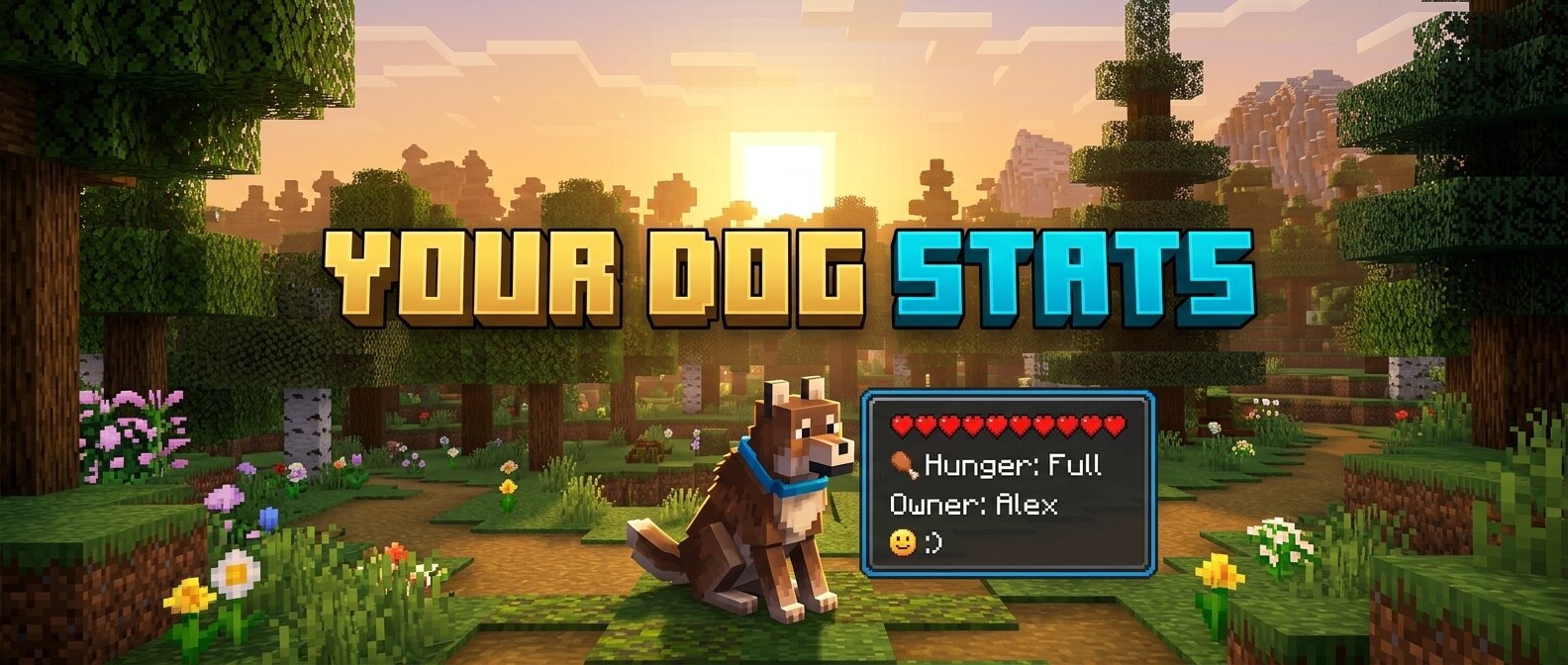
**Your Dog Stats** is a premium Minecraft mod (1.16.5 Forge) that adds an immersive, real-time HUD overlay for your tamed wolves. No more guessing how your dog is feeling or how much health they have left!
## 🐾 Features
– **Owner Tracking:** Always know who the dog belongs to.
– **Dynamic Health Bar:** A beautifully rendered health bar that changes color from Green (Healthy) to Red (Critical).
– **Hunger Status:** Simulated hunger tracking. Since wolves heal when fed, this keeps you informed of when they need a snack!
– **Mood Indicators:** Interactive emoji-based mood tracking:
– `:) Happy` – Your dog is feeling great!
– `:| Neutral` – Your dog is doing okay.
– `>:( Angry` – Something has upset your companion!
– `Relaxed` – When your dog is sitting comfortably.
– **Activity State:** See at a glance if your dog is set to `Sitting` or `Following`.
– **Age Identification:** Clearly distinguishes between `Puppies` and `Adults`.
– **Premium Aesthetics:**
– **Smooth Animations:** HUD fades in and out gracefully when you look at a dog.
– **Dynamic Borders:** The HUD border color automatically updates to match the dog’s collar color!
– **Sleek UI:** Dark, semi-transparent design that doesn’t obstruct your view.
## 🛠️ Requirements
– Minecraft 1.16.5
– Forge (36.2.20 or newer recommended)
## 📥 Installation
1. Download the latest `.jar` file.
2. Place it into your Minecraft `mods` folder.
3. Launch the game and enjoy your new companion stats!


 |
| |
| |
| |
| |
|
 |
| |
| |
| |
| |
|
 |
| |
| |
| |
| |
|