zzzZombie World
# Zombie World Horde
Zombie World Horde is a small gameplay-focused mod designed to be used alongside a zombie apocalypse–style modpack.
This mod modifies hostile mob behavior in the Overworld to create a more consistent and immersive zombie survival experience.
## Features
– Prevents non-zombie hostile mobs from spawning in the Overworld
– Spawns zombies in organized groups or hordes
– Allows configuration of minimum and maximum horde sizes using the `/zwhorde` command
This mod is intended to support a specific playstyle and enhance the overall experience of survival-based gameplay.
## Important Notes
This mod is still a work in progress. There are known issues that I have not been able to fully resolve yet and plan to address in future updates.
### Known Issues
– ~~In some cases, hostile mobs may appear as “ghost” entities. These entities are removed server-side, but the client may fail to immediately recognize their removal.~~
**Update:** All reported bugs have been fixed.
## Feedback
Feedback and bug reports are always welcome. The mod will continue to be improved over time as issues are identified and resolved.
zzz… rrr… Rawr?
Server-side mod that sends a (configurable) message to chat when it’s time to wake up.
The config file can be found at `config/zzz_rawr/config.toml`. This is what it looks like by default:
“`toml
# List of messages to send (one will be chosen at random)
messages = [
“Wakey, wakey, rise and shine… Good Morning everyone!”,
“zzz… rrr… Rawr?”
]
“`
You can add or remove messages here as you see fit, following the [TOML specification](https://toml.io/en/) for an array of strings.
Then, every time players awaken from sleep, one of the defined messages will be broadcast to chat globally.
Inspired by the same feature found in the classic mod [Morpheus](https://www.curseforge.com/minecraft/mc-mods/morpheus), with the title borrowed from that mod’s config in ReikaKalseki’s [DragonRealm](https://dragonrealm.overminddl1.com/).
zzufix
# zzufix
A very simple 1.21+ Minecraft plugin that restores certain behaviors from 1.8 SportPaper and vanilla servers.
## Remove TNT offset
Prevents TNT blocks from moving to the sides a bit when primed (while keeping custom projectiles such as those from PGM functional).
Pair this with
“`yml
fixes:
prevent-tnt-from-moving-in-water: true
“`
in your `root/config/paper-world-defaults.yml` file for maximum PGM TNT action.
## Restore damage and knockback from thrown projectiles
Restores 1.8 behavior for thrown snowballs and eggs (including the new types), which means it makes them deal a bit of damage and give knockback to other players.
## Restore arrow self hits
Restores 1.8 behavior which allowed you to hit yourself with arrows and get knockback. Useful for 2 Player Parkour maps.
# config.yml
“`yml
features:
tnt: true
projectiles: true
arrow-self-hits: true
“`
Zzoyn HCompass



# **Zzoyn HCompass**
### A clean and customizable HUD compass for everyday gameplay
**Zzoyn HCompass** adds a minimalistic compass bar to the top of your screen, showing cardinal directions and degree markers exactly where you need them — without cluttering your interface.
Designed to stay out of the way, yet always useful.
—
## **Features**
– **Minimalistic design** — clean, sharp and unobtrusive
– **Customizable colors** — set any hex color you want
– **Optional features** — toggle background, degree numbers and more
– **Built-in configuration menu** — change settings in-game (default key: **P**)
– **Lightweight and efficient** — no performance impact
– **Always available** — perfect for exploration, building, travelling, roleplay, or simply keeping your sense of direction
—
## **Why use it?**
Unlike large minimaps or heavy UI mods, **Zzoyn HCompass** stays nearly invisible until you need it.
It gives you quick orientation without distractions — ideal when you want a clean screen but still need reliable navigation.
—
## **Perfect for**
– Survival and exploration
– Building large structures
– Adventure maps
– Minimalistic HUD setups
– Any gameplay where a simple, elegant compass makes life easier
—

## **Controls**
– **P** — open the settings panel
– All options update instantly and save automatically
—
A simple, elegant, customizable compass — exactly when you need it and nowhere else.
Zzarty’s Visible Powder Snow
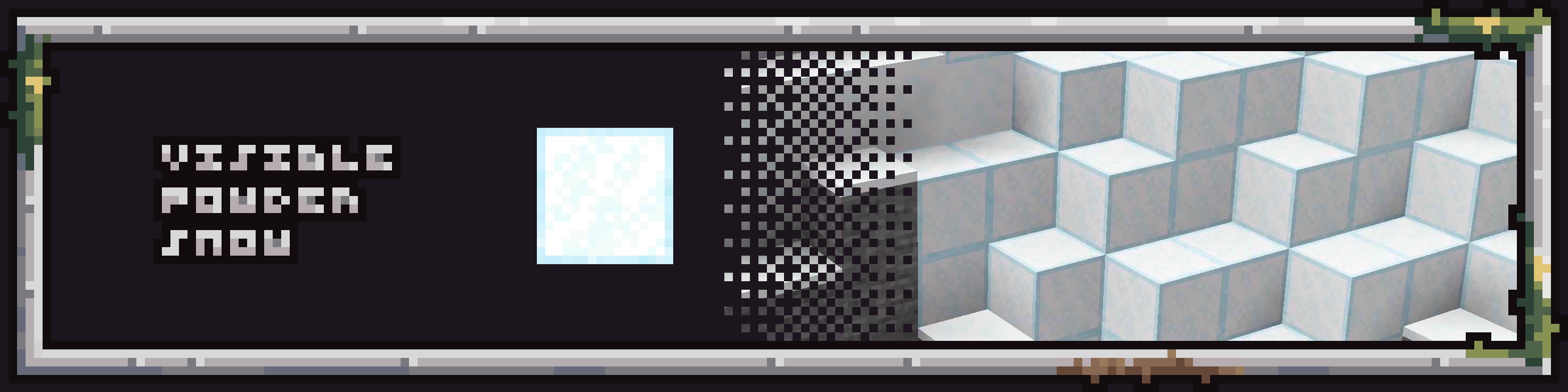
The Visible powder snow texture pack for Minecraft will make your life easier with the updated appearance of the suspicious powder block. This texture pack adds 1 pixel frame around powder snow block, making block more visible.
ZyrenAuth
# ZyrenAuth – Secure Minecraft Authentication Plugin
**ZyrenAuth** is a modern, robust, and privacy-focused authentication plugin for Minecraft 1.21.1+ servers, developed by [_Pheonix](https://pheonix.is-a.dev). It delivers strong account protection and a seamless, intuitive login experience for Paper (Spigot-compatible) environments.
🔗 **[Official Modrinth Page (updates & downloads)](https://modrinth.com/plugin/zyrenauth/versions)**
🔗 **[Official Website & Online Config Generator](https://zyrenauth.wuaze.com/)**
—
## ✨ Key Features
– **Mandatory Reverse Word Captcha on Join**
Every player must solve a reverse word captcha before login/registration. Fully configurable expiry/attempts and safe void teleport during the challenge.
– **Dedicated 2FA Setup GUI**
`/za 2fa setup` opens an in-game GUI to display your 2FA secret key and QR code URI, making authenticator setup seamless.
– **Focused Authentication Teleportation**
After solving captcha, players are teleported to a safe void (`0.5, 0.0, 0.5`) for `/login` or `/register`—no world interaction until auth is done.
– **Comprehensive Player State Management**
Original location, inventory, gamemode, health, food, experience, and potion effects are saved at auth start and reliably restored after success.
– **Asynchronous Modrinth Update Checker**
Plugin checks for the latest release version on startup and notifies server owners in the console if an update is available.
– **Dynamic On-Screen Prompts**
Clear, persistent titles and subtitles for `/register` and `/login` guide users through the process.
– **Optional 2FA (Google Authenticator)**
Players can enable/disable 2FA; required for their own logins once enabled.
– **Smart Player Authentication**
– **Online-Mode Servers:** Automatically registers/logs in legitimate Minecraft accounts, with auto-username update.
– **Offline-Mode/Alternative Auth:** Registered players are auto-logged in; new players must register for account protection.
– **Secure Logins**
BCrypt password hashing and robust username validation.
– **Flexible Storage**
MySQL/MariaDB for scalable persistence. Robust encrypted file-based fallback.
– **Optional Email Features**
Supports email confirmation and password reset (requires MySQL+SMTP).
– **Improved Command Interface**
`/za` (alias: `/zyrenauthadmin`) for all admin, status, reload, migrate, delete, and 2FA subcommands.
– **Streamlined File Management**
All plugin files are organized under `plugins/config/zyrenauth/` for a clean server directory.
—
## 🚀 Supported Platforms
– **Paper** (and all compatible forks) 1.21.1+
_Place ZyrenAuth `.jar` in your `plugins/` folder._
—
## ⚡ Quick Start
1. **Download** the latest version from [Modrinth](https://modrinth.com/plugin/zyrenauth/versions).
2. Put the `.jar` in your server’s `plugins/` folder.
3. Start and stop the server to generate `config.json`.
4. **Easily configure** `config.json` using our [Online Config Generator](https://zyrenauth.wuaze.com/).
5. Restart the server and you’re done!
—
## ⚙️ Key Configuration Options
– Captcha: `captchaEnabled`, `captchaExpiryMinutes`, `maxCaptchaAttempts`
– Password: `minPasswordLength`, `requireDigit`, `requireLowercase`, `requireUppercase`, `requireSpecialChar`
– MySQL: `mysqlEnabled`, `mysqlHost`, `mysqlDatabase`, etc.
– Email/SMTP: `emailFeaturesEnabled`, `smtpHost`, etc.
– See all options at [zyrenauth.wuaze.com](https://zyrenauth.wuaze.com/).
—
## 📜 Commands
– `/register ` – Register a new account.
– `/login ` – Log into your account.
– `/captcha ` – Solve the reverse word captcha.
– `/addemail ` – Link an email.
– `/emailconfirm ` – Confirm your email.
– `/resetpassword` – Request a password reset.
– `/resetconfirm ` – Confirm password reset.
– `/za help` – Plugin help.
– `/za status` – Plugin status (OP only).
– `/za reload` – Reload config (OP only).
– `/za migrate ` – Migration (OP only).
– `/za delete [confirm]` – Delete account (OP only).
– `/za 2fa setup|confirm |disable |status` – Manage 2FA.
---
## 🤝 Support & License
- **Issues/Source:** [https://github.com/Hardik-Verma/ZyrenAuth](https://github.com/Hardik-Verma/ZyrenAuth)
- **License:** MIT
- **By [_Pheonix](https://pheonix.is-a.dev) – Website & app developer**
---
Thank you for choosing ZyrenAuth!
Zyphorix Red
Get ready to PvP with Zyphorix Red! A Recolor of Zyphorix, a PvP texturepack that overhauls all PvP related items while keeping the loved vanilla-like feeling.
Zyphorix Red retextures:
– Swords and Tools of any material
– Iron, Gold, Diamond and Netherite Armor
– Water and Lava Bucket (also empty one of course)
– Mace, Bow and Arrows
– Golden Apples and Totem of Undying
– HUD (Crosshair, Hotbar, etc)
Zyphorix Pink
Get ready to PvP with Zyphorix Pink! A Recolor of Zyphorix, a PvP texturepack that overhauls all PvP related items while keeping the loved vanilla-like feeling.
Zyphorix Pink retextures:
– Swords and Tools of any material
– Iron, Gold, Diamond and Netherite Armor
– Water and Lava Bucket (also empty one of course)
– Mace, Bow and Arrows
– Golden Apples and Totem of Undying
– HUD (Crosshair, Hotbar, etc)
Zyphorix Blue
Get ready to PvP with Zyphorix Blue! A Recolor of Zyphorix, a PvP texturepack that overhauls all PvP related items while keeping the loved vanilla-like feeling.
Zyphorix Blue retextures:
– Swords and Tools of any material
– Iron, Gold, Diamond and Netherite Armor
– Water and Lava Bucket (also empty one of course)
– Mace, Bow and Arrows
– Golden Apples and Totem of Undying
– HUD (Crosshair, Hotbar, etc)
Zyphorix 16x
Get ready to PvP with Zyphorix! A PvP texturepack that overhauls all PvP related items while keeping the loved vanilla-like feeling.
Zyphorix retextures:
– Swords and Tools of any material
– Iron, Gold, Diamond and Netherite Armor
– Water and Lava Bucket (also empty one of course)
– Mace, Bow and Arrows
– Golden Apples and Totem of Undying
– HUD (Crosshair, Hotbar, etc)