Visual Effects+
### **Please read the description carefully!**
—

Visual Effects+ is a resource pack that overhauls Minecraft by reworking every single biome in the game, changing vanilla particles, adding a bunch of new ones, introducing dynamic and colorful fog, a new weather system, and much more.
————————————————————————————————





————————————————————————————————
## Compatibility:
**Resource pack compatibility:**
You can add any resource pack you want and get unique experience with VFX+ resource pack!
**Shader compatibility:**
VFX+ isn’t compatible with any shader that replaces fog or turns off particles.
————————————————————————————————
### **IMPORTANT! RECOMMENDED SETTINGS!**
—
Recommended settings
### 1. Pack should be always on top!
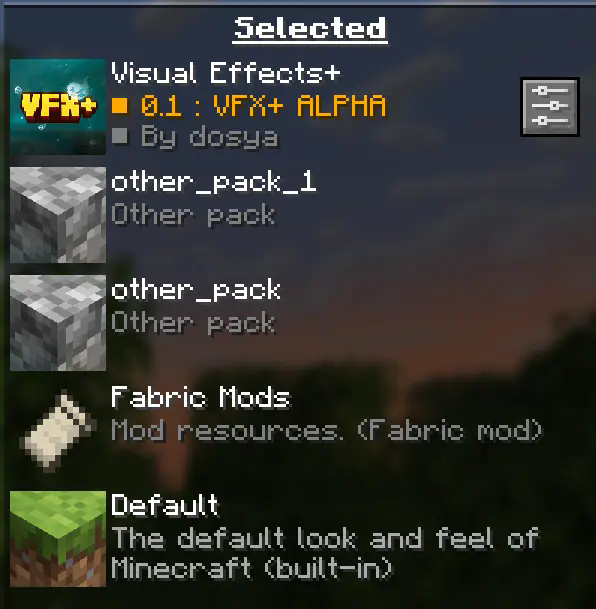
Your pack should be always on top to prevent any polytone related issues.
### 2. Turn off fog occlusion!
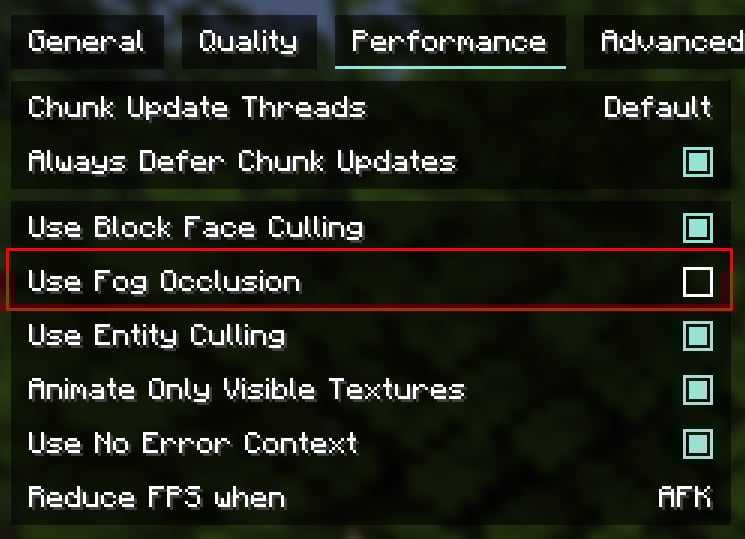
You can find this option in **”Performance”** tab.
**For low-end PC left it turned on**
**Recommended render distance is 12 – 16 chunks, but you can modify this value as you want**
————————————————————————————————
“This resource pack is in **early development** and alot of things might change by release time.
Also this pack might have bugs or any other issues. **If something went wrong you can state about it on Visual Effects+ discord server.**
————————————————————————————————
**Features:**
————————————————————————————————
**You can find more new particles and overhauled biomes by playing the game with Visual Effects+ resource pack!**
————————————————————————————————
CREDITS
Tealover – testing, suggestions and other help.
sapling. – testing, suggestions and other help.
Cubert – helped to decide a title for a project, testing,
suggestions and other help.
Peanut Butter Jelly – testing and suggestions.
VFX+ discord server – big thank you for community feedback and support.
sapling. Mods discord server – big thank you for community feedback and support.
MehVahdJukaar – helping out with polytone.
visual corps
Visual Crops is a lightweight resource pack that replaces the default crop textures for wheat, carrots, potatoes and beetroot. Each growth stage is more visually distinct, making it easy to tell at a glance when your crops are ready to harvest — no more guessing!
Visual Bee Items

Visual Bee Items fully displays the contents of bee nests and beehives on the item, allowing you to see how many bees and how much honey is in the block.
OptiFine or CIT Resewn is required for this resourcepack to work.
The honey level textures are taken from Vanilla Tweaks.
Planned Features
– Chime support
– Displaying baby bees in hives

Terms of usage
If you use or feature this resourcepack through any medium (PMC, YouTube, Curseforge, etc.), you must credit me and link to this page and/or my profile.
If you would like to use this in your public resourcepack, please ask me first, and include credit and a link to this page both in a credits.txt in the resourcepack file and in the description.
Usage must be a modification or addition to your pack, not a repost.
If you see anyone using my content without permission, please let me know so I can sort it out 🙂
## Alternate downloads

## License

This resourcepack is licensed under Creative Commons Attribution-NonCommercial-ShareAlike 4.0 International License
Visual Armor Trim Descriptions
Visual Armor Trim Descriptions is a resource pack that displays previews of armor trims in the lore text of applied armor pieces and smithing templates, allowing you to see them without applying a template or wearing the armor.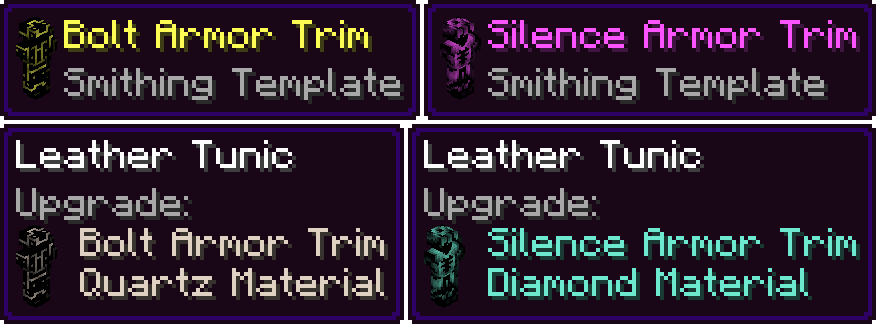
Visibly Sus
### Makes suspicious sand and gravel have an emissive outline in order to make archaeology easier and to hopefully make it harder to accidentally break suspicious sand and gravel when digging.
!DISCLAIMER! Emissve and connecting features require Optifine or any CTM port that functions identically. For fabric users i recommend Continuity.
If used without Optifine or Continuity it will still work but the outlines wont connect, each block will have it’s own outline, and it wont be emmisive.


Visible egaps
Simply makes enchanted golden apples purple, making them easier to spot!
_Is also featured in my Endessentials pack!_
Visible Effects
**A Texture Pack To Reveal Players Using Invisibility**
—
Where To Download?
—


—
**Q&A**
—
**Q: Why Should I Download It?**
—
A: This Pack Is So You Can Catch Players Using An Invisibility Potion.
—
**Q: What Does This Pack Change?**
—
A: This Pack Changes The Potion Partical Effect Texture Within The Game To Be Obvious.
—
**Q: Should I Download From A New Developer That Makes MC Packs And Why?**
—
A: Yes Absolutely, Downloading From A New Dev Can Help Support Them With Creating New And Better Content, You May Even Find Something That Has Low Downloads And Views But Is What You Really Needed (For Example Going In The Nether In 1.13 But With A Modern Texture Pack).
—
How To Install :
—
Drag and Drop The File You Downloaded Into Your Resourcepacks Folder.
—
How To Get To Resourcepacks Folder :
—
Way 1 : Go In Game And Click Onto “Options” Then “Resource Packs…” Then “Open Pack Folder”.
Way 2 : On Windows Click Win + R and Type %appdata% Then Click Onto “.minecraft” Then “resourcepacks”.
—
Usage
—
This Pack May Be Used Personaly And In Videos (Credit Would Be Nice To Support Me :D).
If This Pack Goes On To A Public Server, Credit Is Required.
Reuploading This Pack Is Prohibited Without Concent.
3d Breaking X Visible Ores
This Resource pack is a combination of 2 packs, 3d breaking, and visble ores. Duh.
Here’s a video showing off the pack.
Make sure to use Continuity!
Visible Vault
## Visible Vaults!
This texture pack simplifies your gameplay by removing the bars from Vaults in Trial Chambers. Now you can clearly see the items inside, making it much easier to hunt for the Heavy Core and other rare loot. Enjoy the game!
## IMPORTANT
– ### **Want to use it on Bedrock Edition?**
You can port the texture pack yourself, as long as you comply with all license terms.
– ### **Pack version warning ?**
There is a high chance that resource packs will work with different versions of Minecraft without the need to change the version of the pack, unless there is a major update that breaks resource packs.
Visible Unobtainium
This is a simple resource pack that replaces the Unobtainium Ore’s (from Mythic Metals fabric mod) textures with ones that are much better visible.
Tested on 1.20.1, but should work on any version that Mythic Metals is on, unless they change where the textures are located for some reason.