Wormhole Book
Mod that adds an uncraftable guidebook for wormhole.
It’s literally just a guidebook for wormhole so the mod is easier to setup and understand what each item does without needing Google.
Obviously requires [Wormhole](https://modrinth.com/mod/wormhole) and [Patchouli](https://www.modrinth.com/mod/patchouli).
Wormhole Artifact

### 🌀 **Now you can teleport to your friends!**
Introducing the Wormhole Artifact, an useful item that allows you to teleport to your friends through a simple UI, perfect for multiplayer survival, it offers a fair and balanced alternative to traditional teleportation with commands, keeping the game immersive and challenging.
#
### ✨ **Main Features**
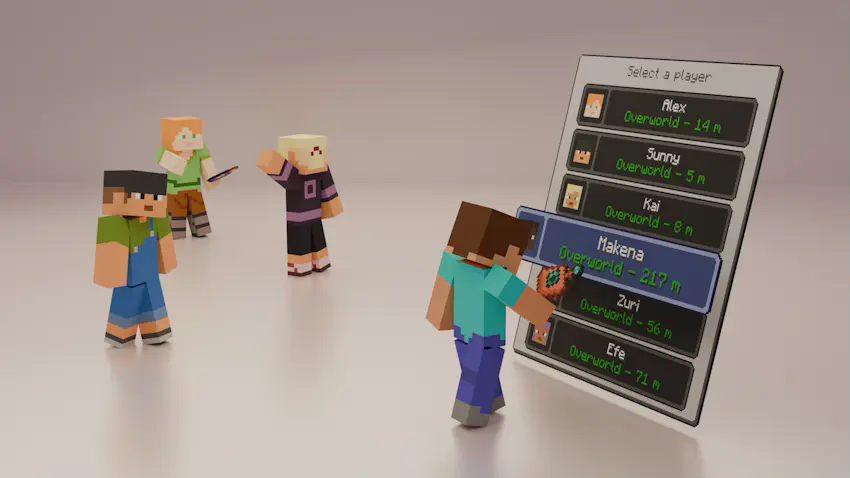
– The Wormhole Artifact allows you to teleport to friends, but only within the same dimension.
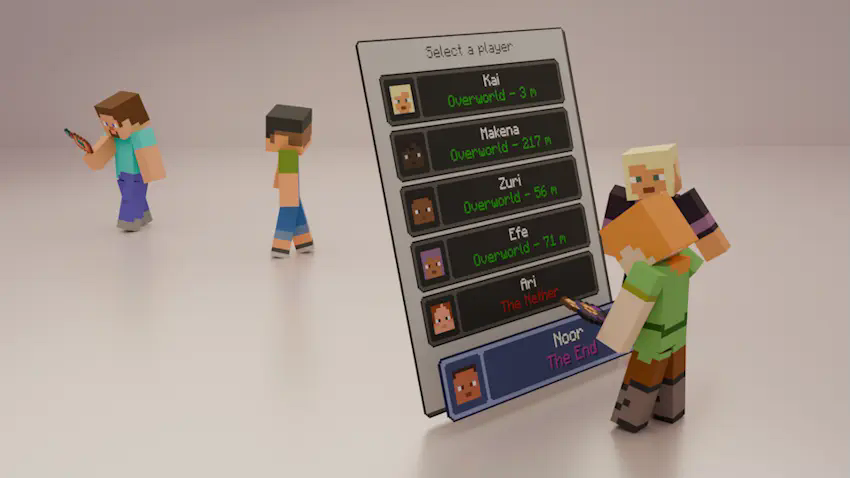
– It can be upgraded to the Wormhole Remote, which lets you teleport to players even if they are in a different dimension.
– The UI displays, in real time, information about all players who have a Wormhole Artifact or Wormhole Remote in their inventory:
– Their name and head icon.
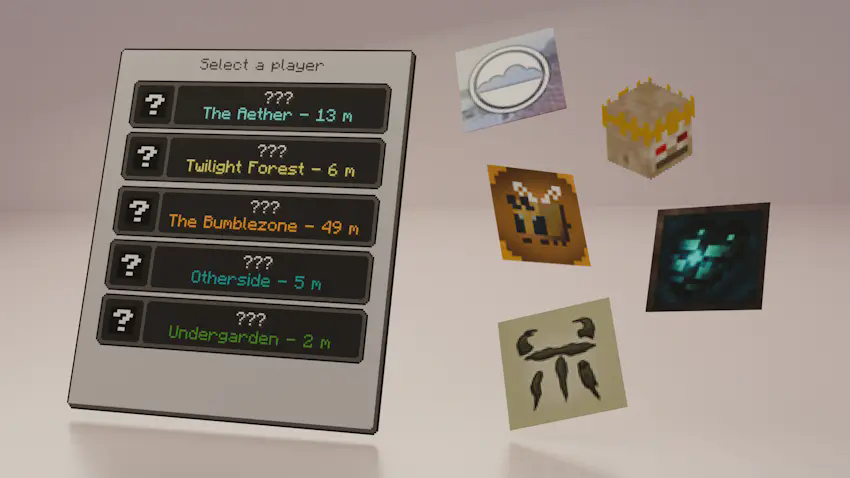
– Their current dimension (including the five modded dimensions shown in the images; otherwise, it will display “???”).
– Their block distance from you (only if you are in the same dimension).
#
### ⚙️ **Configurable Settings**
You can customize various aspects of the mod in the wormhole-artifact-config.toml file, including:
– Durability of both the Wormhole Artifact and Wormhole Remote.
– Cooldown time for using either item.
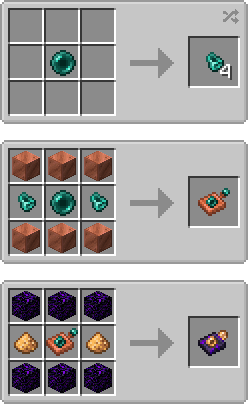
– Ender Nacre drop rate from Ender Pearls.
#
### 📕 **Recipes**
#
### 💬 **Permissions**
✔️ **Allowed**
– You may include this mod in CurseForge and Modrinth modpacks.
– You are free to use this mod in your videos (credits and a link to the mod page in the description would be appreciated).
❌ **Not Allowed**
– Reuploading this mod to any other websites, launchers, or apps.
– Using any content from this mod (textures, models, recipes, tags, etc.) in other projects.
– Selling this mod in any way or including it in paid modpacks.
#
### 🖼️ **Explanation Renders (and a gif)**
📌 **You can teleport to your friends from your same dimension with the Womrhole Artifact!**
📌 **Also you can teleport to friends from other dimensions with the Wormhole Remote!**
📌 **The UI can display the names of modded dimensions!**
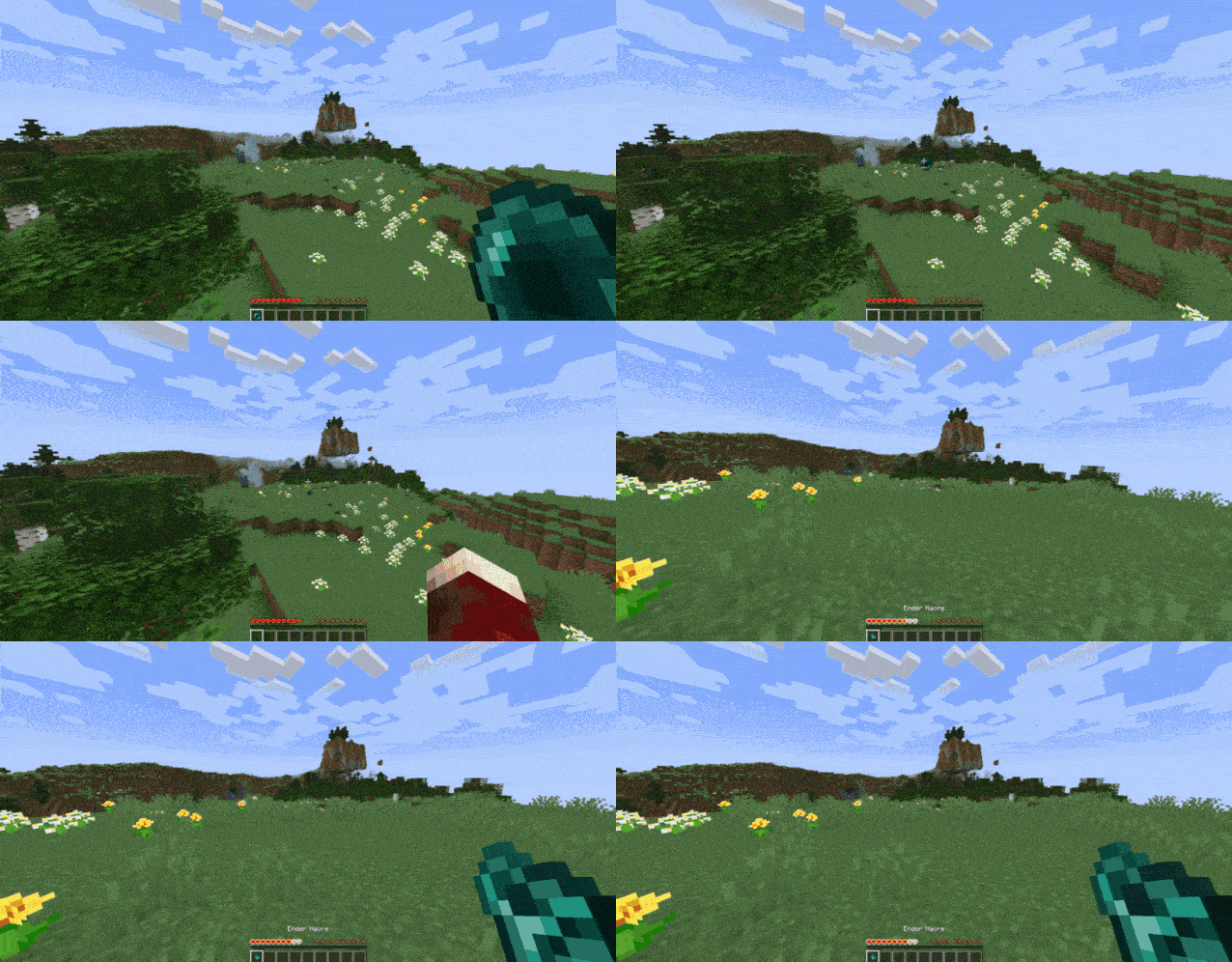
📌 **Also you can get Ender Nacre from using Ender Pearls!**
Worlds
## Worlds – World Management for Paper & Folia
Worlds is a modern, lightweight world management plugin designed for **Paper** and **Folia** servers.
It brings seamless world handling with **customization presets**, eliminating the need for extra plugins just to create
void or custom flat maps. Simply pick a predefined preset, or create your own!
### Why Choose Worlds?
**Vanilla Flat World Preset** – No more extra plugins for void or flat maps
**No Extra Data Files** – Worlds doesn’t store extra files, no more messy file syncing when sharing worlds
**Drag & Drop Import** – Just place the world in the folder & use /world import
**Full World Regeneration** – Reset any world (even the Overworld!) with one command
**Modern & Efficient** – Uses up-to-date server mechanics, not outdated methods
**World Keys** – Worlds are referenced by unique keys, improving compatibility with client mods
**World Linking** – Restore vanilla Nether and End portal behavior for custom worlds
### What’s Next?
**Custom Dimension Creation** – Like datapacks, but usable from commands and API!
[Download now on Modrinth](https://modrinth.com/project/gBIw3Gvy)
[Latest version supporting 1.20.6 (Java 21)](https://github.com/TheNextLvl-net/worlds/releases/tag/v1.2.5)
[Latest version supporting 1.19/1.20.4 (Java 19)](https://github.com/TheNextLvl-net/worlds/releases/tag/v1.1.6)
[Latest version supporting 1.19/1.20.4 (Java 17)](https://github.com/TheNextLvl-net/worlds/releases/tag/v1.1.3)
For further information check out the [Wiki](https://thenextlvl.net/docs/worlds)
[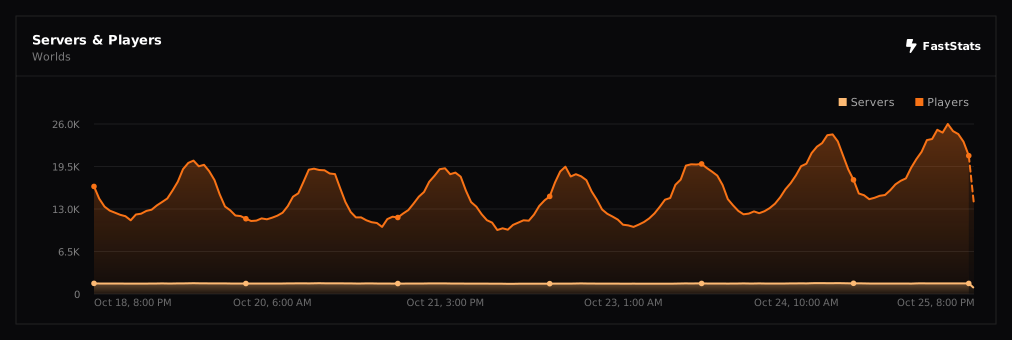](https://faststats.dev/project/worlds)
WorldProtection
# WorldProtection
A comprehensive world protection plugin for Paper/Spigot servers that allows administrators to protect specific worlds with a whitelist system. Even operators are blocked from accessing protected worlds unless explicitly whitelisted.
## Features
### Core Features
– **World Protection Toggle**: Enable or disable protection on any world
– **Whitelist System**: Only whitelisted players can access protected worlds
– **Operator Blocking**: Blocks operators from accessing protected worlds (unless whitelisted)
– **Case-Insensitive World Lookup**: World names are matched case-insensitively for convenience
– **Player Teleport Command**: `/wp go ` allows players to teleport to worlds (blocks if not whitelisted)
– **Multiple Access Methods Blocked**: Prevents access via:
– World changes
– Teleportation commands
– Portal usage (nether portals, end portals, etc.)
– Direct world joining
– **Data Persistence**: Protected worlds and whitelists are saved automatically
– **Config Reload**: Reload configuration without restarting server
– **Multiverse Support**: Compatible with Multiverse-Core (soft dependency)
### Security Features
– Operators are blocked by default (configurable)
– Operators are always teleported away (kicks may not work on ops)
– Bypass permission available but still respects operator blocking
– Automatic teleportation to safe world when access is denied
– Configurable safe world for teleportation
– Optional kick on access denial (default: enabled)
– Customizable kick message
## Requirements
– Paper 1.21.x or compatible
– Java 21
– Multiverse-Core (optional, for Multiverse world management)
## Installation
1. Download the latest JAR from the releases page
2. Place `WorldProtection-1.0.0.jar` in your server’s `plugins/` folder
3. Start or restart your server
4. Configure `plugins/WorldProtection/config.yml` to your preferences
5. Use `/wp toggle ` to protect worlds
6. Use `/wp whitelist add ` to whitelist players
## Configuration
### config.yml
“`yaml
# World Protection Configuration
# Default message when access is denied
messages:
prefix: “&c[WorldProtection]&f ”
access_denied: “&cYou do not have permission to access this world!”
world_protected: “&eWorld &6%world% &eis protected. Only whitelisted players can access it.”
world_unprotected: “&aWorld &6%world% &ais now unprotected.”
world_protected_enabled: “&aWorld &6%world% &ais now protected.”
player_whitelisted: “&aPlayer &e%player% &ahas been whitelisted for world &6%world%&a.”
player_unwhitelisted: “&cPlayer &e%player% &ahas been removed from whitelist for world &6%world%&c.”
not_whitelisted: “&cYou are not whitelisted for world &6%world%&c.”
world_not_found: “&cWorld &6%world% &cnot found!”
no_worlds_protected: “&7No worlds are currently protected.”
teleport_success: “&aTeleported to world &6%world%&a.”
teleport_denied: “&cYou do not have permission to teleport to world &6%world%&c.”
# Block operators from accessing protected worlds (unless whitelisted)
block_operators: true
# Kick players who try to access protected worlds
kick_on_deny: true
# Safe world to teleport players to when access is denied (if kick_on_deny is false)
# Leave empty to auto-find a safe world
safe_world: “”
# Kick message when player is not whitelisted
kick_message: “&4You are not whitelisted on this world”
“`
### Configuration Options
**messages**
– All messages can be customized with color codes
– Use `%world%` placeholder for world names
– Use `%player%` placeholder for player names
**block_operators**
– `true`: Operators are blocked from protected worlds (unless whitelisted)
– `false`: Operators can access protected worlds (not recommended)
**kick_on_deny**
– `true`: Players are kicked when they try to access a protected world (default)
– `false`: Players are teleported back to a safe world
– Note: Operators are always teleported (kicks may not work on ops)
**safe_world**
– Name of the world to teleport players to when access is denied and `kick_on_deny` is `false`
– Leave empty (`””`) to automatically find a safe world
– Must be a valid world name
**kick_message**
– Custom message shown when a player is kicked for accessing a protected world
– Supports color codes (use `&` prefix)
– Default: `”&4You are not whitelisted on this world”`
## Commands
### Player Commands
**/worldprotection go ** or **/wp go **
– Teleport to a world (available to all players)
– Blocks teleportation if the world is protected and you’re not whitelisted
– Example: `/wp go creative`
– Note: World names are case-insensitive
### Admin Commands
All admin commands require `worldprotection.admin` permission (default: OP).
**/worldprotection toggle ** or **/wp toggle **
– Enable or disable protection on a world
– Example: `/wp toggle creative`
– Note: World names are case-insensitive
**/worldprotection whitelist add ** or **/wp whitelist add **
– Add a player to the whitelist for a protected world
– Example: `/wp whitelist creative add PlayerName`
– Note: World names are case-insensitive
**/worldprotection whitelist remove ** or **/wp whitelist remove **
– Remove a player from the whitelist for a protected world
– Example: `/wp whitelist creative remove PlayerName`
– Note: World names are case-insensitive
**/worldprotection list** or **/wp list**
– List all currently protected worlds
– Shows the number of whitelisted players per world
**/worldprotection info ** or **/wp info **
– Show detailed information about a world’s protection status
– Displays protection status and whitelisted players
– Note: World names are case-insensitive
**/worldprotection reload** or **/wp reload**
– Reload the configuration file and data
– Requires admin permission
– Example: `/wp reload`
## Permissions
**worldprotection.admin**
– Full admin access to all world protection commands
– Default: `op` (operators only)
– Allows: toggle protection, manage whitelist, view info
**worldprotection.bypass**
– Bypass world protection (not recommended)
– Default: `op` (operators only)
– Note: Still blocked if `block_operators: true` in config
## Usage Examples
### Protecting a World
1. Protect a world:
“`
/wp toggle creative
“`
Output: `[WorldProtection] World creative is now protected.`
2. Whitelist players:
“`
/wp whitelist creative add PlayerName
/wp whitelist creative add AnotherPlayer
“`
3. Check protection status:
“`
/wp info creative
“`
### Unprotecting a World
1. Remove protection:
“`
/wp toggle creative
“`
Output: `[WorldProtection] World creative is now unprotected.`
2. Note: Whitelist is preserved but not enforced when world is unprotected
### Managing Whitelist
**Add a player:**
“`
/wp whitelist creative add PlayerName
“`
**Remove a player:**
“`
/wp whitelist creative remove PlayerName
“`
**View all protected worlds:**
“`
/wp list
“`
## How It Works
### Protection Mechanism
When a player attempts to access a protected world, the plugin:
1. **Checks if world is protected**
– If not protected, access is allowed
2. **Checks if player is whitelisted**
– If whitelisted, access is allowed
3. **Checks bypass permission**
– If player has `worldprotection.bypass`, access is allowed
– Exception: If `block_operators: true` and player is OP, still blocked
4. **Blocks access if all checks fail**
– If `kick_on_deny: true`: Kicks player with configured kick message
– If `kick_on_deny: false`: Teleports player to safe world (configured or auto-found)
– Operators are always teleported away (kicks may not work on ops)
– Sends access denied message
– Multiple event handlers ensure blocking works regardless of access method
### Access Methods Blocked
The plugin blocks access through:
– **World Changes**: When a player changes worlds (via any method)
– **Player Join**: When a player joins the server in a protected world
– **Teleportation**: All teleportation commands and events (including `/wp go`)
– **Portals**: Nether portals, end portals, and other portal types
### Operator Blocking
Operators are handled specially:
– They are always blocked from protected worlds (when `block_operators: true`)
– They are always teleported away (kicks may not work on operators)
– Multiple event handlers ensure operators cannot stay in protected worlds
– Even if a kick fails, operators are immediately teleported to a safe world
### Data Storage
Protected worlds and whitelists are stored in:
“`
plugins/WorldProtection/data.yml
“`
This file is automatically created and updated when:
– Worlds are protected/unprotected
– Players are added/removed from whitelists
## File Structure
“`
plugins/WorldProtection/
├── config.yml # Configuration file
└── data.yml # Protected worlds and whitelists (auto-generated)
“`
## Troubleshooting
**Operators can still access protected worlds:**
– Check `block_operators` in config.yml (should be `true`)
– Ensure operators are not whitelisted
– Verify they don’t have `worldprotection.bypass` permission
– Operators should be teleported away immediately – if not, check server logs
– Try using `/wp go ` as an operator – you should be blocked and teleported away
**Players can still access protected worlds:**
– Check if world is actually protected: `/wp list`
– Verify player is not whitelisted: `/wp info `
– Check if player has bypass permission
**Whitelist not working:**
– Ensure world is protected: `/wp toggle `
– Verify player was added correctly: `/wp info `
– Check data.yml file for correct UUIDs
**Players getting stuck:**
– If a player is in a protected world when protection is enabled, they will be teleported out immediately
– Use `/wp whitelist add ` to allow them access
– Or temporarily unprotect the world: `/wp toggle `
– Players can use `/wp go ` to attempt teleportation (will be blocked if not whitelisted)
**Multiverse worlds not working:**
– Ensure Multiverse-Core is installed (optional but recommended)
– World names are matched case-insensitively, so you can use any case
– Use `/mv list` to see world names, but you can use any case variation
## Security Considerations
### Operator Blocking
By default, operators are blocked from accessing protected worlds. This is intentional and provides additional security:
– Prevents accidental access by admins
– Ensures only explicitly whitelisted players can access
– Maintains strict access control
– Operators are always teleported away (kicks may not work on operators)
– Multiple event handlers ensure operators cannot bypass protection
To allow operators access, you must:
1. Whitelist them: `/wp whitelist add `
2. Or set `block_operators: false` in config.yml (not recommended)
**Important**: Even if `kick_on_deny` is enabled, operators are teleported instead of kicked, as server protections may prevent kicking operators.
### Bypass Permission
The `worldprotection.bypass` permission exists for special cases but:
– Still respects `block_operators` setting
– Should be used sparingly
– Consider whitelisting instead for better tracking
## API
### Public Methods
“`java
// Check if a world is protected
boolean isWorldProtected(String worldName)
// Check if a player is whitelisted for a world
boolean isPlayerWhitelisted(UUID playerUUID, String worldName)
// Check if a player can access a world
boolean canAccessWorld(Player player, String worldName)
“`
### Events
The plugin listens to and handles:
– `PlayerJoinEvent` – Blocks players joining in protected worlds
– `PlayerChangedWorldEvent` – Blocks world changes
– `PlayerTeleportEvent` – Blocks teleportation
– `PlayerPortalEvent` – Blocks portal usage
## Version
Current Version: 1.0.0
## Support
For issues, feature requests, or questions, please open an issue on the project repository.
## License
This plugin is provided as-is for use on Minecraft servers.
## Credits
Developed for Paper 1.21.x servers with optional Multiverse-Core integration.
World Portal
# World Portal
World Portal can create custom world portal to travel between dimensions. You can make your own portal for your custom dimension easily.
### Important
– [0.0.8] Portal frame corner left and right will be swapped.
– [0.0.10] Client side issue fix and data migration. Load world with this version first before updating.
## Features
– No client needed custom portal.
– Transform nether portal to custom portal by changing it’s frame corners.
– Horizontal portal (>=0.0.8).
– Simple configuration and datapack support.
**Can be added to existing modpack or world and can be removed from existing world easly. Please make sure backup your world first.**
### Planned
– End portal mode.
– Customized portal frame.
– Customized portal spawned mobs not just piglin or disable it.
– Customized portal minimum spawn height.
– Add or change portal particles.
– Command or function execution when entering and exiting portal.
– Destination based on biome, dimension, height, moon phase, time, and weather.
– Destination based on player level, saturation, or even economy and mana.
– Destination based on executed command or function.
– Destination restricted by dimension and player permissions.
– Destination override gamerule.
– Support for economy, permission, and quest mods.
– And many more including compat mods in the way.
Suggest new features for world portal on [GitHub Discussion](https://github.com/mahmudindev/mcmod-worldportal/discussions) or [Discord](https://discord.gg/cuYgFmq3kz) would be appreciated.
## Usage
You can configure this mod by config or data driven by using datapack.
Config (worldportal.json)
The id “minecraft:example” can be anything as long as it’s unique.
“`
{
“portals”: {
“minecraft:example”: {
“frame_top_right”: “minecraft:gold_block”,
“frame_top_left”: “minecraft:iron_block”,
“frame_bottom_right”: “minecraft:iron_block”,
“frame_bottom_left”: “minecraft:gold_block”,
“mode”: “worldportal:default”,
“destination”: “customdimension:dimension”
},
“minecraft:example_horizontal”: {
“frame_top_right”: “minecraft:gold_block”,
“frame_top_left”: “minecraft:iron_block”,
“frame_bottom_right”: “minecraft:iron_block”,
“frame_bottom_left”: “minecraft:gold_block”,
“mode”: “worldportal:horizontal”,
“destination”: “customdimension:dimension_flat”
}
}
}
“`
Datapack
In your datapack namespace folder, create “worldportal” folder with “portal” folder inside. In portal folder create json file with any name with content:
“`
{
“frame_top_right”: “minecraft:gold_block”,
“frame_top_left”: “minecraft:iron_block”,
“frame_bottom_right”: “minecraft:iron_block”,
“frame_bottom_left”: “minecraft:gold_block”,
“mode”: “worldportal:default”,
“destination”: “test:test”
}
“`
-> data\{namespace}worldportalportal\{id}.json
For now you can only customize portal frame corner and destination dimension if matches. More mechanics will be added on the next update, for now it’s enough for my use case.
## Compatibility
– [Passengers Portal Fix](https://modrinth.com/project/LI0BrUQA)
– **Create** Addons: [Create: Portal Integration](https://modrinth.com/project/2f4ngcAb)
## Issues
– [Radium]
Use Canary instead for better mod compatibility or manually disable “mixin.ai.poi.fast_portals”.
There are no new compatibility issues or bugs being reported. Please report it on [GitHub](https://github.com/mahmudindev/mcmod-worldportal/issues) so it can be fixed.
## Support
🟩 26.1-26.1.2 / 🟩 1.21.1 / 🟥 1.21-1.21.11 / 🟩 1.20.1 / 🟪 1.16.5 / 🟪 1.12.2
🟩 Supported
🟥 Support Dropped
🟨 In Progress
🟪 Considered
## Important Note
This mod can only be used to create custom portal. To make dimension, you need datapack or another mod to do it.
Made for personal gameplay tinkering, server customization, and modpack creation. Feel free to use in modpacks, videos, stream, or similar media. Consider help me financially if you like this mod, I will be really grateful.


WorldLock

* [**BukkitOfUtils**](https://modrinth.com/plugin/bukkitofutils)

Please join the Streamline Hub Discord in order to get updates and for me to fully assist you with bugs, questions, or suggestions.
Discord: [**click here**](https://dsc.gg/streamline)

Block players from entering or teleporting to specified worlds — All configurable with commands.

This offers a very simple configuration and setup all while remaining very light-weight.

1. Download and install BukkitOfUtils. Found here: [BukkitOfUtils](https://modrinth.com/plugin/bukkitofutils)
2. Download the correct version of this plugin for you server version.
3. Place in your `plugins` folder.
4. Stop server.
5. Start server.
6. Use to your liking.

## How to block a world
1. Install plugin. (Shown above.)
2. `/manageworlds add ` – where `` is replaced with the world you want to block.
## Notes
Players with operator or the `*` permission can access all worlds by default.
To disable these players from bypassing the world block, set their permission for `worldlock.bypass.*` to false.
## Functions
* Block specified worlds from:
* Teleportation.
* Moving to.
* Portal-Warping to.
* List blocked worlds.
* Bypassable with permissions.
* Permission: `worldlock.bypass.`

## Commands
* `/manageworlds`
* `/manageworlds add `
* Adds a world to the blocked worlds.
* `/manageworlds remove `
* Removes a world from the blocked worlds.
* `/manageworlds list`
* Lists all worlds in the blocked worlds list.
WorldListTrashCan
## Allows players to customize their home world’s trash bin.
This cleaning plugin operates within a specific world (the player’s home) and, when cleaning items, gathers them into a trash bin that the player has personally set up in their home. It combines various features, supports Folia, boasts highly configurable settings, and is compatible with multiple languages.
(This plugin is more suitable for pairing a world with a team’s server, such as the Home server (using the PlayerWorldsPro plugin or other Home plugin servers). If you close the World Garbage can, its functions can also completely replace other cleaning plugins)
**Now, here’s a hellish joke for you:**
**Player** : Hey, my quantum solar panels got swept away by the cleaning plugin. Can you compensate me?
**OP** : No way, you can’t prove it, and my cleaning plugin doesn’t keep records.
**Player** : I just bought them!
**OP** : What if you hid them, and I compensate you, essentially doubling them?
**Player** : ***
**OP** : Even if there were public trash bins on the server, someone would snatch up those solar panels.
**OP** : What should I do?
And there you have it, this plugin was born.
When Foila supports multiple worlds, this cleaning plugin will benefit everyone
### Features:
—
– **Fully customizable tip**
Support multiple prompt messages
You can achieve fully customized prompts
For example, when there are three seconds left, let “bossbar”, “actionbar”, “chat”,and “title” prompt together,
Alternatively, you can have the bossbar change its style every second (solid, non solid, including its color, can be different every second)
After version 5.7.0, it supports switching between different prompt sounds per second, as well as setting different volumes and tones per second
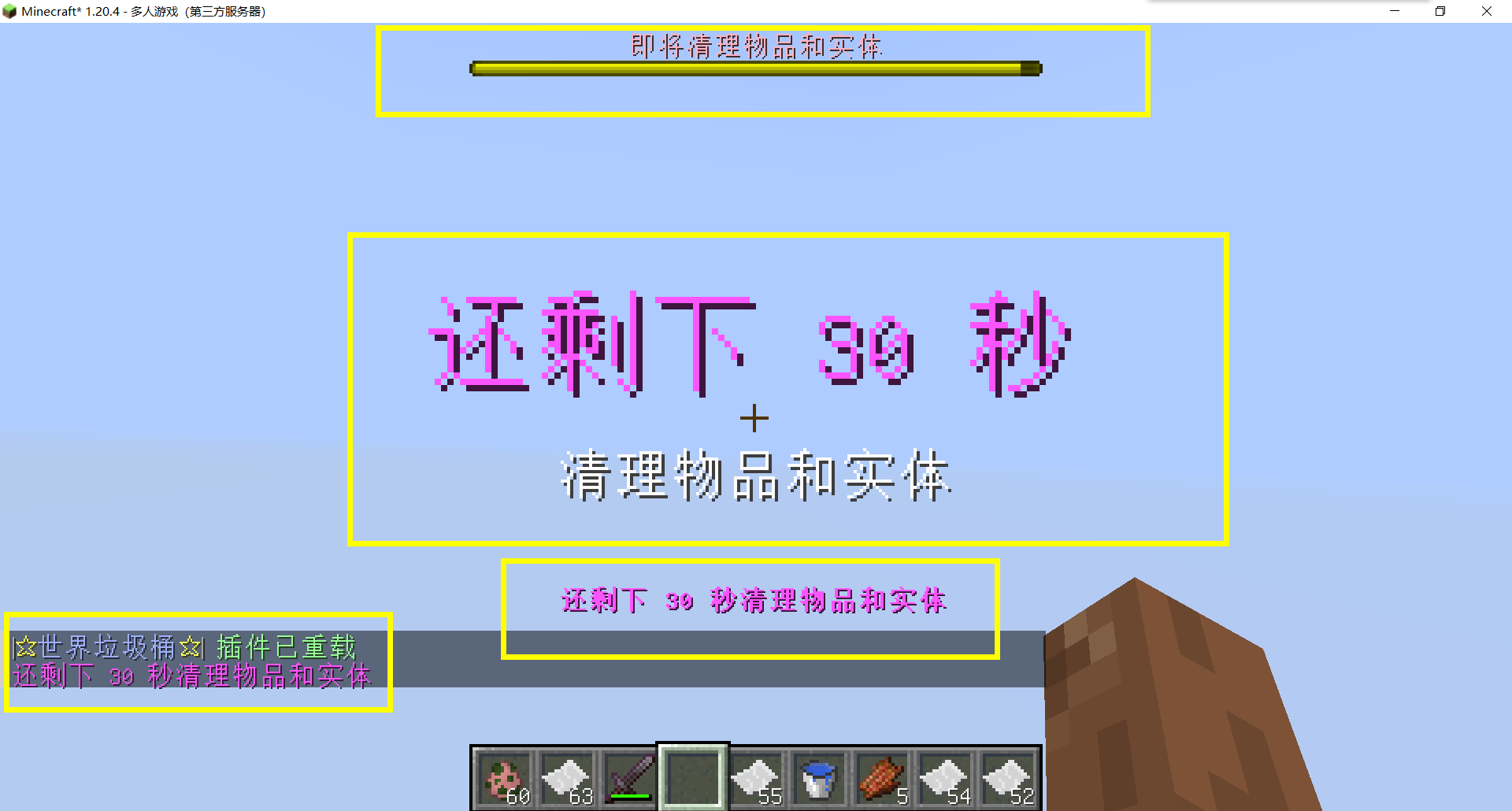
– Thank you to QQ 1664907770 (“笑脸猫”) for providing the material package for the “itemsadder” plugin (applicable to public trash cans) [Click here to download](https://www.hostize.com/zh/v/3TE06XKXx8) (IteamsAdder/WorldTrashCan config and resource)
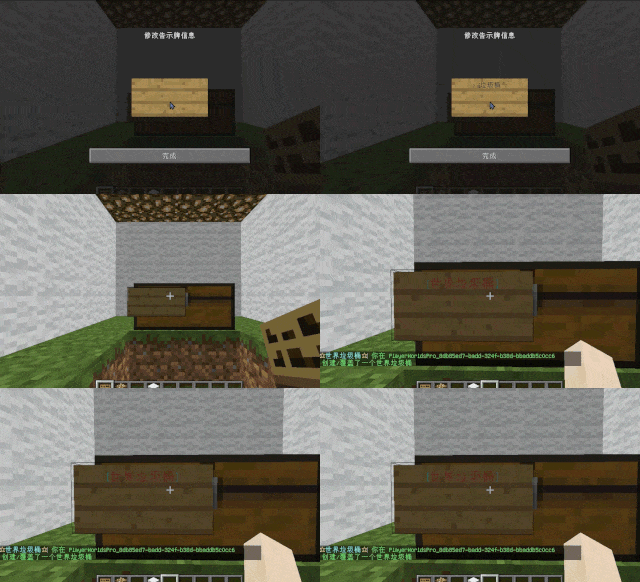
– **Player-Created World Trash Bin:**
Players have the ability to create a trash bin in their world.
Similar to the mechanics of previous sign-locked chests, the font on the sign will undergo a
transformation after creation.
When the cleaning process is initiated, items will be automatically added to the home trash bin.
Configurable settings allow players to specify detection names and transformed names after cleaning.
“To meet the demands of a small number of people, here is a reminder”
How to create a world trash can:
Place the chest on the ground, hold the signboard and right-click on the chest. Enter [世界垃圾桶] in the configuration file (configured in Set. SighCheckName), and once the font is converted, it is created. Every time the garbage is cleaned, it will be placed in the marked chest
In the default configuration file, the names of the three worlds “world, dim-1, dim1” are disabled, creating a “world trash can” (excluding op)
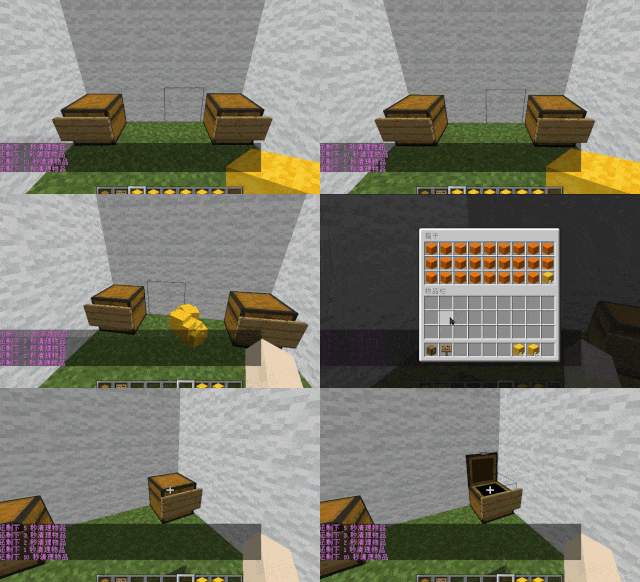
– **Support for Multiple Home Trash Bins:**
Players can use commands to grant special players the ability to place additional home trash bins.
Default quantities for home trash bins are configurable.
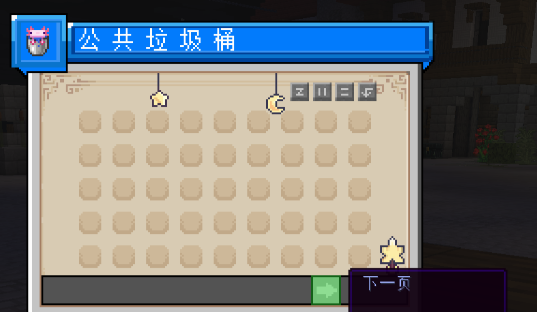
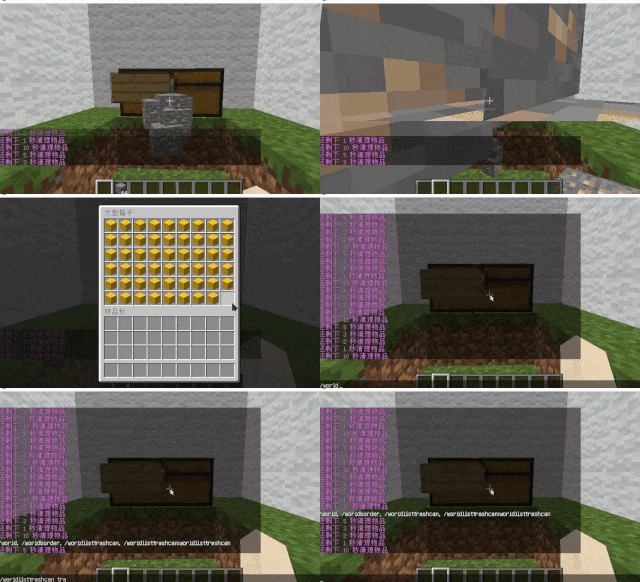
– **Home Trash Bin Overflow to Public Trash Bin:**
Items from home trash bins overflow into the public trash bin.
Public trash bins can have a configurable maximum page count and a blacklist.
– **Item Exclusion and Public Trash Bin Handling:**
Players can add items to the home trash bin blacklist to prevent their recycling.
Excluded items go directly to the public trash bin.
Configuration includes support for excluding items with special lore (e.g., items from the QS shop with
showLocation).
Public trash bins can either clear new items during each sweep or accumulate all trash without clearing.
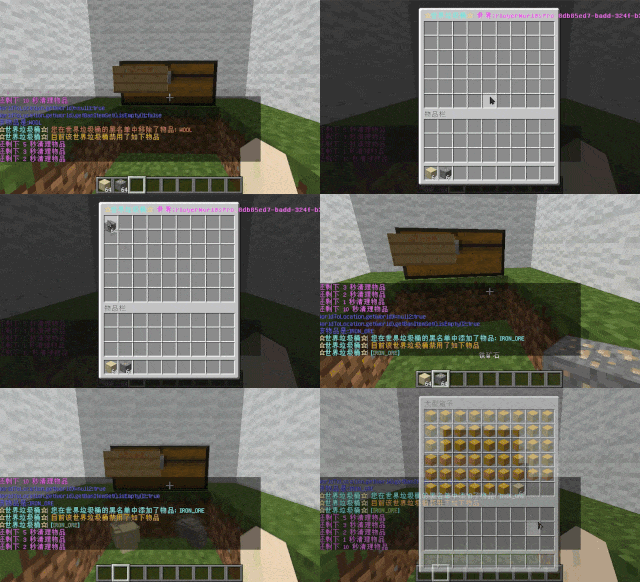
– **The public trash can can enable logging:**
Record what items the player took away

– **Entity Cleanup:**
Optional cleanup of all animals/monsters.
Command (/WorldListTrashCan Look) to view entity types and configure entity blacklists/whitelists.
Support for cleaning special entities from mod.
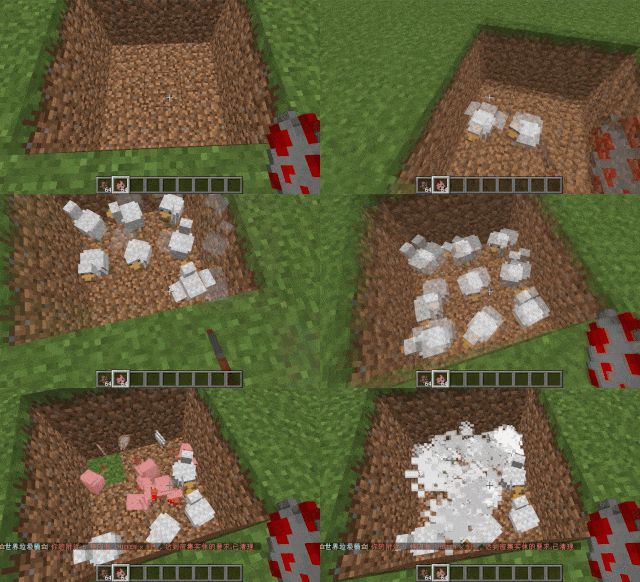
– **Dense Entity Cleanup:**
Configurable radius, target quantity, kill or remove options, and player notifications for dense entity
cleanup.
– **Spam/Command Limitations:**
Configurable chat/command intervals, whitelist commands, and informative messages.
Defense against item dropping.
Players can manually enable or disable the item-drop defense mode.
– **Performance Optimization:**
All optimizations have configurable options in the settings.
1. Quick removal of uncollectible arrows (e.g., arrows from skeletons or bows with infinite
enchantments).
2. Prohibit players from trampling on farmland
### How to Install
—
– **Throw it into the Plugins folder**
### Commands:
—
– **/wtc reload**
Reloads the plugin.
– **/wtc GlobalTrash**
Opens the public trash bin.
– **/wtc help**
Displays help information.
– **/wtc ban**
Opens the local world trash blacklist GUI.
– **/wtc Look**
Right-click to get entity type (useful for adding to the configuration blacklist/whitelist).
– **/wtc GlobalBan**
Opens the global world trash blacklist GUI.
– **/wtc add [WorldName] [Quantity]**
Sets the maximum quantity for the trash bin in the specified world (defaults to the world at your feet if not specified).
– **/wtc DropMode**
Opens or closes drop mode.
### Placeholders
—
– **%WTC_ClearTime%**:
Time until the next cleaning.
### Permission
—
– **WorldListTrashCan.BanGui**:
Permission to open the GUI for adding items to the player’s home trash bin blacklist.
– **WorldListTrashCan.GlobalTrashOpen**:
Permission to open the global trash bin.
– **WorldListTrashCan.help**:
Permission to access command help.
– **WorldListTrashCan.DropMode**:
Permission to open or close drop mode.
***(The above is available by default)***
– **WorldListTrashCan.GlobalBan**:
Permission to open the global trash bin blacklist GUI.
– **WorldListTrashCan.Look**:
Permission to right-click and query the entity type.
***(The above is not available by default)***
WorldEngine

A performance-oriented multi-world management mod for Fabric servers. Run as many worlds as you need — with per-world rules, isolated inventories, and custom portals — without tanking your TPS.
**Minecraft:** 1.21.11 | **Loader:** Fabric | **Required:** Fabric API ≥ 0.141.0
—
## Features
### Multi-World Management
Create and manage worlds at runtime — no server restarts required. Supports 9 generator types: `overworld`, `amplified`, `large_biomes`, `nether`, `end`, `void`, `flat`, `caves`, and `floating_islands`. Worlds are loaded on demand and persist across restarts.
### Per-World Rules
Each world can have its own:
– **Gamemode** — enforce survival, creative, adventure, or spectator per-world
– **PvP** — enable or disable player combat independently of other worlds
– **Difficulty** — peaceful through hard, per world
– **Gamerules** — override any vanilla gamerule (keepInventory, mobGriefing, etc.) per world
### Inventory Isolation
Group worlds together to share inventories, or keep them fully separate. Items, armor, hotbar, ender chest, hunger, XP, and status effects are all saved and restored on world transition. Worlds not in any group use independent inventories.
### Mob Spawn Control
Block or allow mob spawning at the category level (monsters, creatures, ambient, etc.) or target specific entity types. Rules stack: entity-specific rules take priority over group rules.
### Custom Portals
Build portal frames from ore blocks — iron, copper, redstone, lapis, diamond, gold, emerald, or netherite (any size, min 4×5 interior). The entire frame must be one block type. Link portals to any world, then activate by right-clicking the frame with the matching ore item. Portals use a custom animated block that won’t interfere with vanilla nether or end portals. Stepping into an active portal starts a 1.5-second warmup countdown — step out to cancel. Portals can be one-way or bidirectional, and links survive server restarts.
### Performance
– Worlds unload automatically after a configurable idle timeout
– Worlds with no players skip tick processing entirely
– Saves are staggered to avoid simultaneous disk I/O spikes
– Worlds are only loaded when a player actually enters them
—
## Installation
1. Install [Fabric Loader](https://fabricmc.net/) for Minecraft 1.21.11
2. Install [Fabric API](https://modrinth.com/mod/fabric-api) ≥ 0.141.0
3. Drop `worldengine-1.3.0.jar` into your `mods/` folder — on **both server and client**
4. Start the server — config files are created automatically in `config/worldengine/`
> **Note:** Fantasy is bundled inside the JAR. You do not need to install it separately.
> **Client mod required for portals.** The mod must be installed client-side to see and use custom portal blocks. Without it, portals are non-functional but the server won’t crash. All other features (world management, rules, inventories, mob control) are server-side only.
—
## Commands
All commands require **operator level 2** (Gamemaster) unless noted.
### World Management
| Command | Description |
|———|————-|
| `/we create [generator] [seed]` | Create a new world |
| `/we delete ` | Delete a world (requires confirmation) |
| `/we list` | List all worlds with status |
| `/we load ` | Load an unloaded world |
| `/we unload ` | Unload a loaded world |
| `/we tp [x y z] [player]` | Teleport to a world |
| `/we status` | Show performance status for all worlds |
### Per-World Rules
| Command | Description |
|———|————-|
| `/we gamemode ` | Set enforced gamemode |
| `/we pvp ` | Enable/disable PvP |
| `/we difficulty ` | Set world difficulty |
| `/we gamerule [value]` | Get/set a gamerule override |
| `/we fastplacement ` | Toggle fast-placement throttle |
| `/we rules ` | Show all rules for a world (any player) |
### Inventory Groups
| Command | Description |
|———|————-|
| `/we inventory list` | List all groups |
| `/we inventory list` | List worlds in a group |
| `/we inventory add ` | Add a world to a group |
| `/we inventory remove ` | Remove a world from a group |
| `/we inventory delete` | Delete a group |
### Mob Spawning
| Command | Description |
|———|————-|
| `/we mobs list` | Show all mob rules |
| `/we mobs deny ` | Block a specific entity from spawning |
| `/we mobs allow ` | Re-allow a specific entity |
| `/we mobs deny-group ` | Block an entire spawn category |
| `/we mobs allow-group ` | Re-allow a spawn category |
| `/we mobs reset` | Clear all mob rules |
Spawn group names: `monster`, `creature`, `ambient`, `axolotls`, `water_creature`, `water_ambient`, `underground_water_creature`, `misc`
### Portals
| Command | Description |
|———|————-|
| `/we portal list` | List all portals (any player) |
| `/we portal info` | Show info for your selected portal |
| `/we portal name ` | Name your selected portal |
| `/we portal link ` | Link to a world (one-way) or named portal (bidirectional) |
| `/we portal link ` | Link with a specific destination coordinate |
| `/we portal unlink` | Unlink your selected portal |
| `/we portal clear [world]` | Remove all portals (optionally filtered by world) |
—
## Portal Setup
> **Client mod required for portals.**
1. Build a frame from **ore blocks** — iron, copper, redstone, lapis, diamond, gold, emerald, or netherite blocks (at least 4×5 interior, any larger size works). The entire frame must be one type.

2. Right-click the frame with an **empty hand** (OP only) to select it

3. Run `/we portal link ` to link it one-way, or `/we portal link ` to link two named portals bidirectionally


4. **Activate** by right-clicking the frame with the **matching ore item** (e.g., diamond for a diamond block frame) — consumes 1 item in survival

5. Walk into the portal — a 1.5-second countdown appears on the action bar, then you teleport. Step out to cancel.
To create a two-way portal: build frames in both worlds, name each with `/we portal name `, then run `/we portal link ` from each side. Activate both sides with the matching ore item.
Breaking a frame block deactivates the portal. Repair the frame and re-activate with another ore item.
—
## Configuration
Config files are stored in `config/worldengine/` on your server:
– `config.json` — global defaults and performance settings (idle timeout, save interval, etc.)
– `worlds/.json` — per-world settings (auto-created when a world is made)
– `inventory-groups.json` — inventory group assignments
– `portals.json` — portal link data
All config is hot-written on change — no server restart required after running `/we` commands.
—
## Compatibility
– Works alongside vanilla dimensions (overworld, nether, end) — custom portals do not interfere with nether or end portals
– Compatible with LuckPerms (suggested, not required)
– Server-side for all features except portals — portal blocks require the mod on both server and client
WorldBlocker
# WorldBlocker – World Access Control Plugin
**WorldBlocker** lets server admins block players and entities from entering specified worlds, with customizable messages and hot-reload support via `/worldblocker reload`.
**Join our** [**Discord**](https://discord.gg/YGzA4UxzFB) — discover other cool plugins, suggest new features, or get help with configurations.
### Features ✨
– **World Entry Blocking**
Prevent players and/or entities from entering designated worlds.
– **Immune Permissions**
Grant `worldblocker.immune` to bypass world restrictions, or ignore immunity entirely.
– **Custom Messages**
Send configurable MiniMessage alerts when entry is denied.
– **Entity Control**
Optionally block all entities (mobs, items, etc.) except players.
– **Hot Reload**
Reload the plugin config on-the-fly with `/worldblocker reload`.
### Main config (`config.yml`) ⚙️
config.yml
“`yaml
# Join our discord – https://discord.gg/YGzA4UxzFB you can find other cool plugins there.
# Permissions
# “worldblocker.reload” – permission required to use “/worldblocker reload” command
# blocks all entities except players
blockAllEntities: false
# if true, all players without immunePermission will be blocked
blockPlayers: true
# if true, all players will be blocked, even if they have immunePermission
ignoreImmunePermission: false
immunePermission: “worldblocker.immune”
# if true, player will get message when they fail to enter a blocked world
doSendMessage: true
# supports MiniMessage
canNotEnterWorld: “✘ You can’t enter this world!”
noPermissionToReload: “✘ You don’t have permission to reload Config!”
configReloaded: “✔ Config reloaded!”
blockedWorlds:
# – “world”
# – “world_nether”
# – “world_the_end”
““
### Permissions 🔐
| Permission Node | Description |
| ——————— | ———————————- |
| `worldblocker.immune` | Bypass world entry restrictions |
| `worldblocker.reload` | Allows reloading the plugin config |
### Commands 📟
| Command | Description |
| ———————- | ——————————- |
| `/worldblocker reload` | Reload the plugin configuration |
World Dimension Nexus
# 🌐 World Dimension Nexus
[](https://www.curseforge.com/minecraft/mc-mods/world-dimension-nexus)
[](https://www.curseforge.com/minecraft/mc-mods/world-dimension-nexus)
[](https://www.curseforge.com/minecraft/mc-mods/world-dimension-nexus)
[](https://modrinth.com/mod/world-dimension-nexus)
[](https://modrinth.com/mod/world-dimension-nexus)
[][issues]
[][wiki]
[][ko-fi]
![World Dimension Nexus Logo][logo]
**The ultimate serverside tool for managing dimensions, worlds, and player data without requiring
any client-side installation.**
🛠️ *This mod is created as part of
the [NeoForged Serverside Summer Modjam 2025][neoforged-modjam].*
⚠️ **Beta Version Notice**: This mod is currently in beta. Features and commands may change before
the stable release.
## ✨ Key Features
### 🌍 Dimension Management
– **Multi-World Support** – Create and manage unlimited custom dimensions with various world types
– **World Import/Export** – Easy dimension sharing and migration between servers
– **Game Mode Management** – Set different game modes per dimension (creative, survival, adventure,
spectator)
– **Cross-Dimension Safety** – Void protection, safe landing, and automatic fallback systems
### 🚀 Teleportation & Movement
– **Cross-Dimensional Teleportation** – Seamless travel between worlds with built-in safety features
– **📍 Warp System** – Create private and public teleportation points for quick travel
– Private warps for personal bases and locations
– Public warps for community areas and landmarks
– Configurable limits and cooldown protection
– Cross-dimension warp support
– **🤖 Auto-Teleport System** – Automated player movement based on events and triggers
– First join, death, respawn triggers
– Customizable destination coordinates
– Event-based player routing
### 🏛️ Portal Network
– **Physical Portals** – Create visible gateways between dimensions
– **Portal Management** – Bind and configure portal connections
– **Visual Portal System** – Interactive portal blocks for immersive travel
### ⚙️ Server Administration
– **Fully Serverside** – Works with vanilla clients – no client mods required
– **Comprehensive Commands** – Intuitive command system with tab completion
– **Flexible Configuration** – Extensive config options for all systems
– **Permission Integration** – Supports server permission levels and moderation tools
## 🚀 Quick Start (Demo)
This quick start guide will show you a limited set of commands to get you started with the
World Dimension Nexus mod.
Please use a test world to try out the commands and features before using them in your main world.
### 🌍 Dimension Setup
The following commands will help you create and manage dimensions:
“`bash
# Import a new dimension like lobby and fishing
/wdn dimension import lobby_dimension.wdn
/wdn dimension import fishing_dimension.wdn
# Optionally, create a new dimension with a preset
/wdn dimension create my_skyblock skyblock
# List all dimensions
/wdn dimension list
“`
### 🚀 Teleportation & Auto-Teleport Workflow
Set up automated player movement between dimensions using auto-teleport rules:
“`bash
# Teleport to a dimension
/wdn teleport dimension world_dimension_nexus:my_skyblock
# Set up auto-teleport rules
/wdn autoteleport add always world_dimension_nexus:lobby_dimension # 🏠 Send new players to lobby
/wdn autoteleport add on_death world_dimension_nexus:fishing_dimension # 🎣 Send players to fishing on death
# List all auto-teleport rules
/wdn autoteleport list
“`
After running these commands:
– 🏠 Players will be sent to the lobby dimension when they join for the first time.
– 🎣 Players will be sent to the fishing dimension when they die.
💡 *Tip: You can customize triggers, target dimensions, and even coordinates!
See* [Auto-Teleport Commands][commands-auto-teleport] *for advanced options.*
Note: The hot-creation of dimensions is limited, so you might need to restart the server
to get the dimensions fully functional with all features and entities.
### 🏛️ Portal Setup
Create and manage portals between dimensions:
“`bash
# Teleport to the fishing dimension (if not already in the dimension)
/wdn teleport dimension world_dimension_nexus:fishing_dimension
# Use a good location for the portal, e.g. at one of the trees
/wdn portal create unbound green 43 49 20
# Teleport to the lobby dimension
/wdn teleport dimension world_dimension_nexus:lobby_dimension
# Use a good location for the portal, e.g. in the woods
/wdn portal create unbound green -36 9 -27
“`
After running these commands, you will have two portals created in the lobby and fishing.
You can now use the portals to teleport between the dimensions.
## 🎯 Use Cases
– **Creative Servers** – Separate building worlds with different themes
– **Survival Networks** – Multiple survival worlds with different difficulties
– **Minigame Servers** – Dedicated arenas and lobbies
– **Hub Servers** – Central lobby connecting to various game modes
– **Event Hosting** – Temporary dimensions for special occasions
## 📚 Documentation
📖 **[Complete Wiki Documentation][wiki]** – Comprehensive guides and tutorials
### Quick Links
– [⚡ Quick Start Guide][quick-start] – Get started in 5 minutes
– [🌍 Dimension Commands][commands-dimension] – Create and manage dimensions
– [🚀 Teleport Commands][commands-teleport] – Player teleportation
– [🤖 Auto-Teleport Commands][commands-auto-teleport] – Automated rules
– [🏗️ Example Tutorials][examples-creative] – Step-by-step setups
## 🤝 Contributing
We welcome contributions! Please:
1. Check existing [issues][issues] and [pull requests][pull-requests]
2. Follow the existing code style and conventions
3. Test your changes thoroughly
4. Update documentation as needed
## 🐛 Support
– **Bug Reports**: [GitHub Issues][issues]
– **Feature Requests**: [GitHub Discussions][discussions]
– **Documentation**: [Wiki][wiki-home]
– **Troubleshooting**: [Debug Guide][debug-guide]
## 📜 License
This project is open source under the [MIT License][license].
**Ready to get started?** Check out the [Quick Start Guide][quick-start] to create your
first dimension in minutes!
[ko-fi]: https://ko-fi.com/Kaworru
[wiki]: https://github.com/MarkusBordihn/BOs-World-Dimension-Nexus/wiki
[wiki-home]: https://github.com/MarkusBordihn/BOs-World-Dimension-Nexus/wiki/Home
[issues]: https://github.com/MarkusBordihn/BOs-World-Dimension-Nexus/issues
[pull-requests]: https://github.com/MarkusBordihn/BOs-World-Dimension-Nexus/pulls
[discussions]: https://github.com/MarkusBordihn/BOs-World-Dimension-Nexus/discussions
[license]: https://github.com/MarkusBordihn/BOs-World-Dimension-Nexus/blob/main/LICENSE.md
[neoforged-modjam]: https://neoforged.net/news/2025serversidesummer/
[quick-start]: https://github.com/MarkusBordihn/BOs-World-Dimension-Nexus/wiki/Quick-Start
[commands-dimension]: https://github.com/MarkusBordihn/BOs-World-Dimension-Nexus/wiki/Commands-Dimension
[commands-teleport]: https://github.com/MarkusBordihn/BOs-World-Dimension-Nexus/wiki/Commands-Teleport
[commands-auto-teleport]: https://github.com/MarkusBordihn/BOs-World-Dimension-Nexus/wiki/Commands-Auto-Teleport
[examples-creative]: https://github.com/MarkusBordihn/BOs-World-Dimension-Nexus/wiki/Examples-Creative-World
[debug-guide]: https://github.com/MarkusBordihn/BOs-World-Dimension-Nexus/wiki/Commands-Debug
[logo]: https://cdn.modrinth.com/data/nUBOuZRL/images/62b764b75c067e7a716c93eeebc934f75a4256c5.png