XaeroPlus
# XaeroPlus
XaeroPlus is a client-side Minecraft mod that depends on and modifies the Xaero’s WorldMap and Minimap mods with extra
features and performance improvements – particularly for use on anarchy servers like 2b2t.
XaeroPlus is not affiliated or endorsed by xaero96. Please report issues to XaeroPlus’s [Github](https://github.com/rfresh2/XaeroPlus/issues) or [discord server](https://discord.gg/nJZrSaRKtb).
Example Map

# Xaero Versions
Each XaeroPlus release is only compatible with a specific version of Xaero’s WorldMap and Minimap.
Xaero’s Minimap can be swapped out for [BetterPVP](https://chocolateminecraft.com/betterpvp2.php)
Download and include these mods **in addition** to XaeroPlus (3 jars total).
You can find download links to Xaero’s mods here:
* [Xaero’s World Map](https://modrinth.com/mod/xaeros-world-map/versions)
* [Xaero’s Minimap](https://modrinth.com/mod/xaeros-minimap/versions)
# Modifications
* [1.5-3x your FPS by limiting the framerate the minimap is rendered at!](https://youtu.be/hIG-VyGQLao)
* Tip: For least visual impact, lock the minimap’s north
* [Adjustable minimap scaling that increases how many chunks are visible](https://youtu.be/dNqxGzGAHyk)
* [NewChunks Highlighting in MiniMap and WorldMap.](https://youtu.be/n-Tf6TJSsiA)
* [Baritone](https://github.com/cabaletta/baritone) integration
* Baritone Goals synced as temporary waypoints
* [Point and Click Travel](https://youtu.be/gbguyfXLgi0)
* [Waystones](https://legacy.curseforge.com/minecraft/mc-mods/waystones) and [Fabric Waystones](https://legacy.curseforge.com/minecraft/mc-mods/fabric-waystones) integration
* Syncs Waystones as temporary waypoints
* [WorldTools](https://modrinth.com/mod/worldtools/) World Downloader integration
* [Highlights saved chunks while downloading](https://youtu.be/mtCqwJ_RGcc)
* [Portals Highlighting in Minimap and WorldMap](https://youtu.be/zstGVfVRrAs)
* [Portal Skip Highlighting in Minimap and WorldMap](https://youtu.be/g_yQ8D95RY0). Detects chunks where a portal could have been loaded.
* OldChunks Highlighting in Minimap and WorldMap.
* Intended for use on 2b2t. Highlights chunks that were generated in 1.12.2 or lower in the Overworld and Nether based on the natural blocks present in the chunk.
* [Transparent minimap background instead of wasted black screen space.](https://imgur.com/a/jGgHqL4)
* [Fast map region writes](https://youtu.be/B5d7FaHXDCk). Prevent missed chunks in map while traveling at very high speeds.
* Allow multiple MC instances to read/write to the same map concurrently
* Transparent obsidian roof. Useful for mapping 2b2t spawn.
* Setting to always view and create waypoints in the Overworld when in Nether.
* [Render server view distance square around the player.](https://youtu.be/iY_JTGFK6Yg)
* [Dimension hot-switching on WorldMap and Minimap.](https://youtu.be/hXZQtX2df3I)
* Recommended: Create keybinds for Minimap dimension switching.
* WorldMap GUI:
* WorldMap zoom unlocked
* GUI on WorldMap to pan the map to user entered coordinates.
* WorldMap Follow mode and GUI button
* F1 on WorldMap hides GUI and overlays
* Waypoints GUI:
* [Search](https://youtu.be/7DRMUsmZDxc)
* Display distance to waypoints on Waypoints GUI
* Always sort enabled waypoints before disabled waypoints
* GUI button to enable/disable all waypoints
* [Waypoint Beacons](https://imgur.com/a/jGgHqL4)
* Minecraft world always renders in background while in a Xaero GUI for client travel mods compatibility
* Minimap entity dot fix. Hides the entity dot when arrow mode is selected.
* WorldMap and Waypoint directories optionally indexed by:
* Multiplayer server list name.
* Base Server Domain Name
* Server IP (Xaero’s default)
* **Changing this setting requires you to manually rename existing folders in `.minecraft/XaeroWaypoints/` and `.minecraft/XaeroWorldMap/`**
* Overworld dimension optionally stored in the “DIM0” directory instead of “null”
* **Changing this setting requires you to manually rename existing folders in `.minecraft/XaeroWorldMap/Multiplayer_/`**
* WorldMap 1.30.0 added cave data saving and rendering. There is a setting on by default in XaeroPlus that changes how the nether is rendered with cave mode off to be as it was previously.
* This removes the need to manually move existing world data files.
Configurations are in the Xaero WorldMap and Minimap settings GUI.
Toggleable settings support keybinds through the standard Minecraft Controls GUI.
# Language Translations
PR’s are welcomed for language translations.
Language files are located in `src/main/resources/assets/xaeroplus/lang/`
# Other Useful Tools
* Convert JourneyMap World Files to Xaero: [JMToXaero](https://github.com/Entropy5/JMtoXaero)
* Convert JourneyMap Waypoints to Xaero: [JMWaypointsToXaero](https://github.com/rfresh2/JMWaypointsToXaero)
* 2b2t Atlas Waypoints to Xaero: [JMWaypointsToXaero/atlas](https://github.com/rfresh2/JMWaypointsToXaero/tree/atlas)
* Convert MC Region Files to Xaero: [JMToXaero/Region-Scripts](https://github.com/Entropy5/JMtoXaero/blob/Region-Scripts/src/main/java/com/github/entropy5/RegionToXaero.java)
* 2b2t 256k WDL Xaero Map (20GB): [mc-archive](https://data.mc-archive.org/s/eFDEy2XKof83Kez)
* Xaero World
Merger: [JMToXaero/Region-Scripts](https://github.com/Entropy5/JMtoXaero/blob/Region-Scripts/src/main/java/com/github/entropy5/XaeroRegionMerger.java)
* Can be used to merge 256k WDL into an existing world. With optional darkening only on tiles from 256K
Xaero Zoomout
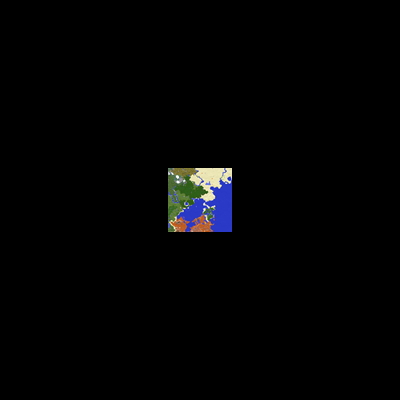
## XaeroZoomout
Reduces the minimum zoom of [Xaero’s World Map](https://modrinth.com/project/NcUtCpym) from 0.0625x to 0.0025x.
[]()
[](https://modrinth.com/project/T6oqPfxF/versions)
[](https://fabricmc.net/)
[](https://neoforged.net/)
[](https://modrinth.com/project/T6oqPfxF)
[](https://curseforge.com/minecraft/mc-mods/xaerozoomout)
[](https://github.com/TerminalMC/XaeroZoomout)
### Features
No settings, no setup; just zoom out and watch it work.
As a guide, the Xaero’s World Map display is typically about 30k blocks wide when
fully zoomed out. With this mod, the display width is increased to about 760k.
Note: Rendering the world map is quite CPU-intensive, so you’ll probably experience
some lag when fully zoomed out.
### Contact
[](https://discord.terminalmc.dev)
[](https://github.com/TerminalMC/XaeroZoomout/issues)
[](https://github.com/TerminalMC/XaeroZoomout/blob/HEAD/LICENSE.txt)
x10k Management Core
# x10k Management Core
### Lastest version: Stable 1.6.1 (01/03/2026)
Hi, I started this plugin as a hobby, so it has lots of features that will enhance the survival gameplay, all in one plugin, so you don’t need to install 4 or more plugins.
Everything is extremely configurable; you can enable and disable almost every command, customize the messages, prefixes, and more!
For now we have:
– **Homes & warps** system and cmds
– **Tpa & ping** system and cmds
– **Graves & back** system and cmds
– **Warps & rank** system and cmds
– **Notifications** system and cmds
– **Msg and reply** system and cmds
– **Clearlag & combat** system and cmds
– **Ban & warn** system and cmds
– **Admin commands** (feed, fly, heal, vanish, gamemode (aliases), etc.)
Also, here are the placeholders (this is a Beta feature, so expect changes):
“`
%xmc_rank% – Displays the highest rank name of the player
%xmc_rank_prefix% – Displays the formatted prefix of the player’s highest rank (including colors and gradients)
%xmc_warnings% – Displays the total amount of active warnings the player has
%xmc_afk% – Displays “AFK” if the player is currently away from keyboard, otherwise empty
“`
Extra links and more info:
> **[Permissions and commands](https://pastebin.com/92PRGhwQ)** (lastest update: 22/02/2026)
xTpa
# ⚡ xTpa | The Premium Teleportation Suite

**xTpa** is a professional-grade teleportation plugin for Minecraft servers that prioritizes user experience, visual feedback, and server performance. Say goodbye to boring, text-only teleport requests and welcome a new era of interactive player movement.
—
## 🚀 Why choose xTpa?
Unlike standard teleport plugins that only provide simple chat messages, **xTpa** focuses on **immersive feedback**. With integrated sounds, titles, and action bars, your players will never miss a request again.
### ✨ Key Features at a Glance:
* **🎨 Advanced Visuals:** Uses **Titles**, **Subtitles**, and **ActionBars** to grab the player’s attention immediately when a request arrives.
* **🎵 Audio Feedback:** Every action has a soul! Fully configurable sounds for receiving requests, starting the countdown, and successful arrival.
* **🛡️ Combat-Safe Teleport:** Prevents players from escaping combat or dangerous situations by detecting movement during the teleport countdown.
* **🌈 HEX & Legacy Colors:** Supports the full range of modern HEX colors (`&#RRGGBB`) and legacy formatting codes.
* **⚡ Optimized Performance:** Written with high-concurrency in mind to ensure your server’s TPS stays at a solid 20.
* **🔗 PlaceholderAPI Support:** Fully integrated placeholders like `%xtpa_player%` and `%xtpa_time%` for customized messages.
—
## 🛠️ Detailed Commands & Permissions
| Command | Usage | Description | Permission |
| :— | :— | :— | :— |
| `/tpa` | `/tpa ` | Send a teleportation request to a player. | *None (Default)* |
| `/tpaccept` | `/tpaccept` | Accept the most recent teleport request. | *None (Default)* |
| `/tpdeny` | `/tpdeny` | Decline the current pending request. | *None (Default)* |
| `/xtpa` | `/xtpa reload` | Reload the plugin configuration and messages. | `xtpa.admin` |
### 🔑 Special Permissions
* `xtpa.bypass.cooldown`: Allows the player to send requests without waiting for the cooldown.
* `xtpa.bypass.delay`: Allows instant teleportation without the countdown wait.
—
## ⚙️ Full Configuration Preview
Here is the complete `config.yml` which allows you to customize every single aspect of the plugin to your liking.
“`yaml
# _____
# __ _/__ _ __ __ _
# / / / // ‘_ / _` |
# > < / / | |_) | (_| |
# /_/_\/ | .__/ __,_|
# |_/
# Official Support: https://xplugins.es/discord
# Documentation: https://xplugins.es/plugins/xtpa
# General plugin settings
settings:
tpa-timeout-seconds: 60 # How long a request stays active before expiring
cooldown-seconds: 15 # Time a player must wait between sending requests
teleport-delay-seconds: 3 # Seconds to wait before the teleport happens
teleport-move-cancel: true # If true, teleport cancels if the player moves
center-messages: false # Aesthetic option to center chat messages
# Sound System
# Use standard Spigot sound names (e.g., ENTITY_ENDERMAN_TELEPORT)
sounds:
received-tpa:
enabled: true
sound: "ENTITY_EXPERIENCE_ORB_PICKUP"
volume: 1.0
pitch: 1.0
teleport-start:
enabled: true
sound: "BLOCK_NOTE_BLOCK_HARP"
volume: 0.5
pitch: 1.5
teleport-success:
enabled: true
sound: "ENTITY_ENDERMAN_TELEPORT"
volume: 1.0
pitch: 1.0
# Visual Feedback (Titles & ActionBars)
visuals:
title:
enabled: false
title: "&#FAEDCB ℹ Request Received!"
subtitle: "&f%xtpa_player% wants to teleport to you"
fade-in: 10
stay: 60
fade-out: 10
actionbar:
enabled: true
message: "&fHey! &#FAEDCB&n%xtpa_player%&f has sent you a TPA! Check your chat."
# Message System (Supports HEX Colors)
messages:
prefix: ""
no-permission: "&c ✘ Error! &fYou do not have permission to use this."
player-not-found: "&c ✘ &fThat player is offline or does not exist."
cooldown: "&#FF5252 ✘ Error! &fWait &e%xtpa_time%s &fbefore sending another request."
self-tpa: "&#FF5252 ✘ Error! &fYou cannot teleport to yourself."
tpa-sent: "&#A0FF91 ✔ Success! &fRequest sent to &e%xtpa_player%&f."
tpa-no-pending: "&#FAEDCB ℹ Info! &fYou have no pending requests."
tpa-expired: "&#FAEDCB ℹ Info! &fThe teleport request has expired."
tpa-denied-target: "&#A0FF91 ✔ Success! &fYou denied the request."
tpa-denied-sender: "&#FF5252 ✘ Error! &fPlayer &e%xtpa_player% &fdenied your request."
tpa-accepted-target: "&#A0FF91 ✔ Success! &fRequest accepted."
tpa-accepted-sender: "&#A0FF91 ✔ Success! &e%xtpa_player% &faccepted your request."
teleport-starting-sender: "&#A0FF91 ✔ Success! &fTeleporting you to &e%xtpa_player%&f."
teleport-delay-notice-sender: "&#FAEDCB ℹ Info! &fTeleporting in %xtpa_time% seconds. Do not move!"
teleport-cancelled-moved: "&#FF5252 ✘ Error! &fMovement detected! Teleport cancelled."
teleport-cancelled-quit: "&#FF5252 ✘ Error! &fPlayer disconnected. Teleport cancelled."
teleport-success-sender: "&#A0FF91 ✔ Success! &fYou have arrived safely."
# Interactive Chat Request
received-request:
line1: "&#FAEDCB ℹ Info! &fPlayer &#FAEDCB%xtpa_player% &fwants to teleport to you."
line2-accept: "&fType &a/tpaccept &fTo accept."
line3-deny: "&fType &c/tpdeny &fTo decline."
line4: "&#FAEDCB ℹ Info! &fThe request expires in %xtpa_time% seconds."
hover-accept: "&#A0FF91 Click here to ACCEPT!"
hover-deny: "&c Click here to DENY!"
```
---
## 📥 Installation
1. **Download** the latest `.jar` file from Modrinth.
2. **Drop** the file into your server's `plugins/` folder.
3. **Restart** or **Reload** your server.
4. **Configure** the `config.yml` to your heart's content!
---
## 🌐 Community & Support
Join our growing community of developers and server owners!
[](https://xplugins.es/plugins/xtpa)
[](https://xplugins.es/discord)
---
*Created by the team at xPlugins. Quality matters.*
xSetSpawn
# 🌍 xSetSpawn – The Ultimate Global Spawn Management
—
**xSetSpawn** is a modern, lightweight, and highly customizable solution for managing your Minecraft server’s spawn point. Now more global than ever, v1.0.3 introduces a full multi-language system and advanced stability features to give your players the most immersive experience possible.

—
## 🔥 Why choose xSetSpawn?
Unlike standard essentials plugins, **xSetSpawn** gives you granular control over the *feel* of your server’s hub. It’s designed for server owners who care about presentation, performance, and international reach.
### 🚀 Key Features
* **🌍 Global Multi-Language System:** Ship your server in **English**, **Spanish**, or **Portuguese (BR)** out of the box. Switch languages on the fly with a single config setting.
* **✨ Immersive Visuals:** Greet your players with customizable on-screen Titles, Subtitles, and ActionBars. All visual texts are now fully localizable per language!
* **🎨 Modern HEX Support:** Full support for **HEX Colors** (`&#RRGGBB`) in all messages, prefixes, and titles for that premium server aesthetic.
* **🧪 Advanced Stability:** Built-in startup error handling and a robust internal refactor to ensure your plugin always enables correctly.
* **⏱️ Smart Cooldown System:** Prevent command spam with customizable delays. Includes a bypass permission for VIPs or Staff.
* **🚪 Auto-Routing:** Force players to spawn on join or respawn to maintain your server flow.
—
## 🛠️ How it Works
1. **Position:** Walk to your desired location. Camera angle (pitch/yaw) is saved!
2. **Set:** Type `/setspawn`. The location is instantly recorded in `data/data.yml`.
3. **Localize:** Pick your language in `config.yml` (e.g., `lang: es`).
4. **Reload:** Use `/xspawn reload` to apply changes instantly without a restart.
5. **Play:** Your players are greeted with beautiful visuals and sounds upon arrival!
—
## 📜 Commands & Permissions
| Command | Description | Permission |
| :— | :— | :— |
| `/spawn` | Teleport to the server’s spawn point. | `xspawn.use` |
| `/setspawn` | Define the spawn location at your position. | `xspawn.admin` |
| `/xspawn reload` | Reload config and language files instantly. | `xspawn.admin` |
*(Note: `xspawn.bypass` allows instant teleportation).*
—
## ⚙️ Configuration (v1.0.3 Snippet)
The new configuration is cleaner and focused on logic, while all text moved to the `lang/` folder:
“`yaml
# __ __ _____
# / / / ____|
# / | (___ _ __ __ _ __ __ _ __
# / ___ | ‘_ / _` | / / / | ‘_
# /_/_ ____) | | |_) | | (_| | V V / | | | |
# |_____/ | .__/ __,_| _/_/ |_| |_|
# | |
# |_| By xPlugins
settings:
# Plugin language. Options: en, es, br
lang: en
# Require permissions to use /spawn?
require-permission: true
# Cooldown System
cooldown:
enabled: true
seconds: 5
bypass-permission: “xspawn.bypass”
# Auto-Teleport
teleport-on-join: true
teleport-on-respawn: true
visuals:
sound:
enabled: true
name: “ENTITY_PLAYER_LEVELUP”
particles:
enabled: true
name: “TOTEM”
titles:
enabled: true
fade-in: 10
stay: 40
fade-out: 10
# All messages and titles are now in lang/messages_.yml
“`
> xPlugins 2026
xRtp
**🚀 xRtp – Smart & Secure Random Teleport**

> **xRtp** is a powerful, optimized, and fully configurable Random Teleport plugin designed for modern Minecraft servers. Built for professional performance, absolute safety, and extreme customization.
 
—
> ## ✨ Main Features (v1.0.2 Update)
> ### 🚀 Zero-Lag Search Engine
Our new algorithm checks up to **10 coordinates per tick** only within **pre-generated chunks**. This ensures almost instant teleportation with **zero TPS drops** and zero lag, as it prevents generating new terrain.
> ### 🎛 Menu Engine 2.0 (Full Customization)
Total control over your `menu.yml`. Toggle the **auto-filler** or design your layout slot-by-slot using **slot lists** (e.g., `slots: [0,1,8,9]`) to create unique borders and designs.
> ### ⚡ Interactive Menu Actions
Turn menu items into functional buttons. Supports several action types:
– `CLOSE`: Closes the inventory.
– `MESSAGE`: Sends custom messages to the player.
– `COMMAND`: Executes a player command (e.g., `/spawn`).
– `CONSOLE`: Executes a command from the console on the player’s behalf.
> ### 📊 Enhanced Visuals & BossBars
Includes a fully customizable **BossBar** with dynamic progress titles that show the remaining time (`%time%s`) during the teleport delay.
—
> ## 📂 Included Files
– `config.yml` → General settings, optimization toggles, permissions, safety system.
– `menu.yml` → GUI Engine 2.0 layout and menu customization.
– `lang.yml` → Fully customizable messages, BossBar, and translations.
– `Config ES/` → **Bonus!** Includes a pre-configured Spanish VIP setup.
—
> ## 🔐 Permissions
| Permission | Description |
|————|————-|
| `xrtp.admin` | Reload the configuration using `/rtp reload` |
| `xrtp.bypass` | Bypass teleport cooldown |
| (Optional) | General use permission can be disabled in config |
—
> ## ⚙️ Configuration Highlights
✔ **Use Pre-generated Chunks** (Anti-lag system)
✔ Cancel teleport on movement
✔ Adjustable cooldown duration
✔ Custom slot-by-slot menu filling
✔ Interactive buttons with placeholders
✔ Advanced BossBar with progress titles
✔ Maximum attempts to find a safe location
—

—
> ## 🎯 Perfect For
Survival • SMP • Skyblock • Factions • Lobby • Etc
—
> ### 💻 Developer API
xRtp includes a **powerful and easy-to-use API** so other plugins can interact with it. You can execute RTPs manually, check cooldowns, and hook into events to modify or cancel teleports.
> #### How to use it
First, verify that xRtp is loaded and get the instance:
“`java
if (Bukkit.getPluginManager().getPlugin(“xRtp”) == null) {
// xRtp is not installed
return;
}
XRtpAPI api = XRtpAPI.getInstance();
Wyrmroost
**Re-imagining the world of Minecraft by filling it with diverse, tameable dragons that roam the new and beautiful worlds awaiting to be explored by those who dare to venture into such territories, where magic advances beyond enchanting. This, is Wyrmroost.**
Wyrmroost aims to add many unique and diverse dragon species, which can be tamed and utilized for players and their needs. Whether it be for combat, farming, transportation, you name it. There’s probably a dragon for it.
But beware, taming a dragon isn’t an easy feat. You will find befriending such a creature will take hard work and dedication, depending on the dragon and the situation.
Our mod currently only has a few dragons implemented, however in the future updates we will have eight different types of dragons. You can check the wiki to find more information about the species currently in-game.
# Dependencies
Pre 1.18.2
– None
Post 1.18.2 (we are currently working on this it’s not released yet.)
– Gecklib
– Patchouli
## Issues / Bug Reports
If you found something that doesn’t look right, is probably a bug, or is just flat out broken please head over to our Github to report it! Your bugs are most likely to be seen there versus our Discord server.
We are aware that in the older versions of the mod the dragons cannot breed. We will not be returning to the .16 version, however a kind person has made this patch:
https://www.curseforge.com/minecraft/mc-mods/wyrmroost-patch
# FAQ
– **How do I tame this dragon?**
We have an official wiki that is updated by the developers only.
– **Can you update/backport to ____?**
Updating takes time. Wyrmroost will continue to try and stay on latest versions of minecraft, however please be patient.
We are looking towards the future, so backporting the mod will never happen and your questions to backport will not be answered.
– **Where’s the dimension and what are your plans for it?**
The dimension is not in the mod yet. It will be the next major update following the port to 1.18.2.
We want to aim for a dragon’s world with our own unique blocks, items, and most importantly, dragons. While we can not give an ETA you can follow our progress in the dedicated Discord server where we are most active.
– **Can I use Wyrmroost in my modpack?**
We have no issues with people using our mod in modpacks.
– **Can I ask a question?**
If You have any further questions you can stop by our Discord! We’ll be happy to help.
### Credits
**Creators:**
– Shannieann – Model and Texture artist, Animator, Wiki manager
– Kingdomall – Model & Texture artist
– Ukan – Model, Texture, and Sound artist
– Sniffity – Coder
– Koala – Coder
**Contributors:**
– Lagoon – Dragon Fruit Drake concept, code contribution, and most importantly, the Geode hoes.
– Novacraft – Original Rooststalker and texture as well as original Dragon Fruit Drake model.
– Coda – Lesser Desertwyrm Item textures. Several contributions.
– Aycfes – Brazilian translations.
– Raptorlos – German translations.
– Azuichh – French translations.
– WolfShotz – (ex) Coder
WXJK’s Simple Pocket Dimensions
This datapack lets players craft and use a personal pocket dimension in the game. There are 3 tiers to the pocket dimensions. Small, Medium, And Large. The first time you enter your pocket dimension it comes with some decoration and there is more decoration as you get a bigger pocket dimension. To use a pocket dimension hold right click to start to use it will take 3 seconds to enter and you will see your progress in the action bar.
Pocket Dimension Crafting Recipies
A=Amethyst Shard
B=Nether Quarts
C=Diamond Block
D=Chest
E=Ender Chest
F=Netherite Scrap
G=Small Pocket Dimension
H=Medium Pocket Dimension
I=Nether Star
J=Netherite Ingot
Small Pocket Dimension:
[ADA]
[BCB]
[AEA]
Medium Pocket Dimension:
[FCF]
[EGE]
[FCF]
Large Pocket Dimension:
[JEJ]
[CHC]
[JIJ]
Waypoints (wWaypoints)
**Officially Allowed on Hoplite**
wWaypoints is the new best waypoint mod. It has unique features including, multi-block waypoints, block and item icon’s, clean folders, tons of customization and much more.
The mod has additional features such as toggle sneak improvement and a toggleable sign GUI popup designed to make trapping much better.
# Watch Sheet’s Showcase:
_(quite outdated; from 0.1.0, new one coming soon)_
Water Physics Overhaul
**Requires **[***SKDS Core***](https://modrinth.com/mod/skds-core)** !**
It will add a new mechanic to the game that makes survival much more difficult, and making it much more interesting – Fluid Physics.
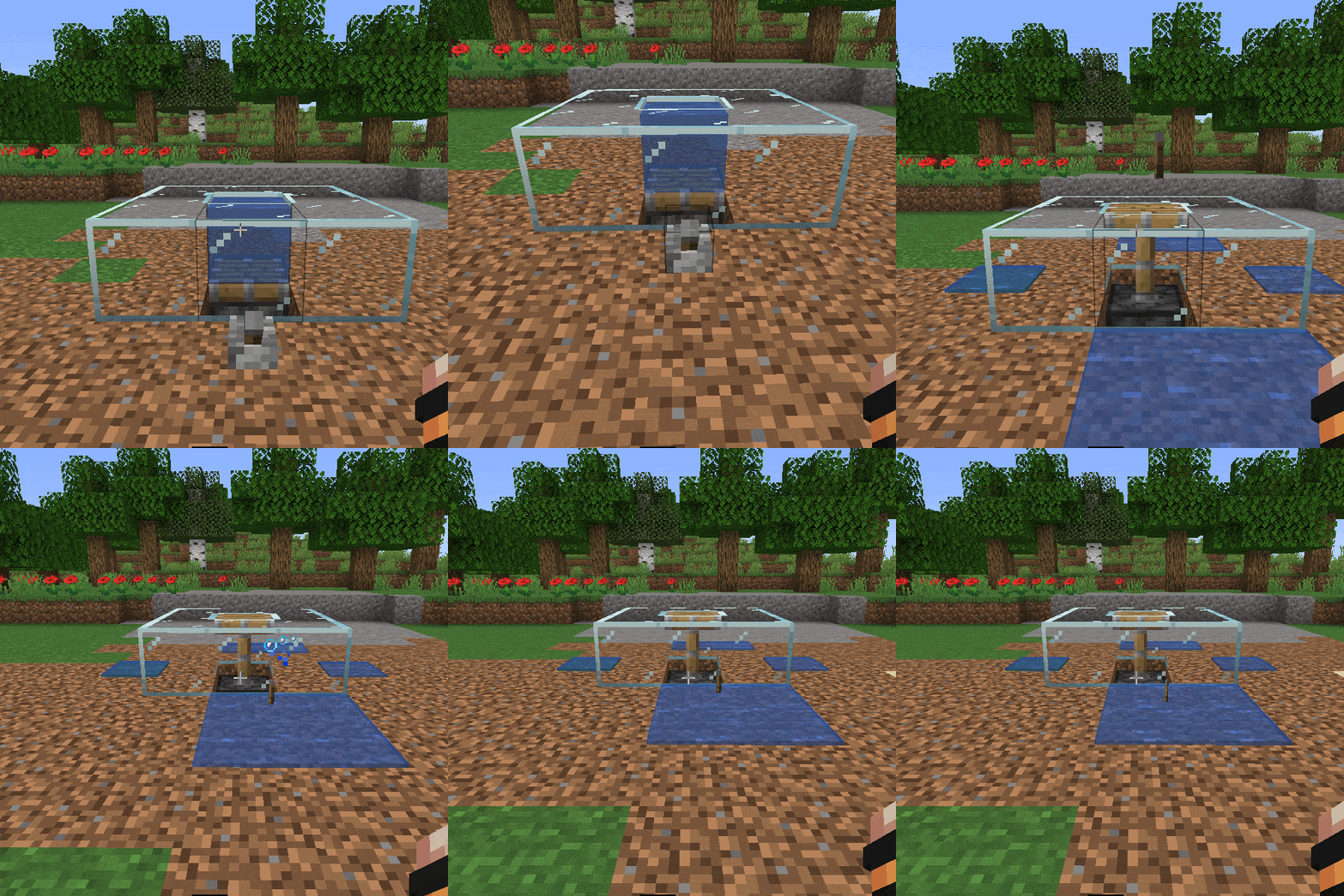
There is physics for all fluids, water, lava and others, from any mod.
This mod will remove the infinite water source and break all vanilla mob farms.
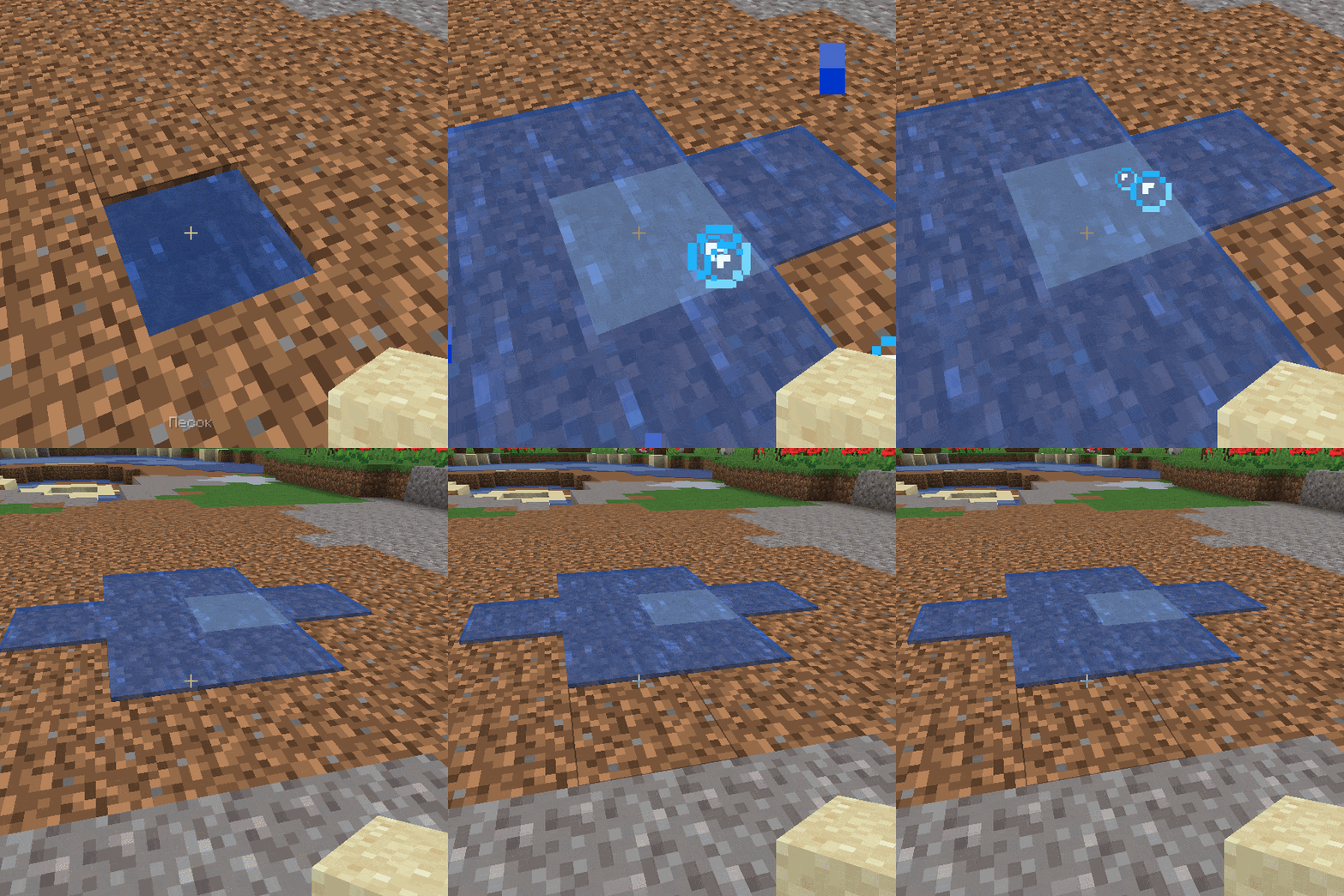
Placing a block in water will not destroy it, but push it out. Water can also be pushed with pistons to make simple mechanisms.

If you have any ideas or find bugs, I would be glad if you report it.
See also:
[Block Physics Overhaul](https://modrinth.com/mod/bpo)