XPTransactions
With the Plugin you can:
– have unlimited night vision (if you want)
– transfer experience between players
– teleport wherever you want with Exp
– send items to other players
– convert your Exp into potions
– play lotto
Commands:
| Command |
Description |
| /nightvision |
gives you night vision, if the plugin fails to do it automatically |
| /givexp |
transfers the given amount of levels to the targeted player |
| /tpe |
teleports you to the given coords for the cost of (by default) 1 level |
| /send |
sends the item(s) that you are holding in your hand to the targeted player (by default) for free |
| /lotto |
(if enabled) takes a configurable amount of levels (by default 2) to play and randomly gives you either nothing or one of the prizes configured, with the configured probabilities. Default prizes: 5 levels: 20%, 10 levels: 3%, 30 levels: 1% |
| /convert <optional amount> |
converts all (or the given amount) of your levels into a potion that you can drink to get the levels back |
Config:
| allowConversion: true |
enables or disables the convert command (Already converted bottles can still be used) |
| autoNightVision: true |
enables or disables night vision |
| ItemSendCost: 0 |
sets the cost in levels for the sending of items |
| enableExpTeleportation: true |
enables or disables the tpe command |
| ExpTeleportationCost: 1 |
sets the cost of the tpe command |
| enableExpLotto: false |
enables or disables the lotto command |
| lottoCooldown: 600 |
set the cooldown between uses of lotto in seconds |
| lottoPrizes: – ‘:‘ |
define how many levels can be won with what probability. You can have multiple prizes with different probabilities. The probabilities have to add up to less then 100%, else buggy behaviour will occur. You can use fractions of percents with a . as decimal separator. The default values are balanced to have an expected value of -0.4, so on average you lose 0.4 levels each time you’re playing. |
Contact:
If you have any questions, problems, ideas or bugs to report, you can send me an E-Mail at:
[email protected]
XNet Gases
## What does it do?
Allows XNet to transport Mekanism chemicals. Gases, slurries, pigments and infuse.
Requires [XNet](https://modrinth.com/mod/xnet), [Mekanism](https://modrinth.com/mod/mekanism) and the respective dependencies.
The channel functions pretty much like the fluid channel in XNet with the following features:
– selecting which type of chemical to move (gas, infuse, pigment, slurry)
– round-robin or priority mode
– delay, transfer limiter and capacity limit
– filter where any tank with a chemical can be used
In addition to a channel dedicated for transporting chemicals, there is a separate logic channel type for redstone logic.
## Sponsor
[](https://www.akliz.net/terrails)
XNet
# XNet
XNet is a mod which adds a single type of cable: a networking cable. Using networking cables you can instantly transport items, fluids, energy, and information. The main focus of this mod is efficiency and flexibility. Efficiency in that it is possible to make huge cable networks (tested with two chests separated by a cable of 12000 blocks long) with no lag. The cables themselves are not even tile entities. Flexibility in that the controller allows for really flexible configuration for distributing information.
## Spotlight by Direwolf20
xJumPads

🌌 xJumPads
xJumPads is a powerful and highly customizable plugin that introduces advanced jump pads to your Minecraft server. Whether you’re building immersive parkour courses, interactive lobbies, or creative minigames, xJumPads gives you all the tools you need to design unique gameplay experiences with style and precision.
Jump pads can be configured to launch players in any direction, add particle effects, play sounds, or trigger special actions. Everything is easily managed through a modern GUI system and fully supports HEX colors, PlaceholderAPI, and translations for any language.
✨ Key Features
✅ Supports Minecraft 1.16+ (regularly updated to stay compatible)
🎨 Full HEX color support for vibrant messages, GUIs, and placeholders
🌍 Multi-language support: suitable for global communities
🔧 PlaceholderAPI integration for dynamic customization
📑 Intuitive in-game menu system (/xjp) to create and manage jump pads easily
🎆 Customizable effects: particles, sounds, velocities, and more
🚀 Lightweight & optimized for both small and large networks
🛡️ User-friendly permissions system
🕹️ Common Use Cases
Parkour maps with spectacular jump mechanics
Server hubs and lobbies with interactive movement features
Minigames where jump pads add strategic depth and excitement
Creative builds that benefit from mobility and visual effects
📜 Commands
/xjp menu – Opens the main xJumPads menu (easy GUI setup and management).
/xjp help – Displays the full list of available commands and usage.
/xjp create – Create a new jump pad at your current location.
/xjp remove – Remove an existing jump pad.
/xjp list – View all existing jump pads on your server.
/xjp reload – Reload configuration files without restarting the server.
⚙️ Permissions
xjumpads.admin → Full access to all commands and menus
👉 With xJumPads, you can transform your server into a dynamic playground where movement is part of the fun. From parkour challenges to stylish hub navigation, this plugin gives you complete control over how players interact with your world.
📜 Config
“`yaml
# _____ __ _
## | / / ___ _ __ | |_ _ __ _
# | | / _ | ‘_ | _| |/ _` | Plugin By
# | __/ (_) | | | | | | | (_| | WillfryDev
# ____/___/|_| |_|_| |_|__, |
# __/ | .yml
#
# Particles that will constantly appear above the JumpPad block.
# Particle list: https://jd.papermc.io/paper/1.20/org/bukkit/Particle.html
# __
# ( _/ /_
#__)/(/((-
# /
idle-particles:
enabled: true
type: “ENCHANTMENT_TABLE”
count: 15
# Effects when using a JumpPad.
launch-effects:
sound:
# Sound list: https://hub.spigotmc.org/javapods/spigot/org/bukkit/Sound.html
type: “ENTITY_ENDER_DRAGON_FLAP”
volume: 1.0 # 0.1 – 2.0
pitch: 1.2 # 0.1 – 2.0
particles:
enabled: true
type: “PORTAL”
count: 50
# __♥__♥_____♥__♥___ Want To
# _♥_____♥_♥_____♥__ Work As
# _♥______♥______♥__ A
# __♥___________♥__ Translator?
# ___♥_________♥___ Join Our
# ____♥______♥_____ Discord At
# ______♥_♥_______ https://discord.gg/
# ________♥_________ AH5k9YE78b
“`
👑 Messanges (All editable, if you want configuration in Spanish open a ticket to discord) 🙂
“`yaml
# __ __
# | / |___ ______ __ _ _ _ __ _ ___ ___
# | |/| / -_|_-<_- ”
remove: “%prefix%Usage: &a/jp remove ”
help-menu:
– “&8&m———– &#FFD1DCxJumPads Help &8&m———–”
– “”
– “&#E0E0E0/jp set » &#AEC6CFCreate a JumpPad.”
– “&#E0E0E0/jp remove » &#AEC6CFRemove a JumpPad.”
– “&#E0E0E0/jp list » &#AEC6CFShow the list of JumpPads.”
– “&#E0E0E0/jp menu » &#AEC6CFOpen the JumpPads menu.”
– “&#E0E0E0/jp reload » &#AEC6CFReload the configuration.”
– “”
– “&8&m————————————”
menu:
title: “&#AEC6CF» &#FFD1DCJumpPads &#AEC6CF«”
item-name: “&#B8E986%name%”
item-lore:
– “&#E0E0E0Location:”
– “&#AEC6CF X: %x%, Y: %y%, Z: %z%”
– “”
– “&#FFD1DCClick to teleport!”
no-pads: “&cThere are no JumpPads to display.”
teleport: “%prefix%&aYou have been teleported to JumpPad &#B8E986%name%&a.”
“`
🏃Jumps (Data saver) 😀
“`yaml
# ____.
# | |__ ________ ______
# | | | ____ / ___/ ⋆˙
# /__| | | / |_> >___
# ________|____/| __/____ > ⋆˙⟡
# |__| / .yml
pads:
test:
location:
world: ‘world’
x: 100.0
y: 64.0
z: -250.0
pitch: 0.0
yaw: 0.0
power: 3.0
directionType: FORWARD
angle: 0.0
“`
Show/Hide Api :3
package com.example.soydev;
import jn.willfrydev.xjumpads.xJumPads;
import jn.willfrydev.xjumpads.api.xJumPadsAPI;
import org.bukkit.plugin.java.JavaPlugin;
public class SoyDev extends JavaPlugin {
private xJumPadsAPI jumpPadsAPI;
@Override
public void onEnable() {
// Comprobación de seguridad
if (getServer().getPluginManager().getPlugin(“xJumPads”) == null) {
getLogger().severe(“xJumPads no fue encontrado. El plugin SoyDev se desactivará.”);
getServer().getPluginManager().disablePlugin(this);
return;
}
this.jumpPadsAPI = xJumPads.getApi();
getLogger().info(“¡Conectado exitosamente con la API de xJumPads!”);
}
}
Xiaoklunar Fly
# ✨ Xiaoklunar Fly (ElytraFlight)
> **Xiaoklunar Fly** is a premium-style Elytra flight plugin that gives players **creative-like flight** without removing balance or immersion.
> Perfect for servers that want flight to feel **powerful, fair, and non-cheaty**.
This plugin is ideal for:
* 💰 Monetizing flight permissions
* 🌍 Controlled flight in specific worlds (spawn, hub, RPG zones)
* ⚖️ Balanced survival gameplay using Elytra durability
—
## 🚀 What Does Xiaoklunar Fly Do?
> Xiaoklunar Fly allows players to toggle **creative-style flight** using `/elytrafly`,
> **only if all required conditions are met**.
Once enabled, the plugin **checks every second** that the player:
* Is in an **allowed world**
* Has an **Elytra equipped**
* Has the **required permission**
* Is **actively flying**
> If **any** requirement fails, flight is **immediately disabled** and the player is notified.
This behavior is similar in spirit to plugins like **EssentialsX.Flight**, but designed specifically around **Elytra-based balance and monetization**.
—
## ⭐ Core Features
### 🪽 Creative-Like Flight (Not Vanilla Gliding)
> Players fly **exactly like creative mode**.
* No awkward Elytra gliding mechanics
* Smooth, controllable, and intuitive movement
—
### 🔐 Permission-Based (Perfect for Monetization)
> Xiaoklunar Fly uses **one configurable permission node**.
* Sell access via **ranks, crates, or stores**
* Fully compatible with **LuckPerms** and other permission plugins
> 💡 **Example:**
> Sell **“Elytra Flight Access”** as a premium perk.
—
### 🌍 World-Restricted Flight
> You decide **where flight is allowed**.
Examples:
* Only in **spawn**
* Only in **hub**
* Or **every world** for full freedom
> Flight is **automatically disabled** when a player leaves an allowed world.
—
### 🛡️ Elytra Required (No Elytra = No Flight)
> Elytra is **required at all times**.
* Must be worn in the chest slot
* Removing it instantly stops flight
* Keeps Elytra meaningful and relevant
—
### 🔧 Configurable Elytra Durability Damage
> Elytra takes durability damage **every second while flying**.
* Damage applies **only while the player is actively flying**
* Fully configurable in `config.yml`
This ensures:
* Flight feels powerful
* Elytra still has a **real cost**
* No infinite free flight abuse
—
### ⏱️ Constant Safety Checks (Every Second)
> The plugin continuously verifies:
* World validity
* Elytra equipped
* Permission still present
* Player still flying
This guarantees:
* ❌ No exploits
* ❌ No bypassing restrictions
* ✅ Clean, predictable behavior
—
### 🧾 Clean & Stylish Messaging
> Fully branded as **Xiaoklunar Fly**.
* All messages use **small-caps font** for a premium look
* Color-code friendly
* Messages trigger **only once per stop reason** (no spam)
—
## 🧑💻 How Players Use It
> Using Xiaoklunar Fly is simple:
1. Equip an **Elytra**
2. Be in an **allowed world**
3. Have the **permission**
4. Run:
“`text
/elytrafly
“`
> Flight toggles **ON / OFF instantly**.
—
## ⚙️ Example Configuration
“`yaml
allowedWorlds:
– “spawn”
– “hub”
permissionNode: “xiaoklunar.fly”
elytraDamagePerSecond: 1
“`
> Adjust worlds, permissions, and Elytra damage to fit your server’s balance.
—
## 🧠 Why This Plugin Is Perfect
* ✅ Feels like creative flight
* ✅ Still balanced and survival-friendly
* ✅ Excellent for server monetization
* ✅ Lightweight and stable
Xhomes
### Xhomes – Your Personal Home Management Plugin for Minecraft
**Xhomes** is an essential plugin designed to enhance your Minecraft experience by allowing players to seamlessly set, manage, and teleport to personal homes. With its user-friendly GUI and intuitive functionality, Xhomes simplifies home management and provides an engaging way to navigate the game world.
## Key Features:
– **Set Home**: Easily set your home location using the command `/sethome [homename]`, enabling quick travel back to your favorite spots.
– **Home GUI**: Access a visually appealing GUI to view and select homes, featuring slots filled with blue beds for a straightforward teleportation interface.
– **Teleportation Countdown**: Enjoy a 5-second countdown before teleportation, accompanied by the message: “Teleporting in 5 seconds, don’t move!” to build anticipation.
– **Movement Cancellation**: Teleportation is canceled if the player moves during the countdown, ensuring safe and accurate arrival at the desired location.
– **Delete Home**: Remove homes easily with the command `/delhome [homename]`.
– **Configurable Limits and Tiers**: Server owners can configure the maximum number of homes players can set based on their permission tier:
– **Tier 1 (xhomes.hometier1)**: 2 homes
– **Tier 2 (xhomes.hometier2)**: 4 homes
– **Tier 3 (xhomes.hometier3)**: 6 homes
– **Tier 4 (xhomes.hometier4)**: 8 homes
These limits are fully configurable in the `config.yml` file.
– **Admin-Friendly Management**: Xhomes provides robust tools for server owners to oversee home settings and permissions, offering fine-grained controls for authorized players.
### LuckPerms Permissions:
– `/sethome`: `xhomes.sethome`
– `/delhome`: `xhomes.delhome`
– `/home`: `xhomes.home`
– Tier 1: `xhomes.hometier1` (2 homes)
– Tier 2: `xhomes.hometier2` (4 homes)
– Tier 3: `xhomes.hometier3` (6 homes)
– Tier 4: `xhomes.hometier4` (8 homes)
Elevate your Minecraft gameplay with **Xhomes**—your all-in-one home management solution!
### Source Code
Check out the source code on GitHub: [Xhomes Repository](https://github.com/Akar1881/Xhomes)
Xaero’s Minimap & World Map – Waystones Compatibility



– This mod doesn’t support the Xaero’s Minimap (Fair-Play Edition)
– This mod is a sucesor of Waystones2Waypoints which creates a Waypoint in the Xaero’s World Map and Xaero’s Minimap when the player actives a Waystone
– This is needed in Both Client and Server Side
– This is not a Fork, because the previous mod is discontinued we have created a new one for the Forge 1.19.2, 1.19.3, 1.19.4, 1.20 and 1.20.1 versions
# Modders
– Shoqapik12


Xaero’s Minimap (Fair-Play)
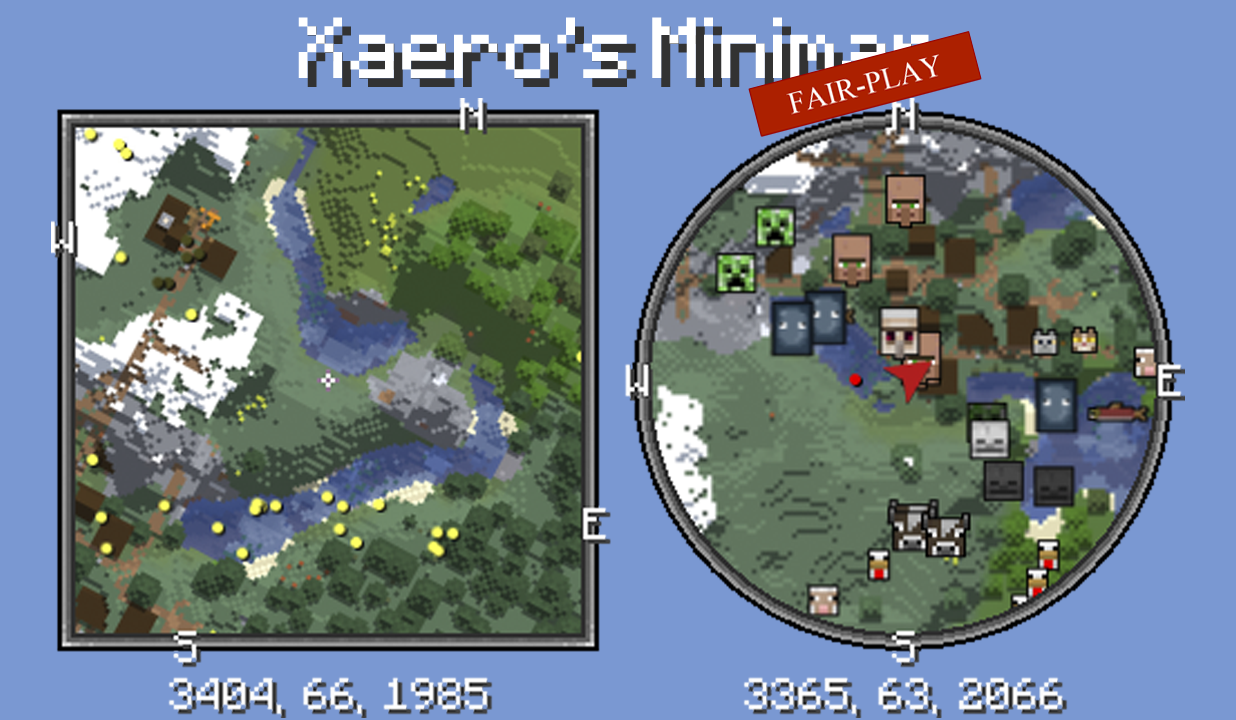
Unlike many other minimap mods, Xaero’s minimap keeps the aesthetic of vanilla Minecraft. This is the FAIR-PLAY version of the mod designed for fair PVP. Features like cave maps and entity radar are disabled in this version of the mod. Read more about the mod here.
Get full mod
Xaero’s Minimap and Waystones Compatibility
# Xaero’s Minimap and Waystones Compatibility
**Xaero’s Minimap and Waystones Compatibility** automatically links **Waystones** with **Xaero’s Minimap**, creating and updating waypoints without any manual setup.
Whenever a Waystone is activated or renamed, a matching waypoint is instantly created or updated on Xaero’s Minimap at the same location.
All waypoints are persistent, and the mod works in both singleplayer and multiplayer servers.

Xaero PointShare
# Xaero PointShare
Simple fabric mod to changes xaero’s minimap waypoint sharing functionality
## Feautures:
– When sharing a waypoint, it no longer sends it in chat, but just copies
– If in the start of message is `x%s:`, it will show waypoint only to yourself
Example: `x%self:xaero-waypoint:1:1:9:-60:13:2:false:0:Internal-overworld`
– If waypoint starts with `x%o:`: it will send a waypoint to all players, like in base xaero’s minimap
## Why?
This mod is made to share a waypoints between people outside of minecraft(e.g discord)
I have a channel where we post all our waypoints like:
> Farm of something:
> “`
> x%s:xaero-waypoint:Farm of something:F:0:0:0:0:false:0:Internal-overworld
> “`
and you can just copypaste it into chat to add a waypoint