Yeet
# Yeet!
Yeet is a very simple mod about throwing things.
Yeet allows you to hold down the drop key (default Q) to wind up your arm.
Release it to throw your items farther.


Thrown items can be directly caught by other players.


Friend running low on materials? Just throw them some more!

YATPAS
YATPAS is a simple but robust Player-to-Player Teleport (TPA) system for Bukkit/Spigot/Paper servers. It features clickable requests, configurable cooldowns, timeouts, and automatic cancellation upon movement or damage, ensuring a balanced gameplay experience.
***
## 🇮🇹 IMPORTANT NOTE ON LANGUAGE
The default language for the messages inside the plugin’s `config.yml` is **Italian**. You can easily translate all messages to English or any other language by editing the `messages:` section of the configuration file.
***
## ✨ Key Features
* **Clickable Requests:** Players can accept or deny TPA requests with a single click.
* **Correct TPA/TPAHERE Logic:** Supports both teleporting to another player (`/tpa`) and calling a player to your location (`/tpahere`).
* **Warmup:** Configurable time before the actual teleport, which is cancelled if the player moves or takes damage.
* **Cooldown & Timeout:** Limits request spam and ensures requests expire automatically.
* **Customizable Messages:** All messages are fully configurable via `config.yml`.
## 📦 Commands
| Command | Alias | Description | Permission |
| :— | :— | :— | :— |
| `/tpa ` | | Requests to teleport to the specified player. | `yatpas.use.tpa` |
| `/tpahere ` | | Requests the specified player to teleport to you. | `yatpas.use.tpahere` |
| `/tpaccept` | | Accepts the pending TPA request. | `yatpas.use.tpaccept` |
| `/tpdeny` | | Denies the pending TPA request. | `yatpas.use.tpdeny` |
| `/tpacancel` | | Cancels your outgoing TPA request. | `yatpas.use.tpacancel` |
## ⚙️ Configuration
The `config.yml` file allows you to customize every aspect of the TPA system.
| Config Key | Description | Default Value |
| :— | :— | :— |
| `teleport-warmup-seconds` | Time in seconds before the teleport occurs. | `5` |
| `tpa-cooldown-seconds` | Cooldown between sending two TPA requests. | `2` |
| `request-timeout-seconds` | Time before a TPA request expires. | `60` |
| `cancel-on-move` | `true` to cancel warmup if the player moves. | `true` |
| `cancel-on-damage` | `true` to cancel warmup if the player takes damage. | `true` |
| `messages.prefix` | Prefix displayed in all messages. | `&3YATPAS&8» &f` |
—
Xwarps
## Xwarp – A Complete Teleportation Solution for Minecraft
Xwarp is a feature-rich teleportation plugin for Minecraft that allows players to easily set and teleport to custom warp points within their world. Whether you’re managing a large server with multiple locations or just want to teleport between your favorite spots, Xwarp offers a seamless and immersive experience.
## Key Features:
Custom Warp Points: Set warp points anywhere in the world with ease using the /setwarp [warpname] command. These warp points can be accessed by any player with the appropriate permissions.
Teleport Countdown: When a player selects a warp, a 5-second countdown begins, with a clear message displayed in the center of the screen: “Teleporting in 5 seconds, don’t move!” (colored in yellow). If the player walks or moves during this time, the teleportation is canceled, adding an element of realism and control to the teleportation process.
Movement Cancellation: Prevent players from teleporting if they move while waiting. This encourages players to remain stationary for teleportation to complete successfully, preventing accidental teleports during gameplay.
GUI-Based Warp Selection:
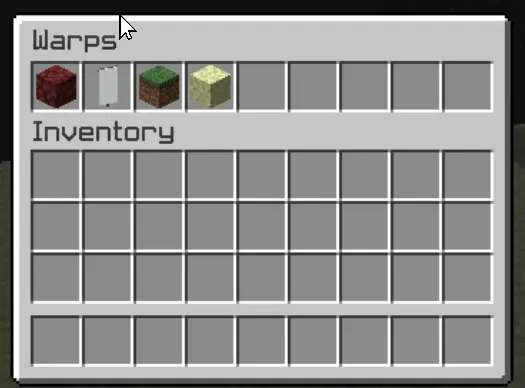
One of Xwarp’s standout features is its Graphical User Interface (GUI) for selecting warps. Instead of relying solely on commands, players can access a sleek warp selection screen where they can visually choose their desired warp point. Here’s what makes the GUI special:
Icon Customization: Each warp point can be represented by a different icon (block/item) in the GUI. Administrators can change the warp icon using the /seticonwarp [warpname] [itemname] command, allowing full customization of the look and feel of the warp menu.
Visual Warp Selection: Players simply open the warp menu and click on the desired warp icon to begin teleporting. The GUI provides an intuitive and engaging way to access teleport points, especially for large servers with multiple destinations.
## Admin-Friendly:
Warp Management: Server administrators can easily add, delete, and manage warp points, and even assign custom icons to each warp point for better organization and clarity.
Permissions Integration: Fine-grained permissions allow you to control which players can set, access, or delete warps. This ensures that only authorized users can manage or use certain warp points.
## How it Works:
1. Setting a Warp: Use /setwarp [warpname] to create a new warp at your current location. The warp is saved along with a default icon.
2. Selecting a Warp: Players can open the warp GUI and click on the icon for their desired destination. A 5-second countdown will start, and if they don’t move, they are teleported to the selected warp.
3. Customizing Warps: Use /seticonwarp [warpname] [itemname] to change the icon representing a warp in the GUI, making it easy for players to distinguish between different warp points.
## Why Xwarp?
Xwarp is designed for flexibility, ease of use, and visual appeal. It’s perfect for large servers that need efficient teleportation management or for small groups of players who want a fast and intuitive way to travel across their world. With its GUI-based approach, teleportation becomes not just a command-line task, but a visually engaging experience that fits right into Minecraft’s world.
Take your server to the next level with Xwarp—your all-in-one teleportation solution!
## LuckPerms
/warp – xwarp.warp
/setwarp – xwarp.setwarp
/delwarp – xwarp.delwarp
/seticonwarp – xwarp.seticonwarp
XTransfer
# XTransfer
## Features
– Developer API
– Whitelist of Player UUID’s
– Token Whitelist via Paper’s Cookie System.
– Customizable and developer-friendly
## Commands
– `/xtransfer` (or your custom Option) – Permission: `transferpacket.command.`
## Permissions
– `xtransfer.command..transfer`
– `xtransfer.command..whitelist`
– `xtransfer.command..whitelist.list`
– `xtransfer.command..whitelist.player`
– `xtransfer.command..whitelist.player.add`
– `xtransfer.command..whitelist.player.remove`
– `xtransfer.command..whitelist.token`
– `xtransfer.command..whitelist.token.add`
– `xtransfer.command..whitelist.token.remove`
## Developer API
**Use our repo to Download the API**
– [https://repo.jespersen.zip/#/releases/dev/xyzjesper/xtransfer](https://repo.jespersen.zip/#/releases/dev/xyzjesper/xtransfer)
### Project Setup
To access the API use the `XTransferAPI` Menthods and interact with the plugin.
__Note: Please add the Plugin TransferPacket as depend! And check the enabled status.__
“`kts
repositories {
mavenCentral()
maven(“https://repo.jespersen.zip/releases”)
}
dependencies {
compileOnly(“zip.jespersen:xtransfer:“)
}
“`
XTpaz
# **XTpaz – TPA Plugin**
XTpaz is a TPA (Teleport Ask) plugin for Paper/Spigot 1.20+. It provides simple, configurable player teleports with an optional confirmation GUI and strong anti-abuse options.
—
## 🔥 Key Features
### 👤 User experience
– **Confirmation GUI:** Confirm or cancel before sending a request; shows target world, ping, and player head.
– **Teleport countdown:** Configurable delay with action bar and sounds.
– **Movement check:** Teleport is cancelled if the player moves during the countdown.
– **Sounds:** Separate sounds for request sent/received, accept/deny, teleport, cooldown, etc.
### ⚙️ Requests & toggles
– **TPA & TPAHere:** Request to go to another player or bring them to you.
– **Auto-accept:** `/tpauto` and `/tpahereauto` for trusted players.
– **TPA toggle:** `/tpatoggle` to disable receiving requests.
– **Confirm toggle:** `/tpaconfirmtoggle` to switch between GUI and direct requests.
### 📋 Safety & limits
– **Request expiry:** Requests automatically expire (default 60 seconds).
– **Cooldowns:** Configurable cooldown between requests.
– **Offline cleanup:** Pending requests cleared when players quit.
### 🔧 Backend
– **Configurable messages:** Hex color support and placeholders (`{player}`, `{target}`, `{time}`).
– **Live reload:** `/xtpaz reload` reloads config and messages without restart.
—
## 🔧 Commands & Permissions
| Command | Description | Permission |
|——–|————-|————|
| `/tpa ` | Request to teleport to a player | `xtpaz.tpa` |
| `/tpahere ` | Request a player to teleport to you | `xtpaz.tpahere` |
| `/tpaccept [player]` | Accept a pending TPA request | `xtpaz.tpaccept` |
| `/tpadeny [player]` | Deny a pending TPA request | `xtpaz.tpadeny` |
| `/tpacancel [player]` | Cancel your pending request | `xtpaz.tpacancel` |
| `/tpauto` | Toggle auto-accept for /tpa | `xtpaz.tpauto` |
| `/tpahereauto` | Toggle auto-accept for /tpahere | `xtpaz.tpahereauto` |
| `/tpatoggle` | Toggle receiving TPA requests on/off | `xtpaz.tpatoggle` |
| `/tpaconfirmtoggle` | Toggle confirmation GUI on/off | `xtpaz.tpaconfirmtoggle` |
| `/xtpaz reload` | Reload configuration | `xtpaz.reload` |
—
## 📁 Configuration files
– **`config.yml`** – Request timeout, auto-accept delay, cooldown, teleport countdown, sounds, and message texts.
—
## ⛏️ Requirements
– **Server:** Paper or Spigot 1.20+
– **Java:** 17 or higher
Xtpa
Xtpa is an innovative teleportation plugin for Minecraft designed to enhance player interaction and navigation. With Xtpa, players can easily send and accept teleport requests, creating a more connected gameplay experience.
One of the standout features of Xtpa is the TPA GUI. When a player receives a teleport request, they can click on a simple button to open the GUI, which provides a clear and intuitive interface. This GUI includes:
– Accept Button:
A green wool block that allows players to accept the teleport request effortlessly.
– Warning Message:
A paper item labeled “!!warning maybe a tp trap!!”, alerting players to the risks associated with teleportation.
– Cancel Button:
A red wool block that enables players to cancel the teleport request if they choose not to accept it.
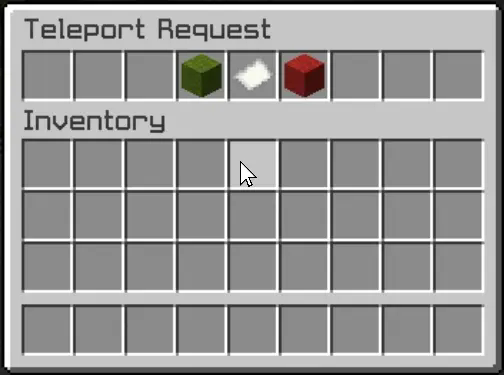
This user-friendly design not only makes the process of accepting or rejecting requests straightforward but also adds an engaging visual element to the experience. Players can quickly make decisions without cluttering their chat with commands, making teleportation seamless and efficient.
Xtpa integrates seamlessly with LuckPerms, allowing server owners to manage permissions easily. The following commands and permissions are included:
– Commands and Permissions
/tpa [playername]
Permission: xtpa.tpa
Description: Send a teleport request to another player.
/tpahere [playername]
Permission: xtpa.tpahere
Description: Request another player to teleport to your location.
/tpaccept [playername]
Permission: xtpa.tpaccept
Description: Accept a teleport request from another player.
/tpcancel [playername]
Permission: xtpa.tpcancel
Description: Cancel a teleport request.
/tpatoggle [on/off]
Permission: xtpa.tpatoggle
Description: Toggle TPA requests on or off for yourself.
/tpagui [requester]
Permission: xtpa.tpagui
Description: Open the TPA request GUI for accepting or canceling requests.
– Conclusion
Overall, Xtpa aims to enrich the Minecraft community by providing a smooth and enjoyable teleportation system that players will love to use. With its intuitive GUI and robust permission management through LuckPerms, Xtpa is the ideal solution for any Minecraft server looking to enhance player connectivity.
Totems of Warping
Download the optional resource pack [HERE](https://cdn.modrinth.com/data/kMFObSC3/versions/qRyZkizc/Warp%20Totem%20RP%20v1.1.1.zip)
The Totem of Warping allows players to teleport to various locations. The totem can either be used to teleport to the player’s spawn point or, if connected to a lodestone, it can be used to teleport back to it at any time. Use the totem for 5 seconds to warp.
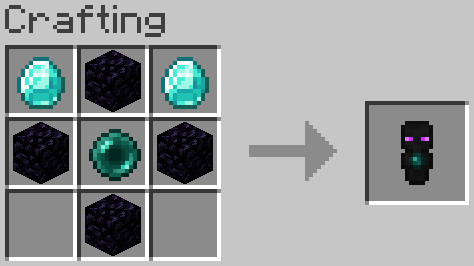
The Totem of Recovery allows players to teleport to their last death location.
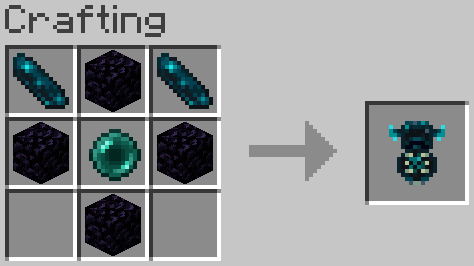
Two versions are available, the Single Use version and the Infinite Use version. Single use consumes the totems on use. Infinite Use can be used indefinitely but offers a toggle which will consume either Ender Pearls or Echo Shards. The toggle can be found in data/xtligh/function/warp_totem/config.json
Stylish Ghasts
Download the REQUIRED resource pack [HERE](https://cdn.modrinth.com/data/JhmYEwBq/versions/Km9kqtHo/Stylish%20Ghast%20RP%20v1.1.1.zip)
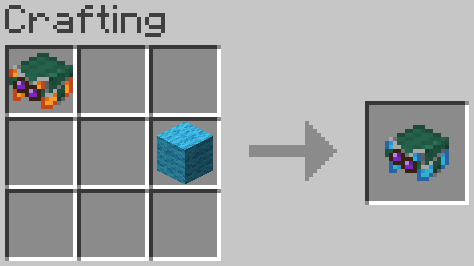
When crafting a ghast harness of any color the glass can be replaced by any stained glass to change the color of its goggles.
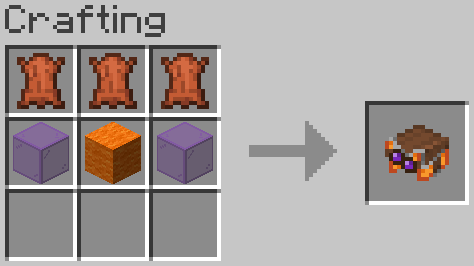
Harnesses can now be dyed similar to leather armor, this changes the the color of the harness’ upper half.
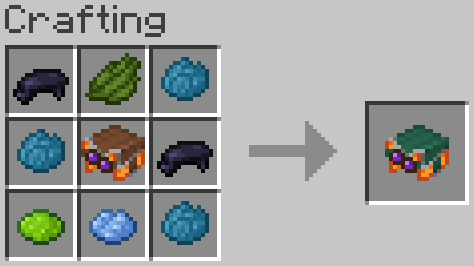
To prevent conflict with the vanilla crafting recipes, wool is used to change the base color of the harness instead of dye.
XTransfer

# 0 What the heck is this?
A new plugin designed to **transfer players’ data between names or UUIDs**. I didn’t find any other plugin can handle this problem before, so I made my own one and uploaded it to here to help anyone who needs this feature for his/her server.
# 1 Features
## 1.1 Smart UUID Detection
Automatically detects UUIDs from:
– Online players
– usercache.json (for premium players)
– Offline-mode UUID generation
## 1.2 Complete Data Transfer
Transfers all vanilla player data:
– Player inventory and Ender Chest (`playerdata/`)
– Statistics (`stats/`)
– Advancements (`advancements/`) for 1.13+
## 1.3 Safe & Reliable
– Creates automatic backups before overwriting
– Kicks online players to prevent data overwrite (configurable)
– Asynchronous file operations – no server lag!
# 2 Commands and Permission Nodes
## 2.1 Commands
“`markdown
– /xtransfer – Show version info
– /xtransfer transfer – Transfer by player names
– /xtransfer transferuuid – Transfer by UUIDs
– /xtransfer list – List all player data files
– /xtransfer list – Show files for specific player
– /xtransfer reload – Reload configuration
– /xtransfer help – Show the help message
/xtf = /transfer = /xtransfer
“`
## 2.2 Permission Nodes
“`markdown
– xtransfer.manage – Allows using all XTransfer commands (default: op)
“`
# 3 Config
“`yaml
# Show logo when plugin enabled
show_logo: true
# World settings
world:
# Manual world name (only used if auto-detect is false)
name: “world”
# Automatically detect world name from server
auto-detect: true
# Transfer settings
transfer:
# Transfer statistics files
stats: true
# Transfer advancements files (1.13+)
advancements: true
# Backup settings
backup:
# Create backup of existing files before overwriting
create: true
# Suffix for backup files
suffix: “.old”
# Online player handling
# If true, kick online players before transfer
# If false, show warning but continue
kick-online-player: true
# Language settings
language: “en”
# Debug mode (enable only for troubleshooting)
debug: false
# Messages – You can customize all messages here
messages:
# English messages
en:
no-permission: “&cYou don’t have permission!”
usage-header: “&9&lX&f&lTransfer &f&lHelp”
usage-transfer: “&7/xtransfer transfer &f ”
usage-transferuuid: “&7/xtransfer transferuuid &f ”
usage-list: “&7/xtransfer list &f[player]”
usage-reload: “&7/xtransfer reload”
usage-help: “&7/xtransfer help”
reload-success: “&a✓ Configuration reloaded!”
transfer-start: “&eStarting async transfer…”
looking-up: “&eLooking up UUIDs for &f{old} &eand &f{new}&e…”
uuid-not-found: “&cCould not find UUID for: &f{name}”
try-uuid: “&7Try using /xtransfer transferuuid with direct UUIDs”
invalid-uuid: “&cInvalid UUID format! Use: /xtransfer transferuuid ”
uuid-example: “&7Example: 12345678-1234-1234-1234-123456789012”
source-data-missing: “&cSource player {name} ({uuid}) has no data file!”
transfer-from: “&7From: &f{name} &7({uuid})”
transfer-to: “&7To: &f{name} &7({uuid})”
transfer-file: “&7File: &f{file}”
backup-created: “&7Backed up existing file to: &f{file}”
transfer-success: “&a✓ Successfully transferred player data!”
transfer-stats: “&7✓ Transferred stats file”
transfer-advancements: “&7✓ Transferred advancements file”
transfer-error: “&cError during transfer: {error}”
folder-not-found: “&cPlayer data folder not found: {path}”
source-not-found: “&cSource file not found: {file}”
source-location: “&7Looked in: {path}”
player-online-warning: “&e⚠ Warning: Player {player} is online! Data may be overwritten when they log out.”
player-kicked: “&e✓ Player {player} has been kicked for data transfer.”
kick-message: “&cYour data is being transferred. Please rejoin in a few seconds.”
no-files: “&eNo player data files found”
list-header: “&6=== Player Data Files ({count}) ===”
list-more: “&7… and {count} more”
list-entry: “&7{name} &8- {uuid}”
list-unknown: “&8{uuid} &7(unknown)”
files-header: “&6=== Files for {player} ===”
file-playerdata: “&7Player Data: {status}{size}”
file-stats: “&7Stats: {status}”
file-advancements: “&7Advancements: {status}”
# Other language…
“`
Xrtp
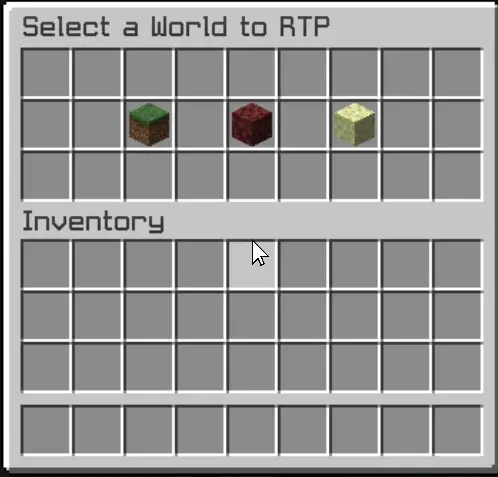
– The Xrtp plugin enhances Minecraft gameplay by providing a robust random teleportation (RTP) feature. Players can teleport to safe locations in the Overworld, Nether, and The End, ensuring a seamless adventure experience.
– The plugin includes a user-friendly graphical interface (GUI) that allows players to initiate teleportation effortlessly. A countdown timer adds an exciting element of anticipation, while the teleportation process cancels if the player moves, preventing unintended outcomes. This combination of safety and convenience makes Xrtp an essential tool for players seeking exploration without the risk of falling into danger.
– Additionally, the config.yml file offers extensive customization options for server administrators. This configuration file allows for the adjustment of teleportation settings, including cooldown periods, maximum teleportation distances, and specific world restrictions. Administrators can fine-tune these parameters to align with their server’s gameplay style, ensuring that the RTP feature enhances rather than disrupts the overall experience.
– The GUI is designed to be intuitive, providing clear options and feedback, ensuring that players can navigate the teleportation process with ease.