Vortex Manipulator
# Vortex Manipulator




*The Vortex Manipulator – Save three waypoints and use them six times.*
## What does this mod add?
This mod adds a new item – the **Vortex Manipulator**
This item is capable of:
– Adding waypoints of your current position
– These waypoints are nameable
– The manipulator can store a maximum of 3 waypoints
– You can cycle through waypoints using right-click
– Shift right-click to add a new waypoint
– Pressing a keybind ( “B” by default ) will teleport you to the selected waypoint
– Cooldown on use
– Maximum of 6 usages
*by Duzo*
Voltrox Homes
**Voltrox Homes** is an advanced, feature-rich homes plugin designed for the best minecraft servers. With an intuitive GUI system, extensive customization options, and seamless integration with popular server plugins, it provides everything needed for a modern homes solution.
Gallery
Soon
# ✨ CORE FEATURES
Intuitive GUI system with pagination and visual home management
Real-time teleportation with customizable countdown display
Bed and last home teleportation with permission controls
Full permission support with flexible home limits per player
# ✨ HOME MANAGEMENT
Set, update, delete, and list homes with ease
Custom home naming with validation
Home limits based on permissions
Last teleported home tracking
Bed spawn teleportation
# ✨ TELEPORT SYSTEM
Configurable teleport delay (0-60 seconds)
Multiple countdown displays: Title, ActionBar, or Chat
Cancel teleport on jump, damage, and movement
Customizable teleport sounds
# ✨ ADMINISTRATION
In-game GUI for configuration management
Live setting adjustments without restarting the server
Reload the config.yml on the fly
World-based home restrictions
# ✨ INTEGRATION
Full PlaceholderAPI support
Compatible with permission plugins like LuckPerms
# ⚙️ FULLY CONFIGURABLE
Customizable messages and prefixes
Adjustable teleport delay and home limits
World blacklisting for homes
Countdown display preferences
Sound effect customization
Permission defaults and overrides
Commands
**Main Command:** `/vh` or `/voltroxhomes`
`/vh` – Open the homes GUI
`/vh sethome ` – Set a new home at your location
`/vh updatehome ` – Update an existing home’s location
`/vh home ` – Teleport to a home, your bed, or last visited home
`/vh delhome ` – Delete a home
`/vh list` – List all your homes
`/vh cancel` – Cancel an ongoing teleport
`/vh help` – Show help menu
`/vh reload` – Reload configuration (Admin only)
Placeholders (Requires PlaceholderAPI)
Replace `` with a home name! Example: `%voltroxhomes_home_x_spawn%` returns the X coordinate of the “spawn” home.
**General Placeholders:**
`%voltroxhomes_homes_count%` – Number of homes the player has
`%voltroxhomes_homes_limit%` – Player’s maximum home limit
`%voltroxhomes_homes_remaining%` – Homes remaining before reaching limit
`%voltroxhomes_homes_list%` – Comma-separated list of all home names
`%voltroxhomes_last_home%` – Name of the last teleported home
`%voltroxhomes_has_last_home%` – “true” or “false” if player has a last home
`%voltroxhomes_has_bed%` – “true” or “false” if player has a bed spawn
`%voltroxhomes_bed_world%` – World name of player’s bed spawn
`%voltroxhomes_bed_x%`, `%voltroxhomes_bed_y%`, `%voltroxhomes_bed_z%` – Bed spawn coordinates
`%voltroxhomes_teleport_delay%` – Teleport delay from configuration
`%voltroxhomes_can_teleport%` – “true” or “false” if player can teleport
`%voltroxhomes_is_teleporting%` – “true” or “false” if player is currently teleporting
**Specific Home Information:**
`%voltroxhomes_has_home_%` – “true” or “false” if player has specified home
`%voltroxhomes_home_world_%` – World of specified home
`%voltroxhomes_home_x_%`, `%voltroxhomes_home_y_%`, `%voltroxhomes_home_z_%` – Home coordinates
`%voltroxhomes_home_created_%` – Date home was created
`%voltroxhomes_home_lastused_%` – Date home was last used
`%voltroxhomes_home_age_%` – Time since home was created
`%voltroxhomes_home_sinceused_%` – Time since home was last used
# ❗ REQUIREMENTS
**Minecraft**: 1.16.5+
**Java**: 16+
**Optional Dependency**: PlaceholderAPI
**Need Support?**
Contact me for help on Discord.
⚠ The Modrinth page (this) and the Spigot page are the only official sources! Do NOT download it from any external site.
Volo Volare

Step into a model glider and soar into a world of wonder.

—
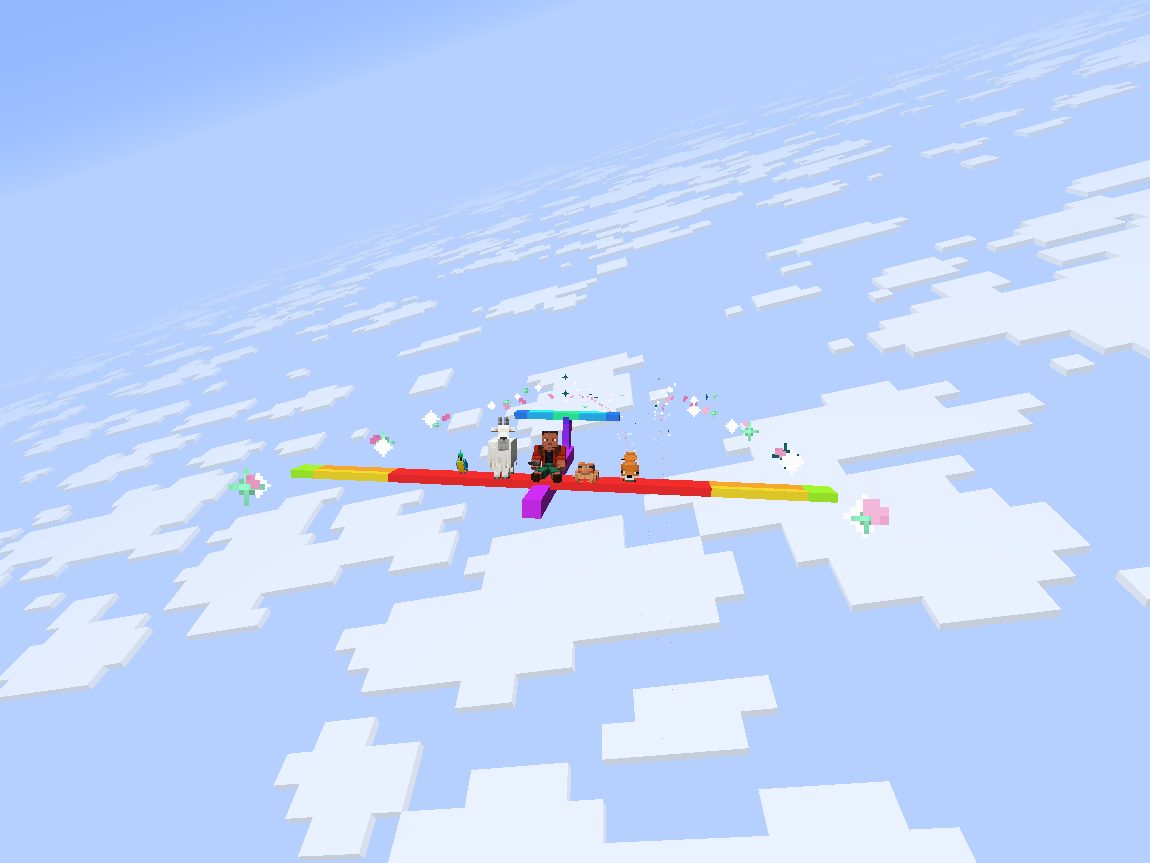
Volo Volare adds a highly-configurable toy glider.
– Give yourself a speed boost by using gunpowder or blaze powder while flying.
(item tag: `volare:thrust_source`)
– Extend your flight by flying through thermals produced by campfires, fire, magma, and lava.
(block tag: `volare:thermal_source`)
– Configure arbitrary wingtip particles with the `volare:glider/particles` component.
“`
/give @s volare:glider[volare:glider/particles=[{type:”minecraft:electric_spark”}, {type:”minecraft:heart”}]]
“`
– Give a glider an initial speed boost with the `volare:glider/frozen_motion` component.
“`
/give @s volare:glider[volare:glider/frozen_motion=[0.0f, 0.0f, 0.8f]]
“`
—
—
## Config
To configure 1st- and 3rd-person roll, edit `config/volare.json5` or use the in-game config screen.
To configure thermals and boost, edit `/serverconfig/volare-server.json5` or use the in-game config screen.
Server configs are automatically synced to clients.
## Customization
### Custom Textures
To create a glider with custom textures:
1. Place a texture at the path `assets//textures/entity/glider/.png`
2. Create a translation for the key `entity.volare.glider.variant..entity.glider.` in `assets//lang/en_us.json`
3. Spawn a glider with the texture using the command:
“`
/give @s volare:glider[volare:glider/variant=”:entity/glider/“]
“`
### Modifying Volo Volare’s Creative Tab
Custom gliders can be added to Volo Volare’s creative tab by creating a JSON file in your resourcepack at `assets/volare/volare_item_groups/main.json`
“`json
{
“entries”: [
{
“id”: “volare:glider”,
“components”: {
“volare:glider/variant”: “:entity/glider/”
}
}
]
}
“`
## Area Lib Integration
### Flak
An area can be configured to shoot down any gliders that fly through it using the `/volare area flak` command.
### Thermals
An area can be configured to act as an updraft or downdraft using the `/volare area thermal` command.
—
*About the name: The first two principal parts of the latin verb for flight are ‘volo volare’ (‘I fly’, ‘to fly’), but ‘volo’ also means ‘I want’, thus ‘volo volare’ means ‘I want to fly’.*
Overgrown’s Origins: Volcanic Dragon
## 🔥 **Volcanic Dragon: Ignite Your Adventure!** 🔥
Embark on an explosive journey with the Volcanic Dragon origin! This isn’t just a new feature; it’s a complete transformation, immersing you in the life of a dragon born from the depths of a volcano. Experience enhanced volcanic powers and a deeper connection to the magma’s core.
### 🌋 **What Makes Volcanic Dragon Unique?** 🌋
– **Fiery Abilities**: Embrace abilities like Eruption Breath and Magma Blast, bringing a new intensity to gameplay.
– **Balanced with Challenges**: While powerful, face vulnerabilities like Brittle Scales and Water Allergy, adding strategic depth.
– **Tailored for the Nether**: Designed to maximize your experience in Minecraft’s most fiery realm.
### 🐉 **Enhanced Gameplay & Survival** 🐉
– **Adapt to Environments**: Adjust your strategy in different biomes, each affecting your dragon powers differently.
– **Unique Dietary Needs**: Challenge yourself with a Magma Block diet, adding a new survival twist.
### 🔴 **Experience the Volcanic Dragon Difference!** 🔴
– **Unique Powers and Weaknesses**: Each ability and vulnerability carefully crafted for an immersive experience.
– **Transformed Gameplay**: Not just an addon, but a complete reimagining of how you interact with the Minecraft world.
– **Balanced for Excitement**: Every feature is fine-tuned for a thrilling yet balanced gameplay.
### 🌡️ **Why Choose Volcanic Dragon?** 🌡️
– The Volcanic Dragon datapack revolutionizes your Minecraft experience, introducing a dynamic playstyle. It’s not just an enhancement; it’s a complete game-changer, adding depth, challenge, and excitement. Recognized for its unique approach to gameplay, it’s more than an addition; it’s a fiery reimagination, ready to transform your adventures.
### 🌟 **Join the Fiery Quest!** 🌟
– Step into the scales of a Volcanic Dragon and see the world through new, fiery eyes. Master your abilities, adapt to your vulnerabilities, and dominate the Nether like never before. **Download now** and become part of the blazing community! 🔥🐉
Void Totem

Void Totem
A totem that prevents you from dying in the void.
About
Flying around in the end with your elytra and suddenly your elytra breaks? Playing SkyBlock and falling down while building? No Problem!
Craft a Totem of Void Undying, put it in your main/-offhand and you will be teleported back to the surface, when you fall in the void.
“A must have for skyblock and modded modpacks!”
Configuration
#Dimensions in this blocklist will prevent the functionality of the void totem. Example: "minecraft:overworld"
blocklisted_dimensions = []
#Whether the blocklist is inverted, meaning the void totem only works in allowlisted dimensions.
is_inverted_blocklist = false
#The height offset from the world height you will be teleported if you can't be placed on a block.
#Range: 0 ~ 1024
teleport_height_offset = 64
#Whether you can use the void totem from anywhere in your inventory.
use_totem_from_inventory = false
Permissions
- You can use this mod in your modpack. Just don’t forget about credits where needed.
- You are not allowed to re-publish this mod to other sites without providing a link to this page.
- You are not allowed to include this (or any other mods of mine) to your own mod.
Feedback
- Issues and Suggestions: Please use the issue tracker at the top of this page.
- Translations: If you want to help translate the mod to other languages, go for it and make a pull request on the github.
- Videos: Feel free to make videos of the mod. Would be cool however, if you add a link to this page, and if you want you can leave a comment here, too.
- Discord: You can you join our Discord Server for support, mod updates, sneak peaks and to chat with others.
VoidSky
**VoidSky** is a very simple plugin that changes how the void works from falling to your death to teleporting you high in the sky to a world of your choice. There’s customization through the config or commands that make setup easy.
This plugin was inspired by how you fall in the Aether mod.
VoidRescue
# VoidRescue
**Never lose your gear to the void again!** VoidRescue automatically saves players from void deaths by teleporting them to safety with a cinematic slow-falling descent.
## 🌟 How It Works
When a player falls below Y=-5 (configurable), VoidRescue springs into action:
1. **Searches for safety** – Scans up to 64 blocks around the player for solid, hazard-free ground
2. **Lifts you up** – Teleports the player 200-300 blocks above the safe spot
3. **Controlled descent** – Applies Slow Falling when within 5 blocks of ground for a smooth landing
4. **Prevents damage** – Optionally cancels fall damage from the rescue
## ✨ Features
– **Smart pathfinding** – Avoids lava, fire, cacti, magma blocks, campfires, and other hazards
– **Multi-dimension support** – Works in Overworld, Nether, and The End (individually toggleable)
– **Game mode filtering** – Only rescues Survival and Adventure players (Creative/Spectator ignored)
– **Anti-spam cooldown** – 8-second cooldown prevents rescue loops
– **Async processing** – Safe spot detection runs asynchronously to prevent server lag
– **Visual feedback** – Portal particles, sound effects, and action bar messages
– **Fallback system** – Uses world spawn if no safe spot found
## ⚙️ Configuration
Fully customizable via `config.yml`:
– Trigger Y-level threshold
– Rescue height range (min/max)
– Slow Falling duration
– Per-dimension enable/disable
– Fall damage cancellation toggle
– Cooldown duration
## 📋 Requirements
– **Minecraft:** 1.21+
– **Server:** Paper or compatible fork (Purpur, Pufferfish, etc.)
– **Java:** 21+
Voidless
Teleports players out of the void in the End, to the same coordinates in the overworld, 1000 blocks in the air.
Void TP
# | DESCRIPTION |
Protects you from the void by TPing you to 0, 0 in the Overworld. Also TPs any items or mobs that fall in the void. Can be used to escape a trap or mistake involving being stuck with a spawnpoint in the End (for example, a bed below the End portal, which makes it impossible to escape the End through the exit portal or death)
# | VERSIONS |
Currently supports Minecraft Java “`1.21-1.21.11“`.
# | COMPATIBILITY |
Incompatible with packs using the same filenames, incompatible with dimensions going below y-64 (will tp you at y-64), incompatible with going below bedrock in Creative or Spectator modes.
## | Patreon |
Join my new Patreon to support my projects!
Void Totems
# Void Totem Plugin
This plugin adds a crafting recipe for a special kind of totem of undying that saves you from losing all your items when falling into the void! When a player falls into the void, they will be teleported back to the sky in the main world.
## Setup
The only step to make sure the plugin works correctly is to make sure the player is teleported to the overworld when they fall into the void. This can be done by using the command /totem setworld worldname where worldname is the name of the overworld. By default this is simply set to “world”. Capital letters do matter here. x y and z are optional coordinates to spawn the player at, rather than at their current x and z coordinates.
## Usage
To use this plugin, all the player needs to do is craft the Void Totem and keep it in their inventory. They will automatically be teleported to the appropriate world when they take damage in the void and the totem in in their inventory. The crafting recipe for the totem can be seen below.

Server operators and players with the permission totem.give can use the command /totem givetotem to get a void totem added to their inventory.
Note: this is my first released project, so I would greatly appreciate any and all feedback from those who use it! <3