Wakes Compat for Valkyrien Skies
## This mod is now built in to wakes reforged! Installing a compat mod for VS2 is no longer required.
If you use fabric, consider trying forge 🙂
—-
Adds Wakes compatibility for Valkyrien Skies! Works with Shaders!!
Note that this mod works only with **_Version 0.2.4_** of Wakes. Do not use the latest Wakes Mod!!
Ships seen in video are naturally generating structures, found in Valkyrien Pirates.
Enjoy!!
Valkyrien Skies: Tournament Reforged
Updated to support Valkyrien 2.4.9+, added six-way thruster and six-way spinner and so on, and fixed numerous bugs, real instantaneous explosives that can trigger each other, no more altitude and speed limits, the real tournament is about to begin…
The six-way state machine RCS system greatly simplifies the manufacturing of a wide range of vehicles, including rockets, airplanes, helicopters, and even cars and motorcycles. Furthermore, its internal parameters can be modified using an NBT editor for a more powerful and customizable experience. Configurable force and torque means that force and torque of any magnitude and direction can be generated at the block’s position.
Credits:Flap model and sprite from Clockwork
Tournament Continued (alex-168)
This project uses the same Apache 2.0 license as the original project.
Valkyrien Skies: Tournament
Adds various blocks like thrusters, distance sensors, ropes, … which are useful for building ships with VS2
Ship In A Bottle
Put your ship in a bottle! Addon for Valkyrien Skies 2 which lets you carry your ship around as an item and then place it back into the world.
Getting Started: Craft a **Big Bottle** with 7 glass and a heart of the sea. Then, right click on a ship while holding the Big Bottle – this will cost 30 levels in survival. Now you have a **Ship In A Bottle**! Empty the bottle back into water to see your ship again.
Also check out:
VS – Crumbles
Notes:
– The mod will attempt to find an unobstructed space to place the ship. If you empty your bottle into an underwater river and can’t find the ship, try looking for it above ground.
– Be careful not to die in lava with your ship! Ships are saved to /saves/[world name]/generated/ship-in-a-bottle/[ship name].nbt so you can use /place template ship-in-a-bottle:[ship name] to bring your ship back into the world.
VS More Modded Masses
## Everything too heavy?
This is a common issue with modded blocks in Valkyrien Skies, a simple fix is to change the default blockweight, however it can be a bit unrealistic with some mods, this datapack adds block weights for the 27 mods found in Mogwump’s VS2 Fork.
VS / Sable Hose Connectors
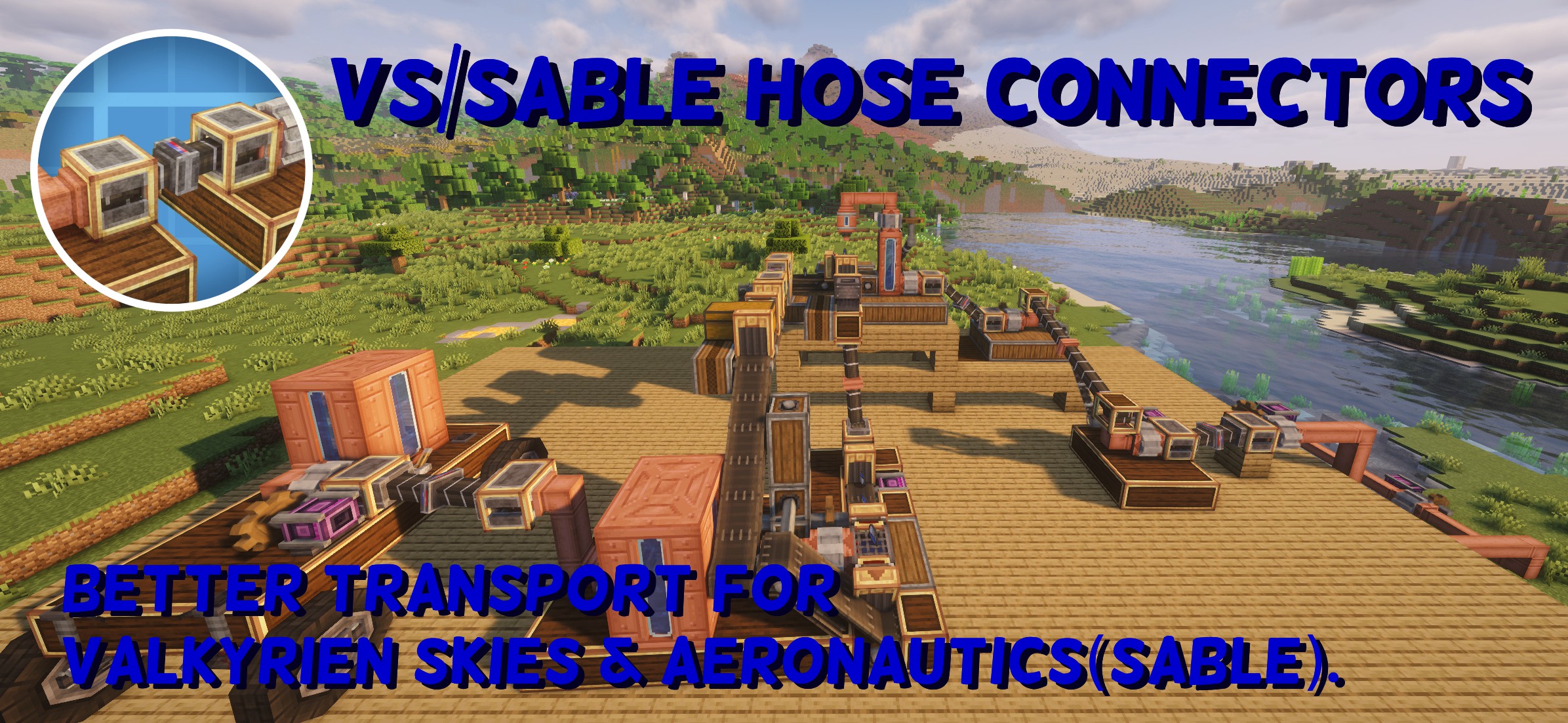
# I’ve experimentally added support for create:Aeronautics (sable).
Released v0.1.0 for NeoForge 1.21.1.
This version includes experimental support for Create: Aeronautics.
If you encounter any issues, please report them on GitHub:
https://github.com/M-K2525/VS_Hose_Connectors/issues
# VS/Sable Hose Connectors
VS/Sable Hose Connectors is an addon mod that requires Create.
When either Valkyrien Skies or Sable (Create: Aeronautics) is installed, it allows the transfer of fluids, items, rotational power, and energy between ships or sublevels.
## Tested and confirmed to work only with the following versions:
VS Hose Connectors 0.0.9
– Minecraft 1.20.1
– Forge 47.4.13
– Valkyrien Skies v2.4.9
– Create 6.0.8
VS/Sable Hose Connectors 0.1.1
– Minecraft 1.21.1
– NeoForge 21.1.227
– Create 6.0.10
– Create Aeronautics 1.1.3
– Sable 1.1.3
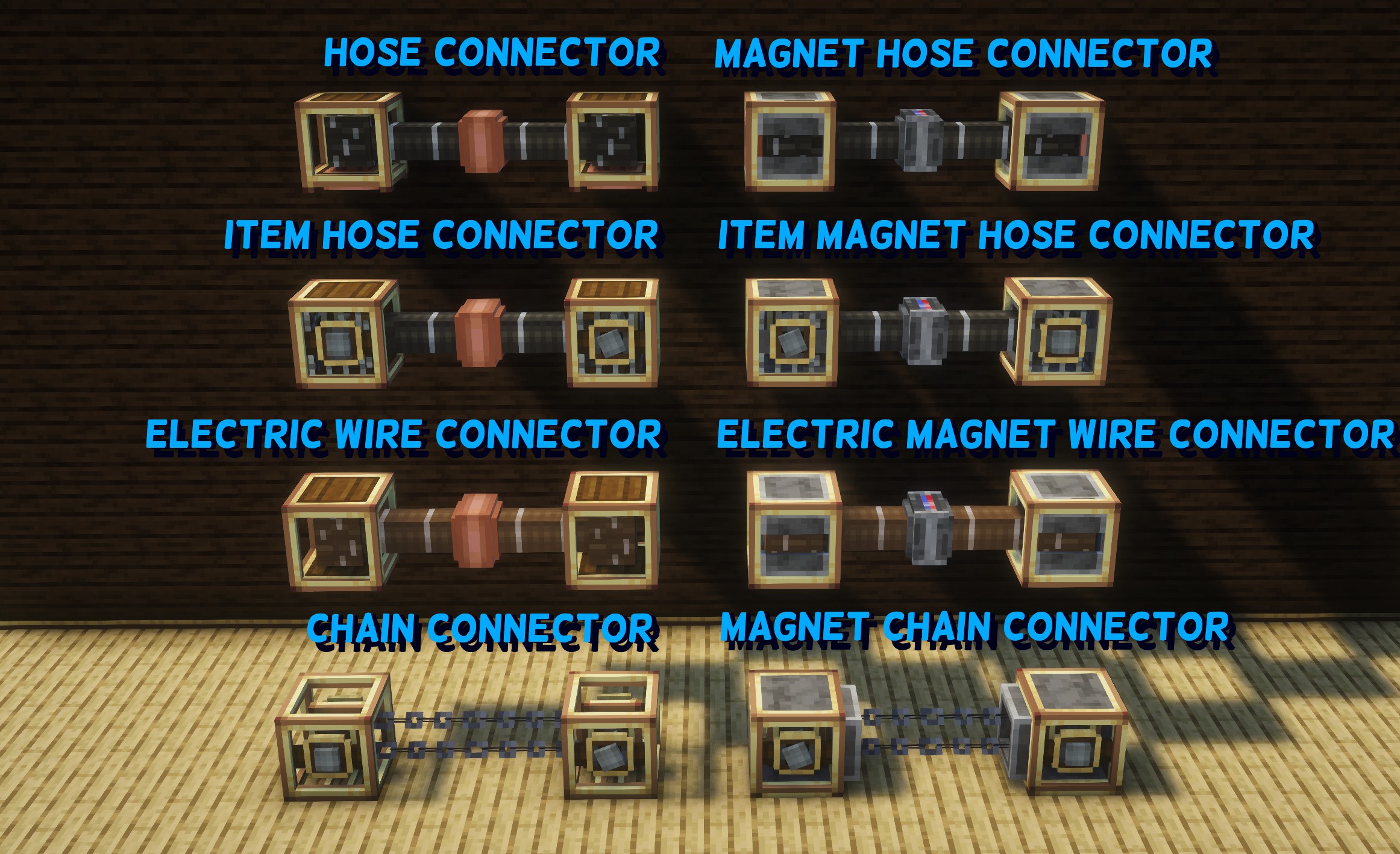
## Added Blocks
### ● Hose Connector
The basic block for fluid transport.
Two connectors can be manually linked using the Create wrench, allowing fluids to be transferred between them.
By connecting Create pipes to the bottom of the connector, fluid transportation between ships becomes possible.
### ● Magnet Hose Connector
Unlike the Hose Connector, this block has a facing direction.
When two connectors are placed facing each other, they automatically connect.
The connection can be disabled by applying a redstone signal.
As with the Hose Connector, connecting Create pipes enables fluid transportation between ships.
### ● Item Hose Connector
Similar to the Hose Connector, two connectors can be manually linked using the Create wrench.
By applying rotational force (32 RPM or higher) from the side, items can be transported between them.
When transporting items, rotational force must be applied only to the source connector.
### ● Item Magnet Hose Connector
Like the Magnet Hose Connector, two blocks placed facing each other will automatically connect.
Items can be transported by applying rotational force (32 RPM or higher) from the side.
As with the Item Hose Connector, rotational force should be applied only to the source connector when transporting items.
### ● Electric Wire Connector
A block that transfers energy by manually linking two connectors using the Create wrench.
It allows energy transfer between ships.
### ● Electric Magnet Wire Connector
Similar to the Magnet Hose Connector, this block automatically connects when placed facing another one.
### ● Chain Connector
When connectors are linked, they transfer rotational force.
This allows rotational power to be transmitted between ships.
### ● Magnet Chain Connector
A chain connector that automatically connects when two connectors are brought close together facing each other.
Genesis
Welcome to Genesis, a revolutionary new space mod utilizing Valkyrien Skies and Pehkui to deliver as immersive of a space experience as possible.
## Space

Genesis adds a space dimension to the game with customizable orbiting planets and stars. In order to deliver the most seamless space experience possible, it utilizes Pehkui and Valkyrien Skies to shrink everything in the space dimension down to 1/16 of the size, resulting in extremely quick movement for ships without the problem of running into unloaded chunks. Thanks to the fact that everything is either a render or a Valkyrien Skies ship, world height no longer matters either.
* New planets and stars can be added/changed through datapacks which have customizable size, color, texture, atmosphere, gravity, orbit speed/distance, day length, and more!
* Planets can be linked to dimensions from any mod, so you will travel to that dimension when you visit that planet in space.
* There is an asteroid belt around the solar system with destructible asteroids. It can be found 25,000 blocks away from the Sun at an approximate y level of 64.
* The skyboxes on planets are a direct view into space from that planet, so all celestial objects you can see in the sky except for the distant stars are visitable, and any new celestials you add with a datapack will automatically appear in the skies of all planets!

By default, Genesis only includes the Earth, the Moon, and the Sun as celestial objects. If you want more celestials but don’t want to create your own, consider installing one of these addons!
Dataplanets
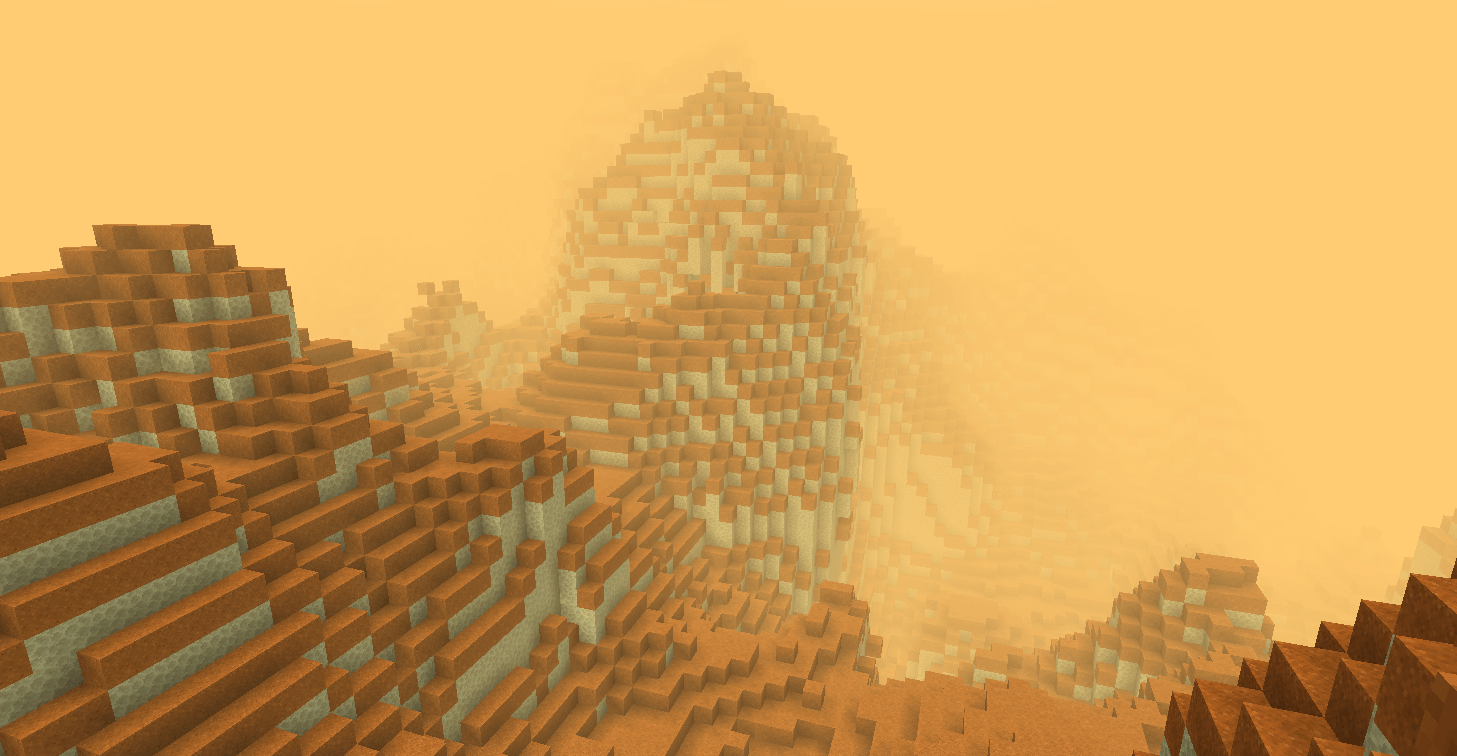
This mod adds infinite procedurally generated planets and star systems to Genesis space. It starts with 5 planets in the Solar system and one additional star with planets around it, and you can right-click with the star system theory item to generate as many new star systems as you like, all without even leaving the world!
Genesis: Ad Astra

This mod adds all of the planets from Ad Astra to Genesis Space and integrates the oxygen and gravity mechanics from Ad Astra into Genesis as well. Install this for the most complete survival experience.
## Progression
There are two tools to help you on your interplanetary travels: The Void Engine, and the Navigation Projector.
The Void Engine is a multiblock structure which grants access to a hyperspace dimension that compresses your coordinates similarly to the Nether, but by a much greater amount. It is basically necessary to have for interplanetary and interstellar travel due to how far apart things are. To make it, you need three things: a Void Core, Void Engine frame blocks, and a Void Engine Interface.
– Void Cores can be obtained by mining deep below the surface of the moon for Void Core Ore, which drops Void Shards.
– To build the engine, surround the core entirely with valid frame blocks (Void Engine Frame, Void Engine Viewport, Void Core Reflector Panel, Void Focus) including diagonals, but leave a spot for the interface. You normally need to completely surround the core including diagonals, but Void Focuses reduce the humber of frame blocks you need for the core to awaken.
– The Void Engine Interface is placed onto the void core facing toward it (blue rings out). Once you do, the core should light up like an end portal and “awaken”.
Usage: First, make sure it is on a Valkyrien Skies ship. Otherwise, it will explode when you activate it. Next, supply the interface with Forge Energy. To start the engine, give the interface a constant redstone signal, and the engine should begin spooling up. Once it completes its spool-up, it should warp you into subspace.

Both of these Void Engine setups are valid.
The Navigation Projector is a block that displays a scaled version of the solar system for finding planets. It will always show your position as a small white cube in the center of the projection. Planets appear as transucent blue cubes, and stars appear as translucent white cubes.
This block is especially helpful while in subspace since planets are not visible there. So, while in subspace, the Navigation Projector and your memory are your only guides as to your location.
## Future Plans
* Artificial gravity / players rotating with their ships
* Suffocation & life support systems for places without atmosphere
* Compatibility with the vanilla time/sleeping system
* Support for axial tilt and eccentric orbits
* The skybox of tidally locked planets rotating as the player moves
* New mechanics for the Void Engine
* Revamps of the Navigation Projector & Radar Display that make use of the ZPS data system
## Important notes:
* To get to space, fly a Valkyrien Skies ship up to y = 2048 and both the ship and you will be teleported.
* Zero Point Labs is the recommended Valkyrien Skies addon to use with this mod. While most other Valkyrien Skies addons should work correctly, you may find that some forces behave strangely in space. If this happens, it is because the addon does not respect ship scale.
* In order to use shaders with Genesis, you will need the mod Oculus Unlocked installed along with Oculus itself.
VS Crumbles
Small ish mod which aims to make blasting other ships with cannonballs more fun.
Now when part of a ship up to a configurable block limit becomes detached, it turns into falling blocks (like vanilla sand). This gets rid of the annoying floating blocks that are created when trying to blow up or burn down your enemies’ ships, and makes sinking ships easier.
**Update 1.1:**
There is now a separate config option for Max Blocks to Crumble if a protected plock is present. By default, Ship Helms from VS: Eureka are protected.
I hope you enjoy 🙂
Also check out:
Ship In A Bottle
VR Swing Sprint
Mod that allows Vivecraft players to run by swinging their arms like Blade and Sorcery!
—
## Modes
This mod has two modes: **Clientside-only** and **client and server**.
#### Clientside-only
This mode automatically activates when the mod is not found on the server. In this mode, VR players can simply
make a running motion to activate vanilla sprint (30% speed boost). This has no effect on non-VR players.
#### Client and Server (preferred)
This mode automatically activates when the mod *is* found on the server. This allows it to apply a **dynamic
sprint speed** depending on the arm’s speed ranging from 15% to 60% at an all out sprint. The dynamic sprint
speed makes the effect helps to feel more natural and fun.
This also disables some of the vanilla sprint-cancel conditions, giving the VR player full control of their
movement.
—
In both modes, this mod works by overriding Vivecraft’s default autosprint (when the forward direction is pushed all the way, it
activates sprint) and activating sprint instead by the player swinging their arms in a jogging/running motion.
—
I made this simple mod because I get vr motion sickness relatively easy and when the autosprint suddenly kicks in,
in adds a bit to that queasy feeling. I really enjoyed this feature in Blade and Sorcery and so here it is added to
Vivecraft 🙂 It helps with the feeling a bit and adds just a little bit of immersion too. Hope you like it!
—
*Any questions or concerns, please contact me on Discord!*
**Requires Vivecraft 1.3.3+ installed.**
*Supported versions: 1.19.2, 1.20.1, 1.21.1, 1.21.4, 1.21.5, 1.21.8, 1.21.10, 1.21.11*
—
## Other Awesome Stuff for VR
* 🍎 Fresh Food VR
* 📚 Better, Fresher 3D Books VR
* 🪣 Fresh Buckets VR
* 🪴 Fresh Flowers and Plants VR
* 💿 Fresh Music Discs VR
* 🖼️ Fresh Paintings VR
* 💎 Fresh Ores and Ingots VR
* 🤾 VR Throwing Extensions
## Contact
For any questions/issues/ideas, feel free to contact me on Discord or Matrix 🙂
Voxel Earth
# Voxel Earth
> Real places, in Minecraft.

Voxel Earth is a full pipeline for turning photogrammetry and 3D Tiles into block-based worlds.
It streams Google Photorealistic 3D Tiles (and other sources) into Minecraft as voxelized chunks, so you can walk through real cities, mountains, and landmarks — block by block.
– 🌍 Stream real-world 3D Tiles into Minecraft
– 🧱 CPU voxelization, no GPU required on the server
– ⚡ Designed to work hand-in-hand with FastAsyncWorldEdit (FAWE)
– 🌐 Web client for browser-side experiments and previews
– 🧪 Separate CLIs for each pipeline stage (download → decode → voxelize)
—
## Links & Community
– **Website:** https://voxelearth.org
– **Play server:** `play.voxelearth.org`
– **Web client demo:** https://beta.voxelearth.org (browser viewer)
– **Discord:** https://discord.gg/8MK8J9EQGe
– **Monorepo (reference):** https://github.com/ryanhlewis/VoxelEarth
—
**What is Voxel Earth and why should I use it?**
Voxel Earth is a Minecraft + web ecosystem for exploring real-world geometry as voxels:
– **3D Tiles to blocks**
Fetches photogrammetry tiles (e.g. Google Photorealistic 3D Tiles), normalizes them, and converts them into Minecraft block palettes.
– **On-demand streaming**
Tiles are pulled and voxelized as players move around, so you can “walk into” a real city and watch it appear around you.
– **Flexible pipeline**
Each major step (download, Draco decode, voxelization) exists as a separate CLI tool and as embedded code in the plugin. You can test each stage locally before wiring everything together.
– **Server-friendly**
The Minecraft plugin is built as a single shaded JAR, with CPU voxelization and async integration with FAWE for high-throughput placement.
—
## Downloads
> **Note:** Links below are placeholders / targets; some may not exist yet.
– **Minecraft plugin (core Voxel Earth JAR)**
– GitHub Releases: https://github.com/ryanhlewis/VoxelEarth/releases
– Modrinth: https://modrinth.com/plugin/voxelearth
– SpigotMC: https://www.spigotmc.org/resources/voxel-earth.130155/
– **Web client**
– GitHub: https://github.com/voxelearth/web-client
—
## Minecraft Plugin
### Requirements
– **Server:** Paper or Spigot **1.20+** with **FastAsyncWorldEdit (FAWE) installed**
– **Java:** **Java 21+**
—
## Commands
VoxelEarth’s plugin adds commands for geocoding, tile loading, and per-player preferences:
“`yml
/visit
Teleport to a geocoded location (city, landmark, etc.) and stream tiles around it.
/visitradius
Configure how many tiles /visit loads around the target area.
/moveradius
Set how many tiles are loaded as the player moves.
/movethreshold
Movement distance (in blocks) required before triggering new loads.
/moveload
Enable/disable movement-based loading for yourself.
/visitother
Teleport another player to a geocoded location and stream tiles.
/visitradiusother
/moveradiusother
/movethresholdother
Admin variants that adjust settings and notify other players.
/voxelapikey
Store a Google API key for geocoding and tile access (per server).
“`
Permissions are namespaced under `voxelearth.*` and default to `true` or `op` as appropriate (see `plugin.yml` for full details).
—
## Web Client
If you just want to experiment with tiles and voxelization **in your browser**, use the web client:
* **Repo:** https://github.com/voxelearth/web-client
* **Live demo:** https://beta.voxelearth.org
The web client:
* Fetches Google Photorealistic 3D Tiles in the browser
* Normalizes/rotates them into a viewable frame
* Can hand off data to the Voxel Earth voxelization pipeline
* Is ideal for exploring regions, testing zoom/SSE parameters, and visually inspecting tilesets before you spin up a Minecraft server
—
## License
Voxel Earth and its companion CLIs are released under the **MIT License**, unless otherwise noted in sub-projects.
See the `LICENSE` file in this repository for full terms.
“Minecraft” is a trademark of Mojang AB.
Voxel Earth is not affiliated with or endorsed by Mojang AB, Microsoft, or Google.