Wayfarer

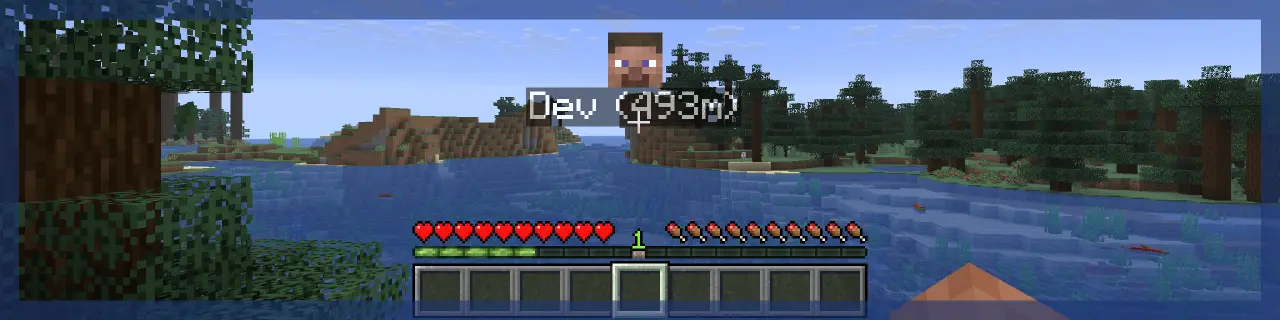

 
> **Wayfarer** implements a waypoint rendering system and aims to improve the locator bar, all in a way that can be utilized by other developers in their projects!
> **Client-side**, the mod handles waypoint rendering in-world and on the locator bar. There are many customization options to tweak waypoint visuals.
> **Server-side**, the mod handles server-to-client waypoint data and synchronization to tell the client what to render. Not all projects need this, client-side mods can just utilize the waypoint renderer directly!

> That’s alright; Wayfarer **is** still useful on its own! Its standalone features include:
> ## Improved Locator Bar
> – Wayfarer adds a **hold** keybind to manually toggle the locator bar.
> – In survival, locator bar icons render over the experience bar instead of replacing it with the locator bar, so you can still see your experience!
> – Head icons are shown for players on the locator bar.
> – Instead of icons getting smaller as they get far away, they become more translucent.
> ## Try These Mods:
> 

You can find an **API Reference** guide and some examples on how to integrate with **Wayfarer** on the **Wiki**.
## Join us. Thrive.

Way Compass
# ✅ Features
– `/trigger rtp` teleport the user in a 8 block range, after 3 seconds (disabled by default, enabled with `/function command:rtp_enabled`).
– Add a new item : Way Compass, it can interact with a lodestone (giveable with `/function command:give/way_compass`).
⚠️ Be sure to download Way Compass resource pack (here) ⚠️
### 🧭 Way Compass
Craft with 4 diamond, 4 popped chorus fruit and 1 compass.
## 🔜 Planned features
– When you right click with a way compass related to a lodestone, teleport at this lodestone
– Security system to prevent a teleportation in blocks and cause suffocation.
## ⚙️ Technical information
### Installation
1. Put `Way compass resourcepack` file in the `resourcepack` file of your instance (download here).
2. When your create your world add the `way compass datapack` in the datapack list.
3. Create your world, be sure that the datapack, resourcepack are oad, play and have fun.
### Compatibility option
Normally, this datapack and the include resourcepack was compatible with all other datapack and mods, but if you have a problems check this :
1. If the name space of other datapack/mods is `way_compass`.
2. If the datapacks/mods modify a vanilla which is modified by this datapack.
3. Else, you can report an issues on github.
/Way
# /Way
`/Way` is a simple survival-friendly waypoint plugin for Paper servers.
Set personal waypoints, open a clean waypoint menu with `/way`, and teleport back to saved locations without needing admin tools or complicated setup. It is designed for small SMP-style servers where players want convenient travel without turning the world into a full map/claims system.
## Features
– Open the waypoint menu with `/way`
– Save multiple personal waypoint slots
– Teleport back to saved locations through a simple GUI
– Per-player waypoint storage
– Lightweight and straightforward for survival servers
## Command
– `/way` — open the waypoint menu
## Notes
– Waypoints are personal to each player
– Data is stored persistently by UUID
– Built for a clean, minimal SMP experience
Tested on **Paper 1.21.11**.
Wavepoint
Wavepoint
Wavepoint is a new, simplistic waypoint plugin designed to make playing Minecraft easier.





## Commands
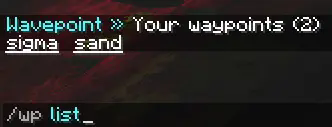
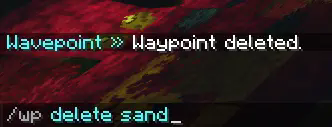
Wavepoint uses one command, `/wp`, to manage waypoints:

“`yml
/wp list: Lists the current waypoints that you have
/wp set : Sets a waypoint at your location
/wp tp : Teleports the player to a waypoint they own
/wp info : Get information about a specific waypoint
/wp delete : Deletes a waypoint that the player owns
“`
## Integrations
Wavepoint has the ability to integrate with some plugins to provide extra functionality:
– Vault (economy)
– CombatLogX (combat logging)
“`yml
# Below are integrations that work with other plugins.
# If the integration is enabled, but the plugin or requirements aren’t met, nothing will happen.
integrations:
vault: # | https://www.spigotmc.org/resources/vault.34315/
enabled: true # Whether to integrate with Vault, for economy purposes.
charge_amount: 5 # How much money to charge the user per teleport.
combatlogx: # | https://www.spigotmc.org/resources/combatlogx.31689/
enabled: true # Whether to integrate with CombatLogX.
combat:
# False = restricted
set: false # Whether to restrict setting waypoints during combat. false = restricted.
teleport: false # Whether to restrict teleporting to waypoints during combat. false = restricted.
“`
More integrations may be added in the future.
## Permissions
Wavepoint comes with a variety of permissions that can be used with a permissions plugin like LuckPerms to limit or restrict what users can do, those being:
“`yml
waypoint.wp: Allows usage of the main /wp command
waypoint.wp.tp: Allows usage of /wp tp
waypoint.wp.set: Allows usage of /wp set
waypoint.wp.list: Allows usage of /wp list
waypoint.wp.delete: Allows usage of /wp delete
waypoint.wp.info: Allows usage of /wp info
“`
## Command Executions
Wavepoint has the ability to execute console commands if a player does a specific action, with two placeholders:
`${player}` and `${playerId}`
This can be set in the `config.yml` file:
“`yml
# Allows the server to execute a command on a specific event. ${player} and ${playerId} are valid placeholders.
commands:
teleport:
– ” # For example kick ${player} No teleporting!
set:
– ” # For example say ${player} has set a waypoint!
list:
– ” # For example say Hey ${player}, what you looking at??
delete:
– ” # For example say Waypoint is now gone!
info:
– ” # For example say ${player} is really interested in this waypoint!
“`
If you would like to view the full `config.yml`, you can view it here.
## Language
Wavepoint contains a language file that can be modified at any time! You can find it under `languages/en_us.yml` in the plugins folder.
## AI Usage
AI mostly helped with Tab Completions (which I still don’t know how to turn off).
However, it was not used to make the majority of Wavepoint. Most of the code is human-made.
## API
Wavepoint does have an API, and you can check out the functions here.
This project is licensed under the MIT License.
Chefmakes’ Wavedash

This mod adds that famous wavedash we all destroyed our hands over. You preform it similarly to how you do it in melee; You just jump, and while holding any direction key, sneak. This will thrust you in that direction and downwards, making you slide a bit because of it.
You can additionally adjust alot of the variables to your liking; From traction to making you feel like you’re playing luigi, to the actual thrust’s horizontal, and vertical force for a lighter or a heavier wavedash.
It’s best to use this mod when you’re fighting bosses or any scenarios where you need quick maneuverablity to avoid taking damage or the opposite
Water Propeller
WARNING: versions before release 1.21.11 will kill all your villagers.
this datapack will boost you while you are under water. it may also cause lag on weaker devices.
if you want to see how it works, just place a few repeathing command blocks with /effect clear @e[type=villager]
thanks! 😀
Water Flasks
Water Flasks for TFC:TNG!
Announcing the 1.20.1 Release!
### 1.20/1.18: Bladders
With the demise of skills in 1.18, bladders now drop more often when animals are killed with higher damage weapons. A red steel axe is approximately 2x more effective that your fists.
#### Drop Chances
| Animal |Drop Chance |
| ——- |———– |
| Bovines |50% |
| Moose |50% |
| Bears |20% |
| Equines |20% |
| Sheep |10% |
| Goat |10% |
| Alpaca |10% |
| Deer |10% |
The flasks break at 100 damage for leather, and 400 for iron. They can be repaired using bladders.
The durability bar is the color of the liquid inside, if any.
### Leather Flask
* To make the leather flask, you’ll need two strings, a bladder, two leather sides, and a knife.
* The capacity of this leather flask is 40% of the OG version, as it was very overpowered.
* The leather sides are knapped out of leather. Please look the recipe up in JEI, as it is different from the old Leather Sac recipe.
* Fluid level in the leather flask is indicated by the apparent size.
### Iron Flask
* Recipe includes burlap and an unfinished flask which is forged out of an iron sheet.
* The iron flask has quadruple the capacity of the leather flask.
* The iron flask requires burlap to repair.
* Fluid level in the iron flask is shown by a bar in the center of the item.
Known issues:
* Filling flasks consumes the source block
* Flasks filled with all possible fluids do NOT show up in JEI, but do show up in creative tabs
* Iron Flasks can no longer be disabled as a config option, use a datapack instead
### TFC Addon history
This was heavily inspired by Emris’ Leather Water Sac 1.7.10 TerraFirmaCraft(TFC) add-on.
The Water Sac Curseforge Page is not by the original author, and has the license completely incorrect. The source for the original mod is on github.
I missed this mod so much for TerraFirmaCraft for 1.12.2+ (TFC:TNG), I needed a replacement.
### 1.12: Bladders
As butchering skill increases, the chance to drop a bladder will increase, with certain skill levels required before the bladder is obtainable from that species.
| Animals |Butchering |Minimum |
| ——- |———- |——- |
|
| Bears |Novice |50 |
| Bovines |Adept |60 |
| Equines |Adept |50 |
| Camel |Adept |50 |
| Sheep |Expert |25 |
| Goat |Expert |25 |
| Alpaca |Expert |25 |
| Llama |Expert |25 |
| Deer |Expert |15 |
| Gazelle |Expert |15 |
As usual, if you break it, you get to keep the pieces.
Please see the TFC:TNG discord at https://invite.gg/terrafirmacraft in channel #content, thread WaterFlasks for support.
Huge props to the TFC:TNG project for building a mod so much easier to code for than 1.7.10!
#### Credits:
EERussianGuy
SirSandwich
Coach for the textures!
AlcatrazEscapee
Awesome translators!
Happy TFC!
———-
##### Gaelmare
WarpUtils
# Introduction
**WarpUtils** is a lightweight, fully configurable server-side utility mod that provides essential teleportation features: Homes, Warps, and TPA requests.
Inspired by the VanillaTweaks Datapacks.
Because it is server-side only, you can install this on your server and **pure vanilla clients can join without any drawbacks** or additional downloads.
## Core Functionality
* **Homes:** Players can set personal waypoints and teleport back to them.
* **Warps:** Operators can set global waypoints (like shops or hubs) accessible to everyone.
* **TPAs:** Players can send requests to teleport to one another securely.
* **Back:** A convenient command to return to your previous location after a teleport.
# Features
Every teleportation feature comes with
– **Cooldowns:** Configure how long a player must wait after teleporting before they can use the command again.
– **Warm-up Delays:** Configure a “stand-still” timer before a teleport executes. This delay will be cancelled if the player moves, runs another command, or is attacked (if the fight cooldown is active).
– **Configurable:** Every feature can be individually disabled and configured (see configuration details below).
Homes
Allows players to set personal homes and teleport back to them at will. Server owners can configure the maximum number of homes a player is allowed to keep.
| Command | Description |
| :— | :— |
| `/home ` | Teleports you to the specific home |
| `/home` | Teleports you to your default home (auto-selects one if no default is set) |
| `/setdefaulthome ` | Sets an existing home as your default |
| `/sethome ` | Creates or overwrites a home at your current location |
| `/delhome ` | Deletes the specified home |
| `/renamehome ` | Renames an existing home (can also override if the `newName` already exists) |
| `/homes` | Lists all your saved homes and their coordinates |
TPAs (Teleport Requests)
Allows players to request teleportation to other players. The requesting player is teleported to the receiving player once they accept the request.
**Note:** A player can only have one *outgoing* request active at a time, but can receive multiple *incoming* requests. Cooldowns apply after the teleport happens; delays apply after the request is accepted.
| Command | Description |
| :— | :— |
| `/tpa ` | Sends a teleport request to the specified player |
| `/tpaaccept ` | Accepts a request from a specific player |
| `/tpaaccept` | Accepts the most recent teleport request. |
| `/tpadeny ` | Denies a request from a specific player |
| `/tpadeny` | Denies all active incoming requests |
| `/tpacancel` | Cancels the outgoing request you sent |
| `/tpas` | Displays all active sent and received requests |
Warps
Allows operators to manage global points of interest that all players can teleport to.
**The Spawn Warp:**
By default, a `Spawn` warp is enabled and linked to the world spawn point (can be set using `/setworldspawn …`)
– It can be detached from the world spawn by overwriting it: `/setwarp Spawn`
– It can be reattached to the world spawn by deleting the custom warp: `/delwarp Spawn`
| Command | Description |
| :— | :— |
| `/warp ` | Teleports you to the specified global warp |
| `/warps` | Lists all available warps and their locations |
| `/setwarp ` | **(OP)** Creates or overwrites a warp at your location |
| `/delwarp ` | **(OP)** Deletes the specified warp |
| `/renamewarp ` | **(OP)** Renames an existing warp |
Commands marked with **(OP)** can only be executed by the
Back Command
Allows players to return to the location they were at *before* their last teleport or to their death location. The behavior is highly customizable via the config (including `mode` and `duration` settings).
| Command | Description |
| :— | :— |
| `/back` | Teleports you back to your last location before a teleport |
Tpr Command
Allows players to teleport to a random location. The maximum and minimum range of the teleport is configurable.
| Command | Description |
| :— | :— |
| `/tpr` | Teleports you to a random location |
Player Preferences & Effects
Personalize your experience using: `/warputils personal …`
## Customizable Options:
* **Delay Display:** When teleporting how should the delay progress be displayed: `none`, `percentage` or `seconds`.
* **Language:** Set your display language (currently only supports English).
* **Message Target:** Choose where mod messages appear: `chat` or `actionbar` (Some messages may be forced to be displayed in one or the other, e.g. homes list).
* **Particles:** Adjust the visual effects of the teleportation.
## Visual Effects
Particles are displayed at three stages:
1. **Charge Effect:** During the warm-up delay.
2. **Departure:** At the location you leave.
3. **Arrival:** At your destination.
*Note: Operators can force effects to be enabled globally, overriding player preferences.*
# Configuration
*Note: The config file is not for direct configuration. It only sets the default values used when creating a world or resetting the world specific config using `/warputils config reset`, `/warputils config reset` or `/warputils config default`*.
The command `/warputils config ` allows you to easily configure the functionality of each feature **as an operator**. Non-operators may read the values of the config but not edit them.
General
This config category allows you to set more general configurations, like the default `messageTarget` or the `cooldown` and `delay` used for teleporation. Each teleportation features inherits the `cooldown` and `delay` values by default (the respective setting’s value is set to -1) but they can be set individually using `/warputils config cooldown ` for example.
Accessed using `/warputils config general `.
| Setting | Default | Description |
| :— | :— | :— |
| `cooldown` | 1200 (1 minutes) | The waiting period (in ticks) between teleportations |
| `delay` | 60 (3 seconds) | The time (in ticks) between executing the command and being teleported |
| `messageTarget` | actionbar | The primary location to display messages to |
The exception to the cooldown default is the /tpr command for which it is set to 24000 (20 minutes).
*ticks: 1 tick = 1/20th of a second*
Homes
Accessed using `/warputils config homes `.
| Setting | Default | Description |
| :— | :— | :— |
| `maxHomeCount` | 3 | The maximum number of homes a player can have (0 = Infinity) |
| `disableHomes` | false | Disables homes (homes won’t be deleted) |
Tpas (Teleport Requests)
Accessed using `/warputils config tpas `.
| Setting | Default | Description |
| :— | :— | :— |
| `duration` | 6000 | The time (in ticks) a tpa request is active (0 = Infinity) |
| `disableTpas` | false | Disables tpas |
*ticks: 1 tick = 1/20th of a second*
Warps
Accessed using `/warputils config warps `.
| Setting | Default | Description |
| :— | :— | :— |
| `disableSpawnWarp` | false | Is the spawn warp disabled |
| `disableWarps` | false | Disables warps (warps won’t be deleted) |
Back Command
Accessed using `/warputils config back `.
| Setting | Default | Description |
| :— | :— | :— |
| `duration` | 0 | The time (in ticks) a tpa request is active (0 = Infinity) |
| `mode` | backBack | The operation mode of the `/back` command |
| `backOnDeath` | false | Does your death set a back location |
| `disableBack` | false | Disables the `/back` command |
The operation modes the `/back` command:
– **backBack**: You can teleport back to the location you used `/back`, `/home`, `/tpa` or `/warp` from
– **singleUse**: You can teleport back once after every teleportation using `/home`, `/tpa` or `/warp`
– **persistent**: The back location only changes when using `/home`, `/tpa` or `/warp`
Tpr Command
Accessed using `/warputils config tpr `.
| Setting | Default | Description |
| :— | :— | :— |
| `minRange` | 500 | The minimum distance (in blocks) tpa can teleport you away from your position |
| `maxRange` | 2000 | The maximum distance (in blocks) tpa can teleport you away from your position |
| `disableTpr` | false | Disables the `/tpr` command |
The operation modes the `/back` command:
– **backBack**: You can teleport back to the location you used `/back`, `/home`, `/tpa` or `/warp` from
– **singleUse**: You can teleport back once after every teleportation using `/home`, `/tpa` or `/warp`
– **persistent**: The back location only changes when using `/home`, `/tpa` or `/warp`
Effects
Accessed using `/warputils config effects `.
| Setting | Default | Description |
| :— | :— | :— |
| `chargeEffect` | RisingRings | The default effect to display during the delay period |
| `enforceChargeEffect` | false | Enforces the default charge effect; always plays this effect instead of the effect the player selected |
| `teleporationEffect` | Smoke | The default effect to display at the location of departure |
| `enforceTeleportEffect` | false | Enforces the default teleportation effect; always plays this effect instead of the effect the player selected |
| `arrivalEffect` | Smoke | The default effect to display at the location of arrival |
| `enforceArrivalEffect` | false | Enforces the default arrival effect; always plays this effect instead of the effect the player selected |
| `disableEffects` | false | Disables all particle effects in this mod |
*Note: To disable one specific effect, select the “None” effect and enforce it.*
Fight Cooldown
Accessed using `/warputils config fightCooldown `.
| Setting | Default | Description |
| :— | :— | :— |
| `cooldown` | 60 | The duration during which you cannot teleport after being attacked |
| `onlyPvP` | false | Whether only players can trigger this cooldown |
*Note: To disable this feature set the cooldown to 0.*
## Note:
Feel free to share any ideas regarding additions or changes on my github issues page.
Also minecraft version 26.1 and higher will no longer support forge.
Warpstones
# 🌍 Warpstones


## 📖 Description
Place Warpstones at key locations to create fast-travel points in your world. Designed for both survival and multiplayer gameplay, this mod offers a simple and balanced way to move around quickly!
### Feactures
– Custom Name (with name tags)
– Glowing (with glowstone dust)
– Compass Linking
I recommend use a Lodestone Recipe Backport to use a iron ingot instead of netherite ingot.
## 🛠️ Recipe

## ⌨️ Commands
Destroy all Warpstones:
“`mcfunction
/function warpstones:destroy_all_warpstones
“`
Give:
“`mcfunction
/loot give @s loot warpstones:warpstone
“`
## 🪪 License
AGPL-3.0-or-later
## 👾 Bugs/Issues
Please report any problem/bug/issues in the Discord Server.
## 💌 Donate
– Donate on Ko-Fi
– Donate on PayPal
## 🎁 Server Hosting
Creating your own server can be a very lengthy, tedious and costly process.
But with BisectHosting, you get your own server in just a couple of clicks! With their 24/7 support and fast-response time, no issues shall stand in your way!
Interested? Then we’ve got a deal for you!
https://bisecthosting.com/lullaby

WarpsGUI

Simple but effective plugin for **infinite** Homes and Warps in GUI with changable icons, messages and even sounds!
****UPDATED TO 1.21.10****
Credit to the original author [[MrHardyCZ]](https://www.spigotmc.org/resources/authors/mrhardycz.62830/).
You can find his original plugin [[here]](https://www.spigotmc.org/resources/%E2%9C%A8-warpsgui-%C2%AB1-8-1-14-%C2%BB-%E2%9C%A8-homes-and-warps-in-gui-%E2%9C%85.22484/).
****Fixes v4.0.0 (v4a)****
* Fixed warps.homelimit.* permission
* Fixed an error when “/tpcancel” is called without an ongoing teleportation
****Additions v4.1.0 (v4e)****
* Added selectable icons for homes
* User can now select a home icon on home creation
* User can now change a home icon in the edit home menu
**Overview**


**EditWarp GUI**
* **Rename warp (Nametag icon)** – rename warp using nice AnvilGUI
* **Change icon (Current icon)** – change icon of the warp, Icons menu contains all items in the game and even search
* **Toggle the need for permissions (Banner icon)** – toggle the need for permissions (warps.usewarp.)
* **Remove warp (Barrier icon)** – remove warp
**EditHome GUI**
* **Rename home (Nameteg icon)** – rename home using nice AnvilGUI
* **Change icon (Current icon)** – change icon of the home, Icons menu contains all items in the game and even search
* **Remove home (Barrier icon)** – remove home


_If you want to decompile the plugin, feel free to do so._
_If you want to change the code, you are allowed to._
_This plugin contains the AnvilGUI API made by WesJD licenced under the MIT licence._