ZX HomeSystem
ZX HomeSystem – Advanced Minecraft Home Management Plugin
Transform your Minecraft server with the most feature-rich home system available!
ZX HomeSystem is a premium home management plugin developed by ZX Studio that provides players with an exceptional teleportation and home management experience. With its intuitive command system and stunning visual interface, players can easily set, manage, and teleport to multiple homes across your server.
Key Features:
🏠 Advanced Home Management
Set multiple named homes with /zxhome set
Delete, rename, and list your homes effortlessly
Public/private home sharing system for player interaction
Permission-based home limits for different rank tiers
⚡ Premium Teleportation System
Configurable teleport delays with movement cancellation
Customizable cooldowns to prevent abuse
Safe teleport location checking for player security
Cross-world teleportation support with sound effects
Particle effects for immersive teleport experience
🎮 Stunning User Interface
Beautiful GUI interface for home management
Full tab completion for all commands
Colorful, formatted chat messages with custom prefixes
Action bar notifications during teleport countdown
Professional ASCII art branding
🛡️ Server Administration Tools
Flexible configuration system with rank-based limits
Economy integration for teleport and home setting costs
World restrictions for home placement control
Automatic data saving with configurable intervals
Detailed logging for server monitoring
Admin reload command for configuration changes
Commands:
/zxhome help – Comprehensive help menu
/zxhome set – Set a new home location
/zxhome go – Teleport to your home
/zxhome del – Remove a home
/zxhome list – View all your homes
/zxhome gui – Open the home management GUI
/zxhome rename – Rename existing homes
/zxhome share – Share homes with friends
/zxhome public – Make homes publicly accessible
/zxhome near – Find your nearest home
/zxhome reload – Reload configuration (Admin only)
Perfect For:
Survival servers wanting enhanced player convenience
Creative servers with multiple world setups
Minigame servers needing quick teleport solutions
Any Minecraft server looking to improve player retention
Built with performance and scalability in mind, ZX HomeSystem seamlessly integrates with your existing server setup while providing the premium features your players demand.
Developed with ❤️ by ZX Studio – Creating exceptional Minecraft experiences
ZTools
# ZTools
This datapack includes a bunch of miscellaneous items and tools for Minecraft, including weapons, tools and more. This is my first datapack so if there is anything wrong, feel free to tell me in the comments.
All custom crafting recipes in this pack are always instantly unlocked and show in the recipe book.
This pack includes:
## Items
### Haste Talisman
When held in mainhand or offhand, gives the player +50% mining speed. For example, a diamond pickaxe with this in offhand can instantly mine netherrack.
### Speed Talisman
When held in offhand, gives the player 30% more speed and 37.5% in mainhand.
### Extendable Arm
When held in offhand, gives the player +1.5 reach and +1.75 in mainhand.
### Fireball Dusts
– Fireball Dust: When used, summons a fireball (With an explosion power of 2) and is consumed with a cooldown of 0.7 seconds.
– Greater Fireball Dust: When used, summons a fireball (With an explosion power of 4) and is consumed with a cooldown of 1.4 seconds.
– _Note: You must hit the fireballs summoned in the direction of choice after summoning them._
### Radar Compass
When held, gives the player -65% movement speed and reveals all entities in a 10 block radius.
### Lumberjack Axe
Cuts down entire trees at once, or any connected logs.
### Compressed Wind Charge
Explodes with 4 times the power of a wind charge.
### Warp Stone
Consumable. Teleports you 8 blocks forward.
## Weapons
### Scythe
Attack stats same as a Sharpness II, Sweeping Edge X Diamond Sword, and it summons a damaging cloud when attacking players.
### Ender Blade
When right clicked, teleports the player 2.5 blocks ahead.
### The Lootmaster
Looting X, Fortune X, Sharpness VII diamond pickaxe.
## Recipes
### Gunpowder
Gunpowder can be crafted with 1 flint to yield 3 gunpowder.
### Machine Gun
Crossbow with Quick Charge V for instant reloading.
### Smelting Lapis
Lapis smelts into a stick twice as fast in a furnace or blast furnace yielding a lot of xp.
### Gluing and Singularity Enchanted Books
### Nutrition-Enhanced Berries
Sweet berries cook faster than regular items in furnace and result in a food that can be eathen faster than most foods with 6 nutrition and 12.7 saturation.
## Enchantments
### Explosive
For crossbows and bows, but an anvil must be used to enchant crossbows. Makes arrows explode when hitting blocks. (Not entities)
### Knowledge
For pickaxes, increases mining XP up to 9x at level V, but is very very expensive, where a level 30 enchantment table can enchant to a maximum of Knowledge III. For higher levels, enchantments must be combined or villagers must be used.
### Gluing
For weapons, glues mobs (not players) in place for 2 seconds when you hit them.
### Singularity
For maces, deals double damage at level 1 and triple at level 2.
ZSpeed
What you need to know!
YOU NEED THESE MODS:
tickrate api
player animator
There are currently 3 suits:
^ Flash
^ Reverse Flash
^ Zoom
Key Bindings:
Y = Increase Speed
H = Decrease Speed
R = Enable/Disable Speed
There Is a small meter at the bottom of your screen.
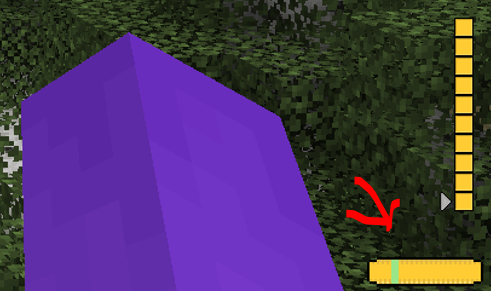
Use Jei or go to [https://legacy.curseforge.com/minecraft/mc-mods/zspeed](https://legacy.curseforge.com/minecraft/mc-mods/zspeed) to see the recipies!
Suit Textures:
I had some preset suits I didn’t make, I took them out but now only the flash suit has a texture, they still work. They just don’t have textures. I will work on them!
Bugs:
There are a few Bugs that I am aware of and trying to fix!
^ Crash – Index (number prob 20-30) Invalid in length 0, This is a bug with the trail, its not you, and its rare. But It can happen, I will try to eliminate it in future versions.
^ Trail is off!!! – At a 45 degree and -135 degree angle the trail is not directly behind the player. I’m not entirely sure why this is. But I will continue to crack at it in the future.
^ Other Players can’t see my trail! – This is because of how I render the trail. I render it directly to the client and not the game itself. I will work on multiplayer compatibility, But Its not here yet!
MULTIPLAYER IS RESTRICTED:
The way I coded some of the features makes it single player only. This mod WILL work in multiplayer, It just wont look as cool 🙁 , I am working on making it compatible, but for now, Only you can see your trail.
I will update this mod over time (especially if yall like it)
Zero Point Systems

Zero Point Systems is a mod that adds many unique logistical blocks and items that can be used for creating redstone contraptions, controlling Valkyrien Skies ships, transmitting data, and more!
The primary feature is a unique cable system that allows for four independent signals to be sent through a single block: the Dense Cable. These signals can be either redstone signals or Forge Energy signals, and you can combine them within a single dense cable. Just make sure they’re all on separate channels, or there might be explosive consequences! You can combine single cables into dense cables and vice versa with the use of the Dense Cable Separator block, which transfers the signals between the dense cables and 4 individual ones which are distinguished by colored faces.
To go along with these dense cables, there are several blocks which connect directly to them without the use of the usual separator block:
– The Octo and Dodeca Controllers. These controllers map keys on your keyboard directly to the colored channels of a dense cable when you sit at them. Their primary intended use case is as a control interface for VS ships, but you can also use them to control anything you like.
– The Switch Panel. This panel connects a tiny lever directly to each channel of a dense cable.
– The Graduated Lever. This lever connects to a single cable and allows precise control of the redstone signal strength passing through it.
The Octo and Dodeca Controllers. These controllers map keys on your keyboard directly to the colored channels of a dense cable when you sit at them. Their primary intended use case is as a control interface for VS ships, but you can also use them to control anything you like.
The Switch Panel. This panel connects a tiny lever directly to each channel of a dense cable.
The Graduated Lever. This lever connects to a single cable and allows precise control of the redstone signal strength passing through it.
There is also a Data Cable system that can send strings of letters over long distances. This can be used to send and receive radio signals, display text on panels, compare text, and automatically record incoming messages into books! You can even play the messages out loud using the text-to-speech Loudspeaker block!
Credits:
– French + German translations courtessy of ruralpainter857
Zombie Horse Traps
This datapack makes it so that Zombie Horse Traps spawn just like Skeleton Horse Traps! Very simple 🙂
Zoe Isn’t Cyberpunk

### Summary:
**Zoe Isn’t Cyberpunk (Zoe)** is a Cyberpunk-influenced (*Influences include* Cyberpunk 2077, Cyberpunk RED *and* Cyberpunk: Edgerunners) mod. It takes many aspects of these universes and implements them in its own way.
# A new (https://www.youtube.com/watch?v=bDYwRxKdzEk) is now available!
## A new [wiki](https://zoeisntcyberpunk.wiki.gg/) is now available!
# The Zoe SMP is now live! Join the [discord](https://discord.com/invite/H3dTXFBPCA) for more information
**Features**: Implants, custom weapons, custom software, custom mobs, 2 bosses, building blocks and more.
The mod is recommended for multiplayer.
Stats
**Cybertechne:** Affects the quality of crafted implants, increased via crafting implants.
**Biotechne:** Represents your “humanity” – your capacity for handling implants. Increased by killing mechanical mobs (especially bosses) and having implants equipped.
**Robotechne:** Increases the power of software. Increased by having software equipped/using software.
Commands
**/zoe_techne** – Used to change a player’s Cybertechne/Biotechne/Robotechne
**/zoe_implant** – Used to generate or clear implants
**/zoe_software** – Used to equip or clear Software
Config
**zoe_config.toml** – General configurations to the Zoe experience
**zoe** (folder) – Configurable settings for each individual implant, including disabling them entirely
Compatibility & Support
### Implants:
Zoe uses JSON files for its implant attributes. If you wish to change them, you can find them in your game file directory (%appdata%) under …/config/zoe and you are free to change it as you wish.
the JSON file names must follow this format: ‘zoe_‘ or it will **not** work.
**NOTE:** If you want your implant changes to stay PERMANENT between mod updates, set their “update” value to ‘false’!
While it is possible to change implant details during runtime, I highly advise against it on servers and even in Singleplayer to avoid any issues (for example, the attribute application system breaking). You should close your world/server before making changes to the JSON files.
### Other
Zoe uses tags and similar things to try and be as friendly as possible for compatibility with other mods. Joining the discord and asking me directly is the best way to learn more about this.
Notice
This mod does not associate itself officially with any of the influences mentioned above, it is merely inspired by them.
This mod is made using **MCreator**. I hope to improve my coding so I’ll eventually be able to move to full-on coding, but MCreator will remain my main method of development until further notice.
While MCreator does get a lot of flak for understandable reasons (and also some pre-determined disinclination), I’ve tried my very best to implement proper compatibility and support where I could for server owners, other mods and the like.
For more info regarding compatibility/support, please check the ‘Compatibility & Support’ section.
zmsg
What are the capabilities of this plugin? :
This plugin is designed to differentiate itself from other chat plugins that don’t require a dependency generator; this plugin allows you to…
1. /chattoggel
2. /msgtoggel
3. /w
4. /msg
5. admincommands
6. /zmsg reload
7. /msgalerts
**What does Chattogel do?**
You are able to deactivate the chat; for example, a player writes something in the chat, but you can’t see it. However, if you have ChatTogel enabled, you can still send messages.
**What does /msgtoggel do?**
/msgtoggel lets you toggle whether you want to receive private messages from players. I also have /msgblock in mind, but that will come later.
**What does msg or w do?**
/msg or /w is simply like the original Minecraft message. Msg is like typing in chat, but only to one person.
**What does /zmsg reload do?**
It simply reloads the configuration without having to stop the server.
**What does /msgalerts do?**
It allows you to see what players write in the message.
Has the Plugins Permission ?
Yes, of couse the permission is:
– zmsg.chat.color
– zmsg.chat.toggle
– zmsg.cooldown.bypass
– zmsg.msg.bypass
– zmsg.msg.toggle
– zmsg.msgalerts
– zmsg.reload
– zmsg.repeat.bypass
_**If you have any questions about the plugin, you can reach me at disord my username:**_
mrzitrroneog
Ziplines: Rezipped!
# Zipline: Rezipped!
[](https://files.minecraftforge.net/) [](https://fabricmc.net/) [](https://neoforged.net/)
This is a multiloader fork of Tomate0613’s [Zipline](https://modrinth.com/mod/zipline): Ziplines inspired by the hit zipline game [Satisfactory](https://www.satisfactorygame.com/)!
## What’s New?
* **Momentum-Based Physics!** Gain speed going down, lose speed going up. Includes a toggle to disable realistic physics for those who prefer a more arcade-y feel (default).
* **Works With Any Tools!** Add your modded tools to the item tag `#zipline:attachment` to zip around with them.
* **Durability!** Usage wears down your zipline tool (configurable).
## Usage
### How to Zip
1. **Equip a Zipline tool** (see _compatibility_ or _customization_ below).
2. **Aim** at a compatible cable, wire, or chain.
3. **Hold Right-Click** to attach and start zipping.
4. **Look** in the direction you want to travel to influence your momentum.
5. **Jump** to detach and launch yourself off the line, or release right-click.
## Configuration
This mod uses **Cloth Config** (optional but recommended) to allow customization of the mechanics. You can access the config screen via Mod Menu or by editing `config/zipline.json`.
## Compatibility
This mod **does not add any cables on its own**. Instead, it turns existing cables from other mods into ziplines.
Supported mods include:
* [Reconnectible Chains](https://modrinth.com/mod/reconnectible-chains)
* ~~[Create Crafts & Additions](https://modrinth.com/mod/createaddition)~~ (temporarily disabled)
* [Station Decoration (Minecraft Transit Railway addon)](https://modrinth.com/mod/station-decoration)
## Customization
### Adding Zipline Tools
This mod defines the specific tag `zipline:attachment`. Any item added to this tag will function as a zipline tool. By default, this includes Pickaxes and items tagged as Wrenches.
You can add items to this tag via a Data Pack: `data/zipline/tags/item/attachment.json`
“`
{
“replace”: false,
“values”: [
“minecraft:stick”,
“create:red_rose_quartz_pickaxe”
]
}
“`
### API
Developers can add support for their own cables by implementing the `Cable` interface and registering a `CableProvider` via `Cables.registerProvider`.
***
## License
[](https://github.com/evanbones/Ziplines-Rezipped/blob/1.21.1/LICENSE.txt)
Zipline
# Zipline
Ziplines inspired by hit zipline game [Satisfactory](https://www.satisfactorygame.com/)

## Compatibility
This mod does not add any cables on its own.
Instead you can zoop along cables, wires and chains from any of these mods:
– [HyphaPiracea](https://modrinth.com/mod/hyphapiracea)
– [Connectible Chains](https://modrinth.com/mod/connectiblechains)
– [Create Crafts & Additions](https://modrinth.com/mod/createaddition)
– [Station Decoration (Minecraft Transit Railway addon)](https://modrinth.com/mod/station-decoration)
## Recipe

zHomes







zHomes is a modern, fast and fully-configurable homes plugin for Spigot/Paper/Purpur/PufferFish servers. It focuses on simplicity, speed and customization so server owners can give players a familiar — but powerful — teleportation experience.
Some features:
– Create, delete and list homes
– Admin tools for managing and converting homes
– PlaceholderAPI support for message placeholders
– MiniPlaceholders support for minimessage placeholders
– Vault support for economy/command-costs
– GriefPrevention and WorldGuard integration for region checks
– Teleport warmup and safe-teleport checks
– Configurable commands, messages and permissions
– 100% configurable menus
– Uses SQL (H2/SQLite/MariaDB/MySQL) for storage (no local data/ directory)
Maintained by [yL3oft](https://github.com/yL3oft). This project is free and open-source.
—

Requirements
– Java 17+ (check release notes for exact JDK requirement)
– Paper, Spigot or a compatible fork
Installation
1. Download the latest JAR from Releases / Modrinth / Hangar / Spigot.
2. Place the JAR in your server’s `plugins/` folder.
3. Start the server once to generate config files (src/main/resources/config.yml defaults).
4. You’re done!
Quick test
– As a player: `/sethome home1` then `/home home1`
– As an admin: `/zhomes reload`
—

Admin
– `/zhomes info` — Shows plugin info and stats.
– `/zhomes reload` — Reloads plugin configuration and messages.
– `/zhomes version ` — Checks the plugin version and updates if `` is specified.
– `/zhomes nearhomes [radius] <-u -h >` — Check for homes near a location (your location by default). Admins can specify a user and home to check near that home.
– `/zhomes parse ` – Parse a string with Plugin Placeholders & PlaceholderAPI placeholders for a specific player.
– `/zhomes export` — Export all homes to a .json.gz file in the plugin folder.
– `/zhomes import ` — Import homes from a .json.gz file exported by `/zhomes export`.
– `/zhomes converter ` — Inline converter tool to import homes from other plugins (example: `/zhomes converter ultimatehomes`). See detailed converter docs: https://docs.yleoft.me/zhomes/commands-and-permissions/zhomes-converter-less-than-type-greater-than
Player / Home commands
– `/sethome [name]` — Create a home (default name if omitted).
– `/delhome [name]` — Delete a home. Admins can use `/delhome `.
– `/home [name]` — Teleport to a home. Admins can use `/home `.
– `/homes [player]` — List homes. Admins can use `/homes `.
– `/home rename [oldName] [newName]` — Rename a home
Notes
– Command costs and vault integration require Vault to be installed.
– Some commands have admin-only variants (see Permissions below).
Full command list and usage: https://docs.yleoft.me/zhomes/commands-and-permissions
—

Below are the permission nodes and their default intent as defined in the plugin configuration (zHomes/config.yml). Use your permissions plugin to grant or deny these.
Command permissions
– zhomes.command.main — Main command (True by default)
– zhomes.command.main.help — Help SubCommand (Only OP by default)
– zhomes.command.main.version — Version SubCommand (True by default)
– zhomes.command.main.info — Info SubCommand (Only OP by default)
– zhomes.command.main.reload — Reload SubCommand (Only OP by default)
– zhomes.command.main.nearhomes – Nearhomes SubCommand (Only OP by default)
– zhomes.command.main.parse — Parse SubCommand (Only OP by default)
– zhomes.command.main.converter — Converter SubCommand (Only OP by default)
– zhomes.command.main.importexport — Import & Export SubCommand (Only OP by default)
– zhomes.command.sethome — `/sethome` (True by default)
– zhomes.command.delhome — `/delhome` (True by default)
– zhomes.command.delhome.others — `/delhome ` (Only OP by default)
– zhomes.command.homes — `/homes` (True by default)
– zhomes.command.homes.others — `/homes ` (Only OP by default)
– zhomes.command.home — `/home` (True by default)
– zhomes.command.home.others — `/home ` (Only OP by default)
– zhomes.command.home.rename — `/home rename` (True by default)
Bypass / misc permissions (as defined in config.yml)
– zhomes.bypass.limit — Bypass home limits (Only OP by default)
– zhomes.bypass.dimensionalteleportation — Bypass dimension restriction (Only OP by default)
– zhomes.bypass.safeteleport — Bypass safe-teleport checking (False by default)
– zhomes.bypass.warmup — Bypass teleport warmup (Only OP by default)
– %command_permission%.bypass.command-cost — Bypass command-cost (Only OP by default). Command-specific bypass permission is generated from the command permission string (see config.yml)
– %command_permission%.bypass.command-cooldown — Bypass commands cooldown (Only OP by default). Command-specific bypass permission is generated from the command permission string (see config.yml)
If you want to see the authoritative defaults and change them, open src/main/resources/config.yml in the repo or check the live docs: https://docs.yleoft.me/zhomes/commands-and-permissions
—

zHomes contains an inline converter to import homes from well-known plugins. The converter runs in-chat (not a GUI). See full converter details here: https://docs.yleoft.me/zhomes/commands-and-permissions/zhomes-converter-less-than-type-greater-than
—

Supported integrations:
– PlaceholderAPI — Message placeholders supported & custom [placeholders provided by zHomes](https://docs.yleoft.me/zhomes/hooks/placeholderapi).
– MiniPlaceholders – MiniMessage placeholders supported for advanced message formatting & custom [placeholders provided by zHomes](https://docs.yleoft.me/zhomes/hooks/miniplaceholders).
– Vault — for economy-based command-costs.
– GriefPrevention — region checks integration.
– WorldGuard — region and flag checks.
– MiniMessage — advanced message formatting.
– bStats — anonymous metrics (configurable).
Enable or disable integrations from config and ensure the third-party plugins are installed on the server when you expect integration behavior.
—

If you find zHomes helpful or need assistance:
– Discord: https://discord.gg/yCdhVDgn4K
– Issues: https://github.com/yL3oft/zHomes/issues
– Docs: https://docs.yleoft.me/zhomes
Support the project by starring the repo and joining the Discord!
—