ZInvisItemFrames
# ZInvisItemFrames
Allow players to craft and place invisible item frames. Folia-compatible invisible item frame plugin.
## Features
– Craft invisible item frames
– Customizable crafting recipe. (Can choose ANY ITEM for the recipe)
– Empty invisible frames can have a glowing outline (configurable)
– MiniMessage support for all text formatting
## Compatibility
– Paper 1.20.1 -> 1.21.4
– Folia-compatible
– Java 17+
## Dependencies
– [MCKotlin](https://modrinth.com/plugin/mckotlin)
## Crafting Recipe
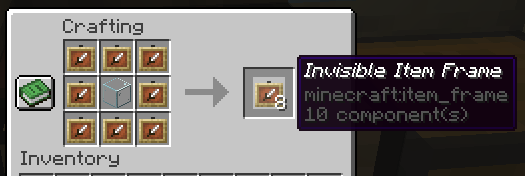
The default crafting recipe is 8 item_frame (or glow_item_frame) in a circle with one custom item in the middle.
You can change the middle-item with `/ziif item`.
You can also configure how many invisible item frames are crafted from the recipe.
## Commands
– `/ziif help` – Show help information
– `/ziif item` – Set the recipe item to the item in your hand
– `/ziif reload` – Reload the configuration
– `/ziif give [–glow]` – Give invisible item frames to a player
## Permissions
– `zinvisitemframes.craft.item_frame` – Allow crafting invisible item frames
– `zinvisitemframes.craft.glow_item_frame` – Allow crafting invisible glow item frames
– `zinvisitemframes.place.item_frame` – Allow placing invisible item frames
– `zinvisitemframes.place.glow_item_frame` – Allow placing invisible glow item frames
– `zinvisitemframes.admin` – Access to all plugin commands
## Installation
1. Download the latest version of ZInvisItemFrames from [Modrinth](https://modrinth.com/plugin/zInvisItemFrames/versions).
2. Download the appropriate version of MCKotlin from [Modrinth](https://modrinth.com/plugin/mckotlin)
3. Place the downloaded `.jar` files into your server’s `plugins/` folder.
4. Restart your server.
5. Configure the plugin to your liking by editing the `.yml` files in the `plugins/ZInvisItemFrames/` folder.
## Configuration
“`yaml
recipe:
item: [] # Set with `/ziif item` command
quantity: 8 # How many frames are crafted per recipe
check-permission: # Whether to check permissions for crafting/placing invis frames
craft: false
place: false
empty-frame:
glow: true # Whether empty frames should glow
visible: true # Whether empty invis frames should be visible
name:
invisible_item_frame: “Invisible Item Frame”
invisible_glow_item_frame: “Invisible Glow Item Frame”
“`
ZhaoZizhengs Subway
This MOD added some track. There are Car plant track,platform track,Speed-changing track…
Then,we have the lift:ladder and vertical lift
How to use them?,please visit https://b23.tv/ctk9RGd to watch the tutorial video.
Next one.
It’s a route map.
right click to open it(It like a paper),there are some route,but if u don’t creat a new route,please,creat a route.
How to creat a new?
find a Route editor (His icon is like an excel spreadsheet)(:
right click
Now u opened a UI
1. find “edit”or”creat”
2. click it
3. Enter the name,Station,and the coulor(Hex)
Then you can watch the video to get more info
ZeroCore
**FAQ:**
– Can I use ZeroCore as an external dependency of my mod? Yes. Drop on discord if you have any question on how to use it
– Fabric ? Yes, I’m working on it. No ETA yet but it’s coming
– Up-to-date versions are available on [CurseForge](https://www.curseforge.com/minecraft/mc-mods/zerocore)
# ZeroCore
**ZeroCore is a mod intended for other mod authors**
It contains code to handle the basic mechanics of the game and Forge, including:
– handlers to process network messages on the correct thread
– new GUI system
– a base TileEntity implementation that simplifiy data syncronization between server and remote clients, updates and GUI handling
– helper classes and blockstate properties to handle connected textures
– standard configuration handler with built-in support for in-game configs changes
– standard ore generator and re-generation
– much more
It’s also the home of a revised multiblock API that support multiple client mods without performance penalities
## MAVEN
ZC is available on my maven rep: https://maven.zerono.it/
## PLAY ALONG WITH YOUR FRIENDS OR STREAM YOUR GAMEPLAY
I’ve partnered with BisectHosting!
If you’re interested in hosting a server to play with Extreme Reactors and other mods or mods pack along with your friends, or in a robust server to play in while you stream your gameplay on You Tube or Twitch, click the image below!
[](https://bisecthosting.com/zero)
BisectHosting offers quick, simple to use and high quality server hosting with over a dozen locations available across the world, ensuring low latency for you and your friends. I use one of their server myself to test Extreme Reactors and play Minacraft along with my friends.
They’ve got greath support to help you choose the best server for your mod pack, be that an existing pack or one that you put together yourself. After your purchase, the server is already configured and ready to use.
Remember to use the code “zero” to get 25% off your first month as a new client for any of their gaming servers. Enjoy!
## CONTACTS
Since many of you have asked, I’ve opened a Discord server. Ask questions about my mods, share your Reactors designs and report issues. You can also find me on the Minecraft Forge discord server or the Direwolf20 one. Happy chat.
## MODPACKS AND LET’S PLAYs AND OTHER PERMISSIONS
You can add Zero Core to your mod pack or use them in your let’s play / live streams to your heart content, no need to ask for my permission: you got it.
If you like, post a comment here or on the main forum thread to let’s us know what fun stuff you are doing with the mods so we can all share in the fun.
No one is authorized to repost my mods, or any part of them, on any other website then the ones I post them to (see below). If you wish, you can link to this page from your website to let your users download the mod.
## A NOTE ON SAFETY
We release our mods only on CurseForge, Modrinth or the FTB launcher and their respective websites:
If you found our mods on another website be sure that they do not come from us and we cannot guarantee that you are downloading something safe to use and that will work on your version of Minecraft. To keep things short: do not download those files and always use the CurseForge, Modrinth or the FTB launcher or their respective websites
## TUTORIALS
A tutorial about the Multiblock API is available here:
http://zerono.it/zerocore-multiblock-api-tutorial/
It’s not up-to-date but still relevant.
Zero G TNT
**Zero G TNT** is a datapack that removes gravity from primed TNT, making it float, drift, and behave unpredictably. This enables zero-G TNT cannons and related physics breaking builds.
**Features**
– Removes gravity from all primed TNT
– TNT will drift in a straight line when given motion (e.g. from another explosion)
**Design Goals**
– Minimal other changes to vanilla behavior
– Easy to integrate to integrate into existing worlds and servers
**Eperimental Mode 2**
An optional experimental mode can be enabled within the datapack. Navigate to the info page through the chat menu in game, and click where it says to toggle mode.
This does changes how the datapack works in the following ways.
– TNT is now normal again, affected by gravity
– Instead you can craft and use a separate Zero G TNT item
⚠️ Warning: Mode 2 is unstable, and may cause unexpected behavior or damage the world. Fixes may be implemented at a future date.
one for one
ptBR: ONE FOR ONE que significa um pra um é um modpack de aventura RPG com muitas masmorras que veio para tentar ser algo leve e divertido para todos e por isso é bem leve e agora eu irei falar bastante sobre ele
zero e um modpack com varios mods temos mods de Tecnologia mekanism e um deles nele você pode criar máquinas reatores falando em reatores nois temos o mod chamado Extreme Reactors que adiciona reatores nuclear mais acho que ja ta bom de tecnologia agora vamos pra exploraçao e aventura e e pra isso que temos o Biomes O’ Plenty que adiciona mais de 50 biomas e varios mobs você gosta de dragões? se sim aqui temos o Ice and Fire que adiciona varias ferramentas bosses e o pricipal varios tipos de dragões e se você ai gosta de magia temos o mahou tsukai um mod que adiciona varias magias e espadas e e isso espero sinceramente que gostem da minha criação. enUS:ONE FOR ONE is an RPG adventure modpack with many dungeons that came to try to be something light and fun for everyone and so it is very light and now I will talk a lot about it zero and a modpack with several mods we have mods of Technology mekanism and one of them in it you can create machines reactors speaking of reactors we have the mod called Extreme Reactors which adds nuclear reactors but I think that’s enough technology now let’s go for exploration and adventure and for that we have Biomes O’ Plenty which adds more than 50 biomes and several mobs do you like dragons? If so, here’s Ice and Fire, which adds various tools, bosses and, most importantly, various types of dragons. If you like magic, here’s Mahou Tsukai, a mod that adds various spells and swords, and I sincerely hope you enjoy my creation.
Zerene Created!
# *Zerene Created!*
### A Fabric client-side modpack for use with Zerene’s modded server. This modpack can be played in single player, too.
### What’s the gist?
Our pack is designed to be fairly relaxing without any particular goal in mind other than to build a central base and then build out a rail network and use trains to goto outposts/remote factories. AE2 is included to help with managing storage/crafting/automation etc. This modpack makes heavy use of Create and additions to Create, Steam ‘n’ Rails and features many other QoL mods that help.
For installation guidence, see Modrinth’s guide here
Zeph’s Vanilla+
# 📕About
My favorite optimization and QoL mods, all in one place. Designed to improve performance while maintaining a strict vanilla feel, with sparse new content along the way. Originally made for a small group of friends, this pack will also work on larger servers. The mods add a few new structures with very few new blocks, with a strict no-new-tools policy. There’s also some mods for technical players thrown in to help them monitor performance and farms.
# 📙Installation Instructions
This pack has been tested in a few of the most popular launchers, but I’ve decided to focus on the Prism launcher, which could be downloaded [here](https://prismlauncher.org). Once you download for your respective platform, follow the install instructions below. There is an auto-updating version of the pack for advanced users which can be found under the mod pack’s [repository](https://github.com/ZephWasTaken/Zephs-Vanilla-Plus).
> 1. Download the mod’s .mrpack file for the latest version
> 2. Open the .mrpack file with the Prism launcher
> 3. Click the browse button and change the file type from .zip to .mrpack
> 4. Select the .mrpack file from wherever you downloaded it to
* There is an auto-updating version of the pack which can be found above, but should be used only if you’re familiar with debugging the install
ZEOS “Client”
The Zeos Client (Working Hacked Client)!
Features:
Over 20 hacks,
Cosmetics,
Fun trolls,
OP Abilities,
OverPowered Kits with unique items
Much more!
Per Section 3 of Modrinth’s Content Rules – This is not a real hacked client and is only usable if the owner allows it! Since this is a datpack, it does not give an unfair advantage in multiplayer servers, and is only server-side!
YouTube Video/Guide! : https://www.youtube.com/watch?v=eIPYbtYw6u4](https://www.youtube.com/watch?v=eIPYbtYw6u4)
HOW TO USE:
Craft the hacked client using 8 sticks surrounding a diamond in the middle.
If you have access to commands, run the following
/recipe give @s survival:hack
This will give you the hacks instantly!
TO USE IN 1.21:
Due to changes in the /give command in 1.21, this datapack won’t work fully.
run this command
/give @p carrot_on_a_stick[custom_name='{“bold”:true,”color”:”aqua”,”italic”:false,”text”:”ZEOS CLIENT”}’,lore=[‘{“color”:”black”,”italic”:false,”text”:”.”}’,'{“bold”:true,”color”:”gold”,”italic”:false,”text”:”RIGHT-CLICK To use!”}’,'{“color”:”black”,”italic”:false,”text”:”.”}’,'{“bold”:true,”color”:”red”,”italic”:false,”text”:”SUPER SPECIAL ITEM”}’],custom_data={type:1}] 1
To Instantly Give you the hacks!
Fly Hack will not work in 1.21!
ZeldaCraft
Hi, this is my first ever mod so if there are any things you think I should add, any bugs, or glitches just comment them or put them in the Discord. This mod aims to give the player the Legend of Zelda experience but inside of Minecraft adding things like the Master Sword, Hylian Shield, and much more to come. I hope you enjoy the mod!
Works with both Better Combat and Epic Fight*
*For Epic Fight compatibility for versions below 1.9 you can find the datapack in mod version’s additional files or here for even older versions. Additionally there are currently issues with some custom armor sets rendering when using Epic Fight.
For things like the paraglider and heart/stamina containers use the Paragliders mod.
Master Sword model credit goes to arthur11151 on Reddit.
Wiki: https://github.com/SilverPlayz7/ZeldaCraft/wiki
[](https://discord.gg/WnZuF6CNwS)
[](https://www.curseforge.com/minecraft/mc-mods/zelda-craft)
Zelda BOTW Boomerang Datapack
# All Boomerang of BOTW The Legend of Zelda Game !
**Works alone and with friends Online** !!
## Work with ResourcePack !!
[https://modrinth.com/resourcepack/the-legend-of-zelda-boomerang](https://modrinth.com/resourcepack/the-legend-of-zelda-boomerang)
Boomerang List
Boomerang
Great Boomerang
Sea Boomerang
Lézarfos Arm
Lézal 1,2,3 blade
## add-on (Disable if u want):
__ToTK Expansion is coming soon ! (add fusion Item mechanics ice fire elec stone)__
Break Blocks
Pickup Item
Glowing
ShowName Item
### Command to disable:
_/function boomerang:disable_
Craft Boomerang


Knight/Soldier Link Armor BOTW/TOTK :
[https://modrinth.com/resourcepack/linkknightset](https://modrinth.com/resourcepack/linkknightset)
———————————————————————————————–
**Other projects if you want :**
[https://modrinth.com/user/Totomag0](https://modrinth.com/user/Totomag0)
[https://modrinth.com/organization/to.company](https://modrinth.com/organization/to.company)