WorldSystem
 A plugin to give every player his own world
1.18 – 1.21.5 Support
***
About
WorldSystem is a plugin where every player can get a world.
There they can do anything they want without creating stress in a single world.
The world owner can also add other players and manage their permissions on his world.
When a player creates a new world you can also set a template which will then be cloned.
Features
Features with (option) need to be enabled in the config.yml
- Every player can create a world
- Players can manage their world
- Worlds can be preconfigured
- Worlds unload if the player disconnects
- Supports different languages
- Removes worlds that are not in use (option)
- PlaceholderAPI support
- GUI Permission system for the world owners
- Generate worlds async (needs Chunky) (option in v2.4.40)
- Set world templates
- … and much more
How to help make this resource better
- Contributing code
- Creating useful issues
- Helping other users
- Leaving a good review
Info
Many answers about optimization and installation are available on the wiki.
Worlds O’ Plenty II
# Welcome to the Worlds O’ Plenty Modpack!
**Worlds O’ Plenty is a curated Modpack by me, the name’s LeeKan nice to meet you!! This was originally created for personal uses, but I wanted to also share this enjoyment with you all as well!**

This modpack contains plenty of popular mods that work together to create a thoroughly enjoyable experience!
# Plenty O’ Mods to enjoy!
From the big mods that introduce entirely different worlds and biomes to the more humble mods that add in decorations and simple technological funs, it aims to be something you can enjoy but not be overwhelmed by!

The aim is always of course, to stack as many different dimensions and worlds as possible without breaking the game + playable!
With a collection that regularly gets updated, you can expect up to 200+ mods running! Of course there’s also TONS of optimization mods to help cope with the amount of stuff going on here! Do still be careful with your RAM usage tho!
## Notable Big Mods include!:
– The Aether (+ Addons)
– The Twilight Forest
– L_Ender’s Cataclysm
– Biomes O’ Plenty (ofc)
– Applied Energistics
– Dimensional Doors
– Stellaris
– Project Alpha
… And **_MANY MORE!!!_**
# Important notes regarding this modpack!:
– As this is a pretty big modpack, please remember to save up at least 8~10GB of RAM to use!
– Updates will take time as I’m only one person!
– If anything pops up, you can join my [Discord Server](https://discord.gg/9yQjsP2zWe)! I’ll try my best to work out any flaws, issues or anything else!
– I do hope you have fun!
– PS: Chances are you MIGHT have to download the [Twilight Forest](https://www.curseforge.com/minecraft/mc-mods/the-twilight-forest) mod! + [Umbral Skies](https://www.curseforge.com/minecraft/mc-mods/umbral-skies) separately in cases where they are missing!
Worlds O’ Plenty
## Welcome to the Worlds O’ Plenty Modpack!
Worlds O’ Plenty is a curated Modpack by me, the name’s LeeKan nice to meet you!!
This was originally created for personal uses, but I wanted to also share this enjoyment with you all as well!

This modpack contains plenty of popular mods that work together to create a thoroughly enjoyable experience!
From the big mods that introduce entirely different worlds and biomes to the more humble mods that add in decorations and simple technological funs, it aims to be something you can enjoy but not be overwhelmed by!
## The Contents within!
With a collection that regularly gets updated, you can expect up to 400+ mods running! Of course there’s also TONS of optimization mods to help cope with the amount of stuff going on here! Do still be careful with your RAM usage tho!
### Some notable big mods include:
– Biomes O’ Plenty
– Create
– The Aether (+ Addons)
– Ad Astra
– Applied Energistics 2
– The Cataclysm Mod
… And more!
### Important notes regarding this modpack!:
1. As this is a pretty big modpack, please remember to save up at least 4~6GB of RAM to use!
2. This is my first ever modpack so updates will be slow at times! As I am only one person and checking compatibilities takes some time!
3. If anything pops up, you can join my [Discord Server!](https://discord.gg/9yQjsP2zWe) I’ll try my best to work out any flaws, issues or anything else!
4. I do hope you have fun!
And lastly some additional mods I’d like to recommend y’all have in here!:
– The [Twilight Forest](https://www.curseforge.com/minecraft/mc-mods/the-twilight-forest) Mod.
– The [Umbral Skies](https://www.curseforge.com/minecraft/mc-mods/umbral-skies) Mod.
– The [Twilight’s Flavor & Delight](https://modrinth.com/mod/twilight-delight) Mod.
– The [Twilight Forest: The Lost Blocks](https://modrinth.com/mod/twilight-forest-the-lost-blocks) Mod.
Worlds
## Worlds – World Management for Paper & Folia
Worlds is a modern, lightweight world management plugin designed for **Paper** and **Folia** servers.
It brings seamless world handling with **customization presets**, eliminating the need for extra plugins just to create
void or custom flat maps. Simply pick a predefined preset, or create your own!
### Why Choose Worlds?
**Vanilla Flat World Preset** – No more extra plugins for void or flat maps
**No Extra Data Files** – Worlds doesn’t store extra files, no more messy file syncing when sharing worlds
**Drag & Drop Import** – Just place the world in the folder & use /world import
**Full World Regeneration** – Reset any world (even the Overworld!) with one command
**Modern & Efficient** – Uses up-to-date server mechanics, not outdated methods
**World Keys** – Worlds are referenced by unique keys, improving compatibility with client mods
**World Linking** – Restore vanilla Nether and End portal behavior for custom worlds
### What’s Next?
**Custom Dimension Creation** – Like datapacks, but usable from commands and API!
[Download now on Modrinth](https://modrinth.com/project/gBIw3Gvy)
[Latest version supporting 1.20.6 (Java 21)](https://github.com/TheNextLvl-net/worlds/releases/tag/v1.2.5)
[Latest version supporting 1.19/1.20.4 (Java 19)](https://github.com/TheNextLvl-net/worlds/releases/tag/v1.1.6)
[Latest version supporting 1.19/1.20.4 (Java 17)](https://github.com/TheNextLvl-net/worlds/releases/tag/v1.1.3)
For further information check out the [Wiki](https://thenextlvl.net/docs/worlds)
[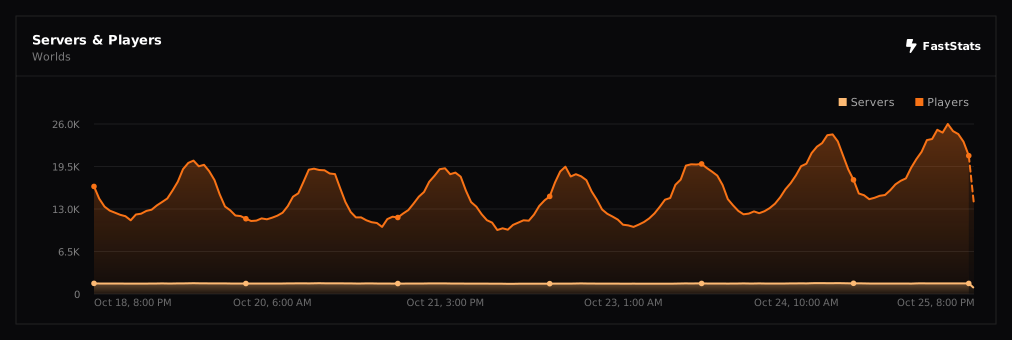](https://faststats.dev/project/worlds)
WorldRules
# Worldrules
> **Handle your world, your way.**
A lightweight permissions toggle for events, minigames, and any moment when you need to lock down chat or interactions on the fly. Unlike WorldGuard or other protection plugins, Worldrules isn’t about regions — it’s about flipping a switch and changing what your players can do **right now**.
## Why Worldrules
– **Built for events.** Toggle chat, building, eating, projectiles in seconds.
– **Lightweight.** One config file, no database, no dependencies.
– **Bypass system.** Give staff or hosts full freedom while restricting everyone else.
– **Per-player or global.** Fine-grained control without spreadsheets.
– **Customizable deny messages.** Full legacy `&` color support.
– **Modern blocks supported.** Vault, Crafter, Trial Spawner, Decorated Pot, Chiseled Bookshelf — all covered.
## Commands
All commands require the `worldrules.admin` permission (default: OP).
### Chat
| Command | Effect |
|—|—|
| `/worldrules chat ` | Enable or disable chat globally |
| `/worldrules chat ` | Override chat for a specific player |
| `/worldrules chat bypass ` | Grant chat immunity (always allowed) |
### Interact
| Command | Effect |
|—|—|
| `/worldrules interact ` | Toggle ALL interactions globally (shorthand for `all`) |
| `/worldrules interact all ` | Same as above, explicit form |
| `/worldrules interact ` | Toggle one category globally |
| `/worldrules interact ` | Per-player override |
| `/worldrules interact bypass ` | Grant interaction immunity |
### Misc
| Command | Effect |
|—|—|
| `/worldrules reload` | Reload the config file |
| `/wr` | Alias for `/worldrules` |
## Interaction Categories
| Category | Blocks |
|—|—|
| `place_blocks` | Placing any block, hanging items, dumping liquid buckets |
| `break_blocks` | Breaking any block |
| `open_doors` | Doors, trapdoors, fence gates, levers, buttons, pressure plates, chests, furnaces, anvils, crafting tables, vaults, crafters, and every other openable/utility block |
| `eat` | Food, milk buckets, regular potions |
| `use_bow` | Bows and crossbows |
| `use_projectiles` | Snowballs, ender pearls, splash potions, eggs, wind charges, fishing rods |
| `all` | Everything above + entity interactions (milking, mounting, item frames, armor stands) |
## How it Works
### Priority order
1. **Bypass beats everything.** A bypassing player ignores all rules.
2. **Per-player override beats global.** Set someone’s chat or interaction independently.
3. **Global `true` clears overrides.** Running `/worldrules interact true` (or `chat true`) wipes per-player rules so everyone returns to the global default.
WorldResourcepacks
######  Made in Germany with love (and [beer](https://s.moep.tv/beer))
######

_Did you ever want to set a different server resource pack for your each of your worlds? Or switch your current resource pack with just one command? Then you came to the right place!
_
This plugin lets you set one Server Resource Pack for each of your worlds or event your whole server! It also allows you to specify packs that should be usable on multiple worlds!
It is also compatible with my [Bungee Resourcepacks](https://modrinth.com/plugin/bungeeresourcepacks) and [Velocity Resourcepacks](https://modrinth.com/plugin/velocityresourcepacks) plugin and will not make the player redownload a resource pack after server switching if it got already applied by Bungee/Velocity Resourcepacks on another server!
**Please check if there are newer [development builds](https://ci.minebench.de/job/resourcepacksplugins/) before reporting issues!**
> Please note that the Vanilla Minecraft client only applies server resource packs that are smaller than **250MiB**! (50MiB before 1.15, 100MiB before in 1.18)
>
> Also certain new **SSL certificates** for URLs (like Let’s Encrypt) do not work with the old Java version shipped with Minecraft (Java 1.8.0_51, [a bug report](https://bugs.mojang.com/browse/mc-143768) regarding that has been filed with Mojang) so you’ll have to either use a different certificate or a non encrypted download (not recommended!)
**Note:** This plugin does not work with older Minecraft versions above 1.8 that do not support server resourcepacks!
### **Features**
* Set different server resourcepacks per world or whole server
* Match world names with regex!
* Commands to configure the plugin ingame
* Language system with messages depending on the locale of the client
* Simplified compoment/json message formatting syntax ([MineDown](https://wiki.phoenix616.dev/library:minedown:syntax))
* Configurable delay before sending the pack to a player
* Remembers which pack a user has currently applied and doesn’t resend on world switch
* Let the user set the pack himself. The pack can be re-applied on each login and will be used for resets on servers that don’t have the pack
* Inform the user which pack the server send them if it was done automatically
* [ResourcePackSendEvent](https://docs.phoenix616.dev/resourcepacksplugins/de/themoep/resourcepacksplugin/bukkit/events/resourcepacksendevent.html) and [ResourcePackSelectEvent](https://docs.phoenix616.dev/resourcepacksplugins/de/themoep/resourcepacksplugin/bukkit/events/resourcepackselectevent.html) for developers to react on the sending or selecting of a pack in their own plugins
* Send the correct pack format depending on the client’s version (requires ViaVersion or ProtocolSupport) with pack-variants either via the version, protocol number or pack format id.
* Automatically generates the sha1 hashes!
* Compatible with [AuthMe Reloaded](https://www.spigotmc.org/resources/authme-reloaded.6269/), [OpenLogin](https://www.spigotmc.org/resources/openlogin-1-7x-1-19x.57272/), NLogin, [LibrePremium](https://www.spigotmc.org/resources/librepremium-proxy-authorization-plugin-automatic-login-2fa.101040/), JPremium.
Do you need it to be compatible with more plugins? [Contact me](https://github.com/phoenix616/resourcepacksplugins/issues/new)!
### **Statistics**
* [McStats.org](http://metrics.griefcraft.com/plugin/worldresourcepacks/)
* [bStats.org](https://bstats.org/plugin/bungeecord/worldresourcepacks)
### **Commands**
To execute every /wrp command you need the `worldresourcepacks.command` permission!
**/wrp reload [resend]** – `worldresourcepacks.command.reload` – Reloads the config file; resends the packs to every online player if the 2nd argument is “resend”
**/wrp version** – `worldresourcepacks.command.version` – Shows the version of this plugin
**/wrp generatehashes** – `worldresourcepacks.command.generatehashes` – Manually generate the resource pack hashes
**/wrp addpack ** – `worldresourcepacks.command.addpack` – Add a new pack
**/wrp pack ** – `worldresourcepacks.command.pack` – View and edit an existing pack
**/wrp listassignments** – `worldresourcepacks.command.listassignments` – View all world assignments
**/wrp deleteassignment ** – `worldresourcepacks.command.deleteassignment` – Delete a world assignment
**/wrp assignment ** – `worldresourcepacks.command.assignment` – View and edit a world assignment
**/wrp globalassignment** – `worldresourcepacks.command.globalassignment` – View and edit the global assignment
**/resetpack [] []** – `worldresourcepacks.command.resetpack` – Reset the pack (of a player) to the empty one or the stored pack. (Like what would happen if you joined a server without any pack) If is set to false the stored pack of the player is reset too.
To execute every /usepack command you need the `worldresourcepacks.command.usepack` permission!
To execute it for other players you need `worldresourcepacks.command.usepack.others`!
To have access to a specific pack a player needs the `worldresourcepacks.pack.` permission or the one defined for the pack in it’s config section!
**/usepack** – List all packs available to you
**/usepack []** – Send a specific pack to yourself or another player
### **Config**
The config.yml allows you to configure everything you can do set up via the commands and a lot more, take a look at the commands in the [file on GitHub](https://github.com/phoenix616/resourcepacksplugins/blob/master/bukkit/src/main/resources/config.yml) for an explanation on all options! (Some might only be available on the [latest development builds](https://ci.minebench.de/job/ResourcepacksPlugins/)!
### **About the client freeze**
> **This should no longer be an issue starting with 1.20.3!**
When a server resource pack is send to a client it will shortly freeze after the download is complete. (Same as manually applying a local pack) This happens because the client has to reload all resources, check which resources overlap and do some other calculation and manipulation with them. (Like stitching all the textures together to a single image like they were in the first texture pack format) It’s not a download issue as the client will locally cache the pack files and not re-download them if their hash didn’t change.
How long this takes generally depends on the PC’s performance and the size of the textures (HD packs take longer) that are used in all resource packs that the player has applied. (So even if the server resource pack doesn’t contain any HD textures or textures at all the client will still completely reload all locally applied resource packs) This is something that has to be fixed in the client by Mojang for example by only reloading resources that changed.
**1.14, 1.15 and 1.16 have some major improvements there and 1.20.3 basically fixed it all so suggest players to use these if they have issues with your server resourcepack!**
### **Dev-Resources**
The source is available on [GitHub](https://github.com/phoenix616/resourcepacksplugins) and licensed under the [GPLv3](https://github.com/phoenix616/resourcepacksplugins/blob/master/license).
Development builds can be found on the Minebench.de [Jenkins](http://ci.minebench.de/job/resourcepacksplugins/).
There are also some [Javadocs](http://docs.phoenix616.dev/resourcepacksplugins/) if you intend to develop plugins based on mine.
### **Support**
You can receive support in the [resource discussion thread on SpigotMC](https://www.spigotmc.org/threads/world-resourcepacks.125581/), the [GitHub issue tracker](https://github.com/phoenix616/resourcepacksplugins/issues), [my IRC channel](https://irc.phoenix616.dev/), or [my Discord](https://phoenix616.dev/discord).
### **Metrics**
This resource includes [bstats.org](https://bstats.org/) metrics. If you don’t want bstats to collect info on your server then you can disable it in the *bStats/config.yml* file. The license the used bStats-lite class is under can be found [here](https://github.com/btobastian/bstats-metrics/blob/master/license).
#####
*This resource is distributed without any warranty or liability by the author. Read more about it [here](https://github.com/Phoenix616/ResourcepacksPlugins/blob/master/LICENSE#L589-L610)*
WorldPlaceholder

This plugin outputs the information about the player’s location in the dimension through Placeholder in the Tab or game chat.
– World – green color
– World_nether – red color
– World_end – purple color
Placeholder:
“`
%worldplaceholder%
“`
“`
messages:
noPermission: “&#dc143cYou do not have sufficient permissions to perform this action!”
reloaded: “�ff7fPlugin successfully reloaded”
# It will look like &#c0c0c0◆
worldSymbol: “◆”
# Default color, used for worlds not specified below
defaultColor: “&#c0c0c0”
# You can use both HEX colors in the format &#abcdef and regular colors using &a
worlds:
world: “�ff7f”
world_nether: “&#dc143c”
world_the_end: “a2be2”
“`
In the config.yml, you can change the colors as well as the symbol.
worldpainter
### Mr_Chibi’s World Painter 🖌️
The world is your canvas! Create, Place, & Color the world how you’d imagine it!
## Why Should I install this into my world?
The pack is unique in its own way!
– You can basicly create pretty world from scratch.
– Who doesn’t love keybinds with “no command” typing!
– I’ve included some of my custom models into schematic brush, such as “Trees”, “Mud Road Patterns”, & some “Vanilla Schematics”!
## What features does it offer for players?
These tools can only be accessed by Server Operator or Given to player for preventions.
Varity of tools! Players can “paint“, “select blocks, and “place” for example, “trees“, “flowers“, “biome painting“, & much more etc.
– Tools that have keybind hotkeys example, pressing “F” key prompts tools.
– Tools that change “paint brush” sizes from “small”, “medium” & “big”!
– Commands such as, “paint_outline“, “paint_fill“, “paint_cube“, & “paint_hollow” have a min of 2” & max “23” example, “/trigger paint_fill set 23“. Automaticly generates size player requests.
– Players can create mountains, hills, or simple smoothen the surface using “sphere brush” & “smooth brush”.
If you like to read more information about the keybinds [[Click here]](https://github.com/mr-chibi/worldpainter/wiki/Hotkeys)
How it was written in:
WorldOptimiser
# WorldOptimiser
**Automatic World Optimization for ReplayMod Compatibility**
A Minecraft Forge mod that automatically optimizes worlds when mod changes are detected, specifically designed to solve ReplayMod block ID mismatch issues.
## 🎯 Purpose
This mod was created to solve a critical issue with [ReforgedPlay Mod](https://www.curseforge.com/minecraft/mc-mods/reforgedplay-mod) (version 0.3.1) where adding or removing mods that contain blocks, models, or textures causes ReplayMod to display incorrect textures and models in replay recordings.
### The Problem
– **ReplayMod works perfectly** when a world is generated with a fixed set of mods
– **Issues arise** when you add or remove mods containing blocks, models, or textures
– This changes the reference ID list, causing ReplayMod to jumble block IDs
– **Previous manual fix**: Download world → Open in singleplayer → Manually optimize → Re-upload
– **This was tedious and risky** for server environments where mods need to be changed on-the-fly
### The Solution
WorldOptimiser automatically detects mod list changes and triggers the world optimization process that you would normally do manually through the “Optimize World” button in singleplayer. This recalibrates the ID mappings and fixes ReplayMod compatibility issues.
## ✨ Features
– **Automatic Detection**: Monitors for mod additions, removals, and version changes
– **Smart Optimization**: Only runs when actual mod changes are detected
– **Server-Side**: Works on both dedicated servers and integrated servers
– **Non-Intrusive**: Runs seamlessly in the background during world startup
– **Replay-Safe**: Ensures your ReplayMod recordings display correctly after mod changes
## 🔧 How It Works
1. **Startup Check**: When a world loads, the mod reads the saved mod list from `level.dat`
2. **Comparison**: Compares the saved mod list with currently loaded mods
3. **Detection**: Identifies any additions, removals, or version changes
4. **Optimization**: Automatically runs the world optimization process if changes are detected
5. **Completion**: World starts normally with updated ID mappings
## 📋 Requirements
– **Minecraft**: 1.20.1
– **Forge**: 47.4.0 or higher
– **Java**: 17+
## 📦 Installation
1. Download the latest release from the releases page
2. Place `worldoptimiser-1.0.jar` in your `mods` folder
3. Start your server/world – the mod will automatically handle optimization when needed
## 🎮 Usage
No configuration required! The mod works automatically:
– Install the mod
– Add/remove other mods as needed
– Start your world – optimization happens automatically if mod changes are detected
– Your ReplayMod recordings will now display correctly
## 📝 Log Output
When the mod detects changes, you’ll see messages like:
“`
[Server thread/WARN] [worldoptimiser]: Detected new mods world will be optimised on startup
[Server thread/INFO] [worldoptimiser/worldupgrader]: World will be optimised it may take a while, please wait…
[Server thread/INFO] [worldoptimiser/worldupgrader]: World optimisation complete
“`
## 🐛 Known Issues
– World optimization can take some time for large worlds
– The process blocks world startup until completion (this is necessary for proper ID remapping)
## 👨💻 Created For
This mod was specifically created for **[@protagnst](https://youtube.com/@protagnst)** to solve ReplayMod compatibility issues in their content creation workflow.
## 💼 Custom Development
Need a custom mod solution for your specific use case? I’m available for hire for custom Minecraft mod development and similar technical solutions.
**Contact**: Available for custom development work – reach out if you have similar issues that need solving!
## 📄 Technical Details
– **Mod ID**: `worldoptimiser`
– **Version**: 1.0
– **Author**: Pelotrio
– **License**: All Rights Reserved
### Compatibility Note
This issue was specific to ReforgedPlay Mod v0.3.1 on Forge 1.20.1. Previous versions (Forge 1.16.5 and Fabric versions) handled ID changes automatically, but this functionality was lost in the 1.20.1 Forge version.
## 🔧 For Developers
The mod hooks into Forge’s mod loading events and world startup to:
– Detect mod list changes via `ModMismatchEvent`
– Read/compare mod lists stored in world NBT data
– Trigger Minecraft’s built-in `WorldUpgrader` when needed
– Ensure compatibility with ReplayMod’s block ID system
—
*This mod solves a specific technical issue with ReplayMod compatibility. If you’re experiencing similar block ID or texture mapping issues after mod changes, this tool automates the manual optimization process that was previously required.*
WorldListTrashCan
## Allows players to customize their home world’s trash bin.
This cleaning plugin operates within a specific world (the player’s home) and, when cleaning items, gathers them into a trash bin that the player has personally set up in their home. It combines various features, supports Folia, boasts highly configurable settings, and is compatible with multiple languages.
(This plugin is more suitable for pairing a world with a team’s server, such as the Home server (using the PlayerWorldsPro plugin or other Home plugin servers). If you close the World Garbage can, its functions can also completely replace other cleaning plugins)
**Now, here’s a hellish joke for you:**
**Player** : Hey, my quantum solar panels got swept away by the cleaning plugin. Can you compensate me?
**OP** : No way, you can’t prove it, and my cleaning plugin doesn’t keep records.
**Player** : I just bought them!
**OP** : What if you hid them, and I compensate you, essentially doubling them?
**Player** : ***
**OP** : Even if there were public trash bins on the server, someone would snatch up those solar panels.
**OP** : What should I do?
And there you have it, this plugin was born.
When Foila supports multiple worlds, this cleaning plugin will benefit everyone
### Features:
—
– **Fully customizable tip**
Support multiple prompt messages
You can achieve fully customized prompts
For example, when there are three seconds left, let “bossbar”, “actionbar”, “chat”,and “title” prompt together,
Alternatively, you can have the bossbar change its style every second (solid, non solid, including its color, can be different every second)
After version 5.7.0, it supports switching between different prompt sounds per second, as well as setting different volumes and tones per second
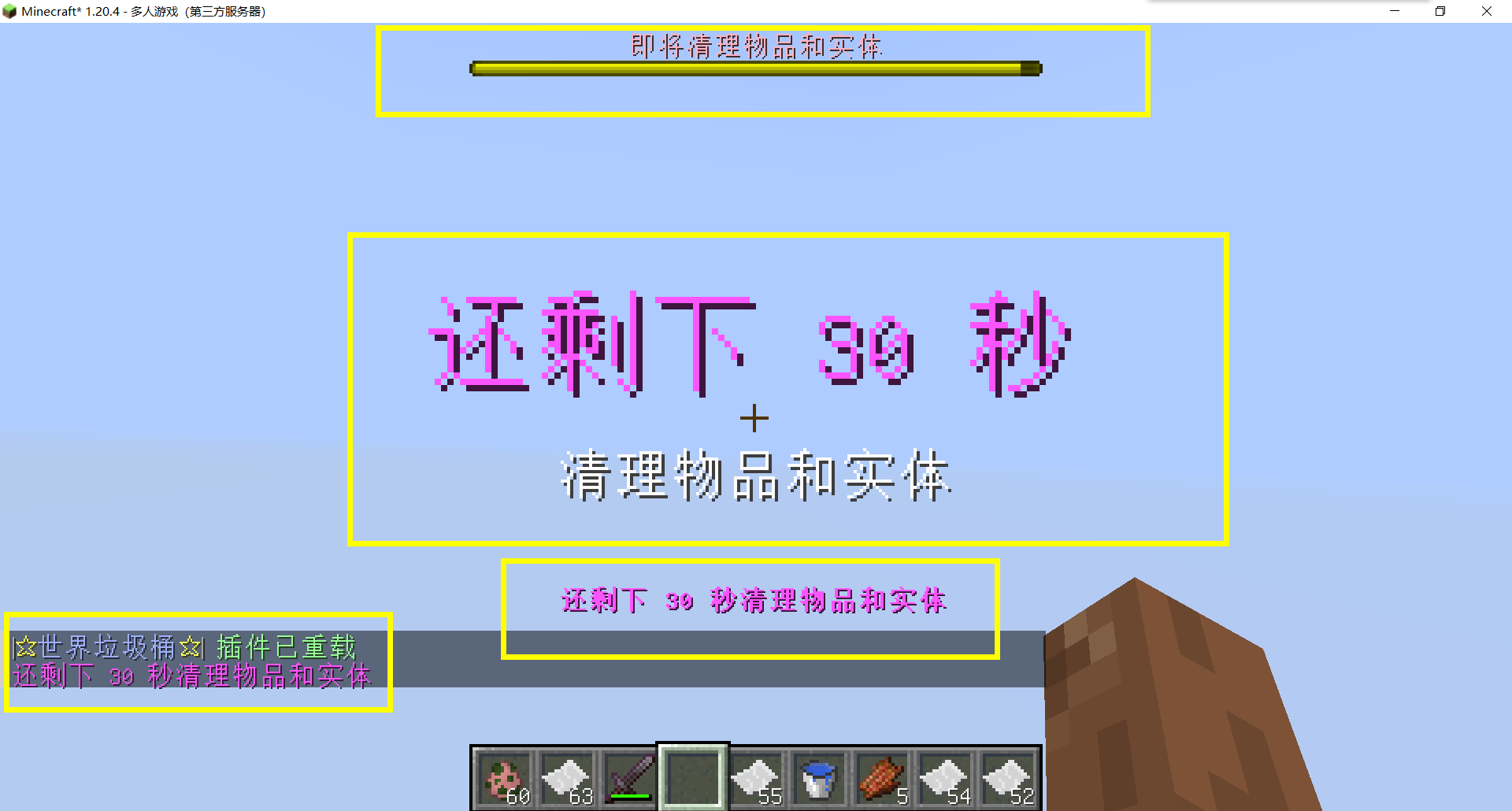
– Thank you to QQ 1664907770 (“笑脸猫”) for providing the material package for the “itemsadder” plugin (applicable to public trash cans) [Click here to download](https://www.hostize.com/zh/v/3TE06XKXx8) (IteamsAdder/WorldTrashCan config and resource)
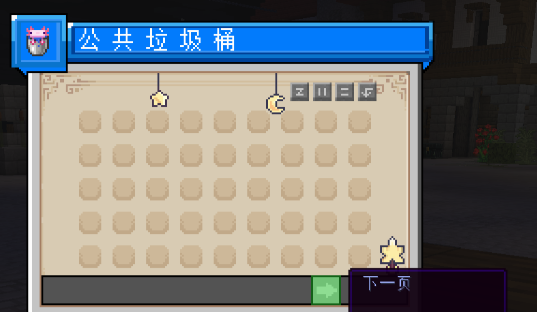
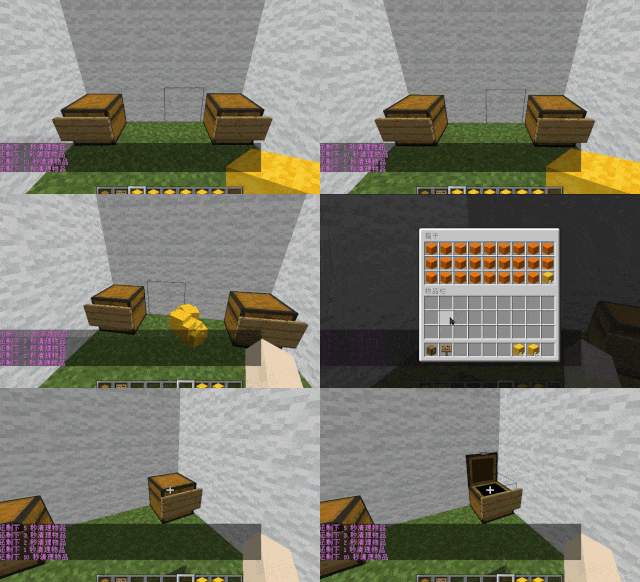
– **Player-Created World Trash Bin:**
Players have the ability to create a trash bin in their world.
Similar to the mechanics of previous sign-locked chests, the font on the sign will undergo a
transformation after creation.
When the cleaning process is initiated, items will be automatically added to the home trash bin.
Configurable settings allow players to specify detection names and transformed names after cleaning.
“To meet the demands of a small number of people, here is a reminder”
How to create a world trash can:
Place the chest on the ground, hold the signboard and right-click on the chest. Enter [世界垃圾桶] in the configuration file (configured in Set. SighCheckName), and once the font is converted, it is created. Every time the garbage is cleaned, it will be placed in the marked chest
In the default configuration file, the names of the three worlds “world, dim-1, dim1” are disabled, creating a “world trash can” (excluding op)
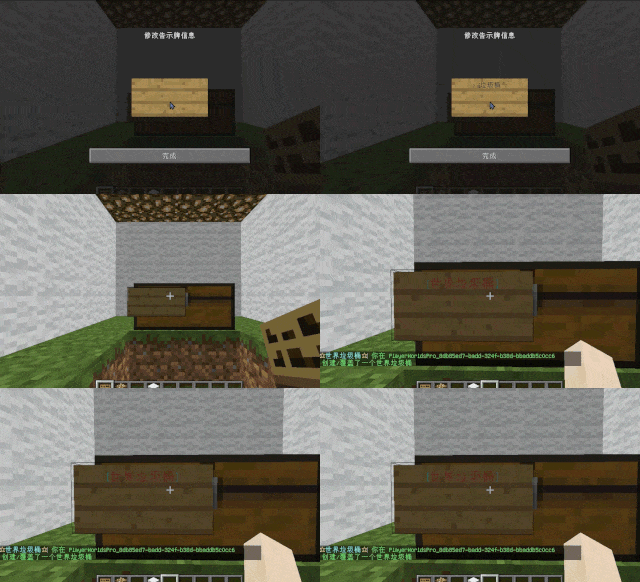
– **Support for Multiple Home Trash Bins:**
Players can use commands to grant special players the ability to place additional home trash bins.
Default quantities for home trash bins are configurable.
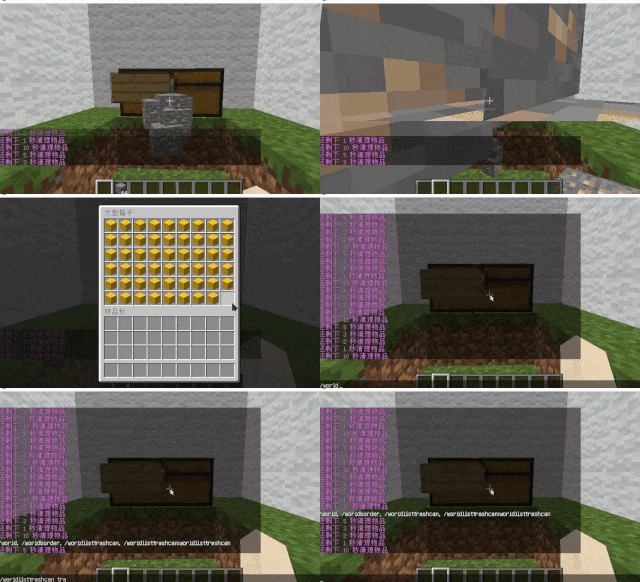
– **Home Trash Bin Overflow to Public Trash Bin:**
Items from home trash bins overflow into the public trash bin.
Public trash bins can have a configurable maximum page count and a blacklist.
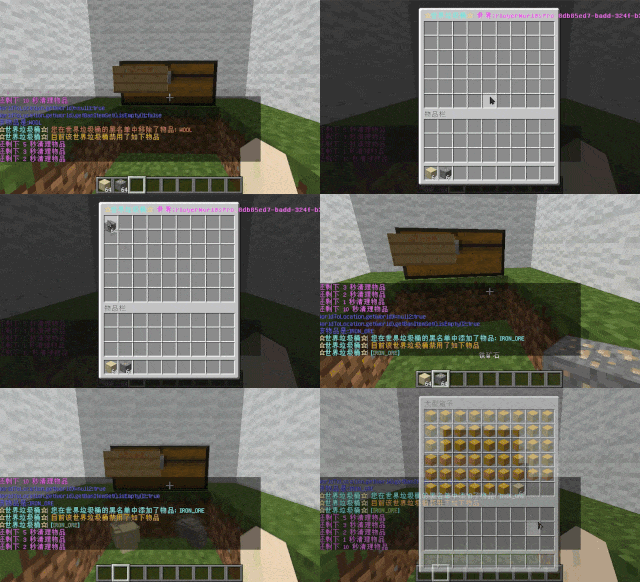
– **Item Exclusion and Public Trash Bin Handling:**
Players can add items to the home trash bin blacklist to prevent their recycling.
Excluded items go directly to the public trash bin.
Configuration includes support for excluding items with special lore (e.g., items from the QS shop with
showLocation).
Public trash bins can either clear new items during each sweep or accumulate all trash without clearing.
– **The public trash can can enable logging:**
Record what items the player took away

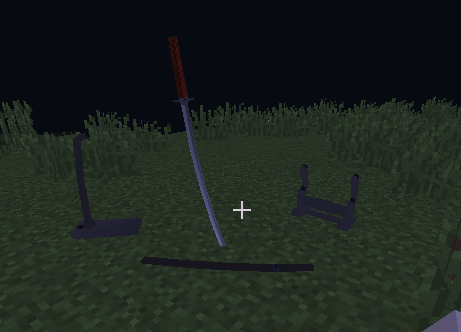
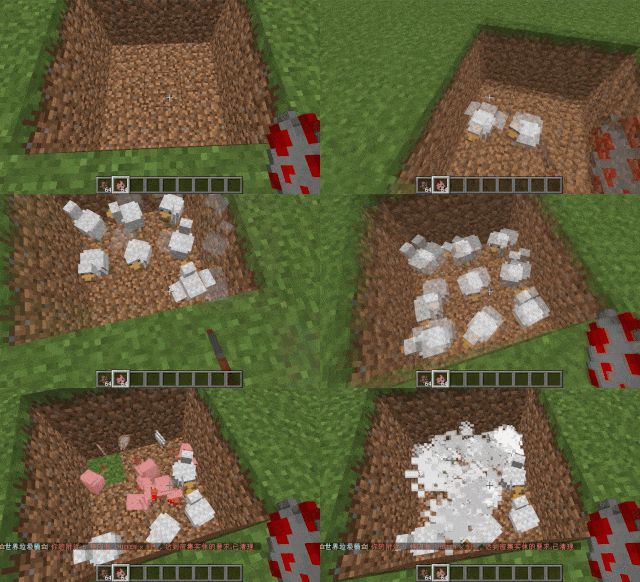
– **Entity Cleanup:**
Optional cleanup of all animals/monsters.
Command (/WorldListTrashCan Look) to view entity types and configure entity blacklists/whitelists.
Support for cleaning special entities from mod.
– **Dense Entity Cleanup:**
Configurable radius, target quantity, kill or remove options, and player notifications for dense entity
cleanup.
– **Spam/Command Limitations:**
Configurable chat/command intervals, whitelist commands, and informative messages.
Defense against item dropping.
Players can manually enable or disable the item-drop defense mode.
– **Performance Optimization:**
All optimizations have configurable options in the settings.
1. Quick removal of uncollectible arrows (e.g., arrows from skeletons or bows with infinite
enchantments).
2. Prohibit players from trampling on farmland
### How to Install
—
– **Throw it into the Plugins folder**
### Commands:
—
– **/wtc reload**
Reloads the plugin.
– **/wtc GlobalTrash**
Opens the public trash bin.
– **/wtc help**
Displays help information.
– **/wtc ban**
Opens the local world trash blacklist GUI.
– **/wtc Look**
Right-click to get entity type (useful for adding to the configuration blacklist/whitelist).
– **/wtc GlobalBan**
Opens the global world trash blacklist GUI.
– **/wtc add [WorldName] [Quantity]**
Sets the maximum quantity for the trash bin in the specified world (defaults to the world at your feet if not specified).
– **/wtc DropMode**
Opens or closes drop mode.
### Placeholders
—
– **%WTC_ClearTime%**:
Time until the next cleaning.
### Permission
—
– **WorldListTrashCan.BanGui**:
Permission to open the GUI for adding items to the player’s home trash bin blacklist.
– **WorldListTrashCan.GlobalTrashOpen**:
Permission to open the global trash bin.
– **WorldListTrashCan.help**:
Permission to access command help.
– **WorldListTrashCan.DropMode**:
Permission to open or close drop mode.
***(The above is available by default)***
– **WorldListTrashCan.GlobalBan**:
Permission to open the global trash bin blacklist GUI.
– **WorldListTrashCan.Look**:
Permission to right-click and query the entity type.
***(The above is not available by default)***