XGamemode

### “*You’re not switching modes, you’re switching dimensions.*”
~~*2000 Downloads?! Thanks!*~~
# 1 Feature
## 1.1 Offline Player
You can change the gamemode of a player, **even he (or she) was offline**.
## 1.2 Permissions
Allow permission group plugins (_like Luckperms_) to manage **which gamemodes can be switched to** and **which gamemodes cannot be switched to**.
_e.g. Allow to switch to survival mode but not to any other mode._
## 1.3 Alias
**/gamemode** is simplified to **/gm** and **/g**.
_(of course you can still use /gamemode)_
## 1.4 Cross-Server Storage
Support **MySQL** and **SQLite** storage backends. Player gamemodes are saved and synchronized across multiple servers in a network.
## 1.5 Folia Support
**Fully compatible with Folia servers** — using region-based scheduling for optimal performance.
## 1.6 Lightweight
The Plugin size is only **~25 KB** and has **almost no impact** on server performance!
# 2 Caution
## 2.1 Shortcut Keys
If you need to use shortcut keys such as **F3+F4**, please install another plugin **F3NPerm**.
## 2.2 Versions
**1.8.X +**
**All Bukkit based server** (Paper, Spigot, Purpur, Folia, etc.)
# 3 Commands
“`markdown
– /xgamemode
– /xgamemode reload
– /gm
– /gm
– /gm -all
– /gm -online
– /gm -offline
/g = /gm = /gamemode
/xg = /xgm = /xgamemode
“`
# 4 Permission Node
“`markdown
– xgamemode.survival
– xgamemode.creative
– xgamemode.adventure
– xgamemode.spectator
– xgamemode.others.survival
– xgamemode.others.creative
– xgamemode.others.adventure
– xgamemode.others.spectator
– xgamemode.reload
– xgamemode.admin
“`
# 5 Custom Config
## 5.1 Basic Settings
“`yaml
lang: en-US
“`
**Language** setting
“`yaml
default_gamemode: survival
“`
If a **new player joined your server**, **which gamemode should he (she) be**?
**survival**, **creative**, **adventure**, **spectator**
“`yaml
show_logo: true
“`
Show logo or not when plugin enabled.
**true**, **false**
“`yaml
debug: false
“`
Enable debug logging for troubleshooting.
**true**, **false**
## 5.2 Storage Configuration
“`yaml
storage:
type: yaml
“`
**Storage backend type**: **yaml**, **sqlite**, **mysql**
### SQLite Example
“`yaml
storage:
type: sqlite
# No additional config needed — data.db will be created automatically
“`
### MySQL Example
“`yaml
storage:
type: mysql
mysql:
host: localhost
port: 3306
database: minecraft
username: root
password: your_password
“`
## 5.3 Custom Messages
“`yaml
messages:
en-US: # Original en-US Language by Wind_Blood
reloaded: “&aXGamemode Reloaded!”
# ……
custom_lang: # Add Your Custom Language!
reloaded: “Thank you for using XGamemode!”
# ……
“`
**Customizable Messages**. You can add **your own new language** here!
## 5.4 An Example config.yml
“`yaml
lang: msgForMyServer
default_gamemode: survival
show_logo: false
debug: false
storage:
type: yaml
messages:
msgForMyServer:
reloaded: “很明显作者是中国人 会说中文很正常 然后我也不知道为什么我要在一堆英文里写一段中文 挺好笑的 哈哈哈 对了 看到我就是缘分 XGamemode 官方 QQ 反馈交流群:点击链接加入群聊【XGamemode 反馈群】:https://qm.qq.com/q/rpTk5LK7w4 欢迎加”
usage: “&cUsage: /gm [player/-all/-online/-offline]”
console_usage: “&cUsage: /gm ”
invalid_gamemode: “&cInvalid Gamemode!”
invalid_player: “&cInvalid Player!”
gamemode_self: “&aYour Gamemode Changed to {mode}!”
gamemode_all: “&aChanged All Player’s Gamemode to {mode}!”
gamemode_online: “&aAll Online Player’s Gamemode Changed to {mode}!”
gamemode_offline: “&aAll Offline Player’s Gamemode Changed to {mode}!”
no_permission: “&cYOU ARE NOT ALLOWED TO DO THAT!”
gamemode_other: “&a{player}’s Gamemode Changed to {mode}!”
gamemode_other_offline: “&a{player} (Offline)’s Gamemode Changed to {mode}!”
“`
# 6 Developer API (Async)
## Get Instance
“`java
Main plugin = Main.getInstance();
“`
## Get Player Gamemode
“`java
plugin.getPlayerMode(playerUUID).thenAccept(mode -> {
if (mode != null) {
// mode is GameMode.SURVIVAL, CREATIVE, ADVENTURE, or SPECTATOR
// Player is online or has saved data
} else {
// Player not found or no saved gamemode yet
}
});
“`
## Set Player Gamemode
“`java
plugin.setPlayerMode(playerUUID, GameMode.SURVIVAL).thenAccept(success -> {
if (success) {
// Gamemode changed and saved successfully
// Works for both online and offline players
} else {
// Failed to save (database error, etc.)
}
});
“`
## Listen to Gamemode Changes
“`java
@EventHandler
public void onGamemodeChange(GamemodeChangeEvent event) {
Player player = event.getPlayer(); // Online player only
GameMode oldMode = event.getOldMode();
GameMode newMode = event.getNewMode();
}
“`
> **Note:** All APIs are **fully async** and thread-safe. The `GamemodeChangeEvent` is only fired for **online players** when their mode is actually changed. The `getPlayerMode()` method returns `null` if the player has no saved gamemode data.
# 7 Reprint Post
www.minebbs.com/resources/xgamemode.11041
hangar.papermc.io/Wind_Blood/XGamemode
modrinth.com/plugin/xgamemode
# 8 Feedback
Just e-mail me with **[email protected]**. Thanks!
XG7Lobby
# I’ll record it again…
# This plugin depends on a core! Download it below:
https://modrinth.com/plugin/xg7plugins
—
# XG7Lobby – Complete Lobby/Hub System
## 📖 What is XG7Lobby?
**XG7Lobby** is a powerful lobby/hub management plugin designed to revolutionize the server join experience. With a wide range of configurable options, the plugin offers **more than 20 customizable features**, including: **Global PVP**, **interactive menus**, **animated scoreboard/tablist**, **custom forms for Geyser**, and much more!
—
## ⚡ Main Features
### 🏰 Multi-Lobby System
Configure **as many lobbies as you want**, including cross-server locations with SQL database support! Players can easily teleport using the `/lobby` command, with a configurable cooldown system and the option to teleport to a specific lobby ID.
### 🎨 Advanced Menu System
Improve your lobby experience with XG7Lobby’s menu system. You can use custom Geyser forms, personalized GUIs, and configurable hotbars — all adjustable to your liking!
### 📊 Scoreboard, Tablist, Bossbar & More
Bring your server to life with **fully animated** scoreboards, tablists, and bossbars. Display useful information such as player statistics, server status, or events in a visually appealing and dynamic way.
### 🎉 Join, Quit & First Join Events
Customize what happens when players join or leave the server, and make a great first impression on new players with a special welcome. Add messages, sounds, effects, or even rewards to make joining and leaving more memorable.
### ⚔️ Global PVP System
Does the lobby sometimes feel boring? With the global PVP system, that won’t be a problem anymore! Let players fight each other in the lobby with the powerful system provided by XG7Lobby, including full statistics for kills, deaths, and KDR.
### 🦘 Multi-Jump System
Go beyond the classic double jump! Configure triple jumps, infinite jumps, or unique jump effects to add fun mechanics to your server.
### 🚀 LaunchPad
Add excitement with customizable launchpads that throw players into the air. Perfect for hubs, lobbies, or minigame arenas with a fun and interactive touch.
### 🛡️ Complete Moderation System
Keep your server safe with robust moderation tools, including warning systems, mute, kick, ban, IP-ban, and automatic punishments based on configurable infraction levels.
### 💬 Advanced Chat Protection
A complete protection system including anti-swearing, anti-spam, and blocking unwanted commands. Keep your chat clean and organized automatically.
### 🔧 Build System
Control who can build in the lobby using the `/build` command, with full protection against block breaking and placing.
### 👻 Vanish System
Allows staff members to become invisible to other players using the `/vanish` command.
### ⚙️ Custom Commands
Add your own commands to fit your server’s style. Customize shortcuts, actions, and utilities without needing extra plugins.
### 👤 NPC & Hologram System
Create user interaction by taking advantage of the new NPC and hologram creation features!

—
## 📋 Full Feature List
* Fully configurable
* Multiple lobbies
* Global PVP system
* Custom menus (GUI, forms, and hotbar)
* Animated scoreboard, tablist, and bossbar
* Multi-jump system
* Launchpad
* Moderation system
* World-based lobby
* Join and quit events
* First join events
* Repeating events
* Auto broadcast
* Customizable MOTD
* Build system
* Custom commands
* Vanish system
* Anti-swearing
* Anti-spam
* NPCs and holograms
* Action queue system
* Preferences menu
* Hide chat
XFPoolManager

# 🎣 XFPoolManager (XFPM)
**XFPoolManager** is a **custom loot pool manager**.
It is designed primarily for **CosmicSMP** and servers with **advanced fishing systems**, but it can also be used as a general-purpose loot pool manager.
## 💡 Soft Dependencies:
– **NBT API**
– **Vault**
– **PlaceholderAPI**
> These plugins are **optional**. XFPM will integrate with them if present, but will function normally without them.
## 📜 General Description
XFPM allows you to define **main pools**, with **mini pools** inside them, and finally **items** inside those mini pools.
It also introduces **custom fishing enchantments** (stored as lore on fishing rods, not real enchantments) that affect loot behavior when rolling with `/xfpm loot`.
✅ If no fishing rod with the required lore is present → normal loot rules apply.
✅ If a fishing rod contains specific enchantments in its lore → the plugin modifies loot generation accordingly.
✅ Enchantments marked with `[X]` in the list below are **ignored** by XFPM.
## ✨ Features
– 🎲 **Configurable loot pools** with:
– Main pools → mini pools → items.
– Item rarities: `common, uncommon, rare, epic, mythic, legendary` (and anything rarer).
– Drop chances per item.
– Fixed or ranged amounts with optional **weighted probability**.
– Full **NBT tag** support (complex JSON supported).
– Custom messages (`%nl%` = line break).
– Console commands executed per reward.
– 🪝 **Custom Fishing Enchantments (for CosmicSMP)**:
– Work only if the player holds a fishing rod with the correct lore.
– Levels are expressed in Roman numerals (`I–VI` or `MAX`).
– No need for additional enchantment plugins.
– Modify loot roll logic dynamically:
– Rarer fish.
– More treasure.
– Increased amounts of fish or trash.
– Bonus XP.
– 🔄 Reload config on the fly: `/xfpm reload`.
– 📦 Works out-of-the-box with **CosmicSMP setups** and similar systems.
—
## 🧩 Custom Enchantments
### 🎲 Chance Boosts
– **Rare Catch** → Boosts chance of catching rarer items.
– **Treasure Finder** → Unlocks or increases chance for rolls in the `treasure` mini pool.
– **Bountiful Haul** → Increases amount of fish (+20% per level). Not compatible with *Wasteful Haul*.
– **Wasteful Haul** → Increases amount of trash (+15% per level). Not compatible with *Bountiful Haul*.
– **Angler’s Fortune** → Grants extra XP per successful catch.
### ⚡ Utility & Other (ignored by XFPM)
– Gambler’s Worth [X]
– Swift Bite [X]
– Endless Line [X]
📌 If the enchantment is **not present in lore** → no effect.
📌 If it is **present but marked [X]** → ignored safely.
—
## ⚙️ Commands
| Command | Description |
|———|————-|
| `/xfpm loot ` | Rolls loot for a player, applying enchantment modifiers if their fishing rod lore qualifies. |
| `/xfpm reload` / `/xfpmreload` | Reloads the plugin configuration without restarting the server. |
—
## 🛠️ Example `config.yml`
“`yaml
pool_main:
fish:
salmon_common:
item: salmon
rarity: common
nbt:
– ‘custom_name=[{“text”:”Common Salmon”,”italic”:false,”color”:”white”}]’
message: “You caught a common salmon!”
amount: “1-2”
amount_weighted: false
chance: 0.5
commands:
– “say %player% caught a salmon!”
treasure:
golden_pearl:
item: ender_pearl
rarity: legendary
nbt:
– ‘custom_name=[{“text”:”Golden Pearl”,”italic”:false,”color”:”gold”}]’
message: “§6You fished up a Golden Pearl!%nl%§7Unbelievable luck!”
amount: “1”
amount_weighted: false
chance: 0.05
commands:
– “give %player% diamond 1”
Xeon’s Create Modpack!
Xeon’s Create Modpack is a modpack for Minecraft 1.20.1 built specifically for the Xeon Create SMP. It focuses on the Create mod, magic, and exploration, offering a rich experience for players who enjoy building complex machines and automating their world.
This modpack combines the mechanical creativity of Create with magical systems and expanded world generation to encourage both innovation and adventure. You’ll discover new structures, biomes, and tools to enhance your gameplay while keeping things balanced and fun.
Designed for both singleplayer and multiplayer use, it’s especially ideal for players who love to tinker, automate, and explore with friends on a server like the Xeon Create SMP.
XD’s Utils
## Description
XD’s Utils is a plugin and mod that provides a custom web interface that you can monitor the whole server, create backups to restore points of your server with a simple script to restore to a backup, an API to get and modify data of the server and plugin through sending web requests, and more!
## Features
| Feature | Implementation |
|——————-|—————-|
| Invsee | ✅ |
| AFK Detector | ✅ |
| Bounties | ✅ |
| Custom Shops | ✅ |
| Economy | ✅ |
| Chat Muting | ✅ |
| Chat Censoring | ✅ |
| Disabled Commands | ✅ |
| Disabled Items | ✅ |
| Custom Messages | ✅ |
| Backups | ✅ |
| Web Interface | ✅ |
| Commands | ✅ |
> ✅ : Implemented
>
> 🚧 : Work in Progress
>
> ❌ : Not implemented
## Config
Config Example
“`yml
# /$$ /$$ /$$$$$$$ /$$
# | $$ / $$| $$__ $$| $/
# | $$/ $$/| $$ $$|_//$$$$$$$
# $$$$/ | $$ | $$ /$$_____/
# >$$ $$ | $$ | $$ | $$$$$$
# /$$/ $$| $$ | $$ ____ $$
# | $$ $$| $$$$$$$/ /$$$$$$$/
# |__/ |__/|_______/ |_______/
# /$$ /$$ /$$ /$$ /$$
# | $$ | $$ | $$ |__/| $$
# | $$ | $$ /$$$$$$ /$$| $$ /$$$$$$$
# | $$ | $$|_ $$_/ | $$| $$ /$$_____/
# | $$ | $$ | $$ | $$| $$| $$$$$$
# | $$ | $$ | $$ /$$| $$| $$ ____ $$
# | $$$$$$/ | $$$$/| $$| $$ /$$$$$$$/
# ______/ ___/ |__/|__/|_______/
# ============================ #
# WEB #
# ============================ #
# Enabled (true/false)
enable_web: true
# Hosted Port (1000-99999)
port: 8080
# ============================ #
# BACKUPS #
# ============================ #
# Enabled (true/false)
enable_backups: true
# Folders to back up & Backup interval (Folder Names: Minutes)
folders:
– world: 120
– world_nether: 240
– world_the_end: 240
– plugins/XDs-Utils: 300
# Max folder size (MB) (-1/0 for unlimited)
max_size: 1024
# Max backups (Int) (-1/0 for unlimited)
max_backups: 10
# Compression level (0-9)
compression_level: 7
# ============================ #
# MESSAGES #
# ============================ #
# Message to send when a player joins for the first time (true/false)
enable_first_join_message: true
# %player% – Player’s name
# %message% – Message to send
first_join_message: “%yellow%Welcome %gray%%player% %yellow%to the server!”
# Message to send when a player joins (true/false)
enable_custom_join_message: true
# %player% – Player’s name
# %message% – Message to send
join_message: “%green%+ %gray%%player%”
# Message to send when a player leaves (true/false)
enable_custom_leave_message: true
# %player% – Player’s name
# %message% – Message to send
leave_message: “%red%- %gray%%player%”
# Custom player messages (true/false)
enable_custom_message_format: true
# %player% – Player’s name
# %message% – Message to send
custom_message_format: “%gray%%player% %dark_gray%» %gray%%message%”
# ============================ #
# DISABLED ITEMS #
# ============================ #
# Items to disable (Item IDs)
disabled_items:
# – minecraft:item_1
# – minecraft:item_2
# – minecraft:item_3
# Method to disable items
# 1 – Removes Recipe
# 2 – Removes Recipe & Clears Item
disable_method: 1
# ============================ #
# DISABLED COMMANDS #
# ============================ #
disabled_commands:
# – “/command_1”
# – “/command_2”
# – “/command_3”
# ============================ #
# CHAT CENSORING #
# ============================ #
# Words to censor
censored_words:
# – “censored_word1”
# – “censored_word2”
# – “censored_word3”
# Regex patterns to censor
censor_regex_patterns:
# – “censored_regex_pattern1”
# – “censored_regex_pattern2”
# – “censored_regex_pattern3”
# Method to censor words
# 0 – Do nothing (Only logs)
# 1 – Replaces Words with ‘*’
# 2 – Removes Words from message
# 3 – Do not send message
censor_method: 1
# ============================ #
# ECONOMY #
# ============================ #
# Enable the shop (true/false)
enable_shop: true
# Allow anyone to create shops (true/false)
anyone_create_shops: true
# Enable bounties (true/false)
enable_bounties: true
# Bounty you gain when you kill a player (Int/Float/Double)
kill_reward: 100.00
# Amount of money to give to players when join the next day (Int/Float/Double)
daily_balance: 100.00
# Items in the default shop (Item ID: Cost, Amount, Slot)
shop_items:
– minecraft:elytra:
cost: 50000
amount: 1
slot: 0
– minecraft:netherite_ingot:
cost: 25000
amount: 1
slot: 1
– minecraft:diamond:
cost: 2500
amount: 1
slot: 2
– minecraft:emerald:
cost: 2500
amount: 1
slot: 3
– minecraft:gold_ingot:
cost: 50
amount: 1
slot: 4
– minecraft:iron_ingot:
cost: 50
amount: 1
slot: 5
“`
xd experience
****english****
**who is ryan xd?** : ryan xd is an algerian pro hardcore player that do some crazy projects in his world
**what the point of the modpack** i made this modpack to give you all of my own experience and share it and to ignore people that asks me about a mod or feature
**why should you download it** my modpack give you about 40+ performance mods , a lot of quality and visuality mods , if you are a desinger or a singlerplayer or multiplayer this modpack is diamond for you , a helping mods a desing build or custom ui is all in one for everyone for everyone
**من هو ريان إكس دي؟**
ريان إكس دي هو لاعب محترف جزائري في الهاردكور (Hardcore) يقوم ببعض المشاريع المجنونة في عالمه.
**ما الهدف من حزمة التعديلات (modpack)؟**
لقد قمت بإنشاء هذه الحزمة لأشارككم تجربتي الخاصة وأجنبكم أسئلة الناس عن تعديلات أو ميزات معينة.
**لماذا يجب عليك تنزيلها؟**
حزمتي تحتوي على أكثر من 40 تعديلًا لتحسين الأداء، بالإضافة إلى العديد من التعديلات التي تعزز الجودة والمرئيات. سواء كنت مصممًا أو لاعبًا فرديًا أو جماعيًا، هذه الحزمة تعتبر كنزًا بالنسبة لك. تحتوي على تعديلات مساعدة لتصميم البناء أو واجهة مستخدم مخصصة، كل شيء في مكان واحد ومناسب للجميع.
اكسدي العالمية
Credits:
Vanilla Tweaks: https://vanillatweaks.net/
WyvernProject
Interesting modpack for playing Minecraft with mods and friends!
Magic, Technology, Magic Technologies!
The assembly is optimised for weak computers, for example, on Celeron N3060, 4GB RAM – 30 fps on the server is stable!
Start your journey with **WyvernProject**
Wyrmcraft: Legends Awaken
Explore a world where ancient magic stirs beneath twisted roots and long-lost machines rumble to life.
Wyrmcraft is a fantasy-adventure modpack that blends dragon-slaying danger, arcane enchantments, steampunk engineering, and vast, unexplored lands. Whether you’re mastering mystical spells, riding the rails of a massive Create-powered factory, or braving the depths of forgotten dungeons, Wyrmcraft throws you into a rich, living world full of secrets.
WynnRunica
# WynnRunica
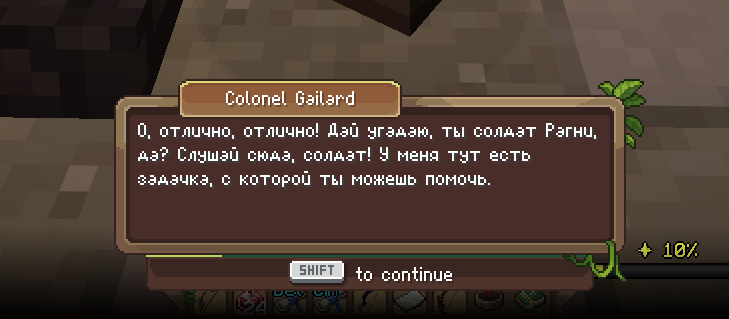
Полноценный русский перевод Wynncraft в стиле оригинала.
(Описание на английском находится ниже / English description is below)
—
Никакого мелкого текста поверх экрана, никаких субтитров. Русский текст отображается прямо в родном диалоговом окне Wynncraft, в той же рамке, тем же шрифтом, с той же атмосферой. Кириллица нарисована вручную в стиле оригинального bitmap-шрифта сервера, так что перевод выглядит как будто Wynncraft изначально был на русском.
## Что внутри
– 🖋️ Живой перевод диалогов – не машинный, как от Google переводчика, с сохранением стиля и атмосферы оригинала
– 🔤 Кастомный кириллический шрифт, нарисованный под оригинальный стиль Wynncraft
– 🖼️ Текст отображается в родном диалоговом окне игры без лишних элементов интерфейса
– 🔄 Автообновление переводов при каждом запуске, новые квесты подтянутся сами
## Установка
1. Установи Fabric Loader
2. Скачай Fabric API
3. Скачай WynnRunica
4. Запусти игру
> **Требования:** Minecraft 1.21.11, Fabric API
## Планы
– Горячая клавиша включения/выключения перевода – Сделано ✅
– Показ оригинала по зажатию клавиши – Сделано ✅
– Перевод дерева навыков и интерфейса
#
#
# WynnRunica
A complete Russian translation of Wynncraft in the original style.
—
No tiny overlay text, no intrusive subtitles. The Russian text is displayed directly in the native Wynncraft dialogue box, using the same frame, the same font, and keeping the same atmosphere. The Cyrillic alphabet is hand-drawn to perfectly match the original server’s bitmap font, making the translation look as if Wynncraft was natively in Russian.
## Features
– 🖋️ **Live dialogue translation** – Hand-translated (not machine translation) to preserve the original style and atmosphere.
– 🔤 **Custom Cyrillic font** – Hand-drawn to match the original Wynncraft font style.
– 🖼️ **Native integration** – Text is displayed in the game’s native dialogue box without any extra UI elements.
– 🔄 **Auto-updates** – Translations update automatically on every launch, seamlessly adding new quests.
## Installation
1. Install Fabric Loader
2. Download Fabric API
3. Download **WynnRunica**
4. Launch the game!
> **Requirements:** Minecraft 1.21.11, Fabric API
## Roadmap
– Toggle hotkey to enable/disable translation on the fly – Done ✅
– Show the original English text by holding a specific key – Done ✅
– Skill tree and UI translation
Wynncraft FPS
Wynncraft FPS
Optimised performance + visibility for your Wynncraft adventures
Get ready to boost your game with this streamlined modpack tailored for low-end PCs and the immersive world of Wynncraft. What you’ll get:
Enhanced FPS via a carefully selected set of performance mods.
Simple, clean setup: no fluff, just essentials to keep things running smoothly.
Included resource pack with glow & flaming effects on mythic boxes — so loot runs become visually clearer and more satisfying.
Why use this pack?
If you want to run Wynncraft with fewer frame drops, less stutter, and more constant performance — this modpack builds a solid foundation. Plus the extra visual touch on mythic loot boxes makes the lootrun gameplay more easy to see. Whether you’re grinding quests or exploring the map, you’ll spend less time tweaking settings and more time playing.
pls update the mod first if something not working.
Hope You Enjoy It!