XercaMod
This mod adds a lot of content to the game. For detailed information, please visit this page.

The additions include:
- Food, especially fast food and desserts
- Tea!
- Unique tools and weapons with enchantments including Warhammer, Grab Hook, Knife, Scythe, etc.
- “Ender Flask” that can be filled with multiple charges of potion
- And Potion Launcher for throwable potions
- Cushions that you can sit on
- A bookshelf that works and shows how many books it holds
- Spyglass (removed in 1.17, since Mojang added it to the base game)
- Confetti and Confetti Balls
- Carved wood with cool designs
- Terracotta tiles, roof material of every color
- Rope that you can climb
- Omni chest, a global ender chest for the whole universe
- Other decorative blocks and items
Configuration
You can edit the xercamod-common.toml file in the config directory to enable/disable each feature in the mod independently.


New in 1.17.1-2.1
Omni Chest

Omni Chest is like Ender Chest, but for the whole universe. It holds a global inventory that anyone can access from anwhere in any dimension. It is everyone’s chest, and yet noone’s at the same time. Get collaborative with your server mates and use this unique logistical ability to your advantage.
Devour

There is a new combat enchantment for the Scythe! It lets you drop little hearts out of the enemy you strike, which you can pick up to replensish health! There is a chance to drop a heart at each hit depending on the Devour level, and a certain amount of heart drops at the killing blow, that again vary depending on the enchantment level.
Food
Cheese and Pizza


You can make cheese to use in recipes or eat as is. The process of making cheese is as follows:
- Craft a curdling vat as in the recipe, using copper and iron ingots.
- Pour milk into the vat.
- Wait as the protein in the milk solidifies into cheese. It should take around 1 minute on average.
- Right click on the vat to retrieve the cheese wheel, then place it on a surface.
- You can eat the cheese in pieces directly from the wheel, or slice it using a knife.

We have wheat, tomatoes, and now cheese. The logical conclusion to all of this is Pizza, of course.
You can prepare a base pizza using these three ingredients, and then either bake it as is to get a margherita pizza, or add toppings of your choosing to create the pizza of your dreams.
The ingredients you can use are sausage, mushroom, chicken, cod fish and doner. You can add up to three ingredients in total. There are 56 variations in total, so go ham with it.
Pizza is eaten in “circular” slices in a way similar to cheese.


Soda

After gulping down all the greasy foodstuff you can get your hands on, there is nothing like carbonated sugar water to wash down your throat. All of the fizzy drinks have a nice, fizzy animation.
You can use an empty glass on a bubbling soul sand to acquire sparkling water. From there, getting to a generic soda is a matter of adding sugar and a snowball to your drink.

Making cola is a little more involved, since it requires processing secret ingredients in a secret procedure:
- Craft the secret cola formula powder using warped roots, rotten flesh, spider eye and three units of sugar.
- Brew the powder into water bottles to get the extract.
- Combine the extract and two snowballs with six glasses of sparkling water to get six glasses of cola.
Drinking cola gives you a Haste effect to reward your efforts.


New Food Items
A few new cheesy and glowy food items are added. Also, the top part of ultimate burger is updated to contain cheese now. Eating glow berry cupcake and glow squid ink paella will make you glow as well.


In addition, the textures of many old food items are updated now!

Nether Carved Wood


There are now carved wood variants for nether stems, namely Crimson Stem and Warped Stem. Differing from their overworld counterparts, these blocks have netherly animations!
Rope with Pistons

Rope now acts like slime block when interacting with pistons!
Credits:
Credits to LuchadorMickey for most of the graphics (good looking ones).
Credits to chechnyacool488 for the Russian translation
Credits to junshengxie for the Chinese translation
Notes:
- Use the one for the latest Minecraft version to get all the features. Older versions may not have newer features.
Xenon
## Xenon
Xenon is a lightweight, open-source network core plugin designed for small to mid-sized Minecraft networks. It provides essential backend systems to help you manage players, permissions, and moderation across multiple servers.
## Features
* **Grant System** – Flexible permission grants with support for temporary and permanent ranks
* **Rank System** – Fully manageable rank hierarchy for structured permission control
* **Punishment System** – Bans, mutes, warnings, and other moderation tools
* **Gift Card System** – Redeemable codes for ranks, perks, or rewards
* **Alt Detection System** – Identify and manage alternate accounts
* **Advanced Chat Filter** – Blocks most variations of profanity
* **Server Manager** – Execute and broadcast commands across connected servers
* **Many More..** – There is more..
> **Note:** Xenon is not intended for production environments or large-scale networks. If you’re running a larger or more demanding network, consider using heather instead.
## Authors:
– All credits go to matheus.
XD’s Utils
## Description
XD’s Utils is a plugin and mod that provides a custom web interface that you can monitor the whole server, create backups to restore points of your server with a simple script to restore to a backup, an API to get and modify data of the server and plugin through sending web requests, and more!
## Features
| Feature | Implementation |
|——————-|—————-|
| Invsee | ✅ |
| AFK Detector | ✅ |
| Bounties | ✅ |
| Custom Shops | ✅ |
| Economy | ✅ |
| Chat Muting | ✅ |
| Chat Censoring | ✅ |
| Disabled Commands | ✅ |
| Disabled Items | ✅ |
| Custom Messages | ✅ |
| Backups | ✅ |
| Web Interface | ✅ |
| Commands | ✅ |
> ✅ : Implemented
>
> 🚧 : Work in Progress
>
> ❌ : Not implemented
## Config
Config Example
“`yml
# /$$ /$$ /$$$$$$$ /$$
# | $$ / $$| $$__ $$| $/
# | $$/ $$/| $$ $$|_//$$$$$$$
# $$$$/ | $$ | $$ /$$_____/
# >$$ $$ | $$ | $$ | $$$$$$
# /$$/ $$| $$ | $$ ____ $$
# | $$ $$| $$$$$$$/ /$$$$$$$/
# |__/ |__/|_______/ |_______/
# /$$ /$$ /$$ /$$ /$$
# | $$ | $$ | $$ |__/| $$
# | $$ | $$ /$$$$$$ /$$| $$ /$$$$$$$
# | $$ | $$|_ $$_/ | $$| $$ /$$_____/
# | $$ | $$ | $$ | $$| $$| $$$$$$
# | $$ | $$ | $$ /$$| $$| $$ ____ $$
# | $$$$$$/ | $$$$/| $$| $$ /$$$$$$$/
# ______/ ___/ |__/|__/|_______/
# ============================ #
# WEB #
# ============================ #
# Enabled (true/false)
enable_web: true
# Hosted Port (1000-99999)
port: 8080
# ============================ #
# BACKUPS #
# ============================ #
# Enabled (true/false)
enable_backups: true
# Folders to back up & Backup interval (Folder Names: Minutes)
folders:
– world: 120
– world_nether: 240
– world_the_end: 240
– plugins/XDs-Utils: 300
# Max folder size (MB) (-1/0 for unlimited)
max_size: 1024
# Max backups (Int) (-1/0 for unlimited)
max_backups: 10
# Compression level (0-9)
compression_level: 7
# ============================ #
# MESSAGES #
# ============================ #
# Message to send when a player joins for the first time (true/false)
enable_first_join_message: true
# %player% – Player’s name
# %message% – Message to send
first_join_message: “%yellow%Welcome %gray%%player% %yellow%to the server!”
# Message to send when a player joins (true/false)
enable_custom_join_message: true
# %player% – Player’s name
# %message% – Message to send
join_message: “%green%+ %gray%%player%”
# Message to send when a player leaves (true/false)
enable_custom_leave_message: true
# %player% – Player’s name
# %message% – Message to send
leave_message: “%red%- %gray%%player%”
# Custom player messages (true/false)
enable_custom_message_format: true
# %player% – Player’s name
# %message% – Message to send
custom_message_format: “%gray%%player% %dark_gray%» %gray%%message%”
# ============================ #
# DISABLED ITEMS #
# ============================ #
# Items to disable (Item IDs)
disabled_items:
# – minecraft:item_1
# – minecraft:item_2
# – minecraft:item_3
# Method to disable items
# 1 – Removes Recipe
# 2 – Removes Recipe & Clears Item
disable_method: 1
# ============================ #
# DISABLED COMMANDS #
# ============================ #
disabled_commands:
# – “/command_1”
# – “/command_2”
# – “/command_3”
# ============================ #
# CHAT CENSORING #
# ============================ #
# Words to censor
censored_words:
# – “censored_word1”
# – “censored_word2”
# – “censored_word3”
# Regex patterns to censor
censor_regex_patterns:
# – “censored_regex_pattern1”
# – “censored_regex_pattern2”
# – “censored_regex_pattern3”
# Method to censor words
# 0 – Do nothing (Only logs)
# 1 – Replaces Words with ‘*’
# 2 – Removes Words from message
# 3 – Do not send message
censor_method: 1
# ============================ #
# ECONOMY #
# ============================ #
# Enable the shop (true/false)
enable_shop: true
# Allow anyone to create shops (true/false)
anyone_create_shops: true
# Enable bounties (true/false)
enable_bounties: true
# Bounty you gain when you kill a player (Int/Float/Double)
kill_reward: 100.00
# Amount of money to give to players when join the next day (Int/Float/Double)
daily_balance: 100.00
# Items in the default shop (Item ID: Cost, Amount, Slot)
shop_items:
– minecraft:elytra:
cost: 50000
amount: 1
slot: 0
– minecraft:netherite_ingot:
cost: 25000
amount: 1
slot: 1
– minecraft:diamond:
cost: 2500
amount: 1
slot: 2
– minecraft:emerald:
cost: 2500
amount: 1
slot: 3
– minecraft:gold_ingot:
cost: 50
amount: 1
slot: 4
– minecraft:iron_ingot:
cost: 50
amount: 1
slot: 5
“`
XDailyVoucher
# XDailyVoucher
A feature-rich daily rewards and voucher system for your Minecraft server!
## 📚 Overview
XDailyVoucher brings an engaging rewards system to your server, encouraging player retention through daily login rewards and a flexible voucher system.
### ✨ Features
**Daily Rewards:**
– Progressive rewards with streak bonuses
– Custom rewards for each day
– Special weekly rewards
– Visual GUI interface
– Persistent streak tracking
**Voucher System:**
– Create custom vouchers
– Multiple rewards per voucher
– Support for both command and item rewards
– Visual GUI for editing voucher contents
– Flexible command execution
– Admin distribution controls
– Player redemption system with limits
## 🎮 Usage
### Player Commands:
– `/xdv daily` – Open daily rewards GUI
– `/xdv redeem ` – Redeem available vouchers
### Admin Commands:
– `/xdv reload` – Reload configuration
– `/xdv voucher ` – Create vouchers
– `/xdv vgui ` – Edit voucher items through GUI
– `/xdv give [amount]` – Distribute vouchers
– `/xdv dailyitem ` – Set rewards
– `/xdv active ` – Enable redemption
– `/xdv deactive ` – Disable redemption
– `/xdv vlist` – List all vouchers
## 📋 Requirements
– Paper 1.17+
– Vault
## ⚙️ Configuration
Easily customize through `config.yml`:
– Base reward amounts
– Streak multipliers
– All messages and notifications
## 🔒 Permissions
– `xdv.admin` – Administrative access
– `xdv.use` – Basic player access (default: true)
## 🔧 Installation
1. Download the plugin
2. Place in plugins folder
3. Restart server
4. Configure settings
## 🤝 Support
Need help? Found a bug? Have a suggestion?
– Create an issue on our [GitHub](https://github.com/Akar1881/xdailyvoucher)
## 📝 License
Released under the GNU License
xChunkHoppers
# xChunkHoppers
### 🚀 The Ultimate Chunk Collector Plugin




—
## 📋 Description
**xChunkHoppers** is the ultimate solution for Survival, SkyBlock, and Factions servers. It allows you to create “Magic Hoppers” that automatically collect items within a specific radius or the entire Chunk without the need for water streams or lag.
Optimized for high performance, with support for **Hex Colors**, **Effects**, **GUI Menu**, and a **complete API** for developers.
## ✨ Key Features
* **🛡️ Extreme Performance:** Smart caching and `PersistentDataContainer` (PDC). Zero lag.
* **📡 Multi-Types:** Create infinite hopper types (VIP, GOD, BASIC) with configurable ranges (8×8, 64×64, Full Chunk).
* **🎨 Premium Design:** Full support for HEX colors (`&#RRGGBB`) and gradients.
* **🖥️ GUI Menu:** Visual admin panel to obtain items (`/xch menu`).
* **💾 Data Persistence:** `data.yml` system to save locations across restarts.
* **🎵 Visual Effects:** Fully configurable sounds and particles when placing blocks.
* **🔌 Developer API:** Simple API to integrate with other plugins.
* **⚙️ Filtering:** Whitelist or blacklist of materials (e.g., only Cactus and Iron).
—
## 📥 Installation
1. Download `xChunkHoppers.jar`.
2. Place it in your server’s `/plugins/` folder.
3. (Optional) Install **PlaceholderAPI** to use variables.
4. Restart the server.
5. Configure the hopper types in `config.yml` and enjoy!
—
## Example Video:
## 💻 Commands and Permissions
| Command | Description | Permission |
| :— | :— | :— |
| `/xch give [amount]` | Gives a specific ChunkHopper to a player. | `xchunkhoppers.admin` |
| `/xch menu` | Opens the GUI menu with all hoppers. | `xchunkhoppers.admin` |
| `/xch reload` | Reloads the configuration and database. | `xchunkhoppers.admin` |
### Other Permissions
* `xchunkhoppers.place` » Allows placing Chunk Hoppers.
* `xchunkhoppers.break` » Allows breaking and retrieving Chunk Hoppers.
—
## 🛠️ Configuration
“`yaml
# ___ _ _
#__ __ / __ |__ _ _ _ __ | | __ / /___ _ __ _ __ ___ _ __ ___
# / // / | ‘_ | | | | ‘_ | |/ // /_/ / _ | ‘_ | ‘_ / _ ‘__/ __|
# > Made with ❤️ by WillfryDev for the community.
Xaero’s Map Chest Tracker Integration
# Xaero’s Map Chest Tracker Integration
This mod extends [Chest Tracker](https://modrinth.com/mod/chest-tracker) functionality, showing the results in [Xaero’s Map](https://modrinth.com/mod/xaeros-world-map).
It is compatible with Xaero’s Minimap, Better PVP, and their fair versions.
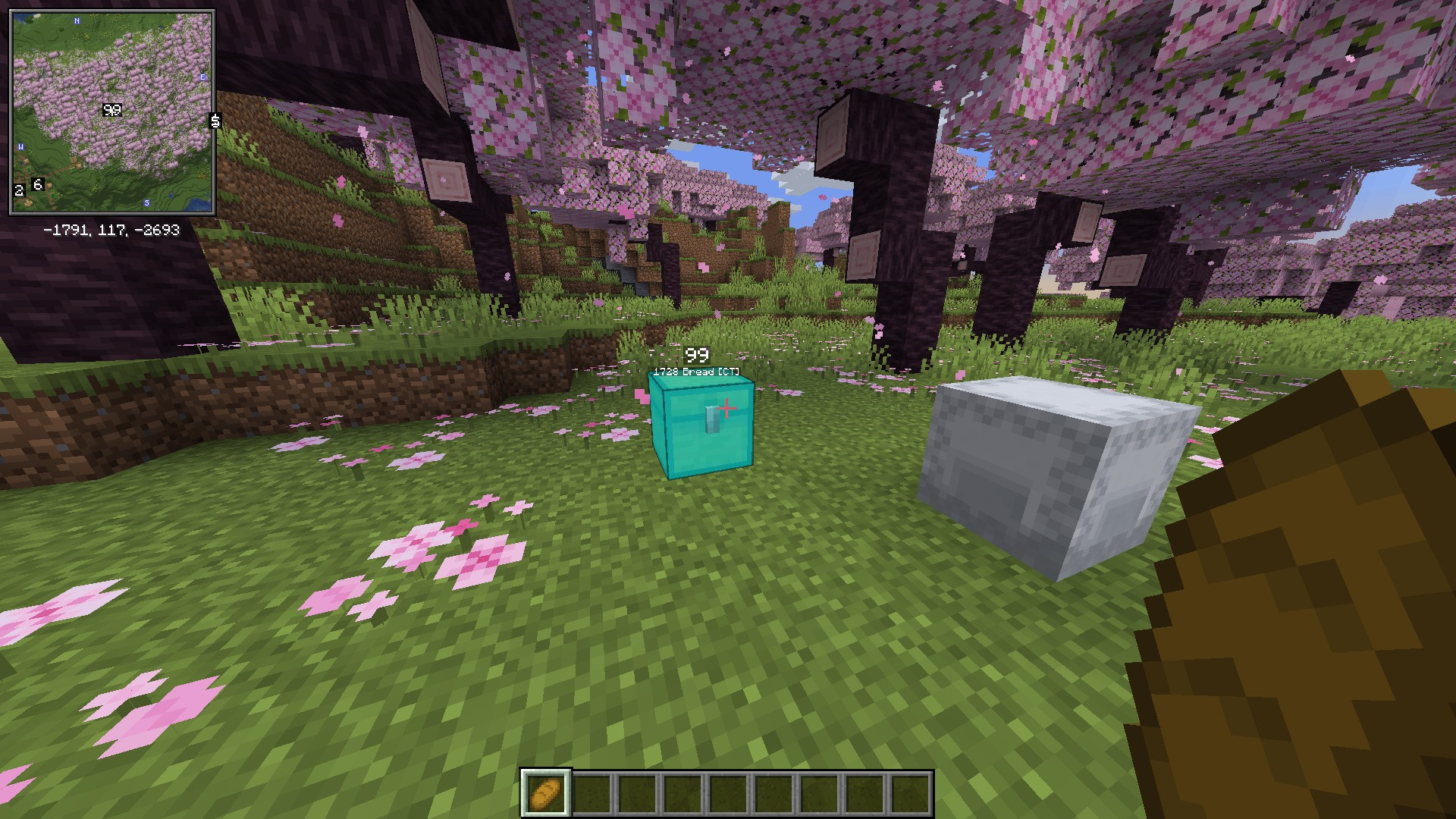
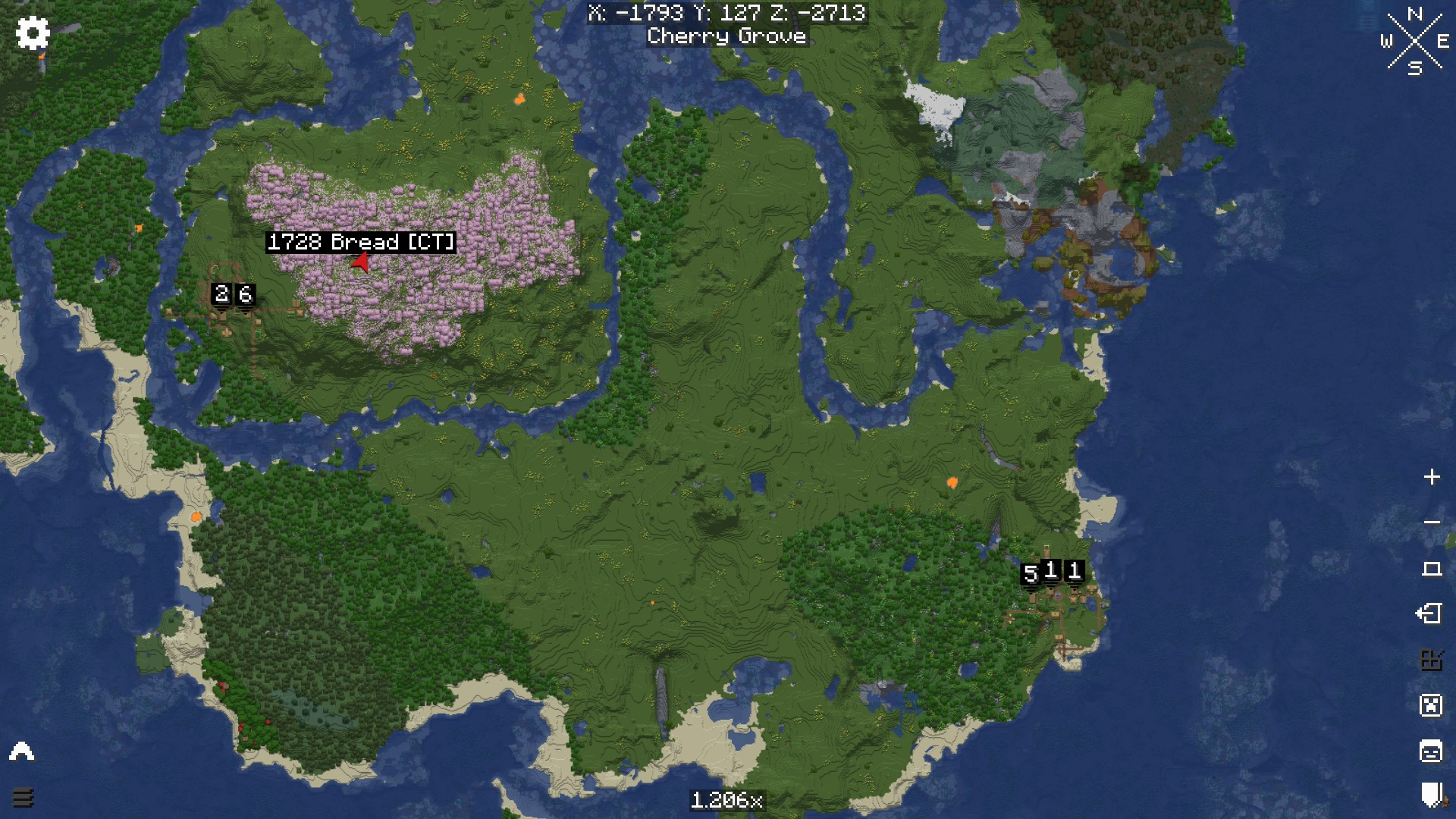
### Requirements:
* [ChestTracker](https://modrinth.com/mod/chest-tracker)
* [Xaero’s Minimap](https://modrinth.com/mod/xaeros-minimap)
x10k Management Core
# x10k Management Core
### Lastest version: Stable 1.6.1 (01/03/2026)
Hi, I started this plugin as a hobby, so it has lots of features that will enhance the survival gameplay, all in one plugin, so you don’t need to install 4 or more plugins.
Everything is extremely configurable; you can enable and disable almost every command, customize the messages, prefixes, and more!
For now we have:
– **Homes & warps** system and cmds
– **Tpa & ping** system and cmds
– **Graves & back** system and cmds
– **Warps & rank** system and cmds
– **Notifications** system and cmds
– **Msg and reply** system and cmds
– **Clearlag & combat** system and cmds
– **Ban & warn** system and cmds
– **Admin commands** (feed, fly, heal, vanish, gamemode (aliases), etc.)
Also, here are the placeholders (this is a Beta feature, so expect changes):
“`
%xmc_rank% – Displays the highest rank name of the player
%xmc_rank_prefix% – Displays the formatted prefix of the player’s highest rank (including colors and gradients)
%xmc_warnings% – Displays the total amount of active warnings the player has
%xmc_afk% – Displays “AFK” if the player is currently away from keyboard, otherwise empty
“`
Extra links and more info:
> **[Permissions and commands](https://pastebin.com/92PRGhwQ)** (lastest update: 22/02/2026)
xRtp
**🚀 xRtp – Smart & Secure Random Teleport**

> **xRtp** is a powerful, optimized, and fully configurable Random Teleport plugin designed for modern Minecraft servers. Built for professional performance, absolute safety, and extreme customization.
 
—
> ## ✨ Main Features (v1.0.2 Update)
> ### 🚀 Zero-Lag Search Engine
Our new algorithm checks up to **10 coordinates per tick** only within **pre-generated chunks**. This ensures almost instant teleportation with **zero TPS drops** and zero lag, as it prevents generating new terrain.
> ### 🎛 Menu Engine 2.0 (Full Customization)
Total control over your `menu.yml`. Toggle the **auto-filler** or design your layout slot-by-slot using **slot lists** (e.g., `slots: [0,1,8,9]`) to create unique borders and designs.
> ### ⚡ Interactive Menu Actions
Turn menu items into functional buttons. Supports several action types:
– `CLOSE`: Closes the inventory.
– `MESSAGE`: Sends custom messages to the player.
– `COMMAND`: Executes a player command (e.g., `/spawn`).
– `CONSOLE`: Executes a command from the console on the player’s behalf.
> ### 📊 Enhanced Visuals & BossBars
Includes a fully customizable **BossBar** with dynamic progress titles that show the remaining time (`%time%s`) during the teleport delay.
—
> ## 📂 Included Files
– `config.yml` → General settings, optimization toggles, permissions, safety system.
– `menu.yml` → GUI Engine 2.0 layout and menu customization.
– `lang.yml` → Fully customizable messages, BossBar, and translations.
– `Config ES/` → **Bonus!** Includes a pre-configured Spanish VIP setup.
—
> ## 🔐 Permissions
| Permission | Description |
|————|————-|
| `xrtp.admin` | Reload the configuration using `/rtp reload` |
| `xrtp.bypass` | Bypass teleport cooldown |
| (Optional) | General use permission can be disabled in config |
—
> ## ⚙️ Configuration Highlights
✔ **Use Pre-generated Chunks** (Anti-lag system)
✔ Cancel teleport on movement
✔ Adjustable cooldown duration
✔ Custom slot-by-slot menu filling
✔ Interactive buttons with placeholders
✔ Advanced BossBar with progress titles
✔ Maximum attempts to find a safe location
—

—
> ## 🎯 Perfect For
Survival • SMP • Skyblock • Factions • Lobby • Etc
—
> ### 💻 Developer API
xRtp includes a **powerful and easy-to-use API** so other plugins can interact with it. You can execute RTPs manually, check cooldowns, and hook into events to modify or cancel teleports.
> #### How to use it
First, verify that xRtp is loaded and get the instance:
“`java
if (Bukkit.getPluginManager().getPlugin(“xRtp”) == null) {
// xRtp is not installed
return;
}
XRtpAPI api = XRtpAPI.getInstance();
WynnAspects
A Wynncraft mod that enhances gameplay on the server.
### Features:
– Scan and store all of your aspects using a keybind (“G”), and then you will be able to view them in the wynnaspects website [https://wynnaspects.com/](https://wynnaspects.com).
– Announce mythic aspects and tomes once you open a raid reward chest.
– The mod keeps track of your mythic streak.
– A ping system for communication (with a “valorant-like” ping wheel system).
– View global statistics, weekly aspect pool and daily gambits on the website.
### Guide:
– Start by signing up at https://wynnaspects.com/ and download the mod.
– Enter your credentials in the WynnAspects mod menu (under the “Credentials” collapsible tab).
– Join the Wynncraft server (you should see a chat message confirming you’ve successfully logged into WynnAspects).
### What does the mod do?
– The mod focuses on scanning your aspects (using a configurable keybind) and tracks newly obtained aspects when you open a raid chest reward.
– You’ll also benefit from quality-of-life features such as dry streak counts, mythic tome and aspect announcements, and more.
– Finally, when you log in to the website, you’ll be able to view your full aspect progression.
### Bug report:
– Expect bugs and glitches, please join our discord server and report any bug you encounter.
Wunderreich

Wunderreich brings some niceties and new mechanics to your game. Everything has been designed with configurability in mind. So you get to decide which features to use.
You may also want to install ModMenu and RoughlyEnoughItems. While those are optional, they enhance the experience (for example you do not have to edit Config-Files in order to change the general behaviour of our Mod.
## Features:
– 🤑 Influence trades offered by villagers
– 🧱 Slabs for vanilla blocks like sand, dirt, concrete or glass
– 🛕 Stairs and Walls for Wool, Concrete and Terracotta
– 🎁 Connected chests that have access to the same inventory
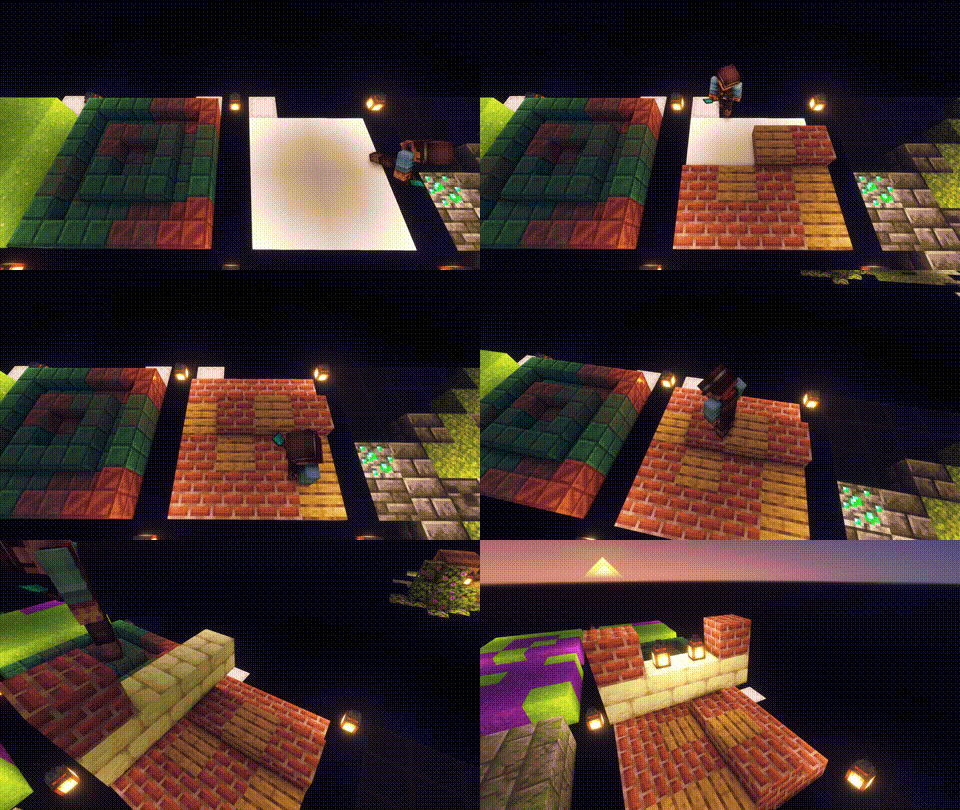
– 🛠️ A tool that places a random block from the hot bar.
Showcase:
 |
|
Trowels:
Use your Trowel to place a random Block/Item from your Hotbar. This is the perfect tool, if you want to use random looking block patterns in your builds. The more Blocks of a type you have in your hot-bar, the more likley it is to be choosen.
|
| |
 |
|
Whispers:
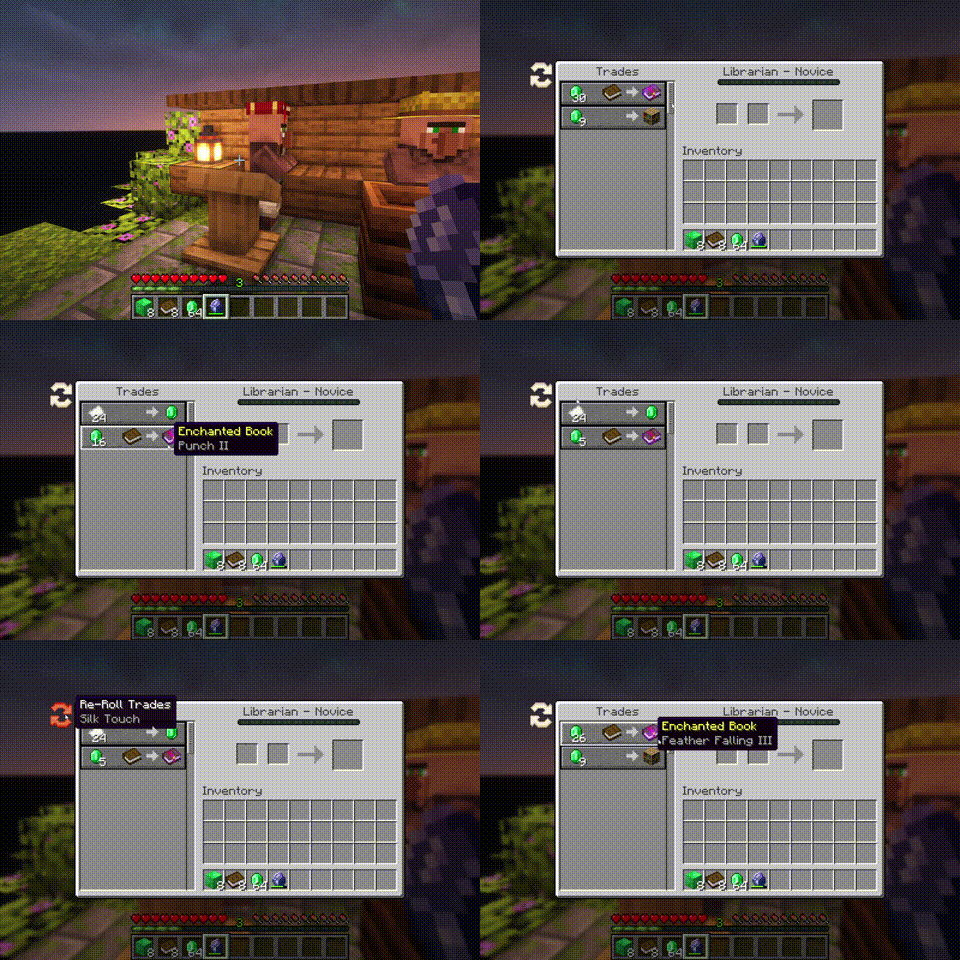
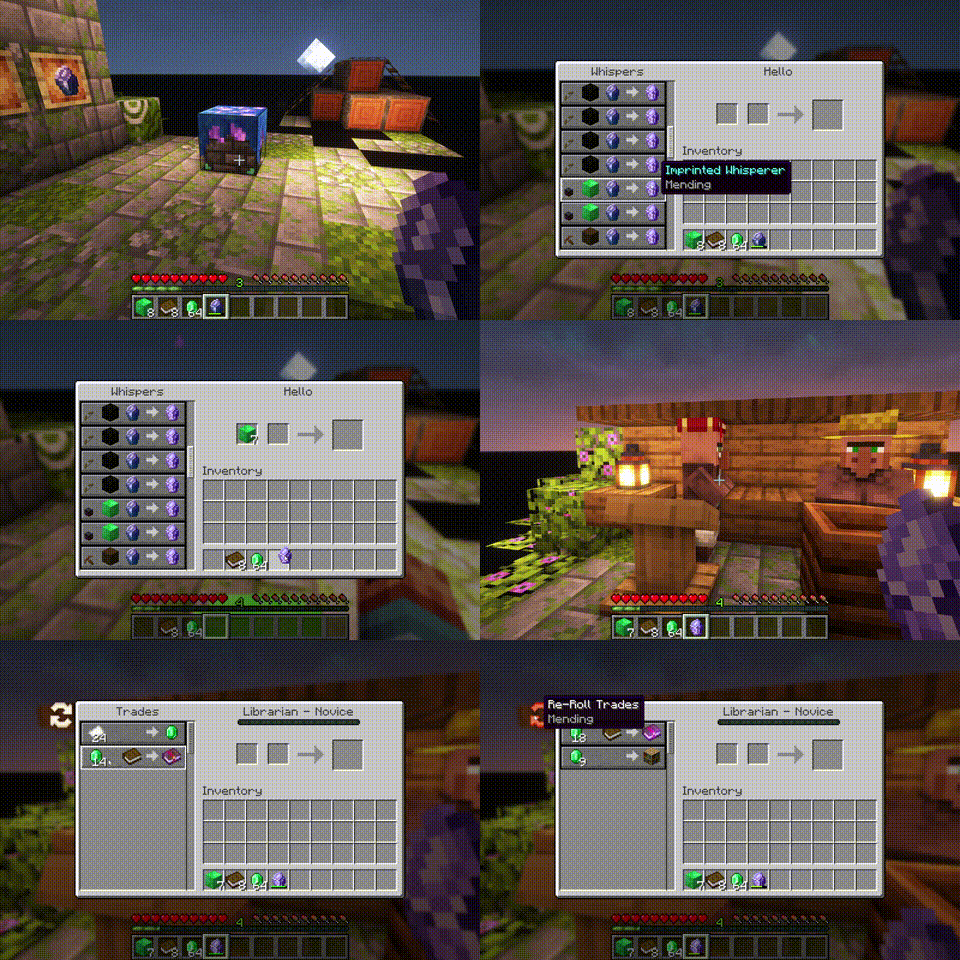
You can Whisper to your Villagers now. If a Villager is untrained, a whisperer of yours will force it to choose another set of initial trades. [more]
|
| |
 |
|
Imprinted Whispers:
If you imprint a Whisper with an enchantment, Librarians will offer only trades that include the imprinted enchanted book. [more]
|
| |
 |
|
Slabs, Stairs and Walls:
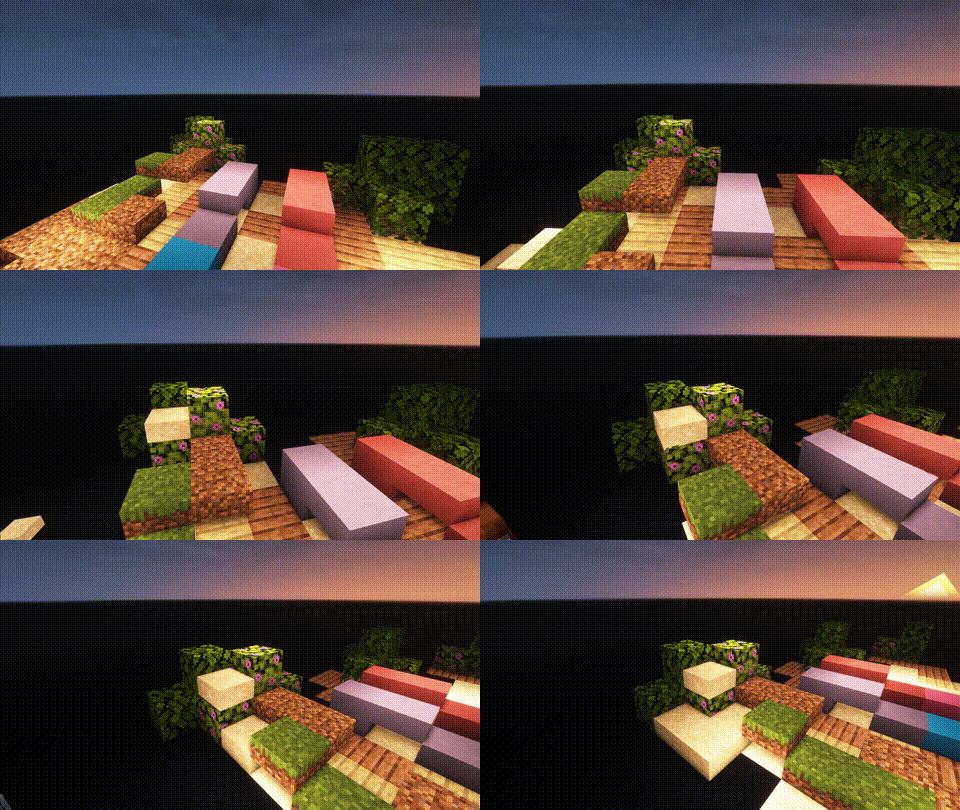
Slabs, Stairs and Walls that are missing from the vanilla game. Our Slabs include Gras, Dirt, Dirt Paths, Coars Dirt, (Red-)Sand, Concrete, Terracotta, Wool and Glas. Sand Slabs will fall and Gras will spread to Dirt-Slabs. Stairs and Walls are currently limited to Concrete, Wool and Terracotta. There are also Walls for vanilla wood types.
|
| |
 |
|
Wunderkiste:
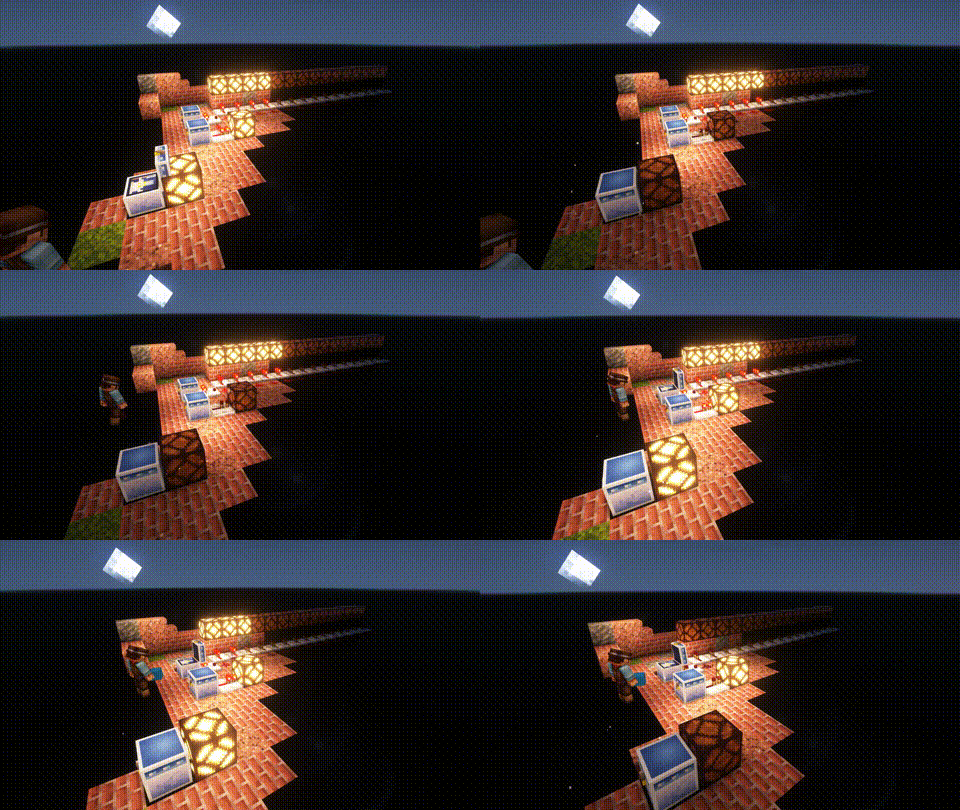
One shared Storrage for everyone in your world. Every Wunderkiste in the world shares the same inevenory across Dimensions. Redstone updates are sent to every single one in real-time. That is why a Wunderkiste doubles as an inter-dimensional chunk loader.
By using dye on a Wunderkiste or naming it on an anvil, you can change the storage network. Wunderkisten of the same color share the same inventory. [more]
|
| |
 |
|
Named Monsters:
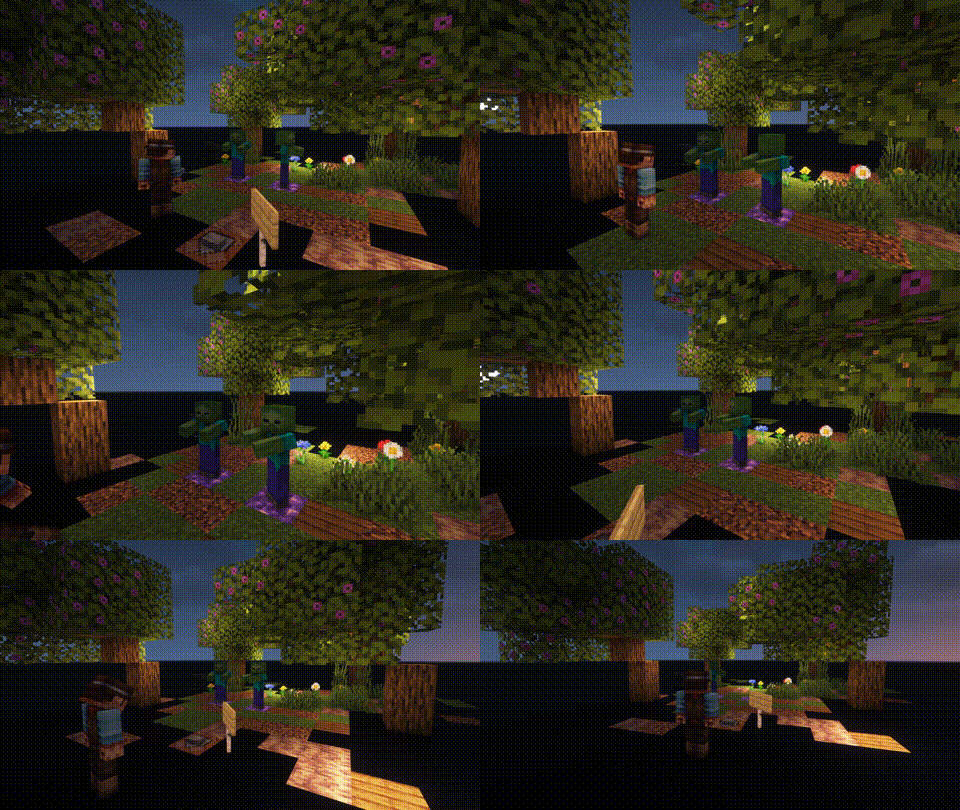
If you name a Monster using a Name-Tag, it will not de-spawn when you switch your game to peaceful. This is usefull, if you often need or want to switch back to peacfull and still be able to use mob farms that require hostile mobs (like endermites).
|

