Y2K4’s Data Pack
### A collection of all my data pack creations.
More features to be added in the future!
—
Features List
### Current features
– Fast Hopper (Transfers one item each game tick)
### Planned features
– Fast Furnace (Smelts one item each game tick)
Crafting Recipes
#### Fast Hopper
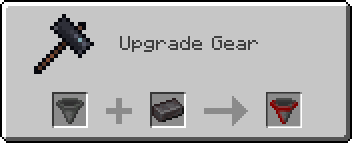
*Craft in a Smithing Table with a hopper and a netherite ingot.*
Xtra stuf
This mod has many new features, some may seem hard to figure out. here are some instructions for hard features.
Mars dimension. in order to go to mars, you need to make a portal out of mars block. you craft it with red sand in the middle and corners of the crafting grid, the rest filled in with iron ingots. you make it like a nether portal, but ignite it with the mars portal igniter made with red sand and flint and steel. in mars, you will find iron oxide, volcanic basalt, and mars bases. the iron oxide can be crafted with iron nugget + bottle of water (not water bottle) the bottle of water is crafted with 2 glass on top of each other. iron oxide can be converted to iron nuggets with sandpaper + iron oxide. sandpaper is made with paper and sand on top of the paper. volcanic basalt can be made into slabs, stairs and walls.
2. Biomes. The biomes naturaly generate around the world. the pine forest is the most commen. it is like a tall tree spruce biome, but the trees are a new tree type, pine, they can be crafted into planks, slabs, stairs, door, trapdoor, and fence. i forgot to make wooden tool and stick craftable with it. Biome 2: Orange tree feilds. this biome generates with orange trees and grass. the oranges drop from the leaves. the oranges can be eaten or crafted into with orange + bottle of water. Biome 3: Glowing plains. this biome is less serious, the ground is glow block, and dirt is glowstone. In mars, there is mars biome and mars basalt plains. in the garbage dimension there is landfill.
3. Garbage dimension. garbage is crafted with paper, stick, dirt. 4 garbage makes a garbage block, used to make a garbage portal. be careful to not break the garbage block be cause it drops junk. to ignite the portal use the garbage portal igniter crafted with flint and steel and garbage. the garbage dimension is garbage block and trash water. it is just like water but flows slower.
4. Ores and materials there are 2 new ores and 5 new materials. first uranium its a bit rare and the armour gives you blast protection and the pickact mines a 3×3 area. the sword gives poison 1 for 60 ticks. next, tin. tin is another ore. it can be used to craft bronze with 1 copper and one tin ingot. bronze can be used to craft a sword, pickaxe, and trumpet. the bronze tools are almost as good as diamond. next, stone armour is now a thing. it is crafted with stone, andisite, diorite, and granite, not cobblestone. Next, great material. the tools and armour are overpowered. you craft it with netherite, diamond and iron. it has a sword, axe, pickaxe, and armour.
5. Plants. Many new plants generate all over the world. some plants, like corn, raspberrys, and tomatos can be eaten. corn when you eat it drops a corn husk, which can be crafted into bonemeal. other plants are decorative. the mushroom piles drop mushrooms.
6. mobs. at the time of writing this, the only new mob is a duck. they are a bit buggy.
7. this may change. new things are always being added.
XTransfer

# 0 What the heck is this?
A new plugin designed to **transfer players’ data between names or UUIDs**. I didn’t find any other plugin can handle this problem before, so I made my own one and uploaded it to here to help anyone who needs this feature for his/her server.
# 1 Features
## 1.1 Smart UUID Detection
Automatically detects UUIDs from:
– Online players
– usercache.json (for premium players)
– Offline-mode UUID generation
## 1.2 Complete Data Transfer
Transfers all vanilla player data:
– Player inventory and Ender Chest (`playerdata/`)
– Statistics (`stats/`)
– Advancements (`advancements/`) for 1.13+
## 1.3 Safe & Reliable
– Creates automatic backups before overwriting
– Kicks online players to prevent data overwrite (configurable)
– Asynchronous file operations – no server lag!
# 2 Commands and Permission Nodes
## 2.1 Commands
“`markdown
– /xtransfer – Show version info
– /xtransfer transfer – Transfer by player names
– /xtransfer transferuuid – Transfer by UUIDs
– /xtransfer list – List all player data files
– /xtransfer list – Show files for specific player
– /xtransfer reload – Reload configuration
– /xtransfer help – Show the help message
/xtf = /transfer = /xtransfer
“`
## 2.2 Permission Nodes
“`markdown
– xtransfer.manage – Allows using all XTransfer commands (default: op)
“`
# 3 Config
“`yaml
# Show logo when plugin enabled
show_logo: true
# World settings
world:
# Manual world name (only used if auto-detect is false)
name: “world”
# Automatically detect world name from server
auto-detect: true
# Transfer settings
transfer:
# Transfer statistics files
stats: true
# Transfer advancements files (1.13+)
advancements: true
# Backup settings
backup:
# Create backup of existing files before overwriting
create: true
# Suffix for backup files
suffix: “.old”
# Online player handling
# If true, kick online players before transfer
# If false, show warning but continue
kick-online-player: true
# Language settings
language: “en”
# Debug mode (enable only for troubleshooting)
debug: false
# Messages – You can customize all messages here
messages:
# English messages
en:
no-permission: “&cYou don’t have permission!”
usage-header: “&9&lX&f&lTransfer &f&lHelp”
usage-transfer: “&7/xtransfer transfer &f ”
usage-transferuuid: “&7/xtransfer transferuuid &f ”
usage-list: “&7/xtransfer list &f[player]”
usage-reload: “&7/xtransfer reload”
usage-help: “&7/xtransfer help”
reload-success: “&a✓ Configuration reloaded!”
transfer-start: “&eStarting async transfer…”
looking-up: “&eLooking up UUIDs for &f{old} &eand &f{new}&e…”
uuid-not-found: “&cCould not find UUID for: &f{name}”
try-uuid: “&7Try using /xtransfer transferuuid with direct UUIDs”
invalid-uuid: “&cInvalid UUID format! Use: /xtransfer transferuuid ”
uuid-example: “&7Example: 12345678-1234-1234-1234-123456789012”
source-data-missing: “&cSource player {name} ({uuid}) has no data file!”
transfer-from: “&7From: &f{name} &7({uuid})”
transfer-to: “&7To: &f{name} &7({uuid})”
transfer-file: “&7File: &f{file}”
backup-created: “&7Backed up existing file to: &f{file}”
transfer-success: “&a✓ Successfully transferred player data!”
transfer-stats: “&7✓ Transferred stats file”
transfer-advancements: “&7✓ Transferred advancements file”
transfer-error: “&cError during transfer: {error}”
folder-not-found: “&cPlayer data folder not found: {path}”
source-not-found: “&cSource file not found: {file}”
source-location: “&7Looked in: {path}”
player-online-warning: “&e⚠ Warning: Player {player} is online! Data may be overwritten when they log out.”
player-kicked: “&e✓ Player {player} has been kicked for data transfer.”
kick-message: “&cYour data is being transferred. Please rejoin in a few seconds.”
no-files: “&eNo player data files found”
list-header: “&6=== Player Data Files ({count}) ===”
list-more: “&7… and {count} more”
list-entry: “&7{name} &8- {uuid}”
list-unknown: “&8{uuid} &7(unknown)”
files-header: “&6=== Files for {player} ===”
file-playerdata: “&7Player Data: {status}{size}”
file-stats: “&7Stats: {status}”
file-advancements: “&7Advancements: {status}”
# Other language…
“`
xSetHome
🏡 xSetHome
A modern, lightweight, and highly customizable home system for your Minecraft server.

—
## ✨ Key Features
* **Interactive GUI Menu:** Let players view and manage their homes through a clean, fully customizable `/homes` inventory. Includes built-in support for empty states and custom buttons.
* **Dynamic Custom Icons:** Players can personalize how their homes look in the menu! Simply **Right-Click** a home icon while holding a block to update its appearance.
* **Safe Teleportation:** Configure a safe teleport delay. If a player moves during the countdown, the teleportation is automatically canceled.
* **Immersive Visuals & Audio:** Enhance the player experience with highly customizable ActionBars, on-screen Titles, sound effects, and particles during teleportation.
* **100% Customizable:** Tailor every single message, prefix, and menu item. Features native support for HEX colors (e.g., `&#FAEDCB`).
* **Custom Head Support:** Use Base64 textures to decorate your menus (perfect for custom “Close Menu” buttons or specific icons).
* **PlaceholderAPI Integration:** Extract data from your players’ homes to display on scoreboards, holograms, or custom UI menus.
—
## 📝 Commands & Permissions
| Command | Description | Permission |
| :— | :— | :— |
| `/sethome ` | Saves your current location as a home. | `xsethome.use.sethome` |
| `/home ` | Teleports you to a saved home. | `xsethome.use.home` |
| `/homes` | Opens the visual homes GUI. | *None (Free for all)* |
| `/delhome ` | Deletes a saved home. | `xsethome.use.delhome` |
| `/xsethome reload` | Reloads the configuration files. | *Admin Only* |
| `/xsethome help` | Displays admin commands. | *Admin Only* |
> **Note:** The default home limit for standard players is **3** (fully adjustable in the `config.yml`).
—
## 🔗 PlaceholderAPI Variables
You can use the following placeholders in your menus, scoreboards, or chat formatting.
*(Make sure to replace `` with the exact name of the home)*:
* `%xsethome__name%` ▸ Returns the name of the home.
* `%xsethome__world%` ▸ Returns the world where it is located.
* `%xsethome__x%` ▸ X coordinate of the home.
* `%xsethome__y%` ▸ Y coordinate of the home.
* `%xsethome__z%` ▸ Z coordinate of the home.
* `%xsethome__date%` ▸ Exact date of creation.
—
## 🚀 Installation Guide
1. **Download** the latest version of `xSetHome.jar`.
2. **Move** the downloaded file into your server’s `plugins` folder.
3. *(Optional but recommended)* Install **PlaceholderAPI** to utilize the custom variables.
4. **Restart** your server to generate the configuration files.
5. **Configure** `config.yml` and `menu.yml` to your liking, then run `/xsethome reload` in-game or from the console.
6. Enjoy!
—
## 🛠️ Support & Links
* 🌐 **Official Website:** [xPlugins – xSetHome](https://xplugins.es/plugins/xsethome)
* 💬 **Discord Support:** [Join our Community](https://xplugins.es/discord)
—
*Developed with ❤️ by [xPlugins](https://xplugins.es/) (2026).*
XP Vials
# 📦 XP Vials — Bottle Your Experience!
Turn your XP into **bottles of experience** with a simple right-click on an enchanting table!
Perfect for **saving XP**, **sharing with friends**, or **keeping it safe before risky adventures**.
## ✨ Features
– Right-click an **Enchanting Table** with a *Glass Bottle* to store XP
– **Sneak-click** to convert *all* bottles at once
– Configurable **XP cost per bottle**
– Smooth & immersive **sound effects**
– **Permission support:** `xpstore.use`
## 🎮 How it works
| Action | Result |
|——-|——–|
| Right-click Enchanting Table with Glass Bottle | Store XP into one bottle |
| Sneak + Right-click | Convert all bottles in hand |
## ⚙️ Permissions
“xpstore.use“ — allows XP bottling
📁 Config
Modify the XP cost in the config file:
“`yaml
xp-cost: 10
“`
## Start banking your XP today — smarter players store their levels 😉
XPVault
🛡️ XPVault Plugin – Comprehensive Technical Guide
What is XPVault?
XPVault is an advanced plugin for Minecraft that allows players to securely manage their experience points (XP).
It introduces a personal XP vault system where players can save, retrieve, and transfer XP, while also giving server administrators full control over XP distribution through administrative commands. XPVault enhances multiplayer gameplay by offering reliability and customization.
—
✅ Key Features
Secure XP vault system to store XP.
Recover saved XP anytime — especially after death.
Send and receive XP between players.
Full administrative control over XP balances.
Full message customization via messages.yml.
Built-in support for PlaceholderAPI integration.
—
🧭 Available Commands
/savexp
Function: Save XP to your personal vault.
Alias: /sxp
Permission: Open to all players
Example: /savexp 100
—
/givexp
Function: Give XP to another player.
Alias: /gxp
Permission: Open to all players
Example: /givexp Steve 500
—
/retrievexp [amount]
Function: Retrieve XP from your vault.
Alias: /rxp
Permission: Open to all players
Example: /retrievexp or /retrievexp 200
—
/adminxp [player] [amount]
Function: Administrative XP controls (reset, set, add, remove).
Permission: xpvault.admin required
Example: /adminxp set Player1 1000
—
/checkxp
Function: Display current and stored XP and levels.
Alias: /cxp
Permission: Open to all players
—
🔗 PlaceholderAPI Integration
Available Placeholder:
%xpvault_saved_xp%: Displays the amount of XP saved in a player’s vault.
Example Usage (Scoreboard):
lines:
– “&aStored XP: &f%xpvault_saved_xp%”
—
💬 Message Customization
Supported Placeholders:
Placeholder Description
%player% Target player name
%amount% XP amount
%current_xp% Player’s current XP
%saved_xp% Player’s saved XP
%sender% Player who sent the XP
%action% Action taken (set, add, remove)
%new_xp% New XP value after the action
Example Messages (messages.yml):
plugin_enabled: “&aXPVault has been enabled!”
xp_saved: “&aYour XP has been saved!”
xp_given: “&aSuccessfully gave %amount% XP to %player%!”
xp_retrieved: “&aYou retrieved %amount% XP from your vault.”
adminxp_player_success: “&a%action% %amount% XP for %player%. New saved XP: %new_xp%”
xPsMenu
🛡️ xPsMenu – Premium ProtectionStones GUI
The most advanced, interactive, and fully customizable GUI menu for ProtectionStones.
[]()
[]()
[]()

—
## ✨ Features
**xPsMenu** takes the classic ProtectionStones experience and transforms it into a modern, visual, and premium system for your players.
* 🎨 **100% Customizable:** Every single menu, item, lore, and message is fully editable (`gui.yml`, `flags.yml`, `selector.yml`, `config.yml`).
* 🌈 **Hex Colors & MiniMessage:** Full support for modern Hex color codes (`&#FFFFFF`) to make your menus pop out.
* 📋 **Dynamic Region Selector:** A live, auto-updating GUI showing all player regions with an interactive filter (View ALL, OWNERS, or MEMBERS).
* 👤 **Advanced Player Management:** View members and owners using real Player Heads! Kick players directly via Shift + Right-Click.
* ✨ **0-Lag Particle System:** When a protection block is hidden, only the owner will see beautiful magical particles indicating its location (highly optimized, 0 server lag).
* 🚀 **OP / VIP Bypass:** Instantly teleport to your region without the 3-second cooldown using a permission node.
* 🛠️ **Admin Tools:** Nuke all regions from the server database with a single safety-confirmed command.
* 🔌 **Developer API:** Easily hook into the plugin to open menus from other custom plugins or NPCs.
# 🎢 Examples:


Do you want to acquire the best ES/EN configuration?
– ¡Enter the discord!
– It helps us a lot.
—
## 📥 Installation
1. Stop your server.
2. Download the `xPsMenu-v1.0.0.jar` and place it in your `/plugins/` folder.
3. Ensure you have the required dependencies:
* **ProtectionStones** (2.10+)
* **WorldGuard** & **WorldEdit**
* **PlaceholderAPI** (Optional, but highly recommended)
4. Start the server.
5. Customize the configuration files inside `/plugins/xPsMenu/` and type `/psmenu reload`.
—
## ⌨️ Commands & Permissions
### Player Commands
* `Shift + Right Click` (on a protection block) – Opens the main management GUI for that specific region.
* `/psmenu` – Opens the dynamic Region Selector (Shows all your active regions).
* `/psmenu help` – Shows the help menu.
### Admin Commands
* `/psmenu reload` – Reloads all configuration files seamlessly.
* **Permission:** `psmenu.admin`
* `/psmenu clearall confirm` – ⚠️ *DANGER!* Wipes every single ProtectionStones region from the server database.
* **Permission:** `psmenu.admin`
### Extra Permissions
* `psmenu.bypass` – Bypasses the 3-second teleportation delay. Instant teleport!
—
## 📊 Placeholders
### Internal Menu Variables
Use these exclusively inside your `gui.yml` and `flags.yml` to display dynamic data:
* `%region%` – Displays the ID of the region currently being edited.
* `%hidden_status%` – Displays the current state of the block (e.g., Hidden ✘ or Visible ✔ – editable in config).
* *Note: You can also use any global PlaceholderAPI variable inside the menus (like `%player_name%`).*
### PlaceholderAPI Variables (Global)
You can use these variables anywhere on your server (Scoreboards, Holograms, Chat, etc.):
* `%xpsmenu_version%` – Displays the current plugin version.
* `%xpsmenu_player%` – Displays the player’s name.
—
## 💻 Developer API
Building a custom core or an NPC script? You can easily hook into **xPsMenu** to open interfaces for your players using our static API.
### Add to your build.gradle:
“`gradle
dependencies {
compileOnly fileTree(dir: ‘libs’, include: ‘xPsMenu-v1.0.0.jar’)
}
Example Usage:
Java
import jn.willfrydev.xPsMenuAPI;
import org.bukkit.entity.Player;
public class MyCustomPlugin {
public void openMenuForPlayer(Player player, String regionId) {
// Opens the main Editor GUI for a specific region
xPsMenuAPI.openMainMenu(player, “ps10x64y5z”);
}
public void openListForPlayer(Player player) {
// Opens the Dynamic Region Selector GUI for the player
xPsMenuAPI.openSelector(player);
}
}
“`
XPMerge
# ✨ XpMerge
> **Less orbs. More frames. Same XP.**
> Automatically merges nearby experience orbs into one — silently, safely, and without ever duping a drop.
—
## 📖 Overview
**XpMerge** is a lean, Folia-native XP orb merging plugin built for servers that care about performance. Every configured interval, it sweeps all loaded chunks, finds clusters of experience orbs in close proximity, and collapses them into a single orb — no XP lost, no exploits, no drama.
Massive mob farms, XP grinders, and enchanting setups can spawn hundreds of orbs in seconds. XpMerge kills that lag at the source by reducing entity count without touching collection logic. Players never notice it’s running — they just notice the server feels smoother.
—
## ✨ Features
– 🔁 **Interval-based sweeping** — merges fire on a configurable tick schedule, not every frame
– 📐 **Radius-based clustering** — orbs within a set block radius collapse into one, preserving total XP
– 🧵 **Folia-native threading** — uses `RegionScheduler` per 8×8 chunk region, meaning all entity reads and writes happen on the correct regional thread with zero unsafe cross-region access
– 🔒 **Dupe-safe design** — re-validates orbs immediately before removal to handle race conditions from collection events mid-sweep
– 🌍 **Multi-world support** — sweeps every loaded world simultaneously
– 🛠️ **Live reload** — update config without restarting via `/xpmerge reload`
– 📊 **Status command** — inspect current settings and lifetime merge count at a glance
– 🐛 **Debug mode** — optional per-merge console logging for diagnostics, off by default
—
## 🔒 Dupe Safety & Bottled XP Compatibility
XpMerge was rigorously tested against plugins that bottle, extract, or otherwise manipulate XP orb entities — a category of plugins that are particularly vulnerable to dupe exploits when combined with orb merging.
The key safeguard: **XpMerge re-validates every orb immediately before removal.** If a player or plugin has already collected an orb between the sweep scan and the merge execution, that orb is skipped entirely. XP is never double-counted or awarded twice.
Tested and confirmed dupe-free with:
| Plugin | Repository |
|—|—|
| **Experience Manager (XPM)** by FruitLoopin | [github.com/jwkerr/XPManager](https://github.com/jwkerr/XPManager) |
| **BottleEXP** by Mooshlol304 | [github.com/Mooshlol304/BottleEXP-1.21.5](https://github.com/Mooshlol304/BottleEXP-1.21.5/tree/main) |
| **XP Bottling** by HoneyBerries | [github.com/HoneyBerries/XPBottling](https://github.com/HoneyBerries/XPBottling) |
> XP values are accumulated as a `long` internally before being written back as an `int`, preventing overflow edge cases on large orb clusters. The final value is clamped to `Integer.MAX_VALUE` as a hard ceiling.
—
## 🖥️ Compatibility
| Platform | Supported Versions |
|—|—|
| **Paper** | 1.21.10 — 1.21.11 *(1.21.x broadly supported)* |
| **Folia** | 1.21.10 — 1.21.11 *(natively threaded)* |
> ⚠️ Spigot/Bukkit are **not** supported. Paper or Folia is required.
> Folia support is first-class — the sweep architecture was designed around `RegionScheduler` from the ground up, not bolted on after.
—
## 🔧 Commands & Permissions
| Command | Description | Permission |
|—|—|—|
| `/xpmerge status` | Shows current interval, radius, debug state, and total orbs merged | `xpmerge.admin` |
| `/xpmerge reload` | Hot-reloads config and restarts the merge task | `xpmerge.admin` |
> `xpmerge.admin` defaults to **OP only**.
—
## ⚙️ Configuration
The config file is located at:
“`
plugins/XpMerge/config.yml
“`
Below is the full default configuration:
“`yaml
# How many ticks between each merge sweep. 20 ticks = 1 second.
# Lower = more aggressive merging, slightly more CPU. Minimum: 1.
merge-interval: 5
# Block radius within which orbs are merged together.
# All orbs within this distance of each other collapse into one.
merge-radius: 20.00
# Print a line to console every time orbs are merged. Turn off in production.
debug: false
“`
### Config Breakdown
– **`merge-interval`** — How often the sweep fires, in ticks. `5` = every quarter second. Lower values merge more aggressively at the cost of slightly more CPU overhead. Hard minimum of `1`.
– **`merge-radius`** — The block radius used to cluster nearby orbs. `20.0` casts a wide net, ideal for large farms and high-density XP setups.
– **`debug`** — When enabled, logs every individual merge to console including location, orb count, and total XP. Useful for testing — leave it off in production.
—
## 📦 Installation
1. Download the latest `.jar` from the releases section
2. Drop it into your `/plugins` folder
3. Restart your server *(not `/reload`)*
4. Edit `plugins/XpMerge/config.yml` to your liking
5. Use `/xpmerge reload` to apply config changes live
—
## 📜 License
XpMerge is open-source and distributed under the **MIT License**.
Contributions, issues, and pull requests are welcome on the project repository.
—
*Built for servers that don’t want to choose between XP farms and good performance.*
XPGui
A simple fabric mod: can store player experience
zh_cn:
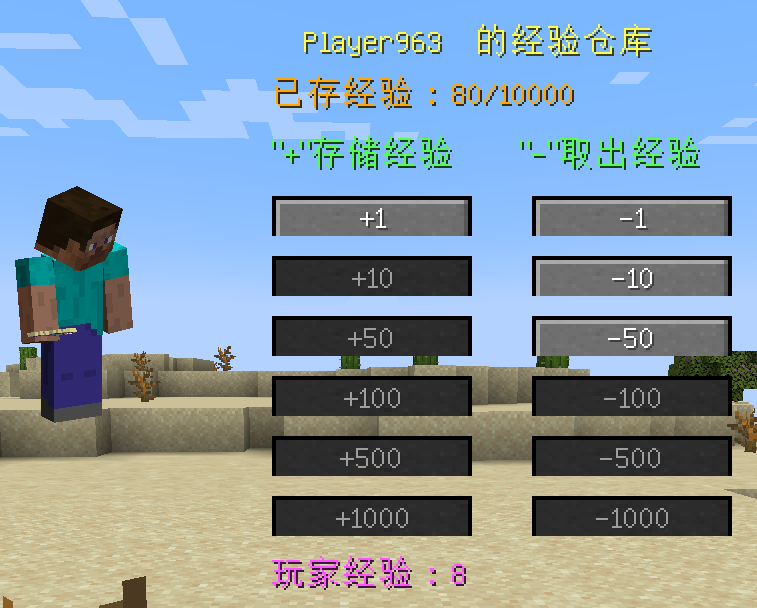
打开背包,点击角色旁边的“体验瓶”按钮,打开储存体验的屏幕。
点击“+”或“-”存储玩家的经验。
即使玩家死亡,仓库中的经验也可以保存。
en_us:
Open the Player Inventory and click the “Experience Bottle” button next to the character to open the screen for storing experiences.
Click “+” or “-” to store the player’s experience.
Experience in the warehouse can be saved even if the player dies.
The Modpack DangerousWorld.
XPDispenser
# XPDispenser
A Minecraft Bukkit plugin to throw your XP at yourself (e.g. to repair your mending tools).

[](https://github.com/Programie/XPDispenser/actions/workflows/build.yml)
[](https://github.com/Programie/XPDispenser/releases/latest)
[](https://modrinth.com/plugin/xpdispenser)
[](https://www.curseforge.com/minecraft/bukkit-plugins/xpdispenser)
## What is it?
XPDispenser allows you to throw XP orbs at yourself by using your currently collected XP points.
The collected XP points can be used to repair tools and armor enchanted with the mending enchantment. In that way, you are able to reuse your already collected XP points to repair your tools and armor.
## Permissions
Currently, there is only one permission available which controls whether a player is allowed to use this plugin: `xpdispenser` (Default: everyone)
## How to use it?
Simply place a sign at any location with the text `[XPDispenser]` at the first line.
Optionally, the second line contains the amount of XP points to be thrown in a single time (defaults to 10, if not given on the sign).
So, if you want to get 50 XP points, you can place a sign with the following content:
* First line: `[XPDispenser]`
* Second line: `50`
After correctly placing the sign, the color of the first line will change to blue.
To use the sign, simply interact with it (i.e. right click on it) while having the tool and/or armor to repair equipped.
### Why use a sign instead of a command?
It’s simple: I just don’t like to execute commands as a normal player, but I like to interact with the environment just like you would do in real life.
In case of this plugin, you could see the sign as some type of machine which will dispense some XP orbs.
## Build
You can build the project in the following 2 steps:
* Check out the repository
* Build the jar file using maven: *mvn clean package*
**Note:** JDK 1.8 and Maven is required to build the project!
## My other plugins
You can find them on [my website](https://selfcoders.com/projects/minecraft-plugins).