*Having problems or concerned about incompatible mods? Check out [this](https://github.com/Eclipse-Studios/backpacks/wiki/%E2%9A%A0%EF%B8%8F-Compatibility).*
#### 🔧 Assistance and tools…
– [Highmore](https://github.com/DefinitelyHighmore)’s library [Sentinel](https://github.com/DefinitelyHighmore/sentinel) for detecting closing containers (may cause visual flickering of items inside backpacks).
– [Mitsaori](https://www.instagram.com/mitsaori/)’s backpacks models.
– [Evtema3](https://github.com/Evtema3)’s [shader](https://discord.com/channels/154777837382008833/157097006500806656/1181814993537220658) to hide the menu’s nametag in third person.
– [AmberWat](https://github.com/AmberWat)’s [Negative Space Font](https://github.com/AmberWat/NegativeSpaceFont) used for hiding the nametags in [Evtema3](https://github.com/Evtema3)’s shader.
#### 🌐 Contributors…
– English (en_us): By [ElGeroIngles](https://modrinth.com/user/ElGeroIngles).
– Spanish (es_es): By [ElGeroIngles](https://modrinth.com/user/ElGeroIngles).
– Brazilian Portuguese (pt_br): By [alexsanderfer](https://github.com/alexsanderfer) and [MeiaQuatru](https://github.com/MeiaQuatru).
– Simplified Chinese (zh_cn): By [calmastorm](https://github.com/calmastorm).
– Russian (ru_ru): By [Akrek](https://github.com/Akrek).
– European Portuguese (pt_pt): By [AlexandreC2000](https://github.com/AlexandreC2000).
You can contribute to this project by translating it to other languages! See how [here](https://github.com/Eclipse-Studios/backpacks/wiki/%F0%9F%8C%90-Supported-Languages).
## 📝 Useful Info
Need any information about the project? Check out it’s new [wiki](https://github.com/Eclipse-Studios/backpacks/wiki)!
Alexia’s Vanilla Plus Recipies
Adds various vanilla plus crafting and blasting recipies.
Helpful additions include:
– Blasting raw copper, iron, and gold blocks.
– Blasting cobblestone, stone, and deepslate.
– De-crafting blue ice, packed ice, amethyst blocks, nether wart blocks, and wool.
– Craftable budding amethyst, green dye and brown dye.
– Returning glass panes and carpet to their full block forms.
And more to discover.
Valhelsia Furniture
Valhelsia Furniture is our take on a furniture mod for Minecraft, adding chairs, stools, tables, curtains and much more! In addition to having full integration with Valhelsia Structures (for 1.19.2), this mod can also be used separately, giving you a wide range of new options to enhance your home.
Join us on our Discord server to get the latest news, changelog and to get support if you have any problems. We also have an extremely active chat channel and an image gallery submitted by members of the community.
Here are some examples of decoration that you can do with our furniture mod. You can find in the images section all the furniture already available and some additional information on specific features of these.
In addition to all the images, you can find below the spotlight video of Jangro on the mod, which will give you some more details.
New furniture will be added as updates are released, as furniture on specific themes like oriental and tiki. New decorations will also be available in the near future, such as a wooden step ladder, plants, rendered books, etc…
Check Out Our Projects:
Utility Belt
[Report Issues](https://github.com/JamCoreModding/utility-belt) • [Chat on Discord](https://discord.jamalam.tech) • [CurseForge](https://curseforge.com/minecraft/mc-mods/utility-belt) • [Modrinth](https://modrinth.com/mod/utility-belt)
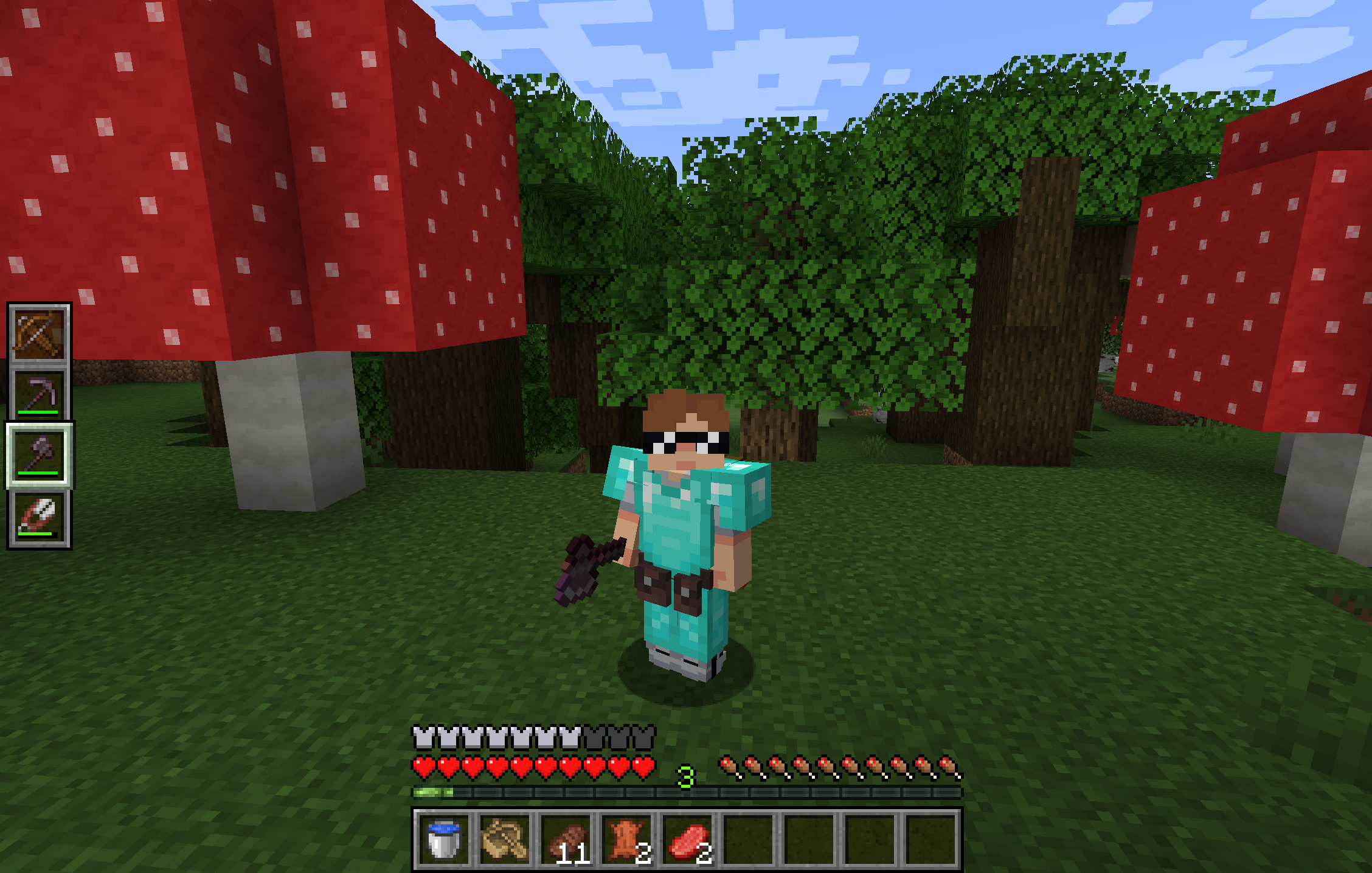
**Utility Belt** will solve your inventory clutter issues. 9 hotbar slots are not enough, especially when playing with mods. Wearing a Utility Belt gives you a second hotbar where only tools and weapons can be stored.
## 🛠️ Getting Started
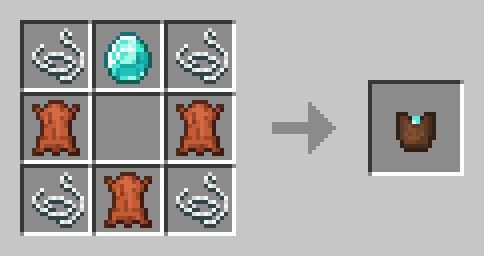
1. **Craft** two belt pouches using the recipe above.
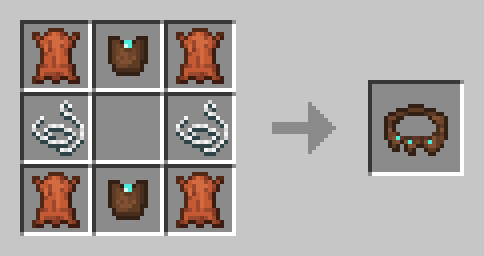
2. **Craft** a Utility Belt using the recipe above.
3. **Equip** it in your belt slot.
4. **Fill** it with your tools and weapons.
## ⬆️ Upgrading the Belt
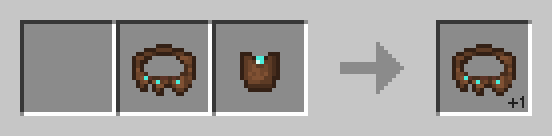
By default, the belt has **4** slots and can be upgraded to have up to **6** slots (_these values can be changed in the mod configuration_). You can add a slot to a belt in a **Smithing Table** using the recipe below.
## 🎮 Controls
| Action | Default Keybind | Description |
|———————-|————————–|——————————————————————|
| **Open Belt Screen** | `’` | Opens the belt GUI to store items in the belt |
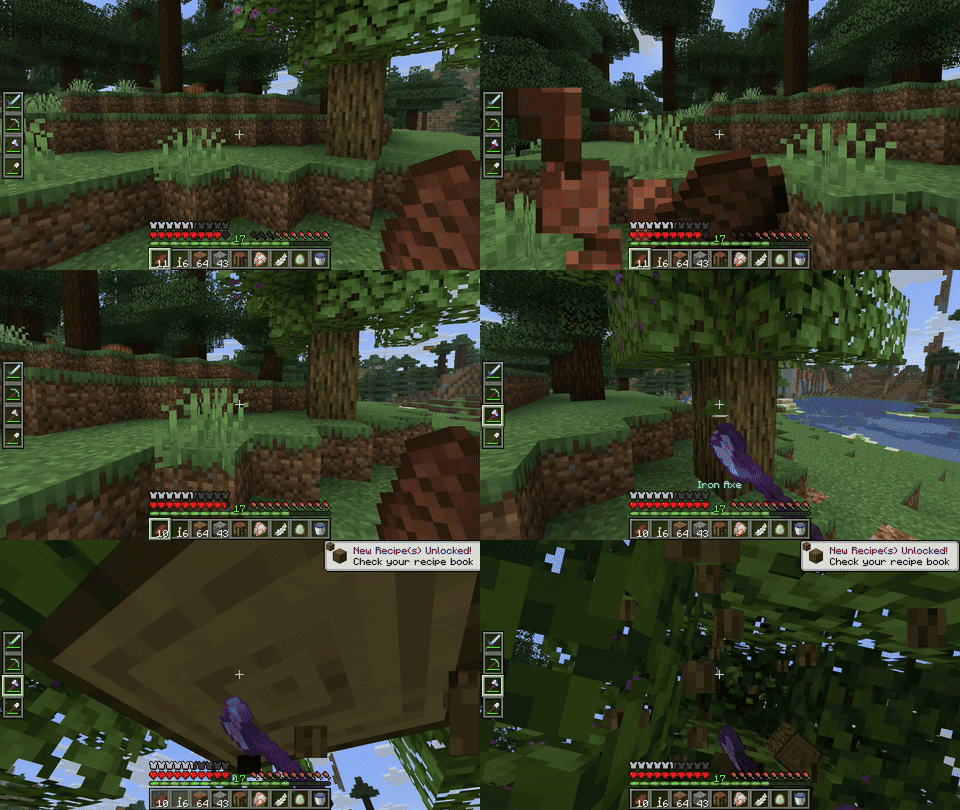
| **Swap Hotbar** | `B` (toggle), `N` (hold) | Switches between your main hotbar and the belt hotbar |
| **Quick Transfer** | `Sneak` + `Swap` | Swap the item in your hand between your main hotbar and the belt |
## ⚙️ Configuration
You can customize Utility Belt’s options using the in-game configuration screen:
– **Fabric**: Accessible using **ModMenu**.
– **Forge/NeoForge**: Accessible using the **Mods** screen.
To change which items are accepted in the belt, you can [**make a datapack**](https://minecraft.wiki/w/Tutorial:Creating_a_data_pack) and add items to the [**allowed_in_utility_belt**](https://docs.jamalam.tech/utility-belt/configuration/) tag.
## 🔗 Compatibility
– **LambDynamicLights**: torches and lanterns in your belt will light up the world around you.
## 🐛 Bugs and Suggestions
You can report any issues and suggest changes on the [GitHub issue tracker](https://github.com/JamCoreModding/utility-belt). Try out the `/utilitybelt fixme` command to see if it resolves the issue while you wait for a fix.
Always keep backups of your world, especially when playing versions marked as beta.
[](https://bisecthosting.com/jamalam)
A bunch of useful vanilla+ kind of blocks and items.
—
## Blocks
### Kiln
The Kiln fixes the arbitrary smelting speed gap by processing the materials vanilla forgot at the same 2x speed as the Blast Furnace and Smoker:
– Clay, Clay Balls, Terracotta
– Stone, Cobblestone
– Sand, Red Sand
—
### Storage Barrels *(not the vanilla kind)*
A storage block that holds up to 4,096 *(configurable)* of a single item type. Sometimes you just need somewhere to dump 3,000 cobblestone without thinking about it. Upgradeable, hopper-compatible, and available in all 12 wood types.
Breaking a barrel preserves its contents and any installed upgrade.
#### Storage Barrel Upgrades
One upgrade at a time. Upgrades can’t be removed if the barrel is holding more items than the lower tier supports — don’t stuff 12,321 items into an Iron-tier barrel and then act surprised when you can’t downgrade to Copper. Upgrading is always unrestricted.
### Harvester Block
Tired of running back and forth harvesting and replanting crops like some kind of medieval peasant? The Harvester Block does it for you. Mostly. It needs fuel to run, and it needs a hoe slotted inside to actually do any harvesting. That hoe still loses durability, too — so if you threw in a wooden hoe and your Harvester mysteriously stopped working, that’s on you. Auto-replants after every harvest, though. Small mercies.
*(Configurable — see Config section)*
—
### Feeding Trough
Animals are hungry. You have food. The Feeding Trough bridges that gap automatically — place it, fill it with anything an animal might reasonably want to eat, and it’ll feed any animal in a 9×3×9 area around it that finds the contents appetising. That covers the usual suspects — crops, seeds, hay, flowers, and a few more exotic options for the less picky animals. If the local animal population exceeds the configured limit, the trough stops working until you do something about the overcrowding. Also, no hopper support. Refill it manually.
*(Configurable — see Config section)*
—
### Chicken Nest Box
Chickens are going to lay eggs whether you like it or not. The Nest Box at least makes sure those eggs end up somewhere useful. Place one down and the Nest Box collects eggs in a 3×3 area in front of it and stores them in its 9-slot inventory. Hoppers can pull eggs out from the bottom of the nest block.
*(Configurable — see Config section)*
—
### Saw Bench
A whole log’s worth of planks, stairs, slabs, fences, doors, and whatever else you need — without the crafting grid busywork. Strips logs too. It’s a saw. It cuts wood. You get it.
—
### Vertical Slabs
Slabs, but vertical. Available in all wood types.
—
### Wooden Beams
A decorative structural beam. Doesn’t connect to anything. Doesn’t do anything clever. Just looks good holding your ceiling up. Available in all wood types.
—
### Filtered Hopper
A hopper with a single filter slot. Only items matching the filter pass through. Everything else gets ignored. That’s the whole thing.
—
### Fast Hopper
Moves 8 items per tick instead of the vanilla 1. Can also be filtered.
—
### Redstone Clock
A redstone clock in a single block. Right-click to increase the pulse interval by 10 ticks, shift-right-click to decrease it. No more spaghetti repeater loops taking up half your base.
Reset it to factory settings (10 ticks) by right-clicking a redstone torch on the clock block.
*(Configurable — see Config section)*
—
### Fan
A redstone-powered fan that pushes items, mobs, and players in the direction it’s facing. Shift-right-click to reverse the flow and pull things toward it instead. Redstone signal strength controls the range. Useful for sorting systems, mob farms, or just annoying your friends.
—
### Charcoal Block
9 charcoal in a crafting grid, one block out. Same burn properties as a coal block.
—
## Items
### Villager Catcher
Long minecart rail systems snaking across your entire world just to move one villager into your trading hall? We’ve all been there. We’ve all hated it. Right-click a villager with the Villager Catcher to imprison the little guy until you’re ready to release them.
**⚠ Fair warning:** Your precious Mending villager will not survive the trip with their trades intact. Upon release, every imprisoned villager resets to an unemployed novice. You have been warned.
### Coal and Charcoal bits
When you need to smelt one thing and don’t want to burn through an entire piece of coal.
—
### Obsidian Boat & Chest Boat
A boat. For lava. Crafted from obsidian. Navigate lava lakes like a reasonable person instead of bridge-pillaring across them.
Don’t try it on water. It sinks. Immediately. It’s obsidian.
—
### Trowel
Building with varied textures means constantly swapping between block types in your hotbar. The Trowel does the swapping for you — right-click to place a random block from your hotbar. Stacks with more items are more likely to be picked, so your materials deplete evenly. Good for breaking up repetitive surfaces without the busywork.
—
### Easy Name Tag Naming/Renaming
Right-clicking a name tag opens a text field where you can type a name directly. No need for an anvil and it doesn’t cost experience.
# UserCrates
This plugin makes every chest a potential crate by someone. Every player can make a crate and put items they want to it, then open their own crates!
## About
How it works? Simply you just look to a crate, write a couple commands, and done! Now anyone with a key can open that crate. Nothing else required!
## Special Notes
### For Server Owners
If you want to enable economy features (such as paying money to a crate), you need to install Vault and an economy plugin that works with Vault to your server. It is not
required though, plugin will automatically disable the economy-specific features when Vault is not correctly setup.
Any chest protected by at least one of the plugins below will be unable to become a crate. If you want another plugin to be here, tell me on my [discord](https://discord.gg/8PPgcmYNf4).
* WorldGuard
* GriefPrevention
All the permissions should be enabled to all users by default. If you wish to make some limitations, you need a permission manager plugin that allows you to disable a
permission.
### For Developers
Unfortunately, there is no API for this plugin. Despite it would be useless at the moment, I can make one if enough requests for it approaches.
## Commands
| Commnad | Descripton | Permission Required |
|————————————|————————————————————————————-|—————————-|
| /crate | Main command. | usercrates.use |
| /crate help | Provides a main help menu for all the other commands | |
| /crate create [amount] [label] | Creates a crate at the chest you are looking at. | usercrates.create |
| /crate delete | Deletes the crate you are looking at. Of course you need to be owner of that crate. | usercrates.delete |
| /crate manage | Provides a simple menu for command suggestions about modifying your crate. | usercrates.manage |
| /crate addaccessor | Adds the given player as an accessor for your crate. | usercrates.accessor.add |
| /crate removeaccessor | Removes the player given from the accessors of your crate. | usercrates.accessor.remove |
| /crate changetype | Changes the type of your crate. | usercrates.changetype |
| /crate setprice | Changes the price of your crate | usercrates.setprice |
| /crate getkey | Gives you an amount of the keys to sell with various ways. | usercrates.getkey |
## Configs
### lang.yml
“`yaml
# Messages of the commands /crate addaccessor and /crate removeaccessor
accessor:
# /crate addaccessor
add:
# When there is no chest at where player is looking.
not-chest: ‘&cYou need to look at the crate that you want to add an accessor.’
# When player is looking to a chest, but it isn’t a crate.
not-crate: ‘&cYou are not looking at a crate.’
# When player tries to do this action for a crate that he does not own.
not-owner: ‘&cThat crate is not yours.’
# When the given name already exists inside accessor list of that crate.
exists: ‘&b%player% &cis already an accessor of this crate.’
# When player successfully adds someone to accessor list
# %player% – Player whose added as an accessor.
success: ‘&aSuccessfully added &b%player% &aas an accessor to this crate!’
# /crate removeaccessor
remove:
# When there is no chest at where player is looking.
not-chest: ‘&cYou need to look at the crate that you want to remove an accessor.’
# When player is looking to a chest, but it isn’t a crate.
not-crate: ‘&cYou are not looking at a crate.’
# When player tries to do this action for a crate that he does not own.
not-owner: ‘&cThat crate is not yours.’
# When the given name does not exist inside accessor list of that crate.
unexists: ‘&b%player% &cis not an accessor of this crate already.’
# When player successfully removes someone from accessor list
# %player% – Player whose removed from accessors
success: ‘&aSuccessfully removed &b%player% &afrom accessors of this crate!’
# /crate changetype
changetype:
# When there is no chest at where player is looking.
not-chest: ‘&cYou need to look at the crate that you want to change type.’
# When player is looking to a chest, but it isn’t a crate.
not-crate: ‘&cYou are not looking at a crate.’
# When player tries to do this action for a crate that he does not own.
not-owner: ‘&cThat crate is not yours.’
# When player wants a pricable type but there is no economy.
no-econ: ‘&cYou can”t make your crate for sale, because this server does not have an economy.’
# When player successfully changes the crate type.
# %type% – New type of the crate. Defined under ‘manage.types’
success: ‘&aSuccessfully changed crate type to &b%type%!’
# /crate create
create:
# When there is no chest at where player is looking.
not-chest: ‘&cYou need look at a chest to make it a crate.’
# When player is looking to a crate
already-crate: ‘&cThere is already a crate there.’
# When player successfully creates a crate.
success: ‘&aSuccessfully created a crate at that block! You can put your items to your crate, set a price and get keys for it, and add accessors to manage the crate.’
# Additional warning to success message. Only appears when there is no economy on the server.
no-econ: ‘&6You won”t be able to make your crate for sale, because this server does not have an economy.’
# /crate delete
delete:
# When there is no chest at where player is looking.
not-chest: ‘&cYou need to look at the crate that you want to delete.’
# When player is looking to a chest, but it isn’t a crate.
not-crate: ‘&cYou are not looking at a crate.’
# When player tries to do this action for a crate that he does not own.
not-owner: ‘&cThat crate is not yours.’
# When player successfully removes the crate.
success: ‘&aSuccessfully removed the crate!’
# /crate getkey
getkey:
# When there is no chest at where player is looking.
not-chest: ‘&cYou need to look at the crate that you want to get a key for.’
# When player is looking to a chest, but it isn’t a crate.
not-crate: ‘&cYou are not looking at a crate.’
# When player tries to do this action for a crate that he does not own.
not-owner: ‘&cThat crate is not yours.’
# When player tries to get a key for a crate that does not support keys.
not-keyable: ‘&cThis crate doesn”t support keys. You have to buy the crate by opening it. If you wanted to make it able for keys, change its type using &b/crate changetype &cfirst.’
# When player successfully gets some keys.
# %amount% – Number amount of the keys player got.
success: ‘&aSuccessfully got &b%amount% &akeys!’
# /crate manage
manage:
# When there is no chest at where player is looking.
not-chest: ‘&cYou need to look at the crate that you want to manage.’
# When player is looking to a chest, but it isn’t a crate.
not-crate: ‘&cYou are not looking at a crate.’
# When player tries to do this action for a crate that he does not own.
not-owner: ‘&cThat crate is not yours.’
# Header of the menu.
# %player% – Player whose owner of this crate.
header: ‘&4–&a%player%”s Crate&4–‘
# Owner text that shows the crate owner.
# %player% – Player whose owner of this crate.
owner: ‘&eOwner: &b%player%’
# Accessors text that shows the accessors.
# %accessors% – A list of the players that is an accessor of this crate.
accessors: ‘&eAccessors: &b%accessors%’
# [ADD] Button that suggests you /crate addaccessor when clicked.
add-accessor: ‘&a&l[ADD]’
# Type text that shows type of the crate.
# %type% – Type of the crate. Defined under ‘manage.types’
type: ‘&eUsing Type: &b%type%’
# Price text that shows price of the crate.
# %price% – Price of the crate.
price: ‘&ePrice: &a%price%’
# [CHANGE] Button that suggests you /crate setprice to change the price when clicked.
change: ‘&a&l[CHANGE]’
# Colorless type names for all the crate types.
types:
# Means that the only way to open the crate is using a key of it.
KEY: ‘Only using Key’
# Means that the only way to open the crate is paying the price of it.
PRICE: ‘Only with price’
# Means that player can open the crate in both key and price ways.
BOTH_PRICE_KEY: ‘Prices & Keys’
# Means that no one but the accessors can open the crate without a price/key. Intended for fun purposed crates.
ONLY_ACCESSORS: ‘Accessor Only’
# Footer of the menu.
footer: ‘&4————————‘
# /crate setprice
setprice:
# When there is no economy on the server, meaning this command is completely useless.
no-econ: ‘&cYou can”t set a price for any crate, because this server does not have an economy.’
# When there is no chest at where player is looking.
not-chest: ‘&cYou need to look at the crate that you want to change the price.’
# When player is looking to a chest, but it isn’t a crate.
not-crate: ‘&cYou are not looking at a crate.’
# When player tries to do this action for a crate that he does not own.
not-owner: ‘&cThat crate is not yours.’
# When the crate player is looking at does not support prices.
not-pricable: ‘&cThis crate can”t have a price. You need to get a key using &b/crate getkey&c. If you wanted to make it for sale, change its type to a buyable type using &b/crate changetype &cfirst.’
# When player successfully changed the crate price.
# %price% – New price of the crate.
success: ‘&aSuccessfully changed crate”s price to &b%price%!’
# /crate help (Also appears when you try to execute an unknown command, such as /crate askdg or /crate setype.)
help:
# Header of the list.
header: ‘&4—–&aHelp Menu&4—–‘
# Command format of the list.
# %cmd% – Usage of the command.
# %desc% – Description of the command.
format: ‘&b%cmd% &6- &e%desc%’
# Footer of the list.
footer: ‘&4——————-‘
# When someone manages to break a crate block without displaying it.
crate-break: ‘&cYou can”t break a crate block. If you tried to remove it, consider &b/crate delete&c.’
# Messages about the moment that someone opens a crate.
open:
# When there is no space at player’s inventory.
no-space: ‘&cYou have no space in your inventory to open this crate.’
# When the crate is in ‘Accessor Only’ mode, but player is not an accessor.
not-accessor: ‘&cThis crate is accessor only, you can”t open it.’
# When player is opening the crate.
ing: ‘&eOpening the crate…’
# When the crate is a type that supports prices but there is no economy in the server.
no-econ: ‘&cYou can”t open this crate right now, because this server probably removed their economy system while this crate was still in &bOnly Price &ctype. Ask the crate”s owner to change the type.’
# Stands for ‘not-enough-balance’. When player couldn’t afford the crate.
# %price% – Amount of the money player needs. Guaranteed that player’s balance is lower than it.
neb: ‘&cYou need &a%price% &cto open this crate.’
# When player isn’t holding a key on his hand but the crate requires one.
no-key: ‘&cYou need to hold a key in your hand for this crate.’
# When player is holding a key that belongs to another crate.
invalid-key: ‘&cYou are not holding the correct key for this crate.’
# When there is nothing inside the crate.
nothing: ‘&cThere is nothing inside this crate.’
# Says how much money did player spent on this crate, if he did.
# %price% – Amount of the money player spent on the crate.
spent: ‘&eSpent &a%price% &eon this crate.’
# Goes to the crate owner when player opens it via price.
# %player% – Player who opened a crate made by whose seeing this message.
# %price% – Amount of the money %player% spent. Player whose seeing this message earned this amount of money.
notification: ‘&b%player% &ebought your crate for &a%price%&e!’
# Says what player got from the crate.
# IMPORTANT: Always put an ‘&f’ before and after ‘%item%’. DO NOT FORGET THIS.
# %item% – Name of the item player got. Shows the entire item tooltip when hovered.
# %count% – Amount of the item.
done: ‘&aYou got &f[&f%item%&f] x%count% &afrom the crate!’
# Lines of the crate hologram.
hologram:
# First line.
# %player% – Player who owns the crate.
1: ‘&e%player%”s Crate’
# Second line.
# %price% – Price of the crate.
2: ‘&ePrice: &a%price%’
# Appears at second line when the crate is in ‘KEY’ mode.
2k: ‘&6Key Required’
# Appears at second line when the crate is in ‘BOTH_KEY_PRICE’ mode.
# %price% – Price of the crate
2kp: ‘&6Use Key &d/ &ePrice: &a%price%’
# Appears at seconds line when the crate is in ‘ACCESSOR_ONLY’ mode.
2a: ‘&6Accessor Only’
# Third line.
3: ‘&7Right-Click to Open’
# Fourth line.
4: ‘&7Left-Click to See Items’
# Crate display menu.
crate_display:
# Title of the menu.
title: ‘Crate Display’
# Change text that appears under every item inside crate display menu.
# %change% – Percentage chance of that item to get while opening the crate.
# %count% – Number that shows how many slots are filled with an item exactly like this one.
# %all% – Amount of the filled slots inside the crate.
chance: ‘&eChance&6: &3%&b%chance% &3(&b%count% in %all%&3)’
# Crate open menu.
crate_opening:
# Title of the menu
# %player% – Player whose owner of the crate that is being opened right now.
title: ‘Opening %player%”s Crate!’
# Display of the crate keys.
key:
# Name of the item.
title: ‘&eCrate Key’
# 3 Lined description of the item.
desc:
# First line. Says that this crate opens %player%’s crate.
# %player% – Player who owns the crate that this key belongs to.
1: ‘&6Opens &e%player%”s Crate&6.’
# Second line. Says how much this keys worth.
# %price% – Price of the crate, price of one key as well.
2: ‘&6Worth &a%price% &6per key from the latest price.’
# Third line. Says how to open the crate using this key.
# %player% – Player who owns the crate that this key belongs to.
3: ‘&6Right-Click to &e%player%”s Crate &6with this key to open it!’
“`
### config.yml
“`yaml
open:
# If enabled, a crate owner will get notified when some of his crates got opened.
notification: true
“`
## Support
If you see any bugs at the plugin, have some ideas for it, or just want to talk with me, consider my [discord](https://discord.gg/8PPgcmYNf4) server! It is (probably the best and) the fastest way to reach me out.
Useful Ribbits
⚠️ Informations :
This mod is a complement, not an addon, to the Ribbits mod by joosh_7889.
It is designed to be fully playable on its own, but it can also extend the experience if used together with the original Ribbits mod.
Join the [Discord](https://discord.gg/WyDbuzMVKZ) server if you want to contact me for suggestions, help, or bug reports.
📜 Description :
Useful Ribbits adds various helpful or decorative Ribbits to your Minecraft world :
Chef Ribbit : Takes meat and fish from a Ribbit Chest and automatically cooks them in a smoker.
⚒️ Crafts :
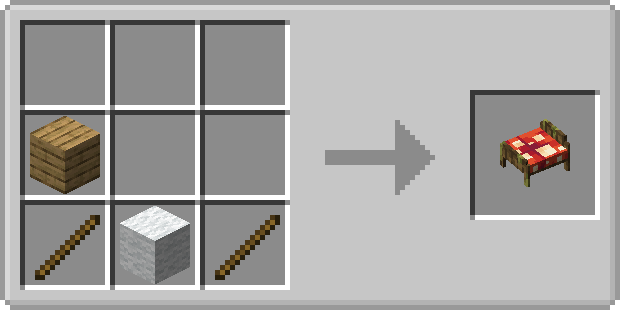
Ribbit Bed :
With the Ribbits mod :
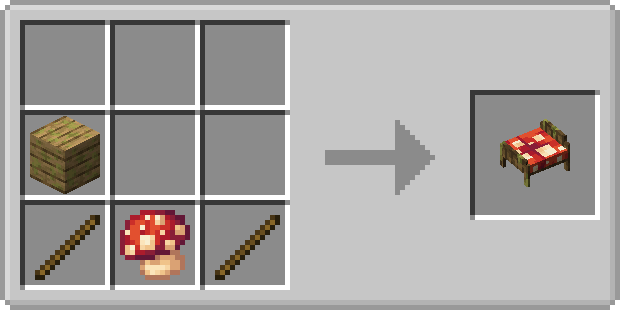
Without the Ribbits mod :
🌍 Languages :
English (en_us) -default
English (en_gb)
French (fr_fr)
📝 Feedback & Bug Reports :
I’d love to hear your feedback!
If you encounter any bugs or issues, please don’t hesitate to report them.
Suggestions and ideas are also very welcome!
how I wish I could find a better place to store all my enchanting books.
# Here! there is a nice thing for you, my bookshelves!

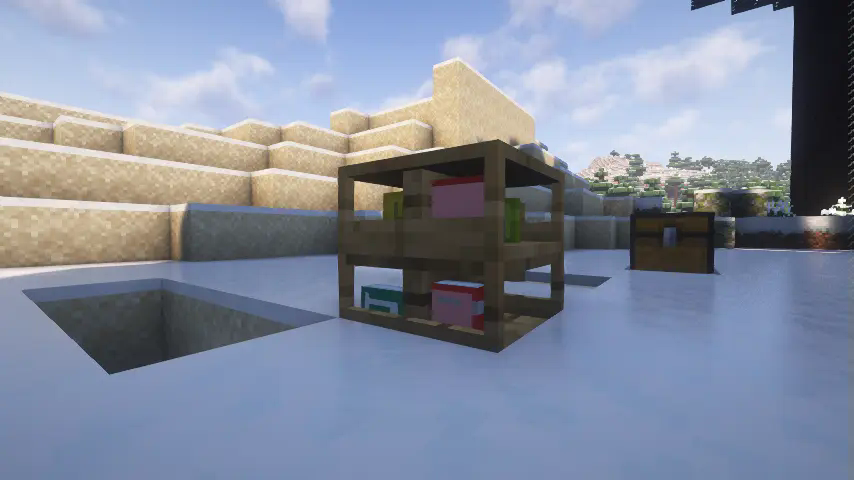
## a special container to store books
the bookshelves can store a little bit more than a normal chest
## each slot with unique 3d model and details
when you put a book in a slot you could notice a book model displayed in the bookshelves
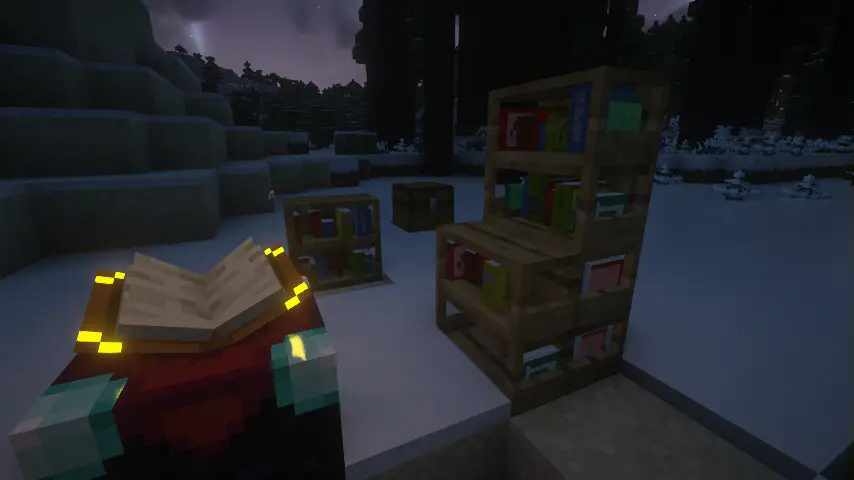
## compatible with enchant table
just like the minecraft:bookshelf, my bookshelves did provide ability of enchanting
## can I store other mod’s book in it?
yes,we have two way to make it
the eaziest,you hold the book you want to store in your main hand and hold “Paper” in your off hand, then “shift + left click” any useful bookshelf. you’ll find you can store the book then.
the harder, manualy write the book’s description id to mod’s common config file, the id looks like “item.minecrafts.tick”,you could press “F3” + “H” in the game and hover your cursor in any items to get the id.
# How to install
first, you download the latest version file. then just put it in your mods folder
# Future
– more bookshelves with different types and materials crafted by different planks even in iron block
– order or disorder book’s model
URLDrop
—
# 📥 URLDrop
### In-game async download manager for Servers
**Download large files directly to your server via URL — without touching the console.**
—
## ✨ What is URLDrop?
URLDrop is an admin-focused plugin that turns your Minecraft server into a download station.
Instead of SSH-ing into your machine to `wget` a backup or a world archive, you open a
chest GUI in-game, paste a URL, choose a destination, and let the server do the rest.
Perfect for:
– 📦 Downloading server backups from remote storage
– 🌍 Pulling world archives or data packs
– 🔌 Staging plugin updates without leaving the game
– 📁 Migrating large files between servers via URL
—
## 🖥️ GUI Overview
Open with `/urldrop` or `/ud`:
| Screen | Description |
|——–|————-|
| **Main Menu** | Hub for all actions |
| **New Download** | 5-step wizard: URL → path → filename → checksum → confirm |
| **Active Downloads** | Live progress bars, speed, ETA, cancel button |
| **Queue** | Reorder, start-now, or remove pending jobs |
| **History** | Re-download or purge completed entries |
| **Settings** | Toggle runtime options without reloading |
—
## ⚡ Features
### Downloads
– ✅ Async downloads on **Java 21 virtual threads** — zero main-thread blocking
– ✅ HTTP streaming directly to disk — no RAM spike for large files
– ✅ **HTTP Range resume** — picks up where it left off if interrupted
– ✅ Configurable **retry with exponential back-off**
– ✅ Automatic **progress tracking** (speed, ETA, % complete)
– ✅ **Auto-unzip** `.zip` archives after download
– ✅ Backup existing files before overwrite (with retention limit)
### Security
– 🔒 Path traversal prevention (`..` blocked before and after normalization)
– 🔒 URL validation — `http`/`https` only, optional domain whitelist/blacklist
– 🔒 Blocked file extensions / content-type filtering
– 🔒 Optional **SHA-256 checksum verification** before file is placed
– 🔒 Downloads stage to a temp file first, then **atomically move** to destination
– 🔒 File size hard cap (default 2 GB)
### Destinations
– 📂 **Any path** the server process can reach (relative or absolute)
– 📂 Works with Pterodactyl (`/home/container/…`)
– 📂 Configurable path **aliases** (e.g. type `backup` → resolves to `backups/`)
### Notifications
– 💬 Clickable in-game Adventure messages with `[Retry]` / `[History]` buttons
– 🔔 Operator join reminders for downloads that finished while you were offline
– 🟣 **Discord webhook** support with rich embeds
### Commands
“`
/ud Open GUI
/ud download Start immediately
/ud queue Add to queue
/ud status [id] Show progress
/ud cancel Cancel
/ud retry Retry failed download
/ud history Recent history in chat
/ud debug Full diagnostics
/ud reload Reload config
“`
| Requirement | Version |
|————-|———|
| Server | Paper 1.21.x |
| Java | 21+ |
No other plugins required. Gson is bundled inside the JAR.
—
Urban Decor
# 

Urban Decor is a decorative mod designed to enchance the building experience of users by adding new decoration blocks. The mod attempts to stand out by having most furniture created from other materials rather than wood and avoids common furniture pieces such as generic tables and chairs.
[](https://www.curseforge.com/minecraft/mc-mods/runiclib)
_Feel free to include this project in modpacks!_

[](https://discord.gg/jmHpajd)
[](https://discord.gg/eJePAPE27T)
[](https://bsky.app/profile/yirmiri.zeus.kitchen)
[](https://twitter.com/Yirmiris)
[](https://www.youtube.com/@Yirmiri)
[](https://www.curseforge.com/members/yirmiri/projects)
[](https://modrinth.com/user/Yirmiri)
[](https://ko-fi.com/yirmiri)
[](https://yirmiri.carrd.co)

– Appliances: Many new decorative blocks to help spice up your builds, most come with variants and light/dark versions and many have interactions!
– Chromite: A new stone type that forms in blobs in deepslate, can create stainless steel; an essential ingredient for many appliances
– Toolbox: A box that can change the variants of appliances into new unique ones or when placed can be used as storage
– Towels: A decorative block that can be placed normally or can be hung from a towel bar

[](https://modrinth.com/mod/excessive-building)
[](https://modrinth.com/mod/delicate-dyes)
[](https://modrinth.com/mod/yapping-tooltips)
[](https://modrinth.com/mod/runiclib)
[](https://modrinth.com/mod/urban-decor)
[](https://modrinth.com/mod/dungeons-delight)

[](https://www.bisecthosting.com/Yirmiri?r=MR+UD)
For exceptional server hosting services, look no further than BisectHosting. **New customers can use code “Yirmiri” to get 25% off their first month**,
and their support team is always available to assist you in any way they can.

**Q:** I have an issue/bug I want to report, where can I do that?
– **A:** You can leave bug reports on the [GitHub page](https://github.com/Yirmiri/Urban-Decor/issues). Please be sure to see to both see if someone else has reported the same issue to avoid duplicates and to use proper tags when possible.
**Q:** I have a suggestion for the project, where can I leave it?
– **A:** You can leave suggestions for the project in [our Discord server](https://discord.gg/jmHpajd) or the [GitHub page](https://github.com/Yirmiri/Urban-Decor/issues), please make sure to follow the guidelines for posts/issues and use proper tags when possible.
**Q:** Will there be a port to **X** version?
– **A:** I do not have any plans to port to any older versions of Minecraft, as for newer versions of the game I will probably be sticking to the biggest modding version at a given time since that will be the version I will be playing the game on.