VaultCrates
# VaultCrates
**A feature-rich, fully animated crate plugin for Paper 1.21.x**
No NMS · No legacy libraries · No external hologram plugin required
—
## ✨ Features
– **12 unique animations** — particles, sounds and visual effects for every style
– **Physical & Virtual Keys** — NBT-tagged items with anti-dupe UUID tracking
– **Pity system** — guaranteed drop after N opens per rarity
– **Reward limits** — global and per-player caps per reward
– **Key shop** — players buy keys with in-game money via `/vc shop`
– **Pouches** — right-clickable reward bags with random number ranges
– **Holograms** — floating Text Display entities, no external plugin needed
– **Placement ID system** — each placed crate gets a unique ID (`/vc remove `)
– **In-game GUI editor** — edit crates without touching YAML files
– **Reward preview** — paginated GUI with normalised drop percentages
– **Best Prizes** — guaranteed bonus reward from a separate pool
– **Bundled items** — give multiple items alongside the main reward
– **Selectable rewards** — players pick their prize from N options
– **Milestones** — bonus rewards after X total crate opens
– **Reward footer** — auto-appended lore showing reward type and rarity
– **NPC support** — Citizens, ZNPCs, ZNPCsPlus, FancyNpcs, or any entity
– **Multi-language** — English, German, French, Spanish built-in + custom locale support
– **Multi-database** — JSON (default), SQLite or MySQL
– **Developer API** — events, programmatic crate opening, key management
—
## 📋 Requirements
– **Paper** (or forks) 1.21 – 1.21.4+
– **Java 21+**
### Optional soft-dependencies
All are fully optional and loaded via reflection:
– **Vault** + economy plugin — key shop & economy commands
– **PlaceholderAPI** — placeholders in messages & holograms
– **ItemsAdder / Oraxen / Nexo** — custom block & item models
– **ExecutableItems / MMOItems** — custom items as rewards
– **Citizens / ZNPCs / ZNPCsPlus / FancyNpcs** — NPC-to-crate linking
—
## 🚀 Quick Start
1. Drop the JAR into `plugins/`
2. Restart the server
3. `/vc getcrate ExampleRound` — get a crate block
4. Place it in the world
5. `/vc key give ExampleRound 1` — give yourself a key
6. Right-click the crate!
—
## 🎬 Animations
| Name | Style |
|—|—|
| `ROUND` | Slot machine — cycles and locks on the winner |
| `ROUND2` | Mystery boxes — BARRIER boxes orbit with lightning reveal |
| `QUICK` | Slot machine — fast version (~3 s) |
| `COSMIC` | Double counter-rotating orbital rings |
| `DISPLAY` | Single item cycles and lands on the winner |
| `PYRAMID` | Three-tiered rotating pyramid |
| `CONTRABAND` | Items float up and vanish one-by-one |
| `INSTANT` | Particle burst, reward given instantly |
| `AIR_STRIKE` | Items fall from height with lightning |
| `BREAKOUT` | Items burst outward and arc back |
| `METEOR_SHOWER` | Items rain down with flame trails |
| `YIN_YANG` | Two rings converge in a yin-yang pattern |
—
## 🌐 Languages
| Code | Language |
|—|—|
| `en` | English (default) |
| `de` | German / Deutsch |
| `fr` | French / Français |
| `es` | Spanish / Español |
Drop a `messages_.yml` in the plugin folder and set `Language: ` to add any language. Regional locale codes (`en_us`, `pt_br`, etc.) are supported with automatic fallback.
---
## 🗄️ Storage
| Type | Notes |
|---|---|
| `JSON` | Default, zero setup |
| `SQLITE` | File-based SQL, bundled driver |
| `MYSQL` | Full MySQL/MariaDB, auto table creation |
---
## ⚙️ Crate config example
```yaml
Animation: ROUND
Block: ENDER_CHEST
Size: 1
HologramLines:
- "&6&lMy Crate"
- "&7Right-click to open"
KeyCrate:
Require: true
Material: TRIPWIRE_HOOK
Name: "&6&lMy Key"
MatchNBT: true
Prizes:
diamond:
Name: "&b&lDiamond"
Rarity: epic # common | rare | epic | legendary | jackpot | mega_jackpot
Chance: 10.0
Material: DIAMOND
GiveItem: true
```
---
## 📊 PlaceholderAPI
| Placeholder | Returns |
|---|---|
| `%vaultcrates_keys_%` | Virtual key count |
| `%vaultcrates_opens_%` | Total opens by player |
| `%vaultcrates_pity__%` | Pity counter |
| `%vaultcrates_is_animating%` | `true` / `false` |
Custom events: `CrateOpenEvent` (cancellable), `CrateOpenedEvent`, `CrateKeyUseEvent`
Vault Manager
# Vault Manager
Simple vault manager for Trial Chambers in Minecraft
—
* 
MultiVersion 1.21–1.21.10: Single JAR for all versions
* Purely client side: works in Singleplayer, in Multiplayer and doesn’t have to be installed on Servers
—
Vault Manager remembers which vaults you have already opened and tells you either:
> Already opened
Or:
> Not yet opened
Especially useful with Freecam when searching for previously unlooted Trial Chambers.
# Features
* Open a vault with a matching key to remember it
* Remember a vault which you have already opened before installing the mod: shift+click
* Forget all remembered vaults from the current world: /vault-manager clear
* Query the nearest opened vault: /vault-manager near; works in the Overworld and in the Nether
# Memory
The memory file works just like a config file, slowly being filled by the mod while you loot away.
The file is located at MINECRAFT/config/vault-manager.json, you can manually edit it
between game restarts, use some program to visualize your adventures or copy the file to another installation
if you want to continue playing on the same server.
# About Me
I am a computer science student in Germany and have a part-time job at a tech company.
Apart from that, I enjoy my free time by spending it with friends, chatting online or gaming.
If you want to keep this project alive, found it helpful or just want to support and motivate me to go on,
you could consider making a small [☕ donation](https://www.paypal.com/donate?hosted_button_id=DVC2UQP2AXR68).
Vault Hunters Compressium
Adds compression support for Vault Hunters Vault Stone and Vault Cobblestone blocks to Compressium.
## Supported Blocks
– **Vault Cobblestone** (9 compression levels: 9 → 387,420,489 blocks)
– **Vault Stone** (9 compression levels: 9 → 387,420,489 blocks)
## Requirements
**Required:**
– Minecraft 1.18.2
– Forge
– Compressium (any version)
– The Vault Hunters Modpack Version 3
**Optional:**
– Inventory Profiles Next (for automatic chest sorting with defined rules)
## Installation
**1. Config Entries**
Open your `config/compressiumblocks.json` file and add the following to the existing array:
“`
[
…
{
“name”: “vault_cobblestone”,
“nestedDepth”: 9,
“isBlockOf”: false,
“baseResourceLocation”: “the_vault:vault_cobblestone”,
“particlePath”: “the_vault:block/vault_cobblestone”,
“baseBlockModel”: “the_vault:block/vault_cobblestone”,
“type”: “block”
},
{
“name”: “vault_stone”,
“nestedDepth”: 9,
“isBlockOf”: false,
“baseResourceLocation”: “the_vault:vault_stone”,
“particlePath”: “the_vault:block/vault_stone”,
“baseBlockModel”: “the_vault:block/vault_stone”,
“type”: “block”
}
]
“`
> **Important:** Merge the entries, don’t replace the entire file!
**2. CraftTweaker Scripts**
Extract the `crafttweaker_compressium_scripts.zip` to the `scripts/` folder so that the following files are available with the other crafttweaker scripts:
– `compressium_vault_cobblestone.zs`
– `compressium_vault_stone.zs`
**5. Datapack**
Copy the `vault-compression-datapack.zip` folder to your world’s `datapacks/` folder:
– Location: `saves/[YourWorldName]/datapacks/`
– For servers: `[ServerFolder]/[WorldName]/datapacks/`
**4. Resourcepack**
Copy the `Vault-Compression.zip` resourcepack to your instances’ `resourcepack/` folder and enable it in-game (Options > Video Options > Resource Packs).
## Usage
**Compress:** Place 9 blocks in a 3×3 crafting grid to compress one level
**Decompress:** Place 1 compressed block in crafting grid to get 9 of the previous level
**Compression Levels:**
– 1x: 9 blocks
– 2x: 81 blocks
– 3x: 729 blocks
– 4x: 6,561 blocks
– 5x: 59,049 blocks
– 6x: 531,441 blocks
– 7x: 4,782,969 blocks
– 8x: 43,046,721 blocks
– 9x: 387,420,489 blocks
## Troubleshooting
**Blocks don’t appear in JEI/Creative:**
– Make sure you added the config entries to compressiumblocks.json
– Restart the game after adding config entries
**Can’t craft compressed blocks:**
– Ensure CraftTweaker scripts are in the scripts folder
– Check CraftTweaker logs for errors
**Blocks have missing textures:**
– Make sure the resourcepack is enabled
– Check that resourcepack files are in the correct location
**Blocks don’t drop when mined:**
– Ensure the datapack is installed in your world’s datapacks folder
– Use `/datapack list` to verify it’s loaded
## Credits
Created for the Vault Hunters modpack community.
## License
This addon is provided as-is for use with the Vault Hunters modpack and Compressium mod.
Vault 2.0 economy plugins





What is Vault2.0?
Vault2.0 is an economy plugin that registers a Bukkit Economy service compatible with the Vault API, allowing other plugins (shops, ranks, etc.) to use money without depending on the original Vault.jar. It includes menus, pay/charge flows, loans, and safe configuration and message reloads
## ━━━━━━━━━━IMPORTANT━━━━━━━━━━
– Do NOT run this plugin alongside the original Vault.jar (same plugin name). Remove Vault.jar before starting
## ━━━━━━━━━━Features━━━━━━━━━━
– Internal economy with persistence (file storage; optional MySQL).
– /pay with GUI and per-player submenu (pay, charge, view balance, loans).
– Loans with GUI wizard (amounts via chat only).
– Defaulted effects configurable (slowness/fatigue, etc.) when a loan defaults.
– /vault main menu (Pay / Loan / Settings / Reload / Update).
– Safe reload: /vault reload updates config.yml and messages_*.yml without overwriting your values.
– Multi-language: en, es, fr, de, nl, pt, ru, zh_TW, hi.
## ━━━━━━━━━━ Installation ━━━━━━━━━━
Copy the .jar file to the plugins folder on your server. Start the server to generate the configuration.
– MySQL compatibility: compatibility with MySQL, allowing users to integrate and manage databases more efficiently.
## ━━━━━━━interactive menu━━━━━━━━
### 📃Submenu:
1:💲pay send money to a player
2:💲balance shows the player’s money
3:💲Charge sends an interactive message to the player with the designated amount (clicking on the message automatically sends the money without using commands).
## ━━━━━━━━Loan System━━━━━━━━
The loan system helps manage the game’s finances. Players can apply for loans, manage payments, and view their financial status.
### Request a Loan
To request a loan, open the menu with `/loan` or `/prestamo` and select **Request**. Specify the amount and, if there are installments, also the amount of each one.
### Money Delivery
Upon confirmation, the money is instantly deposited, and the loan is recorded as “active.”
### Automatic Collection
The system attempts to collect installments automatically. If there’s enough balance, it deducts from the balance.
### View Status
In the menu, the **Status** option shows the outstanding balance and the next payment date.
### Pay Manually
You can use the **Pay** option to pay part or all of the loan at any time.
### debt
If there’s not enough balance to collect, the loan goes into debt. This can cause negative effects until the debt is settled.
This system simplifies financial management in the game, offering control and dynamism.
Spoiler


“`
📜 Commands List:
| /vault -> open main menu
| /vault reload -> reload config + messages and add missing sections
| /vault update -> check updates
| /pay -> open player list GUI
| /loan | /prestamo -> open loan GUI
| /balance -> show your balance
| /eco give/take -> admin (OP)
“`
“`
🔐 Permissions:
| vault.balance (default: true) -> /balance
| vault.pay (default: true) -> /pay + GUI
| vault.loan (default: true) -> /loan /prestamo + loans
| vault.eco (default: op) -> /eco give / take
“`
VarnoShop
🛒 VarnoShop Web Marketplace
The ultimate, zero-dependency, embedded web dashboard for Minecraft economies.
[](#)
[](#)
[](#)
*© 2026 Developed exclusively by **Varnox**. All rights reserved.*
—
🇸🇦 Arabic (العربية)
## عن الإضافة (VarnoShop)
مرحباً بك في **VarnoShop**، المتجر الإلكتروني الأقوى والأحدث لسيرفرات ماين كرافت! هذه الإضافة ليست مجرد متجر عادي؛ إنها نظام كامل مدمج داخله **سيرفر ويب داخلي وتصميم SPA حديث**، مما يعني أنك لست بحاجة لشراء استضافة مواقع أو تثبيت Node.js. فقط ضع البلوجن وسيعمل موقعك فوراً!
### ✨ المميزات الخرافية
* **(Drop & Play):** صفر إعدادات خارجية! سيرفر ويب داخلي فائق السرعة مدمج داخل الإضافة.
* **دعم NBT كامل:** المتجر يقرأ جميع بيانات الأدوات (التطويرات، القصة Lore، المتانة Durability).
* **نظام حماية قوي:** لا يمكن الدخول إلا عن طريق كود سري من داخل السيرفر لمنع السرقة والاختراق.
* **صندوق الاستلام (Mailbox):** الأدوات المشتراة تذهب مباشرة إلى صندوق استلام اللاعب في اللعبة بسلامة تامة.
* **لوحة تحكم للإدارة:** للتحكم المباشر في المتجر وحظر اللاعبين المخالفين وحذف العروض من الموقع مباشرة.
### 📚 الأوامر والصلاحيات (Commands & Permissions)
| الأمر (Command) | الصلاحية (Permission) | الوصف (Description) |
| :— | :— | :— |
| `/loginweb` | تلقائي | يعطيك الكود السري للدخول إلى المتجر الإلكتروني. |
| `/market` | تلقائي | يفتح واجهة المتجر (GUI) داخل اللعبة لتصفح المبيعات والشراء مباشرة من السيرفر. |
| `/market help` | تلقائي | يعرض لك قائمة المساعدة وجميع أوامر البلوجن بشكل مرتب. |
| `/market sell <سعر>` | `varnoshop.sell` | لبيع الأداة التي تمسكها بيدك في المتجر الإلكتروني. |
| `/market claim` | تلقائي | يفتح صندوق البريد لاستلام الأدوات التي اشتريتها من الموقع. |
| `/market admin lock` | `varnoshop.admin` | إغلاق السوق بالكامل بصلاحية الإدارة. |
| `/market admin unlock` | `varnoshop.admin` | إعادة فتح السوق بصلاحية الإدارة. |
### ⚙️ المتطلبات الأساسية
يجب تركيب الإضافات التالية لكي تعمل الإضافة:
1. [Vault](https://www.spigotmc.org/resources/vault.34315/) – المعالج الأساسي لاقتصاد السيرفر.
2. [PlaceholderAPI](https://www.spigotmc.org/resources/placeholderapi.6245/) – لاستخدام المتغيرات (اختياري).
3. [NBT API](https://www.spigotmc.org/resources/nbt-api.7939/) – لمعالجة وتخزين بيانات الأدوات بالكامل.
### 🚀 طريقة التشغيل
1. قم بوضع ملف `VarnoShop.jar` في مجلد `plugins`.
2. قم بتشغيل السيرفر ودع البلوجن ينشئ الملفات.
3. ادخل لملف `config.yml` وغير الـ `web.port` إلى أي منفذ مفتوح من استضافتك (مثال `8080`).
4. **ملاحظة:** يتم تغيير اسم الموقع الظاهر في الأعلى تلقائياً بناءً على الـ `prefix` الخاص بك في `config.yml`.
5. ادخل السيرفر واكتب `/loginweb` لتحصل على الكود والرابط السري الخاص بك لتدخل المتجر!
—
🇺🇸 English
## About VarnoShop
Welcome to **VarnoShop**, the ultimate online marketplace for Minecraft! This plugin is not just a standard shop; it features a **fully embedded internal web server and a modern SPA design**, meaning zero external web hosting or Node.js required. Drop the plugin, and your web shop is instantly live!
### ✨ Amazing Features
* **Drop & Play:** Zero external setup! Lightning-fast embedded web server.
* **Full NBT Support:** Displays enchantments, lore, durability, and custom item data effortlessly.
* **Secure Login:** Access to the web panel requires a securely generated in-game code.
* **In-Game Mailbox:** Purchased items securely wait in a digital mailbox (`/market claim`).
* **Admin Dashboard:** Total control directly from your browser to manage listings and ban rule-breakers.
### 📚 Commands & Permissions
| Command | Permission | Description |
| :— | :— | :— |
| `/loginweb` | Default | Generates your secret login code for the web dashboard. |
| `/market` | Default | Opens the in-game marketplace GUI to browse and buy items directly from the server. |
| `/market help` | Default | Displays the help menu with all available commands. |
| `/market sell ` | `varnoshop.sell` | Put the item in your main hand up for sale on the web. |
| `/market claim` | Default | Open your mailbox to claim items you bought online. |
| `/market admin lock` | `varnoshop.admin` | Lock the marketplace. |
| `/market admin unlock` | `varnoshop.admin` | Unlock the marketplace. |
### 🚀 How to Setup
1. Place `VarnoShop.jar` into your `plugins` directory.
2. Start the server.
3. Open `config.yml` and set the `web.port` to an open port (e.g. `8080`).
4. Join the server, type `/loginweb`, and use the link and code to start trading!
—
🇫🇷 Français
## À propos de VarnoShop
Une marketplace en ligne complète avec un serveur web embarqué directement dans votre serveur Minecraft !
### 📚 Commandes (Commands)
* `/loginweb` : Obtenez votre code secret pour le site.
* `/market` : Ouvre la boutique dans le jeu (GUI).
* `/market help` : Affiche le menu d’aide.
* `/market sell ` : Vendre l’objet que vous tenez.
* `/market claim` : Ouvrir votre boîte de réception.
—
🇪🇸 Español
## Acerca de VarnoShop
¡Un mercado en línea completo con un servidor web interno incorporado directamente en tu servidor de Minecraft!
### 📚 Comandos (Commands)
* `/loginweb` : Obtén tu código de acceso al sitio web.
* `/market` : Abre el mercado dentro del juego (GUI).
* `/market help` : Muestra el menú de ayuda.
* `/market sell ` : Vende el artículo que tienes en la mano.
* `/market claim` : Abre tu buzón de compras.
—
Thank you forchoosing VarnoShop! Developed with passion.
—

Variant-Decoration

Welcome to Variant Decoration or Varan-Deco for Short
This Focuses on the building aspect of Minecraft and adds new modded blocks and variants for old blocks.
A main part of my mod is new Stairs, Slabs and Walls for new blocks and old blocks like Obsidian, Packed Mud & Wooden Barks and for most of the new modded blocks they will normally have all of them except if they are made of wood or metal.
The next thing is that there are five new types of wood. Those types are Cactus, Mushroom, Wooden, Iron Cap (1.20.1+) & Driftwood (1.21.5+). new variants for wooden blocks that didn’t have them before. Those blocks are the Crafting Table, Cartography Table, Smiting Table, Ladder, Bookshelf (1.20.1), Barrel and Finally the Note Block. Now there are some other wooden blocks I also would like to mention, those being Mosaic Planks which are now able to be made out of any wood type and those can also be made into signs and hanging signs alongside planks and stripped wood.
Another big focus of the mod is the new types of flowers, some being part of a family of flowers that are already in Minecraft and others are brand new flowers based on flowers that are found in the real world.
The Final thing I would like to share about the well that there is plenty of new color blocks in the mod those blocks are the Coloured Lamps, Dye Blocks, Hardened and Mosaic Glass (1.20.1+) and also some new stairs, slabs & wall for the Concrete and Terracotta Blocks.
This is a playlist of all showcases I’ve Done on my Mod
[The Playlist of Most of the New Blocks](https://www.youtube.com/playlist?list=PLm3LwO_kmBaBvXlLUGU-seka7OhSjVWD9)
The out of Date Showcase Video
Variant Barrels

“Variant Barrels” is a Minecraft mod that brings a delightful variety of barrels, each meticulously designed to match the aesthetics of different wood types available in the game.
With this mod, you can elevate your storage solutions while adding a touch of personalisation to your Minecraft world.
Explore a wide range of wooden barrels, including Acacia, Bamboo, Birch, Cherry, Crimson, Dark Oak, Jungle, Mangrove, Oak, and Warped variations.
Now, you can seamlessly integrate these unique wood-themed storage containers into your Minecraft world, offering both visual charm and practical storage.
These barrels not only look fantastic but also provide excellent storage capabilities, allowing you to neatly organise your resources and items.
Whether you’re a builder seeking to harmonise your storage solutions with your architectural designs or a player looking to add more depth to your gameplay, “Variant Barrels” offers the perfect enhancement for your Minecraft experience.
Dive into the world of customization and functionality with “Variant Barrels” and enjoy the beauty and utility of these newly added wood variants.
Upgrade your storage today and make your Minecraft world uniquely yours with “Variant Barrels.”

Each variant barrel can be used in any existing vanilla recipe that requires a barrel.
Each variant barrel can also be crafted back to the original barrel style (spruce).


VanishV
## VanishV
### ✨ Features
– Vanish mode (on / off)
– Fly enabled while vanished
– Hidden from other players and TAB list
– Silent join & quit while vanished
– Vanish state saved between restarts
– PlaceholderAPI support (soft-depend, no hard dependency)
### 🧩 Commands
– `/vanish on`
– `/vanish off`
– `/vanish status`
– `/vanish reload`
### 🔐 Permissions
– `vanish.use`
– `vanish.see`
– `vanish.reload`
### ⚙️ Technical
– Java 17
– Paper / Spigot / Folia compatible
– Supports Minecraft 1.19 – 1.21.x
– MIT License
### 📦 Notes
– Placeholder: `%vanishv_status%`
– PlaceholderAPI is optional (auto-detected)
Vanillabean
—

###
Vanillabean adds 100+ features to Minecraft in a well-made, vanilla-friendly style!
Everything Vanillabean offers is well programmed, well thought out and well balanced.
—
**Vanillabean is vanilla-friendly.** It was created following the idea:
“Anything Vanillabean adds could feasibly be added to regular Minecraft.”
**Vanillabean Adds:**
– Many new items and blocks, each with unique uses and functionality
– Unique hostile mobs
– So many new food items, all with fun uses!
– Mysterious structures to add variety to your world
– Tweaks to make underloved Minecraft features much cooler!
– So, so much more!
There’s something for everyone here – whether you’re into exploring, building, combat, or really niche things such as archaeology or fishing.
Check out the [wiki](https://sites.google.com/view/vanillabean-wiki/)!
—
### 🚨⚠️ DOWNLOAD THE RESOURCE PACK! Click on the version of Vanillabean you’re downloading under the “Versions” tab, and get the resource pack file, too. It will not work properly, otherwise! (unless you’re installing the mod version – in that case, you’re fine).
—
I Have a Question!
🌲 If you have any questions, come ask on the [Discord](https://discord.com/invite/m3eYgS8vXv)! There’s a QnA channel for commonly asked questions, and a support channel to ask other questions in.
📁 If your question is about what other data packs / mods / plugins Vanillabean is compatible with, check out the [Compatibility](https://sites.google.com/view/vanillabean-wiki/compatibility) page on the wiki.
Vanilla Backport X Incubation Compat
## ⚠️ Note:
**Keep in mind that the namespace has changed, it’s possible you may lose the egg crates if you use an older version of this mod (the alpha version).**
## **Requires Vanilla Backport and Incubation**

This mod adds compatibility between [Vanilla Backport](https://modrinth.com/mod/vanillabackport) and [Incubation](https://modrinth.com/mod/incubation).
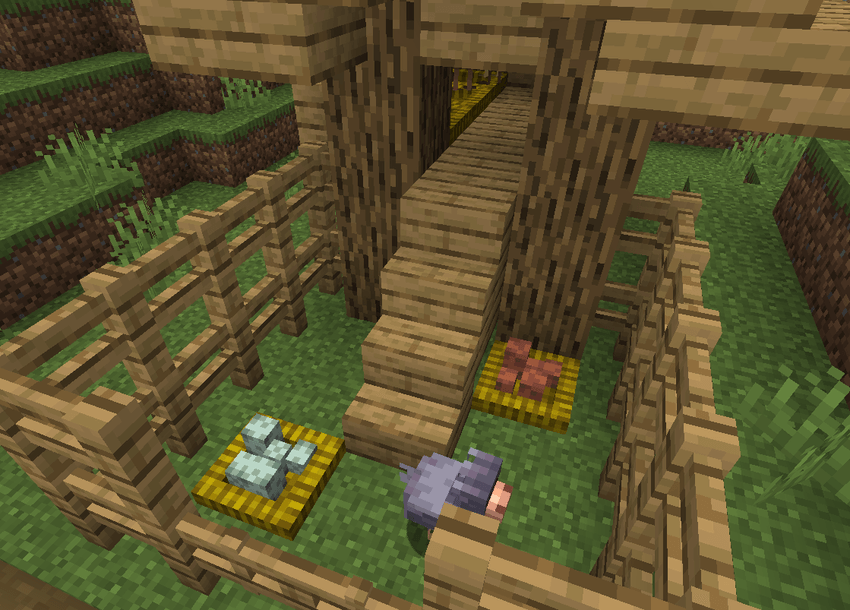
The cold and warm chickens now lay their respective eggs in nests, just like Incubation does with regular eggs. Twig nests with blue and brown eggs can also generate naturally throughout the world.
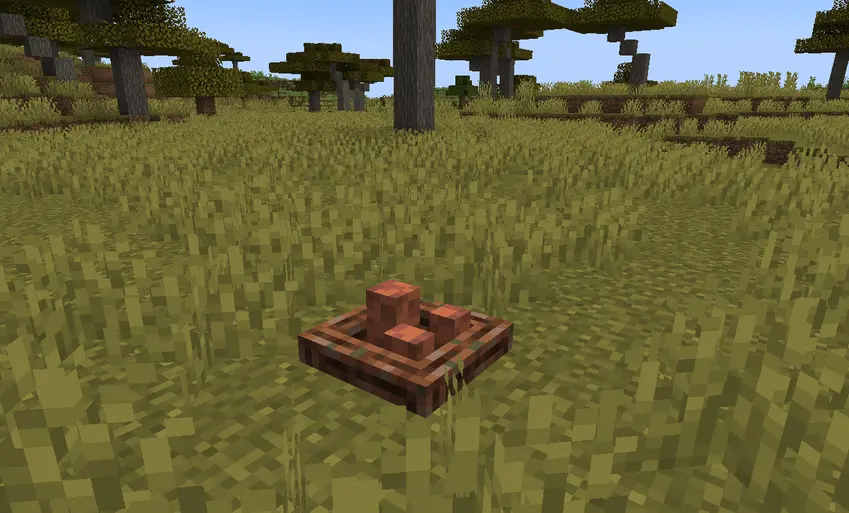

New blue and brown egg crates, they have the same function as the egg crates from Incubation. You can craft them by placing 9 eggs, and reverse the recipe to get the eggs back.