zSupportExtender
## 🚀 zSupportExtender
**zSupportExtender** is a lightweight compatibility layer designed for Paper servers, enabling plugins to run smoothly across multiple Minecraft versions without requiring updates or modifications.
—
### 🛒 Buy Here
**zSupportExtender+++** https://discord.gg/4xZB53Bwd4
—
### ✨ What it does
zSupportExtender helps bridge differences between Minecraft versions by providing a stable runtime environment for plugins. It reduces version-related issues and improves compatibility from **Paper 1.19 up to 26.1.2**.
—
### ⚙️ Features
* Cross-version compatibility support (1.19 → 1.21.1)
* No external dependencies required
* Lightweight and optimized for performance
* Safe fallback handling for API differences
* Clean startup with no warnings or unnecessary logs
—
### 📦 Supported Platforms
* ✔ Paper 1.19
* ✔ Paper 1.20 / 1.20.x
* ✔ Paper 1.21 / 1.21.1
* ✔ Paper 26.1.2
—
### 🛠 Use Case
This plugin is ideal for server owners who want to:
* Run older plugins on newer versions
* Maintain compatibility without constant updates
* Reduce breakage caused by API changes
—
### ⚠️ Important Notes
* This plugin does not modify other plugins directly
* Compatibility depends on how plugins are built ( some may still break (well it?) )
* Designed to improve compatibility, not guarantee it in all cases
—
### 📄 Installation
1. Download the latest version
2. Place the `.jar` file into your `/plugins` folder
3. Restart your server
—
### 👨💻 Developer Info
* Built using stable Paper APIs
* Designed with forward compatibility in mind
* No configuration required (plug & play)
—
**zSupportExtender** focuses on simplicity, performance, and practical compatibility for modern Paper servers.
Zslow







# ZSlow
ZSlow is a versatile plugin designed to manage chat activity on your Minecraft server. With ZSlow, server administrators can easily control chat by enabling features such as chat pausing, slow mode, and chat logging. Whether you’re looking to maintain a more organized chat environment or implement stricter chat regulations, ZSlow provides the tools you need to manage chat activity effectively.

– **Chat Pausing:** Temporarily pause chat activity to prevent messages from being sent.
– **Slow Mode:** Limit the frequency of messages in the chat to reduce spam and maintain order.
– **Chat Logging:** Log chat messages to keep track of conversations and monitor player activity.
– **Whitelist and Blacklist:** Control who can send messages by adding players to either the whitelist or blacklist.
– **Customizable Settings:** Adjust plugin settings to suit your server’s needs and preferences.

– **/zslow enable**: Activate the chat management system.
– **/zslow disable**: Deactivate the chat management system.
– **/zslow settings**: Configure plugin settings, including chat cooldown.
– **/zslow info**: Obtain information about the plugin.
– **/zslow whitelist**:
– `/zslow whitelist add `: Add a player to the whitelist.
– `/zslow whitelist remove `: Remove a player from the whitelist.
– `/zslow whitelist list`: Display all whitelisted players.
– **/zslow blacklist**:
– `/zslow blacklist add `: Add a player to the blacklist.
– `/zslow blacklist remove `: Remove a player from the blacklist.
– `/zslow blacklist list`: Display all blacklisted players.
– **/zslow pausechat**:
– `/zslow pausechat on`: Pause the chat.
– `/zslow pausechat off`: Unpause the chat.
– **/zslow help**: Access plugin help information.
– **/zslow status**: Check the status of the chat management system.
– **/zslow reload**: Reload plugin configurations.
– **/zslow chatlogs**:
– `/zslow chatlogs on`: Enable chat logging.
– `/zslow chatlogs off`: Disable chat logging.

– `zslow.admin`: Allows access to all ZSlow commands and features.
– `zslow.whitelist`: Allows access to manage players on the whitelist.
– `zslow.blacklist`: Allows access to manage players on the blacklist.
– `zslow.info`: Allows access to view plugin information.
– `zslow.pausechat`: Allows access to pause or resume chat activity.
– `zslow.help`: Allows access to view plugin help information.
– `zslow.status`: Allows access to view the current status of chat management features.
– `zslow.reload`: Allows access to reload plugin configurations.
– `zslow.chatlogs`: Allows access to enable or disable chat logging.
– `zslow.bypass.slowmode`: Allows bypassing the slowmode restrictions in ZSlow.
– `zslow.bypass.pausechat`: Allows bypassing the pausechat restrictions in ZSlow.
– `zslow.chatlogs.exempt`: Allows bypassing the pausechat restrictions in ZSlow.
## Support
For support or assistance with the ZSlow plugin, please visit our [GitHub repository](https://github.com/zuhaz/zslow) or contact us through the SpigotMC forums or join our [Discord Server](https://discord.gg/7mhdvfgybX).
## Installation
1. Download the latest version of ZSlow from the [releases page](https://github.com/zuhaz/zslow/releases) or [SpigotMC](https://www.spigotmc.org/resources/zslow.115755/) or [Modrinth](https://modrinth.com/plugin/zslow/).
2. Place the downloaded `.jar` file in your server’s `plugins` folder.
3. Restart or reload your server.
## License
ZSlow is licensed under the MIT License. See the [LICENSE](LICENSE) file for details.
ZoneRental
# ZoneRental – Complete WorldGuard Region Rental System
**A comprehensive Minecraft plugin for managing rental regions with clickable signs, multi-world support, and complete lifecycle automation.**



## What is ZoneRental?
ZoneRental is a feature-rich rental management plugin that allows players to rent WorldGuard regions through clickable signs. The plugin handles the complete rental lifecycle including automatic expiration, block restoration, item storage, and economy integration.
Perfect for servers with player shops, market stalls, or any rentable spaces where you need automatic management and restoration.
## Why Download This?
– **Zero Manual Management** – Everything is automated from rental to expiration
– **WorldEdit Restoration** – Regions automatically restore to original state
– **Item Safety** – All items from containers are saved and retrievable
– **Multi-World Support** – Works across overworld, nether, end, and custom worlds
– **Flexible Configuration** – Per-region pricing, durations, and settings
– **Economy Integration** – Full Vault support with any economy plugin
– **Member System** – Allow friends to access your rented regions
– **Extension System** – Players can extend rentals with configurable limits
– **Complete Refund Tracking** – Full transaction history for all refunds
– **EzChestShop Integration** – Automatic shop removal on expiration
## Essential Information Before Downloading
### Requirements
**Required Dependencies:**
– Vault (economy API)
– WorldGuard 7.0.14+ (region management)
– WorldEdit 7.3.16+ (block restoration)
– Any economy plugin (EssentialsX, CMI, etc.)
**Optional Dependencies:**
– LuckPerms (advanced permissions)
– EzChestShop (automatic shop removal)
### Compatibility
– **Server Software:** Paper, Spigot, or any Paper-based fork
– **Minecraft Version:** 1.21+
– **Java Version:** Java 21 required (OpenJDK recommended)
### Installation Steps
1. Install required dependencies (Vault, WorldGuard, WorldEdit, Economy plugin)
2. Download ZoneRental JAR file
3. Place in `plugins/` folder
4. Restart server (configuration files will be auto-generated)
5. Configure `config.yml` to your preferences
6. Create WorldGuard regions: `/rg define `
7. Place signs and create rental signs: `/zrcreatesign `
## Core Features
### Rental Management
– **Clickable Signs** – Right-click to rent, shift-click to extend
– **Multi-World Support** – Same region names work independently across worlds
– **Automatic Expiration** – Regions automatically expire and restore
– **Extension System** – Players can extend rentals up to configured limits
– **Member Management** – Add/remove members to share rented regions
– **Teleportation** – Players can teleport to their rented regions
### Economy & Pricing
– **Vault Integration** – Works with any economy plugin
– **Per-Region Pricing** – Set custom prices for specific regions
– **Extension Pricing** – Configurable extension costs
– **Permission-Based Discounts** – VIP pricing through permissions
– **Full Refund System** – Admin resets provide 100% refunds
– **Extension Refunds** – Optional refunds when duration is reset
### Block Restoration
– **WorldEdit Integration** – Captures and restores block states
– **Entity Restoration** – Optionally restore entities (mobs, armor stands)
– **Biome Restoration** – Optionally restore biome data
– **Auto-Cleanup** – Configurable automatic schematic deletion
– **World-Aware** – Restoration happens in the correct world
### Item Storage
– **Container Scanning** – Automatically saves items from all containers
– **Player Retrieval** – `/zrretrieve` command to get stored items
– **Notification System** – Players notified when items are stored
– **Auto-Cleanup** – Items removed after retrieval
### Admin Tools
– **Command-Based Config** – All per-region settings via `/zroverride` commands
– **Region Groups** – Group regions for mass configuration changes
– **Duration Management** – Add, remove, set, or reset rental time
– **Auto-Verification** – Startup verification of region configurations
– **Refund History** – Complete transaction tracking per rental
– **Sign Protection** – Signs and support blocks are protected from breaking
### Integration Features
– **EzChestShop** – Automatic chest shop removal on expiration
– **WorldGuard** – Automatic member management
– **LuckPerms** – Full permission system integration
– **Notification System** – Configurable expiration warnings
## User Commands
– `/zr help` – Show help menu
– `/zrinfo ` – View rental information
– `/zrlist [player]` – List active rentals
– `/zrextend ` – Extend a rental
– `/zrretrieve` – Get stored items from expired rentals
– `/zrmember add/remove ` – Manage members
– `/zrmembers ` – List members of rented region
– `/zrtp ` – Teleport to rented region
## Admin Commands
– `/zrcreatesign ` – Create rental sign
– `/zrreload` – Reload configuration
– `/zrreset ` – Reset rental with full refund
– `/zrduration [time]` – Modify duration
– `/zroverride ` – Per-region settings
– `/zrgroup ` – Manage region groups
– `/zrremove ` – Remove rental setup completely
– `/zrrefundhistory ` – View refund transaction history
– `/zrverify` – Verify region configurations
## Permissions
**User Permissions (default: true):**
– `ZoneRental.rent` – Rent regions
– `ZoneRental.extend` – Extend rentals
– `ZoneRental.retrieve` – Retrieve stored items
– `ZoneRental.info` – View rental info
– `ZoneRental.list` – List your rentals
– `ZoneRental.member` – Manage members
– `ZoneRental.members` – View members
– `ZoneRental.tp` – Teleport to rentals
**Admin Permissions (default: op):**
– `ZoneRental.admin.*` – All admin permissions
– `ZoneRental.admin.reload` – Reload plugin
– `ZoneRental.admin.createsign` – Create rental signs
– `ZoneRental.admin.reset` – Reset rentals
– `ZoneRental.admin.duration` – Modify durations
– `ZoneRental.admin.override` – Per-region settings
– `ZoneRental.admin.remove` – Remove rental setup
– `ZoneRental.admin.refundhistory` – View refund history
– `ZoneRental.admin.verify` – Verify configurations
– `ZoneRental.admin.bypass` – Bypass restrictions
– `ZoneRental.admin.breaksign` – Break rental signs
– `ZoneRental.admin.list.others` – List others’ rentals
– `ZoneRental.admin.group` – Manage region groups
## Configuration Files
The plugin creates six configuration files:
1. **config.yml** – Main configuration (economy, durations, messages)
2. **regions.yml** – Per-region overrides (managed via commands)
3. **groups.yml** – Region group definitions
4. **signs.yml** – Sign locations and support blocks
5. **storage.yml** – Item storage from expired rentals
6. **rentals.yml** – Active rental data (runtime)
Plus a `schematics/` folder for WorldEdit region snapshots.
## Quick Start Guide
1. **Install dependencies** (Vault, WorldGuard, WorldEdit, Economy plugin)
2. **Restart server** to generate configs
3. **Configure settings** in `config.yml`
4. **Create a WorldGuard region:** `/rg define shop1`
5. **Place a sign** where you want players to interact
6. **Create rental sign:** `/zrcreatesign shop1`
7. **Optionally customize:** `/zroverride price shop1 500.0`
8. **Done!** Players can now right-click the sign to rent
## Support & Documentation
– **Full Documentation:** See repository README.md
– **Build Instructions:** See BUILDING.md
– **Version History:** See CHANGELOG.md
## Source Code & License
– **Repository:** https://github.com/Warstorm548/ZoneRental
– **License:** AGPL-3.0 (open source)
## Development Note
– this plugin was Developed utilizing claude code, ai-assisted Development
– The plugin is tested manually in a test server environment to ensure minimal bugs and reduce issues that may be persent in the code.
zLink
zLink is your custom link plugin. It works by connecting to a database and giving the user a code, that code the user can input into your project to link their account. Right now you can fetch the users uuid, luckperms rank, display name, world, game mode and when they first joined.
**Please Note: This plugin is still in beta, there will be bugs and it will not be perfect.**
If you would like to get releases before it comes here please visit: [Our Official Website](https://link.zavrobot.tech/)
ZInvisItemFrames
# ZInvisItemFrames
Allow players to craft and place invisible item frames. Folia-compatible invisible item frame plugin.
## Features
– Craft invisible item frames
– Customizable crafting recipe. (Can choose ANY ITEM for the recipe)
– Empty invisible frames can have a glowing outline (configurable)
– MiniMessage support for all text formatting
## Compatibility
– Paper 1.20.1 -> 1.21.4
– Folia-compatible
– Java 17+
## Dependencies
– [MCKotlin](https://modrinth.com/plugin/mckotlin)
## Crafting Recipe
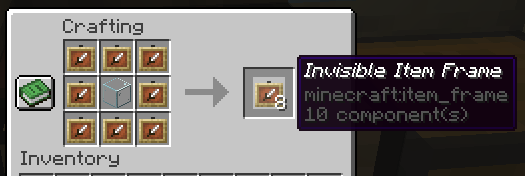
The default crafting recipe is 8 item_frame (or glow_item_frame) in a circle with one custom item in the middle.
You can change the middle-item with `/ziif item`.
You can also configure how many invisible item frames are crafted from the recipe.
## Commands
– `/ziif help` – Show help information
– `/ziif item` – Set the recipe item to the item in your hand
– `/ziif reload` – Reload the configuration
– `/ziif give [–glow]` – Give invisible item frames to a player
## Permissions
– `zinvisitemframes.craft.item_frame` – Allow crafting invisible item frames
– `zinvisitemframes.craft.glow_item_frame` – Allow crafting invisible glow item frames
– `zinvisitemframes.place.item_frame` – Allow placing invisible item frames
– `zinvisitemframes.place.glow_item_frame` – Allow placing invisible glow item frames
– `zinvisitemframes.admin` – Access to all plugin commands
## Installation
1. Download the latest version of ZInvisItemFrames from [Modrinth](https://modrinth.com/plugin/zInvisItemFrames/versions).
2. Download the appropriate version of MCKotlin from [Modrinth](https://modrinth.com/plugin/mckotlin)
3. Place the downloaded `.jar` files into your server’s `plugins/` folder.
4. Restart your server.
5. Configure the plugin to your liking by editing the `.yml` files in the `plugins/ZInvisItemFrames/` folder.
## Configuration
“`yaml
recipe:
item: [] # Set with `/ziif item` command
quantity: 8 # How many frames are crafted per recipe
check-permission: # Whether to check permissions for crafting/placing invis frames
craft: false
place: false
empty-frame:
glow: true # Whether empty frames should glow
visible: true # Whether empty invis frames should be visible
name:
invisible_item_frame: “Invisible Item Frame”
invisible_glow_item_frame: “Invisible Glow Item Frame”
“`
Zero Inventory Problems – ZIP Backpacks
# Zero Inventory Problems – ZIP Backpacks
Zero Inventory Problems is a plugin for Spigot based Minecraft Servers that adds backpacks to store there overfully inventorys.
### Features
* Plug & Play
* Highly configurable config
* Support for Spigot based servers 1.19.* (only tested on spigot)
### Requirements
– Java 17 or higher
– Spigot and (probably) any other fork of Spigot (1.19.* or higher)
### Installation
2. Download [Zero Inventory Problems](https://www.curseforge.com/minecraft/bukkit-plugins/zero-inventory-problems/files)
3. Put both in your *plugins* directory
4. Start your server and [configure](https://github.com/Imprex-Development/zero-inventory-problems/wiki/Config) Zero Inventory Problems to your liking
Still having trouble getting Zero Inventory Problems to run check out our [common issues](https://github.com/Imprex-Development/zero-inventory-problems/wiki/Common-Issues).
ZealousChat
# ZealousChat
*A modern, MiniMessage-powered chat formatter for Paper & Spigot servers*
Technical introduction
ZealousChat replaces Vanilla chat with a fully configurable system built on the Paper’s high performance **AsyncChatEvent** and **MiniMessage** components. It ships with rank/world specific formats, private messaging, inventory placeholders and a granular permission model – all while remaining light-weight and production ready.
—
## Features
– **MiniMessage everywhere** – gradients, hex colours, hover/click events
– **Rank, world & permission based formats** with priority system
– **Private messaging** (`/msg`, `/reply`) with social-spy & cooldowns
– **Cross-server private messaging** (optional, **MySQL required**) for networks running multiple servers
– **Chat / Message toggles** per-player or server-wide (with staff bypass)
– **Inventory placeholders** `[inv]`, `[ender]`, `[armor]`, `[hand]`, `[pos]`, `[health]`
– **URL auto-linking** & **@mentions** (configurable)
– **Advanced swear filter** with regex and fuzzy matching, with a tiered punishment system.
– **Database-backed infraction tracking** with caching for performance
– **PlaceholderAPI bridge** (optional soft-depend)
– **Hot-reloadable** plugin configurations (`/zchat reload`)
– **Customizable Messages** for all messages used within the plugin.
ZealousChat is a high performance, 1.20.4+ chat formatting plugin that uses configurable MiniMessage-based chat formats to format chat messages. ZealousChat includes many extra features other plugins leave out, like the ability to send a read-only view of your inventory/hand/armor/enderchest in chat, formatted /msg and /reply commands, click/hover messages on messages, @mentions and more.
ZealousChat also has special features for server networks, such as cross-server private messaging, and cross server chat channels (for staffchat and similar).
ZealousChat implements all of its features using the Paper API, and is designed to be as efficient as possible.
[Showcase Images](https://modrinth.com/plugin/zealouschat/gallery)
## Commands
### Plugin Core
– `/zealouschat` (`/chatplugin`, `/zchat`) — Base command for ZealousChat
– Permission: `zchat.admin`
– This command is not an actual command, but rather the base for all sub-commands.
### Configuration Commands
– `/zealouschat reload` — Reload plugin configurations
– Permission: `zchat.admin.reload`
– `/zealouschat info` — Display current plugin settings and enabled features
– Permission: `zchat.admin.info`
– `/zealouschat test ` — Preview chat formatting
– Permission: `zchat.admin.test`
– Parameters:
– ``: Text to format and display
### Format Management
– `/zealouschat format set default ` — Set default chat format
– Permission: `zchat.admin.format`
– Parameters:
– ``: MiniMessage format string
– `/zealouschat format set group ` — Define group-specific format
– Permission: `zchat.admin.format`
– Parameters:
– ``: Permission group name
– ``: MiniMessage format string
– `/zealouschat format set world ` — Define world-specific format
– Permission: `zchat.admin.format`
– Parameters:
– ``: World name
– ``: MiniMessage format string
– `/zealouschat format list` — List all current chat formats
– Permission: `zchat.admin.format`
### Feature Toggles
– `/zealouschat toggle colors` — Enable/disable color codes in chat
– Permission: `zchat.admin.toggle`
– `/zealouschat toggle formatting` — Enable/disable text formatting
– Permission: `zchat.admin.toggle`
– `/zealouschat toggle mentions` — Enable/disable player @mentions
– Permission: `zchat.admin.toggle`
– `/zealouschat toggle cooldown` — Enable/disable chat cooldown
– Permission: `zchat.admin.toggle`
### Private Messaging
– `/msg ` — Send a private message (aliases: `/message`, `/tell`, `/whisper`, `/w`)
– Permission: `zchat.message`
– Parameters:
– ``: Recipient player name
– ``: Message text
– `/reply ` — Reply to the last private message sender (aliases: `/r`, `/respond`)
– Permission: `zchat.message`
– Parameters:
– ``: Reply text
#### Cross-server private messages
When you enable cross-server messaging in storage.conf (requires a MySQL or Redis database), ZealousChat can deliver private messages across multiple Paper servers on the same network.
– `/msg` will attempt cross-server delivery when the target is online on another server
– `/reply` also supports cross-server targets
– Recipients that have private messages toggled off will not receive cross-server messages
### Chat & Social Spy Toggles
– `/zealouschat toggle chat` — Toggle your public chat on/off
– Permission: `zchat.toggle.chat`
– `/zealouschat toggle messages` — Toggle your private messages on/off
– Permission: `zchat.toggle.messages`
– `/zealouschat toggle socialspy` — Enable/disable social spy for private messages
– Permission: `zchat.socialspy`
– `/zealouschat alerts` — Toggle alerts on/off
– Permission: `zchat.alerts.toggle`
– `/zealouschat toggle status` — View your current chat & private message status
– Permission: `zchat.status`
### Channel Commands
– `/channel list` — List all available channels
– Permission: `zchat.channel.use.list`
– `/channel join ` — Join a channel
– Permission: `zchat.channel.use.join`
– Parameters:
– ``: Channel name
– `/channel leave ` — Leave a channel
– Permission: `zchat.channel.use.leave`
– Parameters:
– ``: Channel name
– `/channel focus ` — Set a channel as the active channel (where your messages go by default)
– Permission: `zchat.channel.use.focus`
– Parameters:
– ``: Channel name
– `/channel who ` — List members in a channel
– Permission: `zchat.channel.use.who`
– Parameters:
– ``: Channel name
## Swear Filter System
The swear filter provides advanced profanity detection with configurable punishment tiers, database persistence, and bypass permissions for trusted staff.
*This system is currently experimental. There will be (mostly small) issues here. Please report any bugs you find.*
### Filter Types
**Regex Matching**
– Uses regular expressions for precise pattern matching
– Case-insensitive by default (e.g., `(?i)badword`)
– Supports complex patterns and word boundaries
– Automatically caches compiled patterns for performance
**Levenshtein Distance Matching**
– Fuzzy matching based on character distance between words
– Configurable distance threshold (default: 2-3 characters)
– Detects misspellings and variations of filtered words
– Splits messages into individual words for comparison
### Punishment System
– **Infraction Tracking**: Each filter group tracks infractions independently
– **Tiered Punishments**: Map infraction counts to command lists
– **Command Placeholders**: Use `{player}` for the offending player’s name
– **Console Execution**: All punishment commands run as console
– **Database Persistence**: Infraction counts persist across server restarts
### Performance Features
– **Caching**: Online player infractions cached in memory for instant access
– **Async Processing**: Infraction handling runs asynchronously to prevent chat delays
– **Database Optimization**: Efficient queries with proper indexing
– **Regex Caching**: Compiled patterns cached to avoid recompilation
### Administrator Controls
– `/zealouschat admin clear ` — Clear various chat-related data
– Permission: `zchat.admin.clear`
– Parameters:
– ``: One of: `toggles` (resets all chat toggles), `socialspy` (resets all social spy states), `cooldowns` (clears message cooldowns), `blocks` (clears all block lists), `alerts` (clears all alert states), or `all` (clears all data)
– `/zealouschat admin gtoggle ` — Toggle global chat features (aliases: `/gtoggle`, `/chatplugin admin gtoggle`, `/zealouschat admin gtoggle`, `/zchat admin gtoggle`)
– Permission: `zchat.admin.gtoggle`
– Parameters:
– ``: One of: `chat`, `privatemessages`, `both`, `all`
– `/zealouschat admin toggle chat ` — Force toggle public chat for a player
– Permission: `zchat.admin.toggle.chat`
– Parameters:
– ``: Target player name
– ``: Enable or disable chat
– `/zealouschat admin toggle messages ` — Force toggle private messages for a player
– Permission: `zchat.admin.toggle.messages`
– Parameters:
– ``: Target player name
– ``: Enable or disable private messages
– `/zealouschat admin toggle all ` — Force toggle both chat & private messages
– Permission: `zchat.admin.toggle.all`
– Parameters:
– ``: Target player name
– ``: Enable or disable both
– `/zealouschat admin socialspy ` — Force toggle social spy for a player
– Permission: `zchat.admin.socialspy`
– Parameters:
– ``: Target player name
– ``: Enable or disable social spy
– `/zealouschat admin stats` — Display server-wide chat and private message toggle statistics
– Permission: `zchat.admin.stats`
– `/zealouschat admin alerts ` — Force toggle alerts for a player
– Permission: `zchat.admin.alerts`
– Parameters:
– ``: Target player name
– ``: Enable or disable alerts
– `/zealouschat admin block ` — Force a player to block another player
– Permission: `zchat.admin.block`
– Parameters:
– ``: Player who will do the blocking
– ``: Player to be blocked
– `/zealouschat admin unblock ` — Force a player to unblock another player
– Permission: `zchat.admin.block`
– Parameters:
– ``: Player who will do the unblocking
– ``: Player to be unblocked
– `/zealouschat admin clearblocks ` — Clear all blocks for a player
– Permission: `zchat.admin.block`
– Parameters:
– ``: Player whose block list will be cleared
## Quick Start
1. Drop the built jar into `plugins/` and restart.
2. Edit `plugins/ZealousChat/config.conf` – changes can be reloaded with `/zealouschat reload`.
3. (Optional) Configure database settings in `plugins/ZealousChat/database.conf` and messages in `plugins/ZealousChat/messages.conf`.
4. Grant players a format permission such as `zchat.format.vip` or allow colours with `zchat.color`.
5. Send `[inv]`, `[hand]`, `[ender]`, `[health]` and `[pos]` in chat messages to display inventory information.
## Placeholders
All Chat, PM and config strings support MiniMessage plus any PlaceholderAPI tags when the plugin is present.
## Supported Versions / Dependencies
– PaperMC / Spigot **1.20+** (may work on older versions, untested)
– Java 17+
– (Optional) PlaceholderAPI for external placeholders
## Permissions
Click to view permission nodes
| Node | Default | Description |
|————————————-|———|————————————-|
| `zchat.*` | op | Grant everything |
| `zchat.admin` | op | Access root/admin commands |
| `zchat.admin.reload` | op | Reload configuration |
| `zchat.admin.info` | op | View plugin info |
| `zchat.admin.test` | op | Test formatting |
| `zchat.admin.format` | op | Manage chat formats |
| `zchat.admin.toggle` | op | Toggle plugin features |
| `zchat.admin.block` | op | Manage player block lists |
| `zchat.color` | true | Use colour codes in chat |
| `zchat.formatting` | true | Use text formatting codes |
| `zchat.url` | true | Send clickable URLs |
| `zchat.mention` | true | Use @mentions |
| `zchat.bypass.cooldown` | op | Bypass chat/message cooldowns |
| `zchat.bypass.swearfilter` | op | Bypass swear filter restrictions |
| `zchat.format.admin` | op | Use **Admin** chat format |
| `zchat.format.moderator` | false | Use **Moderator** chat format |
| `zchat.format.vip` | false | Use **VIP** chat format |
| `zchat.message` | true | Send & receive private messages |
| `zchat.channel.use.list` | true | Use the `/channel list` command |
| `zchat.channel.use.join` | true | Use the `/channel join` command |
| `zchat.channel.use.leave` | true | Use the `/channel leave` command |
| `zchat.channel.use.focus` | true | Use the `/channel focus` command |
| `zchat.channel.use.who` | true | Use the `/channel who` command |
| `zchat.toggle` | true | Parent of chat/message toggle perms |
| `zchat.toggle.chat` | true | Toggle public chat |
| `zchat.toggle.messages` | true | Toggle private messages |
| `zchat.status` | true | View own chat status |
| `zchat.alerts.toggle` | true | Toggle alerts on/off |
| `zchat.socialspy` | op | Monitor private messages |
| `zchat.commandspy` | op | Monitor player commands |
| `zchat.bypass.chattoggle` | op | Chat even when disabled |
| `zchat.bypass.messagetoggle` | op | PM even when disabled |
| `zchat.bypass.globalchat` | op | Bypass global chat toggle |
| `zchat.bypass.globalmessages` | op | Bypass global message toggle |
| `zchat.viewinventory` | true | View shared inventories |
| `zchat.inventory.placeholders` | true | Use inventory placeholders |
| `zchat.admin.toggle.chat` | op | Force toggle chat for a player |
| `zchat.admin.toggle.messages` | op | Force toggle messages for a player |
| `zchat.admin.toggle.all` | op | Force toggle both chat & messages |
| `zchat.admin.gtoggle` | op | Toggle global chat features |
| `zchat.admin.socialspy` | op | Force toggle social spy for player |
| `zchat.admin.stats` | op | View server-wide statistics |
| `zchat.admin.alerts` | op | Force toggle alerts for a player |
| `zchat.admin.clear` | op | Clear various chat-related data |
—
### Need help?
• Discord: [Join Discord](https://discord.gg/A6NG8DaAb7)
ZCommandCooldown
# ZCommandCooldown
A lightweight Minecraft plugin that adds customizable, permission-based cooldowns to any command on your server.
[](https://papermc.io/)
[](https://github.com/PaperMC/Folia)
[](https://www.minecraft.net/)
## Features
– **Permission-Based Cooldowns**: Set different cooldown durations based on player permissions
– **Command Aliases**: Define aliases for commands that share the same cooldown
– **Customizable Messages**: Fully customizable messages with MiniMessage format support
– **Action Bar Support**: Display cooldown messages in the action bar instead of chat
– **Admin Commands**: Reload configuration, clear cooldowns, and more
– **Persistent Cooldowns**: Cooldowns persist across server restarts
– **Folia Compatible**: Works with both Paper and Folia servers
## Dependencies
– [MCKotlin](https://modrinth.com/plugin/mckotlin)
## Installation
1. Download the latest release from [Modrinth](https://modrinth.com/plugin/zcommandcooldown/versions)
2. Download the appropriate version of MCKotlin from [Modrinth](https://modrinth.com/plugin/mckotlin)
3. Place the JAR file in your server’s `plugins` folder
4. Restart your server
5. Edit the configuration files in the `plugins/ZCommandCooldown/` directory to customize the plugin
## Configuration (`cooldowns.yml`)
“`yaml
cooldowns:
repair: # Command that a cooldown will be applied to.
aliases: # Other aliases for the command. All share the same cooldown.
– fix
– erepair
durations: # Set durations of cooldown according to permission. If player has multiple of these perms, the lowest duration is used.
default: 600 # 600 seconds for players by default
group.group1: 120 # 2 minutes for players with group.group1 permission
group.group2: 60 # 1 minute for players with group.group2 permission
custom.repair.fast: 30 # 30 secods for players with the custom.repair.fast permission
“`
yyz’s backpack
# Inventory Expansion – yyz’s Backpack Mod
**Directly Integrated Backpacks**
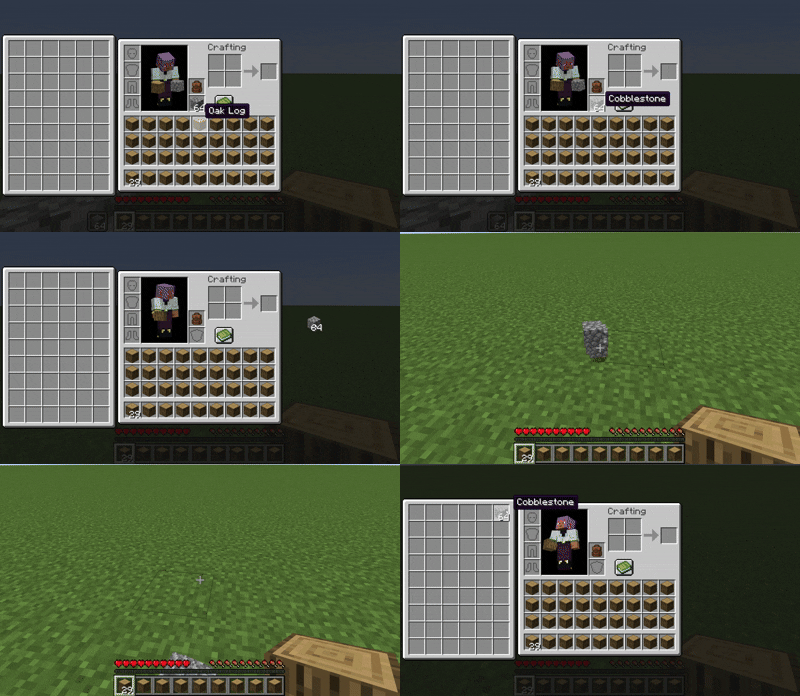
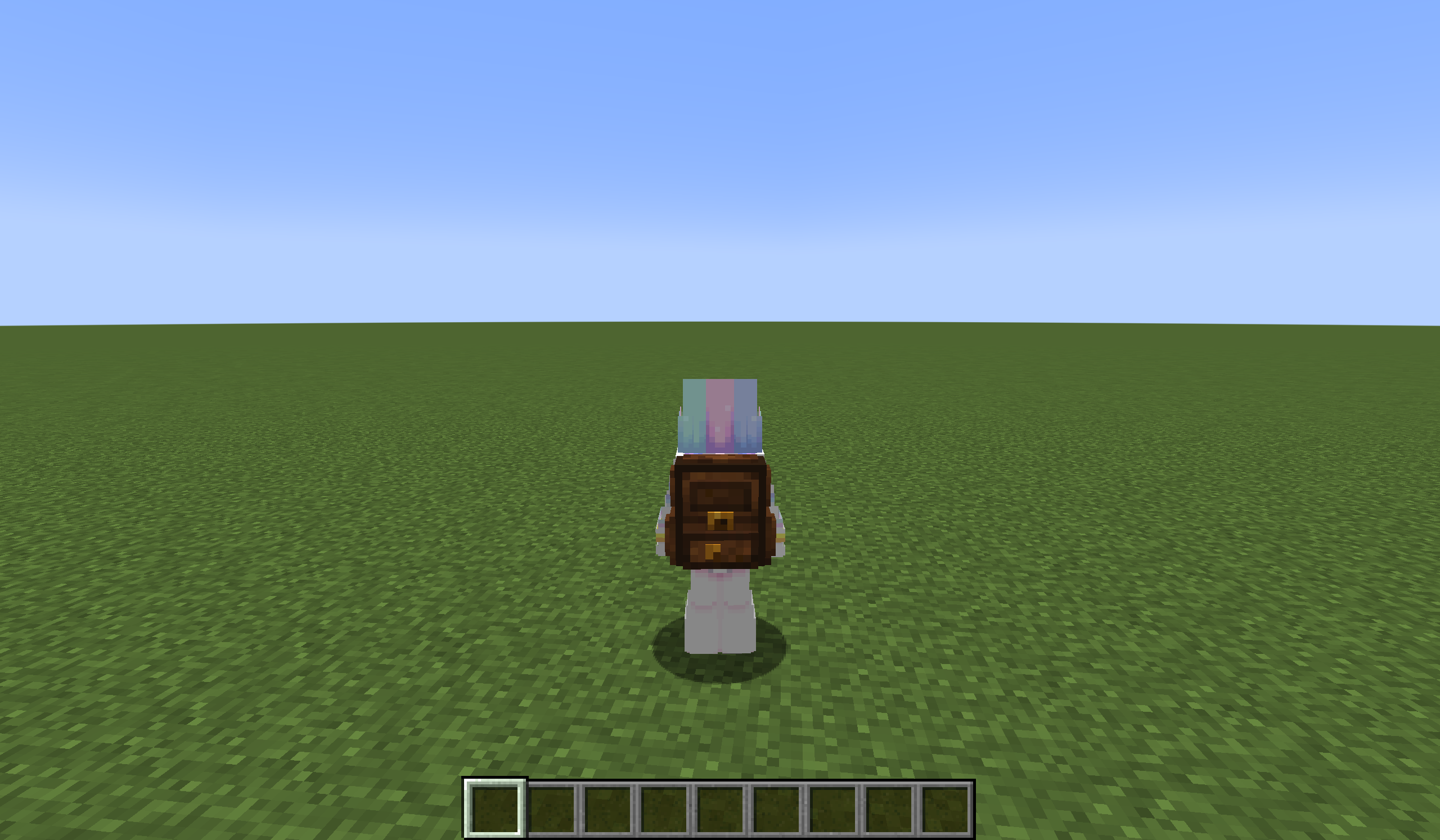
## 🌟 Mod Highlights
### ⚡ Seamless GUI Integration
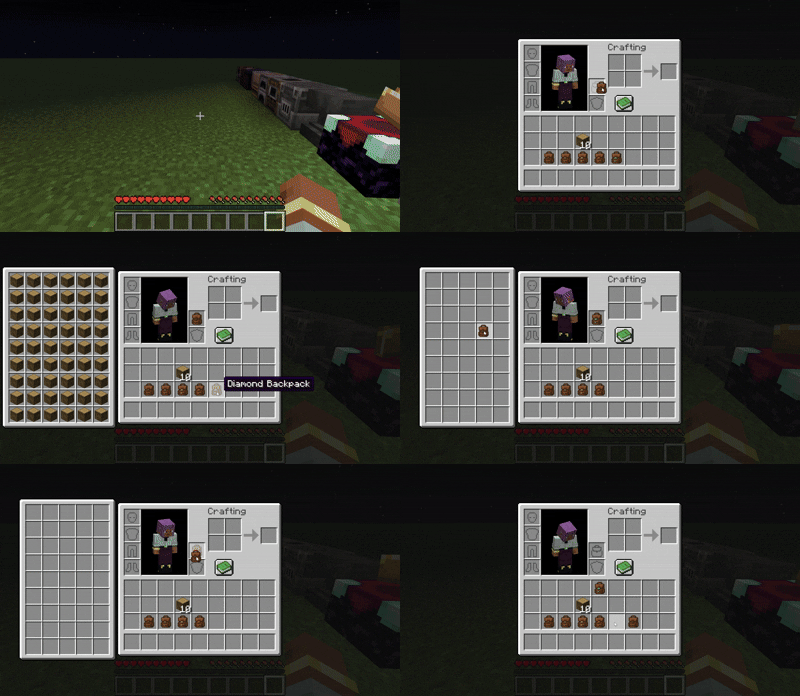
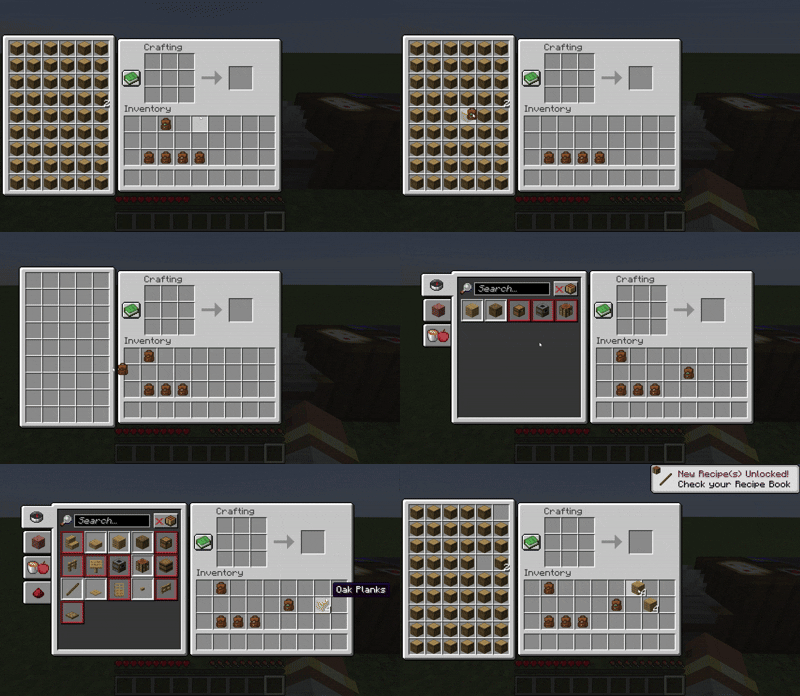
Backpack slots appear directly in **work GUIs** (inventory/crafting table/chest etc.) without opening extra interfaces.
### 🛠️ Enhanced Features
– 🖱️ **Item Transfer**
`Shift+Left Click` → Transfer to main inventory
`Shift+Right Click` → Transfer to backpack
`Double Click` → Auto sort items
– 📦 **Item Collection**
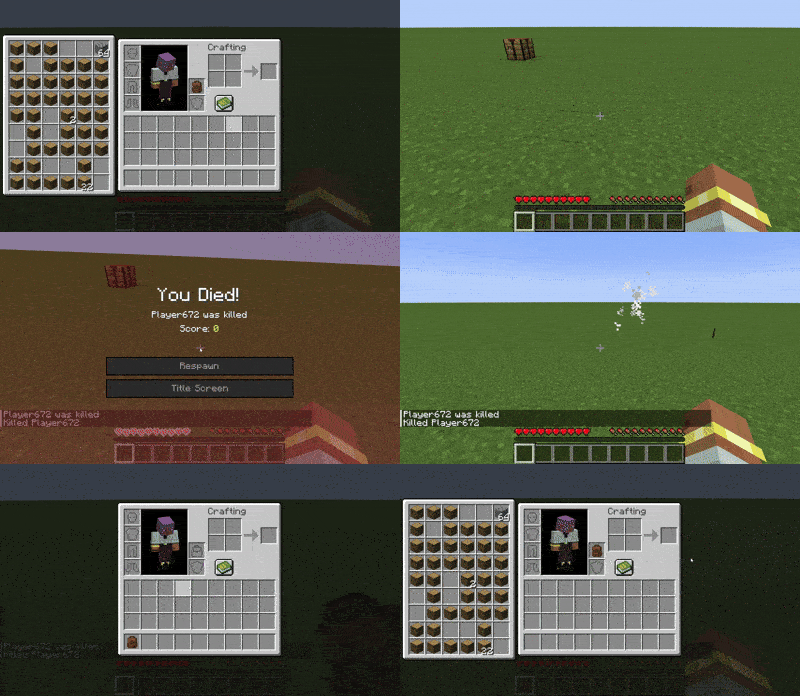
Automatically stores items in backpack when inventory is full
Backpack drops as single item upon death (contents preserved)
– 🔥 **JEI/REI/EMI Integration**
Supports using backpack items **directly in JEI/REI/EMI crafting**
Real-time backpack content display in recipe interface
– 💍 **Accessory Support**
Backpacks can be placed in **Curios/Trinkets slots**
## 🎒 Backpack Tiers
| Backpack Type | Extra Slots | Special Ability |
|—————-|————-|———————-|
| Iron | +18 | Basic capacity |
| Gold | +36 | Basic capacity |
| Diamond | +54 | Basic capacity |
| **Netherite** | **+54** | **Fire Immunity** |
## ⚙️ Compatibility
### Status Key
– ✅ **Fully Compatible**
– ⚠️ **Partial Support**
– ⌛ **Planned**
– ❌ **Unsupported**
### Feature Support Status
| Feature | 1.21.6 | 1.21.5 | 1.21.4 | 1.21.2-1.21.3 | 1.21.1 | 1.20.5-1.20.6 | 1.20.2-1.20.4 | 1.20.1 | 1.19.4 | 1.19.3 | 1.19-1.19.2 | 1.18-1.18.2 |
|————————-|——–|——–|——–|—————|——–|—————|—————|——–|——–|——–|————-|————-|
| JEI | | ✅ | ✅ | | ✅ | ✅ | ✅ | ✅ | ⌛ | ⌛ | ⌛ | ⌛ |
| Curios | | ✅ | ✅ | | ✅ | ✅ | ✅ | ✅ | ⌛ | ⌛ | ⌛ | ⌛ |
| Trinkets | | | | | ✅ | ✅ | ✅ |✅ | ⌛ | ⌛ | ⌛ | ⌛ |
| Quark | | | | | | | | ⚠️ | | | ⚠️ | ⚠️ |
| Accessories | | | ⚠️ | ⚠️ | ⚠️ | | | ⚠️ | | | | |
| REI | | ⌛ | ✅ | ✅ | ✅ | ✅ | ✅ | ✅ | ⌛ | ⌛ | ⌛ | ⌛ |
| EMI | | | | | ✅ | ✅ | ✅ | ✅ | ⌛ | ⌛ | ⌛ | ⌛ |
| Inventorio | | | | | | | ⚠️ | ⚠️ | ⌛ | ⌛ | ⌛ | ⌛ |
| IPN | ⚠️ | ⚠️ | ⚠️ | ❌ | ⚠️ | ❌ | ❌ | ⚠️ | ❌ | ❌ | ❌ | ❌ |
| Inventory Sorting | ⌛ | ⌛ | ⌛ | ⌛ | ⌛ | ⌛ | ⌛ | ⌛ | ⌛ | ⌛ | ⌛ | ⌛ |
| 3D Models | ⌛ | ⌛ | ⌛ | ⌛ | ⌛ | ⌛ | ⌛ | ⌛ | ⌛ | ⌛ | ⌛ | ⌛ |
| Doggy Talents Next | ⌛ | ⌛ | ⌛ | ⌛ | ⌛ | ⌛ | ⌛ | ⌛ | ⌛ | ⌛ | ⌛ | ⌛ |
| AE2 | ⌛ | ⌛ | ⌛ | ⌛ | ✅ | ⌛ | ⌛ | ✅ | ⌛ | ⌛ | ⌛ | ⌛ |
## ❓ Why This Backpack?
Traditional backpack mods = mobile chests requiring separate GUIs. Our solution:
1. **Seamless experience** – Access backpack items directly in **work GUIs**
2. **Native interaction** – Full support for recipe book/JEI/REI/EMI
3. **Backpack swapping** – Swap when placing backpack in backpack slot/inside
4. **Continuous expansion** – Growing mod compatibility support
## ⚠️ Current Status
### The mod is currently in a very early stage. If you find any bugs, you can report them via GitHub or Discord
❗ Found an issue or have suggestions? Report now!
– [GitHub](https://github.com/yyz729/yyzsbackpack/issues)
– [Discord](https://discord.com/invite/3NPKBgXxVU)
🔧 **In development**:
– More GUI support
– Backpack 3D models
– Expanded mod compatibility
> ✨ **Design Philosophy**: Make backpacks a natural extension of the main inventory
Yumo isk-Stackstackstack
# A simple picking module!
When you are still struggling with the variety of items in your integrated bag, why not give it a try? When your backpack is filled with various flowers and plants, even though each item only has one or two spaces, they cannot be stacked together. Now! When there are no available compartments in the backpack, a bundle will be automatically created and fallen items on the ground will be picked up, allowing you to have a better backpack management experience
The performance test is currently unknown. If you encounter any problems, please let me know!

