LANBroadcaster
# LANBroadcaster
[](https://discord.gg/5NMMzK5mAn) 
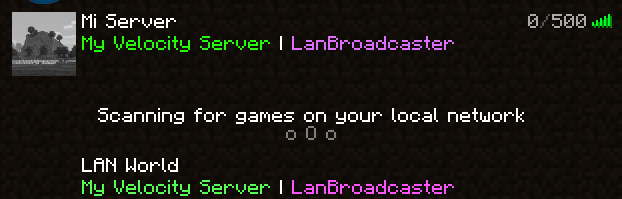
LANBroadcaster, originally created by [Ruan](https://gitlab.com/ruany/) allows a Minecraft
server to be broadcasted over the local area network and appear in the LAN server list without actually adding it.
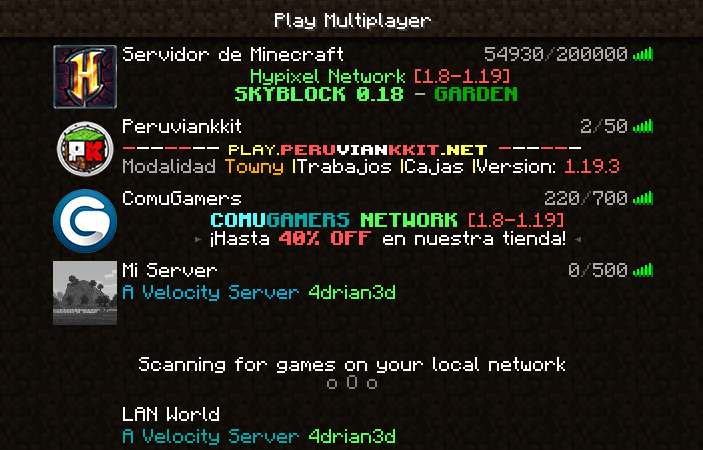
## Why this version?
The original LANBroadcaster, by Ruan has support for Spigot and BungeeCord, bhopahk make its own fork with support for [Sponge](https://spongepowered.org/) and [Velocity](https://velocitypowered.com/),
however this version modularize the project and improves performance and code quality, as well as being upgraded to new platform versions.
[](https://www.bisecthosting.com/4drian3d?r=ModLANBroadcaster)
## Getting Started
LANBroadcaster can be downloaded from the versions tab [here](https://modrinth.com/mod/lanbroadcaster/versions).
Once it is downloaded, simply place it in the relevant plugins folder and start your server. No configuration is required.
> Note: To use LANBroadcaster with BungeeCord or Velocity, you do not need to install it on the servers itself. Only the proxy.
## Limitations
– The description field, when displaying the server in LAN, does not support components, so it does not support RGB colors or gradients
KotlinMC
# KotlinMC
A SpigotMC, BungeeCord and Velocity Plugin with the Kotlin Runtime and Other Libraries that automatically updates upon a new Kotlin Version
Pronouns
# Rewrite in progress!
### The rewrite will improve code flow along side making NeoForge possible without annoying issues! However this means there will be no updates for a while
# Pronouns
PronounDB in Minecraft!
Just a silly little API for PronounDB
Supports Paper (and it’s forks), Sponge, Fabric, Velocity, BungeeCord and Minestom!
## FAQ
Forge support?
No, I’d rather eat a shoe. Feel free to make a mod to use the API to add Forge support, I’m not interested in Forge.
NeoForge support?
NeoForge caused me some issues, but there is a dev build which may or may not work, use at your own risk [NeoForge dev build link](https://github.com/CCSKore/Pronouns/files/15286323/Pronouns-NeoForge-DEVELOPMENT-BUILD.zip)
Why not support Bukkit/Spigot?
While I can, they are old. Let’s face it, Paper is faster and you probably don’t have reason to use Bukkit or Spigot. However feel free to fork the project to add support for this.
—
You can view the Wiki [here](https://github.com/CCSKore/Pronouns/wiki)
Kauri AntiVPN

# KauriVPN
The most accurate and lightweight AntiVPN plugin
*If you’re enjoying the service, please leave a review!*
*Join our [Discord](https://discord.gg/CmAvzTgz43) for support!*
## Web Based Proxy Lookup: [isitbad.io](https://isitbad.io)
—
## Description
This AntiVPN plugin isn’t like other AntiVPN plugins, which use external databases and services not made by the developer themselves. We use our own in-house API to keep things fast and well integrated. And, it’s **compatible with [Velocity](https://velocitypowered.com), [BungeeCord](https://www.spigotmc.org/resources/bungeecord.2719/), and [Spigot](https://www.spigotmc.org/)** in the same JAR!
## Why KauriVPN?
We don’t use any external APIs on our backend, just our homemade special sauce for detecting VPNs, Proxies, and TOR. Not only do we have a **high accuracy** and detection rate, but we also process your queries **fast** in under 2ms! Our API updates its IP tables every 10 minutes, so you don’t have to worry about outdated information allowing bad actors on your server or blocking legitimate connections.
We have multiple regions for our API, allowing for extremely low network latency for most locations!
You can test our API with your own VPN [here](https://funkemunky.cc/vpn/amiusingavpn)!
—
## Plugin Features!
– Optional use of MySQL databases to cache query results.
– Exemption of individual uuids/players from VPN checking.
– Block players based on prefix so you can exempt Bedrock players.
– Ingame player IP lookups, with very extensive detail.
– Get alerts when players join on VPNs!


—
## Plugin Information *(IMPORTANT TO READ)*
### Compatibility
– **BungeeCord Versions**: b1100 and newer have been tested to work
– **Bukkit/Spigot Versions**: 1.7.10 and newer have been tested to work
– **Velocity Versions**: 3.0.1 and newer have been tested to work
### TCPShield
If you are going to be using TCPShield, please ensure you are using their [provided “RealIP” plugin](https://github.com/TCPShield/RealIP/releases). Without this plugin, KauriVPN will see players joining from TCPShield proxies. This means players will always be seen as on a VPN, even if they are not using one.
### GeyserMC Users
Be wary of how you configure GeyserMC for your server. Some configurations of KauriVPN and GeyserMC will result in all Bedrock players being detected as using a proxy. If this is the case for you, please set your player names to use a prefix and configure the `prefixWhitelist` section of KauriVPN with your prefix to prevent detection.
### Commands
– `/antivpn` – View all commands you can use. – `antivpn.command`
– `/antivpn lookup ` – Lookup player IP information – `antivpn.command.lookup`
– `/antivpn alerts` – Toggle your VPN usage alerts – `antivpn.command.alerts`
– `/antivpn allowlist ` – Exempt players or IPs from proxy checks – `antivpn.command.allowlist`
– `/antivpn clearcache` – Clear the API response cache if problems occur
– `/antivpn plan` – View your KauriVPN Plan and Queries Info
– `/antivpn reload` – Reload the KauriVPN plugin
### Other Permissions
– `antivpn.bypass`: Allow a player to bypass the checking/kicking for proxies.
### Generated Files
**config.yml**
“`yaml
#####################################################
# KauriVPN Config #
# by Brighten Development #
#####################################################
# If you find that you run out of your free 20,000 queries, you may purchase a license on https://funkemunky.cc/shop
license: ”
# Message only sent with commands disabled below. Supports color codes (‘&’)
kickMessage: Proxies are not allowed on our server
# Caching results will lower your query usage, but results may be out of date.
cachedResults: true
# All players with any of the following characters in the beginning of their name will be whitelisted
# This is a useful feature for servers that allow players through Geyser and their IPs are not forwarded, causing
# players to be removed falsely for use of proxy.
prefixWhitelists: []
# Configure your database here.
database:
# Enable to cache queries and save alerts state beyond restarts
enabled: false
useCredentials: true
#Options Mongo and MySQL
type: MySQL
# The database name you would like to use
database: kaurivpn
# Can be used if you prefer to authenticate via Mongo URL
mongoURL: ”
# Your database username
username: root
# Your database password
password: password
# The IP of your database goes here
ip: localhost
# -1 will use default port of databases (MySQL:3306, Mongo:27017). Otherwise, enter alternative ports here.
port: -1
commands:
# Enable this to override the default kick function of the plugin with your own commands
enabled: false
# List of commands to run when a player is detected to be using a proxy. Supports color codes (‘&’)
execute:
– kick %player% VPNs are not allowed on our server!
# Enable/disable the default kicking feature of KauriVPN.
kickPlayers: true
# Configure all alerting functionality
alerts:
# You may set to ‘false’ to disable all alerts functionality
enabled: true
# Message to send to users with alerts enabled
# Placeholders: %country% (Country name), %player% (Player name), %reason% (Proxy detection method),
# %city% (City name).
message: ‘&8[&6KauriVPN&8] &e%player% &7has joined on a VPN/proxy &8(&f%reason%&8)
&7in location &8(&f%city%&7, &f%country%&8)’
# Configuration for country gatekeepings
countries:
# You must use ISO codes for country configuration: https://www.iban.com/country-code
# Leave empty to disable this configuration
list: []
# Set whitelist to true to only allow listed country codes, and false to deny listed country codes.
whitelist: true
# The commands to be run if the player is not allowed on the server with the above configured conditions
# Placeholders: %country% (Country name), %player% (Player name), %code% (Country ISO Code)
# Keep this empty with “[]” if you want to use the built-in kicking system.
commands: []
# The kick message that will be used if commands are configured to use the built-in kicking sytem.
# PlaceHolders: %country% (Country name), %player% (Player name), %code% (Country ISO Code)
vanillaKickReason: “&cSorry, but our server does not allow connections fromn&f%country%”
# This will disable any information being sent to https://bstats.org. We recommend you keep this enabled as it helps
# us understand our users and put effort where it is needed. All information sent goes under their privacy as seen
# here: https://bstats.org/privacy-policy
bstats: true
“`
## Dependencies
None 🙂
—
## Free AntiVPN?
Yes, it’s free! You don’t even have to pay for an external API. Our service offers a generous 20,000 queries per month for free. If you are a server with less than 80 players concurrently, you are highly unlikely to reach this cap and won’t need to upgrade. If you start reaching the cap, you can upgrade your plan on [https://funkemunky.cc/shop](https://funkemunky.cc/shop) and insert your license into the `config.yml`.
InvisibleKill
[APEXNODES- Лучший хостинг](https://client.apexnodes.xyz/aff.php?aff=205)
# Ru
При убийстве игрока под зельем невидимости в чате вместо имени убийцы пишется неизвестно.
### Использование:
Установите плагин, теперь люди под зельем невидемости убивают людей и вместо имени убийцы пишется неизвестно.
### Лицензия и Авторы
Описание сделанно r0lanoff
Этот проект имеет лицензию. BSD-2-Clause. Сделано r0lanoff .
# En
When killing a player under an invisibility potion, unknown is written in the chat instead of the killer’s name
### Usage:
Install the plugin, now people under the invisibility potion kill people and instead of the name of the killer it is written unknown.
### License & Credits
Description made by r0lanoff
This project is licensed under BSD-2 clause. Made by r0lanoff .
HuskHomes

GitHub — Setup — Docs — Discord
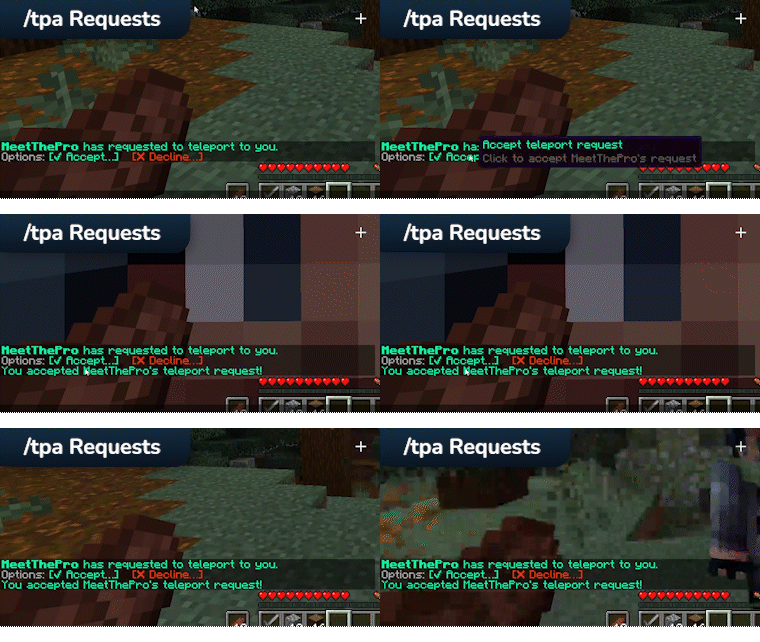
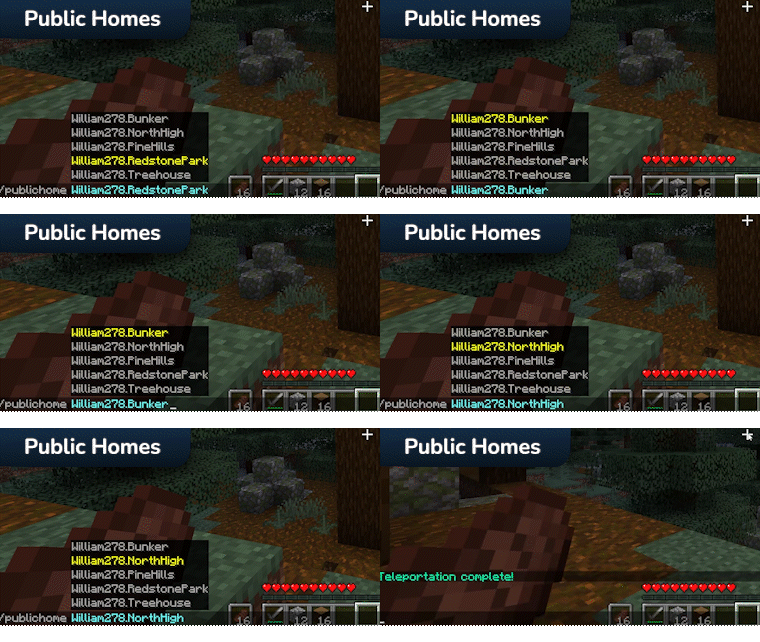
**HuskHomes** is a powerful, intuitive and flexible teleportation plugin for _Minecraft: Java Edition_ servers. HuskHomes contains a meaty—but not bloated—set of player teleportation features, including set homes, warps, public homes, teleport requests, previous and offline position teleporting—and more.
HuskHomes can be used on your Spigot, Sponge or Fabric server, and with a MySQL Database even works cross-server, letting players teleport across your proxy (Bungee or Velocity) network!



### **⭐ Works cross-server**
Let players seamlessly teleport and set homes across your proxies network of servers using MySQL.
### **⭐ Zero learning curve**
Your players already know how to use it! /sethome, /home, /tpa, /rtp—among others—are all built-in and easy-to-use.
### **⭐ Quick and beautiful menus**
Sometimes, simple is better. No monolithic chest GUIs—instead, robust and beautiful interactive chat menus.
### **⭐ Great admin features**
Comes with all the classic admin commands—/tp and /warp—as well as robust tools for managing other players’ homes.
### **⭐ Plan & Web map plugin hooks**
Stay in touch with your community through home analytics via Plan and display homes on Dynmap or BlueMap.
### **⭐ Extensible API & open-source**
Still not enough? Extend the plugin with the HuskHomes API. Or, submit a pull request—we’re open-source!
**Ready? [Get started!](https://william278.net/docs/huskhomes/setup)**

HuskHomes requires the following:
* **Minecraft Spigot (1.17.1+), Fabric (latest Minecraft) or Sponge (Implementing API v9)**
* **Java version 17+**
A MySQL 8.0+ database is also required for cross-server support.

Helpful links to get you started:
* **[Website](https://william278.net/project/huskhomes)** — Visit my website!
* **[Docs](https://william278.net/docs/huskhomes)** — Check the HuskHomes docs!
* **[Discord](https://discord.com/invite/tVYhJfyDWG)** — Get support, ask questions!
* **[bStats](https://bstats.org/plugin/bukkit/HuskHomes/8430)** — Check out the plugin metrics!
* **[GitHub](https://github.com/WiIIiam278/HuskHomes)** — Check out the plugin source code!
* **[Setup](https://william278.net/docs/huskhomes/setup)** — Read the setup instructions!
* **[Translations](https://william278.net/docs/huskhomes/translations)** — Learn how to translate HuskHomes!
Gatekeeper



Gatekeeper is a lightweight, highly optimized Minecraft plugin that defends your server from VPNs, proxies and abusive ISP ranges. It combines fast local ASN analysis with optional external IP checks to give you a multi-layered protection system that’s tuned for high connection volumes.
## ⚡ Requirements & Compatibility
– **Java:** 11 or later
– **Server:** **Bukkit** (**Spigot, Paper, Purpur** etc) / **Bungeecord** / **Velocity**
– **Version range:** `1.8` – `26.1.2`
## 🧩 Modules Overview
| Module | Description & Features |
| :— | :— |
| **AccountLimit** | Keets your server fair by limiting how many accounts can connect from a single IP – perfect for stopping alt abuse. |
| **AntiVpn** | Scans connections through an external API to catch even the most sneaky VPNs and proxies – extremely accurate, with a tiny trade-off in speed for that extra peace of mind. |
| **AsnFilter** | Blocks traffic from dangerous or suspicious ASNs in milliseconds – not quite as precise as a full VPN detector, but blazing fast and catches most bad actors instantly. |
| **Blacklist** | Gives you full control to permanently ban any IP or username – simple, reliable, and instantly effective. |
| **CountryFilter** | Instantly blocks entire countries you don’t trust – clean and ruthless traffic filtering with zero lag. |
| **RateLimit** | Prevents connection floods and brute-force attacks by limiting how often clients can knock on your server’s door – smooth and stable, even under heavy fire. |
| **IpFilter** | Blocks known proxy IPs gathered from popular public proxy lists – keeps your server safe from cheap bypass attempts without costing a dime on external APIs. |
## Why choose Gatekeeper?
Gatekeeper gives you the best of both worlds: **speed and precision**. Local ASN analysis delivers a verdict in milliseconds with almost zero CPU cost. The external API catches anything the local check misses. The result? Fewer false negatives, minimal resource usage, and enterprise-grade features – without a paywall.
## Quick install
1. Drop `Gatekeeper.jar` into your server’s `plugins` folder.
2. Restart the server – the default config will be generated automatically.
3. Edit module configs to add API keys, ASN lists, rate limits, and country rules.
4. Run `/gatekeeper reload` or restart your server.
## Who is Gatekeeper for?
✅ Large public servers and networks
✅ Hubs and communities prone to proxy abuse
✅ Admins who want advanced blocking (ASN, country, rate limits) without tanking performance
> 💡 **One last thing** – Gatekeeper works right out of the box. But its true power unlocks after just 5 minutes of configuration: add your API keys, tweak your ASN lists, set your limits. That’s when your server becomes an impenetrable fortress, and your players will feel the difference. Join us on Discord and see how easy it is to keep your lobby clean.
ForcePack
**ForcePack** is an advanced resource pack utility plugin for Spigot and Velocity that aids in deployment and enforcement, among other utilities. The primary goal of the plugin is to ensure reliable serving of your resource pack(s) to clients.
For clients on 1.20.3+, it also supports applying multiple resource packs.
## Features
ForcePack’s features include, but are not limited to:
– Support for 1.20.3+ multiple resource packs
– Ability to set resource packs on a per-version basis
– Local webserver resource pack hosting
– Resource pack unloading for subservers without a resource pack
– Running custom commands when a resource pack status is received
– Full localisation with MiniMessage support
– Ignoring bedrock players
– Validating SHA-1 hashes, resource pack sizes, and auto-generation for hashes
– Live resource pack reloading/updating
– Support for 1.17+ resource pack screen
– Prevents “ESC out” bypass on clients older than 1.13
– Other basic checks to catch out poorly coded “resource pack bypass” cheats
*Note that spoofing cannot be prevented entirely. Resource packs are inevitably client-controlled, thus eventually detection methods will be bypassed.*
## Installation
Please read our [installation documentation](https://fortitude.islandearth.net/forcepack/introduction) for how to install ForcePack.
ForcePack works on all server and supports client versions **1.8-latest**. However, note that it requires Java 11, so you will need to make sure to use that if running a server older than 1.17.
## FAQ/Support
If you are experiencing issues, please see https://fortitude.islandearth.net/forcepack/configuration#debugging or [join our Discord](https://discord.gg/fh62mxU).
**Q:** I don’t get anything when I join!
**A:** If you are OP (or have the * permission), you will have the permission ForcePack.bypass which means the plugin will not send you the resourcepack. Negate that permission. You may also toggle bypass-permission within the configuration, however this is discouraged.
**Q:** I get a “failed download” after accepting the resource pack!
**A:** This has a variety of causes, but your client logs will tell you what’s wrong. The most common reasons are your pack is too big, or you are using an older client which is unable to delete old packs properly. Try deleting the server-resource-packs folder in your client folder.
**Q:** What’s the maximum resource pack size?
**A:**
– 1.8-1.15: 50 MiB
– 1.16-1.17: 100 MiB
– 1.18+: 250 MiB
**Q:** My resource pack is cleared when switching servers, even though I have it configured on those!?
**A:** This is most likely because of a mod you are using. The most common mod that sees this happen is Pixelmon. The developers have stated this will not be fixed due to technical limitations. Please enable force-constant-download in your config.
### Incompatibilities
– **Minehut** Reports of the plugin not working on Minehut and always returning declined status. Not my problem, tell Minehut to fix their servers.
– **ItemsAdder (???)** There have been reports of ItemsAdder cancelling the screen even when its sending functionality has been disabled.
## Links
– [Discord](https://discord.gg/fh62mxU)
– [Issues](https://github.com/SamB440/ForcePack/issues)
– [Source code](https://github.com/SamB440/ForcePack/)
– [Documentation](https://fortitude.islandearth.net/category/forcepack)
– [Donate](https://ko-fi.com/samb440)
Fly with nostalgia
# Fly with nostalgia
Fly with nostalgia is a mod adding a retro flight mode, similar to the pre-creative days of Minecraft. Players with the retro flight mode active can walk through the air on glass platforms which slowly disappear behind them.

## Commands
### /fly
Enables or disables retro flight mode for the player. All the arguments are optional.
Command format: `/fly `
`targets` – choose one or more players for whom the retro flight mode will be toggled.
`radius` – set how big the platform should be (in blocks around the player). Defaults to 3.
`enable` – specify if the flight should be enabled (true) or disabled (false).
## Permissions
Command responsible for toggling the retro flight mode offers granular permissions for target selection
and platform radius specification as well as a general permission for the base command usage.
`fly_with_nostalgia.command.fly` – usage of base /fly command (with an optional true/false *enable/disable* parameter)
`fly_with_nostalgia.command.fly.target` – selection of a different player to enable flight mode for
using the *target* parameter
`fly_with_nostalgia.command.fly.radius` – customization of a platform radius using the *radius* parameter
All specified permissions are *false* by default. Server operators with vanilla permission level equal
or above 2 are considered to have all permissions.
### Loader-specific information
**(Neo)Forge** – corresponding loader’s native permissions systems are used. External permission management mod
is required for assigning them only.
**Sponge** – native permission system is used. Permission management plugin is needed for assigning them.
**Fabric** – this loader does not provide any permission checking out of the box.
Permissions will be checked using *fabric-permissions-api* mod, if available.
The *fabric-permissions-api-v0* library mod for registering the permissions as well as
a compatible permission management mod for assigning the registered permissions need to be installed.
Otherwise, the mod falls back to vanilla permission levels (op).
Fair Fight
# Fair Fight
## A Simple Anti-Combat Logging Mod
—
## About
Fair Fight is a multiplatform mod aimed to remove those pesky individuals who think combat logging will save them.
Now when they decide to perform their devious tricks, their player will remain on the server if they were engaged in
combat! This will allow the person who was attacking them to continue attacking them.
—
## Configuration
This mod has 4 gamerules:
– `in_combat_ticks`: Allows you to set how many ticks after being attacked
the game should wait until the player is considered not in combat. By default, this is 300 ticks (15s).
– `combat_time_shown`: Toggles the combat time cooldown overlay.
– `combat_logger_players_only`: Only counts combat between players and ignores other mobs
– `disable_elytra_in_combat`: Disables elytra flight when in combat
—
# Supported Platforms
– Fabric/Quilt
– Forge
– NeoForge
– PaperMC/Spigot/Folia
– Sponge
—
# Installation
## Fabric, Quilt, Forge, NeoForge
Simply put the mod in the mods folder
## Sponge
Simply put the plugin in the plugins folder
## Spigot/PaperMC
1. Install the [Ignite](https://github.com/vectrix-space/ignite) Mixin loader
2. Run the ignite jar alongside the paper/spigot jar
3. Put the mod in the mods folder and restart
## Folia
1. Install the [Ignite](https://github.com/vectrix-space/ignite) Mixin loader
2. Rename the Folia jar to “paper.jar”. Alternatively, you can launch the game with the following JVM args: `-Dignite.locator=paper -Dignite.jar=./folia.jar`
3. Run the ignite jar alongside the folia jar
4. Put the mod in the mods folder and restart