TabTPS
# TabTPS 
Minecraft server mod/plugin to show TPS, MSPT, and other information in the tab menu, boss bar, and action bar.
Current supported platforms:
– [Paper](https://papermc.io)
– [Sponge](https://spongepowered.org) 8+
– Fabric (requires [Fabric API](https://modrinth.com/mod/fabric-api))
– NeoForge
## Features
### Live information displays
– Configure what information will be shown using display configs (`/plugins/TabTPS/display-configs/`)
– Each display config has a permission associated, and players with that permission will use that display config.
– The default display config uses the permission `tabtps.defaultdisplay`, and allows for using all three display types.
– Only one display config can be assigned to each player, even if they have permission for multiple. Set priorities for different display configs in the main config (`plugins/TabTPS/main.conf`)
– Configure colors for displays using theme configs (`/plugins/TabTPS/themes/`)
#### Tab menu
* Command: “/tabtps toggle tab“
* 
#### Action bar
* Command: “/tabtps toggle actionbar“
* 
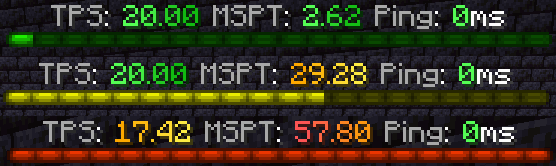
#### Boss bar
* Command: “/tabtps toggle bossbar“
* 
### Commands
#### Improved TPS command
* Command: “/tickinfo“ or “/mspt“
* Permission required: “tabtps.tps“
* 
#### Memory command
* Command: “/memory“, `/mem`, or “/ram“
* View information about the current memory pools of the server jvm.
* Note: the output and usefulness of this command varies depending on the type of garbage collection used, garbage collection settings, and many other factors.
* Permission required: “tabtps.tps“
* 
#### Ping command
* Commands: “/ping“, `/ping [username]`, or “/pingall“
* View the ping of yourself, or another user. “/pingall“ will show a summary of all connected player’s pings.
* Permissions: “tabtps.ping“ to view your own ping, “tabtps.ping.others“ to view other users ping and the ping summary.
* 
* 
#### Reload command
* Command: “/tabtps reload“
* Permission required: “tabtps.reload“
TAB

TAB is an all-in-one plugin for displaying information in various places, which aims to outperform all similar plugins in terms of features, compatibility and performance.
The compact configuration allows you to get the plugin to work the way you want regardless of how simple or complex you want it to be or how experienced you are.
The default configuration already contains useful values and examples to give you a better understanding and get you started quickly with instant results.
The extensive [wiki](https://github.com/NEZNAMY/TAB/wiki) answers any of your questions.


[](https://github.com/NEZNAMY/TAB)
[](https://github.com/NEZNAMY/TAB/issues)
[](https://github.com/NEZNAMY/TAB/wiki)
# Discord?
Official support by me is no longer provided to free users due to limited time and extreme inefficiency (see [provided services]([https://github.com/NEZNAMY/TAB?tab=readme-ov-file#provided-services](https://github.com/NEZNAMY/TAB?tab=readme-ov-file#provided-services)) for more info).
However, you can join this [fresh new community discord]([https://discord.gg/YPqXt63YQj](https://discord.gg/YPqXt63YQj)) made by a nice person who promises to help everyone with all plugins, including TAB.
Before you consider requiring assistance, check out the [wiki](https://github.com/NEZNAMY/TAB/wiki) first. It will answer any questions you may have and is also constantly getting improved.


Switchboard
# TaterComms
[](https://img.shields.io/github/downloads/p0t4t0sandwich/TaterComms/LICENSE)
[](https://github.com/p0t4t0sandwich/TaterComms)
[](https://github.com/p0t4t0sandwich/TaterComms/issues)
[](https://discord.neuralnexus.dev)
[](https://wakatime.com/badge/user/fc67ce74-ca69-40a4-912f-61b26dbe3068/project/c722f2dd-f37e-4e20-9b32-e00d4d8ec34b)
A simple, cross API plugin that bridges communication between servers, using built-in Proxy methods, Discord channels and TCP sockets.
Link to our support: [Discord](https://discord.neuralnexus.dev)
## Download
[](https://github.com/p0t4t0sandwich/TaterComms/releases)
[](https://maven.neuralnexus.dev/#/releases/dev/neuralnexus/TaterComms)
[](https://maven.neuralnexus.dev/#/snapshots/dev/neuralnexus/TaterComms)
[](https://www.spigotmc.org/resources/tatercomms.110592/)
[](https://hangar.papermc.io/p0t4t0sandwich/TaterComms)
[](https://modrinth.com/mod/tatercomms)
[](https://www.curseforge.com/minecraft/mc-mods/tatercomms)
[](https://ore.spongepowered.org/p0t4t0sandwich/TaterComms)
## Usage
– [Configuration guide wiki entry](https://github.com/p0t4t0sandwich/TaterComms/wiki/Configuration-Guide)
– [Create and add a Discord bot to your server](https://discordpy.readthedocs.io/en/stable/discord.html)
– The bot will need permissions to read and send messages with whatever permission scopes you set up, and in the channels you want to use
## Known Issues
– Under certain circumstances with a proxy, prefix/suffix information is not read correctly, still narrowing down the cause
– Global chat still needs some tweaking and a proper, per-user toggle
– Sponge death messages are a tad off with how the component serializes (eg: `playerName Skeleton was shot by` instead of `playerName was shot by Skeleton`)
– Still need to tweak the pass-through system and get that working properly
– Some implementations fire the shutdown event after the plugin unloads, so the shutdown message doesn’t get sent
– Bukkit 1.6.4 doesn’t have an advancement event
– Bukkit b1.7.3 doesn’t support the following
– proper death/advancement events
– plugin messaging
## Dependencies
– [TaterLib](https://github.com/p0t4t0sandwich/TaterLib) – Required on all platforms
– [FabricAPI](https://modrinth.com/mod/fabric-api) – Required on Fabric
### Optional Dependencies
– [LuckPerms](https://luckperms.net/) – For permissions/prefix/suffix support
## Compatibility Cheatsheet
TaterComms supports: Bukkit, Bungee, Fabric, Forge, Sponge, and Velocity
| Server type | Versions | Jar Name |
|———————|————-|———————————|
| All 1.20 (Sponge11) | 1.20-1.20.2 | `TaterComms-1.20-.jar` |
| All 1.19 (Sponge10) | 1.19-1.19.4 | `TaterComms-1.19-.jar` |
| All 1.18 (Sponge9) | 1.18-1.18.2 | `TaterComms-1.18-.jar` |
| All 1.17 (Sponge9) | 1.17-1.17.1 | `TaterComms-1.17-.jar` |
| All 1.16 (Sponge8) | 1.16-1.16.5 | `TaterComms-1.16-.jar` |
| All 1.15 (Sponge8) | 1.15-1.15.2 | `TaterComms-1.15-.jar` |
| All 1.14 | 1.14-1.14.3 | `TaterComms-1.14-.jar` |
## Commands and Permissions
| Command | Permission | Description |
|———————-|——————————|—————————–|
| `/tatercomms reload` | `tatercomms.admin.reload` | Reload the plugin |
| `/discord` | `tatercomms.command.discord` | Get the Discord invite link |
## [Release Notes](https://github.com/p0t4t0sandwich/TaterComms#release-notes)
SternalBoard
INFORMATION:
∗────────────────────∗
Bedrock support, Supporting all version incluiding 1.7x Tab system with animations PlaceholderAPI system support! Animated Scoreboard without delay! Per world Scoreboard Per region WorldGuard scoreboard Permission Scoreboard MiniMessage formating support Once Time Dependency downloader Blacklist/Whitelist Tab completer for Paper, legacy Paper and Spigot Hexadecimal colours suppor Advanced API Easy configuration.
Commands & Permissions /sternalboard- Displays the plugin information. Permission: None /sternalboard reload – Reloads the plugin configs!. Permission: sternalboard.reload /sternalboard toggle- Toggles the scoreboard Permission: sternalboard.toggle
INSTALLATION Download the plugin, drop it on your plugins folder and modify values! The software supports PlaceHolderAPI Click this link and download PlaceHolderApi You can check our WIKI
FEATURES High-performance multi version support Unlimited Animations No duplicated teams Free open source proyect Drop and plug plugin, easier config system for newer people
∗────────────────────∗
squaremap
# squaremap
## What is squaremap
squaremap is a minimalistic and lightweight live world map viewer for Minecraft servers.
squaremap hooks into your Minecraft server as a plugin or mod on a [supported platform](#supported-platforms), then generates and manages a live map of your server, viewable in any web browser.
## Features
* Ultra fast render times. Get your map rendered today, not next week.
* Simple vanilla-like top down 2D view, designed for navigation.
* Player markers showing yaw rotation, health, and armor.
* Easy to [setup](https://github.com/jpenilla/squaremap/wiki/Installation) and [configure](https://github.com/jpenilla/squaremap/wiki/Default-config.yml).
* Up to date Leaflet front-end.
* [Addons and integrations](https://github.com/jpenilla/squaremap/wiki/Addons) for many popular plugins.
## Supported platforms
– [Paper](https://papermc.io/)
– [Sponge](https://www.spongepowered.org/)
– [Fabric](https://fabricmc.net/) (requires [Fabric API](https://www.curseforge.com/minecraft/mc-mods/fabric-api))
– [NeoForge](https://neoforged.net/)
## Downloads
Downloads can be obtained here on Modrinth, or from [GitHub releases](https://github.com/jpenilla/squaremap/releases) for all supported platforms.
Development builds
> Development builds are available at https://jenkins.jpenilla.xyz/job/squaremap/
## Demo
Official squaremap demo: https://squaremap-demo.jpenilla.xyz/
## License
This project is licensed under the [MIT license](https://github.com/jpenilla/squaremap/blob/master/LICENSE)
Leaflet (the web ui frontend) is licensed under [2-clause BSD License](https://github.com/Leaflet/Leaflet/blob/master/LICENSE)
## API
squaremap provides simple APIs to draw markers, shapes, icons, and etc. on rendered maps. Javadocs are hosted on the maven repository alongside the binaries, and should be automatically downloaded by your IDE. See the [README](https://github.com/jpenilla/squaremap/blob/master/README.md) and [Wiki](https://github.com/jpenilla/squaremap/wiki) for more details about the API.
SocialCommands
**_# ✅ العربية_**
هذا البلُوغِن يوفّر مجموعة أوامر مفيدة لسيرفر ماينكرافت، منها:
– **/test**: لاختبار الإضافة.
– **/discord** و **/youtube**: لمشاركة روابط السيرفر.
– **/kickchanel**: لإرسال قناة الكيك (Kick Channel) للاعبين أو المسؤولين عند استخدامه.
كما يحتوي على نظام ترحيب يظهر رسائل مخصّصة عند دخول وخروج اللاعبين.
**طريقة تغيير روابط Discord و YouTube:**
1. بعد تشغيل البلُوغِن لأول مرة، سيتم إنشاء ملف **config.yml** داخل مجلد الإضافة.
2. افتح الملف وعدّل روابط **discord** و **youtube** بروابطك الخاصة.
3. احفظ الملف وأعد تشغيل السيرفر أو استخدم الأمر **/reload**.
سيتم عرض الروابط الجديدة عند تنفيذ الأوامر.
—
**_# ✅ English_**
This plugin adds several useful commands to your Minecraft server, including:
– **/test**: to check the plugin functionality.
– **/discord** and **/youtube**: to share server links.
– **/kickchanel**: sends the kick channel information to players or staff when used.
It also includes a welcome system that displays custom join and quit messages.
**How to change the Discord & YouTube links:**
1. When you launch the plugin for the first time, a **config.yml** file will be created in the plugin folder.
2. Open the file and replace the default **discord** and **youtube** URLs with your own.
3. Save the file and restart the server or use **/reload**.
The new links will appear when the commands are executed.
—
**_# ✅ Français_**
Ce plugin ajoute plusieurs commandes utiles à votre serveur Minecraft, notamment :
– **/test** : pour tester le plugin.
– **/discord** et **/youtube** : pour partager les liens du serveur.
– **/kickchanel** : envoie le lien ou la chaîne dédiée au kick lorsqu’il est utilisé.
Un système de bienvenue est également intégré pour afficher des messages personnalisés à l’arrivée et au départ des joueurs.
**Comment modifier les liens Discord et YouTube :**
1. Lors du premier lancement du plugin, un fichier **config.yml** sera créé dans le dossier du plugin.
2. Ouvrez le fichier et remplacez les URLs par défaut de **discord** et **youtube** par les vôtres.
3. Enregistrez le fichier et redémarrez le serveur ou utilisez **/reload**.
Les nouveaux liens seront affichés lors de l’exécution des commandes.
Sledgehammer
Sledgehammer utilises [SpongePowered/Mixin](https://github.com/SpongePowered/Mixin) to patch issues in Minecraft and Forge mods
### Features
– Configurable
– Compatible with [Forge](https://github.com/MinecraftForge/MinecraftForge), [SpongeForge](https://github.com/SpongePowered/SpongeForge), and [SpongeVanilla](https://github.com/SpongePowered/SpongeVanilla)
### Client Patches
– Fix [BluSunrize/ImmersiveEngineering#3474](https://github.com/BluSunrize/ImmersiveEngineering/issues/3474)
– Disable SearchTree reloading (Speeds up server connection process)
– Increase the maximum length for a WorldType name in SPacketJoinGame
### Common Patches
– Prevent crashes due to invalid translation keys
– Make LazyLoad Thread-safe (Should fix [MC-68381](https://bugs.mojang.com/browse/MC-68381)
– Server Patches
– Print a single message instead of a stacktrace for advancement errors
– Don’t reload Advancements on World Load (Fixes Achievement issues on SkyFactory 4)
– Fix NullPointerException in BiomeProvider::findBiomePosition
– Prevent Grass turning into Dirt
– Prevent Ice turning into Water
– Prevent Totemic from changing the weather
– Chunk Saving
– Alert players when a chunk fails to save
– Remove all Entities and TileEntities from chunks that fail to save
– Remove all blacklisted items from chunks that fail to save
– Generate a crash report and safely stops the server if a chunk fails to save
– Reduce Network usage by postponing flush
– Fix [SpongePowered/SpongeCommon#2013](https://github.com/SpongePowered/SpongeCommon/issues/2013)
– Redirect inventory debugging messages added by Sponge
– Fix MC-134716 – Player kick exploit
– Prevent or delete any items that attempt to teleport across dimensions
– Limit books to 50 pages with 255 characters for each
– Fix potential deadlock on shutdown
– Prevent ConcurrentModificationException in PlayerChunkMap
– Fix Item spawn packet exploit with ProjectRed
– Fix [P3pp3rF1y/Reliquary#370](https://github.com/P3pp3rF1y/Reliquary/issues/370)
– Redirect Ruins debugging messages
– Fix [Daveyx0/PrimitiveMobs#59](https://github.com/Daveyx0/PrimitiveMobs/issues/59) (Sponge only)
– Force permission check for OP based commands (Sponge only)
– Fix Misty World portal issues (Sponge only)
– Fix [An-Sar/PrimalCore#210](https://github.com/An-Sar/PrimalCore/issues/210) (Fixed in 0.6.56 according to Dev) (Sponge only)
– Prevent movement outside of the world border (Sponge only)
– Prevent sending blank death messages (Sponge only)
### Dependencies
– [SpongePowered/configurate](https://github.com/SpongePowered/configurate)
– [SpongePowered/Mixin](https://github.com/SpongePowered/Mixin)
The jar containing ‘-sponge’ does not contain these dependencies as they are already present in a Sponge environment.
SimpleRepair
# SimpleRepair
[](https://discord.gg/5NMMzK5mAn)
Simple Repair Plugin/Mod for Paper, Sponge and Fabric
## Installation
– Download SimpleRepair from [Modrinth](https://modrinth.com/plugin/simplerepair)
– Drag and drop on your Paper/Sponge plugins or Fabric server/client mods folder
– Start the server/client
## Command
### `/simplerepair (hand) (percentage)`
Permission: `simplerepair.use`
This command allows you to repair an item that is in your hand. Both arguments are optional.
In each platform the HAND argument is different according to each implementation, by autocompleting the command you can see the available arguments.
### Fabric Usage
This mod can be installed on both server and client side.
If installed on the server, the player will be able to repair items that are server side.
If installed on the client side, the player will be able to repair items only when playing in a single player world.
## Sponsor
[](https://www.bisecthosting.com/4drian3d?r=ModSimpleRepair)
SignedVelocity
# SignedVelocity

[](https://discord.gg/5NMMzK5mAn)
[](https://modrinth.com/plugin/signedvelocity)

[
](https://ci.codemc.io/job/4drian3d/job/SignedVelocity/)
Allows you to cancel or modify messages or commands from Velocity without synchronization problems
[](https://www.bisecthosting.com/4drian3d?r=ModSignedVelocity)
## Requirements
– Java 21+
– Velocity 3.4.0+
#### **Backend:**
– Paper 1.20+
– Sponge 10/12+
– [Minestom](https://github.com/4drian3d/SignedVelocity?tab=readme-ov-file#minestom)
– Fabric 1.21+
## Features
– Transmit the modification and cancellation status of Velocity messages and commands to your backend server using plugin messages. This avoids chat chain synchronization problems and avoids Velocity’s security check by correctly synchronizing messages.
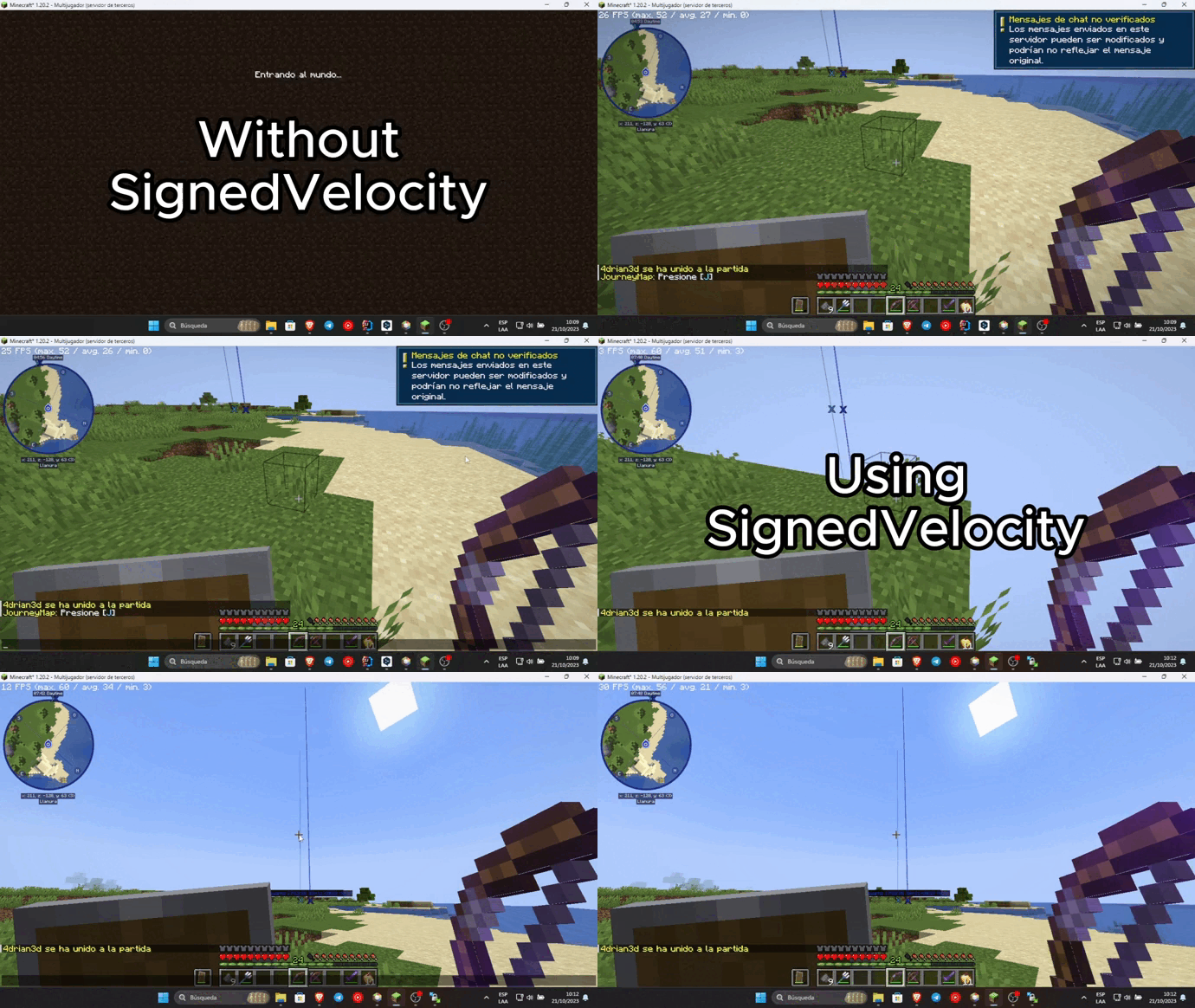
– Chat reporting support using Velocity (can be disabled using external plugins like FreedomChat, **not recommended**)
– Ability to remove the unsecured chat warning when logging into each server. Requires [VPacketEvents](https://modrinth.com/plugin/vpacketevents) or [PacketEvents](https://modrinth.com/plugin/packetevents)
> SignedVelocity-Proxy versions prior to 1.3.0 contain an exploit that can be used
> to replace the input of any player, and can give administrator permissions to malicious agents,
> it is recommended to upgrade to the latest version.
> SignedVelocity backend versions are not affected
## Installation
In order for SignedVelocity to work, you must install it on both Velocity and all your servers
### Velocity
– Download SignedVelocity-Proxy
– Drag and drop on your Velocity plugins folder
– Start your proxy
### Paper
– Download SignedVelocity-Paper
– Drag and drop on your Paper plugins folder
– Start your server
### Sponge
– Download the version of SignedVelocity-Sponge that is compatible with your server.
SignedVelocity-Sponge-8 supports API 8.1 and 9, SignedVelocity-Sponge-10 supports API 10 and 11
– Drag and drop on your Sponge plugins folder
– Start your server
### Fabric
– Download the version of SignedVelocity Fabric that corresponds to your server version
– Drag and drop on your Fabric mods folder
– Start your server
### Minestom
In the case of Minestom, SignedVelocity from version 1.3.0 onwards is used in the form of a library
so that it can be included in your own implementation.
#### Maven Repository
##### Gradle
“`kotlin
repositories {
mavenCentral()
}
dependencies {
implementation(“io.github.4drian3d:signedvelocity-minestom:1.4.0”)
}
“`
#### Example
“`java
import io.github._4drian3d.signedvelocity.minestom.SignedVelocity;
// then…
SignedVelocity.initialize();
“`
For older versions of Minestom, you can use SignedVelocity-Minestom 1.2.4 which comes as an extension
### Installation Videos
### Spanish by 4drian3d
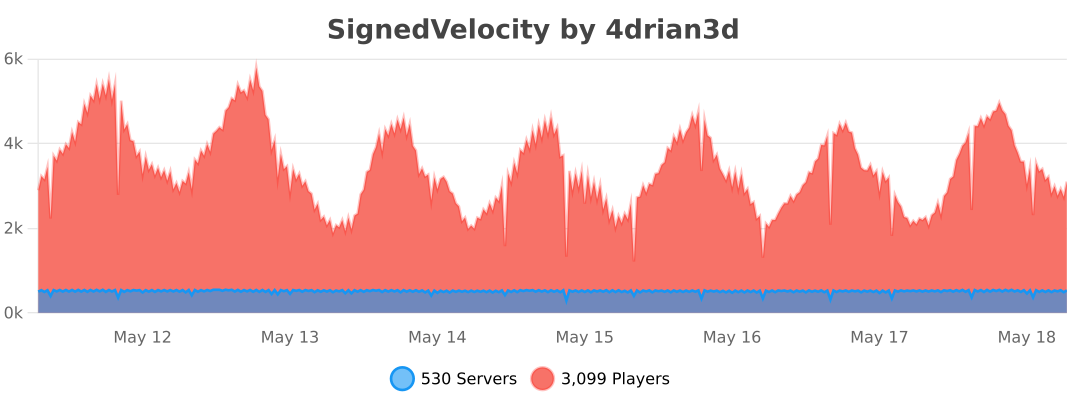
## Metrics
[](https://bstats.org/plugin/velocity/SignedVelocity/18937)
Server Redirect
## **Server Redirect**
This mod provides a lightweight way for servers to transfer players to another server address, without the use of a proxy server.
Server Redirect supports Forge, Fabric, Bukkit/Spigot, SpongeVanilla/SpongeForge, Bungeecord/Waterfall and Velocity.
With Server Redirect, server admins can avoid mod incompatibility issues caused by proxy servers (Bungeecord, Waterfall, and Velocity).
In particular, this mod can be used in combination with **Waterfall and Forge 1.13+** servers and clients to provide a way to transfer players between servers (currently, the 1.13+ Forge server needs to be “online” as they haven’t included IP forwarding yet…).
This mod is optional, so it can be added to modpacks and players can still join servers without this mod. Likewise, servers with this mod can be joined by clients without this mod.
## **Commands**
– **/redirect <Target> <Server Address>**: redirects the specified target player(s) to the specified address
– **/fallback <Target> <Server Address>**: sets the fallback server address for the specified target player(s)
– **/ifplayercanredirect <Target> <Command…>**: runs the specified command for each of the target player(s) that have Server Redirect
– **/ifplayercannotredirect <Target> <Command…>**: runs the specified command for each of the target player(s) that have not Server Redirect
The command source can be anything that can run a command, like a command block, a player, or console.
Replace **/redirect** with **/fallback** to have the specified target players connect to the specified server address when they get forcefully disconnected from the server.
##### **The <Target> argument can be one of the following:**
– **Player Name/UUID**: the specified player on the server
– **Target Selector**: a [target selector](https://minecraft.fandom.com/wiki/Target_selectors). Target selectors are not available on Bungeecord and Velocity.
– **r=N**: all players within N blocks from the command sender, or from the overworld spawn if run by console. Plugin version only.
– **s=<ServerName>**: all players in the specified ServerName. Bungeecord and Velocity only.
– *: all players on the server.
##### **The <Command…> argument can contain the following placeholders:**
– **%PlayerName**: this placeholder will be replaced with the player’s name
– **%PlayerId**: this placeholder will be replaced with the player’s UUID
**NOTICE**: **/ifplayercanredirect** and **/ifplayercannotredirect** will likely not work as expected if run when the target player just joined the server. These commands rely on the client sending a packet to the server telling them they have this mod installed. This packet requires some time to be sent by the client and processed by the server. It is recommended to delay this command execution by at least 20 ticks after the player has joined the server!
#### **Examples:**
– **/redirect KaiNoMood myawesomemcserver.net:25667**: the player named KaiNoMood will connect to myawesomemcserver.net:25667
– **/redirect a54a7884-9ea4-4d54-ac35-1623d70ffbe1 myawesomemcserver.net:25667**: the player with the specified UUID will connect to myawesomemcserver.net:25667
– **/redirect * myawesomemcserver.net:25667**: all players on the server will connect to myawesomemcserver.net:25667.
– **/redirect @a[m=creative] myawesomemcserver.net:25667**: all players in creative mode will connect to myawesomemcserver.net:25667.
– **/redirect r=10 myawesomemcserver.net:25667**: all players within 6 blocks from the command sender will connect to myawesomemcserver.net:25667. This works on Bukkit and Sponge based servers only.
– **/redirect s=lobby myawesomemcserver.net:25667**: all players in the “lobby” server will connect to myawesomemcserver.net:25667. This works on Bungeecord and Velocity proxy servers only.
– **/ifplayercanredirect * say %PlayerName is online and using Server Redirect! Yay!**: the specified command will run for each player on the server that has Server Redirect.
– **/ifplayercannotredirect @a[distance=..5] tell %PlayerName It does not seem you have Server Redirect installed! Make sure to install it!**: the specified command will run for all players without Server Redirect within 5 blocks of the command source.
Replace **/redirect** with **/fallback** for setting a fallback address for the target players. For more info about the fallback command, read below.
## **FAQ**
### **How this mod redirects players**
– By running the /redirect command, the server will send a “transfer” packet containing the specified server address to the specified players.
– All players receiving the packet that have the ServerRedirect mod installed will disconnect from the server, and automatically direct connect to the specified server address.
Any server address that is reachable by the players with the “Direct Connect” button can be used.
The “transfer” packet will not affect players without the mod installed: they will simply stay connected on the current server.
This behaves like the transfer packet present in “Minecraft: Bedrock Edition”, feature included by Mojang by default on that client. Regrettably, “Minecraft: Java Edition” is missing this feature entirely.
Both the redirect and fallback commands are not supposed to be run by players. They are intended for being run by the console, command blocks and other plugins. Command aliases and “server selector” GUIs are recommended (see BossShop or VirtualChest).
### **What the fallback command is for**
The fallback command tells the clients which server address they should connect to in case they get forcefully disconnected from the server (e.g. the server crashes).
Server admins want to use this by running the fallback command automatically by the server for every player that joins the server. If the server shuts down for any reason, the players will automatically direct connect to the fallback server address specified in the fallback command.
Another use of the fallback feature is when you want to redirect a player to a server, but they might get rejected for some reason (e.g. the server is offline). First, set the fallback address for the player to a server address you can be sure they can reach, then use the redirect command to redirect the player to the server address they might get rejected from. If the player cannot join the server they were redirected to, they’ll automatically join the fallback server.
### **Reasons for using this mod instead of a proxy like Bungeecord, Waterfall or Velocity**
Forge mods don’t always expect that the player is being moved from one server to another, and when a proxy transfers a player to a different server, it can cause glitches or crashes. Forge mods commonly expect to be disconnected from the server before connecting to another one. Additionally, Forge 1.13+ does not support proxies server switching. This mod solves the issue by properly disconnecting players from the server, and then connecting them to another server. This way, mods can properly handle players switching from a server to another.
Server admins can also use a combination of a proxy and Server Redirect if they want to use all the other features proxies can provide (except on Forge 1.13+ servers currently). Still, it is suggested to look into replacing the proxy with cross-server plugins and mods.
### **Players with this mod can join servers without this mod**
Any combination of presence/absence of this mod will let players connect to servers. Players with this mod can connect to Vanilla servers as well, and players with vanilla Minecraft can also connect to servers with this mod.
### **This mod can be added in modpacks**
Feel free to add this modpack in public and private modpacks. Asking for permission is not required. If you add Server Redirect to your public modpack, feel free to let everyone know in the comments below! Although this mod shouldn’t have any conflict with any other mod, feel free to [report conflicts here](https://github.com/KaiKikuchi/ServerRedirect/issues).
### **License and improvements to the project**
This project is MIT licensed. Feel free to fork this project and/or suggest new features on [the Issues page](https://github.com/KaiKikuchi/ServerRedirect/issues)! If you cannot find the right version of Server Redirect for your Minecraft version, feel free to ask there!
If you wish to buy me a pizza, [click here](https://paypal.me/kainomood “PayPal Me”)! I appreciate it very much! 🙂