ViaRewind
# ViaRewind
**ViaVersion addon to allow 1.8.x and 1.7.x clients on newer server versions.**
Runs on 1.9-latest servers or 1.8 clients and lower.
**You can override the included version in [ViaFabric](https://modrinth.com/mod/viafabric) or [ViaProxy](https://github.com/ViaVersion/ViaProxy):**
– in **ViaFabric**, put ViaRewind into the `mods` folder
– in **ViaProxy**, put ViaRewind into the `jars` folder
Requires Java 17. See [here](https://docs.papermc.io/misc/java-install) how to update your installed Java version. As a last resort, you can download Java 8 downgraded builds from [our ci](https://ci.viaversion.com/view/ViaRewind/job/ViaRewind-Java8/).
**Requires [ViaVersion](https://hangar.papermc.io/ViaVersion/ViaVersion) and [ViaBackwards](https://hangar.papermc.io/ViaVersion/ViaBackwards) to be installed..**
Releases/Dev Builds
–
You can find releases in the following places:
– **Hangar (for our plugins)**: https://hangar.papermc.io/ViaVersion/ViaRewind
– **Modrinth (for our mods)**: https://modrinth.com/mod/viarewind
– **GitHub**: https://github.com/ViaVersion/ViaRewind/releases
Dev builds for **all** of our projects are on our Jenkins server:
– **Jenkins**: https://ci.viaversion.com/view/ViaRewind/
Other Links
–
**Maven:** https://repo.viaversion.com/
**Issue tracker:** https://github.com/ViaVersion/ViaRewind/issues
**List of contributors:** https://github.com/ViaVersion/ViaRewind/graphs/contributors
ViaBackwards
# ViaBackwards
**On Fabric, use either [ViaFabric](https://modrinth.com/mod/viafabric) or [ViaFabricPlus](https://modrinth.com/mod/viafabricplus). To override the included version**
– in **ViaFabric**, put ViaBackwards into the `mods` folder
– in **ViaFabricPlus**, put ViaBackwards into the `ViaFabricPlus/jars` folder
**Depending on the platform and version, this also requires [ViaVersion](https://modrinth.com/mod/viaversion).**
Requires Java 17. See [here](https://docs.papermc.io/misc/java-install) how to update your installed Java version. As a last resort, you can download Java 8 downgraded builds from [our ci](https://ci.viaversion.com/view/ViaBackwards/job/ViaBackwards-Java8/).
## Get access to Via* with new MC version support early
**Starting with 1.20.5, ViaVersion and ViaBackwards will only be released a day or so *after* a Minecraft update** unless the protocol changes of the update were trivial. **If you want early-access, usually days or even weeks before the final release, you can subscribe to either**:
– [GitHub Sponsors](https://github.com/sponsors/kennytv/sponsorships?sponsor=kennytv&tier_id=385613&preview=false) (*preferred option, also comes with source code access*. Use the `/verify` command on this Discord after), or alternatively
– [Patreon](https://www.patreon.com/kennytv/membership) (see the highest tier and make sure to link Patreon to your Discord account under Discord Settings->Connections)
## Note on release channels
It is recommended to always use the latest beta release. Alpha builds are used for work on snapshot version compatibility or other cutting-edge changes.
**Always use the same build channel across the ViaVersion, ViaBackwards, and ViaRewind projects.**
Releases/Dev Builds
–
You can find releases in the following places:
– **Hangar (for our plugins)**: https://hangar.papermc.io/ViaVersion/ViaBackwards
– **Modrinth (for our mods)**: https://modrinth.com/mod/viabackwards
– **GitHub**: https://github.com/ViaVersion/ViaBackwards/releases
Dev builds for **all** of our projects are on our Jenkins server:
– **Jenkins**: https://ci.viaversion.com/view/ViaBackwards/
Known issues
–
* 1.17+ min_y and height world values that are not 0/256 **are not supported**. Clients older than
1.17 will not be able to see or interact with blocks below y=0 and above y=255
* <1.17 clients on 1.17+ servers might experience inventory desyncs on certain inventory click actions
* Sound mappings are incomplete ([see here](https://github.com/ViaVersion/ViaBackwards/issues/326))
Other Links
-
**Maven:** https://repo.viaversion.com
**List of contributors:** https://github.com/ViaVersion/ViaBackwards/graphs/contributors
Special Thanks
-

[YourKit](https://www.yourkit.com/) supports open source projects with innovative and intelligent tools
for monitoring and profiling Java and .NET applications.
YourKit is the creator of [YourKit Java Profiler](https://www.yourkit.com/java/profiler/),
[YourKit .NET Profiler](https://www.yourkit.com/.net/profiler/),
and [YourKit YouMonitor](https://www.yourkit.com/youmonitor/).
Ultimate Message
– Ru
Этот плагин поможет вам кастомизировать объявление о заходе на сервер, а так же добавит локальный и глобальный чат на ваш сервер
Коротко но понятно 🙂
– En
This plugin will help you customize your server login announcement and add local and global chat to your server
Short but clear 🙂
Total Economy
# Total Economy
Total Economy is a plugin that aims to provide a full-fledged economy for your server. Each feature can be enabled/disabled and configured to your liking. With Vault support, Total Economy can be used alongside other plugins that depend on an economy.
## Features
– Vault support to allow easy integration with multiple plugins
– Easily pay other players
– Ability to enable/disable individual features
– Jobs and the ability to create your own jobs
– Shops (future version)
– Achievements (future version)
– Web UI for easy management (future version)
## Discussion
If you have any feature ideas or questions, please head over to the [Discussion](https://github.com/ericgrandt/TotalEconomy/discussions) page on GitHub as we’d love to hear them.
If you encounter any issues while using Total Economy, please feel free to create an [Issue](https://github.com/ericgrandt/TotalEconomy/issues) on GitHub and we’ll take a look.
TheNewEconomy
**Note: This resource is no longer maintained/supported.**
# The New Economy
[](https://app.codacy.com/gh/TheNewEconomy/EconomyCore/dashboard?utm_source=gh&utm_medium=referral&utm_content=&utm_campaign=Badge_grade)
[](https://ci.codemc.io/job/creatorfromhell/job/TNE/)
[](https://github.com/TheNewEconomy/VaultUnlockedAPI)
The New Economy, TNE, is the ultimate economy plugin for your Minecraft server, no matter what platform you’re on. While
TNE is pushed as being “feature-packed,” but it’s not feature-packed in the normal sense of jamming a bunch of useless features
into the core plugin, but rather using modules.

The economy plugin for server owners that want more out of their economy.
# About TNE
TNE was originally created for hey0’s hMod long before Bukkit/Spigot/Paper was a thing. Since then, it has taken on many
forms and this is the future form of the plugin. This core is designed to be robust and carry TNE into the future with or
without Minecraft by not being platform-dependent.
# Requirements
TNE has some minimum requirements that should be followed.
– MySQL 8.0+ (if using MySQL for storage)
– MariaDB 10.7.0+
– Java 17+
# Switched?
– Converter Coming Soon! Take the poll: [here](https://strawpoll.com/4xw9gxag)
# Support
To get an actual response use a support method below, not the reviews.
– [Developer API Docs](https://github.com/TheNewEconomy/EconomyCore/wiki/API)
– [Discord](https://discord.gg/WNdwzpy)
– [Github](https://github.com/TheNewEconomy/EconomyCore/issues)
# Features
## Menu System
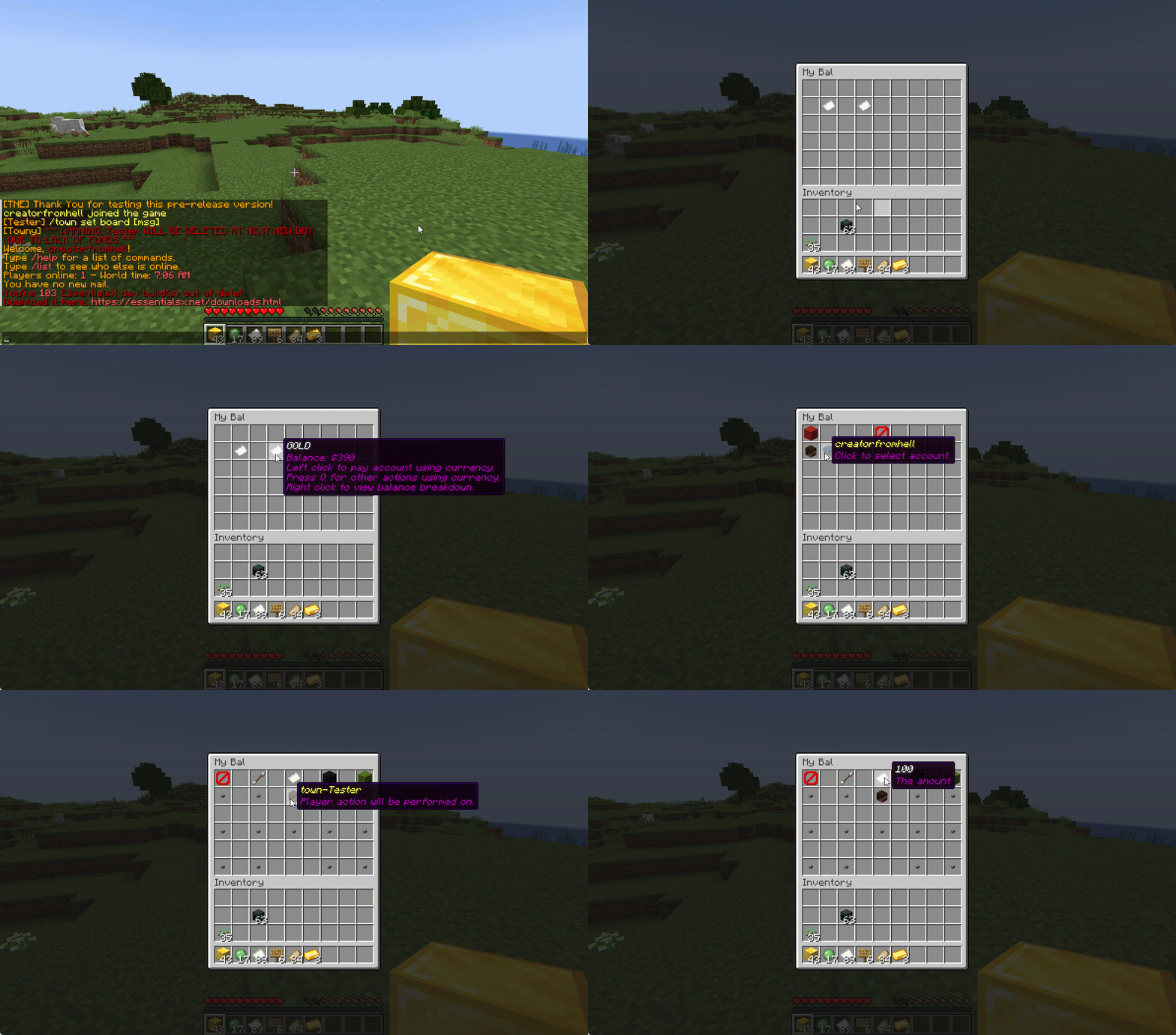
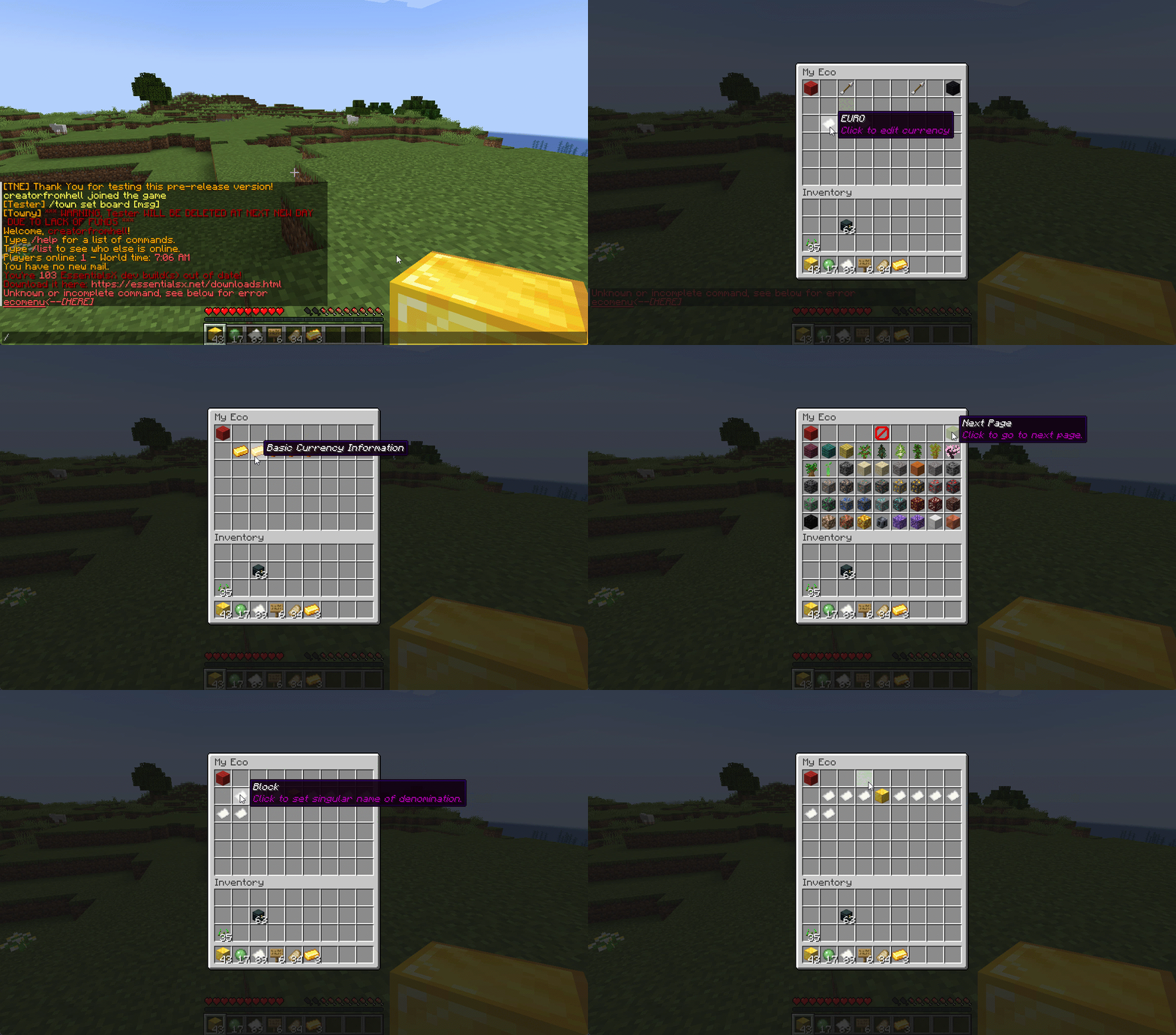
Want to use menus for currency creation and player actions? We got you!
### MyBal for Players
### MyEco for Admins
## Support your favorite plugins
We provide support for all your favorite plugins from Towny to Factions. Anything that supports Vault, supports TNE!
## Cross-Server
We support cross-server balance syncing through our velocity and bungee plugins, as well as Redis!
### Bungee
Download: [here](https://cdn.modrinth.com/data/bZ4eSWf0/versions/OTwQFFn1/TNE-BungeeCore-0.1.2.8-Release-1.jar)
### Velocity
Download: [here](https://cdn.modrinth.com/data/bZ4eSWf0/versions/prNGjbjv/TNE-VelocityCore-0.1.2.8-Release-1.jar)
## Updates
We continue to develop updates for TNE for free, and fix bugs as they’re reported.
## All the currencies – Unlimited
TNE Allows you to create unlimited currencies with ease through the currency creation GUI.
### Types
TNE Supports different types of currencies!
#### Virtual: Simple currency that exists in thin air
#### Item: Use minecraft items as currency.
– Shulker Box Support
– Bundle Support
### Fine Tune your Currency
Lots of per-currency configuration options.
– Create a custom balance format for each currency
– Set a starting amount for each currency
– Set custom conversion rates for each currency
– Create custom crafting recipes for item currencies
– Block Mob drops for each currency
– Set the max balance for each currency
– Set enderchest balance inclusion per currency
– Set item currencies to use MiniMessage inputs for display name and lores!
– Set custom note items for each currency, used to have a currency voucher for each currency.
– Allows for use of model data items as currency items
### Fine Tune Who Can Access What Currency
TNE allows you to fine tune who can run commands with each currency. You’re able to block players from using
/pay for certain currencies, and even checking their balance for others!
#### Mixed: This type uses both virtual and item balances, and allows players to switch their balance between items and virtual whenever!
#### Experience: Use experience as currency.
#### Experience-level: Use experience levels as currency.
## Money Notes
Convert your virtual currency into a physical money note using the /money note command.
## Multi-platform
Use Sponge? Sure. Paper? Why not? Both? Over Velocity? Definitely! Switch between, your TNE data works
for you no matter your platform. More platforms soon!
### Supported:
– Paper/Spigot/Purpur
– Sponge8
### Coming:
– Fabric
– Sponge7
## Discord Server
We have a discord server available to those users that have questions or need support!
## Configurability
TNE strives to allow you to configure things as much as possible. From the messages to starting money, to max holdings!
## MISC Features
– Adventure Chat support for translations to allow for awesome colorful messages!
– Support for Placeholders, include top 10
– Easy commands for easy administration
– Transaction Logging
– Easy-to-use menu system for currency creation and balance actions!
– Multiple data types
– SQL, YAML, and Maria DB
– Tab completion for commands!
– baltop command
## Open Source
Contribute on the [github](https://github.com/TheNewEconomy/EconomyCore)!
## Placeholders
| Name | Description |
|——————————————————-|—————————————————————-|
| tne_balance | Returns player’s balance. |
| tne_balance_formatted | Returns formatted player’s balance. |
| tne_world_worldname | returns player’s balance for specific world. |
| tne_world_worldname_formatted | returns the formatted player’s balance for specific world. |
| tne_currency_currencyname | returns player’s balance for specific currency. |
| tne_currency_currencyname_formatted | returns player’s balance for specific currency. |
| tne_wcur_worldname_currencyname | returns player’s balance for specific world and currency. |
| tne_wcur_worldname_currencyname_formatted | returns player’s balance for specific world and currency. |
| tne_toppos | returns player’s position on baltop |
| tne_toppos_world name or all | returns player’s balance for specific currency. |
| tne_toppos_world name or all_currency name or all | returns player’s balance for specific world and currency. |
| tne_toppos__position_ | returns the value for the position based on the value of Messages.Money.PlaceholderTopEntry in messages.yml |
## Permissions & Commands
## /tne
**About:** All commands that are designated as being for administrative purposes.
**Shortcuts:** /tne menu(/ecomenu), /tne(/ecomin, /ecoadmin, /ecomanage, /tneneweconomy)
**Base node:** tne.admin (default: ops)
**Wildcard node:** tne.admin.*
| Command | Permission | Description | Default |
|———————————–|——————-|———————————————————————————————————–|—————|
| tne backup | tne.admin.backup | Creates a backup of all server data. | ops |
| tne create [balance] | tne.admin.create | Creates a new economy account. Player ~ The account owner. Balance ~ The starting balance of the account. | ops |
| tne debug [level] | tne.admin.debug | Toggles console debug mode to the specified level. | ops |
| tne delete | tne.admin.delete | Deletes a player account. Player ~ The account owner. | ops |
| tne extract | tne.admin.extract | Extracts all player balances with their username attached for database related debugging. | ops |
| tne menu | tne.admin.menu | Opens up the tne economy admin menu | ops |
| tne purge | tne.admin.purge | Deletes all player accounts that have the default balance | ops |
| tne reload [configs] | tne.admin.reload | Used to reload configurations. | ops |
| tne reset | tne.admin.reset | Deletes all economy-related data from the database. | ops |
| tne restore | tne.admin.restore | Restores all balances that are located in extracted.yml after performing the extract command. | ops |
| tne save | tne.admin.save | Force saves all TNE data. | ops |
| tne status [status] | tne.admin.status | Displays, or sets, the current account status of an account. Player ~ The account owner. | ops |
| tne version | tne.admin.version | Displays the version of TNE currently running. | ops |
## /money
**About:** All commands that are used to interact with the server’s money system.
**Shortcuts:** /money balance(/bal, /balance), /money pay(/pay), /money top(/baltop), /money menu(/mybal)
**Base node:** tne.money (default: everyone)
**Wildcard node:** tne.money.*
| Command | Permission | Description | Default |
|————————————————————|———————–|—————————————————————————————-|—————|
| money balmenu | tne.money.mybal | Opens up the mybal menu. | everyone |
| money balance [world] [currency] | tne.money.balance | Displays your current holdings. | everyone |
| money convert [from currency] | tne.money.convert | Convert some of your holdings to another currency. | everyone |
| money deposit [currency] | tne.money.deposit | Deposits money from an item form into a virtual bank for mixed currencies. | everyone |
| money give [world] [currency] | tne.money.give | Adds money into your economy, and gives it to a player. | ops |
| money givenote [currency] | tne.money.givenote | Gives the specified player a currency note for the specified amount. | ops |
| money note [currency] | tne.money.note | Makes your virtual currency physical, for storage/trading purposes. | everyone |
| money other [world] [currency] | tne.money.other | Retrieves the balance of a player. | everyone |
| money pay [currency] | tne.money.pay | Use some of your holdings to pay another player. | everyone |
| money request [currency] | tne.money.request | Request money from a player. |
| money set [world] [currency] | tne.money.set | Set the holdings of a player. | ops |
| money setall [world] [currency] | tne.money.setall | Set the holdings of all players. | ops |
| money take [world] [currency] | tne.money.take | Removes money from your economy, specifically from a player’s balance. | ops |
| money top [page] | tne.money.top | A list of players with the highest balances. | ops |
| money top [page] [refresh(true/false)] | tne.money.top.refresh | This permission allows the user to include the refresh argument to refresh the baltop. | ops |
| money withdraw [currency] | tne.money.withdraw | Withdraws money from your virtual balance into its item form. | ops |
## /transaction
**About:** All commands that are used to interact with the transaction system.
**Shortcuts:** /trans
**Base node:** tne.transaction (default: everyone)
**Wildcard node:** tne.transaction.*
| Command | Permission | Description | Default |
|——————————————————————–|———————————————————|—————————————————————————————|—————|
| transaction away [page #] | tne.transaction.away | Displays transactions that you missed since the last time you were on. | everyone |
| transaction history [player:name] [page:#] [world:name/all] | tne.transaction.history / tne.transaction.history.other | See a detailed break down of your transaction history. Page ~ The page number you wish to view. World ~ The world name you wish to filter, or all for every world. Defaults to current world. | everyone |
| transaction info | tne.transaction.info | Displays information about a transaction. UUID ~ The id of the transaction. | everyone |
| transaction void | tne.transaction.void | Undoes a previously completed transaction. UUID ~ The id of the transaction. | ops |
Tip4serv Donation Webstore
[Tip4serv.com](https://tip4serv.com/?ads=modrinth) provides gaming communities with a platform to effortlessly set up their virtual store and facilitate the sale of digital goods, including donations.
Managing a community and creating content can be demanding tasks. We aim to streamline the process, enabling managers to efficiently handle donations and automatically reward players.
Our mission is to deliver a user-friendly platform that simplifies the experience for both creators and buyers.
Here are examples of stores that you can customize: [https://murga.tip4serv.com](https://murga.tip4serv.com), [https://neon.tip4serv.com](https://neon.tip4serv.com) and [https://steelcraft.tip4serv.com](https://steelcraft.tip4serv.com)
## Features for starter plan (only 5% fee)
– Unlimited game servers & commands
– Create subscriptions plan
– Commands status tracking
– Stock management
– Deliver roles & messages on Discord
– Create discount coupon
– Add managers for your store
– Purchase email and invoice
– Sales statistics
– Private flow for subscribers
– Custom sub-domain
– Resend commands
– No ads
## Features for PRO members (subscription required)
– Dynamic Dark/Light theme
– Account linking with avatars
– Product page with gallery & video
– GUI colors editor & additional CSS
– Top customers & related products
## Store available in 15 languages
English, Danish, Dutch, English, French, German, Hungarian, Italian, Norwegian, Polish, Portuguese, Romanian, Russian, Spanish, Swedish and Turkish.
## Payment method
Here are the payment methods you can offer your players: Visa, Paypal, Cash App, Google Pay, Apple Pay, Ideal, GiroPay, BanContact, Sofort, Sepa, EPS, BACS, Amazon Pay, Revolut Pay, Mobile Pay, MultiBanco, BECS, Przelewy24, Boleto, Oxxo, Afterpay, Link.
## How does this work?
Tip4Serv checks if a player has made a donation on your Tip4Serv store and delivers the order in a minute (e.g., group, money, etc.) by executing commands in the server console.
Create your store and connect your Minecraft server in **5 minutes** on [Tip4Serv](https://tip4serv.com) in 4 simple steps:
1. **Store Settings:**
Enter your store name and set the desired URL.
2. **Payment Methods:**
Select your preferred payment options.
3. **Connect Server:**
Link your Minecraft server to Tip4Serv using your API key.
4. **Add Products:**
Create and configure products with executable commands on your server.
## Commands
**tip4serv connect** – Link your server to Tip4Serv (Ensure the API key is correctly set in tip4serv/tip4serv.key).
**tip4serv reload** – Deliver pending orders if there are any.
**/storelink** – Show a link to the store in the server chat.
## Proxy commands (Velocity & Bungeecord)
**tip4proxy connect** – Link your server to Tip4Serv.
**tip4proxy reload** – Deliver pending orders if there are any.
## Need help?
– [Documentation](https://docs.tip4serv.com/games/minecraft)
– [Contact us](https://tip4serv.com/contact)
The New Economy (Fork)
## ⚠️ Fork Notice – Community Continuation
This repository is **not the official The New Economy (TNE) project**.
The original TNE project was officially **retired on January 1st, 2026**.
This repository is a **community-maintained fork** created to continue development, maintenance, and support for TNE moving forward.
Our goal with this fork is to **take over active support**, accept fixes and improvements, and ensure long-term usability of TNE for existing and future servers.
All original licensing (AGPLv3) and attributions are preserved.
👉 **Join our [Discord](https://discord.gg/cNEDdfaCpa) for this fork’s support.**
—
# The New Economy – Continued Support
The New Economy (TNE) is the ultimate economy plugin for your Minecraft server, no matter what platform you’re on. While TNE is “feature-packed,” it’s not feature-packed in the normal sense of jamming a bunch of useless features into the core plugin. Instead, it uses modules.
[](https://raw.githubusercontent.com/TheNewEconomy/EconomyCore/main/logo.png)
*The economy plugin for server owners that want more out of their economy.*
—
## About TNE
TNE was originally created for hey0’s hMod long before Bukkit/Spigot/Paper existed. Since then, it has taken on many forms, and this is the future form of the plugin. This core is designed to be robust and carry TNE into the future with or without Minecraft by not being platform-dependent.
—
## Requirements
TNE has some minimum requirements that should be followed:
– MySQL 8.0+ (if using MySQL for storage)
– MariaDB 10.7.0+
– Java 17+
—
## Support
To get an actual response, use one of the support methods below — not the reviews.
– [Developer API Docs](https://github.com/TheNewEconomy/EconomyCore/wiki/API)
– [Wiki](https://tne.gitbook.io/tne-docs)
– [Discord](https://discord.gg/cNEDdfaCpa)
– [GitHub Issues](https://github.com/BitworksMC/EconomyCore/issues)
—
# Features
## Menu System
Want to use menus for currency creation and player actions? We got you!
## MyBal for Players
[](https://raw.githubusercontent.com/TheNewEconomy/EconomyCore/main/mybal.gif)
## MyEco for Admins
[](https://raw.githubusercontent.com/TheNewEconomy/EconomyCore/main/myeco.gif)
—
## Support Your Favorite Plugins
We provide support for all your favorite plugins from Towny to Factions. Anything that supports Vault supports TNE!
—
## Updates
We continue to develop updates for TNE for free and fix bugs as they’re reported.
—
## All the Currencies – Unlimited
TNE allows you to create unlimited currencies with ease through the currency creation GUI.
—
## Currency Types
TNE supports different types of currencies:
– **Virtual** — Simple currency that exists in thin air
– **Item** — Use Minecraft items as currency
– Shulker Box Support
– Bundle Support
– **Mixed** — Uses both virtual and item balances, allowing players to switch between them
– **Experience** — Use experience as currency
– **Experience-Level** — Use experience levels as currency
### Money Notes
Convert your virtual currency into a physical money note using the `/money note` command.
—
## Fine Tune Your Currency
Lots of per-currency configuration options:
– Create a custom balance format for each currency
– Set a starting amount for each currency
– Set custom conversion rates for each currency
– Create custom crafting recipes for item currencies
– Block mob drops for each currency
– Set the max balance for each currency
– Set enderchest balance inclusion per currency
– Use MiniMessage inputs for item display names and lores
– Create custom note items (currency vouchers)
– Use model data items as currency
—
## Fine Tune Who Can Access What Currency
TNE allows you to fine tune who can run commands with each currency. You can block players from using `/pay` for certain currencies and even restrict balance checks.
—
## Multi-Platform
Use Sponge? Sure.
Paper? Why not?
Both? Over Velocity? Definitely!
Switch platforms — your TNE data works for you no matter where you run it.
### Supported:
– Paper / Spigot / Purpur
– Sponge 8
### Coming:
– Fabric
– Sponge 7
—
## Discord Server
[We have a Discord server available for users who have questions or need support!](https://discord.gg/cNEDdfaCpa)
—
## Configurability
TNE strives to allow you to configure as much as possible — from messages to starting money to max holdings.
—
## Misc Features
– Adventure Chat support for colorful translations
– Placeholder support (including top 10)
– Easy administration commands
– Transaction logging
– Easy-to-use menu system
– Multiple data types:
– SQL
– YAML
– MariaDB
– Tab completion for commands
– `baltop` command
—
## Open Source
Contribute on GitHub:
https://github.com/BitworksMC/EconomyCore


TeaWaystones
# TeaWaystones
### ⚠ The latest versions won’t work on Spigot and CraftBukkit servers. Please use Paper.
TeaWaystones is my attempt at recreating the [Waystones mod](https://modrinth.com/mod/waystones) as a spigot/paper plugin. It allows you to craft waystones players can teleport to once they visited them.
You can find the builds to download [here](https://releases.tardis.systems/TeaWaystones). Just drop it into your plugins folder and you should be ready to go.
The plugin is compiled for and tested with Paper 1.21.5.
## Usage
You can craft Waystones with the following crafting recipe:

To rename a Waystone, you need to be standing directly next to one and then use the command `/tw setname `. The name may not contain spaces.
## Commands
|command|permission|description|
|-|-|-|
|`/tw setname `||sets the name of the waystone you are looking at.|
|`/tw seticon`||sets the icon of the waystone you are looking at to the item you have in your main hand.|
|`/tw list`|`waystones.command.list`|List all waystones with their location and the uuids of the players who visited the waystone.|
|`/tw setpublic `|`waystones.command.setpublic`|Changes if the waystone you are looking at can be teleported to without having visited it.|
|`/tw getitem`|`waystones.command.getitem`|Admin command that gives you a waystone.|
|`/tw openui [page]`|`waystones.command.openui`|Opens the waystone menu as if you interacted with a waystone.|
||`waystones.menu.seeWaystoneIds`|Players with this permission will see the IDs of waystones in the menu.|
## Config
“`yaml
version: 1 # do not manually change this
playersCanBreakWaystones: true
allPlayersSeeAllWaystones: false
sortWaystonesBy: NAME
recipeShape:
– “OEO”
– “EBE”
– “OCO”
recipeMaterials:
O: OBSIDIAN
E: ENDER_EYE
B: LIGHT_BLUE_CANDLE
C: COMPASS
# The following options might break things. Only change this if you know what you are doing:
waystoneMaterial: BEACON
“`
TaterLib
# TaterLib
[](https://github.com/p0t4t0sandwich/TaterLib/blob/main/LICENSE)
[](https://github.com/p0t4t0sandwich/TaterLib)
[](https://github.com/p0t4t0sandwich/TaterLib/issues)
[](https://discord.neuralnexus.dev)
[](https://wakatime.com/badge/user/fc67ce74-ca69-40a4-912f-61b26dbe3068/project/ba087a5d-fd50-4b54-9723-3effbfda7567)
A cross API code library that allows developers to write code that works across multiple modding platforms, and across a
wide range of Minecraft versions, all with one JAR file. If TaterLib runs on it, so can your plugin/mod.
Please note, some abstractions may not be fully implemented yet, and some may be missing.
If you’re looking for a specific abstraction/game event, please open an issue, and we’ll get to it as soon as possible,
or feel free to open a PR with an implementation.
[Contributions are always welcome!](https://github.com/p0t4t0sandwich/TaterLib/blob/main/.github/CONTRIBUTING.md)
Let’s cut to the chase, why should you use and/or contribute to TaterLib? Well, let’s say you have a mod/plugin that you
want to port to a different modding API. You could go through the laborious task of implementing all the events,
commands, etc. on each platform and create all your own cool fancy abstractions for each game object, or you could use
TaterLib and save yourself a lot of time. (which is why I started this project in the first place)
There’s two ways to use TaterLib, you can depend on the general API, then implement any missing features yourself on
each platform, or if something’s missing, you can start a PR with either a basic or full implementation, and we can
improve TaterLib and save you a lot of time in the future. (a bit of a win-win)
Link to our support: [Discord](https://discord.neuralnexus.dev)
## Download
[](https://github.com/p0t4t0sandwich/TaterLib/releases)
[](https://www.spigotmc.org/resources/taterlib.111852/)
[](https://hangar.papermc.io/p0t4t0sandwich/TaterLib)
[](https://www.curseforge.com/minecraft/bukkit-plugins/taterlib)
[](https://modrinth.com/mod/taterlib)
[](https://www.curseforge.com/minecraft/mc-mods/taterlib)
[](https://ore.spongepowered.org/p0t4t0sandwich/TaterLib)
[](https://builtbybit.com/resources/taterlib.40265/)
[](https://polymart.org/resource/taterlib.5552)
[](https://craftaro.com/marketplace/product/taterlib.2771)
[](https://maven.neuralnexus.dev/#/snapshots/dev/neuralnexus/taterlib-api)[](https://jenkins.neuralnexus.dev/job/TaterLibDev/)
[](https://maven.neuralnexus.dev/#/releases/dev/neuralnexus/taterlib-api)[](https://jenkins.neuralnexus.dev/job/TaterLib/)
### Adding to your project
“`gradle
repositories {
maven {
name = ‘NeuralNexus’
url = ‘https://maven.neuralnexus.dev/releases’
}
}
dependencies {
compileOnly(‘dev.neuralnexus:taterlib-api:‘)
}
“`
There’s also a snapshot repository available at `https://maven.neuralnexus.dev/repository/snapshots`
### Compatibility Cheatsheet
TaterLib supports: Bukkit, BungeeCord, Fabric, Forge, Sponge, and Velocity
General notes:
– No Fabric on 1.13
– No Fabric/Forge below 1.7.10
| Server type | Versions | Jar Name |
|————-|————-|———————————|
| 1.20.x | 1.20-1.20.4 | `TaterLib-1.20.x-.jar` |
| 1.19.4 | 1.19.4 | `TaterLib-1.19.4-.jar` |
| 1.19.2 | 1.19.2 | `TaterLib-1.19.2-.jar` |
| 1.19 | 1.19 | `TaterLib-1.19-.jar` |
| 1.18.2 | 1.18.2 | `TaterLib-1.18.2-.jar` |
| 1.18 | 1.18 | `TaterLib-1.18-.jar` |
| 1.17 | 1.17-1.17.1 | `TaterLib-1.17-.jar` |
| 1.16 | 1.16-1.16.5 | `TaterLib-1.16-.jar` |
| 1.15 | 1.15-1.15.2 | `TaterLib-1.15-.jar` |
| 1.14 | 1.14-1.14.3 | `TaterLib-1.14-.jar` |
| 1.13 | 1.13-1.13.2 | `TaterLib-1.13-.jar` |
| 1.12 | 1.12-1.12.2 | `TaterLib-1.12-.jar` |
| 1.11 | 1.11-1.11.2 | `TaterLib-1.11-.jar` |
| 1.10 | 1.10-1.10.2 | `TaterLib-1.10-.jar` |
| 1.9 | 1.9-1.9.4 | `TaterLib-1.9-.jar` |
| 1.8 | 1.8-1.8.8 | `TaterLib-1.8-.jar` |
| 1.7 | 1.7-1.7.10 | `TaterLib-1.7.10-.jar` |
| 1.6.4 | 1.6.4 | `TaterLib-1.6.4-.jar` |
| 1.2.5 | 1.2.5 | `TaterLib-1.2.5-.jar` |
| b1.7.3 | b1.7.3 | `TaterLib-b1.7.3-.jar` |
## Dependencies
– [Fabric API](https://modrinth.com/mod/fabric-api) – Required on Fabric
– [Legacy Fabric API](https://www.curseforge.com/minecraft/mc-mods/legacy-fabric-api) – Required on Fabric 1.12.2 and
below
### Optional Dependencies
– [LuckPerms](https://luckperms.net/) – For permissions/prefix/suffix support
## Commands and Permissions
| Command | Permission | Description |
|———————-|—————————–|————————–|
| `/taterlib version` | `taterlib.command.version` | Get the TaterLib version |
| `/taterlib reload` | `taterlib.command.reload` | Reload TaterLib config |
| `/taterlib dump` | `taterlib.command.dump` | Dump TaterLib info |
| `/taterlib fulldump` | `taterlib.command.fulldump` | Dump TaterLib info |
## Projects that use TaterLib
Feel free to open a PR to add your plugin/mod to this list!
– [BadSpawns](https://github.com/p0t4t0sandwich/BadSpawns)
– [BeeNameGenerator](https://github.com/p0t4t0sandwich/BeeNameGeneratorPlugin)
– [TaterComms](https://github.com/p0t4t0sandwich/TaterComms)
– [TaterUtils](https://github.com/p0t4t0sandwich/TaterUtils)
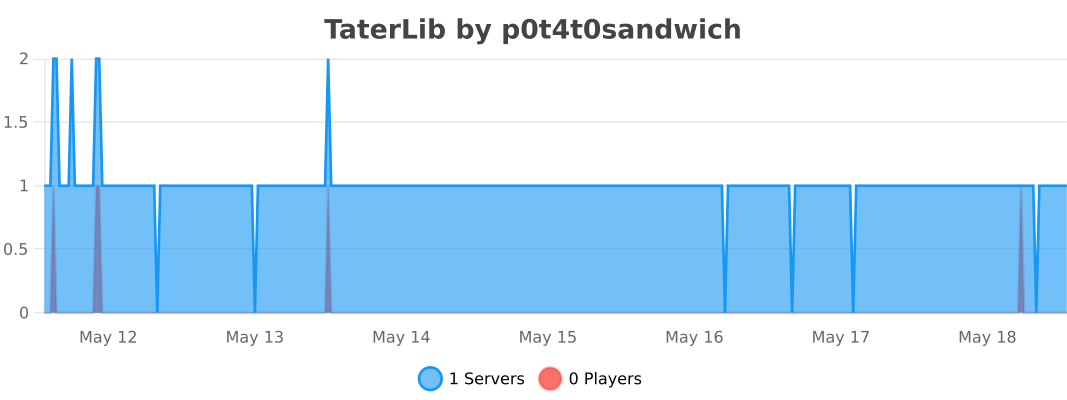
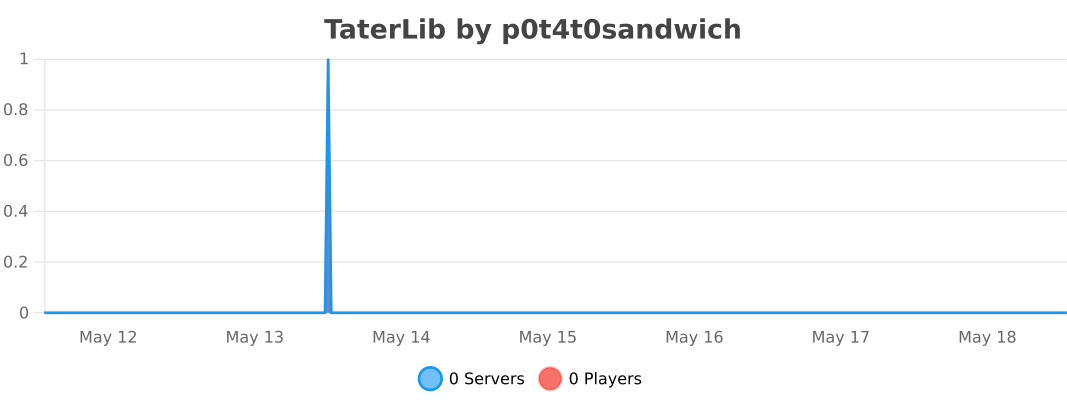
## Metrics
### Bukkit
### BungeeCord
### Sponge
### Velocity
TagItem
– en
TagItem – a plugin that will add your nickname to the item with the help of the archer’s table so that in case of theft of the item you can prove that it is yours. The plugin was created to sign your nicknames in the lore of your item, so that if a player takes the item and does not want to give it to you, you can prove at any time that this is your item, this signature cannot be replaced or removed from the item, it will always be on it!
– ru
TagItem – плагин который с помощи стола лучника добавит на предмет ваш ник чтобы в случае кражи вещи вы могли доказать что она ваша. Плагин создан для подписи вашим ников в лоре вашего предмета, чтобы если игрок отобрал вещь и не хочет отдавать вам вы в любой момент можете доказать что это ваш предмет, эту подпись нельзя заменить или снять с предмета, она будет на нем всегда!